01A Dial With a Continuously Sweeping Second Hand
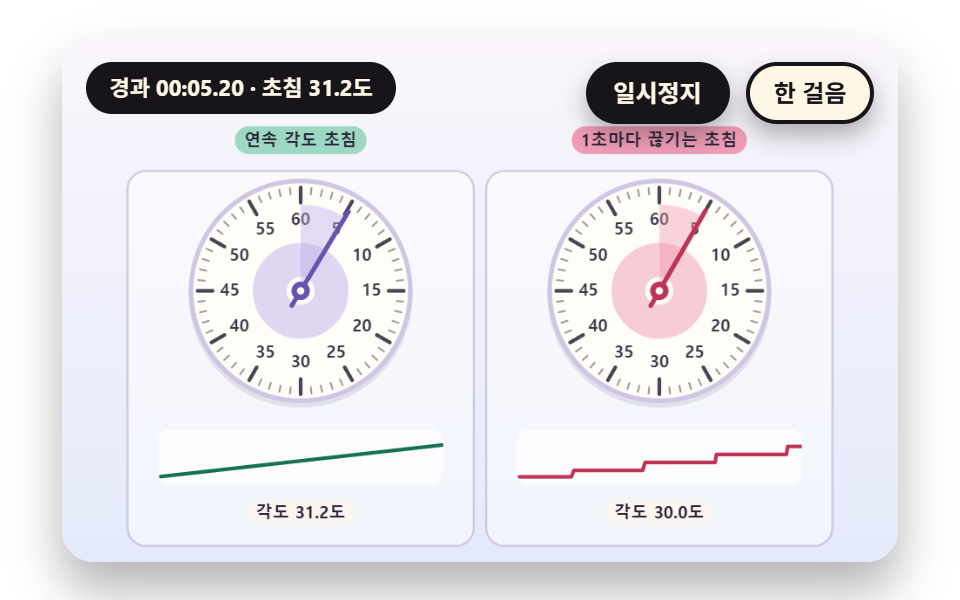
Elapsed time is counted as one integer of centiseconds and turned into an angle that completes one turn per 60 seconds to draw the second hand. Ticks differ in weight at 1 and 5 second marks, and the board on the right updates once per second so the hand jerks as the contrast. A ripple spreads from the hub to the rim at every new second, and the strip below draws the last 4 seconds of angle as a smooth line and as a staircase.
Best forA dial stopwatch for workouts, experiments and cooking
TURN_CSHAND_ANGLETICK_COUNT
<main class="stage">
<div class="vj is-demo" id="vj">
  <div class="vj__pad" data-role="pad" tabindex="0" role="application" aria-label="Stopwatch stage: Enter, Space, R or a click restarts, P pauses, N steps once">
    <canvas class="vj__canvas" data-role="canvas" width="480" height="300" role="img" aria-label="On the left is a dial whose second hand turns without a break because its angle comes from the integer centisecond count. On the right is a dial whose angle comes from a value cut down to whole seconds, so the hand moves one step per second. There are 60 ticks and every fifth is heavier, and the strip under each dial draws the angle change of the last 4 seconds as a smooth line and as a staircase. A ripple spreads from the hub to the rim every time the second changes"></canvas>
  </div>
  <p class="vj__status" data-role="status" aria-live="off">Stopwatch demo</p>
  <div class="vj__ctrl">
    <button class="vj__pause" data-role="pause" type="button" aria-pressed="false">Pause</button>
    <button class="vj__step" data-role="step" type="button">Step</button>
  </div>
  <p class="vj__done" data-role="done" role="status" aria-live="polite"></p>
</div>
</main>
@use "../../../../site/static/demo-tokens" as *;
@include stage($stage-paper);
.vj {
position: relative;
width: min(92vw, calc(160vh - 12.8vw));
aspect-ratio: 480 / 300;
margin: 0 auto;
border-radius: $r-card;
overflow: hidden;
box-shadow: $shadow-raised;
background: $subject-cream;
}
// 무대 상자 — 누르거나 Enter·Space·R 을 치면 처음부터 다시 시작한다. 키보드 포커스도 여기서 받는다(touch-action: none 은 이 상자에만). 무대 밖 터치는 페이지 스크롤 그대로
.vj__pad {
position: absolute;
inset: 0;
border-radius: inherit;
outline: none;
touch-action: none;
cursor: pointer;
}
// 바깥 .vj 가 넘침을 자르므로 포커스 테두리는 안쪽으로 들인다
.vj__pad:focus-visible {
outline: 3px solid $subject-ink;
outline-offset: -3px;
}
.vj__canvas {
position: absolute;
inset: 0;
display: block;
width: 100%;
height: 100%;
}
.vj__ctrl {
position: absolute;
right: $sp-3;
top: $sp-3;
display: flex;
gap: $sp-2;
}
.vj__pause,
.vj__step {
padding: $sp-1 $sp-3;
border: 2px solid $subject-ink;
border-radius: $r-pill;
background: $subject-ink;
color: $subject-cream;
font-family: inherit;
font-weight: 700;
font-size: 12px;
line-height: 1.6;
cursor: pointer;
box-shadow: $shadow-press;
transition: transform $dur-quick $ease-spring;
}
.vj__step {
background: $subject-cream;
color: $subject-ink;
}
// 스크린리더에만 읽히는 완료 알림
.vj__done {
position: absolute;
width: 1px;
height: 1px;
margin: 0;
overflow: hidden;
clip-path: inset(50%);
white-space: nowrap;
}
// 눌린 상태(멈춤) — 바탕과 글자색을 뒤집어 aria-pressed 가 눈에도 보이게
.vj__pause[aria-pressed="true"] {
background: $subject-cream;
color: $subject-ink;
}
.vj__pause:hover,
.vj__step:hover {
transform: translateY(-2px);
}
.vj__pause:active,
.vj__step:active {
transform: translateY(1px);
}
.vj__pause:focus-visible,
.vj__step:focus-visible {
outline: 3px solid $subject-ink;
outline-offset: 3px;
}
// 상태 줄 — 지금 장면의 수치를 글자로. 시연 중에는 aria-live off, 사람이 처음 손대면 polite
.vj__status {
position: absolute;
left: $sp-3;
top: $sp-3;
max-width: calc(100% - 190px);
margin: 0;
padding: $sp-1 $sp-3;
border-radius: $r-pill;
background: $subject-ink;
color: $subject-cream;
font-weight: 700;
font-size: 11px;
line-height: 1.6;
white-space: nowrap;
overflow: hidden;
text-overflow: ellipsis;
pointer-events: none;
}
@media (max-width: 340px) {
.vj__pause,
.vj__step,
.vj__status { font-size: 10px; padding: 0 $sp-2; }
}
// 움직임 줄이기 — 장면은 스크립트가 정지 장면 한 장으로 멈춘다. 버튼도 떠오르지 않게
@media (prefers-reduced-motion: reduce) {
.vj__pause,
.vj__step { transition: none !important; }
.vj__pause:hover,
.vj__pause:active,
.vj__step:hover,
.vj__step:active { transform: none !important; }
}html, body {
margin: 0;
overflow: hidden;
}
.stage {
box-sizing: border-box;
min-height: 100vh;
display: grid;
place-items: center;
margin: 0;
background: #ffffff;
font-family: -apple-system, "Segoe UI", "Noto Sans KR", sans-serif;
padding: clamp(8px, 4vw, 24px);
}
.vj {
position: relative;
width: min(92vw, 160vh - 12.8vw);
aspect-ratio: 480/300;
margin: 0 auto;
border-radius: 16px;
overflow: hidden;
box-shadow: 0 14px 24px rgba(23, 20, 26, 0.32);
background: #fff7e6;
}
.vj__pad {
position: absolute;
inset: 0;
border-radius: inherit;
outline: none;
touch-action: none;
cursor: pointer;
}
.vj__pad:focus-visible {
outline: 3px solid #17141a;
outline-offset: -3px;
}
.vj__canvas {
position: absolute;
inset: 0;
display: block;
width: 100%;
height: 100%;
}
.vj__ctrl {
position: absolute;
right: 12px;
top: 12px;
display: flex;
gap: 8px;
}
.vj__pause,
.vj__step {
padding: 4px 12px;
border: 2px solid #17141a;
border-radius: 999px;
background: #17141a;
color: #fff7e6;
font-family: inherit;
font-weight: 700;
font-size: 12px;
line-height: 1.6;
cursor: pointer;
box-shadow: 0 6px 12px rgba(23, 20, 26, 0.32);
transition: transform 220ms cubic-bezier(0.2, 0.8, 0.2, 1);
}
.vj__step {
background: #fff7e6;
color: #17141a;
}
.vj__done {
position: absolute;
width: 1px;
height: 1px;
margin: 0;
overflow: hidden;
clip-path: inset(50%);
white-space: nowrap;
}
.vj__pause[aria-pressed=true] {
background: #fff7e6;
color: #17141a;
}
.vj__pause:hover,
.vj__step:hover {
transform: translateY(-2px);
}
.vj__pause:active,
.vj__step:active {
transform: translateY(1px);
}
.vj__pause:focus-visible,
.vj__step:focus-visible {
outline: 3px solid #17141a;
outline-offset: 3px;
}
.vj__status {
position: absolute;
left: 12px;
top: 12px;
max-width: calc(100% - 190px);
margin: 0;
padding: 4px 12px;
border-radius: 999px;
background: #17141a;
color: #fff7e6;
font-weight: 700;
font-size: 11px;
line-height: 1.6;
white-space: nowrap;
overflow: hidden;
text-overflow: ellipsis;
pointer-events: none;
}
@media (max-width: 340px) {
.vj__pause,
.vj__step,
.vj__status {
font-size: 10px;
padding: 0 8px;
}
}
@media (prefers-reduced-motion: reduce) {
.vj__pause,
.vj__step {
transition: none !important;
}
.vj__pause:hover,
.vj__pause:active,
.vj__step:hover,
.vj__step:active {
transform: none !important;
}
}(function () {
const root = document.getElementById("vj");
if (!root) return;
// 무대 좌표 — 캔버스 안 계산은 늘 480×300. 화면에 보이는 크기와 상관없다
const W = 480;
const H = 300;
const PI = Math.PI;
const TAU = Math.PI * 2;
function clamp(v, lo, hi) { return v < lo ? lo : (v > hi ? hi : v); }
function lerp(a, b, k) { return a + (b - a) * k; }
function ease(x) { const c = clamp(x, 0, 1); return c * c * (3 - 2 * c); }
// 시드 고정 난수 — 선형 합동 생성기(곱 1664525, 더함 1013904223). 같은 시드면 같은 수열
function seeded(seed) {
let s = (seed >>> 0) || 1;
return function () {
s = (Math.imul(s, 1664525) + 1013904223) >>> 0;
return s / 4294967296;
};
}
// 파스텔 팔레트 — 글자는 늘 INK, 면은 연한 색. 앞섬은 민트, 뒤처짐은 분홍, 바늘은 라벤더·잉크
const BG_TOP = [250, 246, 252];
const BG_BOT = [228, 234, 250];
const FACE = [255, 253, 248];
const FACE_EDGE = [206, 198, 226];
const SKY = [176, 210, 246];
const SKY_DEEP = [74, 120, 176];
const GOLD = [250, 226, 150];
const GOLD_DEEP = [196, 150, 52];
const ROSE = [240, 150, 176];
const ROSE_DEEP = [190, 52, 86];
const MINT = [150, 214, 190];
const MINT_DEEP = [22, 112, 82];
const LAV = [188, 172, 236];
const LAV_DEEP = [104, 82, 176];
const INK = [40, 36, 54];
const PAPER = [250, 246, 240];
function mix(a, b, k) { return [lerp(a[0], b[0], k), lerp(a[1], b[1], k), lerp(a[2], b[2], k)]; }
function rgba(c, a) {
return 'rgba(' + Math.round(clamp(c[0], 0, 255)) + ',' + Math.round(clamp(c[1], 0, 255)) + ',' + Math.round(clamp(c[2], 0, 255)) + ',' + clamp(a, 0, 1).toFixed(3) + ')';
}
// 장면 시계(Seconds)·판 반복 번호·시간표 — 시간표는 (시각, 할 일) 목록이고 시각이 지나면 한 번씩 부른다
// sceneT 는 rAF 타임스탬프 차이(dt, 한 프레임 0.05Seconds 상한)를 쌓은 값 하나뿐이다 — 이 장면의 시간 원천은 이것 하나
let sceneT = 0;
let lap = 0;
let script = [];
let evAt = 0;
// ── 스톱워치 계산 ─────────────────────────────────────────
// 경과 시간은 센티초 정수 하나다. 숫자판의 분·Seconds·센티초도, 문자반의 각도도 이 정수 하나에서만 나온다
const CS_PER_SEC = 100;
const CS_PER_MIN = 6000;
let swStart = 0;
let swStop = -1;
// 장면 시각 t 에서의 경과 센티초 — 시작 전이면 0, 정지 뒤에는 정지 순간 값에 멈춘다
function swCs(t) {
const e = Math.min(t, swStop >= 0 ? swStop : 1e9) - swStart;
return e <= 0 ? 0 : Math.floor(e * CS_PER_SEC + 1e-6);
}
// Lap — 누른 순간의 Total 센티초 목록. 값은 장면 시각 t 로 계산하므로 프레임 길이와 상관없다
let marks = [];
function pressLap(t) { marks.push(swCs(t)); }
// Lap Segment = this total - previous total
function lapSpan(i) { return marks[i] - (i > 0 ? marks[i - 1] : 0); }
function pad2(n) { return n < 10 ? '0' + n : String(n); }
// 센티초 → [분, Seconds, 센티초] — 정수 나눗셈만 쓴다
function splitCs(cs) {
const m = Math.floor(cs / CS_PER_MIN);
const r = cs - m * CS_PER_MIN;
const s = Math.floor(r / CS_PER_SEC);
return [m, s, r - s * CS_PER_SEC];
}
function fmtCs(cs) {
const p = splitCs(cs);
return pad2(p[0]) + ':' + pad2(p[1]) + '.' + pad2(p[2]);
}
// 문자반 각도(라디안, 12시가 -π/2) — turnCs 센티초에 한 바퀴
function dialAng(cs, turnCs) { return ((cs % turnCs) / turnCs) * TAU - PI / 2; }
// 스톱워치 장면의 시작 상태 — 매 판 build() 맨 앞에서 부른다
function swReset() {
swStart = 0;
swStop = -1;
marks = [];
}
const canvasEl = root.querySelector('[data-role="canvas"]');
const padEl = root.querySelector('[data-role="pad"]');
const pauseEl = root.querySelector('[data-role="pause"]');
const statusEl = root.querySelector('[data-role="status"]');
const stepEl = root.querySelector('[data-role="step"]');
const doneEl = root.querySelector('[data-role="done"]');
const ctxRaw = canvasEl ? canvasEl.getContext('2d') : null;
if (!canvasEl || !ctxRaw || !pauseEl || !padEl || !stepEl || !doneEl) {
return;
}
const cv = canvasEl;
const ctx = ctxRaw;
const pauseBtn = pauseEl;
const stepBtn = stepEl;
const doneP = doneEl;
const pad = padEl;
// 외부 웹폰트는 부르지 않는다 — 기기에 있는 글꼴 목록만
const FONT_STACK = 'system-ui, -apple-system, "Segoe UI", "Noto Sans KR", sans-serif';
let dpr = 1;
function fitCanvas() {
// 배율은 2 에서 자른다 — 배율 3 기기에서 화소가 2.25배로 늘지 않게
dpr = Math.min(window.devicePixelRatio || 1, 2);
cv.width = Math.round(W * dpr);
cv.height = Math.round(H * dpr);
ctx.setTransform(dpr, 0, 0, dpr, 0, 0);
}
const VIEW_S = 0.88;
function skyFill(top, bot) {
ctx.setTransform(dpr, 0, 0, dpr, 0, 0);
const g = ctx.createLinearGradient(0, 0, 0, H);
g.addColorStop(0, rgba(top, 1));
g.addColorStop(1, rgba(bot, 1));
ctx.fillStyle = g;
ctx.fillRect(0, 0, W, H);
// 위쪽 Pause·상태 알약이 덮는 띠를 비우려고 장면 전체를 VIEW_S 배로 줄여 아래 가운데에 붙인다 — 이 줄 뒤에 그리는 것은 모두 줄어든 좌표계
ctx.translate(W / 2, H - 3);
ctx.scale(VIEW_S, VIEW_S);
ctx.translate(-W / 2, -(H - 3));
}
function disc(x, y, r, c, a) {
if (r <= 0.2 || a <= 0) {
return;
}
ctx.beginPath();
ctx.arc(x, y, r, 0, TAU);
ctx.fillStyle = rgba(c, a);
ctx.fill();
}
function ring(x, y, r, width, c, a) {
if (r <= 0.2 || a <= 0) {
return;
}
ctx.beginPath();
ctx.arc(x, y, r, 0, TAU);
ctx.lineWidth = width;
ctx.strokeStyle = rgba(c, a);
ctx.stroke();
}
function oval(x, y, rx, ry, c, a) {
if (rx <= 0.2 || ry <= 0.1 || a <= 0) {
return;
}
ctx.beginPath();
ctx.ellipse(x, y, rx, ry, 0, 0, TAU);
ctx.fillStyle = rgba(c, a);
ctx.fill();
}
function seg(x1, y1, x2, y2, width, c, a) {
if (a <= 0) {
return;
}
ctx.beginPath();
ctx.moveTo(x1, y1);
ctx.lineTo(x2, y2);
ctx.lineWidth = width;
ctx.lineCap = 'round';
ctx.strokeStyle = rgba(c, a);
ctx.stroke();
}
function box(x, y, w, h, r, c, a) {
if (w <= 0.2 || h <= 0.2 || a <= 0) {
return;
}
ctx.beginPath();
ctx.roundRect(x, y, w, h, Math.max(0, Math.min(r, w / 2, h / 2)));
ctx.fillStyle = rgba(c, a);
ctx.fill();
}
function outline(x, y, w, h, r, width, c, a) {
if (w <= 0.2 || h <= 0.2 || a <= 0) {
return;
}
ctx.beginPath();
ctx.roundRect(x, y, w, h, Math.max(0, Math.min(r, w / 2, h / 2)));
ctx.lineWidth = width;
ctx.strokeStyle = rgba(c, a);
ctx.stroke();
}
function text(s, x, y, c, a, px, weight, align) {
ctx.font = weight + ' ' + px + 'px ' + FONT_STACK;
ctx.textAlign = align;
ctx.textBaseline = 'middle';
ctx.fillStyle = rgba(c, a);
ctx.fillText(s, x, y);
}
// 글자 이름표 — 바탕 알약 위에 글자
function tag(s, x, y, bg, fg, px, align) {
ctx.font = '700 ' + px + 'px ' + FONT_STACK;
const w = ctx.measureText(s).width + px * 1.1;
const left = align === 'center' ? x - w / 2 : (align === 'right' ? x - w : x);
box(left, y - px * 0.82, w, px * 1.64, px * 0.82, bg, 0.92);
text(s, left + w / 2, y + 0.5, fg, 1, px, 700, 'center');
}
// ── 공통 틀 ───────────────────────────────────────────────
let shownStatus = '';
function pushStatus(s) {
if (!statusEl || s === shownStatus) {
return;
}
shownStatus = s;
statusEl.textContent = s;
}
let paused = false;
const reduceQuery = window.matchMedia('(prefers-reduced-motion: reduce)');
// 페이지를 연 채 움직임 줄이기 설정을 바꿔도 change 리스너가 다시 읽는다
let still = reduceQuery.matches;
// 자동 시연 표시 — 사람이 처음 손대면 떼고 상태 줄을 polite 로 켠다
let demo = root.classList.contains('is-demo');
const off = new AbortController();
function wake() {
if (!demo) {
return;
}
demo = false;
root.classList.remove('is-demo');
if (statusEl) {
statusEl.setAttribute('aria-live', 'polite');
}
}
// 한 판 시연이 끝났음을 스크린리더에 한 번만 알린다 — 판이 되풀이돼도 다시 읽지 않는다
let doneSaid = false;
function checkDone() {
if (!doneSaid && sceneT >= RESULT_S) {
doneSaid = true;
doneP.textContent = statusText();
}
}
function advance(dt) {
sceneT += dt;
while (evAt < script.length && script[evAt].t <= sceneT) {
const ev = script[evAt];
evAt += 1;
ev.f();
}
if (sceneT >= LAP_S) {
lap += 1;
begin();
return;
}
update(dt);
}
// 첫 판은 START_S 만큼 앞서 시작한다 — 바늘이 이미 도는 장면에서 보인다
function runTo(t) {
while (sceneT < t - 1e-6) {
advance(Math.min(1 / 30, t - sceneT));
}
}
function begin() {
sceneT = 0;
evAt = 0;
script = [];
build();
if (lap === 0 && !still) {
runTo(START_S);
}
}
const DT_MAX = 0.05;
function showNow() {
draw();
pushStatus(statusText());
checkDone();
}
let rafId = 0;
let lastTs = -1;
function frame(ts) {
if (still || paused) {
rafId = 0;
return;
}
if (lastTs < 0) {
lastTs = ts;
}
const dt = Math.min((ts - lastTs) / 1000, DT_MAX);
lastTs = ts;
if (dt > 0) {
advance(dt);
}
showNow();
rafId = window.requestAnimationFrame(frame);
}
function startLoop() {
if (rafId) {
return;
}
// 멈췄던 사이의 시간을 첫 프레임 dt 로 넘기지 않는다
lastTs = -1;
rafId = window.requestAnimationFrame(frame);
}
function stopLoop() {
if (rafId) {
window.cancelAnimationFrame(rafId);
rafId = 0;
}
}
// 움직임 줄이기 — 루프 없이 한 판의 멈춘 한 장. 시간표의 REST_S Seconds 장면에서 멈춘다
function showRest() {
stopLoop();
sceneT = 0;
evAt = 0;
script = [];
build();
runTo(REST_S);
doneSaid = false;
showNow();
}
function play() {
begin();
showNow();
if (!paused) {
startLoop();
}
}
function togglePause() {
paused = !paused;
pauseBtn.setAttribute('aria-pressed', paused ? 'true' : 'false');
wake();
if (paused) {
stopLoop();
}
else if (!still) {
startLoop();
}
}
// 다시 — 시간표를 처음부터 다시. 움직임 줄이기에서는 멈춘 한 장
function restart() {
lap += 1;
doneSaid = false;
if (still) {
showRest();
return;
}
begin();
showNow();
if (!paused) {
startLoop();
}
}
// Step — 멈춘 채 시간표의 다음 일 하나까지 시계를 보낸다. 더 부를 일이 없으면 판을 다시 연다
function stepOnce() {
wake();
if (!paused) {
paused = true;
pauseBtn.setAttribute('aria-pressed', 'true');
stopLoop();
}
if (evAt >= script.length) {
restart();
return;
}
runTo(script[evAt].t + 0.05);
showNow();
}
pauseBtn.addEventListener('click', togglePause, { signal: off.signal });
stepBtn.addEventListener('click', stepOnce, { signal: off.signal });
// 키보드 — 무대에 포커스가 있을 때만. Enter·Space·R 은 처음부터 다시, P 는 Pause, N 은 Step
pad.addEventListener('keydown', function (e) {
if (e.altKey || e.ctrlKey || e.metaKey) {
return;
}
const k = e.key;
if (k === 'Enter' || k === ' ') {
e.preventDefault();
wake();
restart();
}
else if (k === 'p' || k === 'P') {
togglePause();
}
else if (k === 'n' || k === 'N') {
stepOnce();
}
else if (k === 'r' || k === 'R') {
wake();
restart();
}
}, { signal: off.signal });
// 마우스·터치 — 무대를 누르면 처음부터 다시
pad.addEventListener('click', function () {
wake();
restart();
}, { signal: off.signal });
// 탭이 숨으면 멈추고, 돌아오면 시계를 다시 맞춰 시작 — 숨은 동안의 몇 초가 한 프레임에 몰리지 않게
document.addEventListener('visibilitychange', function () {
if (document.hidden) {
stopLoop();
}
else if (!paused && !still) {
startLoop();
}
}, { signal: off.signal });
// 설정이 바뀌면 — 켜지면 결과 한 장, 꺼지면 다시 움직인다
reduceQuery.addEventListener('change', function () {
still = reduceQuery.matches;
if (still) {
showRest();
}
else {
lap = 0;
play();
}
}, { signal: off.signal });
window.addEventListener('resize', function () {
fitCanvas();
showNow();
}, { signal: off.signal });
// ── 문자반·숫자판 도구 ─────────────────────────────────────
const PEACH = [250, 204, 170];
const PEACH_DEEP = [176, 92, 40];
// 안쪽에서 바깥쪽으로 — 눈금 ticks 개, majorEvery 번째마다 굵게, labelEvery 번째마다 숫자
function dialFace(cx, cy, R, ticks, majorEvery, labels, labelEvery) {
disc(cx, cy + 3, R + 3, INK, 0.1);
disc(cx, cy, R + 3, FACE_EDGE, 1);
disc(cx, cy, R, FACE, 1);
for (let i = 0; i < ticks; i += 1) {
const a = (i / ticks) * TAU - PI / 2;
const major = i % majorEvery === 0;
const r0 = R * (major ? 0.82 : 0.9);
const r1 = R * 0.96;
seg(cx + Math.cos(a) * r0, cy + Math.sin(a) * r0, cx + Math.cos(a) * r1, cy + Math.sin(a) * r1, major ? 2.4 : 1.2, INK, major ? 0.85 : 0.45);
if (labels.length > 0 && i % labelEvery === 0) {
const k = Math.floor(i / labelEvery);
if (k < labels.length) {
text(labels[k], cx + Math.cos(a) * R * 0.66, cy + Math.sin(a) * R * 0.66, INK, 0.9, Math.max(9, Math.round(R * 0.15)), 700, 'center');
}
}
}
}
function handAt(cx, cy, ang, len, tail, width, c, a) {
seg(cx - Math.cos(ang) * tail, cy - Math.sin(ang) * tail, cx + Math.cos(ang) * len, cy + Math.sin(ang) * len, width, c, a);
}
function hub(cx, cy, r, c) {
disc(cx, cy, r, c, 1);
disc(cx, cy, r * 0.4, FACE, 1);
}
// 12시에서 ang 까지 칠하는 부채꼴
function wedge(cx, cy, r, ang, c, a) {
if (ang <= -PI / 2 + 0.002) {
return;
}
ctx.beginPath();
ctx.moveTo(cx, cy);
ctx.arc(cx, cy, r, -PI / 2, ang);
ctx.closePath();
ctx.fillStyle = rgba(c, a);
ctx.fill();
}
function arcBand(cx, cy, r, a0, a1, width, c, a) {
if (a1 - a0 < 0.0005 || a <= 0) {
return;
}
ctx.beginPath();
ctx.arc(cx, cy, r, a0, a1);
ctx.lineWidth = width;
ctx.lineCap = 'butt';
ctx.strokeStyle = rgba(c, a);
ctx.stroke();
}
function panel(x, y, w, h, c, a) {
box(x, y, w, h, 12, c, a);
outline(x, y, w, h, 12, 1.5, FACE_EDGE, 0.9);
}
// 한 글자씩 같은 칸에 가운데 맞춰 찍는다 — 숫자 폭이 달라도 자릿수가 흔들리지 않는다(tabular)
function digitsRow(s, cx, y, cellW, px, c, a) {
let total = 0;
for (let i = 0; i < s.length; i += 1) {
total += (s[i] === ':' || s[i] === '.') ? cellW * 0.55 : cellW;
}
let x = cx - total / 2;
for (let i = 0; i < s.length; i += 1) {
const w = (s[i] === ':' || s[i] === '.') ? cellW * 0.55 : cellW;
text(s[i], x + w / 2, y, c, a, px, 800, 'center');
x += w;
}
}
// ── 01 끊김 없이 도는 초침 문자반 ─────────────────────────
// 경과 시간은 센티초 정수 cs 하나. 왼쪽 바늘은 cs 전체에서, 오른쪽 바늘은 Seconds 단위로 내린 값에서 각도를 만든다
// 초가 바뀔 때마다 허브에서 두 문자반 가장자리로 퍼지는 파문의 반지름도 같은 센티초 나머지(cs % 100)에서 나온다
const TURN_CS = 6000;
const TICK_COUNT = 60;
const MAJOR_EVERY = 5;
const WINDOW_S = 4;
const LAP_S = 15.0;
const START_S = 3.7;
const REST_S = 3.7;
const RESULT_S = 13.0;
let hist = [];
function build() {
swReset();
hist = [];
}
function update(dt) {
if (dt < 0) {
return;
}
hist.push({ t: sceneT, cs: swCs(sceneT) });
while (hist.length > 1 && hist[0].t < sceneT - WINDOW_S) {
hist.shift();
}
}
function handCs() { return swCs(sceneT); }
function stepCs() { return Math.floor(handCs() / CS_PER_SEC) * CS_PER_SEC; }
function HAND_ANGLE(cs) { return dialAng(cs, TURN_CS); }
function strip(x0, y0, w, h, stair) {
box(x0, y0, w, h, 8, [255, 255, 255], 0.7);
const c0 = swCs(sceneT - WINDOW_S);
ctx.save();
ctx.beginPath();
ctx.roundRect(x0, y0, w, h, 8);
ctx.clip();
ctx.beginPath();
for (let i = 0; i < hist.length; i += 1) {
const v = stair ? Math.floor(hist[i].cs / CS_PER_SEC) * CS_PER_SEC : hist[i].cs;
const x = x0 + w - ((sceneT - hist[i].t) / WINDOW_S) * w;
const y = y0 + h - 5 - clamp((v - c0) / (WINDOW_S * CS_PER_SEC + 100), 0, 1) * (h - 10);
if (i === 0) {
ctx.moveTo(x, y);
}
else {
ctx.lineTo(x, y);
}
}
ctx.lineWidth = 2.4;
ctx.lineJoin = 'round';
ctx.strokeStyle = rgba(stair ? ROSE_DEEP : MINT_DEEP, 1);
ctx.stroke();
ctx.restore();
}
function drawDial(cx, cy, R, cs, shown, c, deep) {
dialFace(cx, cy, R, TICK_COUNT, MAJOR_EVERY, ['60', '5', '10', '15', '20', '25', '30', '35', '40', '45', '50', '55'], MAJOR_EVERY);
// 초가 바뀌는 순간마다 허브에서 퍼지는 파문 — 반지름은 센티초 나머지(cs % 100)에서 계산한다
const frac = (cs % CS_PER_SEC) / CS_PER_SEC;
ring(cx, cy, R * (0.12 + 0.84 * frac), 22, c, 0.6 * (1 - frac));
const a = HAND_ANGLE(shown);
wedge(cx, cy, R * 0.8, a, c, 0.42);
handAt(cx, cy, a, R * 0.86, R * 0.16, 3, deep, 1);
hub(cx, cy, 6, deep);
}
function draw() {
skyFill(BG_TOP, BG_BOT);
const cs = handCs();
panel(10, 46, 226, 244, [255, 255, 255], 0.5);
panel(244, 46, 226, 244, [255, 255, 255], 0.5);
drawDial(123, 124, 70, cs, cs, LAV, LAV_DEEP);
drawDial(357, 124, 70, cs, stepCs(), ROSE, ROSE_DEEP);
strip(30, 214, 186, 36, false);
strip(264, 214, 186, 36, true);
tag('Hand with a continuous angle', 123, 26, MINT, INK, 11, 'center');
tag('Hand that steps once a second', 357, 26, ROSE, INK, 11, 'center');
tag('Angle {a} degrees'.replace('{a}', (((cs % TURN_CS) / TURN_CS) * 360).toFixed(1)), 123, 268, PAPER, INK, 11, 'center');
tag('Angle {a} degrees'.replace('{a}', (((stepCs() % TURN_CS) / TURN_CS) * 360).toFixed(1)), 357, 268, PAPER, INK, 11, 'center');
}
function statusText() {
return 'Elapsed {t} - second hand {a} degrees'.replace('{t}', fmtCs(handCs())).replace('{a}', (((handCs() % TURN_CS) / TURN_CS) * 360).toFixed(1));
}
fitCanvas();
if (still) {
showRest();
}
else {
play();
}
return function () {
stopLoop();
off.abort();
};
})();// DialContinuousSecondHand - 같은 항목 vanilla index.html 의 React 판. 같은 계산을 useEffect 안에서 돌린다
import { useEffect, useRef } from "react";
import styles from "./DialContinuousSecondHand.module.scss";
const cx = (s: string): string => s.split(" ").map((n) => styles[n] ?? n).join(" ");
export default function DialContinuousSecondHand() {
const rootRef = useRef<HTMLDivElement | null>(null);
useEffect(() => {
const rootEl = rootRef.current;
if (!rootEl) return;
const root: HTMLElement = rootEl;
type RGB = [number, number, number];
type RGBA = [number, number, number, number];
// 무대 좌표 — 캔버스 안 계산은 늘 480×300. 화면에 보이는 크기와 상관없다
const W = 480;
const H = 300;
const PI = Math.PI;
const TAU = Math.PI * 2;
function clamp(v: number, lo: number, hi: number): number { return v < lo ? lo : (v > hi ? hi : v); }
function lerp(a: number, b: number, k: number): number { return a + (b - a) * k; }
function ease(x: number): number { const c = clamp(x, 0, 1); return c * c * (3 - 2 * c); }
// 시드 고정 난수 — 선형 합동 생성기(곱 1664525, 더함 1013904223). 같은 시드면 같은 수열
function seeded(seed: number): () => number {
let s = (seed >>> 0) || 1;
return function (): number {
s = (Math.imul(s, 1664525) + 1013904223) >>> 0;
return s / 4294967296;
};
}
// 파스텔 팔레트 — 글자는 늘 INK, 면은 연한 색. 앞섬은 민트, 뒤처짐은 분홍, 바늘은 라벤더·잉크
const BG_TOP: RGB = [250, 246, 252];
const BG_BOT: RGB = [228, 234, 250];
const FACE: RGB = [255, 253, 248];
const FACE_EDGE: RGB = [206, 198, 226];
const SKY: RGB = [176, 210, 246];
const SKY_DEEP: RGB = [74, 120, 176];
const GOLD: RGB = [250, 226, 150];
const GOLD_DEEP: RGB = [196, 150, 52];
const ROSE: RGB = [240, 150, 176];
const ROSE_DEEP: RGB = [190, 52, 86];
const MINT: RGB = [150, 214, 190];
const MINT_DEEP: RGB = [22, 112, 82];
const LAV: RGB = [188, 172, 236];
const LAV_DEEP: RGB = [104, 82, 176];
const INK: RGB = [40, 36, 54];
const PAPER: RGB = [250, 246, 240];
function mix(a: RGB, b: RGB, k: number): RGB { return [lerp(a[0], b[0], k), lerp(a[1], b[1], k), lerp(a[2], b[2], k)]; }
function rgba(c: RGB, a: number): string {
return 'rgba(' + Math.round(clamp(c[0], 0, 255)) + ',' + Math.round(clamp(c[1], 0, 255)) + ',' + Math.round(clamp(c[2], 0, 255)) + ',' + clamp(a, 0, 1).toFixed(3) + ')';
}
// 장면 시계(초)·판 반복 번호·시간표 — 시간표는 (시각, 할 일) 목록이고 시각이 지나면 한 번씩 부른다
// sceneT 는 rAF 타임스탬프 차이(dt, 한 프레임 0.05초 상한)를 쌓은 값 하나뿐이다 — 이 장면의 시간 원천은 이것 하나
let sceneT = 0;
let lap = 0;
type Ev = { t: number; f: () => void };
let script: Ev[] = [];
let evAt = 0;
// ── 스톱워치 계산 ─────────────────────────────────────────
// 경과 시간은 센티초 정수 하나다. 숫자판의 분·초·센티초도, 문자반의 각도도 이 정수 하나에서만 나온다
const CS_PER_SEC = 100;
const CS_PER_MIN = 6000;
let swStart = 0;
let swStop = -1;
// 장면 시각 t 에서의 경과 센티초 — 시작 전이면 0, 정지 뒤에는 정지 순간 값에 멈춘다
function swCs(t: number): number {
const e = Math.min(t, swStop >= 0 ? swStop : 1e9) - swStart;
return e <= 0 ? 0 : Math.floor(e * CS_PER_SEC + 1e-6);
}
// 랩 — 누른 순간의 누적 센티초 목록. 값은 장면 시각 t 로 계산하므로 프레임 길이와 상관없다
let marks: number[] = [];
function pressLap(t: number): void { marks.push(swCs(t)); }
// 랩 구간 = 이번 누적 − 직전 누적
function lapSpan(i: number): number { return marks[i] - (i > 0 ? marks[i - 1] : 0); }
function pad2(n: number): string { return n < 10 ? '0' + n : String(n); }
// 센티초 → [분, 초, 센티초] — 정수 나눗셈만 쓴다
function splitCs(cs: number): [number, number, number] {
const m = Math.floor(cs / CS_PER_MIN);
const r = cs - m * CS_PER_MIN;
const s = Math.floor(r / CS_PER_SEC);
return [m, s, r - s * CS_PER_SEC];
}
function fmtCs(cs: number): string {
const p = splitCs(cs);
return pad2(p[0]) + ':' + pad2(p[1]) + '.' + pad2(p[2]);
}
// 문자반 각도(라디안, 12시가 -π/2) — turnCs 센티초에 한 바퀴
function dialAng(cs: number, turnCs: number): number { return ((cs % turnCs) / turnCs) * TAU - PI / 2; }
// 스톱워치 장면의 시작 상태 — 매 판 build() 맨 앞에서 부른다
function swReset(): void {
swStart = 0;
swStop = -1;
marks = [];
}
const canvasEl = root.querySelector('[data-role="canvas"]') as HTMLCanvasElement | null;
const padEl = root.querySelector('[data-role="pad"]') as HTMLElement | null;
const pauseEl = root.querySelector('[data-role="pause"]') as HTMLButtonElement | null;
const statusEl = root.querySelector('[data-role="status"]') as HTMLElement | null;
const stepEl = root.querySelector('[data-role="step"]') as HTMLButtonElement | null;
const doneEl = root.querySelector('[data-role="done"]') as HTMLElement | null;
const ctxRaw = canvasEl ? canvasEl.getContext('2d') : null;
if (!canvasEl || !ctxRaw || !pauseEl || !padEl || !stepEl || !doneEl) { return; }
const cv: HTMLCanvasElement = canvasEl;
const ctx: CanvasRenderingContext2D = ctxRaw;
const pauseBtn: HTMLButtonElement = pauseEl;
const stepBtn: HTMLButtonElement = stepEl;
const doneP: HTMLElement = doneEl;
const pad: HTMLElement = padEl;
// 외부 웹폰트는 부르지 않는다 — 기기에 있는 글꼴 목록만
const FONT_STACK = 'system-ui, -apple-system, "Segoe UI", "Noto Sans KR", sans-serif';
let dpr = 1;
function fitCanvas(): void {
// 배율은 2 에서 자른다 — 배율 3 기기에서 화소가 2.25배로 늘지 않게
dpr = Math.min(window.devicePixelRatio || 1, 2);
cv.width = Math.round(W * dpr);
cv.height = Math.round(H * dpr);
ctx.setTransform(dpr, 0, 0, dpr, 0, 0);
}
const VIEW_S = 0.88;
function skyFill(top: RGB, bot: RGB): void {
ctx.setTransform(dpr, 0, 0, dpr, 0, 0);
const g = ctx.createLinearGradient(0, 0, 0, H);
g.addColorStop(0, rgba(top, 1));
g.addColorStop(1, rgba(bot, 1));
ctx.fillStyle = g;
ctx.fillRect(0, 0, W, H);
// 위쪽 일시정지·상태 알약이 덮는 띠를 비우려고 장면 전체를 VIEW_S 배로 줄여 아래 가운데에 붙인다 — 이 줄 뒤에 그리는 것은 모두 줄어든 좌표계
ctx.translate(W / 2, H - 3);
ctx.scale(VIEW_S, VIEW_S);
ctx.translate(-W / 2, -(H - 3));
}
function disc(x: number, y: number, r: number, c: RGB, a: number): void {
if (r <= 0.2 || a <= 0) { return; }
ctx.beginPath();
ctx.arc(x, y, r, 0, TAU);
ctx.fillStyle = rgba(c, a);
ctx.fill();
}
function ring(x: number, y: number, r: number, width: number, c: RGB, a: number): void {
if (r <= 0.2 || a <= 0) { return; }
ctx.beginPath();
ctx.arc(x, y, r, 0, TAU);
ctx.lineWidth = width;
ctx.strokeStyle = rgba(c, a);
ctx.stroke();
}
function oval(x: number, y: number, rx: number, ry: number, c: RGB, a: number): void {
if (rx <= 0.2 || ry <= 0.1 || a <= 0) { return; }
ctx.beginPath();
ctx.ellipse(x, y, rx, ry, 0, 0, TAU);
ctx.fillStyle = rgba(c, a);
ctx.fill();
}
function seg(x1: number, y1: number, x2: number, y2: number, width: number, c: RGB, a: number): void {
if (a <= 0) { return; }
ctx.beginPath();
ctx.moveTo(x1, y1);
ctx.lineTo(x2, y2);
ctx.lineWidth = width;
ctx.lineCap = 'round';
ctx.strokeStyle = rgba(c, a);
ctx.stroke();
}
function box(x: number, y: number, w: number, h: number, r: number, c: RGB, a: number): void {
if (w <= 0.2 || h <= 0.2 || a <= 0) { return; }
ctx.beginPath();
ctx.roundRect(x, y, w, h, Math.max(0, Math.min(r, w / 2, h / 2)));
ctx.fillStyle = rgba(c, a);
ctx.fill();
}
function outline(x: number, y: number, w: number, h: number, r: number, width: number, c: RGB, a: number): void {
if (w <= 0.2 || h <= 0.2 || a <= 0) { return; }
ctx.beginPath();
ctx.roundRect(x, y, w, h, Math.max(0, Math.min(r, w / 2, h / 2)));
ctx.lineWidth = width;
ctx.strokeStyle = rgba(c, a);
ctx.stroke();
}
function text(s: string, x: number, y: number, c: RGB, a: number, px: number, weight: number, align: CanvasTextAlign): void {
ctx.font = weight + ' ' + px + 'px ' + FONT_STACK;
ctx.textAlign = align;
ctx.textBaseline = 'middle';
ctx.fillStyle = rgba(c, a);
ctx.fillText(s, x, y);
}
// 글자 이름표 — 바탕 알약 위에 글자
function tag(s: string, x: number, y: number, bg: RGB, fg: RGB, px: number, align: CanvasTextAlign): void {
ctx.font = '700 ' + px + 'px ' + FONT_STACK;
const w = ctx.measureText(s).width + px * 1.1;
const left = align === 'center' ? x - w / 2 : (align === 'right' ? x - w : x);
box(left, y - px * 0.82, w, px * 1.64, px * 0.82, bg, 0.92);
text(s, left + w / 2, y + 0.5, fg, 1, px, 700, 'center');
}
// ── 공통 틀 ───────────────────────────────────────────────
let shownStatus = '';
function pushStatus(s: string): void {
if (!statusEl || s === shownStatus) { return; }
shownStatus = s;
statusEl.textContent = s;
}
let paused = false;
const reduceQuery = window.matchMedia('(prefers-reduced-motion: reduce)');
// 페이지를 연 채 움직임 줄이기 설정을 바꿔도 change 리스너가 다시 읽는다
let still = reduceQuery.matches;
// 자동 시연 표시 — 사람이 처음 손대면 떼고 상태 줄을 polite 로 켠다
let demo = root.classList.contains('is-demo');
const off = new AbortController();
function wake(): void {
if (!demo) { return; }
demo = false;
root.classList.remove('is-demo');
if (statusEl) { statusEl.setAttribute('aria-live', 'polite'); }
}
// 한 판 시연이 끝났음을 스크린리더에 한 번만 알린다 — 판이 되풀이돼도 다시 읽지 않는다
let doneSaid = false;
function checkDone(): void {
if (!doneSaid && sceneT >= RESULT_S) {
doneSaid = true;
doneP.textContent = statusText();
}
}
function advance(dt: number): void {
sceneT += dt;
while (evAt < script.length && script[evAt].t <= sceneT) {
const ev = script[evAt];
evAt += 1;
ev.f();
}
if (sceneT >= LAP_S) { lap += 1; begin(); return; }
update(dt);
}
// 첫 판은 START_S 만큼 앞서 시작한다 — 바늘이 이미 도는 장면에서 보인다
function runTo(t: number): void {
while (sceneT < t - 1e-6) { advance(Math.min(1 / 30, t - sceneT)); }
}
function begin(): void {
sceneT = 0;
evAt = 0;
script = [];
build();
if (lap === 0 && !still) { runTo(START_S); }
}
const DT_MAX = 0.05;
function showNow(): void {
draw();
pushStatus(statusText());
checkDone();
}
let rafId = 0;
let lastTs = -1;
function frame(ts: number): void {
if (still || paused) { rafId = 0; return; }
if (lastTs < 0) { lastTs = ts; }
const dt = Math.min((ts - lastTs) / 1000, DT_MAX);
lastTs = ts;
if (dt > 0) { advance(dt); }
showNow();
rafId = window.requestAnimationFrame(frame);
}
function startLoop(): void {
if (rafId) { return; }
// 멈췄던 사이의 시간을 첫 프레임 dt 로 넘기지 않는다
lastTs = -1;
rafId = window.requestAnimationFrame(frame);
}
function stopLoop(): void {
if (rafId) { window.cancelAnimationFrame(rafId); rafId = 0; }
}
// 움직임 줄이기 — 루프 없이 한 판의 멈춘 한 장. 시간표의 REST_S 초 장면에서 멈춘다
function showRest(): void {
stopLoop();
sceneT = 0;
evAt = 0;
script = [];
build();
runTo(REST_S);
doneSaid = false;
showNow();
}
function play(): void {
begin();
showNow();
if (!paused) { startLoop(); }
}
function togglePause(): void {
paused = !paused;
pauseBtn.setAttribute('aria-pressed', paused ? 'true' : 'false');
wake();
if (paused) { stopLoop(); } else if (!still) { startLoop(); }
}
// 다시 — 시간표를 처음부터 다시. 움직임 줄이기에서는 멈춘 한 장
function restart(): void {
lap += 1;
doneSaid = false;
if (still) { showRest(); return; }
begin();
showNow();
if (!paused) { startLoop(); }
}
// 한 걸음 — 멈춘 채 시간표의 다음 일 하나까지 시계를 보낸다. 더 부를 일이 없으면 판을 다시 연다
function stepOnce(): void {
wake();
if (!paused) {
paused = true;
pauseBtn.setAttribute('aria-pressed', 'true');
stopLoop();
}
if (evAt >= script.length) {
restart();
return;
}
runTo(script[evAt].t + 0.05);
showNow();
}
pauseBtn.addEventListener('click', togglePause, { signal: off.signal });
stepBtn.addEventListener('click', stepOnce, { signal: off.signal });
// 키보드 — 무대에 포커스가 있을 때만. Enter·Space·R 은 처음부터 다시, P 는 일시정지, N 은 한 걸음
pad.addEventListener('keydown', function (e: KeyboardEvent): void {
if (e.altKey || e.ctrlKey || e.metaKey) { return; }
const k = e.key;
if (k === 'Enter' || k === ' ') {
e.preventDefault();
wake();
restart();
} else if (k === 'p' || k === 'P') {
togglePause();
} else if (k === 'n' || k === 'N') {
stepOnce();
} else if (k === 'r' || k === 'R') {
wake();
restart();
}
}, { signal: off.signal });
// 마우스·터치 — 무대를 누르면 처음부터 다시
pad.addEventListener('click', function (): void {
wake();
restart();
}, { signal: off.signal });
// 탭이 숨으면 멈추고, 돌아오면 시계를 다시 맞춰 시작 — 숨은 동안의 몇 초가 한 프레임에 몰리지 않게
document.addEventListener('visibilitychange', function (): void {
if (document.hidden) { stopLoop(); } else if (!paused && !still) { startLoop(); }
}, { signal: off.signal });
// 설정이 바뀌면 — 켜지면 결과 한 장, 꺼지면 다시 움직인다
reduceQuery.addEventListener('change', function (): void {
still = reduceQuery.matches;
if (still) { showRest(); } else { lap = 0; play(); }
}, { signal: off.signal });
window.addEventListener('resize', function (): void {
fitCanvas();
showNow();
}, { signal: off.signal });
// ── 문자반·숫자판 도구 ─────────────────────────────────────
const PEACH: RGB = [250, 204, 170];
const PEACH_DEEP: RGB = [176, 92, 40];
// 안쪽에서 바깥쪽으로 — 눈금 ticks 개, majorEvery 번째마다 굵게, labelEvery 번째마다 숫자
function dialFace(cx: number, cy: number, R: number, ticks: number, majorEvery: number, labels: string[], labelEvery: number): void {
disc(cx, cy + 3, R + 3, INK, 0.1);
disc(cx, cy, R + 3, FACE_EDGE, 1);
disc(cx, cy, R, FACE, 1);
for (let i = 0; i < ticks; i += 1) {
const a = (i / ticks) * TAU - PI / 2;
const major = i % majorEvery === 0;
const r0 = R * (major ? 0.82 : 0.9);
const r1 = R * 0.96;
seg(cx + Math.cos(a) * r0, cy + Math.sin(a) * r0, cx + Math.cos(a) * r1, cy + Math.sin(a) * r1, major ? 2.4 : 1.2, INK, major ? 0.85 : 0.45);
if (labels.length > 0 && i % labelEvery === 0) {
const k = Math.floor(i / labelEvery);
if (k < labels.length) {
text(labels[k], cx + Math.cos(a) * R * 0.66, cy + Math.sin(a) * R * 0.66, INK, 0.9, Math.max(9, Math.round(R * 0.15)), 700, 'center');
}
}
}
}
function handAt(cx: number, cy: number, ang: number, len: number, tail: number, width: number, c: RGB, a: number): void {
seg(cx - Math.cos(ang) * tail, cy - Math.sin(ang) * tail, cx + Math.cos(ang) * len, cy + Math.sin(ang) * len, width, c, a);
}
function hub(cx: number, cy: number, r: number, c: RGB): void {
disc(cx, cy, r, c, 1);
disc(cx, cy, r * 0.4, FACE, 1);
}
// 12시에서 ang 까지 칠하는 부채꼴
function wedge(cx: number, cy: number, r: number, ang: number, c: RGB, a: number): void {
if (ang <= -PI / 2 + 0.002) { return; }
ctx.beginPath();
ctx.moveTo(cx, cy);
ctx.arc(cx, cy, r, -PI / 2, ang);
ctx.closePath();
ctx.fillStyle = rgba(c, a);
ctx.fill();
}
function arcBand(cx: number, cy: number, r: number, a0: number, a1: number, width: number, c: RGB, a: number): void {
if (a1 - a0 < 0.0005 || a <= 0) { return; }
ctx.beginPath();
ctx.arc(cx, cy, r, a0, a1);
ctx.lineWidth = width;
ctx.lineCap = 'butt';
ctx.strokeStyle = rgba(c, a);
ctx.stroke();
}
function panel(x: number, y: number, w: number, h: number, c: RGB, a: number): void {
box(x, y, w, h, 12, c, a);
outline(x, y, w, h, 12, 1.5, FACE_EDGE, 0.9);
}
// 한 글자씩 같은 칸에 가운데 맞춰 찍는다 — 숫자 폭이 달라도 자릿수가 흔들리지 않는다(tabular)
function digitsRow(s: string, cx: number, y: number, cellW: number, px: number, c: RGB, a: number): void {
let total = 0;
for (let i = 0; i < s.length; i += 1) { total += (s[i] === ':' || s[i] === '.') ? cellW * 0.55 : cellW; }
let x = cx - total / 2;
for (let i = 0; i < s.length; i += 1) {
const w = (s[i] === ':' || s[i] === '.') ? cellW * 0.55 : cellW;
text(s[i], x + w / 2, y, c, a, px, 800, 'center');
x += w;
}
}
// ── 01 끊김 없이 도는 초침 문자반 ─────────────────────────
// 경과 시간은 센티초 정수 cs 하나. 왼쪽 바늘은 cs 전체에서, 오른쪽 바늘은 초 단위로 내린 값에서 각도를 만든다
// 초가 바뀔 때마다 허브에서 두 문자반 가장자리로 퍼지는 파문의 반지름도 같은 센티초 나머지(cs % 100)에서 나온다
const TURN_CS = 6000;
const TICK_COUNT = 60;
const MAJOR_EVERY = 5;
const WINDOW_S = 4;
const LAP_S = 15.0;
const START_S = 3.7;
const REST_S = 3.7;
const RESULT_S = 13.0;
type Pt = { t: number; cs: number };
let hist: Pt[] = [];
function build(): void {
swReset();
hist = [];
}
function update(dt: number): void {
if (dt < 0) { return; }
hist.push({ t: sceneT, cs: swCs(sceneT) });
while (hist.length > 1 && hist[0].t < sceneT - WINDOW_S) { hist.shift(); }
}
function handCs(): number { return swCs(sceneT); }
function stepCs(): number { return Math.floor(handCs() / CS_PER_SEC) * CS_PER_SEC; }
function HAND_ANGLE(cs: number): number { return dialAng(cs, TURN_CS); }
function strip(x0: number, y0: number, w: number, h: number, stair: boolean): void {
box(x0, y0, w, h, 8, [255, 255, 255], 0.7);
const c0 = swCs(sceneT - WINDOW_S);
ctx.save();
ctx.beginPath();
ctx.roundRect(x0, y0, w, h, 8);
ctx.clip();
ctx.beginPath();
for (let i = 0; i < hist.length; i += 1) {
const v = stair ? Math.floor(hist[i].cs / CS_PER_SEC) * CS_PER_SEC : hist[i].cs;
const x = x0 + w - ((sceneT - hist[i].t) / WINDOW_S) * w;
const y = y0 + h - 5 - clamp((v - c0) / (WINDOW_S * CS_PER_SEC + 100), 0, 1) * (h - 10);
if (i === 0) { ctx.moveTo(x, y); } else { ctx.lineTo(x, y); }
}
ctx.lineWidth = 2.4;
ctx.lineJoin = 'round';
ctx.strokeStyle = rgba(stair ? ROSE_DEEP : MINT_DEEP, 1);
ctx.stroke();
ctx.restore();
}
function drawDial(cx: number, cy: number, R: number, cs: number, shown: number, c: RGB, deep: RGB): void {
dialFace(cx, cy, R, TICK_COUNT, MAJOR_EVERY, ['60', '5', '10', '15', '20', '25', '30', '35', '40', '45', '50', '55'], MAJOR_EVERY);
// 초가 바뀌는 순간마다 허브에서 퍼지는 파문 — 반지름은 센티초 나머지(cs % 100)에서 계산한다
const frac = (cs % CS_PER_SEC) / CS_PER_SEC;
ring(cx, cy, R * (0.12 + 0.84 * frac), 22, c, 0.6 * (1 - frac));
const a = HAND_ANGLE(shown);
wedge(cx, cy, R * 0.8, a, c, 0.42);
handAt(cx, cy, a, R * 0.86, R * 0.16, 3, deep, 1);
hub(cx, cy, 6, deep);
}
function draw(): void {
skyFill(BG_TOP, BG_BOT);
const cs = handCs();
panel(10, 46, 226, 244, [255, 255, 255], 0.5);
panel(244, 46, 226, 244, [255, 255, 255], 0.5);
drawDial(123, 124, 70, cs, cs, LAV, LAV_DEEP);
drawDial(357, 124, 70, cs, stepCs(), ROSE, ROSE_DEEP);
strip(30, 214, 186, 36, false);
strip(264, 214, 186, 36, true);
tag('연속 각도 초침', 123, 26, MINT, INK, 11, 'center');
tag('1초마다 끊기는 초침', 357, 26, ROSE, INK, 11, 'center');
tag('각도 {a}도'.replace('{a}', (((cs % TURN_CS) / TURN_CS) * 360).toFixed(1)), 123, 268, PAPER, INK, 11, 'center');
tag('각도 {a}도'.replace('{a}', (((stepCs() % TURN_CS) / TURN_CS) * 360).toFixed(1)), 357, 268, PAPER, INK, 11, 'center');
}
function statusText(): string {
return '경과 {t} · 초침 {a}도'.replace('{t}', fmtCs(handCs())).replace('{a}', (((handCs() % TURN_CS) / TURN_CS) * 360).toFixed(1));
}
fitCanvas();
if (still) { showRest(); } else { play(); }
return function (): void {
stopLoop();
off.abort();
};
}, []);
return (
<div className={cx("vj") + " is-demo"} ref={rootRef}>
<div className={cx("vj__pad")} data-role="pad" tabIndex={0} role="application" aria-label={'스톱워치 시연 무대 — Enter 나 Space 나 R 이나 클릭으로 처음부터, P 로 일시정지, N 으로 한 걸음'}>
<canvas className={cx("vj__canvas")} data-role="canvas" width={480} height={300} role="img" aria-label={'왼쪽은 센티초 정수에서 각도를 만들어 끊김 없이 도는 초침 문자반이고 오른쪽은 초 단위로 내린 값에서 각도를 만들어 1초마다 한 칸씩 끊기며 도는 초침 문자반이다. 눈금은 60개이고 5번째마다 굵으며, 각 문자반 아래 띠가 최근 4초의 각도 변화를 매끈한 선과 계단 선으로 그린다. 초가 바뀔 때마다 허브에서 가장자리로 파문이 퍼진다'}></canvas>
</div>
<p className={cx("vj__status")} data-role="status" aria-live="off">{'스톱워치 시연'}</p>
<div className={cx("vj__ctrl")}>
<button className={cx("vj__pause")} data-role="pause" type="button" aria-pressed="false">{'일시정지'}</button>
<button className={cx("vj__step")} data-role="step" type="button">{'한 걸음'}</button>
</div>
<p className={cx("vj__done")} data-role="done" role="status" aria-live="polite"></p>
</div>
);
}01 A Dial With a Continuously Sweeping Second Hand — Measured area 9.893% · moving frames 23/23Original by GODRICH · SCSS and React ship in the zip · Stopwatch JavaScript: 9 Canvas Timing Scenes
The post this demo lives in
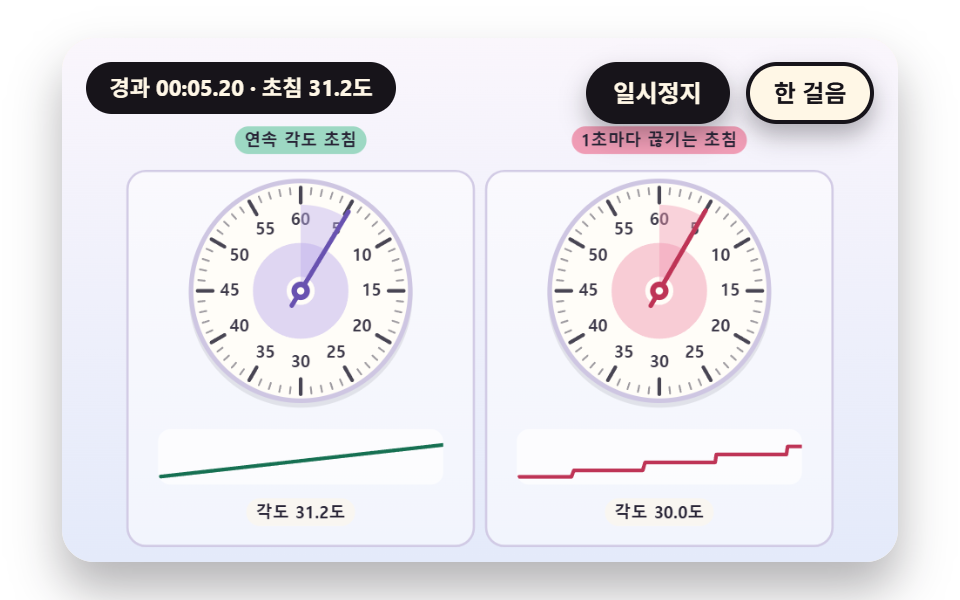 Stopwatch JavaScript: 9 Canvas Timing ScenesHow does a stopwatch turn time into digits and a hand? 01 sets the second hand from one integer count, 03 computes laps See all demos in this post
If you like this effect - similar demos
 Creative UI05 Snap-select dial — settling onto the nearest notch with a small snapCSS Radial Menu: 9 Circular Control Patterns
 Creative UI06 A Ballpoint Line That Trembles and Changes Width with SpeedOne Line Drawing Generator: 9 Canvas Scenes
 Creative UI01 Node box with portsNode Based UI Design: 9 Patterns, No Library