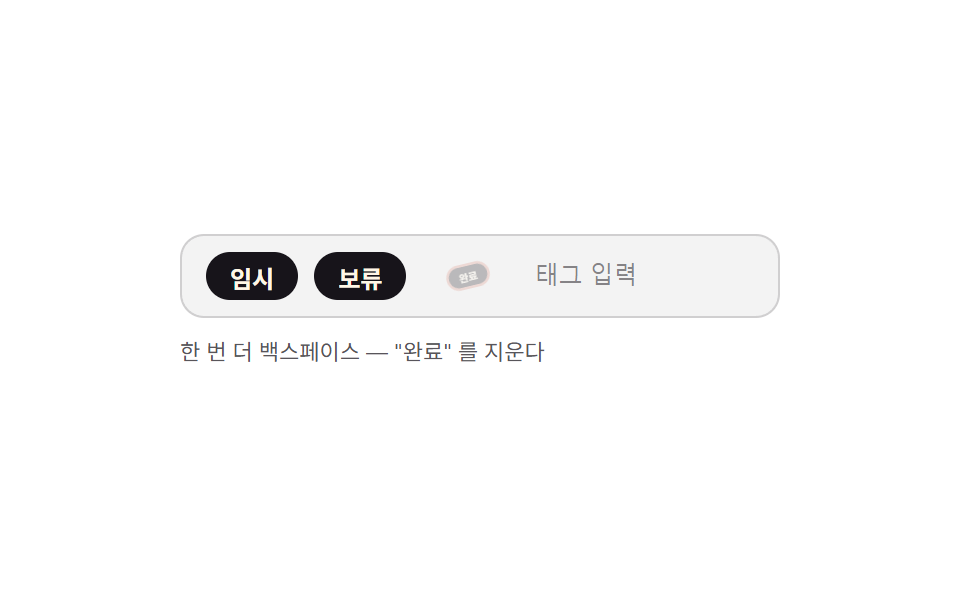
04Tag Input That Needs Two Backspaces to Delete a Chip
With the field empty, backspace first switches the last chip into a selected state, and only a second backspace in that state removes it, guarding against accidental deletes.
Best forRecipient lists and tag inputs mixing required entries
backspaceStepselectlastChip
<main class="stage">
<div class="tb is-demo" id="tb">
  <div class="tb__row" id="tbRow">
    <span class="tb__chip" id="tbChip0" data-text="Temp"><span class="tb__chipText">Temp</span></span>
    <span class="tb__chip" id="tbChip1" data-text="On hold"><span class="tb__chipText">On hold</span></span>
    <span class="tb__chip" id="tbChip2" data-text="Done"><span class="tb__chipText">Done</span></span>
    <input type="text" class="tb__input" id="tbInput" aria-label="Tag input, press backspace twice on an empty field to delete the last chip" placeholder="Tag input">
  </div>
  <p class="tb__meta" id="tbHint">Backspace on empty field — first press selects</p>
  <p class="tb__sr" role="status" aria-live="polite" id="tbLive"></p>
</div>
</main>
@use "../../../../site/static/demo-tokens" as *;
// 계산 겹: backspaceStep() 이 입력이 비어 있을 때만 반응해 2단으로 나눈다 — ① 선택(고르기, 링 표시)
// ② 같은 칩에서 한 번 더 누르면 삭제(회전+수축 퇴장). 다른 키를 누르거나 글자를 입력하면 선택이 풀린다.
@include stage($stage-paper);
.tb { width: min(100%, 300px); display: flex; flex-direction: column; gap: $sp-2; }
.tb__row {
display: flex; flex-wrap: wrap; align-items: center; gap: $sp-2;
background: rgba($subject-ink, .05); border: 1px solid rgba($subject-ink, .16);
border-radius: $r-control; padding: $sp-2 $sp-3;
}
.tb__input {
flex: 1 1 60px; min-width: 40px; border: none; background: transparent; color: $subject-ink;
font-size: 12px; outline: none;
}
.tb__input::placeholder { color: rgba($subject-ink, .5); }
.tb__chip {
display: inline-flex; align-items: center; height: 24px; padding: 0 $sp-3;
background: $subject-ink; color: $subject-cream; border-radius: $r-pill;
font-size: 12px; font-weight: 700; white-space: nowrap;
box-shadow: 0 0 0 0 rgba($error, 0);
transform: scale(1) rotate(0deg); opacity: 1;
transition: box-shadow $dur-quick $ease-out, transform $dur-base $ease-spring, opacity $dur-base $ease-out;
}
.tb__chip--selected { box-shadow: 0 0 0 3px rgba($error, .55); }
.tb__chip--exit { transform: scale(.4) rotate(-14deg); opacity: 0; }
.tb__meta { margin: 0; font-size: 11px; color: rgba($subject-ink, .72); min-height: 14px; }
.tb__sr {
position: absolute; width: 1px; height: 1px; overflow: hidden; clip: rect(0 0 0 0); margin: -1px; padding: 0; border: 0;
}
@media (max-width: 340px) {
.tb { width: 100%; }
.tb__row { padding: $sp-2; }
}
@media (prefers-reduced-motion: reduce) {
.tb__chip { transition: none; }
}html, body {
margin: 0;
overflow: hidden;
}
.stage {
box-sizing: border-box;
min-height: 100vh;
display: grid;
place-items: center;
margin: 0;
background: #ffffff;
font-family: -apple-system, "Segoe UI", "Noto Sans KR", sans-serif;
padding: clamp(8px, 4vw, 24px);
}
.tb {
width: min(100%, 300px);
display: flex;
flex-direction: column;
gap: 8px;
}
.tb__row {
display: flex;
flex-wrap: wrap;
align-items: center;
gap: 8px;
background: rgba(23, 20, 26, 0.05);
border: 1px solid rgba(23, 20, 26, 0.16);
border-radius: 12px;
padding: 8px 12px;
}
.tb__input {
flex: 1 1 60px;
min-width: 40px;
border: none;
background: transparent;
color: #17141a;
font-size: 12px;
outline: none;
}
.tb__input::placeholder {
color: rgba(23, 20, 26, 0.5);
}
.tb__chip {
display: inline-flex;
align-items: center;
height: 24px;
padding: 0 12px;
background: #17141a;
color: #fff7e6;
border-radius: 999px;
font-size: 12px;
font-weight: 700;
white-space: nowrap;
box-shadow: 0 0 0 0 rgba(194, 54, 26, 0);
transform: scale(1) rotate(0deg);
opacity: 1;
transition: box-shadow 220ms ease-out, transform 300ms cubic-bezier(0.2, 0.8, 0.2, 1), opacity 300ms ease-out;
}
.tb__chip--selected {
box-shadow: 0 0 0 3px rgba(194, 54, 26, 0.55);
}
.tb__chip--exit {
transform: scale(0.4) rotate(-14deg);
opacity: 0;
}
.tb__meta {
margin: 0;
font-size: 11px;
color: rgba(23, 20, 26, 0.72);
min-height: 14px;
}
.tb__sr {
position: absolute;
width: 1px;
height: 1px;
overflow: hidden;
clip: rect(0 0 0 0);
margin: -1px;
padding: 0;
border: 0;
}
@media (max-width: 340px) {
.tb {
width: 100%;
}
.tb__row {
padding: 8px;
}
}
@media (prefers-reduced-motion: reduce) {
.tb__chip {
transition: none;
}
}(function () {
var HOLD_MS = 620, GAP_MS = 420, PAUSE_MS = 900;
var reduce = window.matchMedia('(prefers-reduced-motion: reduce)').matches;
var root = document.getElementById('tb');
var row = document.getElementById('tbRow');
var input = document.getElementById('tbInput');
var hint = document.getElementById('tbHint');
var live = document.getElementById('tbLive');
var selectedId = null;
var refillSeq = 0;
function chips() { return Array.prototype.slice.call(row.querySelectorAll('.tb__chip')); }
function lastChip() { var l = chips(); return l.length ? l[l.length - 1] : null; }
function human() { if (root.classList.contains('is-demo')) root.classList.remove('is-demo'); }
function clearSelect() {
if (selectedId) {
var el = document.getElementById(selectedId);
if (el) el.classList.remove('tb__chip--selected');
selectedId = null;
hint.textContent = 'Backspace on empty field — first press selects';
}
}
function select(chip) {
// 계산 겹 1단: 선택은 지우기 전 단계 — 어떤 칩이 지워질지 눈에 보이게 표시만 한다
clearSelect();
chip.classList.add('tb__chip--selected');
selectedId = chip.id;
hint.textContent = 'Backspace once more — "' + chip.dataset.text + '" is removed';
live.textContent = chip.dataset.text + ' selected';
}
function remove(chip) {
// 계산 겹 2단: 선택된 칩에만 퇴장 애니메이션(회전+수축)을 걸고 끝난 뒤 DOM 에서 뗀다
selectedId = null;
chip.classList.add('tb__chip--exit');
var text = chip.dataset.text;
window.setTimeout(function () {
chip.remove();
hint.textContent = 'Backspace on empty field — first press selects';
live.textContent = text + ' removed · tags ' + chips().length + ' ';
}, reduce ? 0 : 320);
}
function backspaceStep() {
// 계산 겹: 입력칸이 비어 있을 때만 반응한다 — 글자가 있으면 브라우저 기본 지우기에 맡긴다
if (input.value) return;
var last = lastChip();
if (!last) return;
if (selectedId === last.id) { remove(last); }
else { select(last); }
}
input.addEventListener('keydown', function (e) {
if (e.key === 'Backspace') { human(); backspaceStep(); }
else if (selectedId) { clearSelect(); }
});
input.addEventListener('input', function () { human(); if (input.value) clearSelect(); });
var timer = 0;
function schedule(fn, ms) { timer = window.setTimeout(fn, ms); }
function loop() {
if (!root.classList.contains('is-demo')) return;
if (lastChip()) {
backspaceStep();
schedule(function () {
if (!root.classList.contains('is-demo')) return;
if (lastChip() && selectedId) { backspaceStep(); }
schedule(loop, GAP_MS);
}, HOLD_MS);
} else {
schedule(function () {
var seed = ['Temp', 'On hold', 'Done'];
seed.forEach(function (t, i) {
var chip = document.createElement('span');
chip.className = 'tb__chip';
chip.id = 'tbChip' + (++refillSeq);
chip.dataset.text = t;
chip.innerHTML = '<span class="tb__chipText"></span>';
chip.querySelector('.tb__chipText').textContent = t;
row.insertBefore(chip, input);
});
schedule(loop, GAP_MS);
}, PAUSE_MS);
}
}
if (!reduce) {
schedule(loop, 280);
} else {
root.classList.remove('is-demo');
}
})();// TagBackspaceSelectDelete — vanilla 판(run/397/demo/04-tag-input-keyboard-backspace-select-delete/index.html) 의 React 포트.
// backspaceStep() 은 입력이 비어 있을 때만 반응한다 — ① 첫 백스페이스는 마지막 칩을 선택(링 표시)
// ② 선택된 채로 한 번 더 누르면 그 칩만 회전+수축 퇴장한다. 다른 키·글자 입력은 선택을 지운다.
import { useEffect, useRef, useState } from "react";
import styles from "./TagBackspaceSelectDelete.module.scss";
type Box<T> = { current: T };
type ChangeEvt = { target: { value: string } };
type KeyEvt = { key: string };
const HOLD_MS = 620, GAP_MS = 420, PAUSE_MS = 900;
const SEED = ["임시", "보류", "완료"];
type Chip = { id: number; text: string; exiting: boolean };
export default function TagBackspaceSelectDelete() {
const timerRef = useRef(0) as unknown as Box<number>;
const seqRef = useRef(1) as unknown as Box<number>;
const isDemoRef = useRef(true) as unknown as Box<boolean>;
const chipsRef = useRef<Chip[]>([]) as unknown as Box<Chip[]>;
const selectedRef = useRef<number | null>(null) as unknown as Box<number | null>;
const draftRef = useRef("") as unknown as Box<string>;
const [chips, setChips] = useState<Chip[]>(() =>
SEED.map((t) => ({ id: seqRef.current++, text: t, exiting: false }))
);
const [selected, setSelected] = useState<number | null>(null);
const [draft, setDraft] = useState("");
const [isDemo, setIsDemo] = useState(true);
const [hint, setHint] = useState('빈 칸에서 백스페이스 — 첫 번째는 고른다');
const [live, setLive] = useState("");
useEffect(() => { chipsRef.current = chips; }, [chips]);
useEffect(() => { selectedRef.current = selected; }, [selected]);
useEffect(() => { draftRef.current = draft; }, [draft]);
function human() {
if (isDemoRef.current) { isDemoRef.current = false; setIsDemo(false); }
}
function clearSelect() {
if (selectedRef.current !== null) {
setSelected(null);
setHint('빈 칸에서 백스페이스 — 첫 번째는 고른다');
}
}
function select(chip: Chip) {
// 계산 겹 1단: 선택은 지우기 전 단계 — 어떤 칩이 지워질지 링으로만 보여준다
setSelected(chip.id);
setHint('한 번 더 백스페이스 — "' + chip.text + '" 를 지운다');
setLive(chip.text + " 선택됨");
}
function remove(chip: Chip) {
// 계산 겹 2단: 선택된 칩에만 퇴장(회전+수축)을 걸고 끝난 뒤 목록에서 뗀다
setSelected(null);
setChips((cs) => cs.map((c) => (c.id === chip.id ? { ...c, exiting: true } : c)));
const reduce = window.matchMedia("(prefers-reduced-motion: reduce)").matches;
window.setTimeout(() => {
setChips((cs) => cs.filter((c) => c.id !== chip.id));
setHint('빈 칸에서 백스페이스 — 첫 번째는 고른다');
setLive(chip.text + " 삭제됨 · 태그 " + (chipsRef.current.length - 1) + "개");
}, reduce ? 0 : 320);
}
function backspaceStep() {
if (draftRef.current) return;
const list = chipsRef.current;
if (!list.length) return;
const last = list[list.length - 1];
if (selectedRef.current === last.id) remove(last);
else select(last);
}
function onKeyDown(e: KeyEvt) {
human();
if (e.key === "Backspace") backspaceStep();
else if (selectedRef.current !== null) clearSelect();
}
function onInput(e: ChangeEvt) {
human();
setDraft(e.target.value);
if (e.target.value) clearSelect();
}
useEffect(() => {
const reduce = window.matchMedia("(prefers-reduced-motion: reduce)").matches;
function loop() {
if (!isDemoRef.current) return;
if (chipsRef.current.length) {
backspaceStep();
timerRef.current = window.setTimeout(() => {
if (!isDemoRef.current) return;
if (chipsRef.current.length && selectedRef.current !== null) backspaceStep();
timerRef.current = window.setTimeout(loop, GAP_MS);
}, HOLD_MS);
} else {
timerRef.current = window.setTimeout(() => {
setChips(SEED.map((t) => ({ id: seqRef.current++, text: t, exiting: false })));
timerRef.current = window.setTimeout(loop, GAP_MS);
}, PAUSE_MS);
}
}
if (!reduce) {
timerRef.current = window.setTimeout(loop, 280);
} else {
isDemoRef.current = false;
setIsDemo(false);
}
return () => window.clearTimeout(timerRef.current);
// eslint-disable-next-line react-hooks/exhaustive-deps
}, []);
return (
<main className={styles.stage}>
<div className={styles.tb + " " + (isDemo ? styles.isDemo : "")}>
<div className={styles.row}>
{chips.map((c) => (
<span
key={c.id}
className={
styles.chip +
(selected === c.id ? " " + styles.chipSelected : "") +
(c.exiting ? " " + styles.chipExit : "")
}
>
{c.text}
</span>
))}
<input
type="text" className={styles.input} aria-label="태그 입력, 빈 칸에서 백스페이스를 두 번 누르면 마지막 칩이 지워진다"
placeholder="태그 입력" value={draft} onChange={onInput} onKeyDown={onKeyDown}
/>
</div>
<p className={styles.meta}>{hint}</p>
<p className={styles.sr} role="status">{live}</p>
</div>
</main>
);
}04 Tag Input That Needs Two Backspaces to Delete a Chip — Measured area 3.374% · moving frames 16/23Original by GODRICH · SCSS and React ship in the zip · 9 Tag Input UI Patterns With CSS Chips
The post this demo lives in
 9 Tag Input UI Patterns With CSS ChipsIt starts where a chip list shows a +3 badge -- a row-width value collapses the overflow, a pasted string splits by a de See all demos in this post