08Resizable terminal window
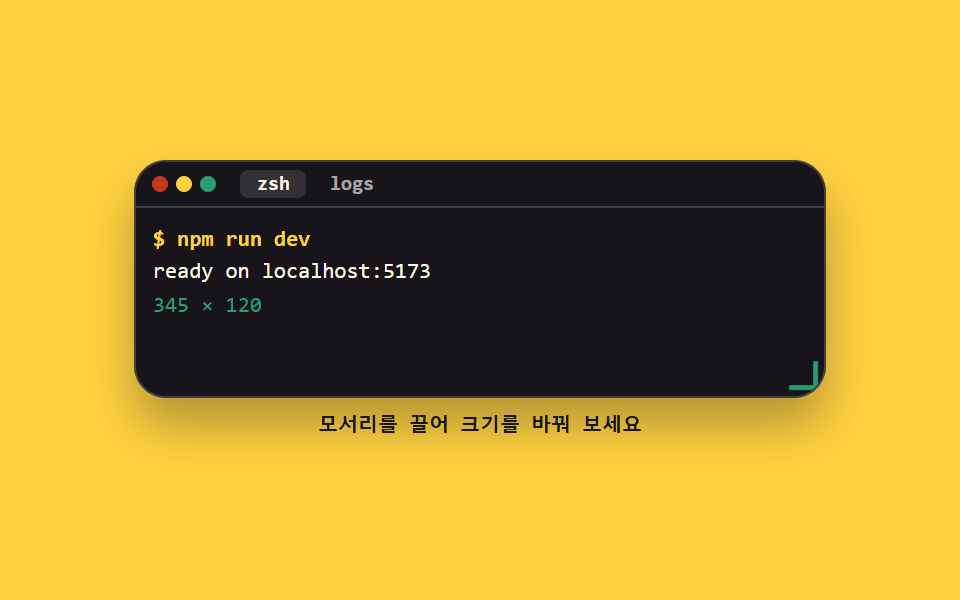
Drag the corner grip and setPointerCapture pins the pointer, so resizing continues even when the cursor leaves the window. The new size is held between a floor and a ceiling by clamp, so it never spills off the stage.
Best forBottom terminal panel of a web IDE, a console you fold and unfold inside docs
setPointerCapturepointermoveclamp
<main class="stage">
<div class="wc is-demo" id="wc">
  <div class="wc__win" id="win">
    <p class="wc__bar">
      <span class="wc__dots" aria-hidden="true"><i class="wc__dot wc__dot--x"></i><i class="wc__dot wc__dot--m"></i><i class="wc__dot wc__dot--z"></i></span>
      <span class="wc__tabs" role="tablist" aria-label="Window tabs">
        <button class="wc__tab" type="button" role="tab" aria-selected="true">zsh</button>
        <button class="wc__tab" type="button" role="tab" aria-selected="false">logs</button>
      </span>
    </p>
    <div class="wc__body">
      <p class="wc__ln wc__ln--cmd">$ npm run dev</p>
      <p class="wc__ln">ready on localhost:5173</p>
      <p class="wc__ln wc__size" aria-live="polite" aria-label="Window size"></p>
    </div>
    <button class="wc__grip" type="button" id="grip" aria-label="Window resize grip"><span aria-hidden="true"></span></button>
  </div>
  <p class="wc__hint">Drag the corner to resize</p>
</div>
</main>
@use "../../../../site/static/demo-tokens" as *;
// 터미널 창 크기 조절 — 모서리 손잡이를 끌면 창이 커지고 줄어든다.
// setPointerCapture 로 포인터를 손잡이에 묶어 두면 커서가 창 밖으로 나가도 pointermove 가 계속 온다.
// 한계는 JS 가 아니라 CSS clamp() 한 곳에서 정한다 — 두 곳에서 자르면 값이 어긋난다.
// 크기를 바꾸는 건 레이아웃 속성이라 보통은 피하지만(transform·opacity 원칙), 여기서는 창 크기 자체가
// 주제라 @property 로 등록한 --w · --h 를 직접 움직인다. 대신 창 하나만 바뀌고 바깥은 그대로다.
$duration: $dur-base;
$easing: $ease-spring;
$color: $chart-3;
$mono: ui-monospace, SFMono-Regular, "SF Mono", Consolas, "Liberation Mono", monospace;
$line: rgba(255, 255, 255, .18);
$dim: rgba(255, 255, 255, .62);
@property --w {
syntax: "<length>";
inherits: false;
initial-value: 300px;
}
@property --h {
syntax: "<length>";
inherits: false;
initial-value: 104px;
}
@property --wn {
syntax: "<integer>";
inherits: true;
initial-value: 300;
}
@property --hn {
syntax: "<integer>";
inherits: true;
initial-value: 104;
}
@include stage($stage-yellow);
.wc { display: flex; flex-direction: column; align-items: center; gap: $sp-2; width: 100%; }
.wc__win {
position: relative; box-sizing: border-box;
width: clamp(200px, var(--w), 100%);
height: clamp(88px, var(--h), 132px);
border: 1px solid $line; border-radius: $r-card; overflow: hidden;
background: $stage-ink; box-shadow: $shadow-raised; font-family: $mono;
}
.wc__bar {
display: flex; align-items: center; gap: $sp-3;
margin: 0; padding: $sp-1 $sp-2; border-bottom: 1px solid $line;
}
.wc__dots { display: inline-flex; gap: $sp-1; flex: 0 0 auto; }
.wc__dot { width: 8px; height: 8px; border-radius: 50%; }
.wc__dot--x { background: $error; }
.wc__dot--m { background: $stage-yellow; }
.wc__dot--z { background: $color; }
.wc__tabs { display: inline-flex; gap: $sp-1; min-width: 0; }
.wc__tab {
box-sizing: border-box; padding: 0 $sp-2; border: 0; border-radius: $r-xs;
background: none; color: $dim; cursor: pointer;
font-family: inherit; font-weight: 700; font-size: clamp(9px, 2.4vw, 10px); line-height: 1.4;
}
.wc__tab[aria-selected="true"] { background: rgba(255, 255, 255, .12); color: $subject-cream; }
.wc__tab:focus-visible { outline: 2px solid $subject-blue; outline-offset: 1px; }
.wc__body { display: flex; flex-direction: column; gap: 0; padding: $sp-2; }
.wc__ln {
margin: 0; color: $subject-cream; font-weight: 500;
font-size: clamp(9px, 2.6vw, 11px); line-height: 1.5; white-space: nowrap; overflow: hidden;
}
.wc__ln--cmd { color: $stage-yellow; font-weight: 700; }
// 크기 표시는 글자가 아니라 등록한 커스텀 속성을 counter() 로 찍는다 — 미리보기와 실제 드래그가 같은 값을 읽는다
.wc__size { color: $color; font-variant-numeric: tabular-nums; }
.wc__size::after { counter-reset: w var(--wn) h var(--hn); content: counter(w) " × " counter(h); }
// 손잡이는 창 오른쪽 아래 모서리에 붙은 요소라 그 모서리를 원점으로 쓴다 (blog-demo 규칙 8 의 예외)
.wc__grip {
position: absolute; right: 0; bottom: 0; width: 18px; height: 18px;
padding: 0; border: 0; border-radius: 0; background: none;
cursor: nwse-resize; touch-action: none;
}
.wc__grip span {
position: absolute; right: 3px; bottom: 3px; width: 10px; height: 10px;
border-right: 2px solid $dim; border-bottom: 2px solid $dim;
transform: scale(1); transform-origin: 100% 100%;
transition: transform $duration $easing, border-color $duration $easing;
}
.wc__grip:hover span, .wc__grip:focus-visible span { border-right-color: $color; border-bottom-color: $color; transform: scale(1.2); }
.wc__grip:focus-visible { outline: 2px solid $subject-blue; outline-offset: -2px; }
.wc__hint { margin: 0; color: $subject-ink; font-family: $mono; font-weight: 700; font-size: clamp(9px, 2.4vw, 10px); line-height: 1.3; }
// ── 격자 미리보기 루프 (2초): 창이 넓어졌다가 88% 안에 원래 크기로 돌아온다.
// 숫자 표시(--wn · --hn)는 같은 퍼센트로 함께 움직여 창 크기와 어긋나지 않는다
.wc.is-demo .wc__win {
animation-name: wcSize; animation-duration: $dur-loop; animation-timing-function: $easing;
animation-iteration-count: infinite; animation-fill-mode: backwards;
}
@keyframes wcSize {
0%, 8% { --w: 300px; --h: 104px; --wn: 300; --hn: 104; }
44%, 64% { --w: 380px; --h: 132px; --wn: 380; --hn: 132; }
88%, 100% { --w: 300px; --h: 104px; --wn: 300; --hn: 104; }
}
.wc.is-demo .wc__grip span {
animation-name: wcGrip; animation-duration: $dur-loop; animation-timing-function: $easing;
animation-iteration-count: infinite; animation-fill-mode: backwards;
}
@keyframes wcGrip {
0%, 8% { transform: scale(1); border-right-color: $dim; border-bottom-color: $dim; }
20%, 70% { transform: scale(1.2); border-right-color: $color; border-bottom-color: $color; }
88%, 100% { transform: scale(1); border-right-color: $dim; border-bottom-color: $dim; }
}
@media (max-width: 340px) {
.wc__bar { gap: $sp-2; }
.wc__body { padding: $sp-1 $sp-2; }
}
@media (prefers-reduced-motion: reduce) {
.wc.is-demo .wc__win,
.wc.is-demo .wc__grip span { animation: none !important; }
.wc__grip span { transition: none !important; }
}@charset "UTF-8";
@property --w {
syntax: "<length>";
inherits: false;
initial-value: 300px;
}
@property --h {
syntax: "<length>";
inherits: false;
initial-value: 104px;
}
@property --wn {
syntax: "<integer>";
inherits: true;
initial-value: 300;
}
@property --hn {
syntax: "<integer>";
inherits: true;
initial-value: 104;
}
html, body {
margin: 0;
overflow: hidden;
}
.stage {
box-sizing: border-box;
min-height: 100vh;
display: grid;
place-items: center;
margin: 0;
background: #ffd23f;
font-family: -apple-system, "Segoe UI", "Noto Sans KR", sans-serif;
padding: clamp(8px, 4vw, 24px);
}
.wc {
display: flex;
flex-direction: column;
align-items: center;
gap: 8px;
width: 100%;
}
.wc__win {
position: relative;
box-sizing: border-box;
width: clamp(200px, var(--w), 100%);
height: clamp(88px, var(--h), 132px);
border: 1px solid rgba(255, 255, 255, 0.18);
border-radius: 16px;
overflow: hidden;
background: #17141a;
box-shadow: 0 14px 24px rgba(23, 20, 26, 0.32);
font-family: ui-monospace, SFMono-Regular, "SF Mono", Consolas, "Liberation Mono", monospace;
}
.wc__bar {
display: flex;
align-items: center;
gap: 12px;
margin: 0;
padding: 4px 8px;
border-bottom: 1px solid rgba(255, 255, 255, 0.18);
}
.wc__dots {
display: inline-flex;
gap: 4px;
flex: 0 0 auto;
}
.wc__dot {
width: 8px;
height: 8px;
border-radius: 50%;
}
.wc__dot--x {
background: #c2361a;
}
.wc__dot--m {
background: #ffd23f;
}
.wc__dot--z {
background: #2b9d74;
}
.wc__tabs {
display: inline-flex;
gap: 4px;
min-width: 0;
}
.wc__tab {
box-sizing: border-box;
padding: 0 8px;
border: 0;
border-radius: 4px;
background: none;
color: rgba(255, 255, 255, 0.62);
cursor: pointer;
font-family: inherit;
font-weight: 700;
font-size: clamp(9px, 2.4vw, 10px);
line-height: 1.4;
}
.wc__tab[aria-selected=true] {
background: rgba(255, 255, 255, 0.12);
color: #fff7e6;
}
.wc__tab:focus-visible {
outline: 2px solid #2f6df6;
outline-offset: 1px;
}
.wc__body {
display: flex;
flex-direction: column;
gap: 0;
padding: 8px;
}
.wc__ln {
margin: 0;
color: #fff7e6;
font-weight: 500;
font-size: clamp(9px, 2.6vw, 11px);
line-height: 1.5;
white-space: nowrap;
overflow: hidden;
}
.wc__ln--cmd {
color: #ffd23f;
font-weight: 700;
}
.wc__size {
color: #2b9d74;
font-variant-numeric: tabular-nums;
}
.wc__size::after {
counter-reset: w var(--wn) h var(--hn);
content: counter(w) " × " counter(h);
}
.wc__grip {
position: absolute;
right: 0;
bottom: 0;
width: 18px;
height: 18px;
padding: 0;
border: 0;
border-radius: 0;
background: none;
cursor: nwse-resize;
touch-action: none;
}
.wc__grip span {
position: absolute;
right: 3px;
bottom: 3px;
width: 10px;
height: 10px;
border-right: 2px solid rgba(255, 255, 255, 0.62);
border-bottom: 2px solid rgba(255, 255, 255, 0.62);
transform: scale(1);
transform-origin: 100% 100%;
transition: transform 300ms cubic-bezier(0.2, 0.8, 0.2, 1), border-color 300ms cubic-bezier(0.2, 0.8, 0.2, 1);
}
.wc__grip:hover span, .wc__grip:focus-visible span {
border-right-color: #2b9d74;
border-bottom-color: #2b9d74;
transform: scale(1.2);
}
.wc__grip:focus-visible {
outline: 2px solid #2f6df6;
outline-offset: -2px;
}
.wc__hint {
margin: 0;
color: #17141a;
font-family: ui-monospace, SFMono-Regular, "SF Mono", Consolas, "Liberation Mono", monospace;
font-weight: 700;
font-size: clamp(9px, 2.4vw, 10px);
line-height: 1.3;
}
.wc.is-demo .wc__win {
animation-name: wcSize;
animation-duration: 2s;
animation-timing-function: cubic-bezier(0.2, 0.8, 0.2, 1);
animation-iteration-count: infinite;
animation-fill-mode: backwards;
}
@keyframes wcSize {
0%, 8% {
--w: 300px;
--h: 104px;
--wn: 300;
--hn: 104;
}
44%, 64% {
--w: 380px;
--h: 132px;
--wn: 380;
--hn: 132;
}
88%, 100% {
--w: 300px;
--h: 104px;
--wn: 300;
--hn: 104;
}
}
.wc.is-demo .wc__grip span {
animation-name: wcGrip;
animation-duration: 2s;
animation-timing-function: cubic-bezier(0.2, 0.8, 0.2, 1);
animation-iteration-count: infinite;
animation-fill-mode: backwards;
}
@keyframes wcGrip {
0%, 8% {
transform: scale(1);
border-right-color: rgba(255, 255, 255, 0.62);
border-bottom-color: rgba(255, 255, 255, 0.62);
}
20%, 70% {
transform: scale(1.2);
border-right-color: #2b9d74;
border-bottom-color: #2b9d74;
}
88%, 100% {
transform: scale(1);
border-right-color: rgba(255, 255, 255, 0.62);
border-bottom-color: rgba(255, 255, 255, 0.62);
}
}
@media (max-width: 340px) {
.wc__bar {
gap: 8px;
}
.wc__body {
padding: 4px 8px;
}
}
@media (prefers-reduced-motion: reduce) {
.wc.is-demo .wc__win,
.wc.is-demo .wc__grip span {
animation: none !important;
}
.wc__grip span {
transition: none !important;
}
}var wc = document.getElementById('wc');
var win = document.getElementById('win');
var grip = document.getElementById('grip');
var from = null;
function readOut() {
// 실제로 그려진 크기를 되읽는다 — 한계는 CSS clamp 가 정하므로 JS 가 다시 자르지 않는다
win.style.setProperty('--wn', String(Math.round(win.offsetWidth)));
win.style.setProperty('--hn', String(Math.round(win.offsetHeight)));
}
grip.addEventListener('pointerdown', function (e) {
wc.classList.remove('is-demo');
grip.setPointerCapture(e.pointerId);
from = { x: e.clientX, y: e.clientY, w: win.offsetWidth, h: win.offsetHeight };
readOut();
});
grip.addEventListener('pointermove', function (e) {
if (!from) { return; }
win.style.setProperty('--w', (from.w + (e.clientX - from.x)) + 'px');
win.style.setProperty('--h', (from.h + (e.clientY - from.y)) + 'px');
readOut();
});
function stop(e) {
if (!from) { return; }
from = null;
if (grip.hasPointerCapture(e.pointerId)) { grip.releasePointerCapture(e.pointerId); }
}
grip.addEventListener('pointerup', stop);
grip.addEventListener('pointercancel', stop);
// 키보드로도 넓힐 수 있어야 한다 — 손잡이에 초점을 두고 화살표를 누른다
grip.addEventListener('keydown', function (e) {
var dx = (e.key === 'ArrowRight') ? 16 : (e.key === 'ArrowLeft') ? -16 : 0;
var dy = (e.key === 'ArrowDown') ? 12 : (e.key === 'ArrowUp') ? -12 : 0;
if (!dx && !dy) { return; }
e.preventDefault();
wc.classList.remove('is-demo');
win.style.setProperty('--w', (win.offsetWidth + dx) + 'px');
win.style.setProperty('--h', (win.offsetHeight + dy) + 'px');
readOut();
});// TerminalWindowResize — vanilla 판(run/294/demo/08-terminal-window-chrome-resize/index.html) 의 React 포트.
// 모서리 손잡이를 끌면 창이 커지고 줄어든다. setPointerCapture 로 포인터를 손잡이에 묶어 두면
// 커서가 창 밖으로 나가도 pointermove 가 계속 온다. 한계는 JS 가 아니라 CSS clamp() 한 곳에서 정한다.
// 크기 표시는 글자가 아니라 등록한 --wn · --hn 을 counter() 로 찍는다.
import { useRef, useState } from "react";
import type { CSSProperties } from "react";
import styles from "./TerminalWindowResize.module.scss";
export type TerminalWindowResizeProps = {
/** 격자 미리보기용 2초 자동 루프. 손잡이를 잡거나 화살표를 누르면 꺼진다 */
demo?: boolean;
duration?: number;
easing?: string;
color?: string;
};
// props 가 넣는 변수는 창 크기 변수(--w · --h · --wn · --hn)와 이름이 겹치지 않는다
type Vars = CSSProperties & { "--duration"?: string; "--easing"?: string; "--color"?: string };
// useRef 는 T | null 을 돌려준다. 처음부터 값이 있고 절대 비지 않는 상자는 이렇게 좁혀 쓴다
type Box<T> = { current: T };
// React 이벤트 제네릭이 없는 환경이라 쓰는 필드만 지역 타입으로 선언한다
type PtrEvt = {
clientX: number;
clientY: number;
pointerId: number;
currentTarget: {
setPointerCapture(id: number): void;
releasePointerCapture(id: number): void;
hasPointerCapture(id: number): boolean;
};
};
type KeyEvt = { key: string; preventDefault(): void };
type From = { x: number; y: number; w: number; h: number };
const STEP_X = 16;
const STEP_Y = 12;
/** 실제로 그려진 크기를 되읽는다 — 한계는 CSS clamp 가 정하므로 JS 가 다시 자르지 않는다 */
function readOut(win: HTMLElement) {
win.style.setProperty("--wn", String(Math.round(win.offsetWidth)));
win.style.setProperty("--hn", String(Math.round(win.offsetHeight)));
}
export default function TerminalWindowResize({
demo = true,
duration = 300,
easing = "cubic-bezier(.2, .8, .2, 1)",
color = "#2b9d74",
}: TerminalWindowResizeProps) {
const [live, setLive] = useState(demo);
const winRef = useRef<HTMLDivElement>(null);
const fromBox = useRef<From | null>(null) as Box<From | null>;
const vars: Vars = { "--duration": `${duration}ms`, "--easing": easing, "--color": color };
function handlePointerDown(e: PtrEvt) {
const win = winRef.current;
if (!win) { return; }
setLive(false);
e.currentTarget.setPointerCapture(e.pointerId);
fromBox.current = { x: e.clientX, y: e.clientY, w: win.offsetWidth, h: win.offsetHeight };
readOut(win);
}
function handlePointerMove(e: PtrEvt) {
const from = fromBox.current;
const win = winRef.current;
if (!from || !win) { return; }
win.style.setProperty("--w", (from.w + (e.clientX - from.x)) + "px");
win.style.setProperty("--h", (from.h + (e.clientY - from.y)) + "px");
readOut(win);
}
function handleStop(e: PtrEvt) {
if (!fromBox.current) { return; }
fromBox.current = null;
if (e.currentTarget.hasPointerCapture(e.pointerId)) { e.currentTarget.releasePointerCapture(e.pointerId); }
}
// 키보드로도 넓힐 수 있어야 한다 — 손잡이에 초점을 두고 화살표를 누른다
function handleKeyDown(e: KeyEvt) {
const win = winRef.current;
if (!win) { return; }
const dx = (e.key === "ArrowRight") ? STEP_X : (e.key === "ArrowLeft") ? -STEP_X : 0;
const dy = (e.key === "ArrowDown") ? STEP_Y : (e.key === "ArrowUp") ? -STEP_Y : 0;
if (!dx && !dy) { return; }
e.preventDefault();
setLive(false);
win.style.setProperty("--w", (win.offsetWidth + dx) + "px");
win.style.setProperty("--h", (win.offsetHeight + dy) + "px");
readOut(win);
}
const cls = [styles.root, live ? styles.isDemo : ""].filter(Boolean).join(" ");
return (
<main className={styles.stage} style={vars}>
<div className={cls}>
<div className={styles.win} ref={winRef}>
<p className={styles.bar}>
<span className={styles.dots} aria-hidden="true">
<i className={styles.dot + " " + styles.dotX} />
<i className={styles.dot + " " + styles.dotM} />
<i className={styles.dot + " " + styles.dotZ} />
</span>
<span className={styles.tabs} role="tablist" aria-label="창 탭">
<button className={styles.tab} type="button" role="tab" aria-selected="true">zsh</button>
<button className={styles.tab} type="button" role="tab" aria-selected="false">logs</button>
</span>
</p>
<div className={styles.body}>
<p className={styles.ln + " " + styles.lnCmd}>$ npm run dev</p>
<p className={styles.ln}>ready on localhost:5173</p>
<p className={styles.ln + " " + styles.size} aria-live="polite" aria-label="창 크기" />
</div>
<button
className={styles.grip}
type="button"
aria-label="창 크기 조절 손잡이"
onPointerDown={handlePointerDown}
onPointerMove={handlePointerMove}
onPointerUp={handleStop}
onPointerCancel={handleStop}
onKeyDown={handleKeyDown}
>
<span aria-hidden="true" />
</button>
</div>
<p className={styles.hint}>모서리를 끌어 크기를 바꿔 보세요</p>
</div>
</main>
);
}08 Resizable terminal window — Measured area 27.394% · moving frames 16/23Original by GODRICH · SCSS and React ship in the zip · Terminal UI Design: 9 Copy-Paste CLI Parts
The post this demo lives in
 Terminal UI Design: 9 Copy-Paste CLI PartsTerminal UI design is the craft of putting a command-line window inside a web page. These nine copy-paste CLI parts go f See all demos in this post