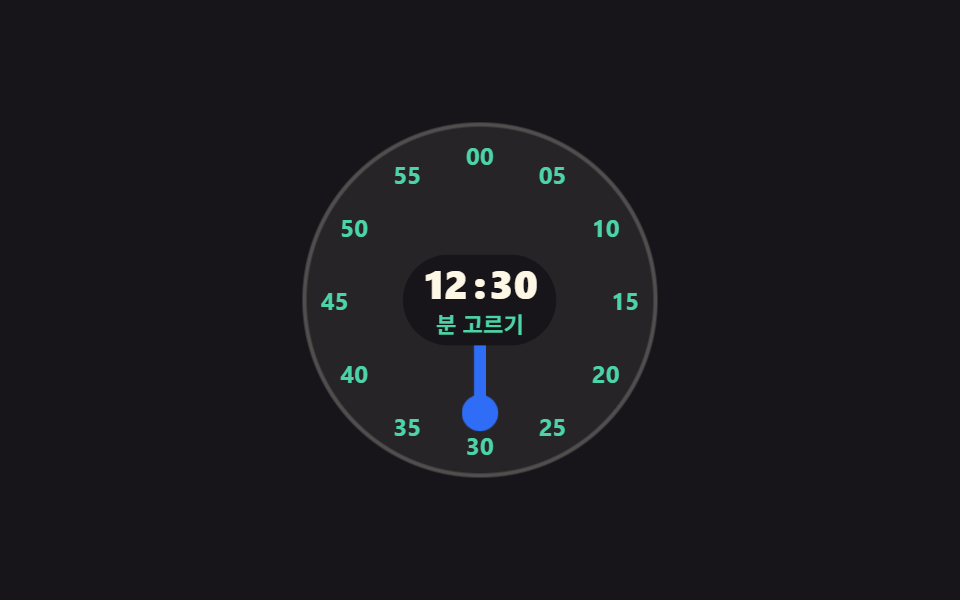
01Round dial you turn by the hour hand
Drag the hand around the face and the angle of your finger becomes an hour, then the dial cuts to minute marks so both steps finish in the same circle.
Best forMobile settings like alarms and wake-up times where a rough hour is grabbed by finger
Math.atan2rotatearia-valuetext

<main class="stage">
  <div class="dl is-demo" data-stage="h">
    <div class="dl__dial" id="dl-dial" role="slider" tabindex="0"
         aria-label="Time dial" aria-valuemin="1" aria-valuemax="12" aria-valuenow="9"
         aria-valuetext="9:30 AM" data-fmt="{h}:{m} AM">
      <span class="dl__ring" data-ring="hour" aria-hidden="true">
        <span class="dl__tick" style="--i:1">1</span><span class="dl__tick" style="--i:2">2</span>
        <span class="dl__tick" style="--i:3">3</span><span class="dl__tick" style="--i:4">4</span>
        <span class="dl__tick" style="--i:5">5</span><span class="dl__tick" style="--i:6">6</span>
        <span class="dl__tick" style="--i:7">7</span><span class="dl__tick" style="--i:8">8</span>
        <span class="dl__tick" style="--i:9">9</span><span class="dl__tick" style="--i:10">10</span>
        <span class="dl__tick" style="--i:11">11</span><span class="dl__tick" style="--i:12">12</span>
      </span>
      <span class="dl__ring" data-ring="min" aria-hidden="true">
        <span class="dl__tick" style="--i:1">05</span><span class="dl__tick" style="--i:2">10</span>
        <span class="dl__tick" style="--i:3">15</span><span class="dl__tick" style="--i:4">20</span>
        <span class="dl__tick" style="--i:5">25</span><span class="dl__tick" style="--i:6">30</span>
        <span class="dl__tick" style="--i:7">35</span><span class="dl__tick" style="--i:8">40</span>
        <span class="dl__tick" style="--i:9">45</span><span class="dl__tick" style="--i:10">50</span>
        <span class="dl__tick" style="--i:11">55</span><span class="dl__tick" style="--i:12">00</span>
      </span>
      <span class="dl__hand" aria-hidden="true"><span class="dl__tip"></span></span>
      <span class="dl__read" aria-hidden="true">
        <span class="dl__val">
          <span class="dl__num">
            <span class="dl__d" data-live="h">09</span>
            <span class="dl__d" data-d="h10">10</span>
            <span class="dl__d" data-d="h11">11</span>
            <span class="dl__d" data-d="h12">12</span>
          </span>
          <span class="dl__sep">:</span>
          <span class="dl__num">
            <span class="dl__d" data-live="m">30</span>
            <span class="dl__d" data-d="m45">45</span>
            <span class="dl__d" data-d="m00">00</span>
          </span>
        </span>
        <span class="dl__step">
          <span class="dl__sv" data-live="s" data-h="Set hour" data-m="Set min">Set hour</span>
          <span class="dl__sv" data-s="m">Set min</span>
        </span>
      </span>
    </div>
  </div>
</main>@use "../../../../site/static/demo-tokens" as *;
$duration: $dur-loop;
$easing: $ease-spring;
$color: $subject-blue;
@include stage($stage-ink);
.dl {
box-sizing: border-box;
display: grid;
place-items: center;
font-family: -apple-system, "Segoe UI", "Noto Sans KR", sans-serif;
}
.dl__dial {
--d: clamp(148px, 44vw, 176px);
--r: calc(var(--d) / 2 - 16px);
--ang: 270deg;
position: relative;
box-sizing: border-box;
width: var(--d);
height: var(--d);
border-radius: 50%;
background-color: rgba(255, 247, 230, .07);
box-shadow: inset 0 0 0 2px rgba(255, 247, 230, .2);
touch-action: none;
cursor: grab;
}
.dl__dial:focus-visible { outline: 3px solid $subject-cream; outline-offset: 3px; }
// ── 눈금: rotate 로 자리를 잡고 숫자 자체는 되돌려 세운다 ──
.dl__ring { position: absolute; inset: 0; opacity: 0; }
.dl__tick {
position: absolute;
left: 50%;
top: 50%;
font-size: clamp(10px, 2.8vw, 12px);
line-height: 1;
font-weight: 700;
color: $subject-cream;
transform:
translate(-50%, -50%)
rotate(calc(var(--i) * 30deg))
translateY(calc(var(--r) * -1))
rotate(calc(var(--i) * -30deg));
}
.dl__ring[data-ring="min"] .dl__tick { color: $subject-mint; }
// 정적 표시가 먼저 — 단계는 data-stage 한 곳에만 적힌다
.dl:not(.is-demo)[data-stage="h"] .dl__ring[data-ring="hour"],
.dl:not(.is-demo)[data-stage="m"] .dl__ring[data-ring="min"] { opacity: 1; }
// ── 바늘: 각도 한 개(--ang)가 시각이다 ──
.dl__hand {
position: absolute;
inset: 0;
z-index: 1;
pointer-events: none;
transform: rotate(var(--ang));
}
.dl__hand::after {
content: "";
position: absolute;
left: calc(50% - 3px);
top: 18%;
width: 6px;
height: 26%;
border-radius: $r-pill;
background-color: $color;
}
.dl__tip {
position: absolute;
left: calc(50% - 9px);
top: calc(18% - 9px);
width: 18px;
height: 18px;
border-radius: 50%;
background-color: $color;
}
.dl[data-stage="m"] .dl__hand::after,
.dl[data-stage="m"] .dl__tip { background-color: $subject-mint; }
// ── 가운데 값 칩: 바늘은 이 뒤로 지나간다 ──
.dl__read {
position: absolute;
left: 50%;
top: 50%;
z-index: 2;
display: grid;
justify-items: center;
gap: $sp-1;
padding: $sp-1 $sp-2;
border-radius: $r-pill;
background-color: $stage-ink;
transform: translate(-50%, -50%);
}
.dl__val { display: flex; align-items: center; color: $subject-cream; }
.dl__num {
position: relative;
display: inline-block;
width: 1.35em;
height: 1em;
font-size: clamp(16px, 4.6vw, 20px);
line-height: 1;
font-weight: 800;
}
.dl__d { position: absolute; left: 0; right: 0; top: 0; text-align: center; opacity: 0; }
.dl__d[data-live] { opacity: 1; }
.dl__sep {
font-size: clamp(16px, 4.6vw, 20px);
line-height: 1;
font-weight: 800;
}
.dl__step {
position: relative;
width: 5em;
height: 13px;
font-size: clamp(9px, 2.6vw, 11px);
line-height: 13px;
font-weight: 600;
color: $subject-mint;
}
.dl__sv { position: absolute; left: 0; right: 0; top: 0; text-align: center; white-space: nowrap; opacity: 0; }
.dl__sv[data-live] { opacity: 1; }
// ── 자동 루프: 시를 몇 칸 돌다 → 분 눈금으로 한 프레임 컷 → 분을 돌고 → 90% 안에 복귀 ──
.dl.is-demo .dl__ring,
.dl.is-demo .dl__d,
.dl.is-demo .dl__sv {
animation-duration: $duration;
animation-timing-function: steps(1, end);
animation-iteration-count: infinite;
}
.dl.is-demo .dl__ring[data-ring="hour"] { animation-name: dl-ring-h; }
.dl.is-demo .dl__ring[data-ring="min"] { animation-name: dl-ring-m; }
@keyframes dl-ring-h { 0% { opacity: 1; } 46% { opacity: 0; } 90% { opacity: 1; } 100% { opacity: 1; } }
@keyframes dl-ring-m { 0% { opacity: 0; } 46% { opacity: 1; } 84% { opacity: 0; } 100% { opacity: 0; } }
.dl.is-demo .dl__d[data-live="h"] { animation-name: dl-h09; }
.dl.is-demo .dl__d[data-d="h10"] { animation-name: dl-h10; }
.dl.is-demo .dl__d[data-d="h11"] { animation-name: dl-h11; }
.dl.is-demo .dl__d[data-d="h12"] { animation-name: dl-h12; }
.dl.is-demo .dl__d[data-live="m"] { animation-name: dl-m30; }
.dl.is-demo .dl__d[data-d="m45"] { animation-name: dl-m45; }
.dl.is-demo .dl__d[data-d="m00"] { animation-name: dl-m00; }
@keyframes dl-h09 { 0% { opacity: 1; } 12% { opacity: 0; } 88% { opacity: 1; } 100% { opacity: 1; } }
@keyframes dl-h10 { 0% { opacity: 0; } 12% { opacity: 1; } 24% { opacity: 0; } 100% { opacity: 0; } }
@keyframes dl-h11 { 0% { opacity: 0; } 24% { opacity: 1; } 36% { opacity: 0; } 100% { opacity: 0; } }
@keyframes dl-h12 { 0% { opacity: 0; } 36% { opacity: 1; } 88% { opacity: 0; } 100% { opacity: 0; } }
@keyframes dl-m30 { 0% { opacity: 1; } 58% { opacity: 0; } 88% { opacity: 1; } 100% { opacity: 1; } }
@keyframes dl-m45 { 0% { opacity: 0; } 58% { opacity: 1; } 70% { opacity: 0; } 100% { opacity: 0; } }
@keyframes dl-m00 { 0% { opacity: 0; } 70% { opacity: 1; } 88% { opacity: 0; } 100% { opacity: 0; } }
.dl.is-demo .dl__sv[data-live] { animation-name: dl-step-h; }
.dl.is-demo .dl__sv[data-s="m"] { animation-name: dl-step-m; }
@keyframes dl-step-h { 0% { opacity: 1; } 46% { opacity: 0; } 90% { opacity: 1; } 100% { opacity: 1; } }
@keyframes dl-step-m { 0% { opacity: 0; } 46% { opacity: 1; } 90% { opacity: 0; } 100% { opacity: 0; } }
// 바늘은 눈금에 딱딱 붙는다 — steps 로 한 칸씩
.dl.is-demo .dl__hand {
animation-name: dl-hand;
animation-duration: $duration;
animation-timing-function: steps(1, end);
animation-iteration-count: infinite;
}
@keyframes dl-hand {
0% { transform: rotate(270deg); }
12% { transform: rotate(300deg); }
24% { transform: rotate(330deg); }
36% { transform: rotate(360deg); }
46% { transform: rotate(540deg); }
58% { transform: rotate(630deg); }
70% { transform: rotate(720deg); }
88% { transform: rotate(270deg); }
100% { transform: rotate(270deg); }
}
// 컷 두 번만으로는 움직인 프레임이 안 차니 바늘 끝이 계속 숨쉰다
.dl.is-demo .dl__tip {
animation-name: dl-tip;
animation-duration: 500ms;
animation-timing-function: $easing;
animation-iteration-count: infinite;
}
@keyframes dl-tip {
0% { transform: scale(1); }
50% { transform: scale(1.28); }
100% { transform: scale(1); }
}
// 분 눈금으로 갈리는 순간 판이 한 번 눌렸다 펴진다
.dl.is-demo .dl__dial {
animation-name: dl-pop;
animation-duration: $duration;
animation-timing-function: $easing;
animation-iteration-count: infinite;
}
@keyframes dl-pop {
0% { transform: scale(1); }
44% { transform: scale(1); }
48% { transform: scale(.94); }
54% { transform: scale(1.02); }
60% { transform: scale(1); }
100% { transform: scale(1); }
}
@media (max-width: 340px) {
.dl__read { gap: 0; padding: 0 $sp-1; }
.dl__step { height: 12px; line-height: 12px; }
}
@media (prefers-reduced-motion: reduce) {
.dl.is-demo .dl__ring,
.dl.is-demo .dl__d,
.dl.is-demo .dl__sv,
.dl.is-demo .dl__hand,
.dl.is-demo .dl__tip,
.dl.is-demo .dl__dial { animation: none !important; }
.dl.is-demo .dl__ring[data-ring="hour"] { opacity: 1; }
}html, body {
margin: 0;
overflow: hidden;
}
.stage {
box-sizing: border-box;
min-height: 100vh;
display: grid;
place-items: center;
margin: 0;
background: #17141a;
font-family: -apple-system, "Segoe UI", "Noto Sans KR", sans-serif;
padding: clamp(8px, 4vw, 24px);
}
.dl {
box-sizing: border-box;
display: grid;
place-items: center;
font-family: -apple-system, "Segoe UI", "Noto Sans KR", sans-serif;
}
.dl__dial {
--d: clamp(148px, 44vw, 176px);
--r: calc(var(--d) / 2 - 16px);
--ang: 270deg;
position: relative;
box-sizing: border-box;
width: var(--d);
height: var(--d);
border-radius: 50%;
background-color: rgba(255, 247, 230, 0.07);
box-shadow: inset 0 0 0 2px rgba(255, 247, 230, 0.2);
touch-action: none;
cursor: grab;
}
.dl__dial:focus-visible {
outline: 3px solid #fff7e6;
outline-offset: 3px;
}
.dl__ring {
position: absolute;
inset: 0;
opacity: 0;
}
.dl__tick {
position: absolute;
left: 50%;
top: 50%;
font-size: clamp(10px, 2.8vw, 12px);
line-height: 1;
font-weight: 700;
color: #fff7e6;
transform: translate(-50%, -50%) rotate(calc(var(--i) * 30deg)) translateY(calc(var(--r) * -1)) rotate(calc(var(--i) * -30deg));
}
.dl__ring[data-ring=min] .dl__tick {
color: #4cd4a6;
}
.dl:not(.is-demo)[data-stage=h] .dl__ring[data-ring=hour],
.dl:not(.is-demo)[data-stage=m] .dl__ring[data-ring=min] {
opacity: 1;
}
.dl__hand {
position: absolute;
inset: 0;
z-index: 1;
pointer-events: none;
transform: rotate(var(--ang));
}
.dl__hand::after {
content: "";
position: absolute;
left: calc(50% - 3px);
top: 18%;
width: 6px;
height: 26%;
border-radius: 999px;
background-color: #2f6df6;
}
.dl__tip {
position: absolute;
left: calc(50% - 9px);
top: calc(18% - 9px);
width: 18px;
height: 18px;
border-radius: 50%;
background-color: #2f6df6;
}
.dl[data-stage=m] .dl__hand::after,
.dl[data-stage=m] .dl__tip {
background-color: #4cd4a6;
}
.dl__read {
position: absolute;
left: 50%;
top: 50%;
z-index: 2;
display: grid;
justify-items: center;
gap: 4px;
padding: 4px 8px;
border-radius: 999px;
background-color: #17141a;
transform: translate(-50%, -50%);
}
.dl__val {
display: flex;
align-items: center;
color: #fff7e6;
}
.dl__num {
position: relative;
display: inline-block;
width: 1.35em;
height: 1em;
font-size: clamp(16px, 4.6vw, 20px);
line-height: 1;
font-weight: 800;
}
.dl__d {
position: absolute;
left: 0;
right: 0;
top: 0;
text-align: center;
opacity: 0;
}
.dl__d[data-live] {
opacity: 1;
}
.dl__sep {
font-size: clamp(16px, 4.6vw, 20px);
line-height: 1;
font-weight: 800;
}
.dl__step {
position: relative;
width: 5em;
height: 13px;
font-size: clamp(9px, 2.6vw, 11px);
line-height: 13px;
font-weight: 600;
color: #4cd4a6;
}
.dl__sv {
position: absolute;
left: 0;
right: 0;
top: 0;
text-align: center;
white-space: nowrap;
opacity: 0;
}
.dl__sv[data-live] {
opacity: 1;
}
.dl.is-demo .dl__ring,
.dl.is-demo .dl__d,
.dl.is-demo .dl__sv {
animation-duration: 2s;
animation-timing-function: steps(1, end);
animation-iteration-count: infinite;
}
.dl.is-demo .dl__ring[data-ring=hour] {
animation-name: dl-ring-h;
}
.dl.is-demo .dl__ring[data-ring=min] {
animation-name: dl-ring-m;
}
@keyframes dl-ring-h {
0% {
opacity: 1;
}
46% {
opacity: 0;
}
90% {
opacity: 1;
}
100% {
opacity: 1;
}
}
@keyframes dl-ring-m {
0% {
opacity: 0;
}
46% {
opacity: 1;
}
84% {
opacity: 0;
}
100% {
opacity: 0;
}
}
.dl.is-demo .dl__d[data-live=h] {
animation-name: dl-h09;
}
.dl.is-demo .dl__d[data-d=h10] {
animation-name: dl-h10;
}
.dl.is-demo .dl__d[data-d=h11] {
animation-name: dl-h11;
}
.dl.is-demo .dl__d[data-d=h12] {
animation-name: dl-h12;
}
.dl.is-demo .dl__d[data-live=m] {
animation-name: dl-m30;
}
.dl.is-demo .dl__d[data-d=m45] {
animation-name: dl-m45;
}
.dl.is-demo .dl__d[data-d=m00] {
animation-name: dl-m00;
}
@keyframes dl-h09 {
0% {
opacity: 1;
}
12% {
opacity: 0;
}
88% {
opacity: 1;
}
100% {
opacity: 1;
}
}
@keyframes dl-h10 {
0% {
opacity: 0;
}
12% {
opacity: 1;
}
24% {
opacity: 0;
}
100% {
opacity: 0;
}
}
@keyframes dl-h11 {
0% {
opacity: 0;
}
24% {
opacity: 1;
}
36% {
opacity: 0;
}
100% {
opacity: 0;
}
}
@keyframes dl-h12 {
0% {
opacity: 0;
}
36% {
opacity: 1;
}
88% {
opacity: 0;
}
100% {
opacity: 0;
}
}
@keyframes dl-m30 {
0% {
opacity: 1;
}
58% {
opacity: 0;
}
88% {
opacity: 1;
}
100% {
opacity: 1;
}
}
@keyframes dl-m45 {
0% {
opacity: 0;
}
58% {
opacity: 1;
}
70% {
opacity: 0;
}
100% {
opacity: 0;
}
}
@keyframes dl-m00 {
0% {
opacity: 0;
}
70% {
opacity: 1;
}
88% {
opacity: 0;
}
100% {
opacity: 0;
}
}
.dl.is-demo .dl__sv[data-live] {
animation-name: dl-step-h;
}
.dl.is-demo .dl__sv[data-s=m] {
animation-name: dl-step-m;
}
@keyframes dl-step-h {
0% {
opacity: 1;
}
46% {
opacity: 0;
}
90% {
opacity: 1;
}
100% {
opacity: 1;
}
}
@keyframes dl-step-m {
0% {
opacity: 0;
}
46% {
opacity: 1;
}
90% {
opacity: 0;
}
100% {
opacity: 0;
}
}
.dl.is-demo .dl__hand {
animation-name: dl-hand;
animation-duration: 2s;
animation-timing-function: steps(1, end);
animation-iteration-count: infinite;
}
@keyframes dl-hand {
0% {
transform: rotate(270deg);
}
12% {
transform: rotate(300deg);
}
24% {
transform: rotate(330deg);
}
36% {
transform: rotate(360deg);
}
46% {
transform: rotate(540deg);
}
58% {
transform: rotate(630deg);
}
70% {
transform: rotate(720deg);
}
88% {
transform: rotate(270deg);
}
100% {
transform: rotate(270deg);
}
}
.dl.is-demo .dl__tip {
animation-name: dl-tip;
animation-duration: 500ms;
animation-timing-function: cubic-bezier(0.2, 0.8, 0.2, 1);
animation-iteration-count: infinite;
}
@keyframes dl-tip {
0% {
transform: scale(1);
}
50% {
transform: scale(1.28);
}
100% {
transform: scale(1);
}
}
.dl.is-demo .dl__dial {
animation-name: dl-pop;
animation-duration: 2s;
animation-timing-function: cubic-bezier(0.2, 0.8, 0.2, 1);
animation-iteration-count: infinite;
}
@keyframes dl-pop {
0% {
transform: scale(1);
}
44% {
transform: scale(1);
}
48% {
transform: scale(0.94);
}
54% {
transform: scale(1.02);
}
60% {
transform: scale(1);
}
100% {
transform: scale(1);
}
}
@media (max-width: 340px) {
.dl__read {
gap: 0;
padding: 0 4px;
}
.dl__step {
height: 12px;
line-height: 12px;
}
}
@media (prefers-reduced-motion: reduce) {
.dl.is-demo .dl__ring,
.dl.is-demo .dl__d,
.dl.is-demo .dl__sv,
.dl.is-demo .dl__hand,
.dl.is-demo .dl__tip,
.dl.is-demo .dl__dial {
animation: none !important;
}
.dl.is-demo .dl__ring[data-ring=hour] {
opacity: 1;
}
}// 각도 → 값은 Math.atan2 로 실제 계산한다. 시를 확정하면 같은 바늘이 min 눈금을 맡는다
(function () {
var dl = document.querySelector('.dl'), dial = document.getElementById('dl-dial');
var hv = dl.querySelector('[data-live="h"]'), mv = dl.querySelector('[data-live="m"]');
var sv = dl.querySelector('[data-live="s"]');
var s = { h: 9, m: 30, hour: true };
function pad(n) { return (n < 10 ? '0' : '') + n; }
function paint() {
dl.setAttribute('data-stage', s.hour ? 'h' : 'm');
dial.style.setProperty('--ang', (s.hour ? s.h * 30 : s.m * 6) + 'deg');
hv.textContent = pad(s.h); mv.textContent = pad(s.m);
sv.textContent = s.hour ? sv.dataset.h : sv.dataset.m;
dial.setAttribute('aria-valuemin', s.hour ? '1' : '0');
dial.setAttribute('aria-valuemax', s.hour ? '12' : '55');
dial.setAttribute('aria-valuenow', String(s.hour ? s.h : s.m));
dial.setAttribute('aria-valuetext', dial.dataset.fmt.replace('{h}', s.h).replace('{m}', s.m));
}
function fromPointer(e) {
var r = dial.getBoundingClientRect();
var a = Math.atan2(e.clientX - r.left - r.width / 2, r.top + r.height / 2 - e.clientY) * 180 / Math.PI;
a = (a + 360) % 360;
if (s.hour) { s.h = Math.round(a / 30) || 12; } else { s.m = (Math.round(a / 30) * 5) % 60; }
paint();
}
dial.addEventListener('pointerdown', function (e) {
dl.classList.remove('is-demo'); dial.setPointerCapture(e.pointerId);
dial.dataset.drag = '1'; fromPointer(e); e.preventDefault();
});
dial.addEventListener('pointermove', function (e) { if (dial.dataset.drag) fromPointer(e); });
dial.addEventListener('pointerup', function () {
if (!dial.dataset.drag) return;
delete dial.dataset.drag;
if (s.hour) { s.hour = false; paint(); } // 시가 확정되면 판이 min 눈금으로 갈린다
});
dial.addEventListener('keydown', function (e) {
var k = e.key, d = (k === 'ArrowRight' || k === 'ArrowUp') ? 1 : (k === 'ArrowLeft' || k === 'ArrowDown') ? -1 : 0;
var jump = k === 'Home' || k === 'End', turn = k === 'Enter' || k === ' ';
if (!d && !jump && !turn) return;
e.preventDefault(); dl.classList.remove('is-demo');
if (turn) { s.hour = !s.hour; }
else if (s.hour) { s.h = k === 'Home' ? 1 : k === 'End' ? 12 : ((s.h - 1 + d + 12) % 12) + 1; }
else { s.m = k === 'Home' ? 0 : k === 'End' ? 55 : (s.m + d * 5 + 60) % 60; }
paint();
});
paint();
})();import { useRef, useState } from "react";
import type { CSSProperties } from "react";
import styles from "./AnalogDialPicker.module.scss";
export type AnalogDialPickerProps = {
labels?: { dial: string; hour: string; minute: string; meridiem: string };
duration?: number;
easing?: string;
color?: string;
};
type Vars = CSSProperties & {
"--duration"?: string;
"--easing"?: string;
"--color"?: string;
"--ang"?: string;
};
type TickVars = CSSProperties & { "--i"?: number };
type KeyEvt = { key: string; preventDefault(): void };
type PtrEvt = {
clientX: number;
clientY: number;
pointerId: number;
preventDefault(): void;
currentTarget: {
setPointerCapture(id: number): void;
getBoundingClientRect(): { left: number; top: number; width: number; height: number };
};
};
const HOURS = [1, 2, 3, 4, 5, 6, 7, 8, 9, 10, 11, 12];
const MINS = ["05", "10", "15", "20", "25", "30", "35", "40", "45", "50", "55", "00"];
const pad = (n: number) => (n < 10 ? "0" : "") + n;
export default function AnalogDialPicker({
labels = { dial: "Time dial", hour: "Set hour", minute: "Set min", meridiem: "AM" },
duration = 2000,
easing = "cubic-bezier(.2,.8,.2,1)",
color = "#2f6df6",
}: AnalogDialPickerProps) {
const [demo, setDemo] = useState(true);
const [hour, setHour] = useState(9);
const [minute, setMinute] = useState(30);
const [pickHour, setPickHour] = useState(true);
const dragging = useRef(false);
const vars: Vars = {
"--duration": `${duration}ms`,
"--easing": easing,
"--color": color,
"--ang": `${pickHour ? hour * 30 : minute * 6}deg`,
};
const valueText = `${hour}:${pad(minute)} ${labels.meridiem}`;
// 각도 → 값은 Math.atan2 로 실제 계산한다
function fromPointer(e: PtrEvt) {
const r = e.currentTarget.getBoundingClientRect();
let a = (Math.atan2(e.clientX - r.left - r.width / 2, r.top + r.height / 2 - e.clientY) * 180) / Math.PI;
a = (a + 360) % 360;
if (pickHour) setHour(Math.round(a / 30) || 12);
else setMinute((Math.round(a / 30) * 5) % 60);
}
function onDown(e: PtrEvt) {
setDemo(false);
e.currentTarget.setPointerCapture(e.pointerId);
dragging.current = true;
fromPointer(e);
e.preventDefault();
}
function onUp() {
if (!dragging.current) return;
dragging.current = false;
if (pickHour) setPickHour(false); // 시가 확정되면 판이 분 눈금으로 갈린다
}
function onKey(e: KeyEvt) {
const d = e.key === "ArrowRight" || e.key === "ArrowUp" ? 1 : e.key === "ArrowLeft" || e.key === "ArrowDown" ? -1 : 0;
const jump = e.key === "Home" || e.key === "End";
const turn = e.key === "Enter" || e.key === " ";
if (!d && !jump && !turn) return;
e.preventDefault();
setDemo(false);
if (turn) setPickHour((v) => !v);
else if (pickHour) setHour(e.key === "Home" ? 1 : e.key === "End" ? 12 : ((hour - 1 + d + 12) % 12) + 1);
else setMinute(e.key === "Home" ? 0 : e.key === "End" ? 55 : (minute + d * 5 + 60) % 60);
}
return (
<div className={`${styles.wrap} ${demo ? styles.isDemo : ""}`} data-stage={pickHour ? "h" : "m"} style={vars}>
<div
className={styles.dial}
role="slider"
tabIndex={0}
aria-label={labels.dial}
aria-valuemin={pickHour ? 1 : 0}
aria-valuemax={pickHour ? 12 : 55}
aria-valuenow={pickHour ? hour : minute}
aria-valuetext={valueText}
onPointerDown={onDown}
onPointerMove={(e: PtrEvt) => { if (dragging.current) fromPointer(e); }}
onPointerUp={onUp}
onKeyDown={onKey}
>
<span className={styles.ring} data-ring="hour" aria-hidden="true">
{HOURS.map((n) => (
<span key={n} className={styles.tick} style={{ "--i": n } as TickVars}>{n}</span>
))}
</span>
<span className={styles.ring} data-ring="min" aria-hidden="true">
{MINS.map((t, i) => (
<span key={t} className={styles.tick} style={{ "--i": i + 1 } as TickVars}>{t}</span>
))}
</span>
<span className={styles.hand} aria-hidden="true"><span className={styles.tip} /></span>
<span className={styles.read} aria-hidden="true">
<span className={styles.val}>
<span className={styles.num}>
<span className={styles.d} data-live="h">{pad(hour)}</span>
<span className={styles.d} data-d="h10">10</span>
<span className={styles.d} data-d="h11">11</span>
<span className={styles.d} data-d="h12">12</span>
</span>
<span className={styles.sep}>:</span>
<span className={styles.num}>
<span className={styles.d} data-live="m">{pad(minute)}</span>
<span className={styles.d} data-d="m45">45</span>
<span className={styles.d} data-d="m00">00</span>
</span>
</span>
<span className={styles.step}>
<span className={styles.sv} data-live="s">{pickHour ? labels.hour : labels.minute}</span>
<span className={styles.sv} data-s="m">{labels.minute}</span>
</span>
</span>
</div>
</div>
);
}01 Round dial you turn by the hour hand — Measured area 7.094% · moving frames 23/23Original by GODRICH · SCSS and React ship in the zip · 9 time picker ui patterns, from a point to a span
The post this demo lives in
 9 time picker ui patterns, from a point to a spanA time picker ui is the part of a screen where someone sets a time without typing it. These nine go past a single time o See all demos in this post