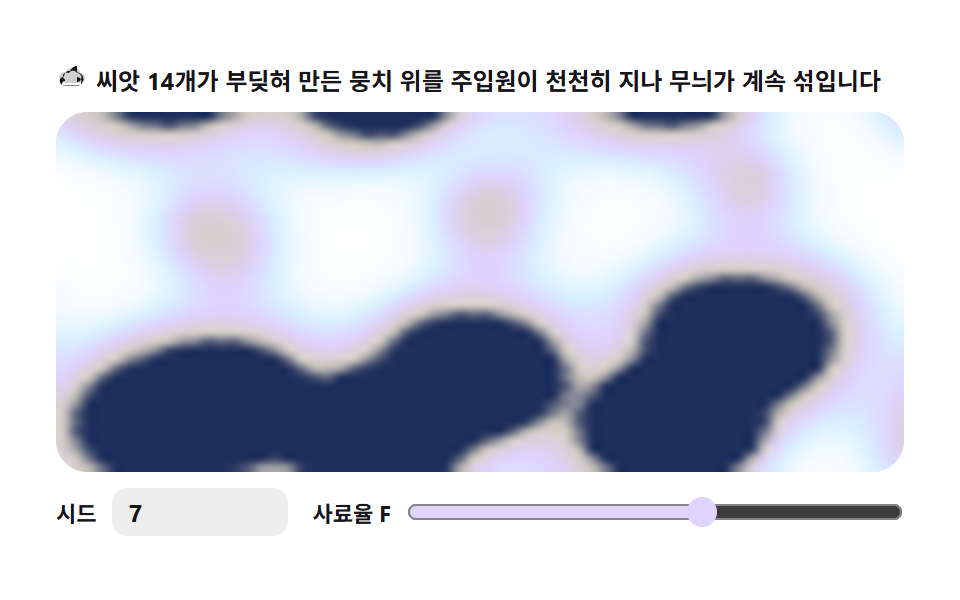
05Sheep fleece — several seeds collide and blend
Scattering several seeds across the canvas lets each grown patch collide into boundaries, giving the lumpy yet clustered texture of fleece or cloud puffs.
Best forTexture backgrounds, illustration fills
ImageDataputImageDatarequestAnimationFrame
<main class="stage">
<div class="tsf" id="tsf">
  <p class="tsf__hint">
    <svg class="tsf__ico" viewBox="0 0 256 256" aria-hidden="true"><g fill="currentColor"><path d="M124.9 32a52 52 0 0 0-49.55 36.11A40 40 0 0 0 24 107.33c0 25 21.75 44.67 46.75 44.67h119c23.5 0 42.25-17.75 42.25-40a40 40 0 0 0-36.71-39.81A52 52 0 0 0 124.9 32" opacity=".2"/><path d="M168 16a56 56 0 0 0-53.16 38.47A44 44 0 0 0 64 97.34c0 .83 0 1.66.08 2.49A36 36 0 0 0 68 172h100a52 52 0 0 0 0-104Zm0 88a36 36 0 0 1 0 72H68a20 20 0 0 1-6.7-38.92l10.83-3.73-2.51-11.22A28 28 0 0 1 97.34 72h4.22l3.76-2.6A36 36 0 0 1 168 72a36 36 0 0 1 0 72Z"/></g></svg>
    <span>Fourteen colliding tufts keep blending as slow injectors sweep across them</span>
  </p>
  <div class="tsf__field" id="field">
    <canvas class="tsf__cv" id="cv"></canvas>
  </div>
  <div class="tsf__bar">
    <label class="tsf__dial">Seed
      <input type="number" id="seed" min="1" max="9999" step="1" value="7" aria-label="Pattern seed">
    </label>
    <label class="tsf__dial tsf__grow">Feed rate F
      <input type="range" id="fk" min="0.010" max="0.070" step="0.001" value="0.046" aria-label="Feed rate F">
    </label>
  </div>
</div>
</main>
@use "../../../../site/static/demo-tokens" as *;
// 양 털 — Gray-Scott 반응-확산. 화면 곳곳의 시드 점이 각자 자라 서로 부딪혀
// 경계를 이루는 덩어리 질감 축 (05).
// 파스텔 — mix() 로 옅게 섞은 로컬 변수만 쓴다. 리터럴 hex 0개(BD26).
$tsf-fleece: mix($subject-cream, $subject-ink, 82%); // 뭉치 본체 — 크림끼 잉크
$tsf-edge: mix($subject-lilac, $stage-paper, 46%); // 뭉치 경계 — 라일락끼
$tsf-field: mix($subject-sky, $stage-paper, 26%); // 밭 바탕 — 옅은 하늘색
$tsf-inkend: mix($subject-blue, $subject-ink, 30%); // 가장 진한 끝단
$duration: $dur-loop;
$easing: $ease-out;
$color: $tsf-edge;
@include stage($stage-paper);
.tsf {
// V 농도 → 색 5단계 LUT (JS 가 getComputedStyle 로 읽는다)
--tsf-c0: #{$stage-paper};
--tsf-c1: #{$tsf-field};
--tsf-c2: #{$tsf-edge};
--tsf-c3: #{$tsf-fleece};
--tsf-c4: #{$tsf-inkend};
display: flex; flex-direction: column; gap: $sp-2;
width: 100%; max-width: 424px;
}
.tsf__hint {
display: flex; align-items: center; gap: $sp-1; margin: 0;
font-weight: 700; font-size: clamp(10px, 2.8vw, 12px); line-height: 1.35;
color: $subject-ink;
}
.tsf__ico { width: 16px; height: 16px; flex: 0 0 auto; color: $subject-ink; }
.tsf__field {
position: relative; height: 180px;
border-radius: $r-card; overflow: hidden;
background: $stage-paper;
box-shadow: inset 0 0 0 1px rgba($subject-ink, .16);
}
.tsf__cv { display: block; width: 100%; height: 100%; }
.tsf__bar { display: flex; align-items: center; gap: $sp-3; flex-wrap: wrap; }
.tsf__dial {
display: flex; align-items: center; gap: $sp-2;
font-weight: 700; font-size: 11px; color: $subject-ink;
}
.tsf__grow { flex: 1 1 auto; min-width: 120px; }
.tsf__grow input { flex: 1 1 auto; }
.tsf__dial input {
width: 72px; margin: 0;
padding: $sp-1 $sp-2; border: 0; border-radius: $r-sm;
background: rgba($subject-ink, .08); color: $subject-ink;
font-weight: 700; font-size: 12px; font-family: inherit;
}
.tsf__dial input[type="range"] {
width: auto; padding: 0; accent-color: $tsf-edge;
}
.tsf__dial input:focus-visible { outline: 2px solid $subject-blue; outline-offset: 2px; }
@media (max-width: 340px) {
.tsf { gap: $sp-1; }
.tsf__field { height: 100px; }
.tsf__dial input { width: 56px; }
.tsf__hint { font-size: 10px; }
}
// reduce — 루프 없이 성숙 상태 한 장만 남긴다
@media (prefers-reduced-motion: reduce) {
.tsf.is-still .tsf__field { cursor: default; }
}html, body {
margin: 0;
overflow: hidden;
}
.stage {
box-sizing: border-box;
min-height: 100vh;
display: grid;
place-items: center;
margin: 0;
background: #ffffff;
font-family: -apple-system, "Segoe UI", "Noto Sans KR", sans-serif;
padding: clamp(8px, 4vw, 24px);
}
.tsf {
--tsf-c0: #ffffff;
--tsf-c1: rgb(85.2156862745%, 94.3921568627%, 100%);
--tsf-c2: rgb(87.3725490196%, 82.862745098%, 100%);
--tsf-c3: rgb(83.6235294118%, 80.8392156863%, 75.7960784314%);
--tsf-c4: rgb(11.8431372549%, 18.3137254902%, 36.0784313725%);
display: flex;
flex-direction: column;
gap: 8px;
width: 100%;
max-width: 424px;
}
.tsf__hint {
display: flex;
align-items: center;
gap: 4px;
margin: 0;
font-weight: 700;
font-size: clamp(10px, 2.8vw, 12px);
line-height: 1.35;
color: #17141a;
}
.tsf__ico {
width: 16px;
height: 16px;
flex: 0 0 auto;
color: #17141a;
}
.tsf__field {
position: relative;
height: 180px;
border-radius: 16px;
overflow: hidden;
background: #ffffff;
box-shadow: inset 0 0 0 1px rgba(23, 20, 26, 0.16);
}
.tsf__cv {
display: block;
width: 100%;
height: 100%;
}
.tsf__bar {
display: flex;
align-items: center;
gap: 12px;
flex-wrap: wrap;
}
.tsf__dial {
display: flex;
align-items: center;
gap: 8px;
font-weight: 700;
font-size: 11px;
color: #17141a;
}
.tsf__grow {
flex: 1 1 auto;
min-width: 120px;
}
.tsf__grow input {
flex: 1 1 auto;
}
.tsf__dial input {
width: 72px;
margin: 0;
padding: 4px 8px;
border: 0;
border-radius: 8px;
background: rgba(23, 20, 26, 0.08);
color: #17141a;
font-weight: 700;
font-size: 12px;
font-family: inherit;
}
.tsf__dial input[type=range] {
width: auto;
padding: 0;
accent-color: rgb(87.3725490196%, 82.862745098%, 100%);
}
.tsf__dial input:focus-visible {
outline: 2px solid #2f6df6;
outline-offset: 2px;
}
@media (max-width: 340px) {
.tsf {
gap: 4px;
}
.tsf__field {
height: 100px;
}
.tsf__dial input {
width: 56px;
}
.tsf__hint {
font-size: 10px;
}
}
@media (prefers-reduced-motion: reduce) {
.tsf.is-still .tsf__field {
cursor: default;
}
}// 양 털 — Gray-Scott 반응-확산. U(사료)·V(촉매) 두 격자를 64x40 셀에 두고
// 매 프레임 16스텝씩 확산 + 반응항을 계산해 ImageData 로 화소를 박는다.
// 시드는 화면 곳곳의 점 14개 — 각자 자란 덩어리가 서로 부딪혀 경계를 이뤄
// 양 털·구름 뭉치 같은 질감이 된다.
// 다만 완전 성숙한 뭉치는 수학적 정지 상태라 변화가 사라진다 — 그래서 성숙 뒤에도
// 위상이 다른 주입원 6개가 리사주 곤적으로 화면을 천천히 순회하며 U 를 부어
// 뭉치가 계속 부딪히며 섞이게 한다 (07 파생). 주제는 '씨앗 여러 개가 섞인다'.
// 라플라스는 간선 0.2·대각 0.05 가중(9점) — 5점 대비 이방성 노이즈가 적어
// 성장 무늬가 부드럽다. DU=1.0 DV=0.5 dt=1.0 (브리프 규격).
// 렌더: 셀 V 값을 파스텔 LUT 로 색을 정해 저해상 버퍼에 putImageData, 그 버퍼를
// drawImage 로 확대한다(imageSmoothingEnabled — 부드럽게).
var root = document.getElementById('tsf');
var field = document.getElementById('field');
var cv = document.getElementById('cv');
var ctx = cv.getContext('2d');
var seedIn = document.getElementById('seed');
var fkIn = document.getElementById('fk');
// 결정적 난수 — mulberry32. 같은 시드면 같은 수열을 돌려준다
function mulberry32(a) {
return function () {
a |= 0; a = (a + 0x6D2B79F5) | 0;
var t = Math.imul(a ^ (a >>> 15), 1 | a);
t = (t + Math.imul(t ^ (t >>> 7), 61 | t)) ^ t;
return ((t ^ (t >>> 14)) >>> 0) / 4294967296;
};
}
var GW = 64, GH = 40; // 격자 셀 수 (480x300 비율)
var DU = 1.0, DV = 0.5; // 확산 계수 (고정)
var F = 0.046, K = 0.062; // 사료율·제거율 (fk 슬라이더가 F 를 움직인다)
var STEPS = 16; // 프레임당 시뮬레이션 스텝
var PRE = 240; // 시작 시 미리 성숙시키는 스텝 — 뭉치가 막 자라기 시작한 시점
var t = 0; // 주입 위상 — 주입원이 이 시간을 따라 화면을 천천히 순회한다
var SRC_N = 6; // 주입원 개수 — 각자 위상이 달라 뭉치를 여러 방향에서 흔든다
var SRC_RAD = 4; // 주입 반경(셀)
var SRC_BOOST = 0.45; // 주입량 — 성숙한 뭉치를 밀어 섞임이 계속 되게 하는 힘
var SRC_DT = 0.003; // 주입원 순회 속도 — 양털은 천천히 (07 물결보다 느리게)
var u = new Float32Array(GW * GH);
var v = new Float32Array(GW * GH);
var u2 = new Float32Array(GW * GH);
var v2 = new Float32Array(GW * GH);
var reduce = window.matchMedia('(prefers-reduced-motion: reduce)').matches;
var W = 0, H = 0, dpr = 1;
var raf = 0;
// ── 색 — scss 가 내려준 파스텔 사용자속성을 읽어 5단계 LUT 를 미리 편다 ──
var css = getComputedStyle(root);
var LUT = new Uint8Array(256 * 3);
function tok(name) { return css.getPropertyValue(name); }
function col2rgb(s) {
// sass 가 rgb(...) 함수꼴로 내려보내는 값과 hex 를 둘 다 받는다
s = String(s).trim();
var m = s.match(/^rgba?\(([^)]+)\)$/);
if (m) {
var parts = m[1].split(',');
var out = [];
for (var i = 0; i < 3; i++) {
var p = parseFloat(parts[i]);
out.push(parts[i].indexOf('%') >= 0 ? Math.round(p * 2.55) : Math.round(p));
}
return out;
}
s = s.replace('#', '');
if (s.length === 3) s = s.charAt(0) + s.charAt(0) + s.charAt(1) + s.charAt(1) + s.charAt(2) + s.charAt(2);
return [parseInt(s.slice(0, 2), 16) || 0, parseInt(s.slice(2, 4), 16) || 0, parseInt(s.slice(4, 6), 16) || 0];
}
function buildLut() {
var stops = [col2rgb(tok('--tsf-c0')), col2rgb(tok('--tsf-c1')), col2rgb(tok('--tsf-c2')), col2rgb(tok('--tsf-c3')), col2rgb(tok('--tsf-c4'))];
for (var q = 0; q < 256; q++) {
var t = q / 255 * (stops.length - 1);
var k = Math.min(stops.length - 2, Math.floor(t));
var f = t - k;
for (var c = 0; c < 3; c++) LUT[q * 3 + c] = stops[k][c] + (stops[k + 1][c] - stops[k][c]) * f;
}
}
// ── Seed — 화면 곳곳에 점 14개를 넓게. 시드가 좌표를 결정 ──
function seedField(sd) {
var rng = mulberry32(sd >>> 0);
u.fill(1); v.fill(0);
for (var n = 0; n < 14; n++) {
var cx = 5 + rng() * (GW - 10), cy = 4 + rng() * (GH - 8);
var rr = 2 + rng() * 1.6;
var y0 = Math.max(0, Math.floor(cy - rr)), y1 = Math.min(GH - 1, Math.ceil(cy + rr));
var x0 = Math.max(0, Math.floor(cx - rr)), x1 = Math.min(GW - 1, Math.ceil(cx + rr));
for (var y = y0; y <= y1; y++) {
for (var x = x0; x <= x1; x++) {
var dx = x - cx, dy = y - cy;
if (dx * dx + dy * dy < rr * rr) { v[y * GW + x] = 0.5; u[y * GW + x] = 0.25; }
}
}
}
}
// ── 한 스텝 — 9점 가중 라플라스(토러스 경계) + Gray-Scott 반응항 ──
function step() {
for (var y = 0; y < GH; y++) {
var yT = ((y - 1 + GH) % GH) * GW, yB = ((y + 1) % GH) * GW, yC = y * GW;
for (var x = 0; x < GW; x++) {
var xL = (x - 1 + GW) % GW, xR = (x + 1) % GW;
var i = yC + x;
var uc = u[i], vc = v[i];
var lapU = 0.2 * (u[yC + xL] + u[yC + xR] + u[yT + x] + u[yB + x])
+ 0.05 * (u[yT + xL] + u[yT + xR] + u[yB + xL] + u[yB + xR]) - uc;
var lapV = 0.2 * (v[yC + xL] + v[yC + xR] + v[yT + x] + v[yB + x])
+ 0.05 * (v[yT + xL] + v[yT + xR] + v[yB + xL] + v[yB + xR]) - vc;
var uvv = uc * vc * vc;
u2[i] = uc + DU * lapU - uvv + F * (1 - uc);
v2[i] = vc + DV * lapV + uvv - (F + K) * vc;
// 포화 클램프 — 주입(v=1) 이웃에서 9점 라플라스가 오버슈트해 음수 U 를 만들면
// uvv 가 음수가 되며 발산한다(실측: 주입 약 100스텝 만에 NaN). 07 과 같이 [0,1] 로 자른다
var cu = u2[i], cv2 = v2[i];
u2[i] = cu < 0 ? 0 : (cu > 1 ? 1 : cu);
v2[i] = cv2 < 0 ? 0 : (cv2 > 1 ? 1 : cv2);
}
}
var tu = u; u = u2; u2 = tu;
var tv = v; v = v2; v2 = tv;
}
var buf = null, small = null, sctx = null;
function setupBuffers() {
small = document.createElement('canvas');
small.width = GW; small.height = GH;
sctx = small.getContext('2d');
buf = sctx.createImageData(GW, GH);
}
// 미세 U 주입 — 위상이 제각각인 주입원 6개가 리사주 궤적으로 화면을 천천히 순회하며
// 성숙한 뭉치를 계속 밀어 섞인다. 주입원끼리 위상이 다르면 밀림 방향도 제각각 —
// 뭉치 전체가 계속 부딪히며 움직이게 보인다 (07 다중 주입원 방식)
function graze() {
for (var j = 0; j < SRC_N; j++) {
var ph = 1.7 + j * 2.4;
var cx = (GW / 2 + Math.cos(t * ph) * GW * 0.38) | 0;
var cy = (GH / 2 + Math.sin(t * (0.9 + j * 0.8)) * GH * 0.38) | 0;
for (var dy = -SRC_RAD; dy <= SRC_RAD; dy++) {
for (var dx = -SRC_RAD; dx <= SRC_RAD; dx++) {
if (dx * dx + dy * dy > SRC_RAD * SRC_RAD) continue;
var i = ((cy + dy + GH) % GH) * GW + ((cx + dx + GW) % GW);
u[i] = 1;
var nv = v[i] + SRC_BOOST;
v[i] = nv > 1 ? 1 : nv;
}
}
}
}
function paint() {
var px = buf.data, i4 = 0;
for (var p = 0; p < GW * GH; p++) {
// V 농도 0(종이) → 1(잉크끼 파스텔) — LUT 로 색 단계
var q = Math.max(0, Math.min(255, (v[p] * 460) | 0));
px[i4] = LUT[q * 3];
px[i4 + 1] = LUT[q * 3 + 1];
px[i4 + 2] = LUT[q * 3 + 2];
px[i4 + 3] = 255;
i4 += 4;
}
sctx.putImageData(buf, 0, 0);
ctx.imageSmoothingEnabled = true;
ctx.imageSmoothingQuality = 'high';
ctx.drawImage(small, 0, 0, GW, GH, 0, 0, W, H);
}
function frame() {
for (var s = 0; s < STEPS; s++) { graze(); step(); }
t += SRC_DT;
paint();
raf = requestAnimationFrame(frame);
}
function fit() {
var r = field.getBoundingClientRect();
dpr = window.devicePixelRatio || 1;
W = r.width; H = r.height;
cv.width = Math.round(W * dpr);
cv.height = Math.round(H * dpr);
ctx.setTransform(dpr, 0, 0, dpr, 0, 0);
}
// Seed 재생성 → 미리성숙(PRE 스텝 동기) → 즉시 다시 그리기 (reduce 경로에서도)
function regrow(sd) {
seedField(sd);
for (var s = 0; s < PRE; s++) step();
t = 0;
paint();
}
function onSeed() {
var val = Math.max(1, Math.min(9999, Math.floor(Number(seedIn.value)) || 1));
regrow(val);
}
function onFk() {
F = Number(fkIn.value);
// reduce 경로에서도 프레임이 변해야 한다 — Seed 유지 상태로 새 F 로 다시 성숙시켜 그린다
if (reduce) regrow(Math.max(1, Math.min(9999, Math.floor(Number(seedIn.value)) || 1)));
}
seedIn.addEventListener('input', onSeed);
seedIn.addEventListener('change', onSeed);
fkIn.addEventListener('input', onFk);
fkIn.addEventListener('change', onFk);
window.addEventListener('resize', function () { fit(); paint(); });
buildLut();
setupBuffers();
fit();
regrow(Number(seedIn.value) || 7);
if (reduce) {
// reduce — 루프를 돌지 않고 성숙 상태 한 장만 그린다
root.classList.add('is-still');
} else {
raf = requestAnimationFrame(frame);
}// SheepFleece — vanilla 판(run/311/demo/05-turing-sheep-fleece/index.html) 의 React 포트.
// Gray-Scott 반응-확산을 64x40 격자에서 계산해 ImageData 로 화소를 박고
// imageSmoothingEnabled 를 켠 채 drawImage 로 늘려 화면을 채운다.
// 시드는 화면 곳곳의 점 14개 — 각자 자라 서로 부딪혀 경계를 이루는 뭉치 질감.
// 성숙 뒤에도 위상이 다른 주입원 6개가 리사주 궤적으로 천천히 순회하며 U 를 부어
// 뭉치가 계속 부딪히며 섞이게 한다 (07 다중 주입원 방식).
// 움직임은 캔버스 rAF 루프가 전부 그리므로 @keyframes 가 없다 — props 는 CSS 변수로 내려간다.
import { useEffect, useRef, useState } from "react";
import type { CSSProperties } from "react";
import styles from "./SheepFleece.module.scss";
export type SheepFleeceProps = {
duration?: string;
easing?: string;
color?: string;
};
type Vars = CSSProperties & { "--duration"?: string; "--easing"?: string; "--color"?: string };
type Box<T> = { current: T };
// React 이벤트 제네릭이 없는 환경이라 필요한 것만 로컬로 선언한다
type InputEvt = { target: { value: string } };
const GW = 64, GH = 40; // 격자 셀 수 (480x300 비율)
const DU = 1.0, DV = 0.5; // 확산 계수 (고정)
const K = 0.062; // 제거율 (고정) — fk 슬라이더는 F 만 움직인다
const F0 = 0.046; // 사료율 초기값
const STEPS = 16; // 프레임당 시뮬레이션 스텝
const PRE = 240; // 시작 시 미리 성숙시키는 스텝 — 뭉치가 막 자라기 시작한 시점
const LUT_SCALE = 460; // V 농도 → LUT 인덱스 배율 (파스텔 대비)
const DOTS = 14; // 시드 점 개수 — 화면에 넓게 뿌린다
const SRC_N = 6; // 주입원 개수 — 각자 위상이 달라 뭉치를 여러 방향에서 흔든다
const SRC_RAD = 4; // 주입 반경(셀)
const SRC_BOOST = 0.45; // 주입량 — 성숙한 뭉치를 밀어 섞임이 계속 되게 하는 힘
const SRC_DT = 0.003; // 주입원 순회 속도 — 양털은 천천히 (07 물결보다 느리게)
const FIELD_LABEL = "양 털 뭉치 실험판";
// 결정적 난수 — mulberry32. 같은 시드면 같은 수열을 돌려준다
function mulberry32(a: number): () => number {
return function () {
a |= 0; a = (a + 0x6d2b79f5) | 0;
const t = Math.imul(a ^ (a >>> 15), 1 | a);
const u = (t + Math.imul(t ^ (t >>> 7), 61 | t)) ^ t;
return ((u ^ (u >>> 14)) >>> 0) / 4294967296;
};
}
// 토큰 다섯 단계를 256칸 표로 편다 — 프레임마다 색을 다시 섞지 않게 하기 위해서다
function buildLut(stops: number[][]): Uint8Array {
const lut = new Uint8Array(256 * 3);
for (let q = 0; q < 256; q++) {
const t = q / 255 * (stops.length - 1);
const k = Math.min(stops.length - 2, Math.floor(t));
const f = t - k;
for (let c = 0; c < 3; c++) lut[q * 3 + c] = stops[k][c] + (stops[k + 1][c] - stops[k][c]) * f;
}
return lut;
}
// sass 가 내려보내는 rgb(%,%,%) 꼴과 hex 를 둘 다 받는다
function col2rgb(s: string): number[] {
const t = String(s).trim();
const m = t.match(/^rgba?\(([^)]+)\)$/);
if (m) {
const parts = m[1].split(",");
const out: number[] = [];
for (let i = 0; i < 3; i++) {
const p = parseFloat(parts[i]);
out.push(parts[i].indexOf("%") >= 0 ? Math.round(p * 2.55) : Math.round(p));
}
return out;
}
let h = t.replace("#", "");
if (h.length === 3) h = h.charAt(0) + h.charAt(0) + h.charAt(1) + h.charAt(1) + h.charAt(2) + h.charAt(2);
return [parseInt(h.slice(0, 2), 16) || 0, parseInt(h.slice(2, 4), 16) || 0, parseInt(h.slice(4, 6), 16) || 0];
}
export default function SheepFleece({
duration = "2s", // vanilla $duration: $dur-loop
easing = "ease-out", // vanilla $easing: $ease-out
color = "#dfd3ff", // vanilla $color: $tsf-edge
}: SheepFleeceProps) {
const rootRef = useRef<HTMLDivElement | null>(null);
const fieldRef = useRef<HTMLDivElement | null>(null);
const cvRef = useRef<HTMLCanvasElement | null>(null);
const ctxRef = useRef<CanvasRenderingContext2D | null>(null);
const smallRef = useRef<HTMLCanvasElement | null>(null);
const sctxRef = useRef<CanvasRenderingContext2D | null>(null);
const imgRef = useRef<ImageData | null>(null);
const uRef = useRef<Float32Array | null>(null);
const vRef = useRef<Float32Array | null>(null);
const u2Ref = useRef<Float32Array | null>(null);
const v2Ref = useRef<Float32Array | null>(null);
const lutRef = useRef<Uint8Array | null>(null);
const fRef = useRef(F0) as Box<number>;
const tRef = useRef(0) as Box<number>;
const sizeRef = useRef({ w: 0, h: 0 }) as Box<{ w: number; h: number }>;
const rafRef = useRef(0) as Box<number>;
const [seed, setSeed] = useState(7);
const [fk, setFk] = useState(F0);
const [still, setStill] = useState(false);
const vars: Vars = { "--duration": duration, "--easing": easing, "--color": color };
function reduced(): boolean {
return window.matchMedia("(prefers-reduced-motion: reduce)").matches;
}
function stops(): number[][] {
const root = rootRef.current;
if (!root) return [[0, 0, 0], [255, 255, 255]];
const css = getComputedStyle(root);
const one = (n: string) => col2rgb(css.getPropertyValue(n));
return [one("--tsf-c0"), one("--tsf-c1"), one("--tsf-c2"), one("--tsf-c3"), one("--tsf-c4")];
}
// 고DPI 대응 — 배킹 스토어는 devicePixelRatio 배, 그리기 좌표계는 CSS 픽셀 그대로
function fit(): void {
const field = fieldRef.current;
const cv = cvRef.current;
if (!field || !cv) return;
const r = field.getBoundingClientRect();
const dpr = window.devicePixelRatio || 1;
sizeRef.current.w = r.width;
sizeRef.current.h = r.height;
cv.width = Math.round(r.width * dpr);
cv.height = Math.round(r.height * dpr);
const ctx = ctxRef.current;
if (ctx) ctx.setTransform(dpr, 0, 0, dpr, 0, 0);
}
// ── 한 스텝 — 9점 가중 라플라스(토러스 경계) + Gray-Scott 반응항 ──────────────
function step(): void {
const U = uRef.current, V = vRef.current, U2 = u2Ref.current, V2 = v2Ref.current;
if (!U || !V || !U2 || !V2) return;
const F = fRef.current;
for (let y = 0; y < GH; y++) {
const yT = ((y - 1 + GH) % GH) * GW, yB = ((y + 1) % GH) * GW, yC = y * GW;
for (let x = 0; x < GW; x++) {
const xL = (x - 1 + GW) % GW, xR = (x + 1) % GW;
const i = yC + x;
const uc = U[i], vc = V[i];
const lapU = 0.2 * (U[yC + xL] + U[yC + xR] + U[yT + x] + U[yB + x])
+ 0.05 * (U[yT + xL] + U[yT + xR] + U[yB + xL] + U[yB + xR]) - uc;
const lapV = 0.2 * (V[yC + xL] + V[yC + xR] + V[yT + x] + V[yB + x])
+ 0.05 * (V[yT + xL] + V[yT + xR] + V[yB + xL] + V[yB + xR]) - vc;
const uvv = uc * vc * vc;
U2[i] = uc + DU * lapU - uvv + F * (1 - uc);
V2[i] = vc + DV * lapV + uvv - (F + K) * vc;
// 포화 클램프 — 주입(v=1) 이웃에서 9점 라플라스가 오버슈트해 음수 U 를 만들면
// uvv 가 음수가 되며 발산한다(실측: 주입 약 100스텝 만에 NaN). 07 과 같이 [0,1] 로 자른다
const cu = U2[i], cv2 = V2[i];
U2[i] = cu < 0 ? 0 : cu > 1 ? 1 : cu;
V2[i] = cv2 < 0 ? 0 : cv2 > 1 ? 1 : cv2;
}
}
uRef.current = U2; u2Ref.current = U;
vRef.current = V2; v2Ref.current = V;
}
// ── 시드 — 화면 곳곳에 점 14개를 넓게. 시드가 좌표를 결정 ──
function seedField(sd: number): void {
const U = uRef.current, V = vRef.current;
if (!U || !V) return;
const rng = mulberry32(sd >>> 0);
U.fill(1); V.fill(0);
for (let n = 0; n < DOTS; n++) {
const cx = 5 + rng() * (GW - 10), cy = 4 + rng() * (GH - 8);
const rr = 2 + rng() * 1.6;
const y0 = Math.max(0, Math.floor(cy - rr)), y1 = Math.min(GH - 1, Math.ceil(cy + rr));
const x0 = Math.max(0, Math.floor(cx - rr)), x1 = Math.min(GW - 1, Math.ceil(cx + rr));
for (let y = y0; y <= y1; y++) {
for (let x = x0; x <= x1; x++) {
const dx = x - cx, dy = y - cy;
if (dx * dx + dy * dy < rr * rr) { V[y * GW + x] = 0.5; U[y * GW + x] = 0.25; }
}
}
}
}
// 시드 재생성 → 미리성숙(PRE 스텝 동기) → 즉시 다시 그리기 (reduce 경로에서도)
function build(sd: number): void {
seedField(sd);
for (let s = 0; s < PRE; s++) step();
tRef.current = 0;
paint();
}
// 미세 U 주입 — 위상이 제각각인 주입원 6개가 리사주 궤적으로 화면을 천천히 순회하며
// 성숙한 뭉치를 계속 밀어 섞인다 (07 다중 주입원 방식)
function graze(): void {
const U = uRef.current, V = vRef.current;
if (!U || !V) return;
const t = tRef.current;
for (let j = 0; j < SRC_N; j++) {
const ph = 1.7 + j * 2.4;
const cx = (GW / 2 + Math.cos(t * ph) * GW * 0.38) | 0;
const cy = (GH / 2 + Math.sin(t * (0.9 + j * 0.8)) * GH * 0.38) | 0;
for (let dy = -SRC_RAD; dy <= SRC_RAD; dy++) {
for (let dx = -SRC_RAD; dx <= SRC_RAD; dx++) {
if (dx * dx + dy * dy > SRC_RAD * SRC_RAD) continue;
const i = ((cy + dy + GH) % GH) * GW + ((cx + dx + GW) % GW);
U[i] = 1;
const nv = V[i] + SRC_BOOST;
V[i] = nv > 1 ? 1 : nv;
}
}
}
}
// 렌더 — 격자 V 를 ImageData 화소에 LUT 로 매핑해 putImageData 로 버퍼에 그리고 drawImage 로 확대한다
function paint(): void {
const ctx = ctxRef.current, sctx = sctxRef.current, img = imgRef.current;
const V = vRef.current, lut = lutRef.current;
if (!ctx || !sctx || !img || !V || !lut) return;
const W = sizeRef.current.w, H = sizeRef.current.h;
const px = img.data;
let i = 0;
for (let c = 0; c < GW * GH; c++) {
const q = Math.max(0, Math.min(255, (V[c] * LUT_SCALE) | 0));
px[i] = lut[q * 3]; px[i + 1] = lut[q * 3 + 1]; px[i + 2] = lut[q * 3 + 2]; px[i + 3] = 255;
i += 4;
}
sctx.putImageData(img, 0, 0);
// 확대 보간을 켜 둔 채로 늘린다 — 낮은 격자를 부드러운 털 면으로 바꾸는 한 줄
ctx.imageSmoothingEnabled = true;
ctx.imageSmoothingQuality = "high";
ctx.drawImage(sctx.canvas, 0, 0, GW, GH, 0, 0, W, H);
}
function frame(): void {
for (let s = 0; s < STEPS; s++) { graze(); step(); }
tRef.current += SRC_DT;
paint();
rafRef.current = requestAnimationFrame(frame);
}
function onSeed(e: InputEvt): void {
const v = Math.max(1, Math.min(9999, Math.floor(Number(e.target.value)) || 1));
setSeed(v);
build(v);
}
function onFk(e: InputEvt): void {
const v = Number(e.target.value);
fRef.current = v;
setFk(v);
// reduce 경로에서도 프레임이 변해야 한다 — 시드 유지 상태로 새 F 로 다시 성숙시켜 그린다
if (reduced()) { seedField(seed); for (let s = 0; s < PRE; s++) step(); paint(); }
}
function onResize(): void {
fit();
paint();
}
useEffect(() => {
const cv = cvRef.current;
if (!cv) return;
ctxRef.current = cv.getContext("2d");
if (!ctxRef.current) return;
const small = document.createElement("canvas");
small.width = GW;
small.height = GH;
smallRef.current = small;
sctxRef.current = small.getContext("2d");
if (!sctxRef.current) return;
imgRef.current = sctxRef.current.createImageData(GW, GH); // 한 번만 만들어 두고 프레임마다 같은 배열을 덮어쓴다
uRef.current = new Float32Array(GW * GH);
vRef.current = new Float32Array(GW * GH);
u2Ref.current = new Float32Array(GW * GH);
v2Ref.current = new Float32Array(GW * GH);
lutRef.current = buildLut(stops());
fit();
window.addEventListener("resize", onResize);
build(7);
if (reduced()) {
// reduce — 루프를 시작하지 않고 성숙 상태 한 장만 그린다
setStill(true);
paint();
} else {
rafRef.current = requestAnimationFrame(frame);
}
return () => {
window.removeEventListener("resize", onResize);
cancelAnimationFrame(rafRef.current);
};
}, []);
const cls = [styles.root, still ? styles.isStill : ""].filter(Boolean).join(" ");
return (
<main className={styles.stage}>
<div className={cls} ref={rootRef} style={vars}>
<p className={styles.hint}>
<svg className={styles.ico} viewBox="0 0 256 256" aria-hidden="true"><g fill="currentColor"><path d="M124.9 32a52 52 0 0 0-49.55 36.11A40 40 0 0 0 24 107.33c0 25 21.75 44.67 46.75 44.67h119c23.5 0 42.25-17.75 42.25-40a40 40 0 0 0-36.71-39.81A52 52 0 0 0 124.9 32" opacity=".2"/><path d="M168 16a56 56 0 0 0-53.16 38.47A44 44 0 0 0 64 97.34c0 .83 0 1.66.08 2.49A36 36 0 0 0 68 172h100a52 52 0 0 0 0-104Zm0 88a36 36 0 0 1 0 72H68a20 20 0 0 1-6.7-38.92l10.83-3.73-2.51-11.22A28 28 0 0 1 97.34 72h4.22l3.76-2.6A36 36 0 0 1 168 72a36 36 0 0 1 0 72Z"/></g></svg>
<span>씨앗 14개가 부딪혀 만든 뭉치 위를 주입원이 천천히 지나 무늬가 계속 섞입니다</span>
</p>
<div
className={styles.field}
ref={fieldRef}
role="application"
aria-label={FIELD_LABEL}
>
<canvas className={styles.cv} ref={cvRef} id="cv"></canvas>
</div>
<div className={styles.bar}>
<label className={styles.dial}>시드
<input type="number" min={1} max={9999} step={1} value={seed} aria-label="패턴 시드" onChange={onSeed} />
</label>
<label className={styles.dial + " " + styles.grow}>사료율 f
<input type="range" min={0.010} max={0.070} step={0.001} value={fk} aria-label="사료율 f" onChange={onFk} />
</label>
</div>
</div>
</main>
);
}05 Sheep fleece — several seeds collide and blend — Measured area 50.932% · moving frames 23/23Original by GODRICH · SCSS and React ship in the zip · 9 Reaction Diffusion Simulations, No Library
The post this demo lives in
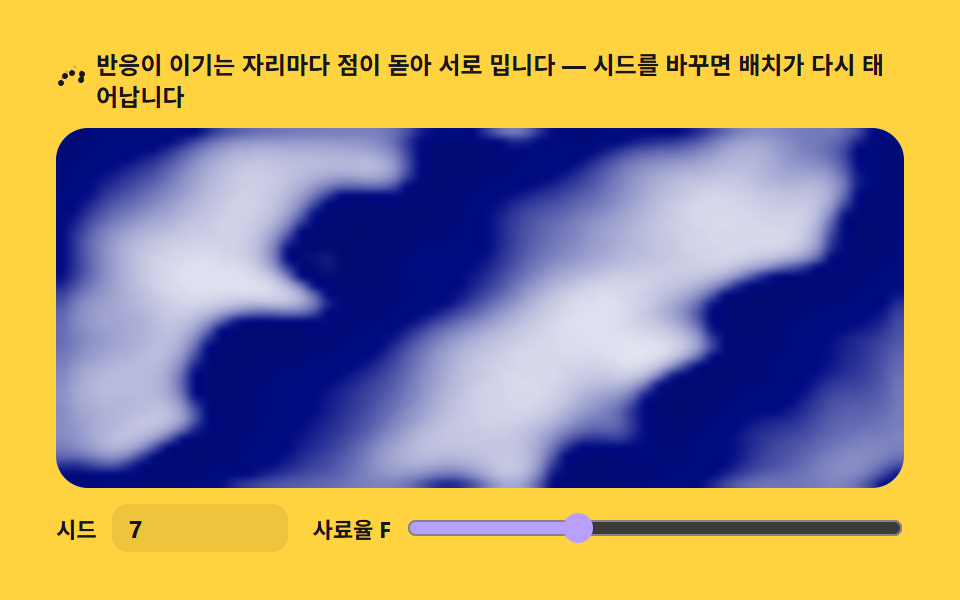 9 Reaction Diffusion Simulations, No LibraryA reaction diffusion simulation computes two chemicals on a grid until spots, stripes and mazes emerge on their own. The See all demos in this post
If you like this effect - similar demos
 Creative UI03 Torus ring — the donut distance and rim light9 Ray Marching Scenes in Canvas (No WebGL)
 Creative UI04 Fire spread — a consumption rule that burns neighboring fuel and shrinksFalling Sand Simulator, 9 Ways (No Library)
 Creative UI03 Needles and ferns — shift the humidity band and ferns turn to needlesSnowflake Generator, 9 Ways (DLA, No Library)