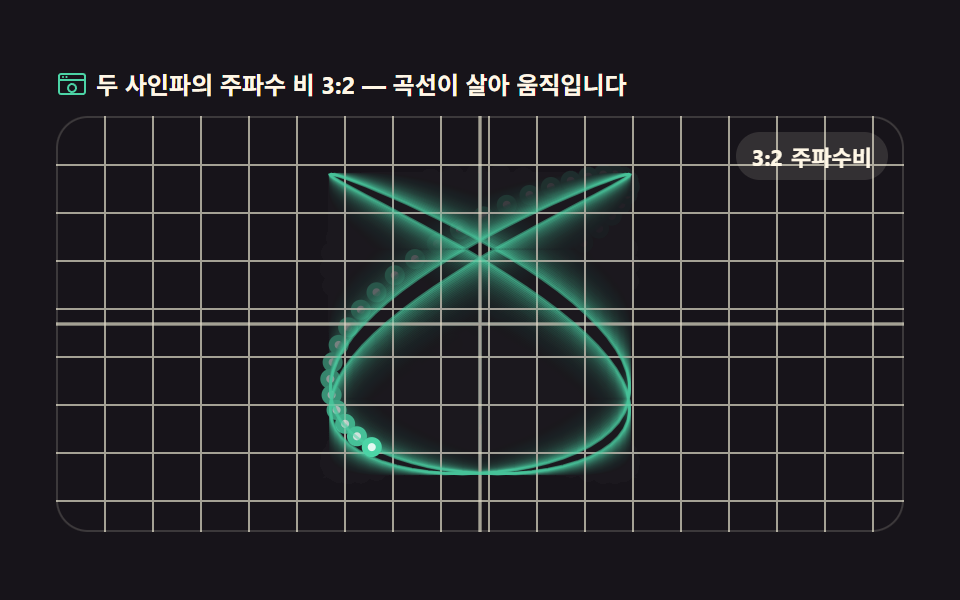
01Lissajous XY scope
Two sine waves drive the X and Y axes so the loop rotates by their phase difference. Each requestAnimationFrame tick computes the point with Math.sin and stamps it, while globalCompositeOperation fades the previous frame into an afterglow trail.
Best forOscilloscope demo screens, phase-difference teaching material
requestAnimationFrameMath.singlobalCompositeOperation

<main class="stage">
<div class="ls" id="ls">
  <p class="ls__hint">
    <svg class="ls__ico" viewBox="0 0 256 256" aria-hidden="true"><g fill="currentColor"><path d="M216 40H40a24 24 0 0 0-24 24v128a24 24 0 0 0 24 24h176a24 24 0 0 0 24-24V64a24 24 0 0 0-24-24ZM40 56h176a8 8 0 0 1 8 8v24H32V64a8 8 0 0 1 8-8Zm176 144H40a8 8 0 0 1-8-8V104h192v88a8 8 0 0 1-8 8Z"/><circle cx="56" cy="72" r="8"/><circle cx="84" cy="72" r="8"/><path d="M128 120a40 40 0 1 0 40 40a40 40 0 0 0-40-40Zm0 64a24 24 0 1 1 24-24a24 24 0 0 1-24 24Z"/></g></svg>
    <span>The two sines run at a 3:2 frequency ratio — the curve is alive</span>
  </p>
  <div class="ls__field" id="field" role="application" aria-label="Lissajous curve playground">
    <canvas class="ls__cv" id="cv"></canvas>
    <b class="ls__badge" aria-hidden="true"><span class="ls__badgeNum">3:2</span><span class="ls__badgeUnit">freq ratio</span></b>
  </div>
</div>
</main>
@use "../../../../site/static/demo-tokens" as *;
// 리사주 XY 오실로스코프 — 움직임은 전부 캔버스 rAF 루프 안에 있다. CSS 는 무대·판·배지만 맡는다.
// @keyframes 를 하나도 두지 않는다 — CSS 애니메이션이 0개라야 렌더러가 실시간으로 프레임을 찍어
// 캔버스가 실제로 도는 모습이 담긴다(도구/demo.py 렌더(), 077 선례).
$duration: $dur-loop;
$easing: $ease-spring;
$color: $subject-blue;
@include stage($stage-ink);
.ls {
--scope-bg: #{$stage-ink};
--trace: #{$subject-mint};
--grid: #{rgba($subject-cream, .14)};
--badge-bg: #{rgba($subject-cream, .12)};
--badge-fg: #{$subject-cream};
display: flex; flex-direction: column; gap: $sp-2;
width: 100%; max-width: 424px;
}
.ls__hint {
display: flex; align-items: center; gap: $sp-1; margin: 0;
font-weight: 700; font-size: clamp(10px, 2.8vw, 12px); line-height: 1.35;
color: $subject-cream;
}
.ls__ico { width: 16px; height: 16px; flex: 0 0 auto; color: $subject-mint; }
.ls__field {
position: relative; height: 208px;
border-radius: $r-card; overflow: hidden;
background: var(--scope-bg);
box-shadow: inset 0 0 0 1px rgba($subject-cream, .16);
}
.ls__cv { display: block; width: 100%; height: 100%; }
.ls__badge {
position: absolute; right: $sp-2; top: $sp-2;
display: flex; align-items: baseline; gap: $sp-1;
padding: $sp-1 $sp-2; border-radius: $r-pill;
background: var(--badge-bg);
color: var(--badge-fg); font-weight: 700; font-size: 11px;
}
@media (max-width: 340px) {
.ls__field { height: 124px; }
.ls__badge { font-size: 10px; padding: 0 $sp-1; }
}
@media (prefers-reduced-motion: reduce) {
.ls.is-still .ls__badge { opacity: .92 !important; }
}html, body {
margin: 0;
overflow: hidden;
}
.stage {
box-sizing: border-box;
min-height: 100vh;
display: grid;
place-items: center;
margin: 0;
background: #17141a;
font-family: -apple-system, "Segoe UI", "Noto Sans KR", sans-serif;
padding: clamp(8px, 4vw, 24px);
}
.ls {
--scope-bg: #17141a;
--trace: #4cd4a6;
--grid: rgba(255, 247, 230, 0.14);
--badge-bg: rgba(255, 247, 230, 0.12);
--badge-fg: #fff7e6;
display: flex;
flex-direction: column;
gap: 8px;
width: 100%;
max-width: 424px;
}
.ls__hint {
display: flex;
align-items: center;
gap: 4px;
margin: 0;
font-weight: 700;
font-size: clamp(10px, 2.8vw, 12px);
line-height: 1.35;
color: #fff7e6;
}
.ls__ico {
width: 16px;
height: 16px;
flex: 0 0 auto;
color: #4cd4a6;
}
.ls__field {
position: relative;
height: 208px;
border-radius: 16px;
overflow: hidden;
background: var(--scope-bg);
box-shadow: inset 0 0 0 1px rgba(255, 247, 230, 0.16);
}
.ls__cv {
display: block;
width: 100%;
height: 100%;
}
.ls__badge {
position: absolute;
right: 8px;
top: 8px;
display: flex;
align-items: baseline;
gap: 4px;
padding: 4px 8px;
border-radius: 999px;
background: var(--badge-bg);
color: var(--badge-fg);
font-weight: 700;
font-size: 11px;
}
@media (max-width: 340px) {
.ls__field {
height: 124px;
}
.ls__badge {
font-size: 10px;
padding: 0 4px;
}
}
@media (prefers-reduced-motion: reduce) {
.ls.is-still .ls__badge {
opacity: 0.92 !important;
}
}// 리사주 XY 오실로스코프 — X 축·Y 축에 각기 다른 주파수의 사인파를 걸면 펜이 그리는 자취가
// 리사주 곡선이 된다. 매 프레임 Math.sin 으로 좌표를 계산해 점을 찍고,
// globalCompositeOperation(destination-out) 으로 이전 프레임을 살짝 지워 잔상 트레일을 남긴다.
var root = document.getElementById('ls');
var field = document.getElementById('field');
var cv = document.getElementById('cv');
// willReadFrequently 를 안 쓰는 대신 매 프레임 전체를 다시 칠하는 방식(잔상은 destination-out)으로
// getImageData 왕복 없이 돈다 — 픽셀 계산은 02·04·07 번이 맡는다.
var ctx = cv.getContext('2d');
var css = getComputedStyle(root);
var TRACE = css.getPropertyValue('--trace').trim();
var GRID = css.getPropertyValue('--grid').trim();
var BGN = css.getPropertyValue('--scope-bg').trim();
var FX = 3, FY = 2; // X·Y 주파수 비 — 3:2 로 두면 곡선이 닫히는 데 2 초가 걸린다
var LOOP = 2; // 곡선 한 바퀴(초). 캡처 창(2초)과 같아 gif 가 이어진다
var TRAIL = 0.10; // 매 프레임 지우는 양(알파) — 작게 두면 잔상이 길게 늘어진다
var reduce = window.matchMedia('(prefers-reduced-motion: reduce)').matches;
var W = 0, H = 0, dpr = 1, raf = 0;
var phase = 0; // 슬라이더·자동 루프가 공유하는 위상(라디안)
function fit() {
var r = field.getBoundingClientRect();
dpr = window.devicePixelRatio || 1;
W = r.width; H = r.height;
cv.width = Math.round(W * dpr);
cv.height = Math.round(H * dpr);
ctx.setTransform(dpr, 0, 0, dpr, 0, 0);
}
// 눈금 — 오실로스코프 화면의 중앙 십자·가는 격자. 곡선이 어디를 지나는지의 기준이 된다
function grid() {
ctx.strokeStyle = GRID;
ctx.lineWidth = 1;
ctx.beginPath();
var step = 24;
for (var x = step; x < W; x += step) { ctx.moveTo(x + 0.5, 0); ctx.lineTo(x + 0.5, H); }
for (var y = step; y < H; y += step) { ctx.moveTo(0, y + 0.5); ctx.lineTo(W, y + 0.5); }
ctx.stroke();
ctx.strokeStyle = GRID;
ctx.lineWidth = 1.5;
ctx.beginPath();
ctx.moveTo(W * 0.5, 0); ctx.lineTo(W * 0.5, H);
ctx.moveTo(0, H * 0.5); ctx.lineTo(W, H * 0.5);
ctx.stroke();
}
// 리사주 점 하나 — X 는 sin(FX·θ), Y 는 sin(FY·θ+phase). 펜이 이 점을 계속 따라다닌다
function point(th) {
var a = Math.min(W, H) * 0.36;
return {
x: W * 0.5 + Math.sin(th * FX) * a,
y: H * 0.5 + Math.sin(th * FY + phase) * a
};
}
function drawTrail(sec) {
// 잔상 — destination-out 으로 살짝 지운 뒤 격자 위에 자취를 다시 그린다.
// 곡선 전체(θ 0→2π)를 얇게 깔고 펜 머리만 진하게 밝힌다
ctx.globalCompositeOperation = 'destination-out';
ctx.fillStyle = 'rgba(0,0,0,' + TRAIL + ')';
ctx.fillRect(0, 0, W, H);
ctx.globalCompositeOperation = 'source-over';
grid();
var N = 160; // 곡선 조각 수 — 부드러우면 충분하다
ctx.strokeStyle = TRACE;
ctx.lineWidth = 1.4;
ctx.globalAlpha = 0.5;
ctx.beginPath();
for (var i = 0; i <= N; i++) {
var p = point(i / N * Math.PI * 2);
if (i === 0) ctx.moveTo(p.x, p.y); else ctx.lineTo(p.x, p.y);
}
ctx.stroke();
ctx.globalAlpha = 1;
// 펜 머리 — 자초 위를 도는 밝은 점. sec 를 그대로 위상으로 쓴다(결정적)
var t = (sec % LOOP) / LOOP * Math.PI * 2;
var hp = point(t);
ctx.fillStyle = TRACE;
ctx.beginPath();
ctx.arc(hp.x, hp.y, 5, 0, Math.PI * 2);
ctx.fill();
ctx.fillStyle = 'rgba(255,255,255,0.85)';
ctx.beginPath();
ctx.arc(hp.x, hp.y, 2, 0, Math.PI * 2);
ctx.fill();
}
// 위상을 천천히 밀어 곡선 모양이 살아 움직이게 한다 — 같은 3:2 여도 위상이 바뀌면 기울어진다
function frame(now) {
var sec = now / 1000;
phase = sec / LOOP * Math.PI * 0.5;
drawTrail(sec);
raf = requestAnimationFrame(frame);
}
fit();
window.addEventListener('resize', function () { fit(); if (reduce) drawTrail(0.3); });
if (reduce) {
// reduce — 루프를 돌리지 않고 위상 0.3의 한 장만 그린다(빈 화면이 아니다)
root.classList.add('is-still');
phase = 0.3;
drawTrail(0.3);
} else {
raf = requestAnimationFrame(frame);
}// LissajousXyScope — vanilla 판(run/303/demo/01-wave-lissajous-xy-scope/index.html) 의 React 포트.
// X 축·Y 축에 각기 다른 주파수의 사인파를 걸어 펜이 그리는 리사주 곡선을
// 캔버스 rAF 루프(Math.sin + destination-out 잔상)로 그린다. CSS 애니메이션 0개.
import { useEffect, useRef } from "react";
import type { CSSProperties } from "react";
import styles from "./LissajousXyScope.module.scss";
export type LissajousXyScopeProps = {
duration?: number;
easing?: string;
accentColor?: string;
};
type Vars = CSSProperties & { "--duration"?: string; "--easing"?: string; "--color"?: string };
const TITLE = "리사주 XY 오실로스코프 데모";
const HINT = "두 사인파의 주파수 비 3:2 — 곡선이 살아 움직입니다";
const FIELD_LABEL = "리사주 곡선 실험판";
const BADGE_NUM = "3:2";
const BADGE_UNIT = "주파수비";
const FX = 3; // X·Y 주파수 비 — 3:2 로 두면 곡선이 닫히는 데 2 초가 걸린다
const LOOP = 2; // 곡선 한 바퀴(초)
const TRAIL = 0.10; // 매 프레임 지우는 양(알파) — 작게 두면 잔상이 길게 늘어진다
export default function LissajousXyScope({
duration = 2000,
easing = "cubic-bezier(.2, .8, .2, 1)",
accentColor = "#4cd4a6",
}: LissajousXyScopeProps) {
const rootRef = useRef<HTMLDivElement>(null);
const fieldRef = useRef<HTMLDivElement>(null);
const cvRef = useRef<HTMLCanvasElement>(null);
const vars: Vars = { "--duration": `${duration}ms`, "--easing": easing, "--color": accentColor };
useEffect(() => {
const root0 = rootRef.current;
const field0 = fieldRef.current;
const cv0 = cvRef.current;
if (!root0 || !field0 || !cv0) return;
// willReadFrequently 를 안 쓰는 대신 매 프레임 전체를 다시 칠하는 방식(잔상은 destination-out)으로
// getImageData 왕복 없이 돈다.
const ctx0 = cv0.getContext("2d");
if (!ctx0) return;
// 중첩 함수(클로저) 안에서는 가드로 좁힌 널 타입이 전달되지 않는다 — 확인된 값으로 다시 상수를 묶는다
const root: HTMLDivElement = root0;
const field: HTMLDivElement = field0;
const cv: HTMLCanvasElement = cv0;
const ctx: CanvasRenderingContext2D = ctx0;
const css = getComputedStyle(root);
const TRACE = css.getPropertyValue("--trace").trim();
const GRID = css.getPropertyValue("--grid").trim();
const reduce = window.matchMedia("(prefers-reduced-motion: reduce)").matches;
let W = 0, H = 0, dpr = 1, raf = 0;
let phase = 0; // 자동 루프가 밀어가는 위상(라디안)
function fit() {
const r = field.getBoundingClientRect();
dpr = window.devicePixelRatio || 1;
W = r.width; H = r.height;
cv.width = Math.round(W * dpr);
cv.height = Math.round(H * dpr);
ctx.setTransform(dpr, 0, 0, dpr, 0, 0);
}
// 눈금 — 오실로스코프 화면의 중앙 십자·가는 격자. 곡선이 어디를 지나는지의 기준이 된다
function grid() {
ctx.strokeStyle = GRID;
ctx.lineWidth = 1;
ctx.beginPath();
const step = 24;
for (let x = step; x < W; x += step) { ctx.moveTo(x + 0.5, 0); ctx.lineTo(x + 0.5, H); }
for (let y = step; y < H; y += step) { ctx.moveTo(0, y + 0.5); ctx.lineTo(W, y + 0.5); }
ctx.stroke();
ctx.strokeStyle = GRID;
ctx.lineWidth = 1.5;
ctx.beginPath();
ctx.moveTo(W * 0.5, 0); ctx.lineTo(W * 0.5, H);
ctx.moveTo(0, H * 0.5); ctx.lineTo(W, H * 0.5);
ctx.stroke();
}
// 리사주 점 하나 — X 는 sin(FX·θ), Y 는 sin(FY·θ+phase). 펜이 이 점을 계속 따라다닌다
function point(th: number) {
const a = Math.min(W, H) * 0.36;
return {
x: W * 0.5 + Math.sin(th * FX) * a,
y: H * 0.5 + Math.sin(th * 2 + phase) * a,
};
}
function drawTrail(sec: number) {
// 잔상 — destination-out 으로 살짝 지운 뒤 격자 위에 자취를 다시 그린다.
// 곡선 전체(θ 0→2π)를 얇게 깔고 펜 머리만 진하게 밝힌다
ctx.globalCompositeOperation = "destination-out";
ctx.fillStyle = "rgba(0,0,0," + TRAIL + ")";
ctx.fillRect(0, 0, W, H);
ctx.globalCompositeOperation = "source-over";
grid();
const N = 160; // 곡선 조각 수 — 부드러우면 충분하다
ctx.strokeStyle = TRACE;
ctx.lineWidth = 1.4;
ctx.globalAlpha = 0.5;
ctx.beginPath();
for (let i = 0; i <= N; i++) {
const p = point((i / N) * Math.PI * 2);
if (i === 0) ctx.moveTo(p.x, p.y); else ctx.lineTo(p.x, p.y);
}
ctx.stroke();
ctx.globalAlpha = 1;
// 펜 머리 — 자취 위를 도는 밝은 점. sec 를 그대로 위상으로 쓴다(결정적)
const t = ((sec % LOOP) / LOOP) * Math.PI * 2;
const hp = point(t);
ctx.fillStyle = TRACE;
ctx.beginPath();
ctx.arc(hp.x, hp.y, 5, 0, Math.PI * 2);
ctx.fill();
ctx.fillStyle = "rgba(255,255,255,0.85)";
ctx.beginPath();
ctx.arc(hp.x, hp.y, 2, 0, Math.PI * 2);
ctx.fill();
}
// 위상을 천천히 밀어 곡선 모양이 살아 움직이게 한다 — 같은 3:2 여도 위상이 바뀌면 기울어진다
function frame(now: number) {
const sec = now / 1000;
phase = (sec / LOOP) * Math.PI * 0.5;
drawTrail(sec);
raf = requestAnimationFrame(frame);
}
function onResize() {
fit();
if (reduce) drawTrail(0.3);
}
fit();
window.addEventListener("resize", onResize);
if (reduce) {
// reduce — 루프를 돌리지 않고 위상 0.3의 한 장만 그린다(빈 화면이 아니다)
root.classList.add("is-still");
phase = 0.3;
drawTrail(0.3);
} else {
raf = requestAnimationFrame(frame);
}
return () => {
cancelAnimationFrame(raf);
window.removeEventListener("resize", onResize);
};
}, []);
return (
<main className={styles.stage}>
<div className={styles.ls} style={vars} ref={rootRef}>
<p className={styles["ls__hint"]}>
<svg className={styles["ls__ico"]} viewBox="0 0 256 256" aria-hidden="true" focusable="false">
<g fill="currentColor">
<path d="M216 40H40a24 24 0 0 0-24 24v128a24 24 0 0 0 24 24h176a24 24 0 0 0 24-24V64a24 24 0 0 0-24-24ZM40 56h176a8 8 0 0 1 8 8v24H32V64a8 8 0 0 1 8-8Zm176 144H40a8 8 0 0 1-8-8V104h192v88a8 8 0 0 1-8 8Z" />
<circle cx="56" cy="72" r="8" />
<circle cx="84" cy="72" r="8" />
<path d="M128 120a40 40 0 1 0 40 40a40 40 0 0 0-40-40Zm0 64a24 24 0 1 1 24-24a24 24 0 0 1-24 24Z" />
</g>
</svg>
<span>{HINT}</span>
</p>
<div className={styles["ls__field"]} role="application" aria-label={FIELD_LABEL} ref={fieldRef}>
<canvas className={styles["ls__cv"]} ref={cvRef} aria-label={TITLE} />
<b className={styles["ls__badge"]} aria-hidden="true">
<span className={styles["ls__badgeNum"]}>{BADGE_NUM}</span>
<span className={styles["ls__badgeUnit"]}>{BADGE_UNIT}</span>
</b>
</div>
</div>
</main>
);
}01 Lissajous XY scope — Measured area 16.829% · moving frames 23/23Original by GODRICH · SCSS and React ship in the zip · Wave Interference Simulation: 9 Canvas Scenes
The post this demo lives in
 Wave Interference Simulation: 9 Canvas ScenesA wave interference simulation shows what happens on screen when two or more waves combine, and this set builds nine of See all demos in this post