02Walking a Spiral to Find Empty Space
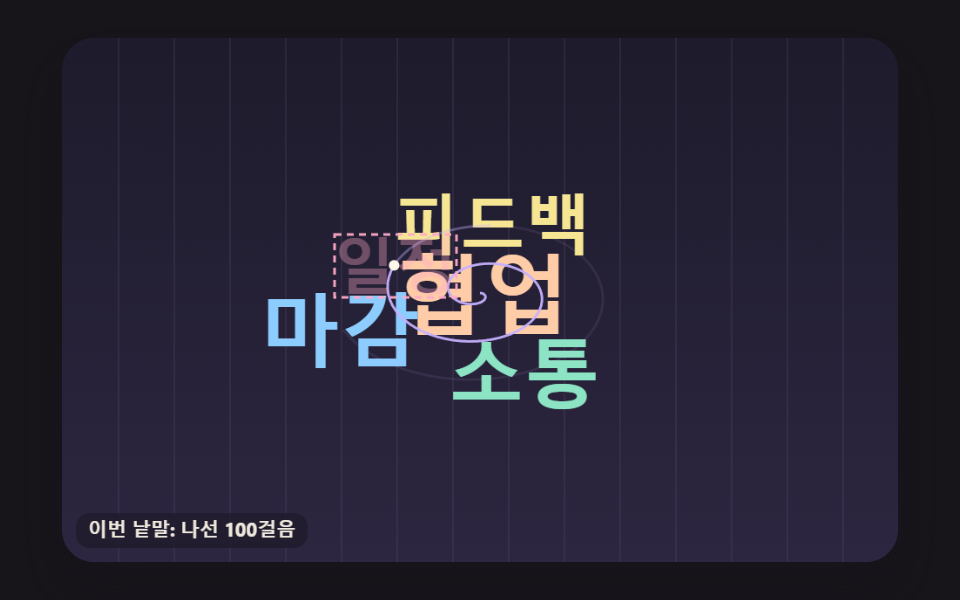
From the center, a spiral whose radius grows at a steady rate is stepped point by point until a spot is found where the word overlaps nothing already painted into the bit grid, leaving a faint trail of the path it walked.
Best forBlog tag overview page
SPIRAL_STEPSPIRAL_TURNBOARD_INTS
<main class="stage">
<div class="wc is-demo" id="wc">
  <canvas class="wc__canvas" data-role="canvas" width="480" height="300" role="img" aria-label="A word cloud that places words one at a time by walking a spiral out from the center to find free space."></canvas>
  <ol class="wc__list" data-role="list" aria-label="Words ranked by frequency"></ol>
</div>
</main>
@use "../../../../site/static/demo-tokens" as *;
@include stage($stage-ink);
.wc {
position: relative;
width: min(92vw, calc(160vh - 12.8vw));
aspect-ratio: 480 / 300;
margin: 0 auto;
border-radius: $r-card;
overflow: hidden;
box-shadow: $shadow-raised;
background: $subject-ink;
}
.wc__canvas {
position: absolute;
inset: 0;
display: block;
width: 100%;
height: 100%;
}
// 화면에서는 숨기고 화면 낭독기는 읽는 빈도 순 목록·알림 줄 — display: none 이 아니라 1px 상자로 줄여 접근성 트리에 남긴다
.wc__list,
.wc__live {
position: absolute;
width: 1px;
height: 1px;
padding: 0;
overflow: hidden;
clip-path: inset(50%);
white-space: nowrap;
border: 0;
}
.wc__vote {
position: absolute;
right: $sp-3;
bottom: $sp-3;
padding: $sp-1 $sp-3;
border: 0;
border-radius: $r-pill;
background: $subject-cream;
color: $subject-ink;
font-family: inherit;
font-weight: 700;
font-size: 12px;
line-height: 1.6;
cursor: pointer;
box-shadow: $shadow-press;
transition: transform $dur-quick $ease-spring;
}
.wc__vote:hover {
transform: translateY(-2px);
}
.wc__vote:active {
transform: translateY(1px);
}
.wc__vote:focus-visible {
outline: 2px solid $subject-cream;
outline-offset: 2px;
}
@media (max-width: 340px) {
.wc__vote { font-size: 11px; padding: $sp-1 $sp-2; }
}
// 동작 줄이기 — 장면은 스크립트가 마지막 배치 한 장면으로 멈춘다. 버튼도 떠오르지 않게
@media (prefers-reduced-motion: reduce) {
.wc__vote { transition: none !important; }
.wc__vote:hover,
.wc__vote:active { transform: none !important; }
}html, body {
margin: 0;
overflow: hidden;
}
.stage {
box-sizing: border-box;
min-height: 100vh;
display: grid;
place-items: center;
margin: 0;
background: #17141a;
font-family: -apple-system, "Segoe UI", "Noto Sans KR", sans-serif;
padding: clamp(8px, 4vw, 24px);
}
.wc {
position: relative;
width: min(92vw, 160vh - 12.8vw);
aspect-ratio: 480/300;
margin: 0 auto;
border-radius: 16px;
overflow: hidden;
box-shadow: 0 14px 24px rgba(23, 20, 26, 0.32);
background: #17141a;
}
.wc__canvas {
position: absolute;
inset: 0;
display: block;
width: 100%;
height: 100%;
}
.wc__list,
.wc__live {
position: absolute;
width: 1px;
height: 1px;
padding: 0;
overflow: hidden;
clip-path: inset(50%);
white-space: nowrap;
border: 0;
}
.wc__vote {
position: absolute;
right: 12px;
bottom: 12px;
padding: 4px 12px;
border: 0;
border-radius: 999px;
background: #fff7e6;
color: #17141a;
font-family: inherit;
font-weight: 700;
font-size: 12px;
line-height: 1.6;
cursor: pointer;
box-shadow: 0 6px 12px rgba(23, 20, 26, 0.32);
transition: transform 220ms cubic-bezier(0.2, 0.8, 0.2, 1);
}
.wc__vote:hover {
transform: translateY(-2px);
}
.wc__vote:active {
transform: translateY(1px);
}
.wc__vote:focus-visible {
outline: 2px solid #fff7e6;
outline-offset: 2px;
}
@media (max-width: 340px) {
.wc__vote {
font-size: 11px;
padding: 4px 8px;
}
}
@media (prefers-reduced-motion: reduce) {
.wc__vote {
transition: none !important;
}
.wc__vote:hover,
.wc__vote:active {
transform: none !important;
}
}(function () {
const root = document.getElementById("wc");
if (!root) return;
const W = 480;
const H = 300;
const FIXED_DT = 16;
const TAU = Math.PI * 2;
// 파스텔 팔레트 — 어두운 판 위에 밝은 파스텔 글자를 얹어 명도 차로 글자가 읽힌다
const BG = [30, 27, 44];
const BG_LOW = [44, 38, 64];
const GUIDE = [104, 96, 140];
const CREAM = [255, 248, 234];
const PEACH = [255, 204, 168];
const MINT = [140, 228, 196];
const SKY = [140, 204, 255];
const LEMON = [246, 230, 148];
const LILAC = [198, 176, 255];
const PINK = [255, 170, 198];
const WORD_COLORS = [PEACH, MINT, SKY, LEMON, LILAC, PINK];
// 글꼴 — 기기에 이미 있는 시스템 글꼴 목록만. 바깥에서 글꼴 파일을 불러오지 않는다
const FONT_FAMILY = '"Segoe UI", "Malgun Gothic", "Hiragino Sans", "Noto Sans KR", sans-serif';
const FONT_WEIGHT = 700;
// 크기 = SIZE_MAX × (횟수 / 1위 횟수)^SIZE_EXPONENT. 0.5(제곱근)면 글자 넓이(크기의 제곱)가 횟수에 비례한다
const SIZE_EXPONENT = 0.5;
const SIZE_MAX = 50;
const SIZE_MIN = 10;
function sizeFor(count, top) {
return Math.max(SIZE_MIN, SIZE_MAX * Math.pow(count / top, SIZE_EXPONENT));
}
// meetings·설문에서 흔히 나오는 낱말과 횟수 — 많이 나온 순. theme 은 0 Pace · 1 Together · 2 How we work · 3 Growing
const VOCAB = [
{ text: 'collaboration', count: 24, theme: 1 },
{ text: 'communication', count: 19, theme: 1 },
{ text: 'deadline', count: 16, theme: 0 },
{ text: 'feedback', count: 14, theme: 2 },
{ text: 'schedule', count: 12, theme: 0 },
{ text: 'growth', count: 11, theme: 3 },
{ text: 'sharing', count: 10, theme: 2 },
{ text: 'trust', count: 9, theme: 1 },
{ text: 'meetings', count: 8, theme: 0 },
{ text: 'priorities', count: 8, theme: 0 },
{ text: 'rest', count: 7, theme: 3 },
{ text: 'goals', count: 7, theme: 0 },
{ text: 'kindness', count: 6, theme: 1 },
{ text: 'docs', count: 6, theme: 2 },
{ text: 'praise', count: 6, theme: 1 },
{ text: 'focus', count: 5, theme: 0 },
{ text: 'automation', count: 5, theme: 2 },
{ text: 'learning', count: 5, theme: 3 },
{ text: 'reviews', count: 4, theme: 2 },
{ text: 'cheering', count: 4, theme: 1 },
{ text: 'challenge', count: 4, theme: 3 },
{ text: 'planning', count: 4, theme: 0 },
{ text: 'questions', count: 3, theme: 2 },
{ text: 'balance', count: 3, theme: 3 },
{ text: 'thanks', count: 3, theme: 1 },
{ text: 'speed', count: 3, theme: 0 },
{ text: 'data', count: 3, theme: 2 },
{ text: 'leeway', count: 3, theme: 3 },
{ text: 'retros', count: 2, theme: 0 },
{ text: 'support', count: 2, theme: 1 },
{ text: 'experiments', count: 2, theme: 2 },
{ text: 'habits', count: 2, theme: 3 },
{ text: 'quality', count: 2, theme: 2 },
{ text: 'mood', count: 2, theme: 1 },
{ text: 'change', count: 2, theme: 3 },
{ text: 'launch', count: 2, theme: 0 },
{ text: 'cleanup', count: 1, theme: 2 },
{ text: 'roles', count: 1, theme: 1 },
{ text: 'fun', count: 1, theme: 1 },
{ text: 'notes', count: 1, theme: 0 },
{ text: 'efficiency', count: 1, theme: 0 },
{ text: 'onboarding', count: 1, theme: 2 },
{ text: 'connection', count: 1, theme: 1 },
{ text: 'ideas', count: 1, theme: 3 },
{ text: 'stability', count: 1, theme: 3 },
{ text: 'transparency', count: 1, theme: 2 },
{ text: 'customers', count: 1, theme: 2 },
{ text: 'practice', count: 1, theme: 3 }
];
// 횟수 문구 — 1 은 따로 둔다(영어판의 단수형 자리)
const COUNT_LABEL = '{n} mentions';
const COUNT_ONE = '1 mention';
const TOP_LABEL = 'Most frequent:';
// 캔버스 요약에서 1~3위 앞에 붙는 말 — 09 투표판은 자기 말로 바꾼다
let rankHeading = TOP_LABEL;
function countText(n) { return n === 1 ? COUNT_ONE : COUNT_LABEL.replace('{n}', String(n)); }
function clamp(v, lo, hi) { return v < lo ? lo : (v > hi ? hi : v); }
function lerp(a, b, k) { return a + (b - a) * k; }
function smooth(x) { const c = clamp(x, 0, 1); return c * c * (3 - 2 * c); }
function rgba(c, a) {
return 'rgba(' + Math.round(clamp(c[0], 0, 255)) + ',' + Math.round(clamp(c[1], 0, 255)) + ',' + Math.round(clamp(c[2], 0, 255)) + ',' + clamp(a, 0, 1).toFixed(3) + ')';
}
function mixRGB(a, b, k) { return [lerp(a[0], b[0], k), lerp(a[1], b[1], k), lerp(a[2], b[2], k)]; }
// 시드 고정 난수 — 같은 시드면 같은 배치·일정표가 다시 나온다 (32비트 정수 섞기)
function makeRng(seed) {
let s = seed >>> 0;
return function () {
s = (s + 0x6d2b79f5) >>> 0;
let t = s;
t = Math.imul(t ^ (t >>> 15), t | 1);
t ^= t + Math.imul(t ^ (t >>> 7), t | 61);
return ((t ^ (t >>> 14)) >>> 0) / 4294967296;
};
}
// 튀어나오기 — 감쇠 진동 1 − e^(−POP_DAMP·t)·cos(POP_FREQ·t), t 는 초. goals 크기를 한 번 넘겼다가 자리 잡는다
const POP_DAMP = 7;
const POP_FREQ = 11;
function popScale(t) {
if (t <= 0) {
return 0;
}
return 1 - Math.exp(-POP_DAMP * t) * Math.cos(POP_FREQ * t);
}
const canvasEl = root.querySelector('[data-role="canvas"]');
const listEl = root.querySelector('[data-role="list"]');
const ctxRaw = canvasEl ? canvasEl.getContext('2d') : null;
if (!canvasEl || !ctxRaw || !listEl) {
return;
}
const cv = canvasEl;
const ctx = ctxRaw;
const list = listEl;
// 캔버스 요약 — HTML 에 적힌 장면 설명 뒤에 지금 1~3위를 덧붙인다
const baseAria = cv.getAttribute('aria-label') || '';
const reduceQuery = window.matchMedia('(prefers-reduced-motion: reduce)');
// 페이지를 연 채 동작 줄이기 설정을 바꿔도 change 리스너가 이 값을 다시 읽는다
let still = reduceQuery.matches;
// 자동 시연 중인가 — 사람이 처음 손대면 시연 표시를 뗀다
let demo = root.classList.contains('is-demo');
// 리스너는 한 묶음으로 달고 정리할 때 한 번에 뗀다
const off = new AbortController();
// 포인터 자리(판 좌표) — 판 밖이면 -1
let hoverX = -1;
let hoverY = -1;
function fitCanvas() {
// 배율은 2 에서 자른다 — 배율 3 기기에서 화소가 2.25배로 늘어 프레임마다 일이 그만큼 커지지 않게
const dpr = Math.min(window.devicePixelRatio || 1, 2);
cv.width = Math.round(W * dpr);
cv.height = Math.round(H * dpr);
ctx.setTransform(dpr, 0, 0, dpr, 0, 0);
}
function clearStage() {
const g = ctx.createLinearGradient(0, 0, 0, H);
g.addColorStop(0, rgba(BG, 1));
g.addColorStop(1, rgba(BG_LOW, 1));
ctx.fillStyle = g;
ctx.fillRect(0, 0, W, H);
}
function fontOf(size) { return FONT_WEIGHT + ' ' + size.toFixed(1) + 'px ' + FONT_FAMILY; }
function roundRectPath(x, y, w, h, r) {
ctx.beginPath();
ctx.moveTo(x + r, y);
ctx.arcTo(x + w, y, x + w, y + h, r);
ctx.arcTo(x + w, y + h, x, y + h, r);
ctx.arcTo(x, y + h, x, y, r);
ctx.arcTo(x, y, x + w, y, r);
ctx.closePath();
}
// 놓인 낱말 그리기 — 상자 가운데를 중심으로 scale 배·angle 라디안 돌리고 lift 만큼 띄운다. 비트 칸을 만든 자리와 같은 기준선에 찍는다
function drawPlaced(p, alpha, scale, angle, lift, color) {
if (alpha <= 0.002 || scale <= 0.001) {
return;
}
const cx = p.x + p.w / 2;
const cy = p.y + p.h / 2;
ctx.save();
ctx.translate(cx, cy - lift);
if (angle !== 0) {
ctx.rotate(angle);
}
if (scale !== 1) {
ctx.scale(scale, scale);
}
ctx.font = fontOf(p.size);
ctx.textAlign = 'left';
ctx.textBaseline = 'alphabetic';
ctx.fillStyle = rgba(color, alpha);
ctx.fillText(p.text, p.x + p.dx - cx, p.y + p.dy - cy);
ctx.restore();
}
function hitPlaced(p) {
return hoverX >= p.x && hoverX <= p.x + p.w && hoverY >= p.y && hoverY <= p.y + p.h;
}
// 포인터 아래 낱말 — 뒤에 그린 것이 위에 있으니 뒤에서부터 찾는다. shown(i) 가 거짓인 낱말은 건너뛴다
function pickPlaced(ps, shown) {
if (hoverX < 0) {
return -1;
}
for (let i = ps.length - 1; i >= 0; i -= 1) {
if (shown(i) && hitPlaced(ps[i])) {
return i;
}
}
return -1;
}
function drawHalo(x, y, w, h) {
ctx.lineWidth = 1.5;
ctx.strokeStyle = rgba(CREAM, 0.9);
roundRectPath(x - 3, y - 2, w + 6, h + 4, 6);
ctx.stroke();
}
// 말풍선 — 낱말과 횟수를 크림 바탕에 진한 글자로
function drawTip(label, ax, ay) {
ctx.font = fontOf(11);
const bw = ctx.measureText(label).width + 16;
const bh = 22;
const bx = clamp(ax - bw / 2, 4, W - bw - 4);
const by = ay - bh - 8 < 4 ? ay + 10 : ay - bh - 8;
ctx.fillStyle = rgba(CREAM, 0.96);
roundRectPath(bx, by, bw, bh, 8);
ctx.fill();
ctx.fillStyle = rgba(BG, 1);
ctx.textAlign = 'center';
ctx.textBaseline = 'middle';
ctx.fillText(label, bx + bw / 2, by + bh / 2 + 0.5);
}
// 판 위 설명 글 — 어두운 알약 바탕에 작은 크림 글자. 돌려주는 값은 차지한 상자 [x, y, w, h]
function drawCaption(text, x, y, alignRight) {
ctx.font = fontOf(11);
const bw = ctx.measureText(text).width + 14;
const bh = 20;
const bx = alignRight ? x - bw : x;
ctx.fillStyle = rgba(BG, 0.82);
roundRectPath(bx, y, bw, bh, 8);
ctx.fill();
ctx.fillStyle = rgba(CREAM, 0.92);
ctx.textAlign = 'left';
ctx.textBaseline = 'middle';
ctx.fillText(text, bx + 7, y + bh / 2 + 0.5);
return [bx, y, bw, bh];
}
const SPRITE_PAD = 2;
const INK_ALPHA = 40;
// 판 비트 칸 — 한 줄에 BOARD_INTS 개 정수(480px = 정수 15개 + 밀려난 끝을 받을 leeway 2개)
const BOARD_INTS = (W >> 5) + 2;
const scratch = document.createElement('canvas');
const scratchRaw = scratch.getContext('2d', { willReadFrequently: true });
if (!scratchRaw) {
return;
}
const sctx = scratchRaw;
// 비트 AND 로 겹침을 잰 횟수 — 판 밖이라 바로 거른 자리는 세지 않는다
let bitTests = 0;
function makeSprite(text, size) {
sctx.font = fontOf(size);
const m = sctx.measureText(text);
const left = Math.ceil(m.actualBoundingBoxLeft);
const right = Math.ceil(m.actualBoundingBoxRight);
const asc = Math.ceil(m.actualBoundingBoxAscent);
const desc = Math.ceil(m.actualBoundingBoxDescent);
const w = Math.max(1, left + right) + SPRITE_PAD * 2;
const h = Math.max(1, asc + desc) + SPRITE_PAD * 2;
// 크기를 바꾸면 그리기 설정이 초기화되므로 글꼴은 그 뒤에 다시 준다
if (scratch.width < w) {
scratch.width = w;
}
if (scratch.height < h) {
scratch.height = h;
}
sctx.clearRect(0, 0, w, h);
sctx.font = fontOf(size);
sctx.textAlign = 'left';
sctx.textBaseline = 'alphabetic';
sctx.fillStyle = '#000';
const dx = SPRITE_PAD + left;
const dy = SPRITE_PAD + asc;
sctx.fillText(text, dx, dy);
const px = sctx.getImageData(0, 0, w, h).data;
const mw = (w >> 5) + 1;
const bits = new Uint32Array(mw * h);
for (let y = 0; y < h; y += 1) {
for (let x = 0; x < w; x += 1) {
if (px[(y * w + x) * 4 + 3] <= INK_ALPHA) {
continue;
}
// 한 픽셀 둘레(3×3)까지 칠해 두 글자 사이에 1px 틈이 남게 한다
for (let yy = Math.max(0, y - 1); yy <= Math.min(h - 1, y + 1); yy += 1) {
for (let xx = Math.max(0, x - 1); xx <= Math.min(w - 1, x + 1); xx += 1) {
bits[yy * mw + (xx >> 5)] |= (0x80000000 >>> (xx & 31));
}
}
}
}
return { w: w, h: h, mw: mw, bits: bits, dx: dx, dy: dy };
}
function makeBoard() { return new Uint32Array(BOARD_INTS * H); }
// 겹침 검사 — 글자 줄마다 정수를 판의 x 자리만큼 밀어(>>> s) 판 정수와 AND. 0 이 아니면 이미 칠해진 픽셀과 겹친다
function collides(board, sp, ox, oy) {
// 판 밖으로 한 픽셀이라도 나가면 겹친 것으로 친다 — 판 끝 긴 단어가 잘린 채 놓이지 않게
if (ox < 0 || oy < 0 || ox + sp.w > W || oy + sp.h > H) {
return true;
}
bitTests += 1;
const s = ox & 31;
const base = ox >> 5;
const inv = 32 - s;
for (let r = 0; r < sp.h; r += 1) {
const row = (oy + r) * BOARD_INTS + base;
const sr = r * sp.mw;
let carry = 0;
for (let k = 0; k < sp.mw; k += 1) {
const v = sp.bits[sr + k];
const part = s === 0 ? v : ((v >>> s) | carry);
if ((board[row + k] & part) !== 0) {
return true;
}
carry = s === 0 ? 0 : (v << inv);
}
if (carry !== 0 && (board[row + sp.mw] & carry) !== 0) {
return true;
}
}
return false;
}
// 찍기 — 겹침 검사와 같은 밀기로 글자 비트를 판에 OR 한다
function stamp(board, sp, ox, oy) {
const s = ox & 31;
const base = ox >> 5;
const inv = 32 - s;
for (let r = 0; r < sp.h; r += 1) {
const row = (oy + r) * BOARD_INTS + base;
const sr = r * sp.mw;
let carry = 0;
for (let k = 0; k < sp.mw; k += 1) {
const v = sp.bits[sr + k];
board[row + k] |= s === 0 ? v : ((v >>> s) | carry);
carry = s === 0 ? 0 : (v << inv);
}
if (carry !== 0) {
board[row + sp.mw] |= carry;
}
}
}
// 픽셀 하나 칠하기 — 설명 글 자리·모양 바깥처럼 낱말이 들어가면 안 되는 곳을 미리 막는다
function blockPixel(board, x, y) {
board[y * BOARD_INTS + (x >> 5)] |= (0x80000000 >>> (x & 31));
}
function blockRect(board, x, y, w, h) {
const x0 = Math.max(0, Math.floor(x));
const y0 = Math.max(0, Math.floor(y));
const x1 = Math.min(W, Math.ceil(x + w));
const y1 = Math.min(H, Math.ceil(y + h));
for (let yy = y0; yy < y1; yy += 1) {
for (let xx = x0; xx < x1; xx += 1) {
blockPixel(board, xx, yy);
}
}
}
// 칠해진 픽셀 수 — 판이 얼마나 찼는지(변형 비교용)
function inkCount(board) {
let n = 0;
for (let i = 0; i < board.length; i += 1) {
let v = board[i];
while (v !== 0) {
v &= v - 1;
n += 1;
}
}
return n;
}
// 반지름이 일정하게 늘어나는 나선 — 걸음 i 에서 각 = i × SPIRAL_TURN(라디안), 반지름 = i × SPIRAL_STEP(px).
// 한 바퀴(2π / SPIRAL_TURN 걸음)마다 반지름이 같은 폭만큼 커진다. 가로는 SPIRAL_ASPECT 배로 늘려 넓은 판을 고르게 훑는다
const SPIRAL_STEP = 0.35;
const SPIRAL_TURN = 0.1;
const SPIRAL_ASPECT = 1.6;
// 나선을 끝낼 걸음 — 반지름이 판 대각선 절반에 닿으면 그만 찾는다
const SPIRAL_LIMIT = Math.ceil(Math.hypot(W, H) / 2 / SPIRAL_STEP);
// 지금까지 나선에서 내디딘 걸음 수 — 자리 하나 찾는 데 든 일
let spiralSteps = 0;
function spiralAt(i) {
const a = i * SPIRAL_TURN;
const r = i * SPIRAL_STEP;
return [Math.cos(a) * r * SPIRAL_ASPECT, Math.sin(a) * r];
}
// 나선 탐색 — 기준점 (cx, cy) 에서 나선을 한 걸음씩 옮기며, 글자 상자 가운데를 그 점에 두고 비트 칸이 안 겹치는 첫 자리를 돌려준다.
// trail 을 주면 지나온 나선 점을 모두 적는다(02 가 그 자취를 그린다)
function searchSpiral(board, sp, cx, cy, trail) {
for (let i = 0; i < SPIRAL_LIMIT; i += 1) {
spiralSteps += 1;
const p = spiralAt(i);
const ox = Math.round(cx + p[0] - sp.w / 2);
const oy = Math.round(cy + p[1] - sp.h / 2);
if (trail) {
trail.push([cx + p[0], cy + p[1]]);
}
if (!collides(board, sp, ox, oy)) {
return [ox, oy];
}
}
return null;
}
// 판 끝 긴 단어 — 나선을 끝까지 돌아도 자리가 없으면 SHRINK_RATIO 배로 한 단계 작게 다시 놓는다. SIZE_FLOOR 보다 작아지면 버린다
const SHRINK_RATIO = 0.85;
const SIZE_FLOOR = 8;
let shrinkCount = 0;
let dropCount = 0;
function placeEntry(board, e, size, cx, cy, color, trail) {
let s = size;
let shrinks = 0;
while (s >= SIZE_FLOOR) {
const sp = makeSprite(e.text, s);
if (trail) {
trail.length = 0;
}
const at = searchSpiral(board, sp, cx, cy, trail);
if (at) {
stamp(board, sp, at[0], at[1]);
return { text: e.text, count: e.count, theme: e.theme, size: s, x: at[0], y: at[1], w: sp.w, h: sp.h, dx: sp.dx, dy: sp.dy, color: color, shrinks: shrinks };
}
s *= SHRINK_RATIO;
shrinks += 1;
shrinkCount += 1;
}
dropCount += 1;
return null;
}
// 나선에 올릴 낱말 수 — 많이 나온 순으로 앞에서부터
const WORD_COUNT = 36;
const CENTER_Y = 146;
// 자취 재생 — 한 낱말의 나선 자취를 걸음 수 × TRAIL_MS_PER_STEP(TRAIL_MIN_MS~TRAIL_MAX_MS) 동안 따라간 뒤, 자리를 찾으면 낱말이 튀어나온다
const START_MS = 200;
const TRAIL_MS_PER_STEP = 0.9;
const TRAIL_MIN_MS = 90;
const TRAIL_MAX_MS = 420;
const LAND_GAP_MS = 50;
const TRAIL_FADE_MS = 350;
const HOLD_MS = 1200;
const FADE_MS = 400;
const STEPS_LABEL = 'This word: {s} spiral steps';
let walks = [];
let loopMs = 6000;
let t = 0;
function build() {
const top = VOCAB[0].count;
const board = makeBoard();
// 아래 왼쪽 걸음 수 글 자리를 막는다
blockRect(board, 4, H - 32, 200, 28);
walks = [];
spiralSteps = 0;
bitTests = 0;
let at = START_MS;
for (let i = 0; i < Math.min(WORD_COUNT, VOCAB.length); i += 1) {
const e = VOCAB[i];
const trail = [];
const p = placeEntry(board, e, sizeFor(e.count, top), W / 2, CENTER_Y, WORD_COLORS[i % WORD_COLORS.length], trail);
if (!p) {
continue;
}
const dur = clamp(trail.length * TRAIL_MS_PER_STEP, TRAIL_MIN_MS, TRAIL_MAX_MS);
walks.push({ p: p, trail: trail.slice(), start: at, dur: dur });
at += dur + LAND_GAP_MS;
}
loopMs = at + HOLD_MS + FADE_MS + 200;
}
function loopLength() { return loopMs; }
function step(ms) { t = ms; }
function holdEnd() { return loopMs - FADE_MS - 200; }
// 동작 줄이기 — 모든 낱말이 내려앉은 뒤의 한 장면(자취는 없다)
function finalScene() { t = holdEnd() - 1; }
function onWake() { }
function strokeTrail(tr, n, alpha) {
if (n < 2 || alpha <= 0) {
return;
}
ctx.lineWidth = 1.4;
ctx.strokeStyle = rgba(LILAC, alpha);
ctx.beginPath();
ctx.moveTo(tr[0][0], tr[0][1]);
for (let i = 1; i < n; i += 1) {
ctx.lineTo(tr[i][0], tr[i][1]);
}
ctx.stroke();
}
function draw() {
clearStage();
const fade = 1 - smooth((t - holdEnd()) / FADE_MS);
// 32px 마다 세로 안내선 — 비트 칸 한 줄에서 32비트 정수 하나가 맡는 폭
ctx.strokeStyle = rgba(GUIDE, 0.18);
ctx.lineWidth = 1;
ctx.beginPath();
for (let x = 32; x < W; x += 32) {
ctx.moveTo(x + 0.5, 0);
ctx.lineTo(x + 0.5, H);
}
ctx.stroke();
let current = -1;
for (let i = 0; i < walks.length; i += 1) {
const wk = walks[i];
if (t < wk.start) {
break;
}
const landAt = wk.start + wk.dur;
if (t < landAt) {
current = i;
continue;
}
const age = (t - landAt) / 1000;
drawPlaced(wk.p, clamp(age * 10, 0, 1) * fade, popScale(age), 0, 0, wk.p.color);
// 막 내려앉은 낱말의 자취는 TRAIL_FADE_MS 동안 옅어진다
if (age * 1000 < TRAIL_FADE_MS) {
strokeTrail(wk.trail, wk.trail.length, (1 - age * 1000 / TRAIL_FADE_MS) * 0.55 * fade);
}
}
if (current >= 0) {
const wk = walks[current];
const k = clamp((t - wk.start) / wk.dur, 0, 1);
const n = Math.max(1, Math.ceil(k * wk.trail.length));
strokeTrail(wk.trail, n, 0.9);
const head = wk.trail[n - 1];
const bx = Math.round(head[0] - wk.p.w / 2);
const by = Math.round(head[1] - wk.p.h / 2);
// 지금 재는 글자 — 나선 위 점에 상자 가운데를 두고 흐리게 겹쳐 본다
drawPlaced({ text: wk.p.text, count: wk.p.count, theme: wk.p.theme, size: wk.p.size, x: bx, y: by, w: wk.p.w, h: wk.p.h, dx: wk.p.dx, dy: wk.p.dy, color: wk.p.color, shrinks: wk.p.shrinks }, 0.35, 1, 0, 0, PINK);
ctx.setLineDash([4, 3]);
ctx.lineWidth = 1.5;
ctx.strokeStyle = rgba(PINK, 0.95);
ctx.strokeRect(bx + 0.5, by + 0.5, wk.p.w, wk.p.h);
ctx.setLineDash([]);
ctx.fillStyle = rgba(CREAM, 1);
ctx.beginPath();
ctx.arc(head[0], head[1], 3, 0, TAU);
ctx.fill();
drawCaption(STEPS_LABEL.replace('{s}', String(n)), 8, H - 28, false);
}
const hi = pickPlaced(walks.map(function (wk) { return wk.p; }), function (i) { return t >= walks[i].start + walks[i].dur; });
if (hi >= 0 && fade > 0.5) {
const p = walks[hi].p;
drawHalo(p.x, p.y, p.w, p.h);
drawTip(p.text + ' · ' + countText(p.count), p.x + p.w / 2, p.y);
}
}
function ranking() {
return walks.map(function (wk) { return [wk.p.text, wk.p.count, countText(wk.p.count)]; });
}
// 글꼴 준비가 끝나 배치를 계산했는가
let ready = false;
// cleanup 뒤(리액트 언마운트)에 늦게 온 글꼴 준비 알림이 일을 시작하지 않게
let alive = true;
// 시연 시계(ms) — 16ms 고정 스텝으로만 늘어난다
let clock = 0;
function wake() {
if (!demo) {
return;
}
demo = false;
root.classList.remove('is-demo');
onWake();
}
// 포인터 자리를 판 좌표(480×300)로 — 화면에 보이는 캔버스 크기와 상관없이
function toBoard(ev) {
const r = cv.getBoundingClientRect();
return [(ev.clientX - r.left) * W / Math.max(1, r.width), (ev.clientY - r.top) * H / Math.max(1, r.height)];
}
cv.addEventListener('pointermove', function (ev) {
const p = toBoard(ev);
hoverX = p[0];
hoverY = p[1];
wake();
if (still && ready) {
render();
}
}, { signal: off.signal });
cv.addEventListener('pointerleave', function () {
hoverX = -1;
hoverY = -1;
if (still && ready) {
render();
}
}, { signal: off.signal });
// 숨긴 목록 — 순위나 횟수가 바뀐 때만 다시 쓴다. 캔버스 요약에는 1~3위를 붙인다
let listKey = '';
function syncList() {
const rows = ranking();
const key = rows.map(function (r) { return r[0] + ':' + r[1]; }).join('|');
if (key === listKey) {
return;
}
listKey = key;
while (list.firstChild) {
list.removeChild(list.firstChild);
}
for (let i = 0; i < rows.length; i += 1) {
const li = document.createElement('li');
li.textContent = rows[i][0] + ' — ' + rows[i][2];
list.appendChild(li);
}
const top = rows.slice(0, 3).map(function (r) { return r[0] + ' ' + r[2]; }).join(', ');
cv.setAttribute('aria-label', baseAria + ' ' + rankHeading + ' ' + top);
}
function render() {
draw();
syncList();
}
let rafId = 0;
let lastTs = -1;
let acc = 0;
function frame(ts) {
if (still) {
rafId = 0;
return;
}
if (lastTs < 0) {
lastTs = ts;
}
// 탭이 숨었다 돌아와도 한 번에 100ms 까지만 따라잡는다
acc += Math.min(ts - lastTs, 100);
lastTs = ts;
let n = 0;
while (acc >= FIXED_DT && n < 6) {
clock += FIXED_DT;
step(clock % loopLength());
acc -= FIXED_DT;
n += 1;
}
render();
rafId = window.requestAnimationFrame(frame);
}
function startLoop() {
if (rafId) {
return;
}
lastTs = -1;
acc = 0;
rafId = window.requestAnimationFrame(frame);
}
function stopLoop() {
if (rafId) {
window.cancelAnimationFrame(rafId);
rafId = 0;
}
}
// 동작 줄이기 — 루프를 돌리지 않고 배치를 끝까지 계산한 마지막 한 장면만 그린다
function showStill() {
stopLoop();
finalScene();
render();
}
function play() {
clock = 0;
step(0);
render();
startLoop();
}
// 설정이 페이지를 연 채 바뀌면 — 켜지면 마지막 장면에서 멈추고, 꺼지면 시연을 처음부터
function onMotionPref() {
still = reduceQuery.matches;
if (!ready) {
return;
}
if (still) {
showStill();
}
else {
play();
}
}
reduceQuery.addEventListener('change', onMotionPref, { signal: off.signal });
window.addEventListener('resize', function () {
fitCanvas();
if (ready) {
render();
}
}, { signal: off.signal });
function begin() {
if (!alive) {
return;
}
fitCanvas();
build();
ready = true;
if (still) {
showStill();
}
else {
play();
}
}
// 글꼴 — 준비(document.fonts.ready)가 끝난 뒤에 글자 폭을 잰다. 준비 전에 재면 나중에 바뀐 글꼴과 비트 칸이 어긋난다
const fontSet = document.fonts;
// 늦게 도착한 글꼴 — 배치를 마친 뒤 글꼴이 새로 들어오면 글자 폭을 다시 재 배치를 다시 계산한다
fontSet.addEventListener('loadingdone', function () {
if (!ready || !alive) {
return;
}
build();
if (still) {
finalScene();
}
render();
}, { signal: off.signal });
fontSet.ready.then(begin);
return function () {
alive = false;
stopLoop();
off.abort();
};
})();// SpiralBitGridPlace - vanilla 판(02-wc-spiral-bitgrid-place) 의 React 포트. 같은 계산을 useEffect 안에서 돌린다.
import { useEffect, useRef } from "react";
import styles from "./SpiralBitGridPlace.module.scss";
const cx = (s: string): string => s.split(" ").map((n) => styles[n] ?? n).join(" ");
export default function SpiralBitGridPlace() {
const rootRef = useRef<HTMLDivElement | null>(null);
useEffect(() => {
const rootEl = rootRef.current;
if (!rootEl) return;
const root: HTMLElement = rootEl;
type RGB = [number, number, number];
type Pt = [number, number];
// 낱말 하나 — 글자, 나온 횟수, 주제 번호(05 무리 색)
type Entry = { text: string; count: number; theme: number };
// 판에 놓인 낱말 — (x, y) 는 글자 상자 왼쪽 위, w·h 는 상자 크기, (dx, dy) 는 상자 왼쪽 위에서 글자 기준선 시작점까지
type Placed = { text: string; count: number; theme: number; size: number; x: number; y: number; w: number; h: number; dx: number; dy: number; color: RGB; shrinks: number };
// 숨긴 목록 한 줄 — 낱말, 횟수, 읽어 줄 횟수 문구
type Row = [string, number, string];
const W = 480;
const H = 300;
const FIXED_DT = 16;
const TAU = Math.PI * 2;
// 파스텔 팔레트 — 어두운 판 위에 밝은 파스텔 글자를 얹어 명도 차로 글자가 읽힌다
const BG: RGB = [30, 27, 44];
const BG_LOW: RGB = [44, 38, 64];
const GUIDE: RGB = [104, 96, 140];
const CREAM: RGB = [255, 248, 234];
const PEACH: RGB = [255, 204, 168];
const MINT: RGB = [140, 228, 196];
const SKY: RGB = [140, 204, 255];
const LEMON: RGB = [246, 230, 148];
const LILAC: RGB = [198, 176, 255];
const PINK: RGB = [255, 170, 198];
const WORD_COLORS: RGB[] = [PEACH, MINT, SKY, LEMON, LILAC, PINK];
// 글꼴 — 기기에 이미 있는 시스템 글꼴 목록만. 바깥에서 글꼴 파일을 불러오지 않는다
const FONT_FAMILY = '"Segoe UI", "Malgun Gothic", "Hiragino Sans", "Noto Sans KR", sans-serif';
const FONT_WEIGHT = 700;
// 크기 = SIZE_MAX × (횟수 / 1위 횟수)^SIZE_EXPONENT. 0.5(제곱근)면 글자 넓이(크기의 제곱)가 횟수에 비례한다
const SIZE_EXPONENT = 0.5;
const SIZE_MAX = 50;
const SIZE_MIN = 10;
function sizeFor(count: number, top: number): number {
return Math.max(SIZE_MIN, SIZE_MAX * Math.pow(count / top, SIZE_EXPONENT));
}
// 회의·설문에서 흔히 나오는 낱말과 횟수 — 많이 나온 순. theme 은 0 일의 속도 · 1 함께하기 · 2 일하는 방식 · 3 배우고 자라기
const VOCAB: Entry[] = [
{ text: '협업', count: 24, theme: 1 },
{ text: '소통', count: 19, theme: 1 },
{ text: '마감', count: 16, theme: 0 },
{ text: '피드백', count: 14, theme: 2 },
{ text: '일정', count: 12, theme: 0 },
{ text: '성장', count: 11, theme: 3 },
{ text: '공유', count: 10, theme: 2 },
{ text: '신뢰', count: 9, theme: 1 },
{ text: '회의', count: 8, theme: 0 },
{ text: '우선순위', count: 8, theme: 0 },
{ text: '휴식', count: 7, theme: 3 },
{ text: '목표', count: 7, theme: 0 },
{ text: '배려', count: 6, theme: 1 },
{ text: '문서', count: 6, theme: 2 },
{ text: '칭찬', count: 6, theme: 1 },
{ text: '집중', count: 5, theme: 0 },
{ text: '자동화', count: 5, theme: 2 },
{ text: '학습', count: 5, theme: 3 },
{ text: '리뷰', count: 4, theme: 2 },
{ text: '응원', count: 4, theme: 1 },
{ text: '도전', count: 4, theme: 3 },
{ text: '계획', count: 4, theme: 0 },
{ text: '질문', count: 3, theme: 2 },
{ text: '균형', count: 3, theme: 3 },
{ text: '감사', count: 3, theme: 1 },
{ text: '속도', count: 3, theme: 0 },
{ text: '데이터', count: 3, theme: 2 },
{ text: '여유', count: 3, theme: 3 },
{ text: '회고', count: 2, theme: 0 },
{ text: '지원', count: 2, theme: 1 },
{ text: '실험', count: 2, theme: 2 },
{ text: '습관', count: 2, theme: 3 },
{ text: '품질', count: 2, theme: 2 },
{ text: '분위기', count: 2, theme: 1 },
{ text: '변화', count: 2, theme: 3 },
{ text: '출시', count: 2, theme: 0 },
{ text: '정리', count: 1, theme: 2 },
{ text: '역할', count: 1, theme: 1 },
{ text: '재미', count: 1, theme: 1 },
{ text: '기록', count: 1, theme: 0 },
{ text: '효율', count: 1, theme: 0 },
{ text: '온보딩', count: 1, theme: 2 },
{ text: '연결', count: 1, theme: 1 },
{ text: '아이디어', count: 1, theme: 3 },
{ text: '안정', count: 1, theme: 3 },
{ text: '투명성', count: 1, theme: 2 },
{ text: '고객', count: 1, theme: 2 },
{ text: '연습', count: 1, theme: 3 }
];
// 횟수 문구 — 1 은 따로 둔다(영어판의 단수형 자리)
const COUNT_LABEL = '{n}회';
const COUNT_ONE = '1회';
const TOP_LABEL = '가장 많이 나온 말:';
// 캔버스 요약에서 1~3위 앞에 붙는 말 — 09 투표판은 자기 말로 바꾼다
let rankHeading = TOP_LABEL;
function countText(n: number): string { return n === 1 ? COUNT_ONE : COUNT_LABEL.replace('{n}', String(n)); }
function clamp(v: number, lo: number, hi: number): number { return v < lo ? lo : (v > hi ? hi : v); }
function lerp(a: number, b: number, k: number): number { return a + (b - a) * k; }
function smooth(x: number): number { const c = clamp(x, 0, 1); return c * c * (3 - 2 * c); }
function rgba(c: RGB, a: number): string {
return 'rgba(' + Math.round(clamp(c[0], 0, 255)) + ',' + Math.round(clamp(c[1], 0, 255)) + ',' + Math.round(clamp(c[2], 0, 255)) + ',' + clamp(a, 0, 1).toFixed(3) + ')';
}
function mixRGB(a: RGB, b: RGB, k: number): RGB { return [lerp(a[0], b[0], k), lerp(a[1], b[1], k), lerp(a[2], b[2], k)]; }
// 시드 고정 난수 — 같은 시드면 같은 배치·일정표가 다시 나온다 (32비트 정수 섞기)
function makeRng(seed: number): () => number {
let s = seed >>> 0;
return function (): number {
s = (s + 0x6d2b79f5) >>> 0;
let t = s;
t = Math.imul(t ^ (t >>> 15), t | 1);
t ^= t + Math.imul(t ^ (t >>> 7), t | 61);
return ((t ^ (t >>> 14)) >>> 0) / 4294967296;
};
}
// 튀어나오기 — 감쇠 진동 1 − e^(−POP_DAMP·t)·cos(POP_FREQ·t), t 는 초. 목표 크기를 한 번 넘겼다가 자리 잡는다
const POP_DAMP = 7;
const POP_FREQ = 11;
function popScale(t: number): number {
if (t <= 0) { return 0; }
return 1 - Math.exp(-POP_DAMP * t) * Math.cos(POP_FREQ * t);
}
const canvasEl = root.querySelector('[data-role="canvas"]') as HTMLCanvasElement | null;
const listEl = root.querySelector('[data-role="list"]') as HTMLElement | null;
const ctxRaw = canvasEl ? canvasEl.getContext('2d') : null;
if (!canvasEl || !ctxRaw || !listEl) { return; }
const cv: HTMLCanvasElement = canvasEl;
const ctx: CanvasRenderingContext2D = ctxRaw;
const list: HTMLElement = listEl;
// 캔버스 요약 — HTML 에 적힌 장면 설명 뒤에 지금 1~3위를 덧붙인다
const baseAria = cv.getAttribute('aria-label') || '';
const reduceQuery = window.matchMedia('(prefers-reduced-motion: reduce)');
// 페이지를 연 채 동작 줄이기 설정을 바꿔도 change 리스너가 이 값을 다시 읽는다
let still = reduceQuery.matches;
// 자동 시연 중인가 — 사람이 처음 손대면 시연 표시를 뗀다
let demo = root.classList.contains('is-demo');
// 리스너는 한 묶음으로 달고 정리할 때 한 번에 뗀다
const off = new AbortController();
// 포인터 자리(판 좌표) — 판 밖이면 -1
let hoverX = -1;
let hoverY = -1;
function fitCanvas(): void {
// 배율은 2 에서 자른다 — 배율 3 기기에서 화소가 2.25배로 늘어 프레임마다 일이 그만큼 커지지 않게
const dpr = Math.min(window.devicePixelRatio || 1, 2);
cv.width = Math.round(W * dpr);
cv.height = Math.round(H * dpr);
ctx.setTransform(dpr, 0, 0, dpr, 0, 0);
}
function clearStage(): void {
const g = ctx.createLinearGradient(0, 0, 0, H);
g.addColorStop(0, rgba(BG, 1));
g.addColorStop(1, rgba(BG_LOW, 1));
ctx.fillStyle = g;
ctx.fillRect(0, 0, W, H);
}
function fontOf(size: number): string { return FONT_WEIGHT + ' ' + size.toFixed(1) + 'px ' + FONT_FAMILY; }
function roundRectPath(x: number, y: number, w: number, h: number, r: number): void {
ctx.beginPath();
ctx.moveTo(x + r, y);
ctx.arcTo(x + w, y, x + w, y + h, r);
ctx.arcTo(x + w, y + h, x, y + h, r);
ctx.arcTo(x, y + h, x, y, r);
ctx.arcTo(x, y, x + w, y, r);
ctx.closePath();
}
// 놓인 낱말 그리기 — 상자 가운데를 중심으로 scale 배·angle 라디안 돌리고 lift 만큼 띄운다. 비트 칸을 만든 자리와 같은 기준선에 찍는다
function drawPlaced(p: Placed, alpha: number, scale: number, angle: number, lift: number, color: RGB): void {
if (alpha <= 0.002 || scale <= 0.001) { return; }
const cx = p.x + p.w / 2;
const cy = p.y + p.h / 2;
ctx.save();
ctx.translate(cx, cy - lift);
if (angle !== 0) { ctx.rotate(angle); }
if (scale !== 1) { ctx.scale(scale, scale); }
ctx.font = fontOf(p.size);
ctx.textAlign = 'left';
ctx.textBaseline = 'alphabetic';
ctx.fillStyle = rgba(color, alpha);
ctx.fillText(p.text, p.x + p.dx - cx, p.y + p.dy - cy);
ctx.restore();
}
function hitPlaced(p: Placed): boolean {
return hoverX >= p.x && hoverX <= p.x + p.w && hoverY >= p.y && hoverY <= p.y + p.h;
}
// 포인터 아래 낱말 — 뒤에 그린 것이 위에 있으니 뒤에서부터 찾는다. shown(i) 가 거짓인 낱말은 건너뛴다
function pickPlaced(ps: Placed[], shown: (i: number) => boolean): number {
if (hoverX < 0) { return -1; }
for (let i = ps.length - 1; i >= 0; i -= 1) {
if (shown(i) && hitPlaced(ps[i])) { return i; }
}
return -1;
}
function drawHalo(x: number, y: number, w: number, h: number): void {
ctx.lineWidth = 1.5;
ctx.strokeStyle = rgba(CREAM, 0.9);
roundRectPath(x - 3, y - 2, w + 6, h + 4, 6);
ctx.stroke();
}
// 말풍선 — 낱말과 횟수를 크림 바탕에 진한 글자로
function drawTip(label: string, ax: number, ay: number): void {
ctx.font = fontOf(11);
const bw = ctx.measureText(label).width + 16;
const bh = 22;
const bx = clamp(ax - bw / 2, 4, W - bw - 4);
const by = ay - bh - 8 < 4 ? ay + 10 : ay - bh - 8;
ctx.fillStyle = rgba(CREAM, 0.96);
roundRectPath(bx, by, bw, bh, 8);
ctx.fill();
ctx.fillStyle = rgba(BG, 1);
ctx.textAlign = 'center';
ctx.textBaseline = 'middle';
ctx.fillText(label, bx + bw / 2, by + bh / 2 + 0.5);
}
// 판 위 설명 글 — 어두운 알약 바탕에 작은 크림 글자. 돌려주는 값은 차지한 상자 [x, y, w, h]
function drawCaption(text: string, x: number, y: number, alignRight: boolean): [number, number, number, number] {
ctx.font = fontOf(11);
const bw = ctx.measureText(text).width + 14;
const bh = 20;
const bx = alignRight ? x - bw : x;
ctx.fillStyle = rgba(BG, 0.82);
roundRectPath(bx, y, bw, bh, 8);
ctx.fill();
ctx.fillStyle = rgba(CREAM, 0.92);
ctx.textAlign = 'left';
ctx.textBaseline = 'middle';
ctx.fillText(text, bx + 7, y + bh / 2 + 0.5);
return [bx, y, bw, bh];
}
// 글자 모양 비트 칸 — 글자를 작은 캔버스에 그려 알파가 INK_ALPHA 를 넘는 픽셀을 비트 1 로 두고, 한 줄을 32비트 정수 mw 개로 묶는다
// (dx, dy) 는 상자 왼쪽 위에서 글자 기준선 시작점까지 — 판에 찍을 때 같은 자리에 그린다
type Sprite = { w: number; h: number; mw: number; bits: Uint32Array; dx: number; dy: number };
const SPRITE_PAD = 2;
const INK_ALPHA = 40;
// 판 비트 칸 — 한 줄에 BOARD_INTS 개 정수(480px = 정수 15개 + 밀려난 끝을 받을 여유 2개)
const BOARD_INTS = (W >> 5) + 2;
const scratch = document.createElement('canvas');
const scratchRaw = scratch.getContext('2d', { willReadFrequently: true });
if (!scratchRaw) { return; }
const sctx: CanvasRenderingContext2D = scratchRaw;
// 비트 AND 로 겹침을 잰 횟수 — 판 밖이라 바로 거른 자리는 세지 않는다
let bitTests = 0;
function makeSprite(text: string, size: number): Sprite {
sctx.font = fontOf(size);
const m = sctx.measureText(text);
const left = Math.ceil(m.actualBoundingBoxLeft);
const right = Math.ceil(m.actualBoundingBoxRight);
const asc = Math.ceil(m.actualBoundingBoxAscent);
const desc = Math.ceil(m.actualBoundingBoxDescent);
const w = Math.max(1, left + right) + SPRITE_PAD * 2;
const h = Math.max(1, asc + desc) + SPRITE_PAD * 2;
// 크기를 바꾸면 그리기 설정이 초기화되므로 글꼴은 그 뒤에 다시 준다
if (scratch.width < w) { scratch.width = w; }
if (scratch.height < h) { scratch.height = h; }
sctx.clearRect(0, 0, w, h);
sctx.font = fontOf(size);
sctx.textAlign = 'left';
sctx.textBaseline = 'alphabetic';
sctx.fillStyle = '#000';
const dx = SPRITE_PAD + left;
const dy = SPRITE_PAD + asc;
sctx.fillText(text, dx, dy);
const px = sctx.getImageData(0, 0, w, h).data;
const mw = (w >> 5) + 1;
const bits = new Uint32Array(mw * h);
for (let y = 0; y < h; y += 1) {
for (let x = 0; x < w; x += 1) {
if (px[(y * w + x) * 4 + 3] <= INK_ALPHA) { continue; }
// 한 픽셀 둘레(3×3)까지 칠해 두 글자 사이에 1px 틈이 남게 한다
for (let yy = Math.max(0, y - 1); yy <= Math.min(h - 1, y + 1); yy += 1) {
for (let xx = Math.max(0, x - 1); xx <= Math.min(w - 1, x + 1); xx += 1) {
bits[yy * mw + (xx >> 5)] |= (0x80000000 >>> (xx & 31));
}
}
}
}
return { w: w, h: h, mw: mw, bits: bits, dx: dx, dy: dy };
}
function makeBoard(): Uint32Array { return new Uint32Array(BOARD_INTS * H); }
// 겹침 검사 — 글자 줄마다 정수를 판의 x 자리만큼 밀어(>>> s) 판 정수와 AND. 0 이 아니면 이미 칠해진 픽셀과 겹친다
function collides(board: Uint32Array, sp: Sprite, ox: number, oy: number): boolean {
// 판 밖으로 한 픽셀이라도 나가면 겹친 것으로 친다 — 판 끝 긴 단어가 잘린 채 놓이지 않게
if (ox < 0 || oy < 0 || ox + sp.w > W || oy + sp.h > H) { return true; }
bitTests += 1;
const s = ox & 31;
const base = ox >> 5;
const inv = 32 - s;
for (let r = 0; r < sp.h; r += 1) {
const row = (oy + r) * BOARD_INTS + base;
const sr = r * sp.mw;
let carry = 0;
for (let k = 0; k < sp.mw; k += 1) {
const v = sp.bits[sr + k];
const part = s === 0 ? v : ((v >>> s) | carry);
if ((board[row + k] & part) !== 0) { return true; }
carry = s === 0 ? 0 : (v << inv);
}
if (carry !== 0 && (board[row + sp.mw] & carry) !== 0) { return true; }
}
return false;
}
// 찍기 — 겹침 검사와 같은 밀기로 글자 비트를 판에 OR 한다
function stamp(board: Uint32Array, sp: Sprite, ox: number, oy: number): void {
const s = ox & 31;
const base = ox >> 5;
const inv = 32 - s;
for (let r = 0; r < sp.h; r += 1) {
const row = (oy + r) * BOARD_INTS + base;
const sr = r * sp.mw;
let carry = 0;
for (let k = 0; k < sp.mw; k += 1) {
const v = sp.bits[sr + k];
board[row + k] |= s === 0 ? v : ((v >>> s) | carry);
carry = s === 0 ? 0 : (v << inv);
}
if (carry !== 0) { board[row + sp.mw] |= carry; }
}
}
// 픽셀 하나 칠하기 — 설명 글 자리·모양 바깥처럼 낱말이 들어가면 안 되는 곳을 미리 막는다
function blockPixel(board: Uint32Array, x: number, y: number): void {
board[y * BOARD_INTS + (x >> 5)] |= (0x80000000 >>> (x & 31));
}
function blockRect(board: Uint32Array, x: number, y: number, w: number, h: number): void {
const x0 = Math.max(0, Math.floor(x));
const y0 = Math.max(0, Math.floor(y));
const x1 = Math.min(W, Math.ceil(x + w));
const y1 = Math.min(H, Math.ceil(y + h));
for (let yy = y0; yy < y1; yy += 1) {
for (let xx = x0; xx < x1; xx += 1) { blockPixel(board, xx, yy); }
}
}
// 칠해진 픽셀 수 — 판이 얼마나 찼는지(변형 비교용)
function inkCount(board: Uint32Array): number {
let n = 0;
for (let i = 0; i < board.length; i += 1) {
let v = board[i];
while (v !== 0) { v &= v - 1; n += 1; }
}
return n;
}
// 반지름이 일정하게 늘어나는 나선 — 걸음 i 에서 각 = i × SPIRAL_TURN(라디안), 반지름 = i × SPIRAL_STEP(px).
// 한 바퀴(2π / SPIRAL_TURN 걸음)마다 반지름이 같은 폭만큼 커진다. 가로는 SPIRAL_ASPECT 배로 늘려 넓은 판을 고르게 훑는다
const SPIRAL_STEP = 0.35;
const SPIRAL_TURN = 0.1;
const SPIRAL_ASPECT = 1.6;
// 나선을 끝낼 걸음 — 반지름이 판 대각선 절반에 닿으면 그만 찾는다
const SPIRAL_LIMIT = Math.ceil(Math.hypot(W, H) / 2 / SPIRAL_STEP);
// 지금까지 나선에서 내디딘 걸음 수 — 자리 하나 찾는 데 든 일
let spiralSteps = 0;
function spiralAt(i: number): Pt {
const a = i * SPIRAL_TURN;
const r = i * SPIRAL_STEP;
return [Math.cos(a) * r * SPIRAL_ASPECT, Math.sin(a) * r];
}
// 나선 탐색 — 기준점 (cx, cy) 에서 나선을 한 걸음씩 옮기며, 글자 상자 가운데를 그 점에 두고 비트 칸이 안 겹치는 첫 자리를 돌려준다.
// trail 을 주면 지나온 나선 점을 모두 적는다(02 가 그 자취를 그린다)
function searchSpiral(board: Uint32Array, sp: Sprite, cx: number, cy: number, trail: Pt[] | null): Pt | null {
for (let i = 0; i < SPIRAL_LIMIT; i += 1) {
spiralSteps += 1;
const p = spiralAt(i);
const ox = Math.round(cx + p[0] - sp.w / 2);
const oy = Math.round(cy + p[1] - sp.h / 2);
if (trail) { trail.push([cx + p[0], cy + p[1]]); }
if (!collides(board, sp, ox, oy)) { return [ox, oy]; }
}
return null;
}
// 판 끝 긴 단어 — 나선을 끝까지 돌아도 자리가 없으면 SHRINK_RATIO 배로 한 단계 작게 다시 놓는다. SIZE_FLOOR 보다 작아지면 버린다
const SHRINK_RATIO = 0.85;
const SIZE_FLOOR = 8;
let shrinkCount = 0;
let dropCount = 0;
function placeEntry(board: Uint32Array, e: Entry, size: number, cx: number, cy: number, color: RGB, trail: Pt[] | null): Placed | null {
let s = size;
let shrinks = 0;
while (s >= SIZE_FLOOR) {
const sp = makeSprite(e.text, s);
if (trail) { trail.length = 0; }
const at = searchSpiral(board, sp, cx, cy, trail);
if (at) {
stamp(board, sp, at[0], at[1]);
return { text: e.text, count: e.count, theme: e.theme, size: s, x: at[0], y: at[1], w: sp.w, h: sp.h, dx: sp.dx, dy: sp.dy, color: color, shrinks: shrinks };
}
s *= SHRINK_RATIO;
shrinks += 1;
shrinkCount += 1;
}
dropCount += 1;
return null;
}
// 나선에 올릴 낱말 수 — 많이 나온 순으로 앞에서부터
const WORD_COUNT = 36;
const CENTER_Y = 146;
// 자취 재생 — 한 낱말의 나선 자취를 걸음 수 × TRAIL_MS_PER_STEP(TRAIL_MIN_MS~TRAIL_MAX_MS) 동안 따라간 뒤, 자리를 찾으면 낱말이 튀어나온다
const START_MS = 200;
const TRAIL_MS_PER_STEP = 0.9;
const TRAIL_MIN_MS = 90;
const TRAIL_MAX_MS = 420;
const LAND_GAP_MS = 50;
const TRAIL_FADE_MS = 350;
const HOLD_MS = 1200;
const FADE_MS = 400;
const STEPS_LABEL = '이번 낱말: 나선 {s}걸음';
type Walk = { p: Placed; trail: Pt[]; start: number; dur: number };
let walks: Walk[] = [];
let loopMs = 6000;
let t = 0;
function build(): void {
const top = VOCAB[0].count;
const board = makeBoard();
// 아래 왼쪽 걸음 수 글 자리를 막는다
blockRect(board, 4, H - 32, 200, 28);
walks = [];
spiralSteps = 0;
bitTests = 0;
let at = START_MS;
for (let i = 0; i < Math.min(WORD_COUNT, VOCAB.length); i += 1) {
const e = VOCAB[i];
const trail: Pt[] = [];
const p = placeEntry(board, e, sizeFor(e.count, top), W / 2, CENTER_Y, WORD_COLORS[i % WORD_COLORS.length], trail);
if (!p) { continue; }
const dur = clamp(trail.length * TRAIL_MS_PER_STEP, TRAIL_MIN_MS, TRAIL_MAX_MS);
walks.push({ p: p, trail: trail.slice(), start: at, dur: dur });
at += dur + LAND_GAP_MS;
}
loopMs = at + HOLD_MS + FADE_MS + 200;
}
function loopLength(): number { return loopMs; }
function step(ms: number): void { t = ms; }
function holdEnd(): number { return loopMs - FADE_MS - 200; }
// 동작 줄이기 — 모든 낱말이 내려앉은 뒤의 한 장면(자취는 없다)
function finalScene(): void { t = holdEnd() - 1; }
function onWake(): void { }
function strokeTrail(tr: Pt[], n: number, alpha: number): void {
if (n < 2 || alpha <= 0) { return; }
ctx.lineWidth = 1.4;
ctx.strokeStyle = rgba(LILAC, alpha);
ctx.beginPath();
ctx.moveTo(tr[0][0], tr[0][1]);
for (let i = 1; i < n; i += 1) { ctx.lineTo(tr[i][0], tr[i][1]); }
ctx.stroke();
}
function draw(): void {
clearStage();
const fade = 1 - smooth((t - holdEnd()) / FADE_MS);
// 32px 마다 세로 안내선 — 비트 칸 한 줄에서 32비트 정수 하나가 맡는 폭
ctx.strokeStyle = rgba(GUIDE, 0.18);
ctx.lineWidth = 1;
ctx.beginPath();
for (let x = 32; x < W; x += 32) { ctx.moveTo(x + 0.5, 0); ctx.lineTo(x + 0.5, H); }
ctx.stroke();
let current = -1;
for (let i = 0; i < walks.length; i += 1) {
const wk = walks[i];
if (t < wk.start) { break; }
const landAt = wk.start + wk.dur;
if (t < landAt) { current = i; continue; }
const age = (t - landAt) / 1000;
drawPlaced(wk.p, clamp(age * 10, 0, 1) * fade, popScale(age), 0, 0, wk.p.color);
// 막 내려앉은 낱말의 자취는 TRAIL_FADE_MS 동안 옅어진다
if (age * 1000 < TRAIL_FADE_MS) { strokeTrail(wk.trail, wk.trail.length, (1 - age * 1000 / TRAIL_FADE_MS) * 0.55 * fade); }
}
if (current >= 0) {
const wk = walks[current];
const k = clamp((t - wk.start) / wk.dur, 0, 1);
const n = Math.max(1, Math.ceil(k * wk.trail.length));
strokeTrail(wk.trail, n, 0.9);
const head = wk.trail[n - 1];
const bx = Math.round(head[0] - wk.p.w / 2);
const by = Math.round(head[1] - wk.p.h / 2);
// 지금 재는 글자 — 나선 위 점에 상자 가운데를 두고 흐리게 겹쳐 본다
drawPlaced({ text: wk.p.text, count: wk.p.count, theme: wk.p.theme, size: wk.p.size, x: bx, y: by, w: wk.p.w, h: wk.p.h, dx: wk.p.dx, dy: wk.p.dy, color: wk.p.color, shrinks: wk.p.shrinks }, 0.35, 1, 0, 0, PINK);
ctx.setLineDash([4, 3]);
ctx.lineWidth = 1.5;
ctx.strokeStyle = rgba(PINK, 0.95);
ctx.strokeRect(bx + 0.5, by + 0.5, wk.p.w, wk.p.h);
ctx.setLineDash([]);
ctx.fillStyle = rgba(CREAM, 1);
ctx.beginPath();
ctx.arc(head[0], head[1], 3, 0, TAU);
ctx.fill();
drawCaption(STEPS_LABEL.replace('{s}', String(n)), 8, H - 28, false);
}
const hi = pickPlaced(walks.map(function (wk: Walk): Placed { return wk.p; }), function (i: number): boolean { return t >= walks[i].start + walks[i].dur; });
if (hi >= 0 && fade > 0.5) {
const p = walks[hi].p;
drawHalo(p.x, p.y, p.w, p.h);
drawTip(p.text + ' · ' + countText(p.count), p.x + p.w / 2, p.y);
}
}
function ranking(): Row[] {
return walks.map(function (wk: Walk): Row { return [wk.p.text, wk.p.count, countText(wk.p.count)]; });
}
// 글꼴 준비가 끝나 배치를 계산했는가
let ready = false;
// 정리 뒤(리액트 언마운트)에 늦게 온 글꼴 준비 알림이 일을 시작하지 않게
let alive = true;
// 시연 시계(ms) — 16ms 고정 스텝으로만 늘어난다
let clock = 0;
function wake(): void {
if (!demo) { return; }
demo = false;
root.classList.remove('is-demo');
onWake();
}
// 포인터 자리를 판 좌표(480×300)로 — 화면에 보이는 캔버스 크기와 상관없이
function toBoard(ev: PointerEvent): Pt {
const r = cv.getBoundingClientRect();
return [(ev.clientX - r.left) * W / Math.max(1, r.width), (ev.clientY - r.top) * H / Math.max(1, r.height)];
}
cv.addEventListener('pointermove', function (ev: PointerEvent): void {
const p = toBoard(ev);
hoverX = p[0];
hoverY = p[1];
wake();
if (still && ready) { render(); }
}, { signal: off.signal });
cv.addEventListener('pointerleave', function (): void {
hoverX = -1;
hoverY = -1;
if (still && ready) { render(); }
}, { signal: off.signal });
// 숨긴 목록 — 순위나 횟수가 바뀐 때만 다시 쓴다. 캔버스 요약에는 1~3위를 붙인다
let listKey = '';
function syncList(): void {
const rows = ranking();
const key = rows.map(function (r: Row): string { return r[0] + ':' + r[1]; }).join('|');
if (key === listKey) { return; }
listKey = key;
while (list.firstChild) { list.removeChild(list.firstChild); }
for (let i = 0; i < rows.length; i += 1) {
const li = document.createElement('li');
li.textContent = rows[i][0] + ' — ' + rows[i][2];
list.appendChild(li);
}
const top = rows.slice(0, 3).map(function (r: Row): string { return r[0] + ' ' + r[2]; }).join(', ');
cv.setAttribute('aria-label', baseAria + ' ' + rankHeading + ' ' + top);
}
function render(): void {
draw();
syncList();
}
let rafId = 0;
let lastTs = -1;
let acc = 0;
function frame(ts: number): void {
if (still) { rafId = 0; return; }
if (lastTs < 0) { lastTs = ts; }
// 탭이 숨었다 돌아와도 한 번에 100ms 까지만 따라잡는다
acc += Math.min(ts - lastTs, 100);
lastTs = ts;
let n = 0;
while (acc >= FIXED_DT && n < 6) {
clock += FIXED_DT;
step(clock % loopLength());
acc -= FIXED_DT;
n += 1;
}
render();
rafId = window.requestAnimationFrame(frame);
}
function startLoop(): void {
if (rafId) { return; }
lastTs = -1;
acc = 0;
rafId = window.requestAnimationFrame(frame);
}
function stopLoop(): void {
if (rafId) { window.cancelAnimationFrame(rafId); rafId = 0; }
}
// 동작 줄이기 — 루프를 돌리지 않고 배치를 끝까지 계산한 마지막 한 장면만 그린다
function showStill(): void {
stopLoop();
finalScene();
render();
}
function play(): void {
clock = 0;
step(0);
render();
startLoop();
}
// 설정이 페이지를 연 채 바뀌면 — 켜지면 마지막 장면에서 멈추고, 꺼지면 시연을 처음부터
function onMotionPref(): void {
still = reduceQuery.matches;
if (!ready) { return; }
if (still) { showStill(); } else { play(); }
}
reduceQuery.addEventListener('change', onMotionPref, { signal: off.signal });
window.addEventListener('resize', function (): void {
fitCanvas();
if (ready) { render(); }
}, { signal: off.signal });
function begin(): void {
if (!alive) { return; }
fitCanvas();
build();
ready = true;
if (still) { showStill(); } else { play(); }
}
// 글꼴 — 준비(document.fonts.ready)가 끝난 뒤에 글자 폭을 잰다. 준비 전에 재면 나중에 바뀐 글꼴과 비트 칸이 어긋난다
const fontSet = document.fonts;
// 늦게 도착한 글꼴 — 배치를 마친 뒤 글꼴이 새로 들어오면 글자 폭을 다시 재 배치를 다시 계산한다
fontSet.addEventListener('loadingdone', function (): void {
if (!ready || !alive) { return; }
build();
if (still) { finalScene(); }
render();
}, { signal: off.signal });
fontSet.ready.then(begin);
return function (): void {
alive = false;
stopLoop();
off.abort();
};
}, []);
return (
<div className={cx("wc") + " is-demo"} ref={rootRef}>
<canvas className={cx("wc__canvas")} data-role="canvas" width={480} height={300} role="img" aria-label="가운데서 나선을 따라 빈자리를 찾아 단어를 하나씩 놓는 워드 클라우드."></canvas>
<ol className={cx("wc__list")} data-role="list" aria-label="빈도 순 낱말 목록"></ol>
</div>
);
}02 Walking a Spiral to Find Empty Space — Measured area 18.528% · moving frames 23/23Original by GODRICH · SCSS and React ship in the zip · Word Cloud JavaScript: 9 Scenes, Spiral to 3D
The post this demo lives in
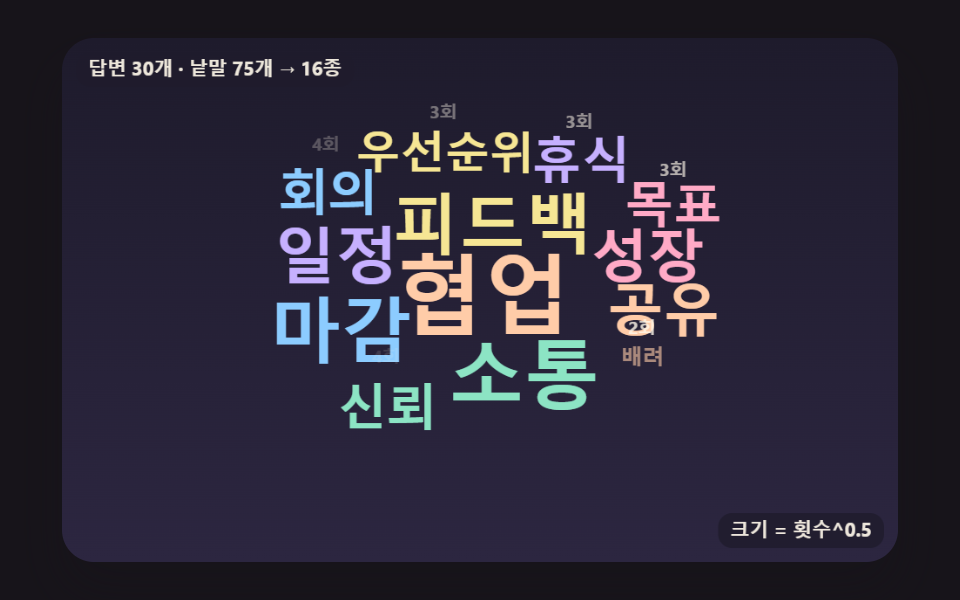 Word Cloud JavaScript: 9 Scenes, Spiral to 3DWord cloud JavaScript on canvas: if every new vote reshuffles the cloud, nobody can read it. 09 keeps each word in place See all demos in this post