04指紋から盾へ切り替わるパスキー登録
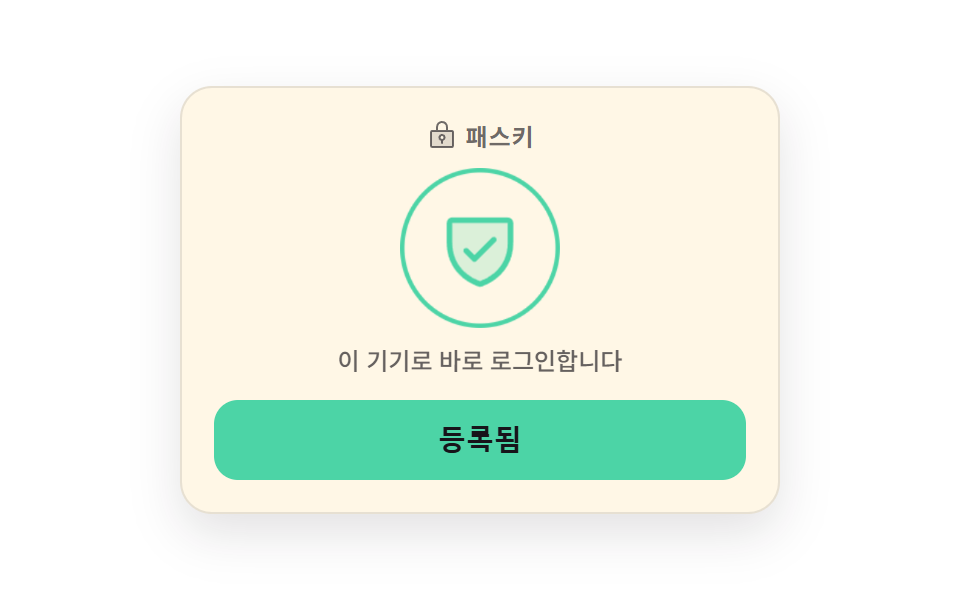
中央の指紋が膨らんでは戻るのを繰り返し、端末が指を待っていることを示します。登録が終わると盾の印へ一フレームで切り替わり、待っている間ボタンは固まり、その事実は属性にも書かれます。
使いどころパスワードなしで入れるようにこの端末を登録するセキュリティ設定カード
steps(1, end)aria-busyscale
<main class="stage">
  <section class="pk is-demo" data-state="idle">
    <div class="pk__card">
      <p class="pk__head">
        <span class="pk__head-ic" aria-hidden="true"><svg viewBox="0 0 256 256" width="16" height="16"><g fill="currentColor"><path d="M208 88H48a8 8 0 0 0-8 8v112a8 8 0 0 0 8 8h160a8 8 0 0 0 8-8V96a8 8 0 0 0-8-8m-80 72a20 20 0 1 1 20-20a20 20 0 0 1-20 20" opacity=".2"/><path d="M208 80h-32V56a48 48 0 0 0-96 0v24H48a16 16 0 0 0-16 16v112a16 16 0 0 0 16 16h160a16 16 0 0 0 16-16V96a16 16 0 0 0-16-16M96 56a32 32 0 0 1 64 0v24H96Zm112 152H48V96h160zm-80-96a28 28 0 0 0-8 54.83V184a8 8 0 0 0 16 0v-17.17a28 28 0 0 0-8-54.83m0 40a12 12 0 1 1 12-12a12 12 0 0 1-12 12"/></g></svg></span>
        <span class="pk__head-t">パスキー</span>
      </p>

      <div class="pk__badge">
        <span class="pk__ring" aria-hidden="true"></span>
        <span class="pk__arc" aria-hidden="true"></span>
        <span class="pk__ic" data-ic="print" aria-hidden="true"><svg viewBox="0 0 256 256" width="40" height="40"><g fill="currentColor"><path d="M224 128a96 96 0 1 1-96-96a96 96 0 0 1 96 96" opacity=".2"/><path d="M72 128a134.6 134.6 0 0 1-14.16 60.47a8 8 0 1 1-14.32-7.12A118.8 118.8 0 0 0 56 128a71.73 71.73 0 0 1 27-56.2a8 8 0 1 1 10 12.49A55.76 55.76 0 0 0 72 128m56-8a8 8 0 0 0-8 8a184.1 184.1 0 0 1-23 89.1a8 8 0 0 0 14 7.76A200.2 200.2 0 0 0 136 128a8 8 0 0 0-8-8m0-32a40 40 0 0 0-40 40a8 8 0 0 0 16 0a24 24 0 0 1 48 0a214.1 214.1 0 0 1-20.51 92a8 8 0 1 0 14.51 6.83A230 230 0 0 0 168 128a40 40 0 0 0-40-40m0-64A104.11 104.11 0 0 0 24 128a87.8 87.8 0 0 1-5 29.33a8 8 0 0 0 15.09 5.33A103.9 103.9 0 0 0 40 128a88 88 0 0 1 176 0a282 282 0 0 1-5.29 54.45a8 8 0 0 0 6.3 9.4a8 8 0 0 0 1.55.15a8 8 0 0 0 7.84-6.45A298.4 298.4 0 0 0 232 128A104.12 104.12 0 0 0 128 24M94.4 152.17a8 8 0 0 0-9.4 6.25a151 151 0 0 1-17.21 45.44a8 8 0 0 0 13.86 8a166.7 166.7 0 0 0 19-50.25a8 8 0 0 0-6.25-9.44M128 56a73 73 0 0 0-9 .56a8 8 0 0 0 2 15.87A56.08 56.08 0 0 1 184 128a252 252 0 0 1-1.92 31a8 8 0 0 0 6.92 9a8 8 0 0 0 1 .06a8 8 0 0 0 7.92-7a267 267 0 0 0 2-33A72.08 72.08 0 0 0 128 56m57.93 128.25a8 8 0 0 0-9.75 5.75c-1.46 5.69-3.15 11.4-5 17a8 8 0 0 0 5 10.13a7.9 7.9 0 0 0 2.55.42a8 8 0 0 0 7.58-5.46c2-5.92 3.79-12 5.35-18.05a8 8 0 0 0-5.72-9.78Z"/></g></svg></span>
        <span class="pk__ic" data-ic="shield" aria-hidden="true"><svg viewBox="0 0 256 256" width="40" height="40"><g fill="currentColor"><path d="M216 56v56c0 96-88 120-88 120s-88-24-88-120V56a8 8 0 0 1 8-8h160a8 8 0 0 1 8 8" opacity=".2"/><path d="M208 40H48a16 16 0 0 0-16 16v56c0 52.72 25.52 84.67 46.93 102.19c23.06 18.86 46 25.26 47 25.53a8 8 0 0 0 4.2 0c1-.27 23.91-6.67 47-25.53C198.48 196.67 224 164.72 224 112V56a16 16 0 0 0-16-16m0 72c0 37.07-13.66 67.16-40.6 89.42a129.3 129.3 0 0 1-39.4 22.2a128.3 128.3 0 0 1-38.92-21.81C61.82 179.51 48 149.3 48 112V56h160ZM82.34 141.66a8 8 0 0 1 11.32-11.32L112 148.69l50.34-50.35a8 8 0 0 1 11.32 11.32l-56 56a8 8 0 0 1-11.32 0Z"/></g></svg></span>
      </div>

      <p class="pk__state" role="status" aria-live="polite">
        <span class="pk__word" data-word="idle">指紋や画面ロックでログインします</span>
        <span class="pk__word" data-word="busy">端末を確認しています</span>
        <span class="pk__word" data-word="done">この端末からすぐログインします</span>
      </p>

      <button class="pk__btn" id="pk-btn" type="button" aria-busy="false">
        <span class="pk__face" data-face="idle">この端末を登録</span>
        <span class="pk__face" data-face="busy">確認中</span>
        <span class="pk__face" data-face="done">登録済み</span>
      </button>
    </div>
  </section>
</main>@use "../../../../site/static/demo-tokens" as *;
$duration: $dur-base;
$easing: $ease-pop;
$color: $subject-blue;
@include stage($stage-paper);
.pk {
box-sizing: border-box;
width: min(300px, 88vw);
font-family: -apple-system, "Segoe UI", "Noto Sans KR", sans-serif;
color: $subject-ink;
}
.pk__card {
box-sizing: border-box;
display: flex;
flex-direction: column;
align-items: center;
gap: $sp-3;
padding: $sp-4;
border: 1px solid rgba($subject-ink, .1);
border-radius: $r-card;
background-color: $subject-cream;
box-shadow: 0 10px 24px rgba($subject-ink, .12);
}
.pk__head {
display: flex;
align-items: center;
gap: $sp-1;
margin: 0;
height: 16px;
color: rgba($subject-ink, .62);
}
.pk__head-ic { display: inline-flex; }
.pk__head-ic svg { display: block; }
.pk__head-t {
font-size: 12px;
line-height: 16px;
font-weight: 700;
letter-spacing: .04em;
}
// ── 배지: 고리 + 회전 호 + 지문/방패 두 장 ───────────────────
.pk__badge {
position: relative;
display: grid;
place-items: center;
width: 72px;
height: 72px;
}
.pk__ring {
position: absolute;
inset: 0;
border: 2px solid rgba($subject-ink, .14);
border-radius: 50%;
}
.pk__arc {
position: absolute;
inset: 0;
border: 3px solid transparent;
border-top-color: $color;
border-radius: 50%;
opacity: 0;
}
.pk__ic {
position: absolute;
display: inline-flex;
width: 40px;
height: 40px;
opacity: 0;
color: $color;
}
.pk__ic svg { display: block; width: 100%; height: 100%; }
.pk__ic[data-ic="shield"] { color: $subject-mint; }
// ── 상태 문구 ─────────────────────────────────────────────
.pk__state {
position: relative;
margin: 0;
width: 100%;
height: 16px;
}
.pk__word {
position: absolute;
left: 0;
right: 0;
top: 0;
text-align: center;
font-size: 12px;
line-height: 16px;
font-weight: 500;
color: rgba($subject-ink, .66);
white-space: nowrap;
opacity: 0;
}
// ── 버튼 ─────────────────────────────────────────────────
.pk__btn {
position: relative;
box-sizing: border-box;
margin: 0;
padding: 0;
width: 100%;
height: 40px;
overflow: hidden;
border: 0;
border-radius: $r-control;
background-color: $subject-blue-deep;
color: $subject-cream;
cursor: pointer;
transition: background-color $duration $easing;
}
.pk__btn:focus-visible { outline: 3px solid $subject-ink; outline-offset: 3px; }
.pk__face {
position: absolute;
left: 0;
right: 0;
top: 0;
bottom: 0;
display: flex;
align-items: center;
justify-content: center;
font-size: 14px;
line-height: 20px;
font-weight: 700;
white-space: nowrap;
opacity: 0;
}
// ── 사람이 조작한 정적 상태 — 루프를 껐을 때도 화면이 비지 않는다 ──
.pk:not(.is-demo)[data-state="idle"] .pk__face[data-face="idle"],
.pk:not(.is-demo)[data-state="busy"] .pk__face[data-face="busy"],
.pk:not(.is-demo)[data-state="done"] .pk__face[data-face="done"],
.pk:not(.is-demo)[data-state="idle"] .pk__word[data-word="idle"],
.pk:not(.is-demo)[data-state="busy"] .pk__word[data-word="busy"],
.pk:not(.is-demo)[data-state="done"] .pk__word[data-word="done"],
.pk:not(.is-demo)[data-state="idle"] .pk__ic[data-ic="print"],
.pk:not(.is-demo)[data-state="busy"] .pk__ic[data-ic="print"],
.pk:not(.is-demo)[data-state="done"] .pk__ic[data-ic="shield"],
.pk:not(.is-demo)[data-state="busy"] .pk__arc { opacity: 1; }
.pk:not(.is-demo)[data-state="busy"] .pk__btn { background-color: rgba($subject-ink, .14); color: rgba($subject-ink, .55); }
.pk:not(.is-demo)[data-state="done"] .pk__btn { background-color: $subject-mint; color: $subject-ink; }
.pk:not(.is-demo)[data-state="done"] .pk__ring { border-color: $subject-mint; }
// 호는 기다리는 동안 계속 돈다 — 컷 두 번만으로는 움직인 프레임이 안 찬다
.pk__arc {
animation-name: pk-spin;
animation-duration: 900ms;
animation-timing-function: linear;
animation-iteration-count: infinite;
}
@keyframes pk-spin {
from { transform: rotate(0deg); }
to { transform: rotate(360deg); }
}
// ── 자동 루프: idle → busy(16.67%) → done(66.67%). 등록됨은 되돌리지 않는다 ──
.pk.is-demo .pk__face,
.pk.is-demo .pk__word,
.pk.is-demo .pk__ic,
.pk.is-demo .pk__ring,
.pk.is-demo .pk__btn {
animation-duration: $dur-loop;
animation-timing-function: steps(1, end);
animation-iteration-count: infinite;
}
.pk.is-demo .pk__face[data-face="idle"],
.pk.is-demo .pk__word[data-word="idle"] { animation-name: pk-idle; }
.pk.is-demo .pk__face[data-face="busy"],
.pk.is-demo .pk__word[data-word="busy"] { animation-name: pk-busy; }
.pk.is-demo .pk__face[data-face="done"],
.pk.is-demo .pk__word[data-word="done"],
.pk.is-demo .pk__ic[data-ic="shield"] { animation-name: pk-done; }
.pk.is-demo .pk__ring { animation-name: pk-ring; }
.pk.is-demo .pk__btn { animation-name: pk-skin; }
@keyframes pk-idle {
0% { opacity: 1; }
16.67% { opacity: 0; }
100% { opacity: 0; }
}
@keyframes pk-busy {
0% { opacity: 0; }
16.67% { opacity: 1; }
66.67% { opacity: 0; }
100% { opacity: 0; }
}
@keyframes pk-done {
0% { opacity: 0; }
66.67% { opacity: 1; }
100% { opacity: 1; }
}
@keyframes pk-ring {
0% { border-color: rgba($subject-ink, .14); }
66.67% { border-color: $subject-mint; }
100% { border-color: $subject-mint; }
}
@keyframes pk-skin {
0% { background-color: $subject-blue-deep; color: $subject-cream; }
16.67% { background-color: rgba($subject-ink, .14); color: rgba($subject-ink, .55); }
66.67% { background-color: $subject-mint; color: $subject-ink; }
100% { background-color: $subject-mint; color: $subject-ink; }
}
// 호는 기다리는 구간에만 보인다 — 회전과 컷을 한 요소에 겹쳐 건다
.pk.is-demo .pk__arc {
animation-name: pk-spin, pk-busy;
animation-duration: 900ms, $dur-loop;
animation-timing-function: linear, steps(1, end);
animation-iteration-count: infinite, infinite;
}
// 지문은 기다리는 동안 부풀었다 줄기를 반복한다
.pk.is-demo .pk__ic[data-ic="print"] {
animation-name: pk-print, pk-pulse;
animation-duration: $dur-loop, $dur-loop;
animation-timing-function: steps(1, end), $ease-spring;
animation-iteration-count: infinite, infinite;
}
@keyframes pk-print {
0% { opacity: 1; }
66.67% { opacity: 0; }
100% { opacity: 0; }
}
@keyframes pk-pulse {
0% { transform: scale(1); }
16.67% { transform: scale(1); }
29.17% { transform: scale(1.16); }
41.67% { transform: scale(1); }
54.17% { transform: scale(1.16); }
66.67% { transform: scale(1); }
100% { transform: scale(1); }
}
// 등록됨으로 갈리는 순간 배지가 한 번 튄다 — 이 프레임이 대표 장면이 된다
.pk.is-demo .pk__badge {
animation-name: pk-pop;
animation-duration: $dur-loop;
animation-timing-function: $easing;
animation-iteration-count: infinite;
}
@keyframes pk-pop {
0% { transform: scale(1); }
66.67% { transform: scale(.9); }
75% { transform: scale(1.1); }
85% { transform: scale(1); }
100% { transform: scale(1); }
}
@media (max-width: 340px) {
.pk__card { gap: $sp-2; padding: $sp-2; }
.pk__head { height: 14px; }
.pk__head-t { font-size: 11px; line-height: 14px; }
.pk__badge { width: 52px; height: 52px; }
.pk__ic { width: 30px; height: 30px; }
.pk__state { height: 14px; }
.pk__word { font-size: 10px; line-height: 14px; }
.pk__btn { height: 30px; }
.pk__face { font-size: 12px; line-height: 16px; }
}
@media (prefers-reduced-motion: reduce) {
.pk.is-demo .pk__face,
.pk.is-demo .pk__word,
.pk.is-demo .pk__ic,
.pk.is-demo .pk__ring,
.pk.is-demo .pk__btn,
.pk.is-demo .pk__arc,
.pk.is-demo .pk__badge,
.pk__arc { animation: none !important; }
.pk.is-demo .pk__face[data-face="idle"],
.pk.is-demo .pk__word[data-word="idle"],
.pk.is-demo .pk__ic[data-ic="print"] { opacity: 1 !important; }
.pk.is-demo .pk__arc { opacity: 0 !important; }
.pk__btn { transition: none !important; }
}html, body {
margin: 0;
overflow: hidden;
}
.stage {
box-sizing: border-box;
min-height: 100vh;
display: grid;
place-items: center;
margin: 0;
background: #ffffff;
font-family: -apple-system, "Segoe UI", "Noto Sans KR", sans-serif;
padding: clamp(8px, 4vw, 24px);
}
.pk {
box-sizing: border-box;
width: min(300px, 88vw);
font-family: -apple-system, "Segoe UI", "Noto Sans KR", sans-serif;
color: #17141a;
}
.pk__card {
box-sizing: border-box;
display: flex;
flex-direction: column;
align-items: center;
gap: 12px;
padding: 16px;
border: 1px solid rgba(23, 20, 26, 0.1);
border-radius: 16px;
background-color: #fff7e6;
box-shadow: 0 10px 24px rgba(23, 20, 26, 0.12);
}
.pk__head {
display: flex;
align-items: center;
gap: 4px;
margin: 0;
height: 16px;
color: rgba(23, 20, 26, 0.62);
}
.pk__head-ic {
display: inline-flex;
}
.pk__head-ic svg {
display: block;
}
.pk__head-t {
font-size: 12px;
line-height: 16px;
font-weight: 700;
letter-spacing: 0.04em;
}
.pk__badge {
position: relative;
display: grid;
place-items: center;
width: 72px;
height: 72px;
}
.pk__ring {
position: absolute;
inset: 0;
border: 2px solid rgba(23, 20, 26, 0.14);
border-radius: 50%;
}
.pk__arc {
position: absolute;
inset: 0;
border: 3px solid transparent;
border-top-color: #2f6df6;
border-radius: 50%;
opacity: 0;
}
.pk__ic {
position: absolute;
display: inline-flex;
width: 40px;
height: 40px;
opacity: 0;
color: #2f6df6;
}
.pk__ic svg {
display: block;
width: 100%;
height: 100%;
}
.pk__ic[data-ic=shield] {
color: #4cd4a6;
}
.pk__state {
position: relative;
margin: 0;
width: 100%;
height: 16px;
}
.pk__word {
position: absolute;
left: 0;
right: 0;
top: 0;
text-align: center;
font-size: 12px;
line-height: 16px;
font-weight: 500;
color: rgba(23, 20, 26, 0.66);
white-space: nowrap;
opacity: 0;
}
.pk__btn {
position: relative;
box-sizing: border-box;
margin: 0;
padding: 0;
width: 100%;
height: 40px;
overflow: hidden;
border: 0;
border-radius: 12px;
background-color: #0a4fe8;
color: #fff7e6;
cursor: pointer;
transition: background-color 300ms cubic-bezier(0.2, 1.4, 0.4, 1);
}
.pk__btn:focus-visible {
outline: 3px solid #17141a;
outline-offset: 3px;
}
.pk__face {
position: absolute;
left: 0;
right: 0;
top: 0;
bottom: 0;
display: flex;
align-items: center;
justify-content: center;
font-size: 14px;
line-height: 20px;
font-weight: 700;
white-space: nowrap;
opacity: 0;
}
.pk:not(.is-demo)[data-state=idle] .pk__face[data-face=idle],
.pk:not(.is-demo)[data-state=busy] .pk__face[data-face=busy],
.pk:not(.is-demo)[data-state=done] .pk__face[data-face=done],
.pk:not(.is-demo)[data-state=idle] .pk__word[data-word=idle],
.pk:not(.is-demo)[data-state=busy] .pk__word[data-word=busy],
.pk:not(.is-demo)[data-state=done] .pk__word[data-word=done],
.pk:not(.is-demo)[data-state=idle] .pk__ic[data-ic=print],
.pk:not(.is-demo)[data-state=busy] .pk__ic[data-ic=print],
.pk:not(.is-demo)[data-state=done] .pk__ic[data-ic=shield],
.pk:not(.is-demo)[data-state=busy] .pk__arc {
opacity: 1;
}
.pk:not(.is-demo)[data-state=busy] .pk__btn {
background-color: rgba(23, 20, 26, 0.14);
color: rgba(23, 20, 26, 0.55);
}
.pk:not(.is-demo)[data-state=done] .pk__btn {
background-color: #4cd4a6;
color: #17141a;
}
.pk:not(.is-demo)[data-state=done] .pk__ring {
border-color: #4cd4a6;
}
.pk__arc {
animation-name: pk-spin;
animation-duration: 900ms;
animation-timing-function: linear;
animation-iteration-count: infinite;
}
@keyframes pk-spin {
from {
transform: rotate(0deg);
}
to {
transform: rotate(360deg);
}
}
.pk.is-demo .pk__face,
.pk.is-demo .pk__word,
.pk.is-demo .pk__ic,
.pk.is-demo .pk__ring,
.pk.is-demo .pk__btn {
animation-duration: 2s;
animation-timing-function: steps(1, end);
animation-iteration-count: infinite;
}
.pk.is-demo .pk__face[data-face=idle],
.pk.is-demo .pk__word[data-word=idle] {
animation-name: pk-idle;
}
.pk.is-demo .pk__face[data-face=busy],
.pk.is-demo .pk__word[data-word=busy] {
animation-name: pk-busy;
}
.pk.is-demo .pk__face[data-face=done],
.pk.is-demo .pk__word[data-word=done],
.pk.is-demo .pk__ic[data-ic=shield] {
animation-name: pk-done;
}
.pk.is-demo .pk__ring {
animation-name: pk-ring;
}
.pk.is-demo .pk__btn {
animation-name: pk-skin;
}
@keyframes pk-idle {
0% {
opacity: 1;
}
16.67% {
opacity: 0;
}
100% {
opacity: 0;
}
}
@keyframes pk-busy {
0% {
opacity: 0;
}
16.67% {
opacity: 1;
}
66.67% {
opacity: 0;
}
100% {
opacity: 0;
}
}
@keyframes pk-done {
0% {
opacity: 0;
}
66.67% {
opacity: 1;
}
100% {
opacity: 1;
}
}
@keyframes pk-ring {
0% {
border-color: rgba(23, 20, 26, 0.14);
}
66.67% {
border-color: #4cd4a6;
}
100% {
border-color: #4cd4a6;
}
}
@keyframes pk-skin {
0% {
background-color: #0a4fe8;
color: #fff7e6;
}
16.67% {
background-color: rgba(23, 20, 26, 0.14);
color: rgba(23, 20, 26, 0.55);
}
66.67% {
background-color: #4cd4a6;
color: #17141a;
}
100% {
background-color: #4cd4a6;
color: #17141a;
}
}
.pk.is-demo .pk__arc {
animation-name: pk-spin, pk-busy;
animation-duration: 900ms, 2s;
animation-timing-function: linear, steps(1, end);
animation-iteration-count: infinite, infinite;
}
.pk.is-demo .pk__ic[data-ic=print] {
animation-name: pk-print, pk-pulse;
animation-duration: 2s, 2s;
animation-timing-function: steps(1, end), cubic-bezier(0.2, 0.8, 0.2, 1);
animation-iteration-count: infinite, infinite;
}
@keyframes pk-print {
0% {
opacity: 1;
}
66.67% {
opacity: 0;
}
100% {
opacity: 0;
}
}
@keyframes pk-pulse {
0% {
transform: scale(1);
}
16.67% {
transform: scale(1);
}
29.17% {
transform: scale(1.16);
}
41.67% {
transform: scale(1);
}
54.17% {
transform: scale(1.16);
}
66.67% {
transform: scale(1);
}
100% {
transform: scale(1);
}
}
.pk.is-demo .pk__badge {
animation-name: pk-pop;
animation-duration: 2s;
animation-timing-function: cubic-bezier(0.2, 1.4, 0.4, 1);
animation-iteration-count: infinite;
}
@keyframes pk-pop {
0% {
transform: scale(1);
}
66.67% {
transform: scale(0.9);
}
75% {
transform: scale(1.1);
}
85% {
transform: scale(1);
}
100% {
transform: scale(1);
}
}
@media (max-width: 340px) {
.pk__card {
gap: 8px;
padding: 8px;
}
.pk__head {
height: 14px;
}
.pk__head-t {
font-size: 11px;
line-height: 14px;
}
.pk__badge {
width: 52px;
height: 52px;
}
.pk__ic {
width: 30px;
height: 30px;
}
.pk__state {
height: 14px;
}
.pk__word {
font-size: 10px;
line-height: 14px;
}
.pk__btn {
height: 30px;
}
.pk__face {
font-size: 12px;
line-height: 16px;
}
}
@media (prefers-reduced-motion: reduce) {
.pk.is-demo .pk__face,
.pk.is-demo .pk__word,
.pk.is-demo .pk__ic,
.pk.is-demo .pk__ring,
.pk.is-demo .pk__btn,
.pk.is-demo .pk__arc,
.pk.is-demo .pk__badge,
.pk__arc {
animation: none !important;
}
.pk.is-demo .pk__face[data-face=idle],
.pk.is-demo .pk__word[data-word=idle],
.pk.is-demo .pk__ic[data-ic=print] {
opacity: 1 !important;
}
.pk.is-demo .pk__arc {
opacity: 0 !important;
}
.pk__btn {
transition: none !important;
}
}// 실제 동작: 누르면 busy(잠김 + aria-busy) → done(登録済み). 등록된 뒤 한 번 더 누르면 처음으로 되돌린다
var root = document.querySelector('.pk');
var btn = document.getElementById('pk-btn');
var t = 0;
function setState(s) {
root.setAttribute('data-state', s);
btn.setAttribute('aria-busy', String(s === 'busy'));
btn.disabled = s === 'busy'; // 기다리는 동안만 잠근다
}
btn.addEventListener('click', function () {
root.classList.remove('is-demo'); // 사람이 만졌으니 자동 루프를 끈다
clearTimeout(t);
if (root.getAttribute('data-state') === 'done') { setState('idle'); return; }
setState('busy');
t = setTimeout(function () { setState('done'); }, 1400); // 기기가 답한 시점
});import { useState, useRef, useEffect } from "react";
import type { CSSProperties } from "react";
import styles from "./PasskeyEnrollCard.module.scss";
export type EnrollState = "idle" | "busy" | "done";
export type PasskeyEnrollCardProps = {
heading?: string;
labels?: Record<EnrollState, string>;
notes?: Record<EnrollState, string>;
/** 기기가 답하기까지 기다리는 시간 (ms) */
verifyMs?: number;
duration?: number;
easing?: string;
color?: string;
};
type Vars = CSSProperties & { "--duration"?: string; "--easing"?: string; "--color"?: string };
type Timer = ReturnType<typeof setTimeout>;
const LOCK = (
<g fill="currentColor">
<path d="M208 88H48a8 8 0 0 0-8 8v112a8 8 0 0 0 8 8h160a8 8 0 0 0 8-8V96a8 8 0 0 0-8-8m-80 72a20 20 0 1 1 20-20a20 20 0 0 1-20 20" opacity=".2" />
<path d="M208 80h-32V56a48 48 0 0 0-96 0v24H48a16 16 0 0 0-16 16v112a16 16 0 0 0 16 16h160a16 16 0 0 0 16-16V96a16 16 0 0 0-16-16M96 56a32 32 0 0 1 64 0v24H96Zm112 152H48V96h160zm-80-96a28 28 0 0 0-8 54.83V184a8 8 0 0 0 16 0v-17.17a28 28 0 0 0-8-54.83m0 40a12 12 0 1 1 12-12a12 12 0 0 1-12 12" />
</g>
);
const FINGERPRINT = (
<g fill="currentColor">
<path d="M224 128a96 96 0 1 1-96-96a96 96 0 0 1 96 96" opacity=".2" />
<path d="M72 128a134.6 134.6 0 0 1-14.16 60.47a8 8 0 1 1-14.32-7.12A118.8 118.8 0 0 0 56 128a71.73 71.73 0 0 1 27-56.2a8 8 0 1 1 10 12.49A55.76 55.76 0 0 0 72 128m56-8a8 8 0 0 0-8 8a184.1 184.1 0 0 1-23 89.1a8 8 0 0 0 14 7.76A200.2 200.2 0 0 0 136 128a8 8 0 0 0-8-8m0-32a40 40 0 0 0-40 40a8 8 0 0 0 16 0a24 24 0 0 1 48 0a214.1 214.1 0 0 1-20.51 92a8 8 0 1 0 14.51 6.83A230 230 0 0 0 168 128a40 40 0 0 0-40-40m0-64A104.11 104.11 0 0 0 24 128a87.8 87.8 0 0 1-5 29.33a8 8 0 0 0 15.09 5.33A103.9 103.9 0 0 0 40 128a88 88 0 0 1 176 0a282 282 0 0 1-5.29 54.45a8 8 0 0 0 6.3 9.4a8 8 0 0 0 1.55.15a8 8 0 0 0 7.84-6.45A298.4 298.4 0 0 0 232 128A104.12 104.12 0 0 0 128 24M94.4 152.17a8 8 0 0 0-9.4 6.25a151 151 0 0 1-17.21 45.44a8 8 0 0 0 13.86 8a166.7 166.7 0 0 0 19-50.25a8 8 0 0 0-6.25-9.44M128 56a73 73 0 0 0-9 .56a8 8 0 0 0 2 15.87A56.08 56.08 0 0 1 184 128a252 252 0 0 1-1.92 31a8 8 0 0 0 6.92 9a8 8 0 0 0 1 .06a8 8 0 0 0 7.92-7a267 267 0 0 0 2-33A72.08 72.08 0 0 0 128 56m57.93 128.25a8 8 0 0 0-9.75 5.75c-1.46 5.69-3.15 11.4-5 17a8 8 0 0 0 5 10.13a7.9 7.9 0 0 0 2.55.42a8 8 0 0 0 7.58-5.46c2-5.92 3.79-12 5.35-18.05a8 8 0 0 0-5.72-9.78Z" />
</g>
);
const SHIELD = (
<g fill="currentColor">
<path d="M216 56v56c0 96-88 120-88 120s-88-24-88-120V56a8 8 0 0 1 8-8h160a8 8 0 0 1 8 8" opacity=".2" />
<path d="M208 40H48a16 16 0 0 0-16 16v56c0 52.72 25.52 84.67 46.93 102.19c23.06 18.86 46 25.26 47 25.53a8 8 0 0 0 4.2 0c1-.27 23.91-6.67 47-25.53C198.48 196.67 224 164.72 224 112V56a16 16 0 0 0-16-16m0 72c0 37.07-13.66 67.16-40.6 89.42a129.3 129.3 0 0 1-39.4 22.2a128.3 128.3 0 0 1-38.92-21.81C61.82 179.51 48 149.3 48 112V56h160ZM82.34 141.66a8 8 0 0 1 11.32-11.32L112 148.69l50.34-50.35a8 8 0 0 1 11.32 11.32l-56 56a8 8 0 0 1-11.32 0Z" />
</g>
);
export default function PasskeyEnrollCard({
heading = "Passkey",
labels = { idle: "Enroll this device", busy: "Checking", done: "Enrolled" },
notes = {
idle: "Sign in with your fingerprint or screen lock",
busy: "Checking this device",
done: "You can sign in straight from this device",
},
verifyMs = 1400,
duration = 300,
easing = "cubic-bezier(.2,1.4,.4,1)",
color = "#2f6df6",
}: PasskeyEnrollCardProps) {
const [demo, setDemo] = useState(true);
const [state, setState] = useState<EnrollState>("idle");
const timer = useRef<Timer>(null);
const vars: Vars = { "--duration": `${duration}ms`, "--easing": easing, "--color": color };
function clear() {
if (timer.current !== null) clearTimeout(timer.current);
}
useEffect(() => clear, []); // 떠날 때 예약된 타이머를 버린다
// 누르면 busy(잠김 + aria-busy) → done. 등록된 뒤 한 번 더 누르면 처음으로
function run() {
setDemo(false); // 사람이 만졌으니 자동 루프를 끈다
clear();
if (state === "done") {
setState("idle");
return;
}
setState("busy");
timer.current = setTimeout(() => setState("done"), verifyMs);
}
return (
<section className={`${styles.pk} ${demo ? styles.isDemo : ""}`} data-state={state} style={vars}>
<div className={styles.card}>
<p className={styles.head}>
<span className={styles.headIc} aria-hidden="true">
<svg viewBox="0 0 256 256" width="16" height="16">{LOCK}</svg>
</span>
<span className={styles.headTxt}>{heading}</span>
</p>
<div className={styles.badge}>
<span className={styles.ring} aria-hidden="true" />
<span className={styles.arc} aria-hidden="true" />
<span className={styles.ic} data-ic="print" aria-hidden="true">
<svg viewBox="0 0 256 256" width="40" height="40">{FINGERPRINT}</svg>
</span>
<span className={styles.ic} data-ic="shield" aria-hidden="true">
<svg viewBox="0 0 256 256" width="40" height="40">{SHIELD}</svg>
</span>
</div>
<p className={styles.state} role="status" aria-live="polite">
<span className={styles.word} data-word="idle">{notes.idle}</span>
<span className={styles.word} data-word="busy">{notes.busy}</span>
<span className={styles.word} data-word="done">{notes.done}</span>
</p>
<button
className={styles.btn}
type="button"
aria-busy={state === "busy"}
disabled={state === "busy"}
onClick={run}
>
<span className={styles.face} data-face="idle">{labels.idle}</span>
<span className={styles.face} data-face="busy">{labels.busy}</span>
<span className={styles.face} data-face="done">{labels.done}</span>
</button>
</div>
</section>
);
}04 指紋から盾へ切り替わるパスキー登録 — 計測 累積面積 10.955% · 動いたフレーム 21/23GODRICH オリジナル · SCSS と React は zip に同梱 · アカウント セキュリティ 設定 UI 9選 — ログイン後の画面
このデモが属する記事
 アカウント セキュリティ 設定 UI 9選 — ログイン後の画面アカウント セキュリティ 設定とは、ログインを済ませた人が次に巡り会う画面のことです。今つながっている端末、二段階認証、パスワードそのものを、本人の手で確かめて変えていく場所です。9つすべて実際に動きます。端末の行は本当に折りたたまれ、バッ この記事のデモをすべて見る