09グラデーションボタン・グローフォーカス
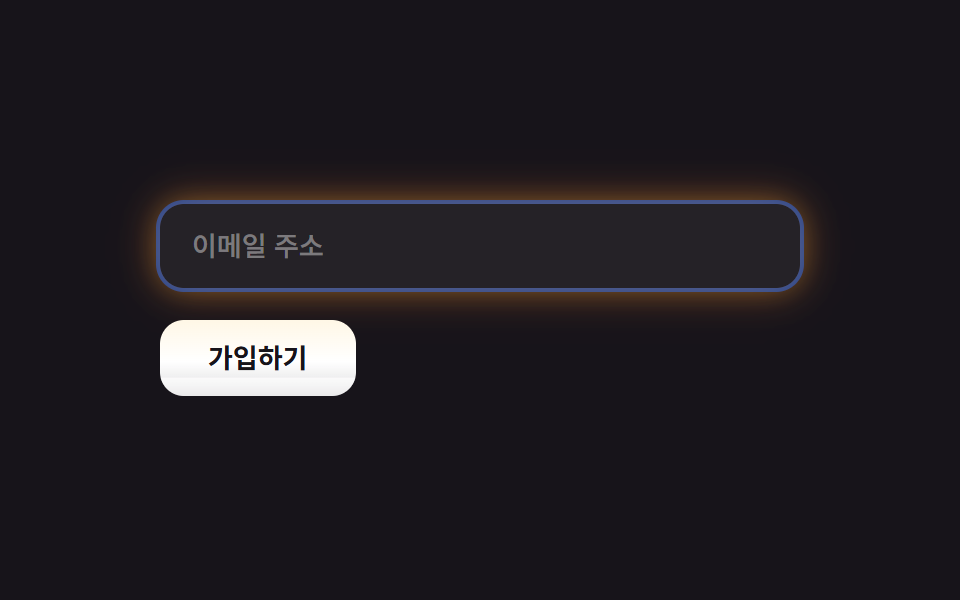
ボタン内のグラデーションはホバーのたびに位置がずれて流れ、入力欄はフォーカスするとオーロラ色のグローリングが広がります。
使いどころフォーム送信ボタン・メール入力欄
background-position 호버box-shadow 이중 글로우radius control
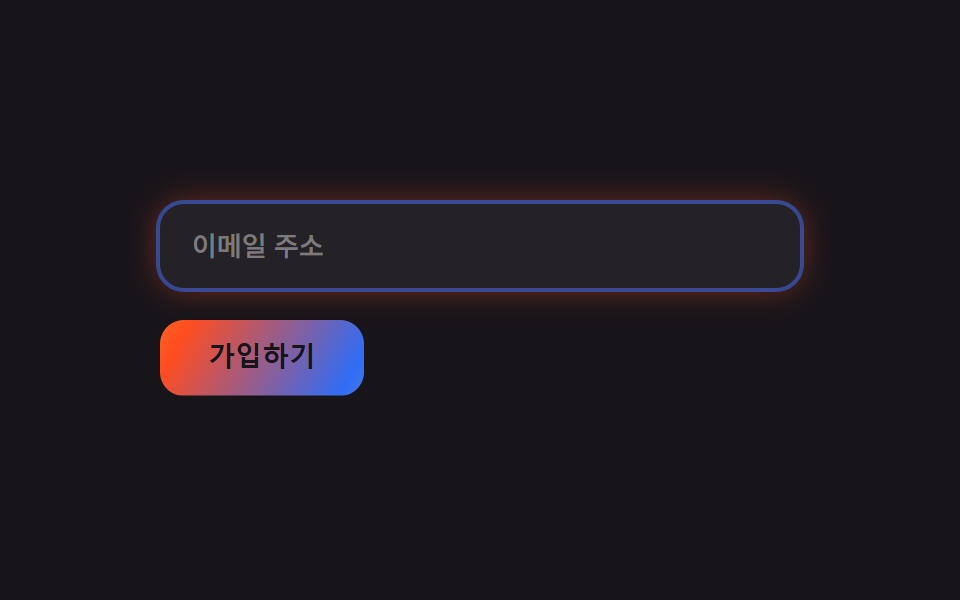
<main class="stage">
  <form class="bi-a is-demo">
    <input class="bi-a__input" type="email" placeholder="メールアドレス" readonly>
    <button class="bi-a__btn" type="button">登録する</button>
  </form>
</main>
@use "../../../../site/static/demo-tokens" as *;
$duration: $dur-loop;
$easing: $ease-out;
$color: $stage-yellow;
@include stage($stage-ink);
.bi-a { display: flex; flex-direction: column; gap: $sp-4; width: clamp(220px, 78vw, 320px); }
.bi-a__input {
border: 0;
border-radius: $r-control;
padding: $sp-3 $sp-4;
background: rgba($stage-paper, .06);
color: $stage-paper;
font: 500 clamp(12px, 3vw, 13.5px)/1.3 -apple-system, "Segoe UI", "Noto Sans KR", sans-serif;
box-shadow: 0 0 0 2px rgba($subject-blue, .55), 0 0 16px rgba($stage-orange, .45);
}
.bi-a__input::placeholder { color: rgba($stage-paper, .4); }
// 버튼 안 그라디언트는 호버(.is-demo 로 강제 발동)에만 흐른다 — background-position 만 바뀐다
.bi-a__btn {
align-self: flex-start;
border: 0;
border-radius: $r-control;
padding: $sp-3 $sp-6;
color: $stage-ink;
font-weight: 700; font-size: clamp(12px, 3vw, 13.5px); line-height: 1;
background: linear-gradient(120deg, $color, $stage-orange, $subject-blue, $color);
background-size: 260% 100%;
background-position: 0% 50%;
}
.is-demo .bi-a__btn,
.bi-a__btn:hover,
.bi-a__btn:focus-visible {
animation: shift $duration $easing infinite;
}
@keyframes shift { 0% { background-position: 0% 50%; } 50% { background-position: 100% 50%; } 100% { background-position: 0% 50%; } }
@media (prefers-reduced-motion: reduce) {
.is-demo .bi-a__btn, .bi-a__btn:hover, .bi-a__btn:focus-visible { animation: none; }
}html, body {
margin: 0;
overflow: hidden;
}
.stage {
box-sizing: border-box;
min-height: 100vh;
display: grid;
place-items: center;
margin: 0;
background: #17141a;
font-family: -apple-system, "Segoe UI", "Noto Sans KR", sans-serif;
padding: clamp(8px, 4vw, 24px);
}
.bi-a {
display: flex;
flex-direction: column;
gap: 16px;
width: clamp(220px, 78vw, 320px);
}
.bi-a__input {
border: 0;
border-radius: 12px;
padding: 12px 16px;
background: rgba(255, 255, 255, 0.06);
color: #ffffff;
font: 500 clamp(12px, 3vw, 13.5px)/1.3 -apple-system, "Segoe UI", "Noto Sans KR", sans-serif;
box-shadow: 0 0 0 2px rgba(47, 109, 246, 0.55), 0 0 16px rgba(255, 77, 31, 0.45);
}
.bi-a__input::placeholder {
color: rgba(255, 255, 255, 0.4);
}
.bi-a__btn {
align-self: flex-start;
border: 0;
border-radius: 12px;
padding: 12px 24px;
color: #17141a;
font-weight: 700;
font-size: clamp(12px, 3vw, 13.5px);
line-height: 1;
background: linear-gradient(120deg, #ffd23f, #ff4d1f, #2f6df6, #ffd23f);
background-size: 260% 100%;
background-position: 0% 50%;
}
.is-demo .bi-a__btn,
.bi-a__btn:hover,
.bi-a__btn:focus-visible {
animation: shift 2s ease-out infinite;
}
@keyframes shift {
0% {
background-position: 0% 50%;
}
50% {
background-position: 100% 50%;
}
100% {
background-position: 0% 50%;
}
}
@media (prefers-reduced-motion: reduce) {
.is-demo .bi-a__btn, .bi-a__btn:hover, .bi-a__btn:focus-visible {
animation: none;
}
}import { useState } from "react";
import type { CSSProperties } from "react";
import styles from "./AuroraButtonsInputs.module.scss";
export type AuroraButtonsInputsProps = {
placeholder?: string;
cta?: string;
duration?: number;
easing?: string;
color?: string;
};
type Vars = CSSProperties & { "--duration"?: string; "--easing"?: string; "--color"?: string };
export default function AuroraButtonsInputs({
placeholder = "Email address",
cta = "Sign up",
duration = 2000,
easing = "ease-out",
color = "#ffd23f",
}: AuroraButtonsInputsProps) {
const vars: Vars = { "--duration": `${duration}ms`, "--easing": easing, "--color": color };
const [hover, setHover] = useState(false);
return (
<form className={styles.form} style={vars} onSubmit={(e: { preventDefault: () => void }) => e.preventDefault()}>
<input className={styles.input} type="email" placeholder={placeholder} />
<button
type="submit"
className={`${styles.btn} ${hover ? styles.active : ""}`}
onMouseEnter={() => setHover(true)}
onMouseLeave={() => setHover(false)}
>
{cta}
</button>
</form>
);
}09 グラデーションボタン・グローフォーカス — 計測 累積面積 2.579% · 動いたフレーム 20/23GODRICH オリジナル · SCSS と React は zip に同梱 · メッシュグラデーションの上に、あえてグレインを残す
このデモが属する記事
 メッシュグラデーションの上に、あえてグレインを残すメッシュグラデーションは、暗い背景の上で複数のぼかした色の塊がオーロラのようににじみ合い、その上にフィルムグレインを重ねる背景スタイルです。AIっぽさを消すために、デザイナーはあえてこのグレインを残します。このスタイルから、9つのパーツをそ この記事のデモをすべて見る