04Tab インデントと解除
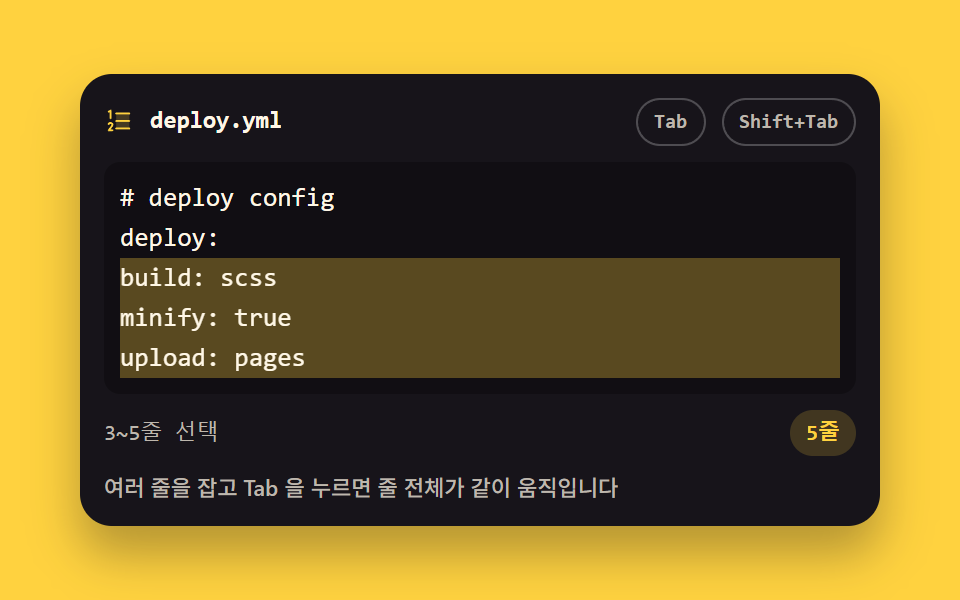
Tab は 2 文字を入れ、Shift+Tab は 2 文字を取ります。複数行を選んで押すと選択行すべてが一緒に動き、選択範囲も残ります。
使いどころインデントが意味を持つ設定ファイル編集
selectionEndsplittab-size
<main class="stage">
<div class="ti is-demo" id="ti">
  <div class="ti__bar">
    <span class="ti__ico" aria-hidden="true"><svg xmlns="http://www.w3.org/2000/svg" width="1em" height="1em" viewBox="0 0 256 256"><g fill="currentColor"><path d="M216 64v128H104V64Z" opacity=".2"/><path d="M224 128a8 8 0 0 1-8 8H104a8 8 0 0 1 0-16h112a8 8 0 0 1 8 8M104 72h112a8 8 0 0 0 0-16H104a8 8 0 0 0 0 16m112 112H104a8 8 0 0 0 0 16h112a8 8 0 0 0 0-16M43.58 55.16L48 52.94V104a8 8 0 0 0 16 0V40a8 8 0 0 0-11.58-7.16l-16 8a8 8 0 0 0 7.16 14.32m36.19 101.56a23.73 23.73 0 0 0-9.6-15.95a24.86 24.86 0 0 0-34.11 4.7a23.6 23.6 0 0 0-3.57 6.46a8 8 0 1 0 15 5.47a7.8 7.8 0 0 1 1.18-2.13a8.76 8.76 0 0 1 12-1.59a7.9 7.9 0 0 1 3.26 5.32a7.64 7.64 0 0 1-1.57 5.78a1 1 0 0 0-.08.11l-28.69 38.32A8 8 0 0 0 40 216h32a8 8 0 0 0 0-16H56l19.08-25.53a23.47 23.47 0 0 0 4.69-17.75"/></g></svg></span>
    <span class="ti__name">deploy.yml</span>
    <span class="ti__key ti__key--tab" aria-hidden="true">Tab</span>
    <span class="ti__key ti__key--sft" aria-hidden="true">Shift+Tab</span>
  </div>
  <div class="ti__wrap">
    <pre class="ti__ghost" id="ghost" aria-hidden="true"><span class="ti__ln"><span class="ti__tx"># deploy config</span></span><span class="ti__ln"><span class="ti__tx">deploy:</span></span><span class="ti__ln ti__ln--sel"><span class="ti__tx">build: scss</span></span><span class="ti__ln ti__ln--sel"><span class="ti__tx">minify: true</span></span><span class="ti__ln ti__ln--sel"><span class="ti__tx">upload: pages</span></span></pre>
    <textarea class="ti__ta" id="ta" spellcheck="false" autocomplete="off" aria-label="コード入力欄"># deploy config
deploy:
build: scss
minify: true
upload: pages</textarea>
  </div>
  <p class="ti__meta"><span class="ti__status" id="status" data-t-sel="{a}〜{b}行目を選択中" data-t-caret="{n}行目にカーソル"><span class="ti__stCaret">1行目にカーソル</span><span class="ti__stSel">3〜5行目を選択中</span></span><span class="ti__lines" id="lines" data-t="{n}行">5行</span></p>
  <p class="ti__note">複数行を選んで Tab を押すと行全体が一緒に動きます</p>
</div>
</main>
@use "../../../../site/static/demo-tokens" as *;
// Tab 들여쓰기와 되돌리기 — 잡힌 줄 전체가 같이 움직이고 선택 범위는 재계산되어 남는다.
// 실제 조작은 textarea 의 keydown Tab/Shift+Tab (JS). 격자 미리보기(.is-demo)는
// 선택 밴드가 steps(1, end) 컷으로 켜지고, 선택 줄의 글자가 두 칸씩 slide 로 밀렸다 빠진다.
// 무대가 옐로라 편집기 판은 잉크로 뒤집고 글자는 크림 — 옐로 면 위 크림 글자는 AA 미달 단골이라
// 이 데모의 글자는 전부 잉크 판 위에 앉는다.
$duration: $dur-quick;
$easing: $ease-spring;
$color: $stage-yellow;
$mono: ui-monospace, SFMono-Regular, "SF Mono", Consolas, "Liberation Mono", monospace;
$line: rgba(255, 255, 255, .16);
$dim: #beb7ad;
$fs: clamp(11px, 3vw, 13px);
$lh: 20px;
$sel: rgba(255, 210, 63, .30);
@include stage($stage-yellow);
.ti {
display: flex; flex-direction: column; gap: $sp-2;
box-sizing: border-box; width: min(100%, 400px);
padding: $sp-3; border-radius: $r-card;
background: $stage-ink;
box-shadow: $shadow-raised;
}
// ── 파일 이름 줄
.ti__bar { display: flex; align-items: center; gap: $sp-2; }
.ti__ico { display: grid; place-items: center; color: $color; font-size: 15px; }
.ti__name {
flex: 1 1 auto; color: $subject-cream;
font-family: $mono; font-weight: 700; font-size: 12px; line-height: 1.4;
}
.ti__key {
flex: 0 0 auto; padding: $sp-1 $sp-2; border-radius: $r-pill;
border: 1px solid rgba(255, 255, 255, .24);
color: $dim; font-family: $mono; font-weight: 700; font-size: 10px; line-height: 1.4;
}
// ── 두 겹이 겹치는 자리. 미리보기용 pre 를 textarea 와 포갠다 (정적 경로에서는 pre 가 꺼져 있다)
.ti__wrap { position: relative; display: grid; height: $lh * 5 + $sp-4; }
.ti__wrap > * { grid-area: 1 / 1; }
%layer {
box-sizing: border-box; margin: 0; padding: $sp-2;
border: 0; border-radius: $r-sm;
font-family: $mono; font-weight: 500; font-size: $fs; line-height: $lh;
letter-spacing: 0; tab-size: 2; // 붙여 넣은 탭 문자도 두 칸 폭으로
white-space: pre; overflow: hidden;
}
.ti__ghost {
@extend %layer;
background: rgba(0, 0, 0, .28); color: $subject-cream;
opacity: 0; pointer-events: none;
}
.ti__ln { display: block; }
.ti__tx { display: inline-block; } // transform 이 inline 에는 안 걸리므로 블록화
.ti__ta {
@extend %layer;
background: transparent; color: $subject-cream; caret-color: $stage-yellow;
resize: none;
}
.ti__ta::selection { background: $sel; }
.ti__ta:focus-visible { outline: 2px solid $stage-yellow; outline-offset: -2px; }
.ti__meta { display: flex; align-items: center; justify-content: space-between; gap: $sp-2; margin: 0; }
.ti__status { color: $dim; font-family: $mono; font-weight: 500; font-size: 11px; line-height: 1.4; }
.ti__lines {
flex: 0 0 auto; padding: $sp-1 $sp-2; border-radius: $r-pill;
background: rgba(255, 210, 63, .18); color: $stage-yellow;
font-family: $mono; font-weight: 700; font-size: 11px; line-height: 1.4;
}
.ti__note {
margin: 0; color: $dim;
font-weight: 500; font-size: 11px; line-height: 1.4;
}
// ── 격자 미리보기 루프 (2초)
// 이야기: 6% 에 선택 밴드가 steps(1, end) 컷으로 켜지고(밴드 컷이 곧 포스터 — 줄 전체가 잡힌 장) →
// Tab 칩 점등(17%)과 함께 20→26% 두 칸 밀림 → 36→42% 다시 두 칸 →
// Shift+Tab 칩 점등(55%)과 함께 62%·72% 제자리. 복귀는 78% 안에 끝난다.
// 밴드를 0% 부터 고정하면 누적면적이 밴드 몫을 잃고 3% 대로 떨어진다(실측 299) — 컷이 면적을 지킨다.
// 밴드는 실제 편집기처럼 줄 전체 폭으로 깔리고 글자만 그 안에서 밀린다.
.ti.is-demo .ti__ta { color: transparent; -webkit-text-fill-color: transparent; }
.ti.is-demo .ti__ghost { opacity: 1; }
.ti.is-demo .ti__ln--sel {
animation-name: tiBand;
animation-duration: $dur-loop; animation-timing-function: steps(1, end);
animation-iteration-count: infinite; animation-fill-mode: backwards;
}
.ti.is-demo .ti__ln--sel .ti__tx {
animation-name: tiIndent;
animation-duration: $dur-loop; animation-timing-function: $easing;
animation-iteration-count: infinite; animation-fill-mode: backwards;
}
// 상태 문장도 밴드와 **같은 순간**에 갈아 끼운다 — 어긋나면 「1번 줄 커서 + 3~5줄 선택 밴드」 장면이
// poster 로 뽑힌다 (실측 2026-09-13: 문장을 JS 로만 쓰다 보니 미리보기에서 영원히 첫 문장이었다)
.ti__status { display: inline-grid; }
.ti__stCaret, .ti__stSel { grid-area: 1 / 1; }
.ti__stSel { visibility: hidden; }
.ti.is-demo .ti__stCaret { visibility: hidden; }
.ti.is-demo .ti__stSel { visibility: visible; }
.ti.is-demo .ti__key--tab {
animation-name: tiTabLit;
animation-duration: $dur-loop; animation-timing-function: steps(1, end);
animation-iteration-count: infinite; animation-fill-mode: backwards;
}
.ti.is-demo .ti__key--sft {
animation-name: tiSftLit;
animation-duration: $dur-loop; animation-timing-function: steps(1, end);
animation-iteration-count: infinite; animation-fill-mode: backwards;
}
// steps(1, end) 는 구간 끝에서만 값을 바꾼다 — 점프 지점(6%)을 키프레임에 따로 둔다
@keyframes tiBand {
0%, 5% { background-color: rgba(255, 210, 63, 0); }
6%, 100% { background-color: $sel; }
}
// 2ch = 등폭 글자 두 칸 — 글자 크기가 좁은 화면에서 줄어도 밀림 폭이 글자와 같이 줄어든다
@keyframes tiIndent {
0%, 20% { transform: translateX(0); }
26%, 36% { transform: translateX(2ch); }
42%, 56% { transform: translateX(4ch); }
62%, 72% { transform: translateX(2ch); }
78%, 100% { transform: translateX(0); }
}
@keyframes tiTabLit {
0%, 17% { background-color: rgba(255, 210, 63, 0); color: $dim; border-color: rgba(255, 255, 255, .24); }
18%, 52% { background-color: $stage-yellow; color: $stage-ink; border-color: $stage-yellow; }
53%, 100% { background-color: rgba(255, 210, 63, 0); color: $dim; border-color: rgba(255, 255, 255, .24); }
}
@keyframes tiSftLit {
0%, 55% { background-color: rgba(255, 210, 63, 0); color: $dim; border-color: rgba(255, 255, 255, .24); }
56%, 84% { background-color: $stage-yellow; color: $stage-ink; border-color: $stage-yellow; }
85%, 100% { background-color: rgba(255, 210, 63, 0); color: $dim; border-color: rgba(255, 255, 255, .24); }
}
// ── 좁은 화면: 행간과 여백을 줄여 무대 안에 들어오게 한다 (2·3px 는 0 으로 내린다)
@media (max-width: 340px) {
.ti { gap: $sp-1; padding: $sp-2; }
.ti__wrap { height: 16px * 5 + $sp-2; }
.ti__ghost, .ti__ta { font-size: 11px; line-height: 16px; padding: $sp-1; }
.ti__name { font-size: 11px; }
.ti__key { font-size: 9px; padding: 0 $sp-1; }
.ti__ico { font-size: 13px; }
.ti__status, .ti__lines, .ti__note { font-size: 10px; }
}
@media (prefers-reduced-motion: reduce) {
.ti.is-demo .ti__ln--sel,
.ti.is-demo .ti__ln--sel .ti__tx,
.ti.is-demo .ti__key--tab,
.ti.is-demo .ti__key--sft {
animation: none !important;
transform: none !important;
background-color: transparent !important;
color: $dim !important;
border-color: rgba(255, 255, 255, .24) !important;
}
}html, body {
margin: 0;
overflow: hidden;
}
.stage {
box-sizing: border-box;
min-height: 100vh;
display: grid;
place-items: center;
margin: 0;
background: #ffd23f;
font-family: -apple-system, "Segoe UI", "Noto Sans KR", sans-serif;
padding: clamp(8px, 4vw, 24px);
}
.ti {
display: flex;
flex-direction: column;
gap: 8px;
box-sizing: border-box;
width: min(100%, 400px);
padding: 12px;
border-radius: 16px;
background: #17141a;
box-shadow: 0 14px 24px rgba(23, 20, 26, 0.32);
}
.ti__bar {
display: flex;
align-items: center;
gap: 8px;
}
.ti__ico {
display: grid;
place-items: center;
color: #ffd23f;
font-size: 15px;
}
.ti__name {
flex: 1 1 auto;
color: #fff7e6;
font-family: ui-monospace, SFMono-Regular, "SF Mono", Consolas, "Liberation Mono", monospace;
font-weight: 700;
font-size: 12px;
line-height: 1.4;
}
.ti__key {
flex: 0 0 auto;
padding: 4px 8px;
border-radius: 999px;
border: 1px solid rgba(255, 255, 255, 0.24);
color: #beb7ad;
font-family: ui-monospace, SFMono-Regular, "SF Mono", Consolas, "Liberation Mono", monospace;
font-weight: 700;
font-size: 10px;
line-height: 1.4;
}
.ti__wrap {
position: relative;
display: grid;
height: 116px;
}
.ti__wrap > * {
grid-area: 1/1;
}
.ti__ta, .ti__ghost {
box-sizing: border-box;
margin: 0;
padding: 8px;
border: 0;
border-radius: 8px;
font-family: ui-monospace, SFMono-Regular, "SF Mono", Consolas, "Liberation Mono", monospace;
font-weight: 500;
font-size: clamp(11px, 3vw, 13px);
line-height: 20px;
letter-spacing: 0;
tab-size: 2;
white-space: pre;
overflow: hidden;
}
.ti__ghost {
background: rgba(0, 0, 0, 0.28);
color: #fff7e6;
opacity: 0;
pointer-events: none;
}
.ti__ln {
display: block;
}
.ti__tx {
display: inline-block;
}
.ti__ta {
background: transparent;
color: #fff7e6;
caret-color: #ffd23f;
resize: none;
}
.ti__ta::selection {
background: rgba(255, 210, 63, 0.3);
}
.ti__ta:focus-visible {
outline: 2px solid #ffd23f;
outline-offset: -2px;
}
.ti__meta {
display: flex;
align-items: center;
justify-content: space-between;
gap: 8px;
margin: 0;
}
.ti__status {
color: #beb7ad;
font-family: ui-monospace, SFMono-Regular, "SF Mono", Consolas, "Liberation Mono", monospace;
font-weight: 500;
font-size: 11px;
line-height: 1.4;
}
.ti__lines {
flex: 0 0 auto;
padding: 4px 8px;
border-radius: 999px;
background: rgba(255, 210, 63, 0.18);
color: #ffd23f;
font-family: ui-monospace, SFMono-Regular, "SF Mono", Consolas, "Liberation Mono", monospace;
font-weight: 700;
font-size: 11px;
line-height: 1.4;
}
.ti__note {
margin: 0;
color: #beb7ad;
font-weight: 500;
font-size: 11px;
line-height: 1.4;
}
.ti.is-demo .ti__ta {
color: transparent;
-webkit-text-fill-color: transparent;
}
.ti.is-demo .ti__ghost {
opacity: 1;
}
.ti.is-demo .ti__ln--sel {
animation-name: tiBand;
animation-duration: 2s;
animation-timing-function: steps(1, end);
animation-iteration-count: infinite;
animation-fill-mode: backwards;
}
.ti.is-demo .ti__ln--sel .ti__tx {
animation-name: tiIndent;
animation-duration: 2s;
animation-timing-function: cubic-bezier(0.2, 0.8, 0.2, 1);
animation-iteration-count: infinite;
animation-fill-mode: backwards;
}
.ti__status {
display: inline-grid;
}
.ti__stCaret, .ti__stSel {
grid-area: 1/1;
}
.ti__stSel {
visibility: hidden;
}
.ti.is-demo .ti__stCaret {
visibility: hidden;
}
.ti.is-demo .ti__stSel {
visibility: visible;
}
.ti.is-demo .ti__key--tab {
animation-name: tiTabLit;
animation-duration: 2s;
animation-timing-function: steps(1, end);
animation-iteration-count: infinite;
animation-fill-mode: backwards;
}
.ti.is-demo .ti__key--sft {
animation-name: tiSftLit;
animation-duration: 2s;
animation-timing-function: steps(1, end);
animation-iteration-count: infinite;
animation-fill-mode: backwards;
}
@keyframes tiBand {
0%, 5% {
background-color: rgba(255, 210, 63, 0);
}
6%, 100% {
background-color: rgba(255, 210, 63, 0.3);
}
}
@keyframes tiIndent {
0%, 20% {
transform: translateX(0);
}
26%, 36% {
transform: translateX(2ch);
}
42%, 56% {
transform: translateX(4ch);
}
62%, 72% {
transform: translateX(2ch);
}
78%, 100% {
transform: translateX(0);
}
}
@keyframes tiTabLit {
0%, 17% {
background-color: rgba(255, 210, 63, 0);
color: #beb7ad;
border-color: rgba(255, 255, 255, 0.24);
}
18%, 52% {
background-color: #ffd23f;
color: #17141a;
border-color: #ffd23f;
}
53%, 100% {
background-color: rgba(255, 210, 63, 0);
color: #beb7ad;
border-color: rgba(255, 255, 255, 0.24);
}
}
@keyframes tiSftLit {
0%, 55% {
background-color: rgba(255, 210, 63, 0);
color: #beb7ad;
border-color: rgba(255, 255, 255, 0.24);
}
56%, 84% {
background-color: #ffd23f;
color: #17141a;
border-color: #ffd23f;
}
85%, 100% {
background-color: rgba(255, 210, 63, 0);
color: #beb7ad;
border-color: rgba(255, 255, 255, 0.24);
}
}
@media (max-width: 340px) {
.ti {
gap: 4px;
padding: 8px;
}
.ti__wrap {
height: 88px;
}
.ti__ghost, .ti__ta {
font-size: 11px;
line-height: 16px;
padding: 4px;
}
.ti__name {
font-size: 11px;
}
.ti__key {
font-size: 9px;
padding: 0 4px;
}
.ti__ico {
font-size: 13px;
}
.ti__status, .ti__lines, .ti__note {
font-size: 10px;
}
}
@media (prefers-reduced-motion: reduce) {
.ti.is-demo .ti__ln--sel,
.ti.is-demo .ti__ln--sel .ti__tx,
.ti.is-demo .ti__key--tab,
.ti.is-demo .ti__key--sft {
animation: none !important;
transform: none !important;
background-color: transparent !important;
color: #beb7ad !important;
border-color: rgba(255, 255, 255, 0.24) !important;
}
}var ti = document.getElementById('ti');
var ta = document.getElementById('ta');
var statusEl = document.getElementById('status');
var linesEl = document.getElementById('lines');
// 문구 템플릿은 화면 글자와 같은 근원(data-*)에서 읽는다 — 언어팩이 값을 바꿔도 조립 규칙이 함께 바뀐다
var TPL_SEL = statusEl.getAttribute('data-t-sel');
var TPL_CARET = statusEl.getAttribute('data-t-caret');
var TPL_LINES = linesEl.getAttribute('data-t');
var NL = '\n';
var INDENT = ' '; // 두 칸
function lineAt(v, pos) { return v.slice(0, pos).split(NL).length; }
function report() {
// 미리보기 루프 중에는 상태 칸을 건드리지 않는다 — 겹쳐 둔 두 문장을 textContent 가 통째로 지운다
if (ti.classList.contains('is-demo')) return;
var v = ta.value, s = ta.selectionStart, e = ta.selectionEnd;
if (e > s && v.slice(s, e).indexOf(NL) !== -1) {
statusEl.textContent = TPL_SEL.replace('{a}', lineAt(v, s)).replace('{b}', lineAt(v, e));
} else {
statusEl.textContent = TPL_CARET.replace('{n}', lineAt(v, s));
}
linesEl.textContent = TPL_LINES.replace('{n}', v.split(NL).length);
}
// 여러 줄 잡기: 잡힌 줄 전체가 같이 들여쓰기/내어쓰기되고 selectionStart/End 는 그 바뀐 만큼 다시 계산된다
function indentBlock(dir) {
var v = ta.value, s = ta.selectionStart, e = ta.selectionEnd;
var ls = v.lastIndexOf(NL, s - 1) + 1;
var ne = v.indexOf(NL, e);
if (ne === -1) ne = v.length;
var lines = v.slice(ls, ne).split(NL);
var firstShift = 0, lastShift = 0;
var moved = lines.map(function (ln, i) {
if (dir > 0) {
if (i === 0) firstShift = INDENT.length;
if (i === lines.length - 1) lastShift = INDENT.length;
return INDENT + ln;
}
var lead = ln.match(/^ {1,2}/);
var cut = lead ? lead[0].length : 0;
if (i === 0) firstShift = -cut;
if (i === lines.length - 1) lastShift = -cut;
return ln.slice(cut);
});
ta.value = v.slice(0, ls) + moved.join(NL) + v.slice(ne);
// 선택 범위 재계산: 시작은 첫 줄의 밀린 만큼, 끝은 마지막 줄의 밀린 만큼 따라간다
ta.setSelectionRange(Math.max(ls, s + firstShift), Math.max(ls + 1, e + lastShift));
}
ta.addEventListener('keydown', function (ev) {
if (ev.key !== 'Tab') return;
ev.preventDefault();
ti.classList.remove('is-demo');
var v = ta.value, s = ta.selectionStart, e = ta.selectionEnd;
if (v.slice(s, e).indexOf(NL) === -1) {
// 한 줄 안에서는 Tab 이 그 자리에 두 칸, Shift+Tab 이 줄 머리에서 두 칸을 지운다
if (!ev.shiftKey) {
ta.value = v.slice(0, s) + INDENT + v.slice(e);
ta.setSelectionRange(s + INDENT.length, s + INDENT.length);
} else {
var ls = v.lastIndexOf(NL, s - 1) + 1;
var cut = Math.min(INDENT.length, v.slice(ls, s).match(/ *$/)[0].length);
if (cut) {
ta.value = v.slice(0, s - cut) + v.slice(s);
ta.setSelectionRange(s - cut, s - cut);
}
}
} else {
indentBlock(ev.shiftKey ? -1 : 1);
}
report();
});
ta.addEventListener('input', report);
ta.addEventListener('keyup', report);
ta.addEventListener('mouseup', report);
ta.addEventListener('focus', function () { ti.classList.remove('is-demo'); });
ti.addEventListener('pointerdown', function () { ti.classList.remove('is-demo'); });
report();// TabIndentEditor — vanilla 판(run/299/demo/04-editor-tab-indent-selection/index.html) 의 React 포트.
// Tab 은 두 칸 들여쓰고 Shift+Tab 은 두 칸 되돌린다. 여러 줄을 잡고 누르면 잡힌 줄 전체가 같이 움직이고
// selectionStart/End 는 첫 줄·마지막 줄이 밀린 만큼 다시 계산되어 남는다 (vanilla 의 indentBlock 과 같은 식).
import { useEffect, useRef, useState } from "react";
import type { CSSProperties } from "react";
import styles from "./TabIndentEditor.module.scss";
export type TabIndentEditorProps = {
duration?: number;
easing?: string;
color?: string;
initialCode?: string;
};
type Vars = CSSProperties & { "--duration"?: string; "--easing"?: string; "--color"?: string };
// useRef<T> 는 T | null 을 돌려준다 — ambient 타입에 맞춰 상자 타입을 따로 둔다
type Box<T> = { current: T | null };
// ambient 에 React 이벤트 제네릭이 없다 — 쓰는 속성만 적은 로컬 타입을 파일 안에 둔다
type KeyEvt = { key: string; shiftKey: boolean; preventDefault(): void };
type ChangeEvt = { target: { value: string; selectionStart: number; selectionEnd: number } };
const LABEL = "코드 입력칸";
const NOTE = "여러 줄을 잡고 Tab 을 누르면 줄 전체가 같이 움직입니다";
const FILE_NAME = "deploy.yml";
const KEY_TAB = "Tab";
const KEY_SHIFT_TAB = "Shift+Tab";
// 문구 템플릿은 화면 글자와 같은 근원에서 읽는다 — 언어팩이 값을 바꿔도 조립 규칙이 함께 바뀐다
const TPL_SEL = "{a}~{b}줄 선택";
const TPL_CARET = "{n}번 줄 커서";
const TPL_LINES = "{n}줄";
// 미리보기에 겹쳐 두는 두 문장. 밴드가 켜지는 순간 CSS 가 둘을 갈아 끼운다
const PREVIEW_CARET = "1번 줄 커서";
const PREVIEW_SEL = "3~5줄 선택";
const NL = "\n";
const INDENT = " "; // 두 칸
const CODE = ["# deploy config", "deploy:", "build: scss", "minify: true", "upload: pages"].join(NL);
// 미리보기 유령 판에서 선택 밴드가 깔리는 줄 (vanilla 의 ti__ln--sel 과 같은 자리)
const GHOST_SEL = [2, 3, 4];
type Edit = { value: string; start: number; end: number };
function lineAt(v: string, pos: number): number {
return v.slice(0, pos).split(NL).length;
}
// 여러 줄 잡기: 잡힌 줄 전체가 같이 들여쓰기/내어쓰기되고 selectionStart/End 는 그 바뀐 만큼 다시 계산된다
function indentBlock(dir: number, v: string, s: number, e: number): Edit {
const ls = v.lastIndexOf(NL, s - 1) + 1;
let ne = v.indexOf(NL, e);
if (ne === -1) ne = v.length;
const lines = v.slice(ls, ne).split(NL);
let firstShift = 0;
let lastShift = 0;
const moved = lines.map((ln, i) => {
if (dir > 0) {
if (i === 0) firstShift = INDENT.length;
if (i === lines.length - 1) lastShift = INDENT.length;
return INDENT + ln;
}
const lead = ln.match(/^ {1,2}/);
const cut = lead ? lead[0].length : 0;
if (i === 0) firstShift = -cut;
if (i === lines.length - 1) lastShift = -cut;
return ln.slice(cut);
});
// 선택 범위 재계산: 시작은 첫 줄의 밀린 만큼, 끝은 마지막 줄의 밀린 만큼 따라간다
return {
value: v.slice(0, ls) + moved.join(NL) + v.slice(ne),
start: Math.max(ls, s + firstShift),
end: Math.max(ls + 1, e + lastShift),
};
}
export default function TabIndentEditor(props: TabIndentEditorProps) {
const duration = props.duration ?? 220;
const easing = props.easing ?? "cubic-bezier(.2, .8, .2, 1)";
const color = props.color ?? "#ffd23f";
const [code, setCode] = useState<string>(props.initialCode ?? CODE);
const [sel, setSel] = useState<{ start: number; end: number }>({ start: 0, end: 0 });
const [preview, setPreview] = useState<boolean>(true);
const taRef = useRef<HTMLTextAreaElement>(null) as Box<HTMLTextAreaElement>;
// Tab 이 만든 다음 선택 범위. 값이 그려진 뒤에 setSelectionRange 로 놓아야 커서가 제자리에 선다
const pending = useRef<{ start: number; end: number }>(null) as Box<{ start: number; end: number }>;
useEffect(() => {
const ta = taRef.current;
const p = pending.current;
if (ta && p) {
ta.setSelectionRange(p.start, p.end);
pending.current = null;
}
}, [code]);
const report = () => {
const ta = taRef.current;
if (ta) setSel({ start: ta.selectionStart, end: ta.selectionEnd });
};
const onKeyDown = (ev: KeyEvt) => {
if (ev.key !== "Tab") return;
ev.preventDefault();
setPreview(false);
const ta = taRef.current;
if (!ta) return;
const v = ta.value;
const s = ta.selectionStart;
const e = ta.selectionEnd;
let next: Edit | null = null;
if (v.slice(s, e).indexOf(NL) === -1) {
// 한 줄 안에서는 Tab 이 그 자리에 두 칸, Shift+Tab 이 줄 머리에서 두 칸을 지운다
if (!ev.shiftKey) {
next = { value: v.slice(0, s) + INDENT + v.slice(e), start: s + INDENT.length, end: s + INDENT.length };
} else {
const ls = v.lastIndexOf(NL, s - 1) + 1;
const tail = v.slice(ls, s).match(/ *$/);
const cut = Math.min(INDENT.length, tail ? tail[0].length : 0);
if (cut) next = { value: v.slice(0, s - cut) + v.slice(s), start: s - cut, end: s - cut };
}
} else {
next = indentBlock(ev.shiftKey ? -1 : 1, v, s, e);
}
if (!next) return;
pending.current = { start: next.start, end: next.end };
setSel({ start: next.start, end: next.end });
setCode(next.value);
};
const status =
sel.end > sel.start && code.slice(sel.start, sel.end).indexOf(NL) !== -1
? TPL_SEL.replace("{a}", String(lineAt(code, sel.start))).replace("{b}", String(lineAt(code, sel.end)))
: TPL_CARET.replace("{n}", String(lineAt(code, sel.start)));
const lineCount = TPL_LINES.replace("{n}", String(code.split(NL).length));
const vars: Vars = { "--duration": duration + "ms", "--easing": easing, "--color": color };
return (
<main className={styles.stage}>
<div className={styles.root + (preview ? " " + styles.isDemo : "")} style={vars}>
<div className={styles.bar}>
<span className={styles.ico} aria-hidden="true">
<svg xmlns="http://www.w3.org/2000/svg" width="1em" height="1em" viewBox="0 0 256 256">
<g fill="currentColor">
<path d="M216 64v128H104V64Z" opacity=".2" />
<path d="M224 128a8 8 0 0 1-8 8H104a8 8 0 0 1 0-16h112a8 8 0 0 1 8 8M104 72h112a8 8 0 0 0 0-16H104a8 8 0 0 0 0 16m112 112H104a8 8 0 0 0 0 16h112a8 8 0 0 0 0-16M43.58 55.16L48 52.94V104a8 8 0 0 0 16 0V40a8 8 0 0 0-11.58-7.16l-16 8a8 8 0 0 0 7.16 14.32m36.19 101.56a23.73 23.73 0 0 0-9.6-15.95a24.86 24.86 0 0 0-34.11 4.7a23.6 23.6 0 0 0-3.57 6.46a8 8 0 1 0 15 5.47a7.8 7.8 0 0 1 1.18-2.13a8.76 8.76 0 0 1 12-1.59a7.9 7.9 0 0 1 3.26 5.32a7.64 7.64 0 0 1-1.57 5.78a1 1 0 0 0-.08.11l-28.69 38.32A8 8 0 0 0 40 216h32a8 8 0 0 0 0-16H56l19.08-25.53a23.47 23.47 0 0 0 4.69-17.75" />
</g>
</svg>
</span>
<span className={styles.name}>{FILE_NAME}</span>
<span className={styles.key + " " + styles.keyTab} aria-hidden="true">{KEY_TAB}</span>
<span className={styles.key + " " + styles.keySft} aria-hidden="true">{KEY_SHIFT_TAB}</span>
</div>
<div className={styles.wrap} onPointerDown={() => setPreview(false)}>
<pre className={styles.ghost} aria-hidden="true">
{CODE.split(NL).map((ln, i) => (
<span key={i} className={styles.ln + (GHOST_SEL.indexOf(i) !== -1 ? " " + styles.lnSel : "")}>
<span className={styles.tx}>{ln}</span>
</span>
))}
</pre>
<textarea
className={styles.ta}
ref={taRef}
value={code}
spellCheck={false}
autoComplete="off"
aria-label={LABEL}
onKeyDown={onKeyDown}
onChange={(e: ChangeEvt) => {
setPreview(false);
setSel({ start: e.target.selectionStart, end: e.target.selectionEnd });
setCode(e.target.value);
}}
onKeyUp={report}
onMouseUp={report}
onSelect={report}
onFocus={() => setPreview(false)}
/>
</div>
<p className={styles.meta}>
<span className={styles.status}>
{preview ? (
<>
<span className={styles.stCaret}>{PREVIEW_CARET}</span>
<span className={styles.stSel}>{PREVIEW_SEL}</span>
</>
) : (
status
)}
</span>
<span className={styles.lines}>{lineCount}</span>
</p>
<p className={styles.note}>{NOTE}</p>
</div>
</main>
);
}04 Tab インデントと解除 — 計測 累積面積 16.572% · 動いたフレーム 12/23GODRICH オリジナル · SCSS と React は zip に同梱 · html css エディタ UI 9選 — コードエディタ 作り方の基本
このデモが属する記事
 html css エディタ UI 9選 — コードエディタ 作り方の基本html css エディタ とは、Web ページの中に置いてコードを打つと色が付き、行番号が並び、括弧が自分で閉じる入力欄のことです。9つともライブラリなし、textarea だけで組んであり、下のグリッドが今すぐ動きます。どの部品もそのま この記事のデモをすべて見る