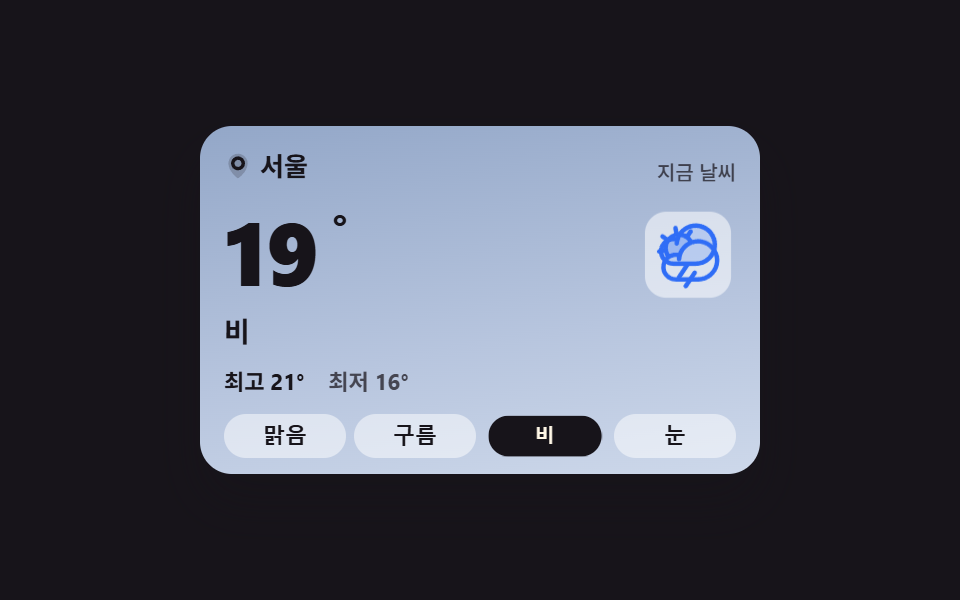
01条件を変えると空色も文面も一緒に変わる現在のカード
晴れ・曇り・雨・雪の四条件から選ぶと、カードの空色が二枚のうち一枚へカットで切り替わり、温度・状態の文・最高最低がひとそろいで入れ替わります。
使いどころダッシュボード上部の天気まとめ、旅行・屋外イベントページ
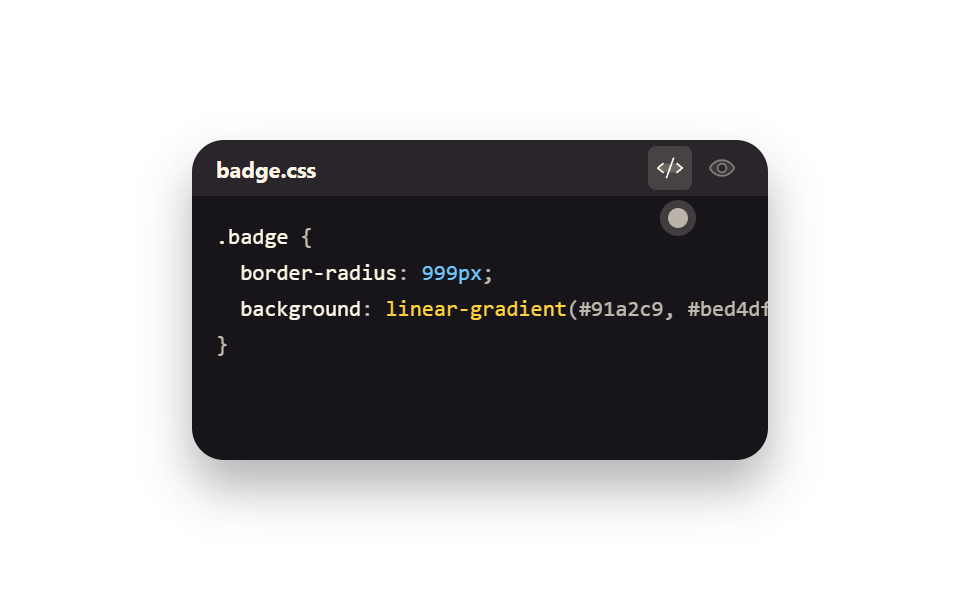
opacitytransitionaria-pressed
<main class="stage stage--ink">
  <section class="wc is-demo" id="wc" aria-label="現在の天気カード">
    <span class="wc__sky wc__sky--a" aria-hidden="true"></span>
    <span class="wc__sky wc__sky--b" aria-hidden="true"></span>
    <div class="wc__body">
      <header class="wc__head">
        <p class="wc__loc"><svg viewBox="0 0 256 256" width="14" height="14" fill="currentColor" aria-hidden="true"><path d="M128,16a88,88,0,0,0-88,88c0,75.3,80,132.17,83.41,134.55a8,8,0,0,0,9.18,0C136,236.17,216,179.3,216,104A88,88,0,0,0,128,16Z" opacity="0.2"/><path d="M128,40a64,64,0,1,0,64,64A64.07,64.07,0,0,0,128,40Zm0,96a32,32,0,1,1,32-32A32,32,0,0,1,128,136Z"/></svg>ソウル</p>
        <p class="wc__label">今の天気</p>
      </header>
      <div class="wc__now">
        <p class="wc__temp">
          <span class="wc__swap"><span class="wc__v">24</span><span class="wc__alt" aria-hidden="true">19</span></span><span class="wc__deg">°</span>
        </p>
        <span class="wc__art" aria-hidden="true">
          <span class="wc__glyph wc__glyph--sunny"><svg viewBox="0 0 256 256" width="40" height="40" fill="currentColor"><path d="M184,128a56,56,0,1,1-56-56A56,56,0,0,1,184,128Z" opacity="0.2"/><path d="M120,40V16a8,8,0,0,1,16,0V40a8,8,0,0,1-16,0Zm72,88a64,64,0,1,1-64-64A64.07,64.07,0,0,1,192,128Zm-16,0a48,48,0,1,0-48,48A48.05,48.05,0,0,0,176,128ZM58.34,69.66A8,8,0,0,0,69.66,58.34l-16-16A8,8,0,0,0,42.34,53.66Zm0,116.68-16,16a8,8,0,0,0,11.32,11.32l16-16a8,8,0,0,0-11.32-11.32ZM192,72a8,8,0,0,0,5.66-2.34l16-16a8,8,0,0,0-11.32-11.32l-16,16A8,8,0,0,0,192,72Zm5.66,114.34a8,8,0,0,0-11.32,11.32l16,16a8,8,0,0,0,11.32-11.32ZM48,128a8,8,0,0,0-8-8H16a8,8,0,0,0,0,16H40A8,8,0,0,0,48,128Zm80,80a8,8,0,0,0-8,8v24a8,8,0,0,0,16,0V216A8,8,0,0,0,128,208Zm112-88H216a8,8,0,0,0,0,16h24a8,8,0,0,0,0-16Z"/></svg></span>
          <span class="wc__glyph wc__glyph--cloudy"><svg viewBox="0 0 256 256" width="40" height="40" fill="currentColor"><path d="M139.84,84.41v0a68.22,68.22,0,0,0-41.65,46v-.11a44.08,44.08,0,0,0-38.54,5h0a48,48,0,1,1,80.19-50.94Z" opacity="0.2"/><path d="M164,72a76.2,76.2,0,0,0-20.26,2.73,55.63,55.63,0,0,0-9.41-11.54l9.51-13.57a8,8,0,1,0-13.11-9.18L121.22,54A55.9,55.9,0,0,0,96,48c-.58,0-1.16,0-1.74,0L91.37,31.71a8,8,0,1,0-15.75,2.77L78.5,50.82A56.1,56.1,0,0,0,55.23,65.67L41.61,56.14a8,8,0,1,0-9.17,13.11L46,78.77A55.55,55.55,0,0,0,40,104c0,.57,0,1.15,0,1.72L23.71,108.6a8,8,0,0,0,1.38,15.88,8.24,8.24,0,0,0,1.39-.12l16.32-2.88a55.74,55.74,0,0,0,5.86,12.42A52,52,0,0,0,84,224h80a76,76,0,0,0,0-152ZM56,104a40,40,0,0,1,72.54-23.24,76.26,76.26,0,0,0-35.62,40,52.14,52.14,0,0,0-31,4.17A40,40,0,0,1,56,104ZM164,208H84a36,36,0,1,1,4.78-71.69c-.37,2.37-.63,4.79-.77,7.23a8,8,0,0,0,16,.92,58.91,58.91,0,0,1,1.88-11.81c0-.16.09-.32.12-.48A60.06,60.06,0,1,1,164,208Z"/></svg></span>
          <span class="wc__glyph wc__glyph--rainy"><svg viewBox="0 0 256 256" width="40" height="40" fill="currentColor"><path d="M224,92a68,68,0,0,1-68,68H76A44,44,0,1,1,90.2,74.34v.11A68.06,68.06,0,0,1,224,92Z" opacity="0.2"/><path d="M158.66,196.44l-32,48a8,8,0,1,1-13.32-8.88l32-48a8,8,0,0,1,13.32,8.88ZM232,92a76.08,76.08,0,0,1-76,76H132.28l-29.62,44.44a8,8,0,1,1-13.32-8.88L113.05,168H76A52,52,0,1,1,76,64a53.26,53.26,0,0,1,8.92.76A76.08,76.08,0,0,1,232,92Zm-16,0A60.06,60.06,0,0,0,96,88.46a8,8,0,0,1-16-.92q.21-3.66.77-7.23A38.11,38.11,0,0,0,76,80a36,36,0,0,0,0,72h80A60.07,60.07,0,0,0,216,92Z"/></svg></span>
          <span class="wc__glyph wc__glyph--snowy"><svg viewBox="0 0 256 256" width="40" height="40" fill="currentColor"><path d="M220,128a92,92,0,1,1-92-92A92.1,92.1,0,0,1,220,128Z" opacity="0.2"/><path d="M223.77,150.09a8,8,0,0,1-5.86,9.68l-24.64,6,6.46,24.11a8,8,0,0,1-5.66,9.8A8.25,8.25,0,0,1,192,200a8,8,0,0,1-7.72-5.93l-7.72-28.8L136,141.86v46.83l21.66,21.65a8,8,0,0,1-11.32,11.32L128,203.31l-18.34,18.35a8,8,0,0,1-11.32-11.32L120,188.69V141.86L79.45,165.27l-7.72,28.8A8,8,0,0,1,64,200a8.25,8.25,0,0,1-2.08-.27,8,8,0,0,1-5.66-9.8l6.46-24.11-24.64-6a8,8,0,0,1,3.82-15.54l29.45,7.23L112,128,71.36,104.54l-29.45,7.23A7.85,7.85,0,0,1,40,112a8,8,0,0,1-1.91-15.77l24.64-6L56.27,66.07a8,8,0,0,1,15.46-4.14l7.72,28.8L120,114.14V67.31L98.34,45.66a8,8,0,0,1,11.32-11.32L128,52.69l18.34-18.35a8,8,0,0,1,11.32,11.32L136,67.31v46.83l40.55-23.41,7.72-28.8a8,8,0,0,1,15.46,4.14l-6.46,24.11,24.64,6A8,8,0,0,1,216,112a7.85,7.85,0,0,1-1.91-.23l-29.45-7.23L144,128l40.64,23.46,29.45-7.23A8,8,0,0,1,223.77,150.09Z"/></svg></span>
        </span>
        <p class="wc__word wc__swap"><span class="wc__v">晴れ</span><span class="wc__alt" aria-hidden="true">雨</span></p>
      </div>
      <p class="wc__range">
        <span class="wc__hi">最高 <span class="wc__swap"><span class="wc__v">27</span><span class="wc__alt" aria-hidden="true">21</span></span>°</span>
        <span class="wc__lo">最低 <span class="wc__swap"><span class="wc__v">18</span><span class="wc__alt" aria-hidden="true">16</span></span>°</span>
      </p>
      <div class="wc__conds" role="group" aria-label="空の状態を選ぶ">
        <button class="wc__c is-on" type="button" data-cond="sunny" aria-pressed="true">晴れ</button>
        <button class="wc__c" type="button" data-cond="cloudy" aria-pressed="false">曇り</button>
        <button class="wc__c" type="button" data-cond="rainy" aria-pressed="false">雨</button>
        <button class="wc__c" type="button" data-cond="snowy" aria-pressed="false">雪</button>
      </div>
    </div>
  </section>
</main>@use "../../../../site/static/demo-tokens" as *;
// 하늘 상태를 고르면 카드 전체 — 하늘 배경·아이콘·온도·최고최저 — 가 한 세트로 맞바뀐다.
// 상태 교체는 steps(1, end) 컷: 크로스페이드로 겹치면 대표 이미지에 두 하늘이 반투명하게 겹친다(237 실측).
// 아이콘이 솟았다 내려앉는 pop 만 transform — 컷만으로는 움직인 프레임이 모자란다(252 실측).
$duration: $dur-loop;
$easing: $ease-spring;
$color: $subject-blue;
@include stage($stage-ink);
.wc {
position: relative;
box-sizing: border-box;
width: min(280px, 92vw);
overflow: hidden;
border-radius: $r-card;
color: $subject-ink;
box-shadow: $shadow-raised;
}
.wc * { box-sizing: border-box; }
// 두 하늘 겹 — 맑음(a)과 비(b). 기본은 a.
.wc__sky {
position: absolute;
inset: 0;
pointer-events: none;
}
.wc__sky--a { background: linear-gradient(170deg, #bfe3ff 0%, #dcefff 46%, #ffe9b0 100%); }
.wc__sky--b { background: linear-gradient(170deg, #93a7c8 0%, #b7c5de 60%, #cdd8ea 100%); opacity: 0; }
.wc__body {
position: relative;
display: grid;
gap: $sp-2;
padding: $sp-3 $sp-3 $sp-2;
}
.wc__head {
display: flex;
align-items: baseline;
justify-content: space-between;
gap: $sp-2;
}
.wc__loc {
display: inline-flex;
align-items: center;
gap: $sp-1;
margin: 0;
font-size: 13px;
font-weight: 700;
line-height: 1.3;
}
.wc__label {
margin: 0;
font-size: 10px;
font-weight: 500;
line-height: 1.3;
color: rgba($subject-ink, .72);
}
.wc__now {
display: grid;
grid-template-columns: 1fr auto;
align-items: center;
gap: $sp-2;
}
.wc__temp {
display: flex;
align-items: flex-start;
margin: 0;
font-size: 44px;
font-weight: 800;
line-height: 1;
font-variant-numeric: tabular-nums;
}
.wc__deg { font-size: 22px; font-weight: 700; }
.wc__word {
grid-column: 1 / -1;
margin: 0;
font-size: 14px;
font-weight: 700;
line-height: 1.3;
}
// 아이콘 네 겹 — 상태 클래스가 한 개만 보이게 한다
.wc__art {
position: relative;
display: grid;
place-items: center;
width: 48px;
height: 48px;
border-radius: $r-control;
background: rgba(255, 255, 255, .55);
}
.wc__glyph {
grid-area: 1 / 1;
display: grid;
place-items: center;
color: $subject-blue;
transition: none;
}
.wc__glyph--sunny { color: #ba9f72; }
.wc__glyph--rainy { opacity: 0; }
.wc__glyph--snowy { opacity: 0; color: #4a89c9; }
.wc.is-cloudy .wc__glyph--sunny,
.wc.is-rainy .wc__glyph--sunny,
.wc.is-snowy .wc__glyph--sunny { opacity: 0; }
.wc.is-cloudy .wc__glyph--cloudy { opacity: 1; }
.wc.is-rainy .wc__glyph--rainy { opacity: 1; }
.wc.is-snowy .wc__glyph--snowy { opacity: 1; }
.wc.is-cloudy .wc__sky--a,
.wc.is-rainy .wc__sky--a,
.wc.is-snowy .wc__sky--a { opacity: 0; }
.wc.is-cloudy .wc__sky--b,
.wc.is-rainy .wc__sky--b,
.wc.is-snowy .wc__sky--b { opacity: 1; }
// 실제 클릭: 아이콘이 한 번 솟았다 내려앉는다
@keyframes wc-pop {
0% { transform: translateY(3px) scale(.88); }
55% { transform: translateY(-3px) scale(1.04); }
100% { transform: translateY(0) scale(1); }
}
.wc__art.is-pop { animation-name: wc-pop; animation-duration: $dur-quick; animation-timing-function: $easing; animation-iteration-count: 1; }
.wc__range {
display: flex;
gap: $sp-3;
margin: 0;
font-size: 11px;
font-weight: 700;
line-height: 1.4;
font-variant-numeric: tabular-nums;
}
.wc__lo { color: rgba($subject-ink, .72); }
// 겹쳐 둔 두 번째 값 — 미리보기 루프에서만 보인다
.wc__swap { position: relative; display: inline-block; }
.wc__alt {
position: absolute;
inset: 0;
opacity: 0;
}
.wc__conds {
display: grid;
grid-template-columns: repeat(4, 1fr);
gap: $sp-1;
}
.wc__c {
padding: $sp-1 0;
border: 0;
border-radius: $r-control;
background: rgba(255, 255, 255, .5);
color: $subject-ink;
font-size: 11px;
font-weight: 700;
line-height: 1.3;
cursor: pointer;
&:focus-visible { outline: 2px solid $subject-blue; outline-offset: 2px; }
&.is-on { background: $subject-ink; color: $subject-cream; }
}
// ── 격자 미리보기 루프 (2초) ──
// 0~44% 맑음 → 45% 컷으로 비(아이콘 pop 함께) → 88% 맑음 복귀(90% 안)
@keyframes wc-a { 0%, 44% { opacity: 1; } 45%, 87% { opacity: 0; } 88%, 100% { opacity: 1; } }
@keyframes wc-b { 0%, 44% { opacity: 0; } 45%, 87% { opacity: 1; } 88%, 100% { opacity: 0; } }
@keyframes wc-va { 0%, 44% { opacity: 1; } 45%, 87% { opacity: 0; } 88%, 100% { opacity: 1; } }
@keyframes wc-vb { 0%, 44% { opacity: 0; } 45%, 87% { opacity: 1; } 88%, 100% { opacity: 0; } }
@keyframes wc-poploop {
0%, 42% { transform: translateY(0) scale(1); }
45% { transform: translateY(3px) scale(.88); }
58% { transform: translateY(-3px) scale(1.04); }
70%, 85% { transform: translateY(0) scale(1); }
88% { transform: translateY(3px) scale(.88); }
97%, 100% { transform: translateY(0) scale(1); }
}
@keyframes wc-press {
0%, 41% { transform: scale(1); }
45% { transform: scale(.9); }
57%, 100% { transform: scale(1); }
}
// 루프에서는 고른 단추의 강조도 상태와 함께 맞바뀐다 — 컷으로
@keyframes wc-on-a {
0%, 44% { background-color: $subject-ink; color: $subject-cream; }
45%, 87% { background-color: rgba(255, 255, 255, .5); color: $subject-ink; }
88%, 100% { background-color: $subject-ink; color: $subject-cream; }
}
@keyframes wc-on-b {
0%, 44% { background-color: rgba(255, 255, 255, .5); color: $subject-ink; }
45%, 87% { background-color: $subject-ink; color: $subject-cream; }
88%, 100% { background-color: rgba(255, 255, 255, .5); color: $subject-ink; }
}
.wc.is-demo {
.wc__sky--a { animation-name: wc-a; }
.wc__sky--b { animation-name: wc-b; }
.wc__glyph--sunny { animation-name: wc-a; }
.wc__glyph--rainy { animation-name: wc-b; }
.wc__sky--a, .wc__sky--b,
.wc__glyph--sunny, .wc__glyph--rainy {
animation-duration: $duration;
animation-timing-function: steps(1, end);
animation-iteration-count: infinite;
animation-fill-mode: backwards;
}
.wc__swap .wc__v { animation-name: wc-va; }
.wc__swap .wc__alt { animation-name: wc-vb; }
.wc__swap .wc__v, .wc__swap .wc__alt {
animation-duration: $duration;
animation-timing-function: steps(1, end);
animation-iteration-count: infinite;
animation-fill-mode: backwards;
}
.wc__art { animation-name: wc-poploop; animation-duration: $duration; animation-timing-function: $ease-out; animation-iteration-count: infinite; animation-fill-mode: backwards; }
.wc__c:nth-child(3) { animation-name: wc-press, wc-on-b; }
.wc__c:nth-child(1) { animation-name: wc-on-a; }
.wc__c:nth-child(1), .wc__c:nth-child(3) {
animation-duration: $duration, $duration;
animation-timing-function: $easing, steps(1, end);
animation-iteration-count: infinite, infinite;
animation-fill-mode: backwards, backwards;
}
}
@media (max-width: 340px) {
.wc__body { padding: $sp-2 $sp-2 $sp-1; }
.wc__temp { font-size: 36px; }
.wc__art { width: 40px; height: 40px; }
.wc__art svg { width: 32px; height: 32px; }
}
@media (prefers-reduced-motion: reduce) {
.wc.is-demo .wc__sky--a, .wc.is-demo .wc__sky--b,
.wc.is-demo .wc__glyph, .wc.is-demo .wc__swap .wc__v, .wc.is-demo .wc__swap .wc__alt,
.wc.is-demo .wc__art, .wc.is-demo .wc__c {
animation: none !important;
transform: none !important;
}
.wc.is-demo .wc__sky--a, .wc.is-demo .wc__glyph--sunny,
.wc.is-demo .wc__swap .wc__v { opacity: 1 !important; }
.wc.is-demo .wc__sky--b, .wc.is-demo .wc__glyph--rainy,
.wc.is-demo .wc__swap .wc__alt { opacity: 0 !important; }
.wc__art.is-pop { animation: none !important; }
}html, body {
margin: 0;
overflow: hidden;
}
.stage {
box-sizing: border-box;
min-height: 100vh;
display: grid;
place-items: center;
margin: 0;
background: #17141a;
font-family: -apple-system, "Segoe UI", "Noto Sans KR", sans-serif;
padding: clamp(8px, 4vw, 24px);
}
.wc {
position: relative;
box-sizing: border-box;
width: min(280px, 92vw);
overflow: hidden;
border-radius: 16px;
color: #17141a;
box-shadow: 0 14px 24px rgba(23, 20, 26, 0.32);
}
.wc * {
box-sizing: border-box;
}
.wc__sky {
position: absolute;
inset: 0;
pointer-events: none;
}
.wc__sky--a {
background: linear-gradient(170deg, #bfe3ff 0%, #dcefff 46%, #ffe9b0 100%);
}
.wc__sky--b {
background: linear-gradient(170deg, #93a7c8 0%, #b7c5de 60%, #cdd8ea 100%);
opacity: 0;
}
.wc__body {
position: relative;
display: grid;
gap: 8px;
padding: 12px 12px 8px;
}
.wc__head {
display: flex;
align-items: baseline;
justify-content: space-between;
gap: 8px;
}
.wc__loc {
display: inline-flex;
align-items: center;
gap: 4px;
margin: 0;
font-size: 13px;
font-weight: 700;
line-height: 1.3;
}
.wc__label {
margin: 0;
font-size: 10px;
font-weight: 500;
line-height: 1.3;
color: rgba(23, 20, 26, 0.72);
}
.wc__now {
display: grid;
grid-template-columns: 1fr auto;
align-items: center;
gap: 8px;
}
.wc__temp {
display: flex;
align-items: flex-start;
margin: 0;
font-size: 44px;
font-weight: 800;
line-height: 1;
font-variant-numeric: tabular-nums;
}
.wc__deg {
font-size: 22px;
font-weight: 700;
}
.wc__word {
grid-column: 1/-1;
margin: 0;
font-size: 14px;
font-weight: 700;
line-height: 1.3;
}
.wc__art {
position: relative;
display: grid;
place-items: center;
width: 48px;
height: 48px;
border-radius: 12px;
background: rgba(255, 255, 255, 0.55);
}
.wc__glyph {
grid-area: 1/1;
display: grid;
place-items: center;
color: #2f6df6;
transition: none;
}
.wc__glyph--sunny {
color: #ba9f72;
}
.wc__glyph--rainy {
opacity: 0;
}
.wc__glyph--snowy {
opacity: 0;
color: #4a89c9;
}
.wc.is-cloudy .wc__glyph--sunny,
.wc.is-rainy .wc__glyph--sunny,
.wc.is-snowy .wc__glyph--sunny {
opacity: 0;
}
.wc.is-cloudy .wc__glyph--cloudy {
opacity: 1;
}
.wc.is-rainy .wc__glyph--rainy {
opacity: 1;
}
.wc.is-snowy .wc__glyph--snowy {
opacity: 1;
}
.wc.is-cloudy .wc__sky--a,
.wc.is-rainy .wc__sky--a,
.wc.is-snowy .wc__sky--a {
opacity: 0;
}
.wc.is-cloudy .wc__sky--b,
.wc.is-rainy .wc__sky--b,
.wc.is-snowy .wc__sky--b {
opacity: 1;
}
@keyframes wc-pop {
0% {
transform: translateY(3px) scale(0.88);
}
55% {
transform: translateY(-3px) scale(1.04);
}
100% {
transform: translateY(0) scale(1);
}
}
.wc__art.is-pop {
animation-name: wc-pop;
animation-duration: 220ms;
animation-timing-function: cubic-bezier(0.2, 0.8, 0.2, 1);
animation-iteration-count: 1;
}
.wc__range {
display: flex;
gap: 12px;
margin: 0;
font-size: 11px;
font-weight: 700;
line-height: 1.4;
font-variant-numeric: tabular-nums;
}
.wc__lo {
color: rgba(23, 20, 26, 0.72);
}
.wc__swap {
position: relative;
display: inline-block;
}
.wc__alt {
position: absolute;
inset: 0;
opacity: 0;
}
.wc__conds {
display: grid;
grid-template-columns: repeat(4, 1fr);
gap: 4px;
}
.wc__c {
padding: 4px 0;
border: 0;
border-radius: 12px;
background: rgba(255, 255, 255, 0.5);
color: #17141a;
font-size: 11px;
font-weight: 700;
line-height: 1.3;
cursor: pointer;
}
.wc__c:focus-visible {
outline: 2px solid #2f6df6;
outline-offset: 2px;
}
.wc__c.is-on {
background: #17141a;
color: #fff7e6;
}
@keyframes wc-a {
0%, 44% {
opacity: 1;
}
45%, 87% {
opacity: 0;
}
88%, 100% {
opacity: 1;
}
}
@keyframes wc-b {
0%, 44% {
opacity: 0;
}
45%, 87% {
opacity: 1;
}
88%, 100% {
opacity: 0;
}
}
@keyframes wc-va {
0%, 44% {
opacity: 1;
}
45%, 87% {
opacity: 0;
}
88%, 100% {
opacity: 1;
}
}
@keyframes wc-vb {
0%, 44% {
opacity: 0;
}
45%, 87% {
opacity: 1;
}
88%, 100% {
opacity: 0;
}
}
@keyframes wc-poploop {
0%, 42% {
transform: translateY(0) scale(1);
}
45% {
transform: translateY(3px) scale(0.88);
}
58% {
transform: translateY(-3px) scale(1.04);
}
70%, 85% {
transform: translateY(0) scale(1);
}
88% {
transform: translateY(3px) scale(0.88);
}
97%, 100% {
transform: translateY(0) scale(1);
}
}
@keyframes wc-press {
0%, 41% {
transform: scale(1);
}
45% {
transform: scale(0.9);
}
57%, 100% {
transform: scale(1);
}
}
@keyframes wc-on-a {
0%, 44% {
background-color: #17141a;
color: #fff7e6;
}
45%, 87% {
background-color: rgba(255, 255, 255, 0.5);
color: #17141a;
}
88%, 100% {
background-color: #17141a;
color: #fff7e6;
}
}
@keyframes wc-on-b {
0%, 44% {
background-color: rgba(255, 255, 255, 0.5);
color: #17141a;
}
45%, 87% {
background-color: #17141a;
color: #fff7e6;
}
88%, 100% {
background-color: rgba(255, 255, 255, 0.5);
color: #17141a;
}
}
.wc.is-demo .wc__sky--a {
animation-name: wc-a;
}
.wc.is-demo .wc__sky--b {
animation-name: wc-b;
}
.wc.is-demo .wc__glyph--sunny {
animation-name: wc-a;
}
.wc.is-demo .wc__glyph--rainy {
animation-name: wc-b;
}
.wc.is-demo .wc__sky--a, .wc.is-demo .wc__sky--b,
.wc.is-demo .wc__glyph--sunny, .wc.is-demo .wc__glyph--rainy {
animation-duration: 2s;
animation-timing-function: steps(1, end);
animation-iteration-count: infinite;
animation-fill-mode: backwards;
}
.wc.is-demo .wc__swap .wc__v {
animation-name: wc-va;
}
.wc.is-demo .wc__swap .wc__alt {
animation-name: wc-vb;
}
.wc.is-demo .wc__swap .wc__v, .wc.is-demo .wc__swap .wc__alt {
animation-duration: 2s;
animation-timing-function: steps(1, end);
animation-iteration-count: infinite;
animation-fill-mode: backwards;
}
.wc.is-demo .wc__art {
animation-name: wc-poploop;
animation-duration: 2s;
animation-timing-function: ease-out;
animation-iteration-count: infinite;
animation-fill-mode: backwards;
}
.wc.is-demo .wc__c:nth-child(3) {
animation-name: wc-press, wc-on-b;
}
.wc.is-demo .wc__c:nth-child(1) {
animation-name: wc-on-a;
}
.wc.is-demo .wc__c:nth-child(1), .wc.is-demo .wc__c:nth-child(3) {
animation-duration: 2s, 2s;
animation-timing-function: cubic-bezier(0.2, 0.8, 0.2, 1), steps(1, end);
animation-iteration-count: infinite, infinite;
animation-fill-mode: backwards, backwards;
}
@media (max-width: 340px) {
.wc__body {
padding: 8px 8px 4px;
}
.wc__temp {
font-size: 36px;
}
.wc__art {
width: 40px;
height: 40px;
}
.wc__art svg {
width: 32px;
height: 32px;
}
}
@media (prefers-reduced-motion: reduce) {
.wc.is-demo .wc__sky--a, .wc.is-demo .wc__sky--b,
.wc.is-demo .wc__glyph, .wc.is-demo .wc__swap .wc__v, .wc.is-demo .wc__swap .wc__alt,
.wc.is-demo .wc__art, .wc.is-demo .wc__c {
animation: none !important;
transform: none !important;
}
.wc.is-demo .wc__sky--a, .wc.is-demo .wc__glyph--sunny,
.wc.is-demo .wc__swap .wc__v {
opacity: 1 !important;
}
.wc.is-demo .wc__sky--b, .wc.is-demo .wc__glyph--rainy,
.wc.is-demo .wc__swap .wc__alt {
opacity: 0 !important;
}
.wc__art.is-pop {
animation: none !important;
}
}// 하늘 상태를 고르면 카드 전체(하늘·아이콘·온도·최고최저)가 한 세트로 맞바뀐다.
// 값은 데이터 속성에 들어 있고, 화면 글자는 언어팩이 바꾼 텍스트 노드만 고친다.
var wcRoot = document.getElementById('wc');
// 상태 문구도 한 세트다 — 언어팩 사본이 이 한국어 글자를 통째로 바꾼다(04 의 drDetails 와 같은 방식)
var wcData = {
sunny: { temp: 24, hi: 27, lo: 18, word: '晴れ' },
cloudy: { temp: 21, hi: 24, lo: 17, word: '曇り' },
rainy: { temp: 19, hi: 21, lo: 16, word: '雨' },
snowy: { temp: -2, hi: 1, lo: -5, word: '雪' }
};
var wcSwaps = [
{ box: '.wc__temp .wc__swap', key: 'temp' },
{ box: '.wc__word', key: 'word' },
{ box: '.wc__hi .wc__swap', key: 'hi' },
{ box: '.wc__lo .wc__swap', key: 'lo' }
];
function wcApply(cond) {
wcRoot.classList.remove('is-sunny', 'is-cloudy', 'is-rainy', 'is-snowy');
wcRoot.classList.add('is-' + cond);
for (var i = 0; i < wcSwaps.length; i++) {
var box = wcRoot.querySelector(wcSwaps[i].box);
box.querySelector('.wc__v').textContent = String(wcData[cond][wcSwaps[i].key]);
}
var btns = wcRoot.querySelectorAll('.wc__c');
for (var j = 0; j < btns.length; j++) {
var on = btns[j].getAttribute('data-cond') === cond;
btns[j].setAttribute('aria-pressed', on ? 'true' : 'false');
btns[j].classList.toggle('is-on', on);
}
// 아이콘이 한 번 솟았다 내려앉는다 — 상태가 바뀌었다는 피드백
var art = wcRoot.querySelector('.wc__art');
art.classList.remove('is-pop');
void art.offsetWidth;
art.classList.add('is-pop');
}
wcRoot.addEventListener('click', function (e) {
var btn = e.target.closest('.wc__c');
if (!btn) return;
wcRoot.classList.remove('is-demo');
wcApply(btn.getAttribute('data-cond'));
});import { useState } from "react";
import type { CSSProperties } from "react";
import styles from "./WeatherCurrentCard.module.scss";
// vanilla 판(run/281/demo/01-weather-current-card/index.html) 의 React 포트.
// 하늘 상태를 고르면 카드 전체(하늘·아이콘·온도·최고최저)가 한 세트로 맞바뀐다.
export type WcCondition = {
id: string;
/** 단추에 쓰는 낱말 — 언어팩이 통째로 바꾼다 */
label: string;
/** 큰 온도 아래 붙는 하늘 낱말 */
word: string;
temp: number;
hi: number;
lo: number;
};
export type WeatherCurrentCardProps = {
location?: string;
label?: string;
hiLabel?: string;
loLabel?: string;
groupLabel?: string;
condsLabel?: string;
conditions?: WcCondition[];
/** 격자 미리보기 루프가 컷으로 맞바꾸는 두 번째 하늘 상태 */
loopTo?: string;
/** 격자 미리보기 2초 자동 루프. 사람이 손대면 꺼진다 */
demo?: boolean;
duration?: number;
easing?: string;
color?: string;
};
type Vars = CSSProperties & { "--duration"?: string; "--easing"?: string; "--color"?: string };
const DEFAULT_CONDITIONS: WcCondition[] = [
{ id: "sunny", label: "맑음", word: "맑음", temp: 24, hi: 27, lo: 18 },
{ id: "cloudy", label: "구름", word: "구름", temp: 21, hi: 24, lo: 17 },
{ id: "rainy", label: "비", word: "비", temp: 19, hi: 21, lo: 16 },
{ id: "snowy", label: "눈", word: "눈", temp: -2, hi: 1, lo: -5 },
];
function PinIcon() {
return (
<svg viewBox="0 0 256 256" width="14" height="14" fill="currentColor" aria-hidden="true"><path d="M128,16a88,88,0,0,0-88,88c0,75.3,80,132.17,83.41,134.55a8,8,0,0,0,9.18,0C136,236.17,216,179.3,216,104A88,88,0,0,0,128,16Z" opacity="0.2"/><path d="M128,40a64,64,0,1,0,64,64A64.07,64.07,0,0,0,128,40Zm0,96a32,32,0,1,1,32-32A32,32,0,0,1,128,136Z"/></svg>
);
}
function SunGlyph() {
return (
<svg viewBox="0 0 256 256" width="40" height="40" fill="currentColor"><path d="M184,128a56,56,0,1,1-56-56A56,56,0,0,1,184,128Z" opacity="0.2"/><path d="M120,40V16a8,8,0,0,1,16,0V40a8,8,0,0,1-16,0Zm72,88a64,64,0,1,1-64-64A64.07,64.07,0,0,1,192,128Zm-16,0a48,48,0,1,0-48,48A48.05,48.05,0,0,0,176,128ZM58.34,69.66A8,8,0,0,0,69.66,58.34l-16-16A8,8,0,0,0,42.34,53.66Zm0,116.68-16,16a8,8,0,0,0,11.32,11.32l16-16a8,8,0,0,0-11.32-11.32ZM192,72a8,8,0,0,0,5.66-2.34l16-16a8,8,0,0,0-11.32-11.32l-16,16A8,8,0,0,0,192,72Zm5.66,114.34a8,8,0,0,0-11.32,11.32l16,16a8,8,0,0,0,11.32-11.32ZM48,128a8,8,0,0,0-8-8H16a8,8,0,0,0,0,16H40A8,8,0,0,0,48,128Zm80,80a8,8,0,0,0-8,8v24a8,8,0,0,0,16,0V216A8,8,0,0,0,128,208Zm112-88H216a8,8,0,0,0,0,16h24a8,8,0,0,0,0-16Z"/></svg>
);
}
function CloudGlyph() {
return (
<svg viewBox="0 0 256 256" width="40" height="40" fill="currentColor"><path d="M139.84,84.41v0a68.22,68.22,0,0,0-41.65,46v-.11a44.08,44.08,0,0,0-38.54,5h0a48,48,0,1,1,80.19-50.94Z" opacity="0.2"/><path d="M164,72a76.2,76.2,0,0,0-20.26,2.73,55.63,55.63,0,0,0-9.41-11.54l9.51-13.57a8,8,0,1,0-13.11-9.18L121.22,54A55.9,55.9,0,0,0,96,48c-.58,0-1.16,0-1.74,0L91.37,31.71a8,8,0,1,0-15.75,2.77L78.5,50.82A56.1,56.1,0,0,0,55.23,65.67L41.61,56.14a8,8,0,1,0-9.17,13.11L46,78.77A55.55,55.55,0,0,0,40,104c0,.57,0,1.15,0,1.72L23.71,108.6a8,8,0,0,0,1.38,15.88,8.24,8.24,0,0,0,1.39-.12l16.32-2.88a55.74,55.74,0,0,0,5.86,12.42A52,52,0,0,0,84,224h80a76,76,0,0,0,0-152ZM56,104a40,40,0,0,1,72.54-23.24,76.26,76.26,0,0,0-35.62,40,52.14,52.14,0,0,0-31,4.17A40,40,0,0,1,56,104ZM164,208H84a36,36,0,1,1,4.78-71.69c-.37,2.37-.63,4.79-.77,7.23a8,8,0,0,0,16,.92,58.91,58.91,0,0,1,1.88-11.81c0-.16.09-.32.12-.48A60.06,60.06,0,1,1,164,208Z"/></svg>
);
}
function RainGlyph() {
return (
<svg viewBox="0 0 256 256" width="40" height="40" fill="currentColor"><path d="M224,92a68,68,0,0,1-68,68H76A44,44,0,1,1,90.2,74.34v.11A68.06,68.06,0,0,1,224,92Z" opacity="0.2"/><path d="M158.66,196.44l-32,48a8,8,0,1,1-13.32-8.88l32-48a8,8,0,0,1,13.32,8.88ZM232,92a76.08,76.08,0,0,1-76,76H132.28l-29.62,44.44a8,8,0,1,1-13.32-8.88L113.05,168H76A52,52,0,1,1,76,64a53.26,53.26,0,0,1,8.92.76A76.08,76.08,0,0,1,232,92Zm-16,0A60.06,60.06,0,0,0,96,88.46a8,8,0,0,1-16-.92q.21-3.66.77-7.23A38.11,38.11,0,0,0,76,80a36,36,0,0,0,0,72h80A60.07,60.07,0,0,0,216,92Z"/></svg>
);
}
function SnowGlyph() {
return (
<svg viewBox="0 0 256 256" width="40" height="40" fill="currentColor"><path d="M220,128a92,92,0,1,1-92-92A92.1,92.1,0,0,1,220,128Z" opacity="0.2"/><path d="M223.77,150.09a8,8,0,0,1-5.86,9.68l-24.64,6,6.46,24.11a8,8,0,0,1-5.66,9.8A8.25,8.25,0,0,1,192,200a8,8,0,0,1-7.72-5.93l-7.72-28.8L136,141.86v46.83l21.66,21.65a8,8,0,0,1-11.32,11.32L128,203.31l-18.34,18.35a8,8,0,0,1-11.32-11.32L120,188.69V141.86L79.45,165.27l-7.72,28.8A8,8,0,0,1,64,200a8.25,8.25,0,0,1-2.08-.27,8,8,0,0,1-5.66-9.8l6.46-24.11-24.64-6a8,8,0,0,1,3.82-15.54l29.45,7.23L112,128,71.36,104.54l-29.45,7.23A7.85,7.85,0,0,1,40,112a8,8,0,0,1-1.91-15.77l24.64-6L56.27,66.07a8,8,0,0,1,15.46-4.14l7.72,28.8L120,114.14V67.31L98.34,45.66a8,8,0,0,1,11.32-11.32L128,52.69l18.34-18.35a8,8,0,0,1,11.32,11.32L136,67.31v46.83l40.55-23.41,7.72-28.8a8,8,0,0,1,15.46,4.14l-6.46,24.11,24.64,6A8,8,0,0,1,216,112a7.85,7.85,0,0,1-1.91-.23l-29.45-7.23L144,128l40.64,23.46,29.45-7.23A8,8,0,0,1,223.77,150.09Z"/></svg>
);
}
// 상태 클래스 — 바닐라의 .is-sunny … 를 모듈 클래스로
const STATE_CLASS: { [k: string]: string } = {
sunny: styles.isSunny,
cloudy: styles.isCloudy,
rainy: styles.isRainy,
snowy: styles.isSnowy,
};
export default function WeatherCurrentCard({
location = "서울",
label = "지금 날씨",
hiLabel = "최고",
loLabel = "최저",
groupLabel = "현재 날씨 카드",
condsLabel = "하늘 상태 고르기",
conditions = DEFAULT_CONDITIONS,
loopTo = "rainy",
demo = true,
duration = 2000,
easing = "cubic-bezier(.2,.8,.2,1)",
color = "#2f6df6",
}: WeatherCurrentCardProps) {
const [cond, setCond] = useState("sunny");
const [live, setLive] = useState(demo);
// 아이콘이 솟았다 내려앉는 pop 을 다시 튜닌다 — key 를 바꿔 한 번짜리 애니메이션을 처음부터 돌린다
const [popTick, setPopTick] = useState(0);
const vars: Vars = { "--duration": `${duration}ms`, "--easing": easing, "--color": color };
const cur = conditions.filter((c: WcCondition) => c.id === cond)[0];
const alt = conditions.filter((c: WcCondition) => c.id === loopTo)[0];
function pick(id: string): void {
setLive(false);
setCond(id);
setPopTick((n: number) => n + 1);
}
const cls = [styles.wc, live ? styles.isDemo : "", STATE_CLASS[cond] || ""].filter(Boolean).join(" ");
return (
<main className={styles.stage}>
<section className={cls} style={vars} aria-label={groupLabel}>
<span className={`${styles.sky} ${styles["sky--a"]}`} aria-hidden="true" />
<span className={`${styles.sky} ${styles["sky--b"]}`} aria-hidden="true" />
<div className={styles.body}>
<header className={styles.head}>
<p className={styles.loc}><PinIcon />{location}</p>
<p className={styles.label}>{label}</p>
</header>
<div className={styles.now}>
<p className={styles.temp}>
<span className={styles.swap}><span className={styles.v}>{cur.temp}</span><span className={styles.alt} aria-hidden="true">{alt.temp}</span></span>
<span className={styles.deg}>°</span>
</p>
<span className={[styles.art, popTick > 0 ? styles.isPop : ""].filter(Boolean).join(" ")} key={popTick} aria-hidden="true">
<span className={`${styles.glyph} ${styles["glyph--sunny"]}`}><SunGlyph /></span>
<span className={`${styles.glyph} ${styles["glyph--cloudy"]}`}><CloudGlyph /></span>
<span className={`${styles.glyph} ${styles["glyph--rainy"]}`}><RainGlyph /></span>
<span className={`${styles.glyph} ${styles["glyph--snowy"]}`}><SnowGlyph /></span>
</span>
<p className={`${styles.word} ${styles.swap}`}><span className={styles.v}>{cur.word}</span><span className={styles.alt} aria-hidden="true">{alt.word}</span></p>
</div>
<p className={styles.range}>
<span className={styles.hi}>{hiLabel} <span className={styles.swap}><span className={styles.v}>{cur.hi}</span><span className={styles.alt} aria-hidden="true">{alt.hi}</span></span>°</span>
<span className={styles.lo}>{loLabel} <span className={styles.swap}><span className={styles.v}>{cur.lo}</span><span className={styles.alt} aria-hidden="true">{alt.lo}</span></span>°</span>
</p>
<div className={styles.conds} role="group" aria-label={condsLabel}>
{conditions.map((c: WcCondition) => (
<button
key={c.id}
className={[styles.c, c.id === cond ? styles.isOn : ""].filter(Boolean).join(" ")}
type="button"
aria-pressed={c.id === cond ? "true" : "false"}
onClick={() => pick(c.id)}
>{c.label}</button>
))}
</div>
</div>
</section>
</main>
);
}01 条件を変えると空色も文面も一緒に変わる現在のカード — 計測 累積面積 33.206% · 動いたフレーム 11/23GODRICH オリジナル · SCSS と React は zip に同梱 · 天気 ウィジェット 9選 — 温度・時計・アイコンをコピペOK
このデモが属する記事
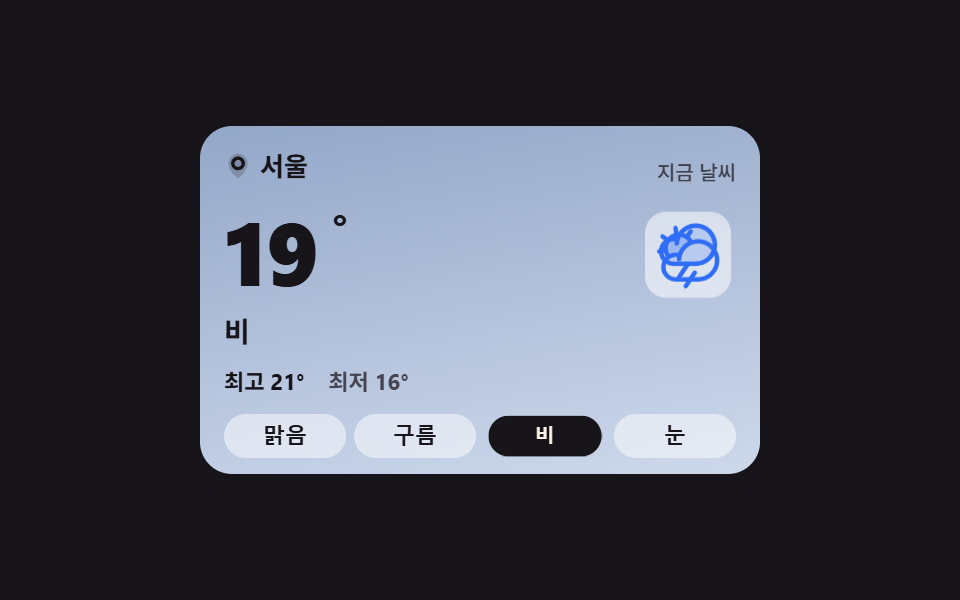 天気 ウィジェット 9選 — 温度・時計・アイコンをコピペOK天気 ウィジェットとは、今の空・温度・時刻を一枚の小さなカードにまとめてページへ貼る表示部品のことです。九つともHTML・SCSS・数行のJavaScriptだけで作ってあり、貼った場所でそのまま動くコピペOKの部品で、天気のAPIは一つも この記事のデモをすべて見る