08エラーの波線と吹き出し
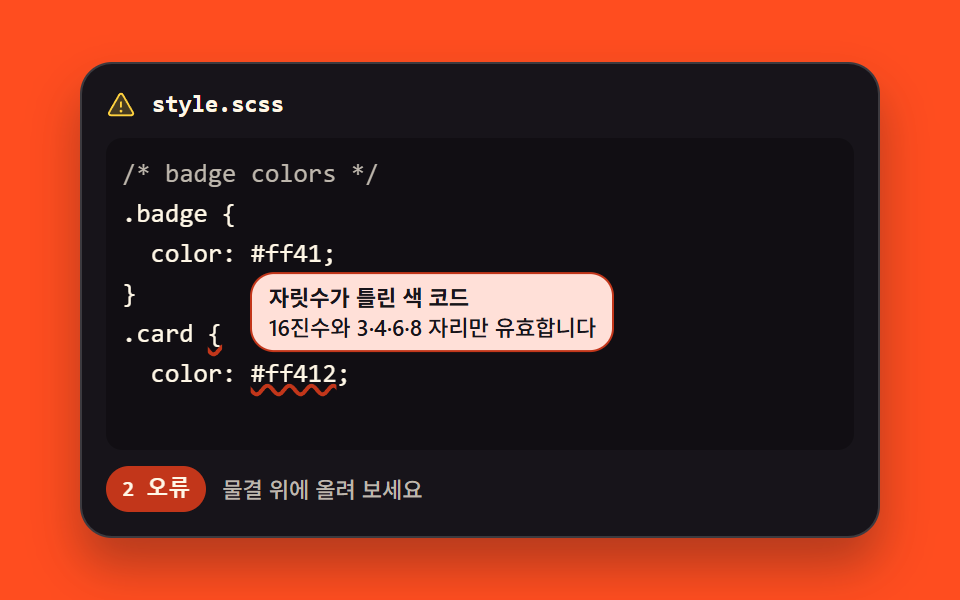
括弧が閉じていない、色コードの桁が違う — その位置に赤い波線が引かれ、重ねると理由が出ます。件数は下のバーに残ります。
使いどころ貼り付けたコードをその場で点検する欄
text-decoration-styletext-decoration-skip-inkaria-describedby
<main class="stage">
<div class="lint is-demo" id="lint">
  <div class="lint__bar">
    <span class="lint__ico" aria-hidden="true"><svg xmlns="http://www.w3.org/2000/svg" width="1em" height="1em" viewBox="0 0 256 256"><g fill="currentColor"><path d="M215.46 216H40.54c-12.62 0-20.54-13.21-14.41-23.91l87.46-151.87c6.3-11 22.52-11 28.82 0l87.46 151.87c6.13 10.7-1.79 23.91-14.41 23.91" opacity=".2"/><path d="M236.8 188.09L149.35 36.22a24.76 24.76 0 0 0-42.7 0L19.2 188.09a23.51 23.51 0 0 0 0 23.72A24.35 24.35 0 0 0 40.55 224h174.9a24.35 24.35 0 0 0 21.33-12.19a23.51 23.51 0 0 0 .02-23.72m-13.87 15.71a8.5 8.5 0 0 1-7.48 4.2H40.55a8.5 8.5 0 0 1-7.48-4.2a7.59 7.59 0 0 1 0-7.72l87.45-151.87a8.75 8.75 0 0 1 15 0l87.45 151.87a7.59 7.59 0 0 1-.04 7.72M120 144v-40a8 8 0 0 1 16 0v40a8 8 0 0 1-16 0m20 36a12 12 0 1 1-12-12a12 12 0 0 1 12 12"/></g></svg></span>
    <span class="lint__name">style.scss</span>
  </div>
  <div class="lint__wrap" id="wrap">
    <span class="lint__scan" aria-hidden="true"></span>
    <pre class="lint__hl" id="hl" aria-hidden="true"></pre>
    <div class="lint__tip" id="tip0" aria-hidden="true"></div>
    <div class="lint__tip" id="tip1" aria-hidden="true"></div>
    <textarea class="lint__ta" id="ta" wrap="off" spellcheck="false" autocomplete="off" aria-label="コード入力欄" aria-describedby="lintStatus">/* badge colors */
.badge {
  color: #ff41;
}
.card {
  color: #ff412;
</textarea>
  </div>
  <p class="lint__status" id="lintStatus" role="status">
    <span class="lint__chip" id="chip" data-n="2"><span class="lint__count" id="count">エラー 2件</span><span class="lint__countd" aria-hidden="true"><b>エラー 0件</b><b>エラー 1件</b><b>エラー 2件</b></span></span>
    <span class="lint__hint">波線に重ねて理由を見る</span>
  </p>
</div>
</main>@use "../../../../site/static/demo-tokens" as *;
// 오류 물결 밑줄과 툴팁 — 글자를 투명하게 만든 textarea 를 같은 자리·같은 서체의 pre 위에 얹는
// 기법(01 실시간 구문 강조와 같은 뼈대)에 간이 린트를 얹는다. 린트 규칙은 둘: 괄호 짝(스택)과
// 색 코드 자릿수(3·4·6·8 자리의 16진수만 유효 — 4자리 #ff41 은 알파 1바이트를 포함하는 유효한
// 표기고 5자리 #ff412 가 오류다).
// 오류 조각에는 text-decoration-style: wavy 물결을 깔고 text-decoration-skip-ink: none 으로
// 내려꽂이는 글자에서도 물결이 끊기지 않게 한다. wavy 밑줄 계열 지원률 — caniuse text-decoration
// 페이지 실측 2026-09-13: 전역 96.65%(부분지원 표기, wavy·style 값은 주요 브라우저 전부 사용 가능).
// 툴팁은 절대배치다 — 절대배치는 부모 높이에서 빠지지만 scrollHeight 에는 잡혀 320px 에서 BD9 가
// 깨지므로 오류 줄 "위"쪽에 띄워 래핑 상자 안에 두고, 가로는 JS 가 오른쪽 끝으로 묶는다.
// 접근성 경로는 툴팁(마우스·키보드 커서용)이 아니라 상태 줄이다 — textarea 의 aria-describedby 가
// 상태 줄을 가리켜 포커스할 때 오류 수를 읽어 준다.
// 격자 미리보기(.is-demo)는 스캔 줄이 내려가며 지나친 줄의 물결을 steps(1, end) 컷으로 켜고
// 툴팁 두 개가 차례로 뜬다. 정적 규칙을 먼저 쓰고 그 위에 루프를 덧씌웠다(254-06 함정 대비).
$duration: $dur-loop;
$easing: $ease-spring;
$color: $stage-yellow; // 스캔 줄·아이콘·캐럿 — 어두운 패널 위
$err: $error; // 물결 색 — 코드 면 위 굵은 장식선 기준으로 쓴다
$mono: ui-monospace, SFMono-Regular, "SF Mono", Consolas, "Liberation Mono", monospace;
$dim: #beb7ad;
$fs: clamp(11px, 3vw, 13px);
$lh: 20px;
@include stage($stage-orange);
// 에디터 패널은 어두운 면으로 깐다 — 오렌지 무대 위에 크림 작은 글자를 직접 얹으면 3.11:1 로
// AA 에 미달한다(blog-design 글자 대비 표). 글자는 전부 이 패널 위에 있다.
.lint {
--scan-y: #{6 * $lh};
display: flex; flex-direction: column; gap: $sp-2;
box-sizing: border-box; width: min(100%, 400px);
padding: $sp-3; border: 1px solid rgba(255, 255, 255, .16); border-radius: $r-card;
background: $stage-ink; box-shadow: $shadow-raised;
}
// ── 파일 이름 줄
.lint__bar { display: flex; align-items: center; gap: $sp-2; }
.lint__ico { display: grid; place-items: center; color: $color; font-size: 15px; }
.lint__name {
flex: 1 1 auto; color: $subject-cream;
font-family: $mono; font-weight: 700; font-size: 12px; line-height: 1.4;
}
// ── 두 겹이 겹치는 자리. 한 격자 칸에 pre 와 textarea 를 포갠다
.lint__wrap { position: relative; display: grid; height: $lh * 7 + $sp-4; }
.lint__wrap > pre, .lint__wrap > textarea { grid-area: 1 / 1; }
%layer {
box-sizing: border-box; margin: 0; padding: $sp-2;
border: 0; border-radius: $r-sm;
font-family: $mono; font-weight: 500; font-size: $fs; line-height: $lh;
letter-spacing: 0; tab-size: 2;
white-space: pre; overflow: auto; overscroll-behavior: contain;
}
.lint__hl {
@extend %layer;
position: relative; z-index: 1;
background: rgba(0, 0, 0, .28); color: $subject-cream;
pointer-events: none;
}
.lint__ln { display: block; }
.lint__ln--com { color: $dim; }
.lint__err {
// 물결 밑줄 — 글자색은 그대로 두고 장식만 덧입힌다
text-decoration-line: underline;
text-decoration-style: wavy;
text-decoration-color: $err;
text-decoration-thickness: 2px;
text-decoration-skip-ink: none;
}
// 글자는 투명하고 커서만 남긴다 — 색과 물결은 아래 pre 가 그린다
.lint__ta {
@extend %layer;
position: relative; z-index: 2;
background: transparent; color: transparent; caret-color: $color;
resize: none;
-webkit-text-fill-color: transparent;
}
.lint__ta::selection { background: rgba(255, 210, 63, .32); }
.lint__ta:focus-visible { outline: 2px solid $color; outline-offset: 2px; }
// 한 글자 폭 재는 실험칸 — 렌더 트리에 있어야 폭이 나오므로 visibility 로 감춘다
.lint__probe { position: absolute; visibility: hidden; white-space: pre; }
// 스캔 줄 — 미리보기에서만 쓴다(정적 경로 opacity 0). 코드 줄 뒤에 깔리게 z-index 를 낮춘다
.lint__scan {
position: absolute; z-index: 0; left: $sp-2; right: $sp-2; top: $sp-2; height: $lh;
border-radius: $r-xs; background: rgba(255, 210, 63, .14);
opacity: 0; pointer-events: none;
}
// 툴팁 — 절대배치. 오류 줄 위쪽에 띄워 래핑 상자 안에 머문다(스크롤 넘침 방지)
.lint__tip {
position: absolute; z-index: 3; max-width: 240px;
box-sizing: border-box; padding: $sp-1 $sp-2;
border: 1px solid $err; border-radius: $r-control;
background: $error-soft; color: $subject-ink;
font-weight: 500; font-size: 11px; line-height: 1.4;
opacity: 0; pointer-events: none;
}
.lint__tip b { display: block; font-weight: 700; }
.lint__tip.is-open { opacity: 1; }
// ── 상태 줄. aria-describedby 가 여기를 가리킨다
.lint__status { display: flex; align-items: center; gap: $sp-2; margin: 0; }
.lint__chip {
position: relative; box-sizing: border-box; padding: $sp-1 $sp-2; border-radius: $r-pill;
background: $err; color: $subject-cream;
font-family: $mono; font-weight: 700; font-size: 11px; line-height: 1.4;
}
.lint__chip[data-n="0"] { background: rgba(255, 247, 230, .12); }
.lint__hint { flex: 1 1 auto; color: $dim; font-weight: 500; font-size: 11px; line-height: 1.4; }
// 미리보기 전용 칩 세 개 — 실제 칩 글자와 같은 자리에 포개고 opacity 컷으로 갈아 낸다.
// 정적 경로에서는 display:none 이라 실제 편집을 가리지 않는다
.lint__countd { position: absolute; inset: 0; display: none; }
.lint__countd b {
position: absolute; inset: 0; display: flex; align-items: center; justify-content: center;
font-weight: 700;
}
// ── 격자 미리보기 루프(2초). 스캔 줄이 3~62% 에 내려가고, 지나친 오류의 물결이
// 48%·62% 에 컷으로 켜지며, 툴팁이 69%·90% 부터 차례로 뜬다.
// steps(1, end) 는 구간 끝에서만 값을 바꾼다 — 컷 지점을 별도 키프레임으로 둔다.
.lint.is-demo .lint__scan {
animation-name: lintScanFade, lintScanMove;
animation-duration: $duration, $duration;
animation-timing-function: steps(1, end), $ease-out;
animation-iteration-count: infinite, infinite;
}
.lint.is-demo .lint__err {
animation-name: lintErrOn;
animation-duration: $duration;
animation-timing-function: steps(1, end);
animation-iteration-count: infinite;
animation-fill-mode: backwards;
}
.lint.is-demo .lint__err[data-e="0"] { animation-delay: .88s; }
.lint.is-demo .lint__err[data-e="1"] { animation-delay: 1.16s; }
.lint.is-demo .lint__count { visibility: hidden; }
.lint.is-demo .lint__countd { display: block; }
.lint.is-demo .lint__countd b {
animation-duration: $duration;
animation-timing-function: steps(1, end);
animation-iteration-count: infinite;
}
.lint.is-demo .lint__countd b:nth-child(1) { animation-name: lintChip0; }
.lint.is-demo .lint__countd b:nth-child(2) { animation-name: lintChip1; }
.lint.is-demo .lint__countd b:nth-child(3) { animation-name: lintChip2; }
.lint.is-demo .lint__tip {
animation-name: lintTipFadeA, lintTipRise;
animation-duration: $duration, $duration;
animation-timing-function: steps(1, end), $easing;
animation-iteration-count: infinite, infinite;
animation-fill-mode: backwards, backwards;
}
.lint.is-demo #tip0 { animation-delay: 1.12s, 1.12s; }
.lint.is-demo #tip1 { animation-name: lintTipFadeB, lintTipRise; animation-delay: 1.5s, 1.5s; }
@keyframes lintScanFade {
0%, 2% { opacity: 0; }
3%, 64% { opacity: 1; }
65%, 100% { opacity: 0; }
}
// 이동 거리는 변수로 둔다 — 좁은 화면에서 줄 높이가 줄면 같이 줄인다
@keyframes lintScanMove {
0%, 3% { transform: translateY(0); }
62%, 100% { transform: translateY(var(--scan-y)); }
}
@keyframes lintErrOn {
0% { text-decoration-color: transparent; }
4%, 100% { text-decoration-color: $err; }
}
@keyframes lintChip0 {
0%, 47% { opacity: 1; }
48%, 100% { opacity: 0; }
}
@keyframes lintChip1 {
0%, 47% { opacity: 0; }
48%, 61% { opacity: 1; }
62%, 100% { opacity: 0; }
}
@keyframes lintChip2 {
0%, 61% { opacity: 0; }
62%, 100% { opacity: 1; }
}
// 툴팁 A(괄호)는 33% 키프레임에서 다시 꺼진다 — 지연 1.12s 를 더하면 벽시계 1.78s,
// 툴팁 B(색 코드)가 1.80s 부터 떠 두 개가 겹치지 않는다
@keyframes lintTipFadeA {
0%, 14% { opacity: 0; }
15%, 32% { opacity: 1; }
33%, 100% { opacity: 0; }
}
@keyframes lintTipFadeB {
0%, 14% { opacity: 0; }
15%, 100% { opacity: 1; }
}
@keyframes lintTipRise {
0%, 15% { transform: translateY(8px); }
28%, 100% { transform: translateY(0); }
}
// ── 좁은 화면: 행간과 여백을 줄여 무대 안에 들어온다 (2·3px 을 4px 로 올리지 않는다).
// 코드의 일곱째 줄은 빈 줄이라 여섯 줄만 보여도 내용이 사라지지 않는다 — 상자를 한 줄 줄여
// 세로 넘침(174px 한도)을 막는다. 스캔 이동거리도 여섯 줄에 맞춘다
@media (max-width: 340px) {
.lint { --scan-y: 80px; gap: $sp-1; padding: $sp-2; }
.lint__wrap { height: 16px * 6 + $sp-2; }
.lint__hl, .lint__ta { font-size: 11px; line-height: 16px; padding: $sp-1; }
.lint__scan { left: $sp-1; right: $sp-1; top: $sp-1; height: 16px; }
.lint__name { font-size: 11px; }
.lint__chip, .lint__hint { font-size: 10px; }
.lint__tip { font-size: 10px; }
}
@media (prefers-reduced-motion: reduce) {
// 애니메이션을 끊면 정적 규칙이 그대로 드러난다 — 물결은 켜져 있고 스캔·툴팁은 꺼져 있다
.lint.is-demo .lint__scan,
.lint.is-demo .lint__err,
.lint.is-demo .lint__tip,
.lint.is-demo .lint__countd b {
animation: none !important;
}
.lint.is-demo .lint__scan,
.lint.is-demo .lint__tip { opacity: 0 !important; }
.lint.is-demo .lint__err { text-decoration-color: $err !important; }
.lint.is-demo .lint__count { visibility: visible !important; }
.lint.is-demo .lint__countd { display: none !important; }
}html, body {
margin: 0;
overflow: hidden;
}
.stage {
box-sizing: border-box;
min-height: 100vh;
display: grid;
place-items: center;
margin: 0;
background: #ff4d1f;
font-family: -apple-system, "Segoe UI", "Noto Sans KR", sans-serif;
padding: clamp(8px, 4vw, 24px);
}
.lint {
--scan-y: 120px;
display: flex;
flex-direction: column;
gap: 8px;
box-sizing: border-box;
width: min(100%, 400px);
padding: 12px;
border: 1px solid rgba(255, 255, 255, 0.16);
border-radius: 16px;
background: #17141a;
box-shadow: 0 14px 24px rgba(23, 20, 26, 0.32);
}
.lint__bar {
display: flex;
align-items: center;
gap: 8px;
}
.lint__ico {
display: grid;
place-items: center;
color: #ffd23f;
font-size: 15px;
}
.lint__name {
flex: 1 1 auto;
color: #fff7e6;
font-family: ui-monospace, SFMono-Regular, "SF Mono", Consolas, "Liberation Mono", monospace;
font-weight: 700;
font-size: 12px;
line-height: 1.4;
}
.lint__wrap {
position: relative;
display: grid;
height: 156px;
}
.lint__wrap > pre, .lint__wrap > textarea {
grid-area: 1/1;
}
.lint__ta, .lint__hl {
box-sizing: border-box;
margin: 0;
padding: 8px;
border: 0;
border-radius: 8px;
font-family: ui-monospace, SFMono-Regular, "SF Mono", Consolas, "Liberation Mono", monospace;
font-weight: 500;
font-size: clamp(11px, 3vw, 13px);
line-height: 20px;
letter-spacing: 0;
tab-size: 2;
white-space: pre;
overflow: auto;
overscroll-behavior: contain;
}
.lint__hl {
position: relative;
z-index: 1;
background: rgba(0, 0, 0, 0.28);
color: #fff7e6;
pointer-events: none;
}
.lint__ln {
display: block;
}
.lint__ln--com {
color: #beb7ad;
}
.lint__err {
text-decoration-line: underline;
text-decoration-style: wavy;
text-decoration-color: #c2361a;
text-decoration-thickness: 2px;
text-decoration-skip-ink: none;
}
.lint__ta {
position: relative;
z-index: 2;
background: transparent;
color: transparent;
caret-color: #ffd23f;
resize: none;
-webkit-text-fill-color: transparent;
}
.lint__ta::selection {
background: rgba(255, 210, 63, 0.32);
}
.lint__ta:focus-visible {
outline: 2px solid #ffd23f;
outline-offset: 2px;
}
.lint__probe {
position: absolute;
visibility: hidden;
white-space: pre;
}
.lint__scan {
position: absolute;
z-index: 0;
left: 8px;
right: 8px;
top: 8px;
height: 20px;
border-radius: 4px;
background: rgba(255, 210, 63, 0.14);
opacity: 0;
pointer-events: none;
}
.lint__tip {
position: absolute;
z-index: 3;
max-width: 240px;
box-sizing: border-box;
padding: 4px 8px;
border: 1px solid #c2361a;
border-radius: 12px;
background: #ffe0d8;
color: #17141a;
font-weight: 500;
font-size: 11px;
line-height: 1.4;
opacity: 0;
pointer-events: none;
}
.lint__tip b {
display: block;
font-weight: 700;
}
.lint__tip.is-open {
opacity: 1;
}
.lint__status {
display: flex;
align-items: center;
gap: 8px;
margin: 0;
}
.lint__chip {
position: relative;
box-sizing: border-box;
padding: 4px 8px;
border-radius: 999px;
background: #c2361a;
color: #fff7e6;
font-family: ui-monospace, SFMono-Regular, "SF Mono", Consolas, "Liberation Mono", monospace;
font-weight: 700;
font-size: 11px;
line-height: 1.4;
}
.lint__chip[data-n="0"] {
background: rgba(255, 247, 230, 0.12);
}
.lint__hint {
flex: 1 1 auto;
color: #beb7ad;
font-weight: 500;
font-size: 11px;
line-height: 1.4;
}
.lint__countd {
position: absolute;
inset: 0;
display: none;
}
.lint__countd b {
position: absolute;
inset: 0;
display: flex;
align-items: center;
justify-content: center;
font-weight: 700;
}
.lint.is-demo .lint__scan {
animation-name: lintScanFade, lintScanMove;
animation-duration: 2s, 2s;
animation-timing-function: steps(1, end), ease-out;
animation-iteration-count: infinite, infinite;
}
.lint.is-demo .lint__err {
animation-name: lintErrOn;
animation-duration: 2s;
animation-timing-function: steps(1, end);
animation-iteration-count: infinite;
animation-fill-mode: backwards;
}
.lint.is-demo .lint__err[data-e="0"] {
animation-delay: 0.88s;
}
.lint.is-demo .lint__err[data-e="1"] {
animation-delay: 1.16s;
}
.lint.is-demo .lint__count {
visibility: hidden;
}
.lint.is-demo .lint__countd {
display: block;
}
.lint.is-demo .lint__countd b {
animation-duration: 2s;
animation-timing-function: steps(1, end);
animation-iteration-count: infinite;
}
.lint.is-demo .lint__countd b:nth-child(1) {
animation-name: lintChip0;
}
.lint.is-demo .lint__countd b:nth-child(2) {
animation-name: lintChip1;
}
.lint.is-demo .lint__countd b:nth-child(3) {
animation-name: lintChip2;
}
.lint.is-demo .lint__tip {
animation-name: lintTipFadeA, lintTipRise;
animation-duration: 2s, 2s;
animation-timing-function: steps(1, end), cubic-bezier(0.2, 0.8, 0.2, 1);
animation-iteration-count: infinite, infinite;
animation-fill-mode: backwards, backwards;
}
.lint.is-demo #tip0 {
animation-delay: 1.12s, 1.12s;
}
.lint.is-demo #tip1 {
animation-name: lintTipFadeB, lintTipRise;
animation-delay: 1.5s, 1.5s;
}
@keyframes lintScanFade {
0%, 2% {
opacity: 0;
}
3%, 64% {
opacity: 1;
}
65%, 100% {
opacity: 0;
}
}
@keyframes lintScanMove {
0%, 3% {
transform: translateY(0);
}
62%, 100% {
transform: translateY(var(--scan-y));
}
}
@keyframes lintErrOn {
0% {
text-decoration-color: transparent;
}
4%, 100% {
text-decoration-color: #c2361a;
}
}
@keyframes lintChip0 {
0%, 47% {
opacity: 1;
}
48%, 100% {
opacity: 0;
}
}
@keyframes lintChip1 {
0%, 47% {
opacity: 0;
}
48%, 61% {
opacity: 1;
}
62%, 100% {
opacity: 0;
}
}
@keyframes lintChip2 {
0%, 61% {
opacity: 0;
}
62%, 100% {
opacity: 1;
}
}
@keyframes lintTipFadeA {
0%, 14% {
opacity: 0;
}
15%, 32% {
opacity: 1;
}
33%, 100% {
opacity: 0;
}
}
@keyframes lintTipFadeB {
0%, 14% {
opacity: 0;
}
15%, 100% {
opacity: 1;
}
}
@keyframes lintTipRise {
0%, 15% {
transform: translateY(8px);
}
28%, 100% {
transform: translateY(0);
}
}
@media (max-width: 340px) {
.lint {
--scan-y: 80px;
gap: 4px;
padding: 8px;
}
.lint__wrap {
height: 104px;
}
.lint__hl, .lint__ta {
font-size: 11px;
line-height: 16px;
padding: 4px;
}
.lint__scan {
left: 4px;
right: 4px;
top: 4px;
height: 16px;
}
.lint__name {
font-size: 11px;
}
.lint__chip, .lint__hint {
font-size: 10px;
}
.lint__tip {
font-size: 10px;
}
}
@media (prefers-reduced-motion: reduce) {
.lint.is-demo .lint__scan,
.lint.is-demo .lint__err,
.lint.is-demo .lint__tip,
.lint.is-demo .lint__countd b {
animation: none !important;
}
.lint.is-demo .lint__scan,
.lint.is-demo .lint__tip {
opacity: 0 !important;
}
.lint.is-demo .lint__err {
text-decoration-color: #c2361a !important;
}
.lint.is-demo .lint__count {
visibility: visible !important;
}
.lint.is-demo .lint__countd {
display: none !important;
}
}var lintEl = document.getElementById('lint');
var ta = document.getElementById('ta');
var hl = document.getElementById('hl');
var wrap = document.getElementById('wrap');
var chip = document.getElementById('chip');
var count = document.getElementById('count');
var TIP = [document.getElementById('tip0'), document.getElementById('tip1')];
var MSG_BRACKET = ['閉じていない括弧', '開き括弧に閉じる対がありません'];
var MSG_HEX = ['桁数が違う色コード', '16進数で3・4・6・8桁のみ有効です'];
var COUNT_TPL = 'エラー {n}件';
var HEX_DIGITS = [3, 4, 6, 8]; // 유효한 색 코드 자릿수. 4자리(#ff41 처럼 알파 1바이트)도 유효하고 5·7자리가 아니다
var lineStarts = [], errsCache = [];
// 간이 린트 — 두 규칙만. ① 색 코드: # 뒤가 16진수이고 자릿수가 3·4·6·8 중 하나여야 한다
// (# 뒤에 16진수가 아닌 글자가 붙어도 묶어서 오류로 잡는다). ② 괄호 짝: 스택으로 짝을 짓고
// 끝까지 안 닫힌 여는 괄호를 오류로 남긴다. 결과는 글자 인덱스 오름차순.
function lint(text) {
var errs = [], m;
var hexRe = /#[0-9a-zA-Z]+/g;
while ((m = hexRe.exec(text)) !== null) {
var body = m[0].slice(1);
var ok = /^[0-9a-fA-F]+$/.test(body) && HEX_DIGITS.indexOf(body.length) >= 0;
if (!ok) errs.push({ start: m.index, end: m.index + m[0].length, msg: MSG_HEX });
}
var stack = [];
for (var i = 0; i < text.length; i++) {
var ch = text.charAt(i);
if (ch === '{' || ch === '(' || ch === '[') stack.push(i);
else if (ch === '}' || ch === ')' || ch === ']') {
if (stack.length) stack.pop();
else errs.push({ start: i, end: i + 1, msg: MSG_BRACKET });
}
}
stack.forEach(function (p) { errs.push({ start: p, end: p + 1, msg: MSG_BRACKET }); });
errs.sort(function (a, b) { return a.start - b.start; });
return errs;
}
function esc(t) { return t.replace(/&/g, '&').replace(/</g, '<').replace(/>/g, '>'); }
// 투명 textarea 아래 pre 를 다시 그린다. 주석 줄은 흐리게, 오류 범위는 물결 span 으로 감싼다
function render() {
var text = ta.value;
errsCache = lint(text);
var lines = text.split('\n');
lineStarts = [0];
lines.forEach(function (l, i) { if (i) lineStarts.push(lineStarts[i - 1] + lines[i - 1].length + 1); });
hl.innerHTML = lines.map(function (line, ln) {
var lead = lineStarts[ln];
// 주석 줄 판정은 정규식으로 한다 — 소스에 여는 주석 문자열을 리터럴로 남기면 이 파일을 읽는
// 도구(게이트의 주석 제거기)가 거기서 주석이 열린 줄 알고 뒤를 통째로 삼킨다 (실측 2026-09-13)
var com = /^\s*\/\*/.test(line);
var local = [];
errsCache.forEach(function (e, ei) {
if (e.start >= lead && e.end <= lead + line.length) local.push({ s: e.start - lead, t: e.end - lead, ei: ei });
});
var out = '', pos = 0;
local.forEach(function (x) {
out += esc(line.slice(pos, x.s)) + '<span class="lint__err" data-e="' + x.ei + '">' + esc(line.slice(x.s, x.t)) + '</span>';
pos = x.t;
});
out += esc(line.slice(pos));
return '<span class="lint__ln' + (com ? ' lint__ln--com' : '') + '">' + (out || '') + '</span>';
}).join('');
placeTips();
chip.dataset.n = String(errsCache.length);
count.textContent = COUNT_TPL.replace('{n}', String(errsCache.length));
}
// 한 글자 폭과 줄 높이를 pre 안에서 실측한다 — 폰 폭에서 서체 크기가 줄어도 따라간다
function metric() {
var probe = document.createElement('span');
probe.className = 'lint__probe';
probe.textContent = '0000000000';
hl.appendChild(probe);
var cs = getComputedStyle(hl);
var M = { w: probe.getBoundingClientRect().width / 10, lh: parseFloat(cs.lineHeight), x: parseFloat(cs.paddingLeft), y: parseFloat(cs.paddingTop) };
probe.remove();
return M;
}
// 툴팁 두 개를 각 오류 줄 위(래핑 상자 안)에 둔다 — 아래로 삐져나오면 scrollHeight 가 커진다.
// 가로는 오른쪽 끝을 넘지 않게 묶는다.
function placeTips() {
var M = metric();
errsCache.slice(0, TIP.length).forEach(function (e, i) {
var ln = 0;
while (ln + 1 < lineStarts.length && lineStarts[ln + 1] <= e.start) ln++;
var tip = TIP[i];
tip.innerHTML = '<b>' + e.msg[0] + '</b>' + e.msg[1];
tip.style.left = '0px';
var left = M.x + (e.start - lineStarts[ln]) * M.w;
var top = M.y + ln * M.lh - tip.offsetHeight - 4;
var maxL = wrap.clientWidth - tip.offsetWidth - 4;
tip.style.left = Math.max(4, Math.min(left, maxL)) + 'px';
tip.style.top = Math.max(0, top) + 'px';
tip.classList.remove('is-open');
});
}
// 포인터 위치를 글자 인덱스로 바꾼다 — 고정폭 서체라 한 글자 폭으로 열을 잃는다
function charIndex(px, py) {
var M = metric();
var ln = Math.floor((py - M.y) / M.lh);
if (ln < 0 || ln >= lineStarts.length) return -1;
var col = Math.round((px - M.x) / M.w);
var lineLen = ta.value.split('\n')[ln].length;
return lineStarts[ln] + Math.max(0, Math.min(col, lineLen));
}
function openAt(idx) {
var hit = -1;
errsCache.forEach(function (e, i) { if (idx >= e.start && idx <= e.end) hit = i; });
TIP.forEach(function (t, i) { t.classList.toggle('is-open', i === hit); });
}
ta.addEventListener('input', function () { lintEl.classList.remove('is-demo'); render(); });
ta.addEventListener('scroll', function () { hl.scrollTop = ta.scrollTop; hl.scrollLeft = ta.scrollLeft; });
ta.addEventListener('focus', function () { lintEl.classList.remove('is-demo'); });
ta.addEventListener('pointermove', function (ev) {
var r = ta.getBoundingClientRect();
openAt(charIndex(ev.clientX - r.left, ev.clientY - r.top));
});
ta.addEventListener('pointerleave', function () { TIP.forEach(function (t) { t.classList.remove('is-open'); }); });
// 키보드로도 이유를 본다 — 커서가 오류 범위에 있으면 그 툴팁이 열린다
ta.addEventListener('keyup', function () { openAt(ta.selectionStart); });
wrap.addEventListener('pointerdown', function () { lintEl.classList.remove('is-demo'); });
// 창 폭이 바뀌면 줄 높이가 달라진다 — 툴팁 자리를 다시 잡는다
window.addEventListener('resize', placeTips);
render();// LintUnderlineEditor — vanilla 판(run/299/demo/08-editor-lint-error-underline/index.html) 의 React 포트.
// 글자를 투명하게 만든 textarea 를 같은 자리·같은 서체의 pre 위에 얹고, 간이 린트가 잡은 범위만
// 물결 밑줄 span 으로 감싼다. 린트 규칙 둘(괄호 짝·색 코드 자릿수)과 그 순서는 vanilla 와 같은 글자다.
// 접근성 경로는 툴팁이 아니라 상태 줄이다 — textarea 의 aria-describedby 가 상태 줄을 가리킨다.
import { useEffect, useMemo, useRef, useState } from "react";
import type { CSSProperties } from "react";
import styles from "./LintUnderlineEditor.module.scss";
export type LintUnderlineEditorProps = {
duration?: number;
easing?: string;
color?: string;
initialCode?: string;
};
type Vars = CSSProperties & { "--duration"?: string; "--easing"?: string; "--color"?: string };
// useRef<T> 는 T | null 을 돌려준다 — ambient 타입에 맞춰 상자 타입을 따로 둔다
type Box<T> = { current: T | null };
// 이벤트 파라미터는 로컬 타입으로 받는다 — DOM 전역 타입을 "react" 에서 가져오면 tsc 가 죽는다
type PointerEvt = { clientX: number; clientY: number };
const LABEL = "코드 입력칸";
const HINT = "물결 위에 올려 보세요";
const FILE_NAME = "style.scss";
const COUNT_TPL = "{n} 오류";
const MSG_BRACKET = ["닫히지 않은 괄호", "열린 괄호에 닫는 짝이 없습니다"];
const MSG_HEX = ["자릿수가 틀린 색 코드", "16진수와 3·4·6·8 자리만 유효합니다"];
const HEX_DIGITS = [3, 4, 6, 8]; // 유효한 색 코드 자릿수. 4자리(#ff41 처럼 알파 1바이트)도 유효하고 5·7자리가 아니다
const STATUS_ID = "lintStatus";
const TIP_SLOTS = 2;
const CODE = [
"/* badge colors */",
".badge {",
" color: #ff41;",
"}",
".card {",
" color: #ff412;",
"",
].join("\n");
type LintErr = { start: number; end: number; msg: string[] };
type Metric = { w: number; lh: number; x: number; y: number };
// 간이 린트 — 두 규칙만. ① 색 코드: # 뒤가 16진수이고 자릿수가 3·4·6·8 중 하나여야 한다
// (# 뒤에 16진수가 아닌 글자가 붙어도 묶어서 오류로 잡는다). ② 괄호 짝: 스택으로 짝을 짓고
// 끝까지 안 닫힌 여는 괄호를 오류로 남긴다. 결과는 글자 인덱스 오름차순.
function lint(text: string): LintErr[] {
const errs: LintErr[] = [];
const hexRe = /#[0-9a-zA-Z]+/g;
let m = hexRe.exec(text);
while (m !== null) {
const body = m[0].slice(1);
const ok = /^[0-9a-fA-F]+$/.test(body) && HEX_DIGITS.indexOf(body.length) >= 0;
if (!ok) errs.push({ start: m.index, end: m.index + m[0].length, msg: MSG_HEX });
m = hexRe.exec(text);
}
const stack: number[] = [];
for (let i = 0; i < text.length; i++) {
const ch = text.charAt(i);
if (ch === "{" || ch === "(" || ch === "[") stack.push(i);
else if (ch === "}" || ch === ")" || ch === "]") {
if (stack.length) stack.pop();
else errs.push({ start: i, end: i + 1, msg: MSG_BRACKET });
}
}
stack.forEach((p) => errs.push({ start: p, end: p + 1, msg: MSG_BRACKET }));
errs.sort((a, b) => a.start - b.start);
return errs;
}
function lineStartsOf(text: string): number[] {
const lines = text.split("\n");
const starts = [0];
lines.forEach((l, i) => {
if (i) starts.push(starts[i - 1] + lines[i - 1].length + 1);
});
return starts;
}
function escapeHtml(text: string): string {
return text.replace(/&/g, "&").replace(/</g, "<").replace(/>/g, ">");
}
// 투명 textarea 아래 pre 를 다시 그린다. 주석 줄은 흐리게, 오류 범위는 물결 span 으로 감싼다
function paint(text: string, errs: LintErr[], starts: number[]): string {
return text
.split("\n")
.map((line, ln) => {
const lead = starts[ln];
const com = line.replace(/^\s+/, "").indexOf("/*") === 0;
const local: { s: number; t: number; ei: number }[] = [];
errs.forEach((e, ei) => {
if (e.start >= lead && e.end <= lead + line.length) local.push({ s: e.start - lead, t: e.end - lead, ei: ei });
});
let out = "";
let pos = 0;
local.forEach((x) => {
out += escapeHtml(line.slice(pos, x.s)) + '<span class="' + styles.err + '" data-e="' + x.ei + '">' +
escapeHtml(line.slice(x.s, x.t)) + "</span>";
pos = x.t;
});
out += escapeHtml(line.slice(pos));
const cls = styles.ln + (com ? " " + styles["ln--com"] : "");
return '<span class="' + cls + '">' + (out || "") + "</span>";
})
.join("");
}
// 한 글자 폭과 줄 높이를 pre 안에서 실측한다 — 폰 폭에서 서체 크기가 줄어도 따라간다
function metric(hl: HTMLPreElement): Metric {
const probe = document.createElement("span");
probe.className = styles.probe;
probe.textContent = "0000000000";
hl.appendChild(probe);
const cs = getComputedStyle(hl);
const m: Metric = {
w: probe.getBoundingClientRect().width / 10,
lh: parseFloat(cs.lineHeight),
x: parseFloat(cs.paddingLeft),
y: parseFloat(cs.paddingTop),
};
probe.remove();
return m;
}
export default function LintUnderlineEditor(props: LintUnderlineEditorProps) {
const duration = props.duration ?? 2000;
const easing = props.easing ?? "cubic-bezier(.2, .8, .2, 1)";
const color = props.color ?? "#ffd23f";
const [code, setCode] = useState<string>(props.initialCode ?? CODE);
const [preview, setPreview] = useState<boolean>(true);
const [openIdx, setOpenIdx] = useState<number>(-1);
const wrapRef = useRef<HTMLDivElement>(null) as Box<HTMLDivElement>;
const hlRef = useRef<HTMLPreElement>(null) as Box<HTMLPreElement>;
const taRef = useRef<HTMLTextAreaElement>(null) as Box<HTMLTextAreaElement>;
const tipARef = useRef<HTMLDivElement>(null) as Box<HTMLDivElement>;
const tipBRef = useRef<HTMLDivElement>(null) as Box<HTMLDivElement>;
const errs = useMemo(() => lint(code), [code]);
const starts = useMemo(() => lineStartsOf(code), [code]);
const html = useMemo(() => paint(code, errs, starts), [code, errs, starts]);
// 툴팁 두 개를 각 오류 줄 위(래핑 상자 안)에 둔다 — 아래로 삐져나오면 scrollHeight 가 커진다.
// 가로는 오른쪽 끝을 넘지 않게 묶는다.
useEffect(() => {
const place = () => {
const hl = hlRef.current;
const wrap = wrapRef.current;
if (!hl || !wrap) return;
const m = metric(hl);
const tips = [tipARef.current, tipBRef.current];
errs.slice(0, TIP_SLOTS).forEach((e, i) => {
const tip = tips[i];
if (!tip) return;
let ln = 0;
while (ln + 1 < starts.length && starts[ln + 1] <= e.start) ln++;
tip.style.left = "0px";
const left = m.x + (e.start - starts[ln]) * m.w;
const top = m.y + ln * m.lh - tip.offsetHeight - 4;
const maxL = wrap.clientWidth - tip.offsetWidth - 4;
tip.style.left = Math.max(4, Math.min(left, maxL)) + "px";
tip.style.top = Math.max(0, top) + "px";
});
};
place();
setOpenIdx(-1);
// 창 폭이 바뀌면 줄 높이가 달라진다 — 툴팁 자리를 다시 잡는다
window.addEventListener("resize", place);
return () => window.removeEventListener("resize", place);
}, [errs, starts]);
// 포인터 위치를 글자 인덱스로 바꾼다 — 고정폭 서체라 한 글자 폭으로 열을 잰다
const charIndex = (px: number, py: number): number => {
const hl = hlRef.current;
if (!hl) return -1;
const m = metric(hl);
const ln = Math.floor((py - m.y) / m.lh);
if (ln < 0 || ln >= starts.length) return -1;
const col = Math.round((px - m.x) / m.w);
const lineLen = code.split("\n")[ln].length;
return starts[ln] + Math.max(0, Math.min(col, lineLen));
};
const openAt = (idx: number) => {
let hit = -1;
errs.forEach((e, i) => {
if (i < TIP_SLOTS && idx >= e.start && idx <= e.end) hit = i;
});
setOpenIdx(hit);
};
const sync = () => {
const ta = taRef.current;
const hl = hlRef.current;
if (ta && hl) {
hl.scrollTop = ta.scrollTop;
hl.scrollLeft = ta.scrollLeft;
}
};
const tipClass = (i: number, extra: string) =>
styles.tip + " " + extra + (openIdx === i ? " " + styles.isOpen : "");
const vars: Vars = { "--duration": duration + "ms", "--easing": easing, "--color": color };
const count = COUNT_TPL.replace("{n}", String(errs.length));
return (
<main className={styles.stage}>
<div className={styles.root + (preview ? " " + styles.isDemo : "")} style={vars}>
<div className={styles.bar}>
<span className={styles.ico} aria-hidden="true">
<svg xmlns="http://www.w3.org/2000/svg" width="1em" height="1em" viewBox="0 0 256 256">
<g fill="currentColor">
<path d="M215.46 216H40.54c-12.62 0-20.54-13.21-14.41-23.91l87.46-151.87c6.3-11 22.52-11 28.82 0l87.46 151.87c6.13 10.7-1.79 23.91-14.41 23.91" opacity=".2" />
<path d="M236.8 188.09L149.35 36.22a24.76 24.76 0 0 0-42.7 0L19.2 188.09a23.51 23.51 0 0 0 0 23.72A24.35 24.35 0 0 0 40.55 224h174.9a24.35 24.35 0 0 0 21.33-12.19a23.51 23.51 0 0 0 .02-23.72m-13.87 15.71a8.5 8.5 0 0 1-7.48 4.2H40.55a8.5 8.5 0 0 1-7.48-4.2a7.59 7.59 0 0 1 0-7.72l87.45-151.87a8.75 8.75 0 0 1 15 0l87.45 151.87a7.59 7.59 0 0 1-.04 7.72M120 144v-40a8 8 0 0 1 16 0v40a8 8 0 0 1-16 0m20 36a12 12 0 1 1-12-12a12 12 0 0 1 12 12" />
</g>
</svg>
</span>
<span className={styles.name}>{FILE_NAME}</span>
</div>
<div className={styles.wrap} ref={wrapRef} onPointerDown={() => setPreview(false)}>
<span className={styles.scan} aria-hidden="true" />
<pre className={styles.hl} ref={hlRef} aria-hidden="true" dangerouslySetInnerHTML={{ __html: html }} />
<div className={tipClass(0, styles.tipA)} ref={tipARef} aria-hidden="true">
{errs.length > 0 ? <b>{errs[0].msg[0]}</b> : null}
{errs.length > 0 ? errs[0].msg[1] : null}
</div>
<div className={tipClass(1, styles.tipB)} ref={tipBRef} aria-hidden="true">
{errs.length > 1 ? <b>{errs[1].msg[0]}</b> : null}
{errs.length > 1 ? errs[1].msg[1] : null}
</div>
<textarea
className={styles.ta}
ref={taRef}
value={code}
wrap="off"
spellCheck={false}
autoComplete="off"
aria-label={LABEL}
aria-describedby={STATUS_ID}
onChange={(e: { target: { value: string } }) => {
setPreview(false);
setCode(e.target.value);
}}
onScroll={sync}
onFocus={() => setPreview(false)}
onPointerMove={(ev: PointerEvt) => {
const ta = taRef.current;
if (!ta) return;
const r = ta.getBoundingClientRect();
openAt(charIndex(ev.clientX - r.left, ev.clientY - r.top));
}}
onPointerLeave={() => setOpenIdx(-1)}
// 키보드로도 이유를 본다 — 커서가 오류 범위에 있으면 그 툴팁이 열린다
onKeyUp={() => {
const ta = taRef.current;
if (ta) openAt(ta.selectionStart);
}}
/>
</div>
<p className={styles.status} id={STATUS_ID} role="status">
<span className={styles.chip} data-n={String(errs.length)}>
{/* 미리보기 중에는 이 글자를 CSS 가 감추고 아래 세 장을 컷으로 갈아 낸다 — 상태 글자는 건드리지 않는다 */}
<span className={styles.count}>{count}</span>
<span className={styles.countd} aria-hidden="true">
<b>0 오류</b>
<b>1 오류</b>
<b>2 오류</b>
</span>
</span>
<span className={styles.hint}>{HINT}</span>
</p>
</div>
</main>
);
}08 エラーの波線と吹き出し — 計測 累積面積 32.71% · 動いたフレーム 21/23GODRICH オリジナル · SCSS と React は zip に同梱 · html css エディタ UI 9選 — コードエディタ 作り方の基本
このデモが属する記事
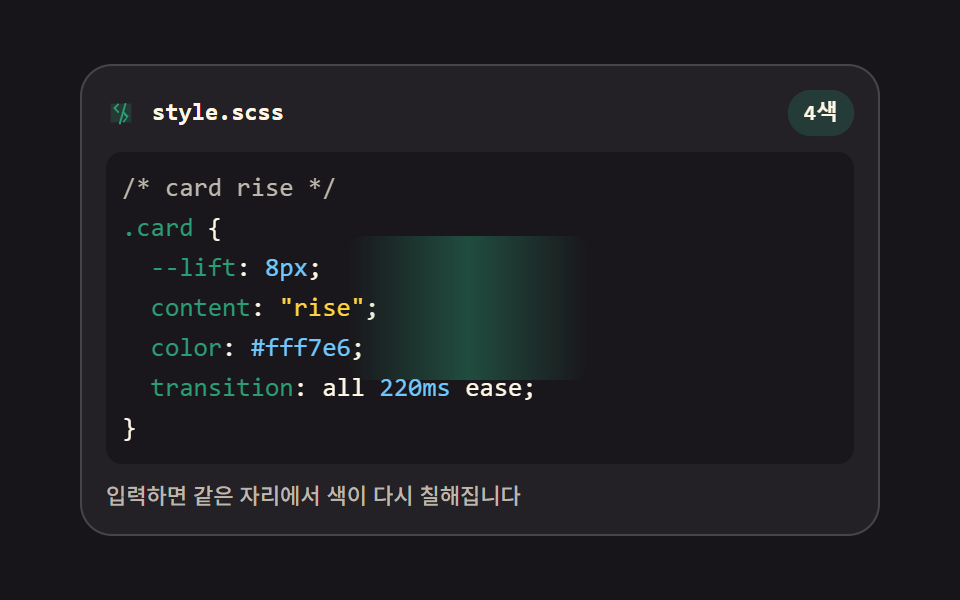 html css エディタ UI 9選 — コードエディタ 作り方の基本html css エディタ とは、Web ページの中に置いてコードを打つと色が付き、行番号が並び、括弧が自分で閉じる入力欄のことです。9つともライブラリなし、textarea だけで組んであり、下のグリッドが今すぐ動きます。どの部品もそのま この記事のデモをすべて見る