09エディタ テーマ切り替え
ライト・ダーク・ハイコントラストの 3 つを CSS 変数ひと束で差し替え、トークンの色までまとめて変えます。ハイコントラストは文字ごとに比率を測って決めました。
使いどころ夜間作業の多い管理画面
data-theme--tok-keycolor-scheme
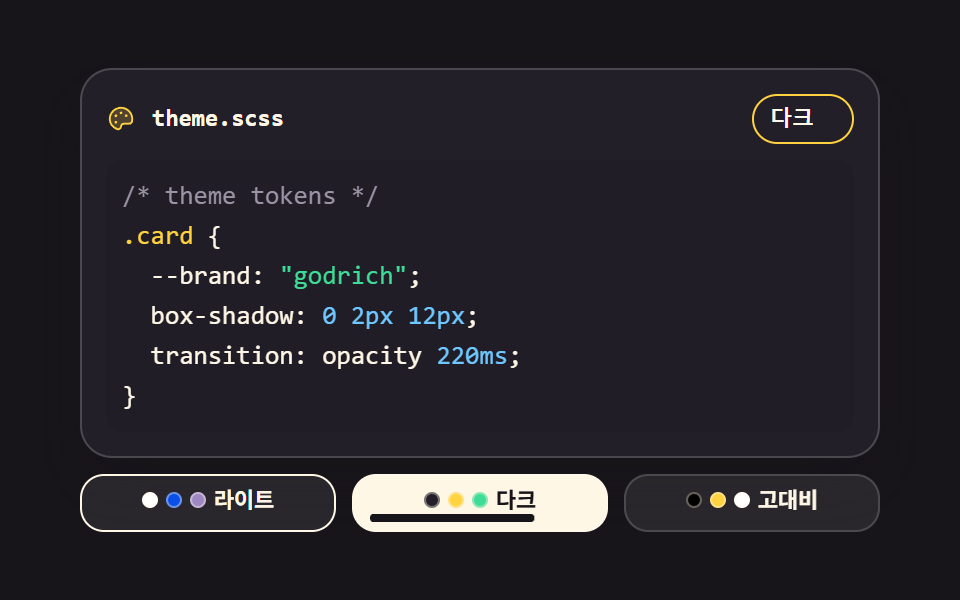
<main class="stage">
<div class="th is-demo" id="th">
  <div class="th__panel" id="panel" data-theme="light">
    <div class="th__bar">
      <span class="th__ico" aria-hidden="true"><svg xmlns="http://www.w3.org/2000/svg" width="1em" height="1em" viewBox="0 0 256 256"><g fill="currentColor"><path d="M224 127.17a96.5 96.5 0 0 1-2.39 22.18a24 24 0 0 1-23.4 18.65H152a24 24 0 0 0-24 24a24 24 0 0 1-32 22.61c-37.27-13.17-64-44.8-64-86.61a96 96 0 0 1 95-96c52.84-.53 96.55 42.35 97 95.17" opacity=".2"/><path d="M200.77 53.89A103.27 103.27 0 0 0 128 24h-1.07A104 104 0 0 0 24 128c0 43 26.58 79.06 69.36 94.17A32 32 0 0 0 136 192a16 16 0 0 1 16-16h46.21a31.81 31.81 0 0 0 31.2-24.88a104.4 104.4 0 0 0 2.59-24a103.28 103.28 0 0 0-31.23-73.23m13 93.71a15.89 15.89 0 0 1-15.56 12.4H152a32 32 0 0 0-32 32a16 16 0 0 1-21.31 15.07C62.49 194.3 40 164 40 128a88 88 0 0 1 87.09-88h.9a88.35 88.35 0 0 1 88 87.25a89 89 0 0 1-2.18 20.35ZM140 76a12 12 0 1 1-12-12a12 12 0 0 1 12 12m-44 24a12 12 0 1 1-12-12a12 12 0 0 1 12 12m0 56a12 12 0 1 1-12-12a12 12 0 0 1 12 12m88-56a12 12 0 1 1-12-12a12 12 0 0 1 12 12"/></g></svg></span>
      <span class="th__name">theme.scss</span>
      <span class="th__cur" id="cur" data-cur="light"><span class="th__curName" data-set="light">ライト</span><span class="th__curName" data-set="dark">ダーク</span><span class="th__curName" data-set="hc">ハイコントラスト</span></span>
    </div>
    <pre class="th__code"><span class="t t--com">/* theme tokens */</span>
<span class="t t--k">.card</span> {
  --brand: <span class="t t--s">"godrich"</span>;
  box-shadow: <span class="t t--n">0 2px 12px</span>;
  transition: opacity <span class="t t--n">220ms</span>;
}</pre>
  </div>
  <div class="th__opts" role="group" aria-label="テーマ選択">
    <button class="th__opt" type="button" data-set="light" aria-pressed="true">
      <span class="th__ind" aria-hidden="true"></span>
      <span class="th__dots" aria-hidden="true"><i class="th__dot th__dot--1"></i><i class="th__dot th__dot--2"></i><i class="th__dot th__dot--3"></i></span>
      <span class="th__lb">ライト</span>
    </button>
    <button class="th__opt" type="button" data-set="dark" aria-pressed="false">
      <span class="th__ind" aria-hidden="true"></span>
      <span class="th__dots" aria-hidden="true"><i class="th__dot th__dot--1"></i><i class="th__dot th__dot--2"></i><i class="th__dot th__dot--3"></i></span>
      <span class="th__lb">ダーク</span>
    </button>
    <button class="th__opt" type="button" data-set="hc" aria-pressed="false">
      <span class="th__ind" aria-hidden="true"></span>
      <span class="th__dots" aria-hidden="true"><i class="th__dot th__dot--1"></i><i class="th__dot th__dot--2"></i><i class="th__dot th__dot--3"></i></span>
      <span class="th__lb">ハイコントラスト</span>
    </button>
  </div>
</div>
</main>@use "../../../../site/static/demo-tokens" as *;
// 에디터 테마 스위처 — 라이트·다크·고대비 세 벌을 CSS 변수 한 묶음으로 갈아 끼운다.
// 패널의 [data-theme] 선택자 하나가 배면·글자·토큰 색(--tok-key·--tok-str·--tok-num·--tok-com)과
// color-scheme 까지 전부 정의하고, JS 는 그 속성 값만 바꾼다.
// 고대비 판은 글자마다 실제로 대비를 재서 4.5:1 이상으로 맞췄다(실측값 run/299/_probe/theme_contrast.json).
// 고대비에서는 색만이 아니라 굵기로도 토큰을 갈라 색에만 기대지 않게 했다.
// 격자 미리보기(.is-demo)는 테마 교체를 steps(1, end) 컷으로 한 프레임에 자른다 — 크로스페이드로
// 겹치면 poster 에 두 테마가 반투명하게 겹친 유령이 찍힌다(237 실측 계열). 프레임 수는 단추 밑
// 채움 막대(scaleX)가 채운다 — 반투명이 생기지 않는 움직임이다.
$duration: $dur-loop;
$easing: $ease-pop;
$color: $stage-yellow;
$mono: ui-monospace, SFMono-Regular, "SF Mono", Consolas, "Liberation Mono", monospace;
$fs: clamp(11px, 3vw, 13px);
$lh: 20px;
// 색 변수를 등록한다 — 등록된 <color> 변수만 keyframes 에서 steps(1, end) 로 값이 딱 끊어진다.
// 초깃값은 라이트 벌(정적 기본 상태)과 같은 값이다
@property --ed-bg { syntax: '<color>'; inherits: true; initial-value: #{$stage-paper}; }
@property --ed-fg { syntax: '<color>'; inherits: true; initial-value: #{$subject-ink}; }
@property --tok-key { syntax: '<color>'; inherits: true; initial-value: #{$subject-blue-deep}; }
@property --tok-str { syntax: '<color>'; inherits: true; initial-value: #9d88c4; }
@property --tok-num { syntax: '<color>'; inherits: true; initial-value: #{$error}; }
@property --tok-com { syntax: '<color>'; inherits: true; initial-value: #6b6577; }
@include stage($stage-ink);
.th { display: flex; flex-direction: column; gap: $sp-2; width: min(100%, 400px); }
// 세 벌의 변수 묶음. 라이트의 문자열 색은 흰 면 위 4.5:1 을 넘기도록 토큰보다 한 단계
// 내린 값이다(실측값은 theme_contrast.json). 검은 면은 토큰에 없는 색이라 리터럴로 쓴다.
// 사용자 정의 속성값은 SassScript 가 아닌 CSS 값으로 파싱된다 — 토큰은 #{} 보간으로 넣는다
.th__panel[data-theme="light"] {
--ed-bg: #{$stage-paper}; --ed-fg: #{$subject-ink};
--tok-key: #{$subject-blue-deep}; --tok-str: #9d88c4; --tok-num: #{$error}; --tok-com: #6b6577;
color-scheme: light;
}
.th__panel[data-theme="dark"], .th__panel[data-theme="hc"] {
--tok-key: #{$stage-yellow}; --tok-str: #{$tick-up}; --tok-num: #{$subject-sky};
color-scheme: dark;
}
.th__panel[data-theme="dark"] {
--ed-bg: #{$tick-panel}; --ed-fg: #{$subject-cream}; --tok-com: #{$tick-mute};
}
.th__panel[data-theme="hc"] {
--ed-bg: #000000; --ed-fg: #{$stage-paper}; --tok-com: #cfc8d9;
}
.th__panel {
box-sizing: border-box; display: flex; flex-direction: column; gap: $sp-2;
padding: $sp-3; border: 1px solid rgba(255, 255, 255, .18); border-radius: $r-card;
background: var(--ed-bg); color: var(--ed-fg);
box-shadow: $shadow-raised;
}
// ── 파일 이름 줄 — 아이콘·테두리도 토큰 색을 따라가니 테마 바뀌면 같이 바뀐다
.th__bar { display: flex; align-items: center; gap: $sp-2; }
.th__ico { display: grid; place-items: center; color: var(--tok-key); font-size: 15px; }
.th__name { flex: 1 1 auto; font-family: $mono; font-weight: 700; font-size: 12px; line-height: 1.4; }
.th__cur {
display: inline-grid; padding: $sp-1 $sp-2; border: 1px solid var(--tok-key); border-radius: $r-pill;
font-family: $mono; font-weight: 700; font-size: 11px; line-height: 1.4;
}
// 이름표 세 장을 한 칸에 겹친다 — 칸 폭이 가장 긴 이름에 맞춰 고정돼 테마를 갈아도 바가 안 흔들린다
.th__curName { grid-area: 1 / 1; visibility: hidden; }
.th__cur[data-cur="light"] .th__curName[data-set="light"],
.th__cur[data-cur="dark"] .th__curName[data-set="dark"],
.th__cur[data-cur="hc"] .th__curName[data-set="hc"] { visibility: visible; }
.th__code {
margin: 0; padding: $sp-2; border-radius: $r-sm;
background: rgba(0, 0, 0, .05);
font-family: $mono; font-weight: 500; font-size: $fs; line-height: $lh;
letter-spacing: 0; tab-size: 2;
white-space: pre; overflow: auto; overscroll-behavior: contain;
}
.t--k { color: var(--tok-key); }
.t--s { color: var(--tok-str); }
.t--n { color: var(--tok-num); }
.t--com { color: var(--tok-com); }
// 고대비에서는 코드를 굵게, 주석만 보통 굵기로 — 색이 아니라 굵기로도 갈라 읽는다
.th__panel[data-theme="hc"] .th__code { font-weight: 700; }
.th__panel[data-theme="hc"] .t--com { font-weight: 500; }
// ── 테마 단추 세 칸. 격자는 이 컨테이너가 쓴다 — 단추에 display:grid 를 주면 폭이
// fit-content 로 접혀 1fr 칸이 0 이 된다(281-04 실측). 단추 안은 flex 다
.th__opts { display: grid; grid-template-columns: repeat(3, 1fr); gap: $sp-2; }
.th__opt {
position: relative; display: flex; align-items: center; justify-content: center; gap: $sp-1;
box-sizing: border-box; width: 100%; padding: $sp-1 $sp-2 $sp-2;
border: 1px solid rgba(255, 255, 255, .16); border-radius: $r-control;
background: rgba(255, 255, 255, .08); color: $subject-cream;
font-family: inherit; font-weight: 700; font-size: 11px; line-height: 1.4;
cursor: pointer;
}
.th__opt[aria-pressed="true"] { background: $subject-cream; color: $subject-ink; border-color: $subject-cream; }
.th__opt:focus-visible { outline: 2px solid $color; outline-offset: 2px; }
// 각 단추의 색 견본 — 그 테마의 배면·키워드·글자 색 세 점
.th__dots { display: inline-flex; gap: $sp-1; }
.th__dot { width: 8px; height: 8px; border: 1px solid rgba(255, 247, 230, .4); border-radius: 50%; box-sizing: border-box; }
.th__opt[data-set="light"] .th__dot--1 { background: $stage-paper; }
.th__opt[data-set="light"] .th__dot--2 { background: $subject-blue-deep; }
.th__opt[data-set="light"] .th__dot--3 { background: #9d88c4; }
.th__opt[data-set="dark"] .th__dot--1 { background: $tick-panel; }
.th__opt[data-set="dark"] .th__dot--2 { background: $stage-yellow; }
.th__opt[data-set="dark"] .th__dot--3 { background: $tick-up; }
.th__opt[data-set="hc"] .th__dot--1 { background: #000000; }
.th__opt[data-set="hc"] .th__dot--2 { background: $stage-yellow; }
.th__opt[data-set="hc"] .th__dot--3 { background: $stage-paper; }
// 눌린 단추 밑 채움 막대 — 채움 막대는 시작 변에서 자라므로 origin 을 왼쪽에 둔다
// (blog-demo 규칙 8의 "붙는 지점이 있는 요소" 예외). 눌린 단추는 밝은 면이라 막대를 먹색으로
.th__ind {
position: absolute; left: $sp-2; right: $sp-2; bottom: $sp-1; height: $sp-1;
border-radius: $r-pill; background: $color;
transform: scaleX(0);
transform-origin: left center;
}
.th__opt[aria-pressed="true"] .th__ind { transform: scaleX(1); background: $subject-ink; }
// ── 격자 미리보기 루프(2초). 10% 에 다크, 40% 에 고대비, 70% 에 라이트로 돌아온다 —
// 복귀가 루프 안 70% 에 있으므로 24프레임 샘플 안에 다 잡힌다.
// 패널 색 여섯 개는 등록된 변수라 steps 컷으로 딱 끊어지고, 단추 배면·채움 막대가 같은 박자를 따른다
.th.is-demo .th__panel {
animation-name: thBg, thFg, thKey, thStr, thNum, thCom;
animation-duration: $duration;
animation-timing-function: steps(1, end);
animation-iteration-count: infinite;
}
.th.is-demo .th__opt {
animation-duration: $duration;
animation-timing-function: steps(1, end);
animation-iteration-count: infinite;
}
.th.is-demo .th__curName {
animation-duration: $dur-loop; animation-timing-function: steps(1, end);
animation-iteration-count: infinite; animation-fill-mode: backwards;
}
.th.is-demo .th__curName[data-set="light"] { animation-name: thName1; }
.th.is-demo .th__curName[data-set="dark"] { animation-name: thName2; }
.th.is-demo .th__curName[data-set="hc"] { animation-name: thName3; }
.th.is-demo .th__opt:nth-child(1) { animation-name: thOpt1; }
.th.is-demo .th__opt:nth-child(2) { animation-name: thOpt2; }
.th.is-demo .th__opt:nth-child(3) { animation-name: thOpt3; }
.th.is-demo .th__ind {
animation-duration: $duration;
animation-iteration-count: infinite;
}
.th.is-demo .th__opt:nth-child(1) .th__ind { animation-name: thInd1; }
.th.is-demo .th__opt:nth-child(2) .th__ind { animation-name: thInd2; }
.th.is-demo .th__opt:nth-child(3) .th__ind { animation-name: thInd3; }
@keyframes thBg {
0%, 9% { --ed-bg: #{$stage-paper}; }
10%, 39% { --ed-bg: #{$tick-panel}; }
40%, 69% { --ed-bg: #000000; }
70%, 100% { --ed-bg: #{$stage-paper}; }
}
@keyframes thFg {
0%, 9% { --ed-fg: #{$subject-ink}; }
10%, 39% { --ed-fg: #{$subject-cream}; }
40%, 69% { --ed-fg: #{$stage-paper}; }
70%, 100% { --ed-fg: #{$subject-ink}; }
}
@keyframes thKey {
0%, 9% { --tok-key: #{$subject-blue-deep}; }
10%, 100% { --tok-key: #{$stage-yellow}; }
}
@keyframes thStr {
0%, 9% { --tok-str: #9d88c4; }
10%, 100% { --tok-str: #{$tick-up}; }
}
@keyframes thNum {
0%, 9% { --tok-num: #{$error}; }
10%, 100% { --tok-num: #{$subject-sky}; }
}
@keyframes thCom {
0%, 9% { --tok-com: #6b6577; }
10%, 39% { --tok-com: #{$tick-mute}; }
40%, 69% { --tok-com: #cfc8d9; }
70%, 100% { --tok-com: #6b6577; }
}
// 이름표도 단추와 **같은 순간**에 갈아 끼운다 — 어긋나면 「라이트 뱃지 + 다크 화면」 장면이 poster 로 뽑힌다
// (실측 2026-09-13: 이름표를 JS 로만 바꾸다 보니 미리보기에서 영원히 「라이트」였다)
@keyframes thName1 {
0%, 9% { visibility: visible; }
10%, 69% { visibility: hidden; }
70%, 100% { visibility: visible; }
}
@keyframes thName2 {
0%, 9% { visibility: hidden; }
10%, 39% { visibility: visible; }
40%, 100% { visibility: hidden; }
}
@keyframes thName3 {
0%, 39% { visibility: hidden; }
40%, 69% { visibility: visible; }
70%, 100% { visibility: hidden; }
}
@keyframes thOpt1 {
0%, 9% { background: $subject-cream; color: $subject-ink; }
10%, 69% { background: rgba(255, 255, 255, .08); color: $subject-cream; }
70%, 100% { background: $subject-cream; color: $subject-ink; }
}
@keyframes thOpt2 {
0%, 9% { background: rgba(255, 255, 255, .08); color: $subject-cream; }
10%, 39% { background: $subject-cream; color: $subject-ink; }
40%, 100% { background: rgba(255, 255, 255, .08); color: $subject-cream; }
}
@keyframes thOpt3 {
0%, 39% { background: rgba(255, 255, 255, .08); color: $subject-cream; }
40%, 69% { background: $subject-cream; color: $subject-ink; }
70%, 100% { background: rgba(255, 255, 255, .08); color: $subject-cream; }
}
// 채움 막대 — 컷(접기)은 steps, 자라기는 튕김 이징: 키프레임 안에서 이징을 따로 준다.
// 접을 때 튕김을 주면 scaleX 가 음수로 넘겨 반쪽 막대가 번쩍인다
@keyframes thInd1 {
0%, 9% { transform: scaleX(1); background: $subject-ink; animation-timing-function: steps(1, end); }
10%, 69% { transform: scaleX(0); background: $color; animation-timing-function: steps(1, end); }
70% { transform: scaleX(0); background: $subject-ink; animation-timing-function: #{$easing}; }
86%, 100% { transform: scaleX(1); background: $subject-ink; }
}
@keyframes thInd2 {
0%, 9% { transform: scaleX(0); background: $color; animation-timing-function: steps(1, end); }
10% { transform: scaleX(0); background: $subject-ink; animation-timing-function: #{$easing}; }
26%, 39% { transform: scaleX(1); background: $subject-ink; animation-timing-function: steps(1, end); }
40%, 100% { transform: scaleX(0); background: $color; }
}
@keyframes thInd3 {
0%, 39% { transform: scaleX(0); background: $color; animation-timing-function: steps(1, end); }
40% { transform: scaleX(0); background: $subject-ink; animation-timing-function: #{$easing}; }
56%, 69% { transform: scaleX(1); background: $subject-ink; animation-timing-function: steps(1, end); }
70%, 100% { transform: scaleX(0); background: $color; }
}
// ── 좁은 화면: 행간과 여백을 줄여 무대 안에 들어온다
@media (max-width: 340px) {
.th { gap: $sp-1; }
.th__panel { padding: $sp-2; gap: $sp-1; }
.th__code { font-size: 11px; line-height: 16px; padding: $sp-1; }
.th__name { font-size: 11px; }
.th__cur { font-size: 10px; padding: 0 $sp-1; } // 이름표를 겹치면서 칸이 두 줄 몫으로 커졌다 — 세로 여백을 0 으로
.th__opts { gap: $sp-1; }
.th__opt { font-size: 10px; padding: $sp-1; }
}
@media (prefers-reduced-motion: reduce) {
// 애니메이션을 끊으면 정적 규칙(라이트 벌 + 눌린 첫 단추)이 그대로 드러난다
.th.is-demo .th__panel,
.th.is-demo .th__curName,
.th.is-demo .th__opt,
.th.is-demo .th__ind {
animation: none !important;
}
}@property --ed-bg {
syntax: "<color>";
inherits: true;
initial-value: #ffffff;
}
@property --ed-fg {
syntax: "<color>";
inherits: true;
initial-value: #17141a;
}
@property --tok-key {
syntax: "<color>";
inherits: true;
initial-value: #0a4fe8;
}
@property --tok-str {
syntax: "<color>";
inherits: true;
initial-value: #9d88c4;
}
@property --tok-num {
syntax: "<color>";
inherits: true;
initial-value: #c2361a;
}
@property --tok-com {
syntax: "<color>";
inherits: true;
initial-value: #6b6577;
}
html, body {
margin: 0;
overflow: hidden;
}
.stage {
box-sizing: border-box;
min-height: 100vh;
display: grid;
place-items: center;
margin: 0;
background: #17141a;
font-family: -apple-system, "Segoe UI", "Noto Sans KR", sans-serif;
padding: clamp(8px, 4vw, 24px);
}
.th {
display: flex;
flex-direction: column;
gap: 8px;
width: min(100%, 400px);
}
.th__panel[data-theme=light] {
--ed-bg: #ffffff;
--ed-fg: #17141a;
--tok-key: #0a4fe8;
--tok-str: #9d88c4;
--tok-num: #c2361a;
--tok-com: #6b6577;
color-scheme: light;
}
.th__panel[data-theme=dark], .th__panel[data-theme=hc] {
--tok-key: #ffd23f;
--tok-str: #3ddc97;
--tok-num: #6ec8ff;
color-scheme: dark;
}
.th__panel[data-theme=dark] {
--ed-bg: #231f28;
--ed-fg: #fff7e6;
--tok-com: #9a93a6;
}
.th__panel[data-theme=hc] {
--ed-bg: #000000;
--ed-fg: #ffffff;
--tok-com: #cfc8d9;
}
.th__panel {
box-sizing: border-box;
display: flex;
flex-direction: column;
gap: 8px;
padding: 12px;
border: 1px solid rgba(255, 255, 255, 0.18);
border-radius: 16px;
background: var(--ed-bg);
color: var(--ed-fg);
box-shadow: 0 14px 24px rgba(23, 20, 26, 0.32);
}
.th__bar {
display: flex;
align-items: center;
gap: 8px;
}
.th__ico {
display: grid;
place-items: center;
color: var(--tok-key);
font-size: 15px;
}
.th__name {
flex: 1 1 auto;
font-family: ui-monospace, SFMono-Regular, "SF Mono", Consolas, "Liberation Mono", monospace;
font-weight: 700;
font-size: 12px;
line-height: 1.4;
}
.th__cur {
display: inline-grid;
padding: 4px 8px;
border: 1px solid var(--tok-key);
border-radius: 999px;
font-family: ui-monospace, SFMono-Regular, "SF Mono", Consolas, "Liberation Mono", monospace;
font-weight: 700;
font-size: 11px;
line-height: 1.4;
}
.th__curName {
grid-area: 1/1;
visibility: hidden;
}
.th__cur[data-cur=light] .th__curName[data-set=light],
.th__cur[data-cur=dark] .th__curName[data-set=dark],
.th__cur[data-cur=hc] .th__curName[data-set=hc] {
visibility: visible;
}
.th__code {
margin: 0;
padding: 8px;
border-radius: 8px;
background: rgba(0, 0, 0, 0.05);
font-family: ui-monospace, SFMono-Regular, "SF Mono", Consolas, "Liberation Mono", monospace;
font-weight: 500;
font-size: clamp(11px, 3vw, 13px);
line-height: 20px;
letter-spacing: 0;
tab-size: 2;
white-space: pre;
overflow: auto;
overscroll-behavior: contain;
}
.t--k {
color: var(--tok-key);
}
.t--s {
color: var(--tok-str);
}
.t--n {
color: var(--tok-num);
}
.t--com {
color: var(--tok-com);
}
.th__panel[data-theme=hc] .th__code {
font-weight: 700;
}
.th__panel[data-theme=hc] .t--com {
font-weight: 500;
}
.th__opts {
display: grid;
grid-template-columns: repeat(3, 1fr);
gap: 8px;
}
.th__opt {
position: relative;
display: flex;
align-items: center;
justify-content: center;
gap: 4px;
box-sizing: border-box;
width: 100%;
padding: 4px 8px 8px;
border: 1px solid rgba(255, 255, 255, 0.16);
border-radius: 12px;
background: rgba(255, 255, 255, 0.08);
color: #fff7e6;
font-family: inherit;
font-weight: 700;
font-size: 11px;
line-height: 1.4;
cursor: pointer;
}
.th__opt[aria-pressed=true] {
background: #fff7e6;
color: #17141a;
border-color: #fff7e6;
}
.th__opt:focus-visible {
outline: 2px solid #ffd23f;
outline-offset: 2px;
}
.th__dots {
display: inline-flex;
gap: 4px;
}
.th__dot {
width: 8px;
height: 8px;
border: 1px solid rgba(255, 247, 230, 0.4);
border-radius: 50%;
box-sizing: border-box;
}
.th__opt[data-set=light] .th__dot--1 {
background: #ffffff;
}
.th__opt[data-set=light] .th__dot--2 {
background: #0a4fe8;
}
.th__opt[data-set=light] .th__dot--3 {
background: #9d88c4;
}
.th__opt[data-set=dark] .th__dot--1 {
background: #231f28;
}
.th__opt[data-set=dark] .th__dot--2 {
background: #ffd23f;
}
.th__opt[data-set=dark] .th__dot--3 {
background: #3ddc97;
}
.th__opt[data-set=hc] .th__dot--1 {
background: #000000;
}
.th__opt[data-set=hc] .th__dot--2 {
background: #ffd23f;
}
.th__opt[data-set=hc] .th__dot--3 {
background: #ffffff;
}
.th__ind {
position: absolute;
left: 8px;
right: 8px;
bottom: 4px;
height: 4px;
border-radius: 999px;
background: #ffd23f;
transform: scaleX(0);
transform-origin: left center;
}
.th__opt[aria-pressed=true] .th__ind {
transform: scaleX(1);
background: #17141a;
}
.th.is-demo .th__panel {
animation-name: thBg, thFg, thKey, thStr, thNum, thCom;
animation-duration: 2s;
animation-timing-function: steps(1, end);
animation-iteration-count: infinite;
}
.th.is-demo .th__opt {
animation-duration: 2s;
animation-timing-function: steps(1, end);
animation-iteration-count: infinite;
}
.th.is-demo .th__curName {
animation-duration: 2s;
animation-timing-function: steps(1, end);
animation-iteration-count: infinite;
animation-fill-mode: backwards;
}
.th.is-demo .th__curName[data-set=light] {
animation-name: thName1;
}
.th.is-demo .th__curName[data-set=dark] {
animation-name: thName2;
}
.th.is-demo .th__curName[data-set=hc] {
animation-name: thName3;
}
.th.is-demo .th__opt:nth-child(1) {
animation-name: thOpt1;
}
.th.is-demo .th__opt:nth-child(2) {
animation-name: thOpt2;
}
.th.is-demo .th__opt:nth-child(3) {
animation-name: thOpt3;
}
.th.is-demo .th__ind {
animation-duration: 2s;
animation-iteration-count: infinite;
}
.th.is-demo .th__opt:nth-child(1) .th__ind {
animation-name: thInd1;
}
.th.is-demo .th__opt:nth-child(2) .th__ind {
animation-name: thInd2;
}
.th.is-demo .th__opt:nth-child(3) .th__ind {
animation-name: thInd3;
}
@keyframes thBg {
0%, 9% {
--ed-bg: #ffffff;
}
10%, 39% {
--ed-bg: #231f28;
}
40%, 69% {
--ed-bg: #000000;
}
70%, 100% {
--ed-bg: #ffffff;
}
}
@keyframes thFg {
0%, 9% {
--ed-fg: #17141a;
}
10%, 39% {
--ed-fg: #fff7e6;
}
40%, 69% {
--ed-fg: #ffffff;
}
70%, 100% {
--ed-fg: #17141a;
}
}
@keyframes thKey {
0%, 9% {
--tok-key: #0a4fe8;
}
10%, 100% {
--tok-key: #ffd23f;
}
}
@keyframes thStr {
0%, 9% {
--tok-str: #9d88c4;
}
10%, 100% {
--tok-str: #3ddc97;
}
}
@keyframes thNum {
0%, 9% {
--tok-num: #c2361a;
}
10%, 100% {
--tok-num: #6ec8ff;
}
}
@keyframes thCom {
0%, 9% {
--tok-com: #6b6577;
}
10%, 39% {
--tok-com: #9a93a6;
}
40%, 69% {
--tok-com: #cfc8d9;
}
70%, 100% {
--tok-com: #6b6577;
}
}
@keyframes thName1 {
0%, 9% {
visibility: visible;
}
10%, 69% {
visibility: hidden;
}
70%, 100% {
visibility: visible;
}
}
@keyframes thName2 {
0%, 9% {
visibility: hidden;
}
10%, 39% {
visibility: visible;
}
40%, 100% {
visibility: hidden;
}
}
@keyframes thName3 {
0%, 39% {
visibility: hidden;
}
40%, 69% {
visibility: visible;
}
70%, 100% {
visibility: hidden;
}
}
@keyframes thOpt1 {
0%, 9% {
background: #fff7e6;
color: #17141a;
}
10%, 69% {
background: rgba(255, 255, 255, 0.08);
color: #fff7e6;
}
70%, 100% {
background: #fff7e6;
color: #17141a;
}
}
@keyframes thOpt2 {
0%, 9% {
background: rgba(255, 255, 255, 0.08);
color: #fff7e6;
}
10%, 39% {
background: #fff7e6;
color: #17141a;
}
40%, 100% {
background: rgba(255, 255, 255, 0.08);
color: #fff7e6;
}
}
@keyframes thOpt3 {
0%, 39% {
background: rgba(255, 255, 255, 0.08);
color: #fff7e6;
}
40%, 69% {
background: #fff7e6;
color: #17141a;
}
70%, 100% {
background: rgba(255, 255, 255, 0.08);
color: #fff7e6;
}
}
@keyframes thInd1 {
0%, 9% {
transform: scaleX(1);
background: #17141a;
animation-timing-function: steps(1, end);
}
10%, 69% {
transform: scaleX(0);
background: #ffd23f;
animation-timing-function: steps(1, end);
}
70% {
transform: scaleX(0);
background: #17141a;
animation-timing-function: cubic-bezier(0.2, 1.4, 0.4, 1);
}
86%, 100% {
transform: scaleX(1);
background: #17141a;
}
}
@keyframes thInd2 {
0%, 9% {
transform: scaleX(0);
background: #ffd23f;
animation-timing-function: steps(1, end);
}
10% {
transform: scaleX(0);
background: #17141a;
animation-timing-function: cubic-bezier(0.2, 1.4, 0.4, 1);
}
26%, 39% {
transform: scaleX(1);
background: #17141a;
animation-timing-function: steps(1, end);
}
40%, 100% {
transform: scaleX(0);
background: #ffd23f;
}
}
@keyframes thInd3 {
0%, 39% {
transform: scaleX(0);
background: #ffd23f;
animation-timing-function: steps(1, end);
}
40% {
transform: scaleX(0);
background: #17141a;
animation-timing-function: cubic-bezier(0.2, 1.4, 0.4, 1);
}
56%, 69% {
transform: scaleX(1);
background: #17141a;
animation-timing-function: steps(1, end);
}
70%, 100% {
transform: scaleX(0);
background: #ffd23f;
}
}
@media (max-width: 340px) {
.th {
gap: 4px;
}
.th__panel {
padding: 8px;
gap: 4px;
}
.th__code {
font-size: 11px;
line-height: 16px;
padding: 4px;
}
.th__name {
font-size: 11px;
}
.th__cur {
font-size: 10px;
padding: 0 4px;
}
.th__opts {
gap: 4px;
}
.th__opt {
font-size: 10px;
padding: 4px;
}
}
@media (prefers-reduced-motion: reduce) {
.th.is-demo .th__panel,
.th.is-demo .th__curName,
.th.is-demo .th__opt,
.th.is-demo .th__ind {
animation: none !important;
}
}var th = document.getElementById('th');
var panel = document.getElementById('panel');
var cur = document.getElementById('cur');
var opts = Array.prototype.slice.call(document.querySelectorAll('.th__opt'));
// 단추를 누르면 data-theme 하나만 바꾼다 — 색 뭉치는 CSS 변수 선택자가 갈아 끼운다
opts.forEach(function (btn) {
btn.addEventListener('click', function () {
th.classList.remove('is-demo');
panel.dataset.theme = btn.dataset.set;
// 이름표 세 장을 한 칸에 겹쳐 두고 보이는 것만 고른다 — 미리보기 루프도 같은 칸을 컷으로 갈아 끼운다
cur.dataset.cur = btn.dataset.set;
opts.forEach(function (b) { b.setAttribute('aria-pressed', String(b === btn)); });
});
});
th.addEventListener('pointerdown', function () { th.classList.remove('is-demo'); });// EditorThemeSwitcher — vanilla 판(run/299/demo/09-editor-theme-switcher/index.html) 의 React 포트.
// 단추를 누르면 패널의 data-theme 하나만 바뀐다 — 색 뭉치는 CSS 변수 선택자가 갈아 끼우므로
// 테마 토큰(--ed-bg·--ed-fg·--tok-key·--tok-str·--tok-num·--tok-com)은 props 가 아니라 CSS 가 정한다.
// 이름표 세 장은 한 칸에 겹쳐 두고 data-cur 로 보이는 것만 고른다 — textContent 를 갈아 끼우지 않는다.
import { useState } from "react";
import type { CSSProperties } from "react";
import styles from "./EditorThemeSwitcher.module.scss";
export type EditorThemeSwitcherProps = {
duration?: number;
easing?: string;
color?: string;
initialTheme?: string;
};
type Vars = CSSProperties & { "--duration"?: string; "--easing"?: string; "--color"?: string };
const FILE_NAME = "theme.scss";
const GROUP_LABEL = "테마 선택";
const THEMES = [
{ set: "light", label: "라이트" },
{ set: "dark", label: "다크" },
{ set: "hc", label: "고대비" },
];
export default function EditorThemeSwitcher(props: EditorThemeSwitcherProps) {
const duration = props.duration ?? 2000;
const easing = props.easing ?? "cubic-bezier(.2, 1.4, .4, 1)";
const color = props.color ?? "#ffd23f";
const [theme, setTheme] = useState<string>(props.initialTheme ?? "light");
const [preview, setPreview] = useState<boolean>(true);
const vars: Vars = { "--duration": duration + "ms", "--easing": easing, "--color": color };
return (
<main className={styles.stage}>
<div
className={styles.root + (preview ? " " + styles.isDemo : "")}
style={vars}
onPointerDown={() => setPreview(false)}
>
<div className={styles.panel} data-theme={theme}>
<div className={styles.bar}>
<span className={styles.ico} aria-hidden="true">
<svg xmlns="http://www.w3.org/2000/svg" width="1em" height="1em" viewBox="0 0 256 256">
<g fill="currentColor">
<path d="M224 127.17a96.5 96.5 0 0 1-2.39 22.18a24 24 0 0 1-23.4 18.65H152a24 24 0 0 0-24 24a24 24 0 0 1-32 22.61c-37.27-13.17-64-44.8-64-86.61a96 96 0 0 1 95-96c52.84-.53 96.55 42.35 97 95.17" opacity=".2" />
<path d="M200.77 53.89A103.27 103.27 0 0 0 128 24h-1.07A104 104 0 0 0 24 128c0 43 26.58 79.06 69.36 94.17A32 32 0 0 0 136 192a16 16 0 0 1 16-16h46.21a31.81 31.81 0 0 0 31.2-24.88a104.4 104.4 0 0 0 2.59-24a103.28 103.28 0 0 0-31.23-73.23m13 93.71a15.89 15.89 0 0 1-15.56 12.4H152a32 32 0 0 0-32 32a16 16 0 0 1-21.31 15.07C62.49 194.3 40 164 40 128a88 88 0 0 1 87.09-88h.9a88.35 88.35 0 0 1 88 87.25a89 89 0 0 1-2.18 20.35ZM140 76a12 12 0 1 1-12-12a12 12 0 0 1 12 12m-44 24a12 12 0 1 1-12-12a12 12 0 0 1 12 12m0 56a12 12 0 1 1-12-12a12 12 0 0 1 12 12m88-56a12 12 0 1 1-12-12a12 12 0 0 1 12 12" />
</g>
</svg>
</span>
<span className={styles.name}>{FILE_NAME}</span>
<span className={styles.cur} data-cur={theme}>
{THEMES.map((t) => (
<span className={styles.curName} data-set={t.set} key={t.set}>
{t.label}
</span>
))}
</span>
</div>
<pre className={styles.code}>
<span className={styles["t--com"]}>/* theme tokens */</span>{"\n"}
<span className={styles["t--k"]}>.card</span>{" {\n --brand: "}
<span className={styles["t--s"]}>"godrich"</span>{";\n box-shadow: "}
<span className={styles["t--n"]}>0 2px 12px</span>{";\n transition: opacity "}
<span className={styles["t--n"]}>220ms</span>{";\n}"}
</pre>
</div>
<div className={styles.opts} role="group" aria-label={GROUP_LABEL}>
{THEMES.map((t) => (
<button
className={styles.opt}
type="button"
data-set={t.set}
aria-pressed={theme === t.set}
key={t.set}
onClick={() => {
setPreview(false);
setTheme(t.set);
}}
>
<span className={styles.ind} aria-hidden="true" />
<span className={styles.dots} aria-hidden="true">
<i className={styles.dot + " " + styles["dot--1"]} />
<i className={styles.dot + " " + styles["dot--2"]} />
<i className={styles.dot + " " + styles["dot--3"]} />
</span>
<span className={styles.lb}>{t.label}</span>
</button>
))}
</div>
</div>
</main>
);
}09 エディタ テーマ切り替え — 計測 累積面積 61.065% · 動いたフレーム 15/23GODRICH オリジナル · SCSS と React は zip に同梱 · html css エディタ UI 9選 — コードエディタ 作り方の基本
このデモが属する記事
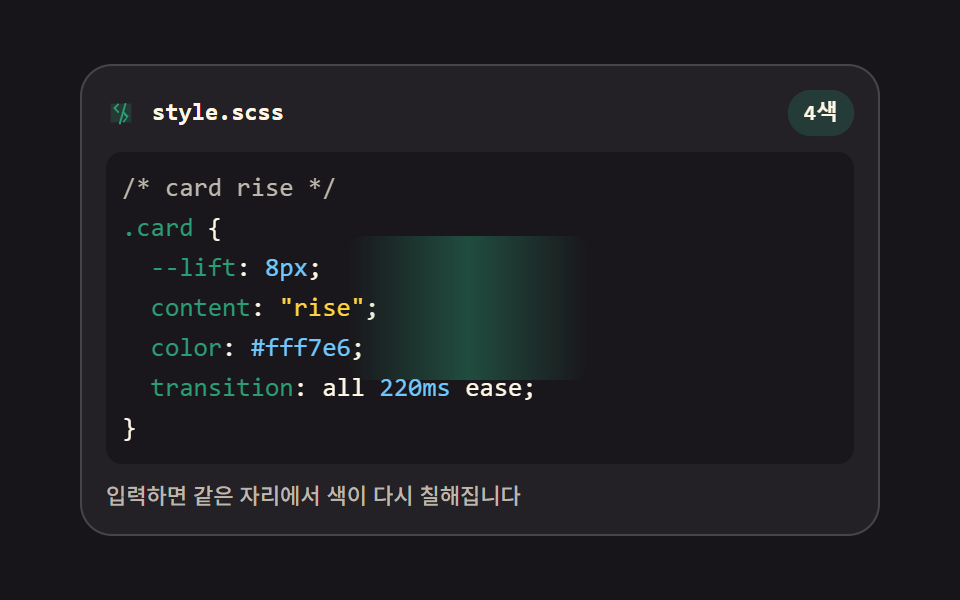 html css エディタ UI 9選 — コードエディタ 作り方の基本html css エディタ とは、Web ページの中に置いてコードを打つと色が付き、行番号が並び、括弧が自分で閉じる入力欄のことです。9つともライブラリなし、textarea だけで組んであり、下のグリッドが今すぐ動きます。どの部品もそのま この記事のデモをすべて見る