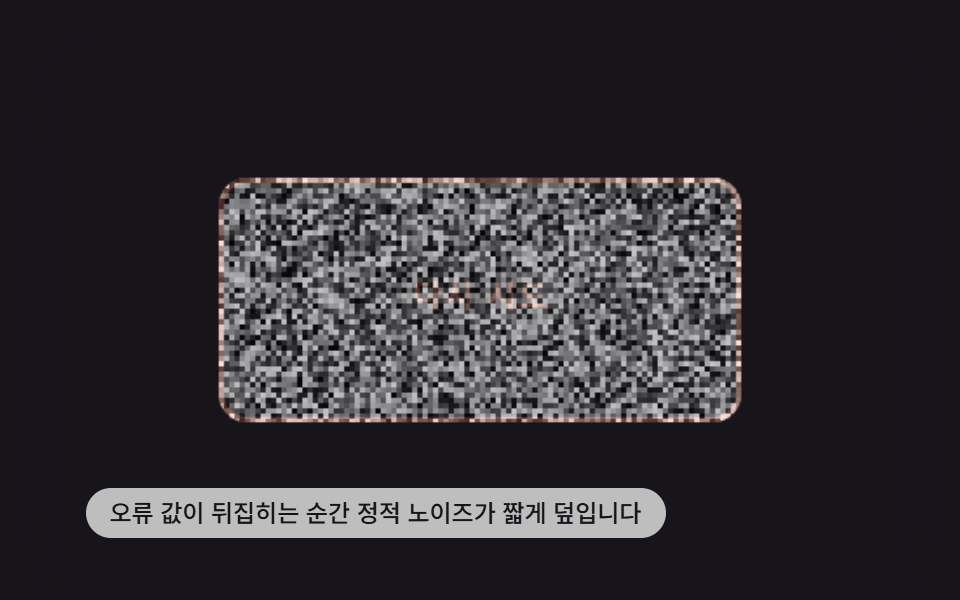
09エラー値が反転すると砂嵐のように揺れるノイズボタン
エラー値がfalseからtrueに反転した瞬間、ボタン表面のピクセルごとに明るさの値をランダムに再計算し、テレビの砂嵐のようなノイズを短く重ねる。
使いどころエラー状態のボタン、再試行の誘導
BTN_CANVAS_STATIC_BURST_MSdrawNoiseTICK_MS
<main class="stage">
<div class="ns is-demo" id="root">
  <canvas class="ns__cv" id="cv" width="480" height="300"></canvas>
  <button class="ns__btn" id="btn" type="button">再試行</button>
  <p class="ns__hint">エラー値が反転する瞬間、砂嵐ノイズが一瞬覆います</p>
</div>
</main>
@use "../../../../site/static/demo-tokens" as *;
$duration: $dur-instant;
$easing: $ease-out;
$color: $subject-cream;
@include stage($stage-ink);
.ns {
position: relative;
width: min(92vw, calc(160vh - 12.8vw));
aspect-ratio: 480 / 300;
margin: 0 auto;
border-radius: $r-card;
overflow: hidden;
box-shadow: $shadow-raised;
}
.ns__cv {
display: block;
width: 100%;
height: 100%;
}
.ns__btn {
position: absolute;
left: 50%;
top: 50%;
width: calc(300 / 480 * 100%);
height: calc(140 / 300 * 100%);
transform: translate(-50%, -50%);
z-index: 2;
border: 0;
border-radius: $r-control;
background: transparent;
color: transparent;
cursor: pointer;
font-size: 16px;
font-weight: 700;
}
.ns__btn:focus-visible {
outline: 2px solid $subject-cream;
outline-offset: 3px;
}
.ns__hint {
position: absolute;
left: $sp-3;
bottom: $sp-3;
margin: 0;
padding: $sp-1 $sp-3;
border-radius: $r-pill;
font-size: 12px;
line-height: 1.4;
font-weight: 500;
background: rgba(255, 255, 255, .72);
color: $subject-ink;
pointer-events: none;
z-index: 3;
}
@media (prefers-reduced-motion: reduce) {
.ns__btn { transition: none; }
}html, body {
margin: 0;
overflow: hidden;
}
.stage {
box-sizing: border-box;
min-height: 100vh;
display: grid;
place-items: center;
margin: 0;
background: #17141a;
font-family: -apple-system, "Segoe UI", "Noto Sans KR", sans-serif;
padding: clamp(8px, 4vw, 24px);
}
.ns {
position: relative;
width: min(92vw, 160vh - 12.8vw);
aspect-ratio: 480/300;
margin: 0 auto;
border-radius: 16px;
overflow: hidden;
box-shadow: 0 14px 24px rgba(23, 20, 26, 0.32);
}
.ns__cv {
display: block;
width: 100%;
height: 100%;
}
.ns__btn {
position: absolute;
left: 50%;
top: 50%;
width: 62.5%;
height: 46.6666666667%;
transform: translate(-50%, -50%);
z-index: 2;
border: 0;
border-radius: 12px;
background: transparent;
color: transparent;
cursor: pointer;
font-size: 16px;
font-weight: 700;
}
.ns__btn:focus-visible {
outline: 2px solid #fff7e6;
outline-offset: 3px;
}
.ns__hint {
position: absolute;
left: 12px;
bottom: 12px;
margin: 0;
padding: 4px 12px;
border-radius: 999px;
font-size: 12px;
line-height: 1.4;
font-weight: 500;
background: rgba(255, 255, 255, 0.72);
color: #17141a;
pointer-events: none;
z-index: 3;
}
@media (prefers-reduced-motion: reduce) {
.ns__btn {
transition: none;
}
}(function () {
'use strict';
function hashNoise(x, y, seed) {
var v = Math.sin(x * 12.9898 + y * 78.233 + seed * 0.0013) * 43758.5453;
return v - Math.floor(v);
}
function roundRect(c, x, y, w, h, r) {
c.beginPath();
c.moveTo(x + r, y);
c.arcTo(x + w, y, x + w, y + h, r);
c.arcTo(x + w, y + h, x, y + h, r);
c.arcTo(x, y + h, x, y, r);
c.arcTo(x, y, x + w, y, r);
c.closePath();
}
var W = 480, H = 300;
var SEED = 90909;
var BW = 300, BH = 140;
var BX = (W - BW) / 2, BY = (H - BH) / 2;
var NOISE_CELL = 3; // px — 노이즈 블록 한 칸
var BTN_CANVAS_STATIC_BURST_MS = 650; // 정적이 덮였다가 가라앉는 데 걸리는 시간
var TICK_MS = 40; // 이 간격마다 노이즈 패턴을 다시 계산한다 (깜빡임 속도)
var root = document.getElementById('root');
var cv = document.getElementById('cv');
var btn = document.getElementById('btn');
var ctx = cv.getContext('2d');
var reduceMQ = window.matchMedia('(prefers-reduced-motion: reduce)');
var errorOn = false;
var burstT0 = null;
function drawPanel(errored) {
roundRect(ctx, BX, BY, BW, BH, 16);
ctx.fillStyle = '#17141a';
ctx.fill();
ctx.fillStyle = errored ? '#ff8a6b' : '#fff7e6';
ctx.font = '700 18px system-ui, sans-serif';
ctx.textAlign = 'center';
ctx.textBaseline = 'middle';
ctx.fillText('再試行', BX + BW / 2, BY + BH / 2);
if (errored) {
ctx.lineWidth = 3;
ctx.strokeStyle = '#ff8a6b';
roundRect(ctx, BX + 1.5, BY + 1.5, BW - 3, BH - 3, 15);
ctx.stroke();
}
}
function drawNoise(envelope, tick) {
ctx.save();
roundRect(ctx, BX, BY, BW, BH, 16);
ctx.clip();
ctx.globalAlpha = envelope;
for (var y = BY; y < BY + BH; y += NOISE_CELL) {
for (var x = BX; x < BX + BW; x += NOISE_CELL) {
var n = hashNoise(x / NOISE_CELL, y / NOISE_CELL, SEED + tick);
var v = Math.floor(n * 255);
ctx.fillStyle = 'rgb(' + v + ',' + v + ',' + v + ')';
ctx.fillRect(x, y, NOISE_CELL, NOISE_CELL);
}
}
ctx.restore();
ctx.globalAlpha = 1;
}
function render(now) {
ctx.clearRect(0, 0, W, H);
drawPanel(errorOn);
if (burstT0 !== null) {
var elapsed = now - burstT0;
if (elapsed >= BTN_CANVAS_STATIC_BURST_MS) {
burstT0 = null;
} else {
var envelope = 1 - elapsed / BTN_CANVAS_STATIC_BURST_MS;
var tick = Math.floor(elapsed / TICK_MS);
drawNoise(envelope, tick);
}
}
}
function trigger() {
root.classList.remove('is-demo');
errorOn = !errorOn;
if (errorOn) burstT0 = performance.now();
if (reduceMQ.matches) render(performance.now());
}
btn.addEventListener('click', trigger);
btn.addEventListener('keydown', function (e) {
if (e.key !== 'Enter' && e.key !== ' ') return;
e.preventDefault();
trigger();
});
cv.addEventListener('pointerdown', function () { trigger(); });
window.addEventListener('resize', function () { render(performance.now()); });
function frame(now) {
if (!reduceMQ.matches) {
if (root.classList.contains('is-demo')) {
// 데모 재생 중엔 정적이 끊기지 않도록 번짐이 끝나는 즉시 다음 번짐을 이어 붙인다.
errorOn = true;
if (burstT0 === null || now - burstT0 >= BTN_CANVAS_STATIC_BURST_MS) burstT0 = now;
}
render(now);
requestAnimationFrame(frame);
}
}
if (reduceMQ.matches) {
errorOn = true;
burstT0 = performance.now() - BTN_CANVAS_STATIC_BURST_MS * 0.4;
render(performance.now());
} else {
requestAnimationFrame(frame);
}
})();// NoiseStaticButton — vanilla 판(run/404/demo/09-btn-canvas-noise-static-glitch/index.html) 의 React 포트.
// 오류 값이 false에서 true로 뒤집히는 순간 버튼 표면 픽셀마다 밝기 값을 무작위로 다시 계산해
// 텔레비전 정적 같은 노이즈를 짧게 덮어씌운다.
import { useEffect, useRef } from "react";
import styles from "./NoiseStaticButton.module.scss";
type Box<T> = { current: T };
type KeyEvt = { key: string; preventDefault(): void };
const W = 480, H = 300;
const SEED = 90909;
const BW = 300, BH = 140;
const BX = (W - BW) / 2, BY = (H - BH) / 2;
const NOISE_CELL = 3;
const BTN_CANVAS_STATIC_BURST_MS = 650;
const TICK_MS = 40;
function hashNoise(x: number, y: number, seed: number): number {
const v = Math.sin(x * 12.9898 + y * 78.233 + seed * 0.0013) * 43758.5453;
return v - Math.floor(v);
}
function roundRect(c: CanvasRenderingContext2D, x: number, y: number, w: number, h: number, r: number): void {
c.beginPath();
c.moveTo(x + r, y);
c.arcTo(x + w, y, x + w, y + h, r);
c.arcTo(x + w, y + h, x, y + h, r);
c.arcTo(x, y + h, x, y, r);
c.arcTo(x, y, x + w, y, r);
c.closePath();
}
export default function NoiseStaticButton() {
const cvRef = useRef<HTMLCanvasElement | null>(null);
const btnRef = useRef<HTMLButtonElement | null>(null);
const errorOnRef = useRef<boolean>(false) as Box<boolean>;
const burstT0Ref = useRef<number | null>(null) as Box<number | null>;
const reduceRef = useRef<boolean>(false) as Box<boolean>;
const demoRef = useRef<boolean>(true) as Box<boolean>;
const frameRef = useRef<number>(0) as Box<number>;
function drawPanel(ctx: CanvasRenderingContext2D, errored: boolean): void {
roundRect(ctx, BX, BY, BW, BH, 16);
ctx.fillStyle = "#17141a";
ctx.fill();
ctx.fillStyle = errored ? "#ff8a6b" : "#fff7e6";
ctx.font = "700 18px system-ui, sans-serif";
ctx.textAlign = "center";
ctx.textBaseline = "middle";
ctx.fillText("다시 시도", BX + BW / 2, BY + BH / 2);
if (errored) {
ctx.lineWidth = 3;
ctx.strokeStyle = "#ff8a6b";
roundRect(ctx, BX + 1.5, BY + 1.5, BW - 3, BH - 3, 15);
ctx.stroke();
}
}
function drawNoise(ctx: CanvasRenderingContext2D, envelope: number, tick: number): void {
ctx.save();
roundRect(ctx, BX, BY, BW, BH, 16);
ctx.clip();
ctx.globalAlpha = envelope;
for (let y = BY; y < BY + BH; y += NOISE_CELL) {
for (let x = BX; x < BX + BW; x += NOISE_CELL) {
const n = hashNoise(x / NOISE_CELL, y / NOISE_CELL, SEED + tick);
const v = Math.floor(n * 255);
ctx.fillStyle = "rgb(" + v + "," + v + "," + v + ")";
ctx.fillRect(x, y, NOISE_CELL, NOISE_CELL);
}
}
ctx.restore();
ctx.globalAlpha = 1;
}
function render(now: number): void {
const cv = cvRef.current;
if (!cv) return;
const ctx = cv.getContext("2d");
if (!ctx) return;
ctx.clearRect(0, 0, W, H);
drawPanel(ctx, errorOnRef.current);
const burstT0 = burstT0Ref.current;
if (burstT0 !== null) {
const elapsed = now - burstT0;
if (elapsed >= BTN_CANVAS_STATIC_BURST_MS) {
burstT0Ref.current = null;
} else {
const envelope = 1 - elapsed / BTN_CANVAS_STATIC_BURST_MS;
const tick = Math.floor(elapsed / TICK_MS);
drawNoise(ctx, envelope, tick);
}
}
}
function trigger(): void {
demoRef.current = false;
errorOnRef.current = !errorOnRef.current;
if (errorOnRef.current) burstT0Ref.current = performance.now();
if (reduceRef.current) render(performance.now());
}
function onKeyDown(e: KeyEvt): void {
if (e.key !== "Enter" && e.key !== " ") return;
e.preventDefault();
trigger();
}
useEffect(() => {
reduceRef.current = window.matchMedia("(prefers-reduced-motion: reduce)").matches;
if (reduceRef.current) {
errorOnRef.current = true;
burstT0Ref.current = performance.now() - BTN_CANVAS_STATIC_BURST_MS * 0.4;
render(performance.now());
return;
}
function frame(now: number): void {
if (demoRef.current) {
// 데모 재생 중엔 정적이 끊기지 않도록 번짐이 끝나는 즉시 다음 번짐을 이어 붙인다.
errorOnRef.current = true;
const t0 = burstT0Ref.current;
if (t0 === null || now - t0 >= BTN_CANVAS_STATIC_BURST_MS) burstT0Ref.current = now;
}
render(now);
frameRef.current = requestAnimationFrame(frame);
}
frameRef.current = requestAnimationFrame(frame);
return () => cancelAnimationFrame(frameRef.current);
}, []);
return (
<main className={styles.stage}>
<div className={styles.ns}>
<canvas className={styles.cv} ref={cvRef} width={W} height={H} onPointerDown={trigger} />
<button className={styles.btn} ref={btnRef} type="button" onClick={trigger} onKeyDown={onKeyDown}>
다시 시도
</button>
<p className={styles.hint}>오류 값이 뒤집히는 순간 정적 노이즈가 짧게 덮입니다</p>
</div>
</main>
);
}09 エラー値が反転すると砂嵐のように揺れるノイズボタン — 計測 累積面積 22.181% · 動いたフレーム 23/23GODRICH オリジナル · SCSS と React は zip に同梱 · css ボタン クリック アニメーション 9選 — キャンバス計算
このデモが属する記事
 css ボタン クリック アニメーション 9選 — キャンバス計算この記事ではcss ボタン クリック アニメーションを9種類、ピクセル計算で作ります。ボタンがガラスのようにひびが入って見える原因は、押下状態の値がオンになると伸びるひびの角度値ひとつだ。2番はその値でひびを描き、5番は同じ値を縁を走る電流 この記事のデモをすべて見る