07地色が明るくなると文字色が反転するボタン
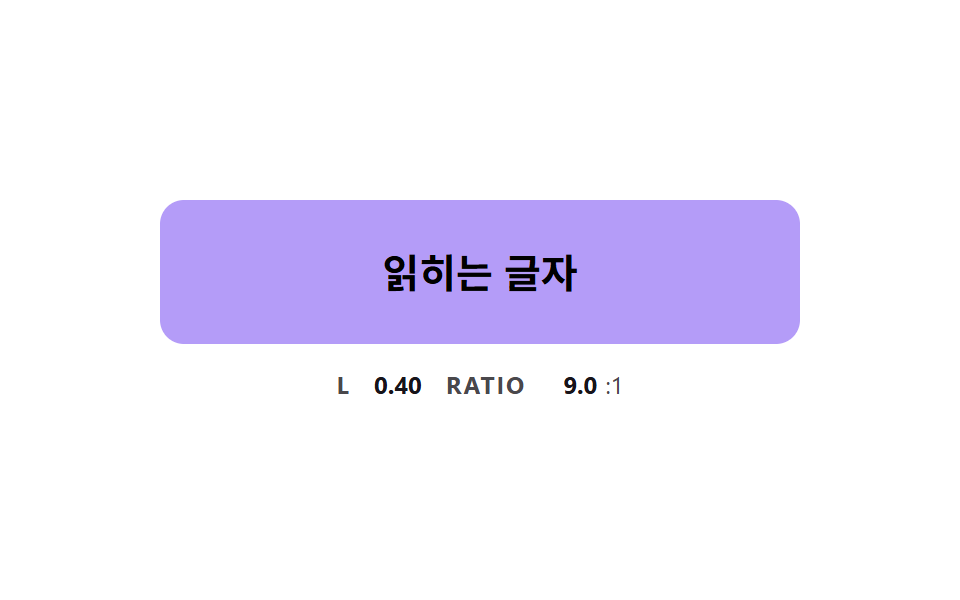
地色が暗い色から明るい色へ変わる間、相対輝度を計算して基準を超えた瞬間に文字色を暗い側へ反転させ、中間色でも文字が読める。
使いどころ色が変わるボタンの中の文字のコントラスト維持
FLIP_THRESHOLDFILL_RATEluminance
<main class="stage">
<div class="bc is-demo" id="bcRoot">
  <button class="bc__btn" id="bcBtn" type="button">読める文字</button>
  <p class="bc__meta"><span class="bc__tag">L</span> <b id="bcLum">0.01</b> <span class="bc__tag">RATIO</span> <b id="bcRatio">17.0</b><span>:1</span></p>
</div>
</main>
@use "../../../../site/static/demo-tokens" as *;
// 핵심: 바탕이 어두운 색에서 밝은 색으로 옮겨 가는 동안 글자색을 매 프레임 상대 밝기로 정한다.
// 글자 두 색은 순수한 흰색과 검정이다 — 둘이 같은 대비를 내는 밝기(0.179)에서 4.58:1 이라 어느 중간 색도 4.5:1 을 넘는다.
$text-pure-dark: #000;
@include stage($stage-paper);
.bc {
--c-from: #{$subject-ink};
--c-to: #{$subject-lilac};
--t-light: #{$stage-paper};
--t-dark: #{$text-pure-dark};
width: min(100%, 320px);
display: grid;
gap: $sp-3;
justify-items: center;
}
.bc__btn {
box-sizing: border-box;
width: 100%;
height: 72px;
border: 0;
border-radius: $r-control;
background: $subject-ink;
color: $stage-paper;
font-family: inherit;
font-size: 20px;
font-weight: 700;
line-height: 24px;
cursor: pointer;
}
.bc__btn:focus-visible { outline: 3px solid $subject-ink; outline-offset: 3px; }
.bc__meta {
margin: 0;
display: flex;
align-items: baseline;
flex-wrap: wrap;
justify-content: center;
gap: $sp-1;
font-size: 12px;
line-height: 16px;
color: rgba($subject-ink, .78);
}
.bc__tag { margin: 0 $sp-1 0 $sp-2; font-weight: 700; letter-spacing: .08em; }
.bc__tag:first-child { margin-left: 0; }
.bc__meta b { min-width: 4ch; text-align: right; font-variant-numeric: tabular-nums; color: $subject-ink; }
@media (prefers-reduced-motion: reduce) {
.bc__btn { transition: none; }
}html, body {
margin: 0;
overflow: hidden;
}
.stage {
box-sizing: border-box;
min-height: 100vh;
display: grid;
place-items: center;
margin: 0;
background: #ffffff;
font-family: -apple-system, "Segoe UI", "Noto Sans KR", sans-serif;
padding: clamp(8px, 4vw, 24px);
}
.bc {
--c-from: #17141a;
--c-to: #b9a0ff;
--t-light: #ffffff;
--t-dark: #000;
width: min(100%, 320px);
display: grid;
gap: 12px;
justify-items: center;
}
.bc__btn {
box-sizing: border-box;
width: 100%;
height: 72px;
border: 0;
border-radius: 12px;
background: #17141a;
color: #ffffff;
font-family: inherit;
font-size: 20px;
font-weight: 700;
line-height: 24px;
cursor: pointer;
}
.bc__btn:focus-visible {
outline: 3px solid #17141a;
outline-offset: 3px;
}
.bc__meta {
margin: 0;
display: flex;
align-items: baseline;
flex-wrap: wrap;
justify-content: center;
gap: 4px;
font-size: 12px;
line-height: 16px;
color: rgba(23, 20, 26, 0.78);
}
.bc__tag {
margin: 0 4px 0 8px;
font-weight: 700;
letter-spacing: 0.08em;
}
.bc__tag:first-child {
margin-left: 0;
}
.bc__meta b {
min-width: 4ch;
text-align: right;
font-variant-numeric: tabular-nums;
color: #17141a;
}
@media (prefers-reduced-motion: reduce) {
.bc__btn {
transition: none;
}
}(function () {
// 기법: 바탕색이 어두운 색에서 밝은 색으로 옮겨 가는 동안 매 프레임 상대 밝기 L 을 직접 계산한다.
// L 이 FLIP_THRESHOLD 를 넘는 순간 글자를 흰색에서 검정으로 뒤집는다.
// 흰색과 검정이 같은 대비(4.58:1)를 내는 밝기가 0.179 라서, 이 기준이면 어느 중간 색에서도 4.5:1 아래로 떨어지지 않는다.
var FLIP_THRESHOLD = 0.179;
var FILL_RATE = 4;
var START_MS = 200;
var ON_MS = 1000;
var CYCLE_MS = 2000;
var root = document.getElementById('bcRoot');
var btn = document.getElementById('bcBtn');
var lumEl = document.getElementById('bcLum');
var ratioEl = document.getElementById('bcRatio');
var reduce = window.matchMedia('(prefers-reduced-motion: reduce)').matches;
function readRgb(name) {
var v = getComputedStyle(btn).getPropertyValue(name).trim().replace('#', '');
if (v.length === 3) v = v.split('').map(function (c) { return c + c; }).join('');
return [parseInt(v.slice(0, 2), 16), parseInt(v.slice(2, 4), 16), parseInt(v.slice(4, 6), 16)];
}
function toHex(rgb) {
return '#' + rgb.map(function (c) { return ('0' + Math.round(c).toString(16)).slice(-2); }).join('');
}
function channel(c) {
var s = c / 255;
return s <= 0.04045 ? s / 12.92 : Math.pow((s + 0.055) / 1.055, 2.4);
}
function luminance(rgb) {
return 0.2126 * channel(rgb[0]) + 0.7152 * channel(rgb[1]) + 0.0722 * channel(rgb[2]);
}
function ratio(a, b) {
var hi = Math.max(a, b);
var lo = Math.min(a, b);
return (hi + 0.05) / (lo + 0.05);
}
var from = readRgb('--c-from');
var to = readRgb('--c-to');
var textLight = readRgb('--t-light');
var textDark = readRgb('--t-dark');
var lumLight = luminance(textLight);
var lumDark = luminance(textDark);
var cur = from.slice();
var pointerIn = false;
var kbFocus = false;
var t0 = null;
var lastTs = null;
function demoOn(now) {
return root.classList.contains('is-demo') && now >= START_MS && (now - START_MS) % CYCLE_MS < ON_MS;
}
function goalOf(now) { return demoOn(now) || pointerIn || kbFocus ? to : from; }
function paint() {
var l = luminance(cur);
var dark = l > FLIP_THRESHOLD;
btn.style.background = toHex(cur);
btn.style.color = toHex(dark ? textDark : textLight);
lumEl.textContent = l.toFixed(2);
ratioEl.textContent = ratio(l, dark ? lumDark : lumLight).toFixed(1);
}
function stopDemo() { root.classList.remove('is-demo'); }
function jump() { cur = (pointerIn || kbFocus ? to : from).slice(); paint(); }
btn.addEventListener('pointerenter', function () { stopDemo(); pointerIn = true; if (reduce) jump(); });
btn.addEventListener('pointerleave', function () { pointerIn = false; if (reduce) jump(); });
btn.addEventListener('focus', function () { kbFocus = btn.matches(':focus-visible'); if (kbFocus) stopDemo(); if (reduce) jump(); });
btn.addEventListener('blur', function () { kbFocus = false; if (reduce) jump(); });
function tick(ts) {
if (t0 === null) t0 = ts;
var now = ts - t0;
var dt = lastTs === null ? 0.016 : Math.min(0.05, (ts - lastTs) / 1000);
lastTs = ts;
var g = goalOf(now);
var k = 1 - Math.exp(-dt * FILL_RATE);
var gap = 0;
for (var i = 0; i < 3; i += 1) {
cur[i] += (g[i] - cur[i]) * k;
gap += Math.abs(g[i] - cur[i]);
}
if (gap < 0.5) cur = g.slice();
paint();
requestAnimationFrame(tick);
}
if (reduce) {
stopDemo();
paint();
} else {
requestAnimationFrame(tick);
}
})();// TextFlipButton — vanilla 판(07-btn-color-text-contrast-flip) 의 React 포트.
// 바탕색이 어두운 색에서 밝은 색으로 옮겨 가는 동안 상대 밝기 L 을 계산해 FLIP_THRESHOLD 를 넘으면 글자색을 뒤집는다.
import { useEffect, useRef } from "react";
import styles from "./TextFlipButton.module.scss";
type Box<T> = { current: T };
type Rgb = [number, number, number];
const FLIP_THRESHOLD = 0.179;
const FILL_RATE = 4;
const START_MS = 200;
const ON_MS = 1000;
const CYCLE_MS = 2000;
function toHex(rgb: Rgb): string {
return "#" + rgb.map((c) => ("0" + Math.round(c).toString(16)).slice(-2)).join("");
}
function channel(c: number): number {
const s = c / 255;
return s <= 0.04045 ? s / 12.92 : Math.pow((s + 0.055) / 1.055, 2.4);
}
function luminance(rgb: Rgb): number {
return 0.2126 * channel(rgb[0]) + 0.7152 * channel(rgb[1]) + 0.0722 * channel(rgb[2]);
}
function ratio(a: number, b: number): number {
return (Math.max(a, b) + 0.05) / (Math.min(a, b) + 0.05);
}
export default function TextFlipButton() {
const rootRef = useRef<HTMLDivElement | null>(null) as Box<HTMLDivElement | null>;
const btnRef = useRef<HTMLButtonElement | null>(null) as Box<HTMLButtonElement | null>;
const lumRef = useRef<HTMLElement | null>(null) as Box<HTMLElement | null>;
const ratioRef = useRef<HTMLElement | null>(null) as Box<HTMLElement | null>;
useEffect(() => {
const btn = btnRef.current;
const lumEl = lumRef.current;
const ratioEl = ratioRef.current;
if (!btn || !lumEl || !ratioEl) return;
const reduce = window.matchMedia("(prefers-reduced-motion: reduce)").matches;
const readRgb = (name: string): Rgb => {
let v = getComputedStyle(btn).getPropertyValue(name).trim().replace("#", "");
if (v.length === 3) v = v.split("").map((c) => c + c).join("");
return [parseInt(v.slice(0, 2), 16), parseInt(v.slice(2, 4), 16), parseInt(v.slice(4, 6), 16)];
};
const from = readRgb("--c-from");
const to = readRgb("--c-to");
const textLight = readRgb("--t-light");
const textDark = readRgb("--t-dark");
const lumLight = luminance(textLight);
const lumDark = luminance(textDark);
let cur: Rgb = [from[0], from[1], from[2]];
let demo = !reduce;
let pointerIn = false;
let kbFocus = false;
let t0: number | null = null;
let lastTs: number | null = null;
let raf = 0;
const demoOn = (now: number): boolean => demo && now >= START_MS && (now - START_MS) % CYCLE_MS < ON_MS;
const paint = (): void => {
const l = luminance(cur);
const dark = l > FLIP_THRESHOLD;
btn.style.background = toHex(cur);
btn.style.color = toHex(dark ? textDark : textLight);
lumEl.textContent = l.toFixed(2);
ratioEl.textContent = ratio(l, dark ? lumDark : lumLight).toFixed(1);
};
const stopDemo = (): void => { demo = false; };
const jump = (): void => {
const g = pointerIn || kbFocus ? to : from;
cur = [g[0], g[1], g[2]];
paint();
};
const onEnter = (): void => { stopDemo(); pointerIn = true; if (reduce) jump(); };
const onLeave = (): void => { pointerIn = false; if (reduce) jump(); };
const onFocus = (): void => { kbFocus = btn.matches(":focus-visible"); if (kbFocus) stopDemo(); if (reduce) jump(); };
const onBlur = (): void => { kbFocus = false; if (reduce) jump(); };
btn.addEventListener("pointerenter", onEnter);
btn.addEventListener("pointerleave", onLeave);
btn.addEventListener("focus", onFocus);
btn.addEventListener("blur", onBlur);
function tick(ts: number): void {
if (t0 === null) t0 = ts;
const now = ts - t0;
const dt = lastTs === null ? 0.016 : Math.min(0.05, (ts - lastTs) / 1000);
lastTs = ts;
const g = demoOn(now) || pointerIn || kbFocus ? to : from;
const k = 1 - Math.exp(-dt * FILL_RATE);
const next: Rgb = [cur[0] + (g[0] - cur[0]) * k, cur[1] + (g[1] - cur[1]) * k, cur[2] + (g[2] - cur[2]) * k];
const gap = Math.abs(g[0] - next[0]) + Math.abs(g[1] - next[1]) + Math.abs(g[2] - next[2]);
cur = gap < 0.5 ? [g[0], g[1], g[2]] : next;
paint();
raf = requestAnimationFrame(tick);
}
if (reduce) paint();
else raf = requestAnimationFrame(tick);
return () => {
cancelAnimationFrame(raf);
btn.removeEventListener("pointerenter", onEnter);
btn.removeEventListener("pointerleave", onLeave);
btn.removeEventListener("focus", onFocus);
btn.removeEventListener("blur", onBlur);
};
}, []);
return (
<main className={styles.stage}>
<div className={styles.bc} ref={rootRef}>
<button className={styles.bc__btn} type="button" ref={btnRef}>읽히는 글자</button>
<p className={styles.bc__meta}>
<span className={styles.bc__tag}>L</span> <b ref={lumRef}>0.01</b> <span className={styles.bc__tag}>RATIO</span> <b ref={ratioRef}>17.0</b><span>:1</span>
</p>
</div>
</main>
);
}07 地色が明るくなると文字色が反転するボタン — 計測 累積面積 16.139% · 動いたフレーム 23/23GODRICH オリジナル · SCSS と React は zip に同梱 · css ボタン 色 変更 9パターン — ホバー途中の色が濁らないよう計算した場面
このデモが属する記事
 css ボタン 色 変更 9パターン — ホバー途中の色が濁らないよう計算した場面ボタンの色をホバーで変えるのは一行で済むが、その一行は途中の色を濁らせ、グラデーションを動かせず、文字を途中で読めなくする — 02番・04番・07番がそれを一つずつ塞ぐ。css ボタン 色 変更は、ホバーや押下に合わせて背景色やグラデーシ この記事のデモをすべて見る