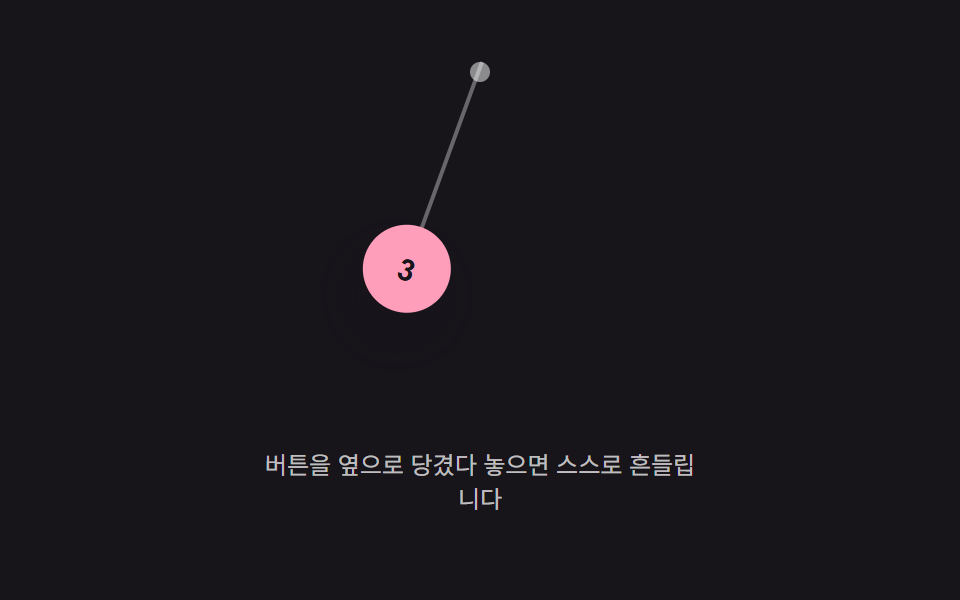
05吊り下げ角度値振動 — 上の一点に吊るされた値が左右に角度の値を行き来しながら小さくなっていく方式
上の一点に吊るされた角度の値が左右に行き来しながら揺れ、その角度の値の幅が時間とともに小さくなります。
使いどころメニュー上部に吊り下がったような通知ボタン、装飾的なヘッダーのアクションボタン
GRAVITYARM_LENDAMPING
<main class="stage">
<div class="bph is-demo" id="bph">
  <div class="bph__field" id="bphField" role="application" aria-label="吊り下げボタンの揺れ実験場" tabindex="0">
    <span class="bph__pivot" aria-hidden="true"></span>
    <div class="bph__arm" id="bphArm">
      <span class="bph__rod" aria-hidden="true"></span>
      <button class="bph__btn" id="bphBtn" type="button" aria-label="通知ボタン">3</button>
    </div>
  </div>
  <p class="bph__hint">ボタンを横に引いて離すと自然に揺れます</p>
</div>
</main>
@use "../../../../site/static/demo-tokens" as *;
// 계산 겹(진자 각가속도 적분)은 JS 에 있다 — 여기는 정적 배치만.
@include stage($stage-ink);
.stage { position: relative; }
.bph {
display: flex;
flex-direction: column;
align-items: center;
gap: $sp-3;
}
.bph__field {
position: relative;
width: 220px;
height: 168px;
}
.bph__pivot {
position: absolute;
left: 50%;
top: 0;
width: 10px;
height: 10px;
margin-left: -5px;
border-radius: $r-pill;
background: rgba($stage-paper, .5);
}
.bph__arm {
position: absolute;
left: 50%;
top: 0;
width: 2px;
height: 110px;
transform-origin: 50% 0%;
// 위쪽 한 점(pivot)에 매달려 회전하는 팔이라 원점이 위 끝에 있다 (규칙 8 예외)
}
.bph__rod {
position: absolute;
left: 0;
top: 0;
width: 2px;
height: 100%;
background: rgba($stage-paper, .35);
}
.bph__btn {
position: absolute;
left: 50%;
bottom: -22px;
margin-left: -22px;
width: 44px;
height: 44px;
border: 0;
border-radius: $r-pill;
background: $subject-pink;
color: $subject-ink;
font-size: 15px;
font-weight: 700;
cursor: grab;
touch-action: none;
box-shadow: $shadow-raised;
}
.bph__hint {
color: rgba($stage-paper, .72);
font-size: 12px;
text-align: center;
max-width: 220px;
}
@media (max-width: 340px) {
.bph__field { width: 160px; height: 96px; }
.bph__arm { height: 56px; }
.bph__btn { width: 32px; height: 32px; bottom: -16px; margin-left: -16px; font-size: 12px; }
}
@media (prefers-reduced-motion: reduce) {
.bph__arm { transition: none !important; }
}html, body {
margin: 0;
overflow: hidden;
}
.stage {
box-sizing: border-box;
min-height: 100vh;
display: grid;
place-items: center;
margin: 0;
background: #17141a;
font-family: -apple-system, "Segoe UI", "Noto Sans KR", sans-serif;
padding: clamp(8px, 4vw, 24px);
}
.stage {
position: relative;
}
.bph {
display: flex;
flex-direction: column;
align-items: center;
gap: 12px;
}
.bph__field {
position: relative;
width: 220px;
height: 168px;
}
.bph__pivot {
position: absolute;
left: 50%;
top: 0;
width: 10px;
height: 10px;
margin-left: -5px;
border-radius: 999px;
background: rgba(255, 255, 255, 0.5);
}
.bph__arm {
position: absolute;
left: 50%;
top: 0;
width: 2px;
height: 110px;
transform-origin: 50% 0%;
}
.bph__rod {
position: absolute;
left: 0;
top: 0;
width: 2px;
height: 100%;
background: rgba(255, 255, 255, 0.35);
}
.bph__btn {
position: absolute;
left: 50%;
bottom: -22px;
margin-left: -22px;
width: 44px;
height: 44px;
border: 0;
border-radius: 999px;
background: #ff9ebb;
color: #17141a;
font-size: 15px;
font-weight: 700;
cursor: grab;
touch-action: none;
box-shadow: 0 14px 24px rgba(23, 20, 26, 0.32);
}
.bph__hint {
color: rgba(255, 255, 255, 0.72);
font-size: 12px;
text-align: center;
max-width: 220px;
}
@media (max-width: 340px) {
.bph__field {
width: 160px;
height: 96px;
}
.bph__arm {
height: 56px;
}
.bph__btn {
width: 32px;
height: 32px;
bottom: -16px;
margin-left: -16px;
font-size: 12px;
}
}
@media (prefers-reduced-motion: reduce) {
.bph__arm {
transition: none !important;
}
}(function () {
var root = document.getElementById('bph');
var field = document.getElementById('bphField');
var arm = document.getElementById('bphArm');
var btn = document.getElementById('bphBtn');
var reduce = window.matchMedia('(prefers-reduced-motion: reduce)').matches;
// 계산 겹: 각가속도 = -(GRAVITY/ARM_LEN)*sin(angle) - DAMPING*avel. 각도(angle)는 도(degree) 단위라
// sin() 에 넣기 전 라디안으로 바꾸고 결과를 다시 도로 되돌린다(RAD 변환 상수) — 단위를 안 맞추면
// 복원력이 57배 작아져 흔들림이 멈춘 것처럼 보인다.
var GRAVITY = 2000, ARM_LEN = 110, DAMPING = 0.42, RAD = 180 / Math.PI;
var angle = 0, avel = 0, dragging = false, last = 0, running = false;
function paint() { arm.style.transform = 'rotate(' + angle.toFixed(2) + 'deg)'; }
function tick(now) {
var dt = Math.min((now - last) / 1000, 0.032);
last = now;
avel += (-(GRAVITY / ARM_LEN) * Math.sin(angle / RAD) * RAD - DAMPING * avel) * dt;
angle += avel * dt;
paint();
if (Math.abs(angle) < 0.2 && Math.abs(avel) < 0.6) { angle = 0; avel = 0; paint(); running = false; return; }
raf = requestAnimationFrame(tick);
}
var raf = null;
function start() { if (!running) { running = true; last = performance.now(); raf = requestAnimationFrame(tick); } }
function angleFromClientX(clientX) {
var r = field.getBoundingClientRect();
var px = clientX - (r.left + r.width / 2);
var deg = Math.atan2(px, ARM_LEN) * RAD;
return Math.max(-70, Math.min(70, deg));
}
function onDown(clientX) {
dragging = true;
if (raf !== null) { cancelAnimationFrame(raf); raf = null; }
running = false;
angle = angleFromClientX(clientX);
avel = 0;
paint();
}
function onMove(clientX) {
if (!dragging) { return; }
angle = angleFromClientX(clientX);
avel = 0;
paint();
}
function onUp() {
if (!dragging) { return; }
dragging = false;
if (reduce) { angle = 0; avel = 0; paint(); return; }
start();
}
function wireReal() {
btn.addEventListener('pointerdown', function (e) { root.classList.remove('is-demo'); stopAutoplay(); onDown(e.clientX); });
window.addEventListener('pointermove', function (e) { onMove(e.clientX); });
window.addEventListener('pointerup', onUp);
}
wireReal();
paint();
// 자동 루프: 실제 드래그 대신 각도를 한 번 밀어 두고 같은 감쇠 진동 경로를 반복 재현한다.
var autoTimer = null;
function autoTick() { angle = 30; avel = 0; running = false; start(); }
function stopAutoplay() { if (autoTimer) { clearInterval(autoTimer); autoTimer = null; } }
if (!reduce) { autoTick(); autoTimer = setInterval(autoTick, 1700); }
})();import { useEffect, useRef } from "react";
import styles from "./ButtonPhysicsPendulumHangSwing.module.scss";
export type ButtonPhysicsPendulumHangSwingProps = {
color?: string;
};
export default function ButtonPhysicsPendulumHangSwing({
color = "#ff9ebb",
}: ButtonPhysicsPendulumHangSwingProps) {
const rootRef = useRef<HTMLDivElement | null>(null);
useEffect(() => {
const root = rootRef.current;
if (!root) return;
const field = root.querySelector<HTMLDivElement>(`.${styles.field}`);
const arm = root.querySelector<HTMLDivElement>(`.${styles.arm}`);
const btn = root.querySelector<HTMLButtonElement>(`.${styles.btn}`);
if (!field || !arm || !btn) return;
const reduce = window.matchMedia("(prefers-reduced-motion: reduce)").matches;
// 계산 겹: 각가속도 = -(GRAVITY/ARM_LEN)*sin(angle) - DAMPING*avel. 각도(angle)는 도(degree) 단위라
// sin() 에 넣기 전 라디안으로 바꾸고 결과를 다시 도로 되돌린다(RAD 변환 상수) — 단위를 안 맞추면
// 복원력이 57배 작아져 흔들림이 멈춘 것처럼 보인다.
const GRAVITY = 2000, ARM_LEN = 110, DAMPING = 0.42, RAD = 180 / Math.PI;
let angle = 0, avel = 0, dragging = false, last = 0, running = false, raf: number | null = null;
function paint() { arm!.style.transform = "rotate(" + angle.toFixed(2) + "deg)"; }
function tick(now: number) {
const dt = Math.min((now - last) / 1000, 0.032);
last = now;
avel += (-(GRAVITY / ARM_LEN) * Math.sin(angle / RAD) * RAD - DAMPING * avel) * dt;
angle += avel * dt;
paint();
if (Math.abs(angle) < 0.2 && Math.abs(avel) < 0.6) { angle = 0; avel = 0; paint(); running = false; return; }
raf = requestAnimationFrame(tick);
}
function start() { if (!running) { running = true; last = performance.now(); raf = requestAnimationFrame(tick); } }
function angleFromClientX(clientX: number) {
const r = field!.getBoundingClientRect();
const px = clientX - (r.left + r.width / 2);
const deg = Math.atan2(px, ARM_LEN) * RAD;
return Math.max(-70, Math.min(70, deg));
}
function onPointerDown(e: PointerEvent) {
stopAutoplay();
dragging = true;
if (raf !== null) { cancelAnimationFrame(raf); raf = null; }
running = false;
angle = angleFromClientX(e.clientX);
avel = 0;
paint();
}
function onPointerMove(e: PointerEvent) {
if (!dragging) return;
angle = angleFromClientX(e.clientX);
avel = 0;
paint();
}
function onPointerUp() {
if (!dragging) return;
dragging = false;
if (reduce) { angle = 0; avel = 0; paint(); return; }
start();
}
btn.addEventListener("pointerdown", onPointerDown);
window.addEventListener("pointermove", onPointerMove);
window.addEventListener("pointerup", onPointerUp);
paint();
let autoTimer: number | null = null;
function autoTick() { angle = 30; avel = 0; running = false; start(); }
function stopAutoplay() { if (autoTimer !== null) { window.clearInterval(autoTimer); autoTimer = null; } }
if (!reduce) { autoTick(); autoTimer = window.setInterval(autoTick, 1700); }
return () => {
stopAutoplay();
if (raf !== null) cancelAnimationFrame(raf);
btn.removeEventListener("pointerdown", onPointerDown);
window.removeEventListener("pointermove", onPointerMove);
window.removeEventListener("pointerup", onPointerUp);
};
}, []);
return (
<div ref={rootRef} className={styles.stage}>
<div className={styles.bph}>
<div className={styles.field} role="application" aria-label="매달린 버튼 흔들기 실험판" tabIndex={0}>
<span className={styles.pivot} aria-hidden="true" />
<div className={styles.arm}>
<span className={styles.rod} aria-hidden="true" />
<button className={styles.btn} type="button" aria-label="알림 버튼" style={{ background: color }}>3</button>
</div>
</div>
<p className={styles.hint}>버튼을 옆으로 당겼다 놓으면 스스로 흔들립니다</p>
</div>
</div>
);
}05 吊り下げ角度値振動 — 上の一点に吊るされた値が左右に角度の値を行き来しながら小さくなっていく方式 — 計測 累積面積 6.13% · 動いたフレーム 23/23GODRICH オリジナル · SCSS と React は zip に同梱 · ボタン 押し込み UI 9選 — 押し込みの値が戻る計算の9通り
このデモが属する記事
 ボタン 押し込み UI 9選 — 押し込みの値が戻る計算の9通り9つのうち1つは押し込みの値が目標値を超えてから戻ることを繰り返して落ち着き、1つは落下した位置の値が床の値ではね返ることを繰り返して止まり、もう1つは離した位置の値が最も近い固定地点の値に引き寄せられて弾むように収まります。ボタン 押し込 この記事のデモをすべて見る