08液体文字 — テキストピクセルから生まれるモーフィング
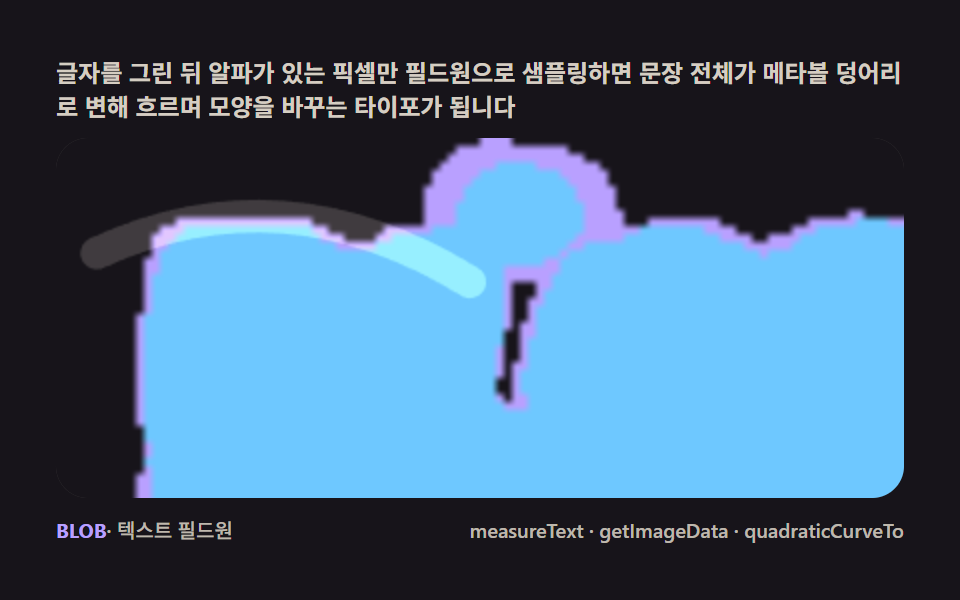
文字を描きgetImageDataでアルファのあるピクセルだけフィールド源として抽出すると、文全体がメタボールの塊に変わり流れながら形を変えるタイポイントロになります。
使いどころヒーロー見出し·文字のモーフィング
measureTextgetImageDataquadraticCurveTo
<main class="stage">
<div class="cd is-demo" id="cdRoot">
  <p class="cd__hint">
    <span>文字を描いてからアルファのあるピクセルだけをフィールド円としてサンプリングすると、文章全体がメタボールの塊に変わり、流れながら形を変えるタイポグラフィになります</span>
  </p>
  <div class="cd__field" id="cdField" role="application" aria-label="液体文字メタボール 実験パネル" tabindex="0">
    <canvas class="cd__cv" id="cdCv"></canvas>
  </div>
  <div class="cd__bar">
    <span class="cd__meta"><b class="cd__val" id="cdN">BLOB</b>・テキストフィールド円</span>
    <span class="cd__meta cd__meta--dim">measureText・getImageData・quadraticCurveTo</span>
  </div>
</div>
</main>
@use "../../../../site/static/demo-tokens" as *;
// 액체 글자(08). @keyframes 없음 — 텍스트 필드원(measureText+getImageData) + rAF 시뮬레이션뿐.
// 무대는 잉크. 편 공통 파스텔 팔레트를 --mb-* 로 (07~09 동일 계열, 항목마다 무대만 다름).
$duration: $dur-loop;
$easing: $ease-spring;
$color: $subject-lilac;
@include stage($stage-ink);
// ── 편 공통 파스텔 팔레트 ──
$mb-stage: $stage-ink;
$mb-edge: $subject-lilac; // 액체 몸통(테두리 임계값)
$mb-core: $subject-sky; // 안쪽 밝은 코어
$mb-gloss: $subject-cream; // 표면을 훑는 광택 스윕
$mb-text: $subject-cream;
.cd {
--mb-stage: #{$mb-stage};
--mb-edge: #{$mb-edge};
--mb-core: #{$mb-core};
--mb-gloss: #{$mb-gloss};
display: flex; flex-direction: column; gap: $sp-2;
width: 100%; max-width: 424px;
}
.cd__hint {
display: flex; align-items: center; gap: $sp-1; margin: 0;
font-weight: 700; font-size: clamp(10px, 2.8vw, 12px); line-height: 1.35;
color: rgba($mb-text, .82);
}
.cd__field {
position: relative; height: 180px;
border-radius: $r-card; overflow: hidden;
background: $mb-stage;
box-shadow: inset 0 0 0 1px rgba($mb-gloss, .16);
}
.cd__field:focus-visible { outline: 2px solid $mb-edge; outline-offset: 2px; }
.cd__cv { display: block; width: 100%; height: 100%; }
.cd__bar { display: flex; align-items: baseline; justify-content: space-between; gap: $sp-2; }
.cd__meta { font-size: 10px; font-weight: 500; color: rgba($mb-text, .72); }
.cd__val { color: $mb-edge; font-weight: 700; }
.cd__meta--dim { font-size: 10px; }
@media (max-width: 340px) {
.cd { gap: $sp-1; }
.cd__field { height: 100px; }
.cd__meta--dim { display: none; }
}
// reduce — rAF 를 돌리지 않고 액체 한 장만 남는다.
@media (prefers-reduced-motion: reduce) {
.cd.is-still .cd__field { cursor: default !important; }
}html, body {
margin: 0;
overflow: hidden;
}
.stage {
box-sizing: border-box;
min-height: 100vh;
display: grid;
place-items: center;
margin: 0;
background: #17141a;
font-family: -apple-system, "Segoe UI", "Noto Sans KR", sans-serif;
padding: clamp(8px, 4vw, 24px);
}
.cd {
--mb-stage: #17141a;
--mb-edge: #b9a0ff;
--mb-core: #6ec8ff;
--mb-gloss: #fff7e6;
display: flex;
flex-direction: column;
gap: 8px;
width: 100%;
max-width: 424px;
}
.cd__hint {
display: flex;
align-items: center;
gap: 4px;
margin: 0;
font-weight: 700;
font-size: clamp(10px, 2.8vw, 12px);
line-height: 1.35;
color: rgba(255, 247, 230, 0.82);
}
.cd__field {
position: relative;
height: 180px;
border-radius: 16px;
overflow: hidden;
background: #17141a;
box-shadow: inset 0 0 0 1px rgba(255, 247, 230, 0.16);
}
.cd__field:focus-visible {
outline: 2px solid #b9a0ff;
outline-offset: 2px;
}
.cd__cv {
display: block;
width: 100%;
height: 100%;
}
.cd__bar {
display: flex;
align-items: baseline;
justify-content: space-between;
gap: 8px;
}
.cd__meta {
font-size: 10px;
font-weight: 500;
color: rgba(255, 247, 230, 0.72);
}
.cd__val {
color: #b9a0ff;
font-weight: 700;
}
.cd__meta--dim {
font-size: 10px;
}
@media (max-width: 340px) {
.cd {
gap: 4px;
}
.cd__field {
height: 100px;
}
.cd__meta--dim {
display: none;
}
}
@media (prefers-reduced-motion: reduce) {
.cd.is-still .cd__field {
cursor: default !important;
}
}// 액체 글자(08). 오프스크린에 글자를 크게 그리고(measureText 로 폭을 재 캔버스에 맞춤) getImageData 로
// 알파 있는 픽셀만 격자 간격으로 샘플링해 필드원(seed) 목록을 만든다. 매 프레임 각 seed 를 살짝 흔들고
// (liquid jitter) 전체를 숨쉬듯 스케일해, 저해상도 필드 캔버스에 가산 원으로 찍은 뒤 임계값 두 단(테두리·
// 코어)으로 나눠 확대하면 글자가 통째로 출렁이는 메타볼 덩어리가 된다. 표면엔 quadraticCurveTo 로 그린
// 하이라이트 곡선이 시간에 따라 훑고 지나가며 광택을 낸다.
(function () {
// ── 변형 상수 블록 — 아래 값 하나만 바꿔 변형을 만든다 ──
var TEXT = 'BLOB'; // 'LIQUID' 로 바꾸면 더 긴 변형
var STRIDE = 7; // seed 샘플 간격(px, 텍스트 캔버스 기준) — 작을수록 촘촘하고 느림
var JITTER = 3.6; // 액체 흔들림 진폭(px)
// ────────────────────────────────────────────────────
var root = document.getElementById('cdRoot');
var field = document.getElementById('cdField');
var cv = document.getElementById('cdCv');
var ctx = cv.getContext('2d');
var css = getComputedStyle(root);
function tok(name) { return css.getPropertyValue(name).trim(); }
var C_STAGE = tok('--mb-stage');
var C_EDGE = tok('--mb-edge');
var C_CORE = tok('--mb-core');
var C_GLOSS = tok('--mb-gloss');
var reduce = window.matchMedia('(prefers-reduced-motion: reduce)').matches;
var W = 0, H = 0;
var LOWW = 0, LOWH = 0, SCALE = 4;
var fieldCv = document.createElement('canvas');
var fieldCtx = fieldCv.getContext('2d');
var bandCv = document.createElement('canvas');
var bandCtx = bandCv.getContext('2d');
var txtCv = document.createElement('canvas');
var txtCtx = txtCv.getContext('2d');
var raf = 0, t0 = -1;
var seeds = [];
function makeRand(seed) {
var st = seed >>> 0;
return function () {
st = (st + 0x6D2B79F5) >>> 0;
var t = st;
t = Math.imul(t ^ (t >>> 15), t | 1);
t ^= t + Math.imul(t ^ (t >>> 7), t | 61);
return ((t ^ (t >>> 14)) >>> 0) / 4294967296;
};
}
var rand = makeRand(0x317A08);
// ── 텍스트 → 필드원 샘플링 (measureText + getImageData) ──
function buildSeeds() {
txtCv.width = W; txtCv.height = H;
txtCtx.clearRect(0, 0, W, H);
var fontSize = Math.round(H * 0.94);
txtCtx.font = '900 ' + fontSize + 'px -apple-system, "Segoe UI", sans-serif';
var m = txtCtx.measureText(TEXT);
var targetW = W * 0.92;
if (m.width > 0) fontSize = Math.max(24, Math.round(fontSize * (targetW / m.width)));
txtCtx.font = '900 ' + fontSize + 'px -apple-system, "Segoe UI", sans-serif';
m = txtCtx.measureText(TEXT);
var asc = m.actualBoundingBoxAscent || fontSize * 0.72;
var desc = m.actualBoundingBoxDescent || fontSize * 0.18;
var cx = W / 2, cy = H / 2 + (asc - desc) / 2;
txtCtx.textAlign = 'center';
txtCtx.textBaseline = 'alphabetic';
txtCtx.fillStyle = '#fff';
txtCtx.fillText(TEXT, cx, cy);
var img = txtCtx.getImageData(0, 0, W, H);
var d = img.data;
seeds = [];
for (var y = 4; y < H - 4; y += STRIDE) {
for (var x = 4; x < W - 4; x += STRIDE) {
var a = d[(y * W + x) * 4 + 3];
if (a > 120) {
seeds.push({ x: x, y: y, ph: rand() * Math.PI * 2, sp: 0.8 + rand() * 1.6 });
}
}
}
}
function fit() {
var r = field.getBoundingClientRect();
W = r.width; H = r.height;
cv.width = Math.round(W); cv.height = Math.round(H);
LOWW = Math.max(48, Math.round(W / SCALE));
LOWH = Math.max(30, Math.round(H / SCALE));
fieldCv.width = LOWW; fieldCv.height = LOWH;
bandCv.width = LOWW; bandCv.height = LOWH;
ctx.imageSmoothingEnabled = true;
buildSeeds();
}
function drawField(t) {
fieldCtx.clearRect(0, 0, LOWW, LOWH);
fieldCtx.fillStyle = '#000';
fieldCtx.fillRect(0, 0, LOWW, LOWH);
fieldCtx.globalCompositeOperation = 'lighter';
var breathe = 1 + Math.sin(t * 0.7) * 0.11; // 숨쉬듯 전체 스케일
var r = 6.4 + Math.sin(t * 0.5) * 0.7;
// 문장 전체가 천천히 필드를 가로지러 흐른다(타이포가 자리를 바꾸며 모양을 다시 만든다)
var driftX = Math.sin(t * 0.33) * LOWW * 0.22 + Math.sin(t * 0.11) * LOWW * 0.08;
var driftY = Math.cos(t * 0.26) * LOWH * 0.20;
function blob(px, py, rad) {
var g = fieldCtx.createRadialGradient(px, py, 0, px, py, rad);
g.addColorStop(0, 'rgba(255,255,255,0.95)');
g.addColorStop(1, 'rgba(255,255,255,0)');
fieldCtx.fillStyle = g;
fieldCtx.fillRect(px - rad, py - rad, rad * 2, rad * 2);
}
for (var i = 0; i < seeds.length; i++) {
var s = seeds[i];
var jx = Math.sin(t * s.sp + s.ph) * JITTER;
var jy = Math.cos(t * s.sp * 1.2 + s.ph) * JITTER;
var px = ((s.x + jx) / SCALE - LOWW / 2) * breathe + LOWW / 2 + driftX;
var py = ((s.y + jy) / SCALE - LOWH / 2) * breathe + LOWH / 2 + driftY;
blob(px, py, r);
}
// 위성 방울 — 글자 주위를 돌며 스쳐 병합하는 메타볼(모양이 더 크게 바뀐다)
var SAT = [[0.9, 0.5, 0.16], [0.6, 0.85, 0.21], [1.25, 0.32, 0.13], [0.45, 0.15, 0.12], [1.05, 0.72, 0.17]];
for (var k = 0; k < SAT.length; k++) {
var o = SAT[k];
var ox = LOWW / 2 + Math.sin(t * o[0] + k * 2.1) * LOWW * 0.42 + driftX * 0.4;
var oy = LOWH / 2 + Math.cos(t * o[1] + k * 1.4) * LOWH * 0.38 + driftY * 0.4;
blob(ox, oy, r * 1.5);
}
fieldCtx.globalCompositeOperation = 'source-over';
}
function classify() {
var img = fieldCtx.getImageData(0, 0, LOWW, LOWH);
var d = img.data;
for (var y = 0; y < LOWH; y++) {
for (var x = 0; x < LOWW; x++) {
var v = d[(y * LOWW + x) * 4] / 255;
var col = v > 0.56 ? C_CORE : (v > 0.15 ? C_EDGE : C_STAGE);
bandCtx.fillStyle = col;
bandCtx.fillRect(x, y, 1, 1);
}
}
}
function gloss(t) {
// 광택 스윕 — quadraticCurveTo 로 그린 곡선이 시간에 따라 왼쪽에서 오른쪽으로 훑는다
var u = (t * 0.28) % 1.4 - 0.2;
var x0 = -W * 0.2 + u * W, y0 = H * 0.32;
var cx1 = x0 + W * 0.22, cy1 = H * 0.08;
var x1 = x0 + W * 0.44, y1 = H * 0.4;
ctx.save();
ctx.globalCompositeOperation = 'lighter';
ctx.strokeStyle = C_GLOSS;
ctx.lineWidth = Math.max(10, H * 0.09);
ctx.lineCap = 'round';
ctx.globalAlpha = 0.16;
ctx.beginPath();
ctx.moveTo(x0, y0);
ctx.quadraticCurveTo(cx1, cy1, x1, y1);
ctx.stroke();
ctx.restore();
}
function draw(t) {
drawField(t);
classify();
ctx.clearRect(0, 0, W, H);
ctx.fillStyle = C_STAGE;
ctx.fillRect(0, 0, W, H);
ctx.drawImage(bandCv, 0, 0, LOWW, LOWH, 0, 0, W, H);
gloss(t);
}
function stillFrame() { draw(0.35); }
function frame(now) {
if (t0 < 0) t0 = now;
var t = (now - t0) / 1000;
draw(t);
raf = requestAnimationFrame(frame);
}
window.addEventListener('resize', function () {
fit();
if (reduce) stillFrame();
});
fit();
if (reduce) {
stillFrame();
root.classList.add('is-still');
} else {
raf = requestAnimationFrame(frame);
}
})();// LiquidText — vanilla 판(run/317/demo/08-metaball-text-liquid-fillet/index.html) 의 React 포트.
// 액체 글자 — 오프스크린에 글자를 measureText 로 재 맞춰 그리고 getImageData 로 알파 픽셀만
// 필드원으로 샘플링해, 저해상도 가산 필드 + 두 단 임계값으로 글자 전체가 출렁이는 메타볼 타이포를 만든다.
// 표면을 quadraticCurveTo 곡선 광택이 주기적으로 훑는다.
import { useEffect, useRef, useState } from "react";
import type { CSSProperties } from "react";
import styles from "./LiquidText.module.scss";
export type LiquidTextProps = {
duration?: string;
easing?: string;
color?: string;
text?: string; // 모핑 원본 문장
stride?: number; // seed 샘플 간격(px) — 작을수록 촘촘
jitter?: number; // 액체 흔들림 진폭(px)
};
type Vars = CSSProperties & { "--duration"?: string; "--easing"?: string; "--color"?: string };
type Box<T> = { current: T };
type Seed = { x: number; y: number; ph: number; sp: number };
const FIELD_LABEL = "액체 글자 메타볼 실험판";
const SCALE = 4;
function makePRNG(seed: number): () => number {
let s = seed >>> 0;
return function () {
s = (s + 0x6d2b79f5) >>> 0;
let t = s;
t = Math.imul(t ^ (t >>> 15), t | 1);
t ^= t + Math.imul(t ^ (t >>> 7), t | 61);
return ((t ^ (t >>> 14)) >>> 0) / 4294967296;
};
}
export default function LiquidText({
duration = "2s",
easing = "cubic-bezier(.2, .8, .2, 1)",
color = "#b9a0ff",
text = "BLOB",
stride = 7,
jitter = 3.6,
}: LiquidTextProps) {
const rootRef = useRef<HTMLDivElement | null>(null);
const fieldRef = useRef<HTMLDivElement | null>(null);
const cvRef = useRef<HTMLCanvasElement | null>(null);
const ctxRef = useRef<CanvasRenderingContext2D | null>(null);
const sizeRef = useRef({ w: 0, h: 0 }) as Box<{ w: number; h: number }>;
const lowRef = useRef({ w: 0, h: 0 }) as Box<{ w: number; h: number }>;
const fieldCvRef = useRef<HTMLCanvasElement | null>(null);
const bandCvRef = useRef<HTMLCanvasElement | null>(null);
const txtCvRef = useRef<HTMLCanvasElement | null>(null);
const fieldCtxRef = useRef<CanvasRenderingContext2D | null>(null);
const bandCtxRef = useRef<CanvasRenderingContext2D | null>(null);
const colRef = useRef<{ stage: string; edge: string; core: string; gloss: string } | null>(null);
const seedsRef = useRef<Seed[]>([]) as Box<Seed[]>;
const strideRef = useRef(stride) as Box<number>;
const jitterRef = useRef(jitter) as Box<number>;
const rafRef = useRef(0) as Box<number>;
const [label, setLabel] = useState(text);
const [still, setStill] = useState(false);
const vars: Vars = { "--duration": duration, "--easing": easing, "--color": color };
function reduced(): boolean {
return window.matchMedia("(prefers-reduced-motion: reduce)").matches;
}
// ── 텍스트 → 필드원 샘플링 (measureText + getImageData) ──
function buildSeeds(): void {
const txtCv = txtCvRef.current;
const { w: W, h: H } = sizeRef.current;
if (!txtCv || W <= 0) return;
const txtCtx = txtCv.getContext("2d");
if (!txtCtx) return;
txtCv.width = W; txtCv.height = H;
txtCtx.clearRect(0, 0, W, H);
let fontSize = Math.round(H * 0.94);
const font = (fs: number) => `900 ${fs}px -apple-system, "Segoe UI", sans-serif`;
txtCtx.font = font(fontSize);
let m = txtCtx.measureText(text);
const targetW = W * 0.92;
if (m.width > 0) fontSize = Math.max(24, Math.round(fontSize * (targetW / m.width)));
txtCtx.font = font(fontSize);
m = txtCtx.measureText(text);
const asc = m.actualBoundingBoxAscent || fontSize * 0.72;
const desc = m.actualBoundingBoxDescent || fontSize * 0.18;
const cy = H / 2 + (asc - desc) / 2;
txtCtx.textAlign = "center";
txtCtx.textBaseline = "alphabetic";
txtCtx.fillStyle = "#fff";
txtCtx.fillText(text, W / 2, cy);
const img = txtCtx.getImageData(0, 0, W, H);
const d = img.data;
const rand = makePRNG(0x317a08);
const arr: Seed[] = [];
const st = strideRef.current;
for (let y = 4; y < H - 4; y += st) {
for (let x = 4; x < W - 4; x += st) {
const a = d[(y * W + x) * 4 + 3];
if (a > 120) arr.push({ x, y, ph: rand() * Math.PI * 2, sp: 0.8 + rand() * 1.6 });
}
}
seedsRef.current = arr;
}
function drawField(t: number): void {
const fieldCtx = fieldCtxRef.current;
const { w: lw, h: lh } = lowRef.current;
if (!fieldCtx) return;
fieldCtx.globalCompositeOperation = "source-over";
fieldCtx.fillStyle = "#000";
fieldCtx.fillRect(0, 0, lw, lh);
fieldCtx.globalCompositeOperation = "lighter";
const breathe = 1 + Math.sin(t * 0.7) * 0.11;
const r = 6.4 + Math.sin(t * 0.5) * 0.7;
// 문장 전체가 천천히 필드를 가로지러 흐른다(타이포가 자리를 바꾸며 모양을 다시 만든다)
const driftX = Math.sin(t * 0.33) * lw * 0.22 + Math.sin(t * 0.11) * lw * 0.08;
const driftY = Math.cos(t * 0.26) * lh * 0.2;
const blob = (px: number, py: number, rad: number): void => {
const g = fieldCtx.createRadialGradient(px, py, 0, px, py, rad);
g.addColorStop(0, "rgba(255,255,255,0.95)");
g.addColorStop(1, "rgba(255,255,255,0)");
fieldCtx.fillStyle = g;
fieldCtx.fillRect(px - rad, py - rad, rad * 2, rad * 2);
};
const seeds = seedsRef.current;
for (let i = 0; i < seeds.length; i++) {
const s = seeds[i];
const jx = Math.sin(t * s.sp + s.ph) * jitterRef.current;
const jy = Math.cos(t * s.sp * 1.2 + s.ph) * jitterRef.current;
const px = ((s.x + jx) / SCALE - lw / 2) * breathe + lw / 2 + driftX;
const py = ((s.y + jy) / SCALE - lh / 2) * breathe + lh / 2 + driftY;
blob(px, py, r);
}
// 위성 방울 — 글자 주위를 돌며 스쳐 병합하는 메타볼(모양이 더 크게 바뀐다)
const SAT: Array<[number, number, number]> = [[0.9, 0.5, 0.16], [0.6, 0.85, 0.21], [1.25, 0.32, 0.13], [0.45, 0.15, 0.12], [1.05, 0.72, 0.17]];
for (let k = 0; k < SAT.length; k++) {
const o = SAT[k];
const ox = lw / 2 + Math.sin(t * o[0] + k * 2.1) * lw * 0.42 + driftX * 0.4;
const oy = lh / 2 + Math.cos(t * o[1] + k * 1.4) * lh * 0.38 + driftY * 0.4;
blob(ox, oy, r * 1.5);
}
fieldCtx.globalCompositeOperation = "source-over";
}
function classify(): void {
const fieldCtx = fieldCtxRef.current;
const bandCtx = bandCtxRef.current;
const col = colRef.current;
const { w: lw, h: lh } = lowRef.current;
if (!fieldCtx || !bandCtx || !col) return;
const img = fieldCtx.getImageData(0, 0, lw, lh);
const d = img.data;
for (let y = 0; y < lh; y++) {
for (let x = 0; x < lw; x++) {
const v = d[(y * lw + x) * 4] / 255;
bandCtx.fillStyle = v > 0.56 ? col.core : (v > 0.15 ? col.edge : col.stage);
bandCtx.fillRect(x, y, 1, 1);
}
}
}
function gloss(t: number): void {
const ctx = ctxRef.current;
const col = colRef.current;
const { w: W, h: H } = sizeRef.current;
if (!ctx || !col) return;
const u = (t * 0.28) % 1.4 - 0.2;
const x0 = -W * 0.2 + u * W, y0 = H * 0.32;
const cx1 = x0 + W * 0.22, cy1 = H * 0.08;
const x1 = x0 + W * 0.44, y1 = H * 0.4;
ctx.save();
ctx.globalCompositeOperation = "lighter";
ctx.strokeStyle = col.gloss;
ctx.lineWidth = Math.max(10, H * 0.09);
ctx.lineCap = "round";
ctx.globalAlpha = 0.16;
ctx.beginPath();
ctx.moveTo(x0, y0);
ctx.quadraticCurveTo(cx1, cy1, x1, y1);
ctx.stroke();
ctx.restore();
}
function draw(t: number): void {
const ctx = ctxRef.current;
const col = colRef.current;
const bandCv = bandCvRef.current;
const { w: W, h: H } = sizeRef.current;
const { w: lw, h: lh } = lowRef.current;
if (!ctx || !bandCv || !col) return;
drawField(t);
classify();
ctx.clearRect(0, 0, W, H);
ctx.fillStyle = col.stage;
ctx.fillRect(0, 0, W, H);
ctx.drawImage(bandCv, 0, 0, lw, lh, 0, 0, W, H);
gloss(t);
}
function fit(): void {
const field = fieldRef.current;
const cv = cvRef.current;
if (!field || !cv) return;
const ctx = cv.getContext("2d");
if (!ctx) return;
const r = field.getBoundingClientRect();
sizeRef.current.w = r.width;
sizeRef.current.h = r.height;
cv.width = Math.round(r.width);
cv.height = Math.round(r.height);
const lw = Math.max(48, Math.round(r.width / SCALE));
const lh = Math.max(30, Math.round(r.height / SCALE));
lowRef.current = { w: lw, h: lh };
const fc = fieldCvRef.current as HTMLCanvasElement; fc.width = lw; fc.height = lh;
const bc = bandCvRef.current as HTMLCanvasElement; bc.width = lw; bc.height = lh;
fieldCtxRef.current = fc.getContext("2d");
bandCtxRef.current = bc.getContext("2d");
ctx.imageSmoothingEnabled = true;
ctxRef.current = ctx;
buildSeeds();
}
function stillFrame(): void { draw(0.35); }
let t0 = -1;
function frame(now: number): void {
if (t0 < 0) t0 = now;
const t = (now - t0) / 1000;
draw(t);
rafRef.current = requestAnimationFrame(frame);
}
useEffect(() => {
const root = rootRef.current;
if (!root) return;
strideRef.current = stride;
jitterRef.current = jitter;
const cs = getComputedStyle(root);
const tok = (name: string) => cs.getPropertyValue(name).trim();
colRef.current = {
stage: tok("--mb-stage"),
edge: tok("--mb-edge"),
core: tok("--mb-core"),
gloss: tok("--mb-gloss"),
};
fit();
setLabel(text);
function onResize(): void {
fit();
if (reduced()) stillFrame();
}
window.addEventListener("resize", onResize);
if (reduced()) {
stillFrame();
setStill(true);
} else {
rafRef.current = requestAnimationFrame(frame);
}
return () => {
window.removeEventListener("resize", onResize);
cancelAnimationFrame(rafRef.current);
};
// eslint-disable-next-line react-hooks/exhaustive-deps
}, [text, stride, jitter]);
const rootCls = still ? `${styles.root} ${styles.isStill}` : styles.root;
return (
<main className={styles.stage}>
<div className={rootCls} ref={rootRef} style={vars}>
<p className={styles.hint}>
<span>글자를 그린 뒤 알파가 있는 픽셀만 필드원으로 샘플링하면 문장 전체가 메타볼 덩어리로 변해 흐르며 모양을 바꾸는 타이포가 됩니다</span>
</p>
<div
className={styles.field}
ref={fieldRef}
role="application"
aria-label={FIELD_LABEL}
tabIndex={0}
>
<canvas className={styles.cv} ref={cvRef}></canvas>
</div>
<div className={styles.bar}>
<span className={styles.meta}><b className={styles.val}>{label}</b>· 텍스트 필드원</span>
<span className={styles.metaDim}>measureText · getImageData · quadraticCurveTo</span>
</div>
</div>
</main>
);
}08 液体文字 — テキストピクセルから生まれるモーフィング — 計測 累積面積 30.161% · 動いたフレーム 23/23GODRICH オリジナル · SCSS と React は zip に同梱 · キャンバス メタボール アニメーション9種 — マーチングスクエアで融合する液体の塊
このデモが属する記事
 キャンバス メタボール アニメーション9種 — マーチングスクエアで融合する液体の塊メタボール アニメーションは球の輪郭を滑らかにモーフィングさせる仕事ではなく、格子点ごとのスカラー場を毎フレーム計算する仕事です。ライブラリ·WebGL なし — 閾値を跨ぐ格子をつなぐマーチングスクエアひとつでブロブが液体のように融合と分 この記事のデモをすべて見る