06ビデオカード — 露出割合から再生を、スクロール量から位置を求めるカード
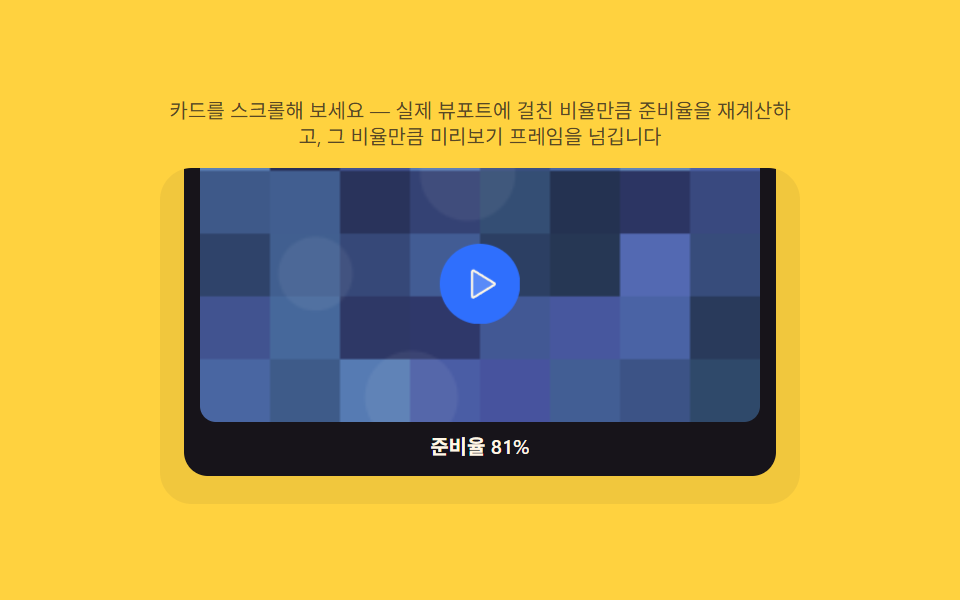
画面内に入っている割合を実際に測ってその値が基準を超えると再生を始め、スクロールが進んだ分だけ動画の再生位置を求め直し、スクロールで動画を送るように見せます。
使いどころ事例動画サムネイルカード、プロジェクトハイライトリール
IntersectionObserverscrollTopgetContext('2d')
<main class="stage">
<section class="panel">
  <p class="hint" id="hint">カードをスクロールしてみてください — 実際にビューポートに入った割合ぶん準備率を再計算し、その比率ぶんプレビューフレームを進めます</p>
  <div class="scrollStage" id="scrollStage">
    <div class="scrollSpacer" aria-hidden="true"></div>
    <article class="card" id="card">
      <canvas class="thumb" id="thumb" width="240" height="135" aria-hidden="true"></canvas>
      <button class="playBtn" id="playBtn" type="button" aria-label="事例動画プレビューを再生">
        <svg class="playIcon" xmlns="http://www.w3.org/2000/svg" width="22" height="22" viewBox="0 0 256 256"><g fill="currentColor"><path d="M228.23 134.69L84.15 222.81A8 8 0 0 1 72 216.12V39.88a8 8 0 0 1 12.15-6.69l144.08 88.12a7.82 7.82 0 0 1 0 13.38" opacity=".2"/><path d="M232.4 114.49L88.32 26.35a16 16 0 0 0-16.2-.3A15.86 15.86 0 0 0 64 39.87v176.26A15.94 15.94 0 0 0 80 232a16.07 16.07 0 0 0 8.36-2.35l144.04-88.14a15.81 15.81 0 0 0 0-27ZM80 215.94V40l143.83 88Z"/></g></svg>
      </button>
      <p class="readyLabel" id="readyLabel">準備率0%</p>
    </article>
    <div class="scrollSpacer" aria-hidden="true"></div>
  </div>
</section>
</main>
@use "../../../../site/static/demo-tokens" as *;
$duration: $dur-quick;
$easing: $ease-pop;
$color: $subject-blue;
@include stage($stage-yellow);
.panel {
width: 100%;
max-width: 320px;
display: flex;
flex-direction: column;
align-items: center;
gap: $sp-2;
text-align: center;
}
.hint {
margin: 0;
color: rgba($subject-ink, .72);
font-weight: 400;
font-size: 10px;
line-height: 1.35;
}
.scrollStage {
position: relative;
width: 100%;
height: 168px;
overflow-y: auto;
overscroll-behavior: contain;
border-radius: $r-card;
background: rgba($subject-ink, .06);
}
.scrollSpacer {
height: 130px;
}
.card {
position: relative;
margin: 0 $sp-3;
padding: $sp-2;
border-radius: $r-control;
background: $subject-ink;
display: flex;
flex-direction: column;
align-items: center;
gap: $sp-1;
}
.thumb {
width: 100%;
height: auto;
border-radius: $r-sm;
display: block;
}
.playBtn {
position: absolute;
top: 50%;
left: 50%;
transform: translate(-50%, -50%) scale(.86);
transform-origin: center;
width: 40px;
height: 40px;
border-radius: $r-pill;
border: 0;
display: grid;
place-items: center;
background: rgba($subject-cream, .22);
color: $subject-cream;
opacity: .72;
cursor: not-allowed;
transition: transform $duration $easing, opacity $duration $easing, background $duration $easing;
&.playBtn--ready {
opacity: 1;
cursor: pointer;
background: $color;
transform: translate(-50%, -50%) scale(1);
}
&.playBtn--pressed {
transform: translate(-50%, -50%) scale(.9);
}
&:focus-visible {
outline: 2px solid $subject-cream;
outline-offset: 2px;
}
}
.playIcon {
width: 18px;
height: 18px;
}
.readyLabel {
margin: 0;
color: $subject-cream;
font-weight: 600;
font-size: 10px;
font-variant-numeric: tabular-nums;
}
@media (max-width: 340px) {
.panel { max-width: 280px; gap: $sp-1; }
.scrollStage { height: 108px; }
.scrollSpacer { height: 80px; }
.hint { font-size: 8px; line-height: 1.25; }
.readyLabel { font-size: 9px; }
.playBtn { width: 32px; height: 32px; }
.playIcon { width: 14px; height: 14px; }
}
@media (prefers-reduced-motion: reduce) {
.playBtn {
transition: none;
}
}html, body {
margin: 0;
overflow: hidden;
}
.stage {
box-sizing: border-box;
min-height: 100vh;
display: grid;
place-items: center;
margin: 0;
background: #ffd23f;
font-family: -apple-system, "Segoe UI", "Noto Sans KR", sans-serif;
padding: clamp(8px, 4vw, 24px);
}
.panel {
width: 100%;
max-width: 320px;
display: flex;
flex-direction: column;
align-items: center;
gap: 8px;
text-align: center;
}
.hint {
margin: 0;
color: rgba(23, 20, 26, 0.72);
font-weight: 400;
font-size: 10px;
line-height: 1.35;
}
.scrollStage {
position: relative;
width: 100%;
height: 168px;
overflow-y: auto;
overscroll-behavior: contain;
border-radius: 16px;
background: rgba(23, 20, 26, 0.06);
}
.scrollSpacer {
height: 130px;
}
.card {
position: relative;
margin: 0 12px;
padding: 8px;
border-radius: 12px;
background: #17141a;
display: flex;
flex-direction: column;
align-items: center;
gap: 4px;
}
.thumb {
width: 100%;
height: auto;
border-radius: 8px;
display: block;
}
.playBtn {
position: absolute;
top: 50%;
left: 50%;
transform: translate(-50%, -50%) scale(0.86);
transform-origin: center;
width: 40px;
height: 40px;
border-radius: 999px;
border: 0;
display: grid;
place-items: center;
background: rgba(255, 247, 230, 0.22);
color: #fff7e6;
opacity: 0.72;
cursor: not-allowed;
transition: transform 220ms cubic-bezier(0.2, 1.4, 0.4, 1), opacity 220ms cubic-bezier(0.2, 1.4, 0.4, 1), background 220ms cubic-bezier(0.2, 1.4, 0.4, 1);
}
.playBtn.playBtn--ready {
opacity: 1;
cursor: pointer;
background: #2f6df6;
transform: translate(-50%, -50%) scale(1);
}
.playBtn.playBtn--pressed {
transform: translate(-50%, -50%) scale(0.9);
}
.playBtn:focus-visible {
outline: 2px solid #fff7e6;
outline-offset: 2px;
}
.playIcon {
width: 18px;
height: 18px;
}
.readyLabel {
margin: 0;
color: #fff7e6;
font-weight: 600;
font-size: 10px;
font-variant-numeric: tabular-nums;
}
@media (max-width: 340px) {
.panel {
max-width: 280px;
gap: 4px;
}
.scrollStage {
height: 108px;
}
.scrollSpacer {
height: 80px;
}
.hint {
font-size: 8px;
line-height: 1.25;
}
.readyLabel {
font-size: 9px;
}
.playBtn {
width: 32px;
height: 32px;
}
.playIcon {
width: 14px;
height: 14px;
}
}
@media (prefers-reduced-motion: reduce) {
.playBtn {
transition: none;
}
}// 영상 카드(06) — 실제 스크롤 컨테이너 안에서 카드가 뷰포트에 걸친 비율을 IntersectionObserver 로
// 실측해 準備率(%)을 매번 다시 구하고, 그 비율로 미리보기 프레임 인덱스를 정해 캔버스에 다시 그린다
// (계산 한 겹). 진짜 영상 파일은 없다 — 프레임은 mulberry32 시드 난수로 매번 다시 그리는 절차적 패턴이다.
(function () {
var scrollStage = document.getElementById('scrollStage');
var card = document.getElementById('card');
var thumb = document.getElementById('thumb');
var playBtn = document.getElementById('playBtn');
var readyLabel = document.getElementById('readyLabel');
if (!scrollStage || !card || !thumb || !playBtn || !readyLabel) return;
var ctx = thumb.getContext('2d');
var reduce = window.matchMedia('(prefers-reduced-motion: reduce)').matches;
var FRAME_COUNT = 12;
var READY_THRESHOLD = 0.62;
var lastFrame = -1;
function mulberry32(a) {
return function () {
a |= 0; a = (a + 0x6D2B79F5) | 0;
var t = Math.imul(a ^ (a >>> 15), 1 | a);
t = (t + Math.imul(t ^ (t >>> 7), 61 | t)) ^ t;
return ((t ^ (t >>> 14)) >>> 0) / 4294967296;
};
}
function drawFrame(frameIndex) {
if (!ctx) return;
var rnd = mulberry32(frameIndex * 7919 + 11);
var w = thumb.width, h = thumb.height;
var cols = 8, rows = 5;
var cw = w / cols, ch = h / rows;
for (var r = 0; r < rows; r++) {
for (var c = 0; c < cols; c++) {
var v = rnd();
var lightness = 22 + v * 34;
var hue = 214 + rnd() * 18;
ctx.fillStyle = 'hsl(' + hue.toFixed(0) + ', 38%, ' + lightness.toFixed(0) + '%)';
ctx.fillRect(c * cw, r * ch, cw + 1, ch + 1);
}
}
ctx.fillStyle = 'rgba(255,255,255,.06)';
for (var i = 0; i < 3; i++) {
var bx = rnd() * w, by = rnd() * h, br = 8 + rnd() * 18;
ctx.beginPath();
ctx.arc(bx, by, br, 0, Math.PI * 2);
ctx.fill();
}
}
function update(ratio) {
var percent = Math.round(ratio * 100);
readyLabel.textContent = '準備率 ' + percent + '%';
var frameIndex = Math.min(FRAME_COUNT - 1, Math.floor(ratio * (FRAME_COUNT - 1)));
if (frameIndex !== lastFrame) {
lastFrame = frameIndex;
drawFrame(frameIndex);
}
if (ratio >= READY_THRESHOLD) {
playBtn.classList.add('playBtn--ready');
playBtn.disabled = false;
} else {
playBtn.classList.remove('playBtn--ready');
playBtn.disabled = true;
}
}
drawFrame(0);
update(0);
var io = new IntersectionObserver(function (entries) {
var entry = entries[0];
if (!entry) return;
update(entry.intersectionRatio);
}, {
root: scrollStage,
threshold: Array.from({ length: 51 }, function (_, i) { return i / 50; })
});
io.observe(card);
playBtn.addEventListener('click', function () {
if (playBtn.disabled) return;
playBtn.classList.add('playBtn--pressed');
setTimeout(function () { playBtn.classList.remove('playBtn--pressed'); }, 260);
});
if (!reduce) {
var max = 0;
requestAnimationFrame(function tick() {
max = scrollStage.scrollHeight - scrollStage.clientHeight;
var t = performance.now() / 1400;
var wave = (Math.sin(t) + 1) / 2;
scrollStage.scrollTop = wave * max;
requestAnimationFrame(tick);
});
}
})();// CaseVideoCard — vanilla 판(run/340/demo/06-case-video-card/index.html) 의 React 포트.
// 실제 스크롤 컨테이너 안에서 카드가 뷰포트에 걸친 비율을 IntersectionObserver 로 실측해
// 준비율(%)을 매번 다시 구하고, 그 비율로 미리보기 프레임 인덱스를 정해 캔버스에 다시 그린다.
// 진짜 영상 파일은 없다 — 프레임은 mulberry32 시드 난수로 매번 다시 그리는 절차적 패턴이다.
import { useEffect, useRef } from "react";
import styles from "./CaseVideoCard.module.scss";
export type CaseVideoCardProps = {
duration?: string;
easing?: string;
color?: string;
};
const HINT = "카드를 스크롤해 보세요 — 실제 뷰포트에 걸친 비율만큼 준비율을 재계산하고, 그 비율만큼 미리보기 프레임을 넘깁니다";
const FRAME_COUNT = 12;
const READY_THRESHOLD = 0.62;
function mulberry32(a: number): () => number {
return function () {
a |= 0;
a = (a + 0x6d2b79f5) | 0;
let t = Math.imul(a ^ (a >>> 15), 1 | a);
t = (t + Math.imul(t ^ (t >>> 7), 61 | t)) ^ t;
return ((t ^ (t >>> 14)) >>> 0) / 4294967296;
};
}
export default function CaseVideoCard({
duration = "220ms",
easing = "cubic-bezier(.2,1.4,.4,1)",
color = "#2f6df6"
}: CaseVideoCardProps) {
const scrollStageRef = useRef<HTMLDivElement | null>(null);
const cardRef = useRef<HTMLElement | null>(null);
const thumbRef = useRef<HTMLCanvasElement | null>(null);
const playBtnRef = useRef<HTMLButtonElement | null>(null);
const readyLabelRef = useRef<HTMLParagraphElement | null>(null);
useEffect(() => {
const scrollStage = scrollStageRef.current;
const card = cardRef.current;
const thumb = thumbRef.current;
const playBtn = playBtnRef.current;
const readyLabel = readyLabelRef.current;
if (!scrollStage || !card || !thumb || !playBtn || !readyLabel) return;
const ctx = thumb.getContext("2d");
const reduce = window.matchMedia("(prefers-reduced-motion: reduce)").matches;
let lastFrame = -1;
function drawFrame(frameIndex: number): void {
if (!ctx) return;
const rnd = mulberry32(frameIndex * 7919 + 11);
const w = thumb!.width;
const h = thumb!.height;
const cols = 8;
const rows = 5;
const cw = w / cols;
const ch = h / rows;
for (let r = 0; r < rows; r++) {
for (let c = 0; c < cols; c++) {
const v = rnd();
const lightness = 22 + v * 34;
const hue = 214 + rnd() * 18;
ctx.fillStyle = "hsl(" + hue.toFixed(0) + ", 38%, " + lightness.toFixed(0) + "%)";
ctx.fillRect(c * cw, r * ch, cw + 1, ch + 1);
}
}
ctx.fillStyle = "rgba(255,255,255,.06)";
for (let i = 0; i < 3; i++) {
const bx = rnd() * w;
const by = rnd() * h;
const br = 8 + rnd() * 18;
ctx.beginPath();
ctx.arc(bx, by, br, 0, Math.PI * 2);
ctx.fill();
}
}
function update(ratio: number): void {
const percent = Math.round(ratio * 100);
readyLabel!.textContent = "준비율 " + percent + "%";
const frameIndex = Math.min(FRAME_COUNT - 1, Math.floor(ratio * (FRAME_COUNT - 1)));
if (frameIndex !== lastFrame) {
lastFrame = frameIndex;
drawFrame(frameIndex);
}
if (ratio >= READY_THRESHOLD) {
playBtn!.classList.add(styles.playBtnReady);
playBtn!.disabled = false;
} else {
playBtn!.classList.remove(styles.playBtnReady);
playBtn!.disabled = true;
}
}
drawFrame(0);
update(0);
const io = new IntersectionObserver(
(entries) => {
const entry = entries[0];
if (!entry) return;
update(entry.intersectionRatio);
},
{
root: scrollStage,
threshold: Array.from({ length: 51 }, (_, i) => i / 50)
}
);
io.observe(card);
function onPlayClick(): void {
if (playBtn!.disabled) return;
playBtn!.classList.add(styles.playBtnPressed);
window.setTimeout(() => playBtn!.classList.remove(styles.playBtnPressed), 260);
}
playBtn.addEventListener("click", onPlayClick);
let raf = 0;
if (!reduce) {
const tick = () => {
const max = scrollStage!.scrollHeight - scrollStage!.clientHeight;
const t = performance.now() / 1400;
const wave = (Math.sin(t) + 1) / 2;
scrollStage!.scrollTop = wave * max;
raf = requestAnimationFrame(tick);
};
raf = requestAnimationFrame(tick);
}
return () => {
io.disconnect();
playBtn.removeEventListener("click", onPlayClick);
if (raf) cancelAnimationFrame(raf);
};
// eslint-disable-next-line react-hooks/exhaustive-deps
}, []);
return (
<main className={styles.stage}>
<section className={styles.panel}>
<p className={styles.hint}>{HINT}</p>
<div className={styles.scrollStage} ref={scrollStageRef}>
<div className={styles.scrollSpacer} aria-hidden="true" />
<article className={styles.card} ref={cardRef}>
<canvas className={styles.thumb} ref={thumbRef} width={240} height={135} aria-hidden="true" />
<button className={styles.playBtn} type="button" aria-label="사례 영상 미리보기 재생" ref={playBtnRef}>
<svg className={styles.playIcon} xmlns="http://www.w3.org/2000/svg" width="22" height="22" viewBox="0 0 256 256">
<g fill="currentColor">
<path d="M228.23 134.69L84.15 222.81A8 8 0 0 1 72 216.12V39.88a8 8 0 0 1 12.15-6.69l144.08 88.12a7.82 7.82 0 0 1 0 13.38" opacity=".2" />
<path d="M232.4 114.49L88.32 26.35a16 16 0 0 0-16.2-.3A15.86 15.86 0 0 0 64 39.87v176.26A15.94 15.94 0 0 0 80 232a16.07 16.07 0 0 0 8.36-2.35l144.04-88.14a15.81 15.81 0 0 0 0-27ZM80 215.94V40l143.83 88Z" />
</g>
</svg>
</button>
<p className={styles.readyLabel} ref={readyLabelRef}>준비율 0%</p>
</article>
<div className={styles.scrollSpacer} aria-hidden="true" />
</div>
</section>
</main>
);
}06 ビデオカード — 露出割合から再生を、スクロール量から位置を求めるカード — 計測 累積面積 31.472% · 動いたフレーム 23/23GODRICH オリジナル · SCSS と React は zip に同梱 · 導入事例 web デザイン9選 — 成果数値まで計算して見せる
このデモが属する記事
 導入事例 web デザイン9選 — 成果数値まで計算して見せる導入事例 web デザインは色や余白より先に、数字がどう動くかで差がつきます。画面に入った瞬間から成果数値がフレームごとに求め直されカウントアップし、事例ごとに計算したインパクトスコアでグリッドタイルの大きさが決まり、引用文の長さに合わせて この記事のデモをすべて見る