03課金トグル — スイッチの位置から節約額を求めてバッジに載せる切り替え
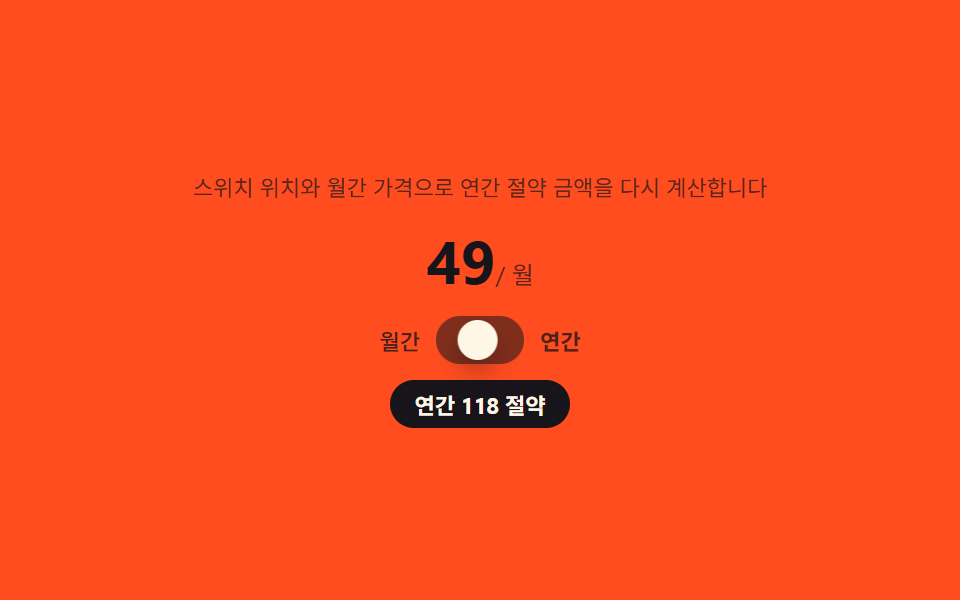
スイッチが年払い側に移ると、月払い価格を基準にした1年分の節約額をその場で求めてバッジの文言に入れ、月払いに戻すとバッジを隠します。
使いどころ料金ページ上部の切替スイッチ、支払いサイクル選択UI
aria-checkedrole="switch":not([hidden])
<main class="stage">
<section class="panel">
  <p class="hint">スイッチの位置と月額料金から年間の節約額を再計算します。</p>
  <p class="priceLine"><span class="priceNum" id="priceNum">29</span><span class="priceUnit"> / 月</span></p>
  <div class="switchWrap">
    <span class="modeLabel" id="modeMonthly">月間</span>
    <button class="switchCtl" id="toggle" type="button" role="switch" aria-checked="false" aria-label="年間払いに切り替え">
      <span class="knob" aria-hidden="true"></span>
    </button>
    <span class="modeLabel" id="modeYearly">年間</span>
  </div>
  <p class="badge" id="savingsBadge" hidden></p>
</section>
</main>
@use "../../../../site/static/demo-tokens" as *;
$duration: $dur-base;
$easing: $ease-spring;
$color: $subject-cream;
@include stage($stage-orange);
.panel {
width: 100%;
max-width: 360px;
display: flex;
flex-direction: column;
align-items: center;
gap: $sp-2;
}
.hint {
margin: 0;
padding: 0 $sp-2;
text-align: center;
font-weight: 400;
font-size: 11px;
line-height: 1.4;
color: rgba($subject-ink, .70);
}
.priceLine {
margin: 0;
display: flex;
align-items: baseline;
}
.priceNum {
font-weight: 700;
font-size: 30px;
color: $subject-ink;
}
.priceUnit {
font-weight: 400;
font-size: 12px;
color: rgba($subject-ink, .70);
}
.switchWrap {
display: flex;
align-items: center;
gap: $sp-2;
}
.modeLabel {
font-weight: 500;
font-size: 11px;
color: rgba($subject-ink, .55);
transition: color $duration $easing;
}
.modeLabel.is-active {
color: $subject-ink;
font-weight: 700;
}
.switchCtl {
position: relative;
width: 44px;
height: 24px;
border: 0;
border-radius: $r-pill;
background: rgba($subject-ink, .18);
padding: 0;
cursor: pointer;
transition: background $duration $easing;
}
.switchCtl[aria-checked="true"] {
background: $subject-ink;
}
.knob {
position: absolute;
top: 2px;
left: 2px;
width: 20px;
height: 20px;
border-radius: $r-pill;
background: $color;
box-shadow: $shadow-press;
transform: translateX(0);
transition: transform $duration $easing;
}
.switchCtl[aria-checked="true"] .knob {
transform: translateX(20px);
}
.badge {
margin: 0;
padding: $sp-1 $sp-3;
border-radius: $r-pill;
background: $subject-ink;
color: $subject-cream;
font-weight: 700;
font-size: 11px;
opacity: 0;
transform: scale(.6);
transform-origin: center;
transition: opacity $dur-quick $ease-out, transform $dur-quick $ease-pop;
}
.badge:not([hidden]) {
opacity: 1;
transform: scale(1);
}
@media (max-width: 340px) {
.panel { max-width: 280px; gap: $sp-1; }
.hint { font-size: 9px; }
.priceNum { font-size: 24px; }
}
@media (prefers-reduced-motion: reduce) {
.modeLabel,
.switchCtl,
.knob,
.badge {
transition: none;
}
}html, body {
margin: 0;
overflow: hidden;
}
.stage {
box-sizing: border-box;
min-height: 100vh;
display: grid;
place-items: center;
margin: 0;
background: #ff4d1f;
font-family: -apple-system, "Segoe UI", "Noto Sans KR", sans-serif;
padding: clamp(8px, 4vw, 24px);
}
.panel {
width: 100%;
max-width: 360px;
display: flex;
flex-direction: column;
align-items: center;
gap: 8px;
}
.hint {
margin: 0;
padding: 0 8px;
text-align: center;
font-weight: 400;
font-size: 11px;
line-height: 1.4;
color: rgba(23, 20, 26, 0.7);
}
.priceLine {
margin: 0;
display: flex;
align-items: baseline;
}
.priceNum {
font-weight: 700;
font-size: 30px;
color: #17141a;
}
.priceUnit {
font-weight: 400;
font-size: 12px;
color: rgba(23, 20, 26, 0.7);
}
.switchWrap {
display: flex;
align-items: center;
gap: 8px;
}
.modeLabel {
font-weight: 500;
font-size: 11px;
color: rgba(23, 20, 26, 0.55);
transition: color 300ms cubic-bezier(0.2, 0.8, 0.2, 1);
}
.modeLabel.is-active {
color: #17141a;
font-weight: 700;
}
.switchCtl {
position: relative;
width: 44px;
height: 24px;
border: 0;
border-radius: 999px;
background: rgba(23, 20, 26, 0.18);
padding: 0;
cursor: pointer;
transition: background 300ms cubic-bezier(0.2, 0.8, 0.2, 1);
}
.switchCtl[aria-checked=true] {
background: #17141a;
}
.knob {
position: absolute;
top: 2px;
left: 2px;
width: 20px;
height: 20px;
border-radius: 999px;
background: #fff7e6;
box-shadow: 0 6px 12px rgba(23, 20, 26, 0.32);
transform: translateX(0);
transition: transform 300ms cubic-bezier(0.2, 0.8, 0.2, 1);
}
.switchCtl[aria-checked=true] .knob {
transform: translateX(20px);
}
.badge {
margin: 0;
padding: 4px 12px;
border-radius: 999px;
background: #17141a;
color: #fff7e6;
font-weight: 700;
font-size: 11px;
opacity: 0;
transform: scale(0.6);
transform-origin: center;
transition: opacity 220ms ease-out, transform 220ms cubic-bezier(0.2, 1.4, 0.4, 1);
}
.badge:not([hidden]) {
opacity: 1;
transform: scale(1);
}
@media (max-width: 340px) {
.panel {
max-width: 280px;
gap: 4px;
}
.hint {
font-size: 9px;
}
.priceNum {
font-size: 24px;
}
}
@media (prefers-reduced-motion: reduce) {
.modeLabel,
.switchCtl,
.knob,
.badge {
transition: none;
}
}// 빌링 토글(03) — 스위치가 연간으로 넘어갈 때마다 지금 표시된 月間 가격(monthly)에
// 12 와 年間 할인율(DISCOUNT)을 곱해 한 해 お得 금액을 그 자리에서 구해 배지에 채운다(계산 한 겹).
// 자동 시연은 月間 가격을 29→49 로 바꿔가며 토글해 같은 공식이 다른 결과를 내는 것을 보여준다.
(function () {
var toggle = document.getElementById('toggle');
var priceNum = document.getElementById('priceNum');
var badge = document.getElementById('savingsBadge');
var modeMonthly = document.getElementById('modeMonthly');
var modeYearly = document.getElementById('modeYearly');
if (!toggle || !priceNum || !badge || !modeMonthly || !modeYearly) return;
var reduce = window.matchMedia('(prefers-reduced-motion: reduce)').matches;
var DISCOUNT = .20;
var STEPS = [
{ monthly: 29, yearly: false },
{ monthly: 29, yearly: true },
{ monthly: 49, yearly: false },
{ monthly: 49, yearly: true }
];
function apply(step) {
priceNum.textContent = String(step.monthly);
toggle.setAttribute('aria-checked', step.yearly ? 'true' : 'false');
modeMonthly.classList.toggle('is-active', !step.yearly);
modeYearly.classList.toggle('is-active', step.yearly);
if (step.yearly) {
var savings = Math.round(step.monthly * 12 * DISCOUNT);
badge.hidden = false;
badge.textContent = '年間 ' + savings + ' お得';
} else {
badge.hidden = true;
}
}
apply(STEPS[0]);
if (!reduce) {
var idx = 0;
setInterval(function () {
idx = (idx + 1) % STEPS.length;
apply(STEPS[idx]);
}, 700);
}
})();// PricingBillingToggle — vanilla 판(run/339/demo/03-pricing-billing-toggle/index.html) 의 React 포트.
// 스위치가 연간으로 넘어갈 때마다 지금 표시된 월간 가격에 12 와 연간 할인율을 곱해 한 해 절약 금액을
// 그 자리에서 구해 배지에 채운다(계산 한 겹).
import { useEffect, useRef } from "react";
import styles from "./PricingBillingToggle.module.scss";
export type PricingBillingToggleProps = {
duration?: string;
easing?: string;
color?: string;
};
const HINT = "스위치 위치와 월간 가격으로 연간 절약 금액을 다시 계산합니다";
const TOGGLE_ARIA = "연간 결제로 전환";
type Step = { monthly: number; yearly: boolean };
const DISCOUNT = 0.2;
const STEPS: Step[] = [
{ monthly: 29, yearly: false },
{ monthly: 29, yearly: true },
{ monthly: 49, yearly: false },
{ monthly: 49, yearly: true }
];
export default function PricingBillingToggle({
duration = "300ms",
easing = "cubic-bezier(.2,.8,.2,1)",
color = "#fff7e6"
}: PricingBillingToggleProps) {
const toggleRef = useRef<HTMLButtonElement | null>(null);
const priceNumRef = useRef<HTMLSpanElement | null>(null);
const badgeRef = useRef<HTMLParagraphElement | null>(null);
const modeMonthlyRef = useRef<HTMLSpanElement | null>(null);
const modeYearlyRef = useRef<HTMLSpanElement | null>(null);
useEffect(() => {
const toggle = toggleRef.current;
const priceNum = priceNumRef.current;
const badge = badgeRef.current;
const modeMonthly = modeMonthlyRef.current;
const modeYearly = modeYearlyRef.current;
if (!toggle || !priceNum || !badge || !modeMonthly || !modeYearly) return;
const reduce = window.matchMedia("(prefers-reduced-motion: reduce)").matches;
function apply(step: Step): void {
priceNum!.textContent = String(step.monthly);
toggle!.setAttribute("aria-checked", step.yearly ? "true" : "false");
modeMonthly!.classList.toggle(styles.isActive, !step.yearly);
modeYearly!.classList.toggle(styles.isActive, step.yearly);
if (step.yearly) {
const savings = Math.round(step.monthly * 12 * DISCOUNT);
badge!.hidden = false;
badge!.textContent = "연간 " + savings + " 절약";
} else {
badge!.hidden = true;
}
}
apply(STEPS[0]);
let timer = 0;
if (!reduce) {
let idx = 0;
timer = window.setInterval(() => {
idx = (idx + 1) % STEPS.length;
apply(STEPS[idx]);
}, 700);
}
return () => {
if (timer) window.clearInterval(timer);
};
// eslint-disable-next-line react-hooks/exhaustive-deps
}, []);
return (
<main className={styles.stage}>
<section className={styles.panel}>
<p className={styles.hint}>{HINT}</p>
<p className={styles.priceLine}>
<span className={styles.priceNum} ref={priceNumRef}>
29
</span>
<span className={styles.priceUnit}> / 월</span>
</p>
<div className={styles.switchWrap}>
<span className={styles.modeLabel} ref={modeMonthlyRef}>
월간
</span>
<button
className={styles.switchCtl}
ref={toggleRef}
type="button"
role="switch"
aria-checked="false"
aria-label={TOGGLE_ARIA}
>
<span className={styles.knob} aria-hidden="true" />
</button>
<span className={styles.modeLabel} ref={modeYearlyRef}>
연간
</span>
</div>
<p className={styles.badge} hidden ref={badgeRef} />
</section>
</main>
);
}03 課金トグル — スイッチの位置から節約額を求めてバッジに載せる切り替え — 計測 累積面積 5.264% · 動いたフレーム 10/23GODRICH オリジナル · SCSS と React は zip に同梱 · 価格表 デザイン9選 — 年払い切替・割引率まで計算して見せる
このデモが属する記事
 価格表 デザイン9選 — 年払い切替・割引率まで計算して見せる価格表 デザインは、料金プランのボタン一つ・数字一つに計算の層を重ねる考え方です。年払い・月払いの切替が変わるたびに各プランの価格を計算し直し、割引バッジは定価と割引価格の差を自分で求め、法人窓口セクションは利用量の値からその場で見積もりを この記事のデモをすべて見る