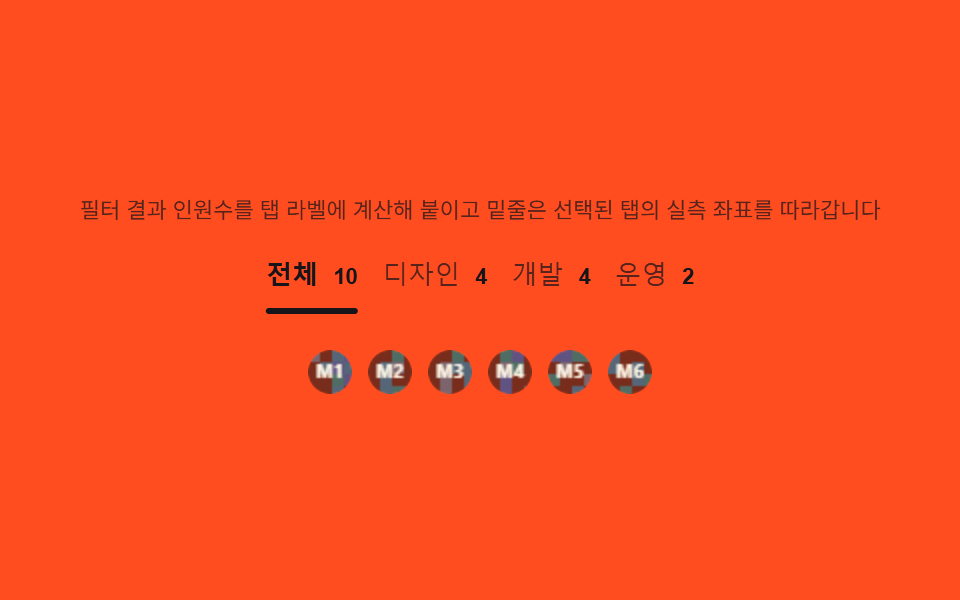
03役職タブ — フィルタ結果の人数をタブラベルに計算して付ける切り替え
メンバー配列をroleでfilterして各タブラベルの人数(「デザイン (4)」)を計算し続け、選択タブのgetBoundingClientRectで左端座標と幅を読んで下線インジケーターのtranslateXとwidthをその値に合わせます。タブが増えても計算方法は変わりません。
使いどころ部署別メンバーフィルタ、職種別紹介タブ
filtergetBoundingClientRecttransform: translateX
<main class="stage">
<section class="tabs" id="tabsWrap">
  <p class="tabs__hint" id="tabsHint">フィルター結果の人数を計算してタブラベルに付け、下線は選択タブの実測座標に追従します。</p>
  <div class="tabs__bar" id="tabsBar" role="tablist" aria-label="役割フィルター">
    <button class="tabs__tab" id="tab-all" role="tab" aria-selected="true" type="button">すべて <span class="tabs__count" id="cnt-all">10</span></button>
    <button class="tabs__tab" id="tab-design" role="tab" aria-selected="false" type="button">デザイン <span class="tabs__count" id="cnt-design">4</span></button>
    <button class="tabs__tab" id="tab-dev" role="tab" aria-selected="false" type="button">開発 <span class="tabs__count" id="cnt-dev">4</span></button>
    <button class="tabs__tab" id="tab-ops" role="tab" aria-selected="false" type="button">運用 <span class="tabs__count" id="cnt-ops">2</span></button>
    <span class="tabs__indicator" id="tabsIndicator" aria-hidden="true"></span>
  </div>
  <div class="tabs__panel" id="tabsPanel" role="list" aria-label="フィルター結果"></div>
</section>
</main>
@use "../../../../site/static/demo-tokens" as *;
$duration: $dur-quick; // 220ms — 인디케이터 이동
$easing: $ease-out;
$color: $subject-ink;
@include stage($stage-orange);
.tabs {
width: 100%;
max-width: 420px;
display: flex;
flex-direction: column;
gap: $sp-3;
align-items: center;
text-align: center;
}
.tabs__hint {
margin: 0;
padding: 0 $sp-2;
font-weight: 400;
font-size: 11px;
line-height: 1.4;
color: rgba($subject-ink, .72);
}
.tabs__bar {
position: relative;
display: flex;
gap: $sp-3;
width: 100%;
justify-content: center;
padding-bottom: $sp-2;
}
.tabs__tab {
flex: 0 0 auto;
appearance: none;
border: 0;
background: none;
padding: $sp-1 0;
font-weight: 500;
font-size: 13px;
color: rgba($subject-ink, .72);
cursor: pointer;
}
.tabs__tab[aria-selected="true"] {
color: $subject-ink;
font-weight: 700;
}
.tabs__count {
display: inline-block;
margin-left: $sp-1;
font-weight: 700;
font-size: 11px;
color: $subject-ink;
}
.tabs__indicator {
position: absolute;
left: 0;
bottom: 0;
height: 3px;
width: var(--iw, 0px);
border-radius: $r-pill;
background: $color;
transform: translateX(var(--ix, 0px));
transition: transform $duration $easing, width $duration $easing;
}
.tabs__panel {
display: flex;
gap: $sp-2;
justify-content: center;
min-height: 34px;
}
.tabs__chip {
display: flex;
align-items: center;
justify-content: center;
opacity: 0;
transform: scale(.8);
transition: opacity $dur-quick $ease-out, transform $duration $ease-pop;
}
.tabs__panel.is-in .tabs__chip {
opacity: 1;
transform: scale(1);
}
.tabs__cv {
display: block;
width: 22px;
height: 22px;
border-radius: $r-pill;
}
@media (max-width: 340px) {
.tabs { max-width: 300px; gap: $sp-2; }
.tabs__hint { font-size: 9px; }
.tabs__bar { gap: $sp-2; }
.tabs__tab { font-size: 11px; }
.tabs__cv { width: 18px; height: 18px; }
}
@media (prefers-reduced-motion: reduce) {
.tabs__indicator,
.tabs__chip {
transition: none;
}
.tabs__chip {
opacity: 1;
transform: none;
}
}html, body {
margin: 0;
overflow: hidden;
}
.stage {
box-sizing: border-box;
min-height: 100vh;
display: grid;
place-items: center;
margin: 0;
background: #ff4d1f;
font-family: -apple-system, "Segoe UI", "Noto Sans KR", sans-serif;
padding: clamp(8px, 4vw, 24px);
}
.tabs {
width: 100%;
max-width: 420px;
display: flex;
flex-direction: column;
gap: 12px;
align-items: center;
text-align: center;
}
.tabs__hint {
margin: 0;
padding: 0 8px;
font-weight: 400;
font-size: 11px;
line-height: 1.4;
color: rgba(23, 20, 26, 0.72);
}
.tabs__bar {
position: relative;
display: flex;
gap: 12px;
width: 100%;
justify-content: center;
padding-bottom: 8px;
}
.tabs__tab {
flex: 0 0 auto;
appearance: none;
border: 0;
background: none;
padding: 4px 0;
font-weight: 500;
font-size: 13px;
color: rgba(23, 20, 26, 0.72);
cursor: pointer;
}
.tabs__tab[aria-selected=true] {
color: #17141a;
font-weight: 700;
}
.tabs__count {
display: inline-block;
margin-left: 4px;
font-weight: 700;
font-size: 11px;
color: #17141a;
}
.tabs__indicator {
position: absolute;
left: 0;
bottom: 0;
height: 3px;
width: var(--iw, 0px);
border-radius: 999px;
background: #17141a;
transform: translateX(var(--ix, 0px));
transition: transform 220ms ease-out, width 220ms ease-out;
}
.tabs__panel {
display: flex;
gap: 8px;
justify-content: center;
min-height: 34px;
}
.tabs__chip {
display: flex;
align-items: center;
justify-content: center;
opacity: 0;
transform: scale(0.8);
transition: opacity 220ms ease-out, transform 220ms cubic-bezier(0.2, 1.4, 0.4, 1);
}
.tabs__panel.is-in .tabs__chip {
opacity: 1;
transform: scale(1);
}
.tabs__cv {
display: block;
width: 22px;
height: 22px;
border-radius: 999px;
}
@media (max-width: 340px) {
.tabs {
max-width: 300px;
gap: 8px;
}
.tabs__hint {
font-size: 9px;
}
.tabs__bar {
gap: 8px;
}
.tabs__tab {
font-size: 11px;
}
.tabs__cv {
width: 18px;
height: 18px;
}
}
@media (prefers-reduced-motion: reduce) {
.tabs__indicator,
.tabs__chip {
transition: none;
}
.tabs__chip {
opacity: 1;
transform: none;
}
}// 역할 탭(03) — メンバー 배열을 role 값으로 filter 해 탭 라벨의 인원수를 계산하고, 선택된 탭의
// getBoundingClientRect 로 좌표·너비를 읽어 밑줄 인디케이터의 translateX·width 를 맞춘다(계산 한 겹).
(function () {
var wrap = document.getElementById('tabsWrap');
var bar = document.getElementById('tabsBar');
var indicator = document.getElementById('tabsIndicator');
var panel = document.getElementById('tabsPanel');
if (!wrap || !bar || !indicator || !panel) return;
var tabs = Array.prototype.slice.call(bar.querySelectorAll('.tabs__tab'));
var reduce = window.matchMedia('(prefers-reduced-motion: reduce)').matches;
var ROLES = ['design', 'design', 'design', 'design', 'dev', 'dev', 'dev', 'dev', 'ops', 'ops'];
var members = ROLES.map(function (role, i) { return { id: i, role: role }; });
var KEYS = ['all', 'design', 'dev', 'ops'];
function mulberry32(a) {
return function () {
a |= 0; a = a + 0x6D2B79F5 | 0;
var t = Math.imul(a ^ a >>> 15, 1 | a);
t = t + Math.imul(t ^ t >>> 7, 61 | t) ^ t;
return ((t ^ t >>> 14) >>> 0) / 4294967296;
};
}
var HEXES = ['#9fc9ec', '#93d9c0', '#b9a0ff', '#f6c6d3'];
function drawAvatar(cv, seed, label) {
var ctx = cv.getContext('2d');
if (!ctx) return;
var rnd = mulberry32(seed);
var s = cv.width;
ctx.save();
ctx.beginPath(); ctx.arc(s / 2, s / 2, s / 2, 0, Math.PI * 2); ctx.clip();
var cell = 6;
for (var y = 0; y < s; y += cell) {
for (var x = 0; x < s; x += cell) {
var v = rnd();
ctx.fillStyle = v > .5 ? HEXES[Math.floor(rnd() * HEXES.length)] : 'rgba(23,20,26,.08)';
ctx.fillRect(x, y, cell, cell);
}
}
ctx.restore();
ctx.fillStyle = 'rgba(23,20,26,.55)';
ctx.beginPath(); ctx.arc(s / 2, s / 2, s / 2, 0, Math.PI * 2); ctx.fill();
ctx.fillStyle = '#fff7e6';
ctx.font = '700 ' + Math.round(s * .4) + 'px -apple-system, "Segoe UI", sans-serif';
ctx.textAlign = 'center'; ctx.textBaseline = 'middle';
ctx.fillText(label, s / 2, s / 2 + 1);
}
// 인원수 계산 — role 값으로 filter 한 배열의 길이를 각 탭 라벨에 붙인다
KEYS.forEach(function (key) {
var span = document.getElementById('cnt-' + key);
if (!span) return;
var n = key === 'all' ? members.length : members.filter(function (m) { return m.role === key; }).length;
span.textContent = String(n);
});
function moveIndicator(tab) {
var barRect = bar.getBoundingClientRect();
var tabRect = tab.getBoundingClientRect();
var ix = tabRect.left - barRect.left;
var iw = tabRect.width;
indicator.style.setProperty('--ix', ix.toFixed(1) + 'px');
indicator.style.setProperty('--iw', iw.toFixed(1) + 'px');
}
function renderPanel(key) {
var list = key === 'all' ? members : members.filter(function (m) { return m.role === key; });
panel.innerHTML = '';
list.slice(0, 6).forEach(function (m) {
var chip = document.createElement('div');
chip.className = 'tabs__chip';
chip.setAttribute('role', 'listitem');
var cv = document.createElement('canvas');
cv.width = 22; cv.height = 22; cv.className = 'tabs__cv';
cv.setAttribute('aria-hidden', 'true');
chip.appendChild(cv);
panel.appendChild(chip);
drawAvatar(cv, 5 + m.id * 9, 'M' + (m.id + 1));
});
panel.classList.remove('is-in');
void panel.offsetWidth;
panel.classList.add('is-in');
}
function selectTab(key) {
var target = document.getElementById('tab-' + key);
if (!target) return;
tabs.forEach(function (t) { t.setAttribute('aria-selected', t === target ? 'true' : 'false'); });
moveIndicator(target);
renderPanel(key);
}
tabs.forEach(function (t) {
t.addEventListener('click', function () {
var key = t.id.replace('tab-', '');
idx = KEYS.indexOf(key);
selectTab(key);
});
});
var idx = 0;
selectTab(KEYS[0]);
window.addEventListener('resize', function () { selectTab(KEYS[idx]); });
if (!reduce) {
setInterval(function () {
idx = (idx + 1) % KEYS.length;
selectTab(KEYS[idx]);
}, 340);
}
})();// TeamRoleTabs — vanilla 판(run/338/demo/03-team-role-tabs/index.html) 의 React 포트.
// 팀원 배열을 role 값으로 filter 해 탭 라벨의 인원수를 계산하고, 선택된 탭의 getBoundingClientRect
// 로 좌표·너비를 읽어 밑줄 인디케이터의 translateX·width 를 맞춘다(계산 한 겹).
import { useEffect, useRef } from "react";
import styles from "./TeamRoleTabs.module.scss";
export type TeamRoleTabsProps = {
duration?: string;
easing?: string;
color?: string;
};
const HINT = "필터 결과 인원수를 탭 라벨에 계산해 붙이고 밑줄은 선택된 탭의 실측 좌표를 따라갑니다";
const BAR_LABEL = "역할 필터";
const PANEL_LABEL = "필터 결과";
type Role = "all" | "design" | "dev" | "ops";
type Member = { id: number; role: "design" | "dev" | "ops" };
const TAB_TEXT: { key: Role; label: string }[] = [
{ key: "all", label: "전체" },
{ key: "design", label: "디자인" },
{ key: "dev", label: "개발" },
{ key: "ops", label: "운영" }
];
const ROLES: Member["role"][] = ["design", "design", "design", "design", "dev", "dev", "dev", "dev", "ops", "ops"];
const MEMBERS: Member[] = ROLES.map((role, i) => ({ id: i, role }));
const KEYS: Role[] = ["all", "design", "dev", "ops"];
function mulberry32(a: number): () => number {
return function (): number {
a |= 0; a = a + 0x6d2b79f5 | 0;
let t = Math.imul(a ^ (a >>> 15), 1 | a);
t = (t + Math.imul(t ^ (t >>> 7), 61 | t)) ^ t;
return ((t ^ (t >>> 14)) >>> 0) / 4294967296;
};
}
const HEXES = ["#9fc9ec", "#93d9c0", "#b9a0ff", "#f6c6d3"];
function drawAvatar(cv: HTMLCanvasElement, seed: number, label: string): void {
const ctx = cv.getContext("2d");
if (!ctx) return;
const rnd = mulberry32(seed);
const s = cv.width;
ctx.save();
ctx.beginPath();
ctx.arc(s / 2, s / 2, s / 2, 0, Math.PI * 2);
ctx.clip();
const cell = 6;
for (let y = 0; y < s; y += cell) {
for (let x = 0; x < s; x += cell) {
const v = rnd();
ctx.fillStyle = v > 0.5 ? HEXES[Math.floor(rnd() * HEXES.length)] : "rgba(23,20,26,.08)";
ctx.fillRect(x, y, cell, cell);
}
}
ctx.restore();
ctx.fillStyle = "rgba(23,20,26,.55)";
ctx.beginPath();
ctx.arc(s / 2, s / 2, s / 2, 0, Math.PI * 2);
ctx.fill();
ctx.fillStyle = "#fff7e6";
ctx.font = "700 " + Math.round(s * 0.4) + 'px -apple-system, "Segoe UI", sans-serif';
ctx.textAlign = "center";
ctx.textBaseline = "middle";
ctx.fillText(label, s / 2, s / 2 + 1);
}
function countFor(key: Role): number {
return key === "all" ? MEMBERS.length : MEMBERS.filter((m) => m.role === key).length;
}
export default function TeamRoleTabs({
duration = "220ms",
easing = "ease-out",
color = "#17141a"
}: TeamRoleTabsProps) {
const barRef = useRef<HTMLDivElement | null>(null);
const indicatorRef = useRef<HTMLSpanElement | null>(null);
const panelRef = useRef<HTMLDivElement | null>(null);
useEffect(() => {
const bar = barRef.current;
const indicator = indicatorRef.current;
const panel = panelRef.current;
if (!bar || !indicator || !panel) return;
const tabs = Array.prototype.slice.call(bar.querySelectorAll("." + styles.tab)) as HTMLButtonElement[];
const reduce = window.matchMedia("(prefers-reduced-motion: reduce)").matches;
function moveIndicator(tab: HTMLElement): void {
const barRect = bar!.getBoundingClientRect();
const tabRect = tab.getBoundingClientRect();
const ix = tabRect.left - barRect.left;
const iw = tabRect.width;
indicator!.style.setProperty("--ix", ix.toFixed(1) + "px");
indicator!.style.setProperty("--iw", iw.toFixed(1) + "px");
}
function renderPanel(key: Role): void {
const list = key === "all" ? MEMBERS : MEMBERS.filter((m) => m.role === key);
panel!.innerHTML = "";
list.slice(0, 6).forEach((m) => {
const chip = document.createElement("div");
chip.className = styles.chip;
chip.setAttribute("role", "listitem");
const cv = document.createElement("canvas");
cv.width = 22; cv.height = 22; cv.className = styles.cv;
cv.setAttribute("aria-hidden", "true");
chip.appendChild(cv);
panel!.appendChild(chip);
drawAvatar(cv, 5 + m.id * 9, "M" + (m.id + 1));
});
panel!.classList.remove(styles.panelIn);
void panel!.offsetWidth;
panel!.classList.add(styles.panelIn);
}
function selectTab(key: Role): void {
const target = bar!.querySelector('[data-key="' + key + '"]') as HTMLElement | null;
if (!target) return;
tabs.forEach((t) => t.setAttribute("aria-selected", t === target ? "true" : "false"));
moveIndicator(target);
renderPanel(key);
}
let idx = 0;
tabs.forEach((t) => {
t.addEventListener("click", () => {
const key = t.getAttribute("data-key") as Role;
idx = KEYS.indexOf(key);
selectTab(key);
});
});
selectTab(KEYS[0]);
const onResize = (): void => selectTab(KEYS[idx]);
window.addEventListener("resize", onResize);
let timer = 0;
if (!reduce) {
timer = window.setInterval(() => {
idx = (idx + 1) % KEYS.length;
selectTab(KEYS[idx]);
}, 340);
}
return () => {
window.removeEventListener("resize", onResize);
if (timer) window.clearInterval(timer);
};
// eslint-disable-next-line react-hooks/exhaustive-deps
}, []);
return (
<main className={styles.stage}>
<section className={styles.tabs}>
<p className={styles.hint}>{HINT}</p>
<div className={styles.bar} ref={barRef} role="tablist" aria-label={BAR_LABEL}>
{TAB_TEXT.map((t, i) => (
<button
key={t.key}
className={styles.tab}
data-key={t.key}
role="tab"
aria-selected={i === 0 ? "true" : "false"}
type="button"
>
{t.label + " "}
<span className={styles.count}>{countFor(t.key)}</span>
</button>
))}
<span className={styles.indicator} ref={indicatorRef} aria-hidden="true" />
</div>
<div className={styles.panel} ref={panelRef} role="list" aria-label={PANEL_LABEL} />
</section>
</main>
);
}03 役職タブ — フィルタ結果の人数をタブラベルに計算して付ける切り替え — 計測 累積面積 2.572% · 動いたフレーム 7/23GODRICH オリジナル · SCSS と React は zip に同梱 · チーム紹介 デザイン9選 — 人数・自己紹介の長さ・時差まで計算して見せる
このデモが属する記事
 チーム紹介 デザイン9選 — 人数・自己紹介の長さ・時差まで計算して見せるチーム紹介 デザインは、人数や自己紹介の長さ、時差までデータとして計算し直す一枚をレイアウトに重ねる考え方です。人数に関わらず列崩れしない列数を計算し、自己紹介が長ければ測って続きを読むボタンを付け、パートナーロゴは枚数に関係なく同じ速さで この記事のデモをすべて見る