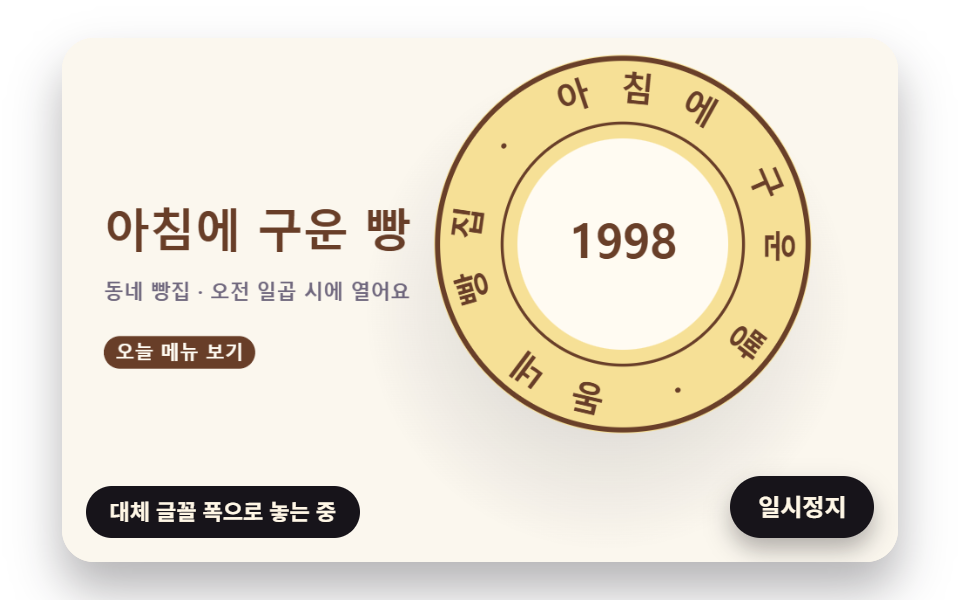
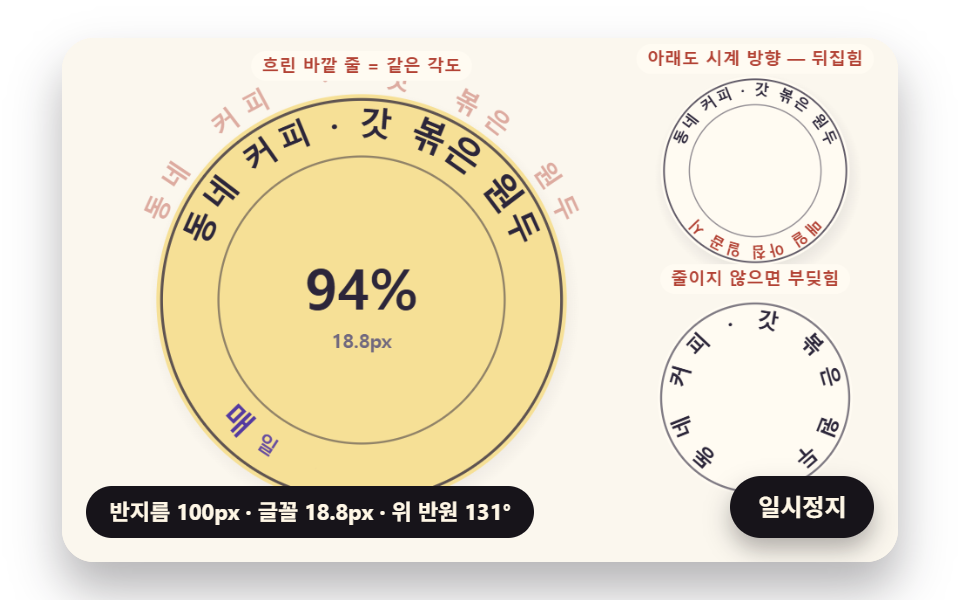
09ベーカリーのファーストビューの判子の場面
03番のようにアーチが丸まって判子の縁の輪になるあいだ、代わりのフォントの幅で置かれていた文字はフォントが届くと測り直した幅の位置へばねのように移り、判子は高さのばねで降りてきて押され、紙に跡を残してから少し浮き上がると、05番のように接した小さな輪が反対向きにいっしょに回り、最初に戻ります。
使いどころベーカリーのランディングページのファーストビュー
FONT_ARRIVE_SSTAMP_STIFFNESSSTAMP_LIFT_SCALE
<main class="stage">
<div class="cf is-demo" id="cf">
  <canvas class="cf__canvas" data-role="canvas" width="480" height="300" aria-hidden="true"></canvas>
  <p class="cf__sr">まちのパン屋・朝焼いたパン — 焼きたて</p>
  <p class="cf__status" data-role="status" aria-live="off">判子を準備しています</p>
  <button class="cf__pause" data-role="pause" type="button" aria-pressed="false">一時停止</button>
</div>
</main>
@use "../../../../site/static/demo-tokens" as *;
@include stage($stage-paper);
.cf {
position: relative;
width: min(92vw, calc(160vh - 12.8vw));
aspect-ratio: 480 / 300;
margin: 0 auto;
border-radius: $r-card;
overflow: hidden;
box-shadow: $shadow-raised;
background: $subject-cream;
}
.cf__canvas {
position: absolute;
inset: 0;
display: block;
width: 100%;
height: 100%;
}
.cf__pause {
position: absolute;
right: $sp-3;
bottom: $sp-3;
padding: $sp-1 $sp-3;
border: 2px solid $subject-ink;
border-radius: $r-pill;
background: $subject-ink;
color: $subject-cream;
font-family: inherit;
font-weight: 700;
font-size: 12px;
line-height: 1.6;
cursor: pointer;
box-shadow: $shadow-press;
transition: transform $dur-quick $ease-spring;
}
// 눌린 상태(멈춤) — 바탕과 글자색을 뒤집어 aria-pressed 가 눈에도 보이게
.cf__pause[aria-pressed="true"] {
background: $subject-cream;
color: $subject-ink;
}
.cf__pause:hover {
transform: translateY(-2px);
}
.cf__pause:active {
transform: translateY(1px);
}
.cf__pause:focus-visible {
outline: 3px solid $subject-ink;
outline-offset: 3px;
}
// 상태 줄 — 지금 고리에서 무슨 계산이 일어났는지 글자로. 시연 중에는 aria-live off, 사람이 처음 손대면 polite
.cf__status {
position: absolute;
left: $sp-3;
bottom: $sp-3;
max-width: calc(100% - 120px);
margin: 0;
padding: $sp-1 $sp-3;
border-radius: $r-pill;
background: $subject-ink;
color: $subject-cream;
font-weight: 700;
font-size: 11px;
line-height: 1.6;
white-space: nowrap;
overflow: hidden;
text-overflow: ellipsis;
pointer-events: none;
}
// 낭독용 원문 한 줄 — 화면에서는 숨기고 낭독기에만 읽힌다(원 위 글자는 캔버스라 aria-hidden)
.cf__sr {
position: absolute;
width: 1px;
height: 1px;
margin: -1px;
padding: 0;
overflow: hidden;
clip-path: inset(50%);
white-space: nowrap;
border: 0;
}
@media (max-width: 340px) {
.cf__pause,
.cf__status { font-size: 10px; padding: $sp-1 $sp-2; }
}
// 동작 줄이기 — 장면은 스크립트가 최종 배치 한 장으로 멈춘다. 버튼도 떠오르지 않게
@media (prefers-reduced-motion: reduce) {
.cf__pause { transition: none !important; }
.cf__pause:hover,
.cf__pause:active { transform: none !important; }
}html, body {
margin: 0;
overflow: hidden;
}
.stage {
box-sizing: border-box;
min-height: 100vh;
display: grid;
place-items: center;
margin: 0;
background: #ffffff;
font-family: -apple-system, "Segoe UI", "Noto Sans KR", sans-serif;
padding: clamp(8px, 4vw, 24px);
}
.cf {
position: relative;
width: min(92vw, 160vh - 12.8vw);
aspect-ratio: 480/300;
margin: 0 auto;
border-radius: 16px;
overflow: hidden;
box-shadow: 0 14px 24px rgba(23, 20, 26, 0.32);
background: #fff7e6;
}
.cf__canvas {
position: absolute;
inset: 0;
display: block;
width: 100%;
height: 100%;
}
.cf__pause {
position: absolute;
right: 12px;
bottom: 12px;
padding: 4px 12px;
border: 2px solid #17141a;
border-radius: 999px;
background: #17141a;
color: #fff7e6;
font-family: inherit;
font-weight: 700;
font-size: 12px;
line-height: 1.6;
cursor: pointer;
box-shadow: 0 6px 12px rgba(23, 20, 26, 0.32);
transition: transform 220ms cubic-bezier(0.2, 0.8, 0.2, 1);
}
.cf__pause[aria-pressed=true] {
background: #fff7e6;
color: #17141a;
}
.cf__pause:hover {
transform: translateY(-2px);
}
.cf__pause:active {
transform: translateY(1px);
}
.cf__pause:focus-visible {
outline: 3px solid #17141a;
outline-offset: 3px;
}
.cf__status {
position: absolute;
left: 12px;
bottom: 12px;
max-width: calc(100% - 120px);
margin: 0;
padding: 4px 12px;
border-radius: 999px;
background: #17141a;
color: #fff7e6;
font-weight: 700;
font-size: 11px;
line-height: 1.6;
white-space: nowrap;
overflow: hidden;
text-overflow: ellipsis;
pointer-events: none;
}
.cf__sr {
position: absolute;
width: 1px;
height: 1px;
margin: -1px;
padding: 0;
overflow: hidden;
clip-path: inset(50%);
white-space: nowrap;
border: 0;
}
@media (max-width: 340px) {
.cf__pause,
.cf__status {
font-size: 10px;
padding: 4px 8px;
}
}
@media (prefers-reduced-motion: reduce) {
.cf__pause {
transition: none !important;
}
.cf__pause:hover,
.cf__pause:active {
transform: none !important;
}
}(function () {
const root = document.getElementById("cf");
if (!root) return;
// 판 좌표 — 캔버스 안은 늘 480×300. 화면에 보이는 크기와 상관없이 계산은 이 좌표로 한다
const W = 480;
const H = 300;
const TAU = Math.PI * 2;
function clamp(v, lo, hi) { return v < lo ? lo : (v > hi ? hi : v); }
function lerp(a, b, k) { return a + (b - a) * k; }
function smooth(x) { const c = clamp(x, 0, 1); return c * c * (3 - 2 * c); }
// 따라가기 비율 — 1 − e^(−rate·dt). 프레임 시간이 달라도 1초에 같은 만큼 다가간다
function follow(rate, dt) { return 1 - Math.exp(-rate * dt); }
// 1/60초마다 ease 만큼 다가가는 비율을 dt 초로 환산 — 1 − (1 − ease)^(dt × 60)
function easeStep(ease, dt) { return 1 - Math.pow(1 - ease, dt * 60); }
// 시드 고정 난수 — 같은 시드면 같은 시연이 다시 나온다 (32비트 정수 섞기)
function makeRng(seed) {
let s = seed >>> 0;
return function () {
s = (s + 0x6d2b79f5) >>> 0;
let t = s;
t = Math.imul(t ^ (t >>> 15), t | 1);
t ^= t + Math.imul(t ^ (t >>> 7), t | 61);
return ((t ^ (t >>> 14)) >>> 0) / 4294967296;
};
}
function deg(rad) { return rad * 180 / Math.PI; }
function makeSpring(x) { return { x: x, v: 0, to: x }; }
const SPRING_SUBSTEP = 1 / 240;
function stepSpring(s, stiffness, damping, dt) {
let left = dt;
while (left > 1e-9) {
const h = Math.min(SPRING_SUBSTEP, left);
s.v += (stiffness * (s.to - s.x) - damping * s.v) * h;
s.x += s.v * h;
left -= h;
}
}
function snapSpring(s, x) { s.x = x; s.v = 0; s.to = x; }
function roughWidth(ch, px, weight) {
const wide = ch.charCodeAt(0) >= 0x1100;
const base = ch === ' ' ? 0.28 : (wide ? 0.95 : 0.6);
return px * base * (weight >= 700 ? 1.06 : 1);
}
// 글꼴이 다 온 뒤 잰 폭
let glyphWidth = roughWidth;
// 대체 글꼴로 잰 폭 — 09 가 「글꼴이 오기 전에 잰 폭」 을 흉내 낼 때만 쓴다
let fallbackWidth = roughWidth;
// 글자 나누기 — 한 글자씩(서로게이트 쌍도 한 글자)
function glyphsOf(s) { return Array.from(s); }
function widthsOf(gs, px, weight, m) {
return gs.map(function (g) { return m(g, px, weight); });
}
function sum(xs) { let s = 0; for (const x of xs) {
s += x;
} return s; }
function arcTotal(ws, tracking) { return sum(ws) + tracking * Math.max(0, ws.length - 1); }
// 글꼴 축소 몫 — 줄이지 않아도 들어가면 1
function arcScale(ws, px, tracking, r, inner, span) {
const total = arcTotal(ws, tracking);
const need = total / Math.max(1, r - inner * px);
return need > span ? span * r / (total + span * inner * px) : 1;
}
function fitArc(ws, px, tracking, r, inner, span, center, dir, allowShrink) {
return placeArc(ws, px, tracking, r, inner, allowShrink ? arcScale(ws, px, tracking, r, inner, span) : 1, center, dir);
}
// 정한 축소 몫으로 놓기 — 위·아래 반원이 같은 글꼴 크기를 쓰도록 둘 중 작은 몫을 넘겨받는다
function placeArc(ws, px, tracking, r, inner, scale, center, dir) {
const n = ws.length;
const total = arcTotal(ws, tracking);
const need = total / Math.max(1, r - inner * px);
const layR = Math.max(1, r - inner * px * scale);
const theta = [];
let acc = 0;
for (let i = 0; i < n; i += 1) {
theta.push(center + dir * (acc + ws[i] / 2 - total / 2) * scale / layR);
acc += ws[i] + tracking;
}
return { theta: theta, px: px * scale, scale: scale, total: total, layR: layR, need: need };
}
// 같은 각도로 놓기(비교판) — 폭은 보지 않고 전체 각을 글자 수로 똑같이 나눈다
function equalArc(n, spanUsed, center, dir) {
const out = [];
const step = spanUsed / Math.max(1, n);
for (let i = 0; i < n; i += 1) {
out.push(center + dir * (i + 0.5 - n / 2) * step);
}
return out;
}
// 이웃 두 글자가 글자 아래 모서리(반지름 r − 0.5·글자 높이)에서 겹친 길이(px). 양수면 부딪힌다.
// 각 간격 × 아래 모서리 반지름 − 두 글자 반폭 합 이 음수인 만큼이 겹침
const GLYPH_DROP = 0.5;
function innerOverlaps(theta, ws, scale, r, px) {
const rin = r - GLYPH_DROP * px;
const out = [];
for (let i = 0; i + 1 < theta.length; i += 1) {
const room = Math.abs(theta[i + 1] - theta[i]) * rin;
out.push((ws[i] + ws[i + 1]) / 2 * scale - room);
}
return out;
}
function arcTable(rf, drf, th0, th1, step) {
const th = [th0];
const s = [0];
let acc = 0;
const n = Math.max(1, Math.ceil((th1 - th0) / step));
const h = (th1 - th0) / n;
for (let i = 0; i < n; i += 1) {
// 걸음 가운데의 값으로 더한다 — 걸음 끝 값보다 같은 걸음에서 오차가 작다
const m = th0 + (i + 0.5) * h;
const r = rf(m);
const dr = drf(m);
acc += Math.sqrt(r * r + dr * dr) * h;
th.push(th0 + (i + 1) * h);
s.push(acc);
}
return { th: th, s: s };
}
function thetaAt(t, s) {
const last = t.s.length - 1;
if (s <= 0) {
return t.th[0];
}
if (s >= t.s[last]) {
return t.th[last];
}
let lo = 0;
let hi = last;
while (hi - lo > 1) {
const mid = (lo + hi) >> 1;
if (t.s[mid] <= s) {
lo = mid;
}
else {
hi = mid;
}
}
const k = (s - t.s[lo]) / Math.max(1e-9, t.s[hi] - t.s[lo]);
return lerp(t.th[lo], t.th[hi], k);
}
function arcLength(t) { return t.s[t.s.length - 1]; }
// 극좌표 곡선의 접선 각(화면 좌표, y 아래) — 점 (r cosθ, r sinθ) 을 θ 로 미분한 방향
function tangentAngle(r, dr, th) {
return Math.atan2(dr * Math.sin(th) + r * Math.cos(th), dr * Math.cos(th) - r * Math.sin(th));
}
// 장면 시계(秒)와 상태 줄 글자 — 장면 계산이 고치고, 화면 쪽이 읽어 그린다
let sceneT = 0;
let simStatus = '';
// 파스텔 팔레트 — 크림 바탕 위 라벤더·민트·버터·산호. 글자는 진한 쪽으로 명도 차를 둔다
const PAPER = [251, 247, 238];
const PAPER_DIM = [241, 234, 220];
const INK = [44, 38, 58];
const INK_SOFT = [112, 104, 126];
const CREAM = [255, 251, 242];
const LAVENDER = [196, 182, 238];
const MINT = [164, 218, 196];
const BUTTER = [246, 224, 150];
const CORAL = [244, 170, 152];
const SKY = [170, 206, 238];
const PINK = [244, 190, 212];
const MINT_DEEP = [36, 116, 90];
const CORAL_DEEP = [178, 66, 52];
const VIOLET_DEEP = [84, 58, 160];
const BROWN_DEEP = [104, 62, 40];
function mix(a, b, k) { return [lerp(a[0], b[0], k), lerp(a[1], b[1], k), lerp(a[2], b[2], k)]; }
function rgba(c, a) {
return 'rgba(' + Math.round(clamp(c[0], 0, 255)) + ',' + Math.round(clamp(c[1], 0, 255)) + ',' + Math.round(clamp(c[2], 0, 255)) + ',' + clamp(a, 0, 1).toFixed(3) + ')';
}
const canvasEl = root.querySelector('[data-role="canvas"]');
const pauseEl = root.querySelector('[data-role="pause"]');
const statusEl = root.querySelector('[data-role="status"]');
const ctxRaw = canvasEl ? canvasEl.getContext('2d') : null;
if (!canvasEl || !ctxRaw || !pauseEl) {
return;
}
const cv = canvasEl;
const ctx = ctxRaw;
const pauseBtn = pauseEl;
// 외부 웹폰트는 부르지 않는다 — 기기에 있는 글꼴 목록만
const FONT_STACK = 'system-ui, -apple-system, "Segoe UI", "Noto Sans KR", sans-serif';
// 대체 글꼴 — 09 가 「글꼴이 오기 전에 잰 폭」 을 흉내 낼 때만 쓴다
const FALLBACK_STACK = 'monospace';
// 잰 폭은 100px 기준으로 한 번만 재 두고 크기에 비례해 쓴다. 글꼴이 새로 오면 통째로 비운다
const widthCache = {};
function measureWith(stack) {
return function (ch, px, weight) {
const key = stack + '|' + weight + '|' + ch;
let w = widthCache[key];
if (w === undefined) {
ctx.font = weight + ' 100px ' + stack;
w = ctx.measureText(ch).width;
widthCache[key] = w;
}
return w * px / 100;
};
}
function remeasure() {
for (const k of Object.keys(widthCache)) {
delete widthCache[k];
}
glyphWidth = measureWith(FONT_STACK);
fallbackWidth = measureWith(FALLBACK_STACK);
relayout();
}
function fitCanvas() {
// 배율은 2 에서 자른다 — 배율 3 기기에서 화소가 2.25배로 늘어 프레임마다 일이 그만큼 커지지 않게
const dpr = Math.min(window.devicePixelRatio || 1, 2);
cv.width = Math.round(W * dpr);
cv.height = Math.round(H * dpr);
ctx.setTransform(dpr, 0, 0, dpr, 0, 0);
}
function clearStage(c) {
ctx.fillStyle = rgba(c, 1);
ctx.fillRect(0, 0, W, H);
}
function setFont(px, weight, stack) {
ctx.font = weight + ' ' + px.toFixed(2) + 'px ' + stack;
}
function label(s, x, y, c, a, px, weight, align) {
setFont(px, weight, FONT_STACK);
ctx.textAlign = align;
ctx.textBaseline = 'middle';
ctx.fillStyle = rgba(c, a);
ctx.fillText(s, x, y);
}
// 글자 하나를 (x, y) 가운데에 rot 라디안 돌려 찍는다. sx·sy 는 가로·세로 배율(음수 sx 는 거울)
function glyphAt(ch, x, y, rot, px, weight, c, a, sx, sy) {
if (a <= 0.01 || px < 0.5) {
return;
}
ctx.save();
ctx.translate(x, y);
ctx.rotate(rot);
ctx.scale(sx, sy);
setFont(px, weight, FONT_STACK);
ctx.textAlign = 'center';
ctx.textBaseline = 'middle';
ctx.fillStyle = rgba(c, a);
ctx.fillText(ch, 0, 0);
ctx.restore();
}
// 기울인 글자 — 글자 자기 좌표에서 가로로 skew(라디안)만큼 민다(윗부분이 앞으로)
function glyphLean(ch, x, y, rot, px, weight, c, a, skew) {
if (a <= 0.01 || px < 0.5) {
return;
}
ctx.save();
ctx.translate(x, y);
ctx.rotate(rot);
ctx.transform(1, 0, -Math.tan(skew), 1, 0, 0);
setFont(px, weight, FONT_STACK);
ctx.textAlign = 'center';
ctx.textBaseline = 'middle';
ctx.fillStyle = rgba(c, a);
ctx.fillText(ch, 0, 0);
ctx.restore();
}
// 원 위 글자 — 중심 (cx, cy), 반지름 r, 각 th. turn 은 글자를 원에 맞춰 세우는 각(위 반원 +π/2, 아래 반원 −π/2)
function ringGlyph(ch, cx, cy, r, th, turn, px, weight, c, a) {
glyphAt(ch, cx + r * Math.cos(th), cy + r * Math.sin(th), th + turn, px, weight, c, a, 1, 1);
}
function roundRectPath(x, y, w, h, r) {
const rr = Math.max(0, Math.min(r, w / 2, h / 2));
ctx.beginPath();
ctx.moveTo(x + rr, y);
ctx.lineTo(x + w - rr, y);
ctx.arcTo(x + w, y, x + w, y + rr, rr);
ctx.lineTo(x + w, y + h - rr);
ctx.arcTo(x + w, y + h, x + w - rr, y + h, rr);
ctx.lineTo(x + rr, y + h);
ctx.arcTo(x, y + h, x, y + h - rr, rr);
ctx.lineTo(x, y + rr);
ctx.arcTo(x, y, x + rr, y, rr);
ctx.closePath();
}
function fillRound(x, y, w, h, r, c, a) {
if (w <= 0.2 || h <= 0.2 || a <= 0) {
return;
}
roundRectPath(x, y, w, h, r);
ctx.fillStyle = rgba(c, a);
ctx.fill();
}
function disc(x, y, r, c, a) {
if (r <= 0.2 || a <= 0) {
return;
}
ctx.beginPath();
ctx.arc(x, y, r, 0, TAU);
ctx.fillStyle = rgba(c, a);
ctx.fill();
}
function ring(x, y, r, width, c, a) {
if (r <= 0.2 || a <= 0) {
return;
}
ctx.beginPath();
ctx.arc(x, y, r, 0, TAU);
ctx.lineWidth = width;
ctx.strokeStyle = rgba(c, a);
ctx.stroke();
}
// 그림자 — 떠 있는 높이 lift(0~1)가 클수록 멀리·흐리게·넓게 떨어진다
function softShadow(x, y, r, lift) {
const off = 4 + 14 * lift;
const g = ctx.createRadialGradient(x + off * 0.4, y + off, r * 0.6, x + off * 0.4, y + off, r * (1.05 + 0.25 * lift));
g.addColorStop(0, rgba(INK, 0.26 - 0.14 * lift));
g.addColorStop(1, rgba(INK, 0));
ctx.fillStyle = g;
ctx.beginPath();
ctx.arc(x + off * 0.4, y + off, r * (1.05 + 0.25 * lift), 0, TAU);
ctx.fill();
}
// 작은 알약 이름표
function pill(s, x, y, bg, fg, a, px) {
setFont(px, 700, FONT_STACK);
const w = ctx.measureText(s).width + px * 1.2;
fillRound(x - w / 2, y - px * 0.85, w, px * 1.7, px * 0.85, bg, a);
label(s, x, y + 0.5, fg, a, px, 700, 'center');
}
// 상태 줄 — 바뀔 때만 글자를 고친다
let shownStatus = '';
function pushStatus() {
if (!statusEl || simStatus === shownStatus) {
return;
}
shownStatus = simStatus;
statusEl.textContent = simStatus;
}
// 09 — 베이커리 첫 화면의 도장 장면. 03 말림 → 01 폭 맞춤 → 도장 스프링 → 05 작은 고리 순서.
// ① 곧은 한 줄이 φ 스프링으로 말려 도장 테두리 고리가 된다(호 길이 = 문구 길이)
// ② 그 사이 글자 폭은 대체 글꼴로 잰 값 — FONT_ARRIVE_S 에 「글꼴이 도착」 하면 다시 재고, 글자마다 각이 새 폭 자리로 스프링으로 옮겨 간다(늦게 온 글꼴 함정)
// ③ 도장이 높이 z 스프링으로 내려와 눌린다 — 크기는 1 + STAMP_LIFT_SCALE·z, 그림자는 z 가 클수록 멀고 흐리다. 처음 닿은 순간 종이에 찍힌 자국이 남는다
// ④ 도장이 조금 떠오르면 옆의 작은 고리가 맞닿은 곳 빠르기를 같게(ω·R 같음) 반대로 돈다
const SEAL_TEXT = 'まちのパン屋・朝焼いたパン・ ';
const BADGE_TEXT = '焼きたて・ ';
const SEAL_PX = 16;
const SEAL_WEIGHT = 800;
const SEAL_R = 72;
const SEAL_CX = 306;
const SEAL_CY = 136;
const CURL_STIFFNESS = 140;
const CURL_DAMPING = 12;
const STRAIGHT_EPS = 1e-3;
// 첫 장면은 곧은 줄이 아니라 이미 조금 휜 아치(φ = CURL_START) — 둘레 길이만 한 곧은 줄은 무대 폭을 넘는다
const CURL_START = 2.6;
const CURL_AT_S = 0.2;
const FONT_ARRIVE_S = 0.75;
const FONT_FIX_STIFFNESS = 180;
const FONT_FIX_DAMPING = 14;
const STAMP_AT_S = 1.15;
const LIFT_AT_S = 1.75;
const STAMP_STIFFNESS = 260;
const STAMP_DAMPING = 13;
const STAMP_LIFT_SCALE = 0.22;
const SEAL_SPIN = 0.5;
const BADGE_PX = 11;
const BADGE_R = 30;
// 도장 바깥 테두리와 작은 고리 바깥 테두리 — 맞닿는 두 원
const SEAL_OUTER = SEAL_R + SEAL_PX * 1.05;
const BADGE_OUTER = BADGE_R + BADGE_PX * 0.9;
const LOOP_S = 4.4;
const STATUS_FALLBACK = '代わりのフォントの幅で配置中';
const STATUS_ARRIVE = 'フォント到着 — 測り直した幅で {d}° 移動';
const STATUS_STAMP = '判子の高さ {z}・影 {s}px';
const STATUS_RING = '小さな輪 {b}°/s・判子 {a}°/s — 接点は同じ速さ';
const sealGlyphs09 = glyphsOf(SEAL_TEXT);
const badgeGlyphs09 = glyphsOf(BADGE_TEXT);
let fallbackS09 = [];
let realS09 = [];
let fallbackLen09 = 1;
let realLen09 = 1;
// 글자마다 고리 위 자리(문구 가운데에서 잰 호 길이를 고리 둘레 몫으로) — 대체 폭 자리에서 진짜 폭 자리로 옮겨 가는 스프링
let slots09 = [];
const curl09 = makeSpring(0);
const stampZ09 = makeSpring(1);
let arrived09 = false;
let imprint09 = 0;
let spin09 = 0;
let maxShift09 = 0;
function centersOf(ws) {
const total = sum(ws);
const out = [];
let acc = 0;
for (const w of ws) {
out.push((acc + w / 2) / total - 0.5);
acc += w;
}
return [out, total];
}
function relayout() {
const a = centersOf(widthsOf(sealGlyphs09, SEAL_PX, SEAL_WEIGHT, fallbackWidth));
const b = centersOf(widthsOf(sealGlyphs09, SEAL_PX, SEAL_WEIGHT, glyphWidth));
fallbackS09 = a[0];
fallbackLen09 = a[1];
realS09 = b[0];
realLen09 = b[1];
maxShift09 = 0;
for (let i = 0; i < realS09.length; i += 1) {
maxShift09 = Math.max(maxShift09, Math.abs(realS09[i] - fallbackS09[i]) * 360);
}
slots09 = fallbackS09.map(function (v, i) { const s = makeSpring(arrived09 ? realS09[i] : v); s.to = arrived09 ? realS09[i] : v; return s; });
}
function sealPlace(i) {
const phi = curl09.x;
const ringLen = TAU * SEAL_R;
const s = slots09[i].x * ringLen;
const y0 = SEAL_CY - SEAL_R;
if (Math.abs(phi) < STRAIGHT_EPS) {
return { x: SEAL_CX + s, y: y0, rot: 0 };
}
const r = ringLen / phi;
const a = s / r;
return { x: SEAL_CX + r * Math.sin(a), y: y0 + r - r * Math.cos(a), rot: a };
}
// 작은 고리 각속도 = 도장 각속도 × 도장 바깥 반지름(떠 있는 배율 포함) / 작은 고리 바깥 반지름
function sealScale09() { return 1 + STAMP_LIFT_SCALE * stampZ09.x; }
function badgeOmega09() { return SEAL_SPIN * SEAL_OUTER * sealScale09() / BADGE_OUTER; }
function reset() {
snapSpring(curl09, CURL_START);
snapSpring(stampZ09, 1);
arrived09 = false;
imprint09 = 0;
spin09 = 0;
relayout();
}
function statusFor09() {
if (!arrived09) {
simStatus = STATUS_FALLBACK;
return;
}
if (sceneT < STAMP_AT_S) {
simStatus = STATUS_ARRIVE.replace('{d}', maxShift09.toFixed(1));
return;
}
if (sceneT < LIFT_AT_S + 0.2) {
simStatus = STATUS_STAMP.replace('{z}', stampZ09.x.toFixed(2)).replace('{s}', String(Math.round(4 + 14 * clamp(stampZ09.x, 0, 1))));
return;
}
simStatus = STATUS_RING.replace('{b}', String(Math.round(deg(badgeOmega09())))).replace('{a}', String(Math.round(deg(SEAL_SPIN))));
}
function update(dt) {
curl09.to = sceneT >= CURL_AT_S ? TAU : CURL_START;
stepSpring(curl09, CURL_STIFFNESS, CURL_DAMPING, dt);
if (!arrived09 && sceneT >= FONT_ARRIVE_S) {
arrived09 = true;
slots09.forEach(function (s, i) { s.to = realS09[i]; });
}
for (const s of slots09) {
stepSpring(s, FONT_FIX_STIFFNESS, FONT_FIX_DAMPING, dt);
}
stampZ09.to = sceneT >= LIFT_AT_S ? 0.35 : (sceneT >= STAMP_AT_S ? 0 : 1);
stepSpring(stampZ09, STAMP_STIFFNESS, STAMP_DAMPING, dt);
if (sceneT >= STAMP_AT_S && stampZ09.x < 0.05) {
imprint09 = 1;
}
if (sceneT >= LIFT_AT_S) {
spin09 += SEAL_SPIN * dt;
}
statusFor09();
}
function restPose() {
snapSpring(curl09, TAU);
arrived09 = true;
relayout();
snapSpring(stampZ09, 0.35);
imprint09 = 1;
spin09 = 0;
sceneT = LIFT_AT_S + 1;
statusFor09();
}
// 09 화면 — 왼쪽 머리글(폭이 HEAD_MAX_W 를 넘으면 글꼴을 줄여 맞춘다), 오른쪽 도장. 도장은 높이 z 만큼 위·오른쪽으로 떠 있고
// 크기·그림자가 z 를 따른다. 처음 닿은 순간의 자국은 종이에 남아 도장이 떠오르면 드러난다
const HEAD_TEXT = '朝焼いたパン';
const SUB_TEXT = 'まちのパン屋・朝7時に開店';
const CTA_TEXT = '今日のメニュー';
const HEAD_PX = 28;
const HEAD_MAX_W = 176;
const HEAD_X = 24;
function bindInput(signal) { void signal; }
function fitLabel(s, x, y, px, maxW, weight, c) {
setFont(px, weight, FONT_STACK);
const w = ctx.measureText(s).width;
label(s, x, y, c, 1, w > maxW ? px * maxW / w : px, weight, 'left');
}
function sealText(cx, cy, c, a, spin) {
for (let i = 0; i < sealGlyphs09.length; i += 1) {
const g = sealPlace(i);
// 도장 중심 둘레로 spin 만큼 돌린다
const dx = g.x - SEAL_CX;
const dy = g.y - SEAL_CY;
const cs = Math.cos(spin);
const sn = Math.sin(spin);
glyphAt(sealGlyphs09[i], cx + dx * cs - dy * sn, cy + dx * sn + dy * cs, g.rot + spin, SEAL_PX, SEAL_WEIGHT, c, a, 1, 1);
}
}
function draw() {
clearStage(PAPER);
fitLabel(HEAD_TEXT, HEAD_X, 112, HEAD_PX, HEAD_MAX_W, 800, BROWN_DEEP);
fitLabel(SUB_TEXT, HEAD_X, 146, 12, HEAD_MAX_W, 700, INK_SOFT);
setFont(11, 700, FONT_STACK);
pill(CTA_TEXT, HEAD_X + (ctx.measureText(CTA_TEXT).width + 13.2) / 2, 180, BROWN_DEEP, CREAM, 1, 11);
const z = stampZ09.x;
const closed = smooth((curl09.x - 4.6) / (TAU - 4.6));
// 종이에 찍힌 자국 — 도장이 닿은 자리(높이 0)에 산호빛으로
if (imprint09 > 0) {
ring(SEAL_CX, SEAL_CY, SEAL_R + SEAL_PX * 0.95, 3, CORAL_DEEP, 0.45);
ring(SEAL_CX, SEAL_CY, SEAL_R - SEAL_PX * 0.95, 1.6, CORAL_DEEP, 0.45);
sealText(SEAL_CX, SEAL_CY, CORAL_DEEP, 0.5, 0);
}
// 도장 — 높이 z 만큼 위·오른쪽으로 떠 있고 1 + STAMP_LIFT_SCALE·z 배로 크다
const ox = SEAL_CX + 16 * z;
const oy = SEAL_CY - 18 * z;
const k = sealScale09();
softShadow(ox - 16 * z, oy + 18 * z, (SEAL_R + SEAL_PX) * k, clamp(z, 0, 1));
ctx.save();
ctx.translate(ox, oy);
ctx.scale(k, k);
ctx.translate(-SEAL_CX, -SEAL_CY);
disc(SEAL_CX, SEAL_CY, SEAL_OUTER, BUTTER, closed);
ring(SEAL_CX, SEAL_CY, SEAL_R + SEAL_PX * 0.95, 2.4, BROWN_DEEP, closed);
ring(SEAL_CX, SEAL_CY, SEAL_R - SEAL_PX * 0.95, 1.4, BROWN_DEEP, closed);
disc(SEAL_CX, SEAL_CY, SEAL_R - SEAL_PX * 1.4, CREAM, closed);
label('1998', SEAL_CX, SEAL_CY, BROWN_DEEP, closed, 22, 800, 'center');
sealText(SEAL_CX, SEAL_CY, BROWN_DEEP, 1, spin09);
ctx.restore();
// 작은 고리 — 도장 오른쪽 아래에 맞닿아 반대로 돈다. 맞닿은 곳 빠르기가 같으려면 각속도 = 도장 각속도 × 도장 바깥 반지름 / 작은 고리 반지름
const ba = smooth((sceneT - LIFT_AT_S) / 0.3);
if (ba > 0) {
const d = SEAL_OUTER * k + BADGE_OUTER;
const bx = ox + d * Math.cos(0.62);
const by = oy + d * Math.sin(0.62);
const turn = -spin09 * SEAL_OUTER * k / BADGE_OUTER;
disc(bx, by, BADGE_OUTER, PINK, ba);
ring(bx, by, BADGE_OUTER, 1.4, BROWN_DEEP, ba);
const n = badgeGlyphs09.length;
const ws = widthsOf(badgeGlyphs09, BADGE_PX, 800, glyphWidth);
const reps = Math.max(1, Math.floor(TAU * BADGE_R / sum(ws)));
const total = sum(ws) * reps;
let acc = 0;
for (let i = 0; i < n * reps; i += 1) {
const w = ws[i % n];
const th = -Math.PI / 2 + turn + (acc + w / 2) / total * TAU;
ringGlyph(badgeGlyphs09[i % n], bx, by, BADGE_R, th, Math.PI / 2, BADGE_PX, 800, BROWN_DEEP, ba);
acc += w;
}
}
}
let paused = false;
const reduceQuery = window.matchMedia('(prefers-reduced-motion: reduce)');
// 페이지를 연 채 동작 줄이기 설정을 바꿔도 change 리스너가 이 값을 다시 읽는다
let still = reduceQuery.matches;
// 자동 시연 중인가 — 사람이 처음 손대면 시연 표시를 떼고 상태 줄을 polite 로 켠다
let demo = root.classList.contains('is-demo');
// 리스너는 한 묶음으로 달고 정리할 때 한 번에 뗀다
const off = new AbortController();
function wake() {
if (!demo) {
return;
}
demo = false;
root.classList.remove('is-demo');
if (statusEl) {
statusEl.setAttribute('aria-live', 'polite');
}
}
// 한 프레임에 넘기는 시간 상한(秒) — 탭을 오래 숨겼다 돌아온 첫 프레임에도 50ms 까지만 계산에 넣는다
const DT_MAX = 0.05;
// 장면 시계를 dt 만큼 — 한 바퀴(LOOP_S)를 넘으면 처음 배치로 되돌려 다시 시연한다
function advance(dt) {
sceneT += dt;
if (sceneT >= LOOP_S) {
sceneT -= LOOP_S;
reset();
}
update(dt);
}
let rafId = 0;
let lastTs = -1;
function frame(ts) {
if (still || paused) {
rafId = 0;
return;
}
if (lastTs < 0) {
lastTs = ts;
}
const dt = Math.min((ts - lastTs) / 1000, DT_MAX);
lastTs = ts;
if (dt > 0) {
advance(dt);
}
draw();
pushStatus();
rafId = window.requestAnimationFrame(frame);
}
function startLoop() {
if (rafId) {
return;
}
// 시계 다시 맞추기 — 멈췄던 사이의 시간을 첫 프레임 dt 로 넘기지 않는다
lastTs = -1;
rafId = window.requestAnimationFrame(frame);
}
function stopLoop() {
if (rafId) {
window.cancelAnimationFrame(rafId);
rafId = 0;
}
}
// 동작 줄이기 — 루프를 돌리지 않고 시연이 끝난 최종 배치 한 장만 그린다
function showRest() {
stopLoop();
sceneT = 0;
reset();
restPose();
draw();
pushStatus();
}
function play() {
sceneT = 0;
reset();
draw();
pushStatus();
if (!paused) {
startLoop();
}
}
pauseBtn.addEventListener('click', function () {
paused = !paused;
pauseBtn.setAttribute('aria-pressed', paused ? 'true' : 'false');
wake();
if (paused) {
stopLoop();
}
else if (!still) {
startLoop();
}
}, { signal: off.signal });
// 탭이 숨으면 루프를 멈추고, 돌아오면 시계를 다시 맞춰 시작한다 — 숨은 동안의 몇 초가 한 프레임에 몰리지 않게
document.addEventListener('visibilitychange', function () {
if (document.hidden) {
stopLoop();
}
else if (!paused && !still && fontsReady) {
startLoop();
}
}, { signal: off.signal });
// 설정이 페이지를 연 채 바뀌면 — 켜지면 최종 배치로 멈추고, 꺼지면 시연을 처음부터
reduceQuery.addEventListener('change', function () {
still = reduceQuery.matches;
if (still) {
showRest();
}
else {
play();
}
}, { signal: off.signal });
window.addEventListener('resize', function () {
fitCanvas();
draw();
}, { signal: off.signal });
bindInput(off.signal);
fitCanvas();
// 글자 폭은 글꼴이 다 온 뒤에 잰다 — 그 전에 잰 폭은 대체 글꼴의 폭이라 글꼴이 바뀌는 순간 자리가 틀어진다.
// 나중에 다른 글꼴이 더 오면(loadingdone) 다시 잰다
let fontsReady = false;
document.fonts.addEventListener('loadingdone', function () {
if (!fontsReady) {
return;
}
remeasure();
draw();
}, { signal: off.signal });
document.fonts.ready.then(function () {
if (off.signal.aborted) {
return;
}
fontsReady = true;
remeasure();
if (still) {
showRest();
}
else {
play();
}
});
return function () {
stopLoop();
off.abort();
};
})();// BakerySealHero - 같은 항목 vanilla 판 index.html 의 React 포트. 같은 계산을 useEffect 안에서 돌린다.
import { useEffect, useRef } from "react";
import styles from "./BakerySealHero.module.scss";
const cx = (s: string): string => s.split(" ").map((n) => styles[n] ?? n).join(" ");
export default function BakerySealHero() {
const rootRef = useRef<HTMLDivElement | null>(null);
useEffect(() => {
const rootEl = rootRef.current;
if (!rootEl) return;
const root: HTMLElement = rootEl;
type RGB = [number, number, number];
// 판 좌표 — 캔버스 안은 늘 480×300. 화면에 보이는 크기와 상관없이 계산은 이 좌표로 한다
const W = 480;
const H = 300;
const TAU = Math.PI * 2;
function clamp(v: number, lo: number, hi: number): number { return v < lo ? lo : (v > hi ? hi : v); }
function lerp(a: number, b: number, k: number): number { return a + (b - a) * k; }
function smooth(x: number): number { const c = clamp(x, 0, 1); return c * c * (3 - 2 * c); }
// 따라가기 비율 — 1 − e^(−rate·dt). 프레임 시간이 달라도 1초에 같은 만큼 다가간다
function follow(rate: number, dt: number): number { return 1 - Math.exp(-rate * dt); }
// 1/60초마다 ease 만큼 다가가는 비율을 dt 초로 환산 — 1 − (1 − ease)^(dt × 60)
function easeStep(ease: number, dt: number): number { return 1 - Math.pow(1 - ease, dt * 60); }
// 시드 고정 난수 — 같은 시드면 같은 시연이 다시 나온다 (32비트 정수 섞기)
function makeRng(seed: number): () => number {
let s = seed >>> 0;
return function (): number {
s = (s + 0x6d2b79f5) >>> 0;
let t = s;
t = Math.imul(t ^ (t >>> 15), t | 1);
t ^= t + Math.imul(t ^ (t >>> 7), t | 61);
return ((t ^ (t >>> 14)) >>> 0) / 4294967296;
};
}
function deg(rad: number): number { return rad * 180 / Math.PI; }
// ── 감쇠 스프링 ──────────────────────────────────────────────
// 가속 = 단단함 × (목표 − 위치) − 감쇠 × 속도. 속도를 먼저 고친 뒤 위치를 옮기는 적분을 1/240초 잔걸음으로 나눠 돌린다
type Spring = { x: number; v: number; to: number };
function makeSpring(x: number): Spring { return { x: x, v: 0, to: x }; }
const SPRING_SUBSTEP = 1 / 240;
function stepSpring(s: Spring, stiffness: number, damping: number, dt: number): void {
let left = dt;
while (left > 1e-9) {
const h = Math.min(SPRING_SUBSTEP, left);
s.v += (stiffness * (s.to - s.x) - damping * s.v) * h;
s.x += s.v * h;
left -= h;
}
}
function snapSpring(s: Spring, x: number): void { s.x = x; s.v = 0; s.to = x; }
// ── 글자 폭 ──────────────────────────────────────────────────
// 글자 하나의 가로 폭(px) — 글꼴 크기 px, 굵기 weight. 화면에서는 캔버스 measureText 로 잰 값으로 바뀐다(dom 쪽).
// 아래 대략 모형은 재기 전 자리 채움일 뿐 — 글자 폭은 반드시 글꼴이 다 온 뒤 다시 잰다
type Measure = (ch: string, px: number, weight: number) => number;
function roughWidth(ch: string, px: number, weight: number): number {
const wide = ch.charCodeAt(0) >= 0x1100;
const base = ch === ' ' ? 0.28 : (wide ? 0.95 : 0.6);
return px * base * (weight >= 700 ? 1.06 : 1);
}
// 글꼴이 다 온 뒤 잰 폭
let glyphWidth: Measure = roughWidth;
// 대체 글꼴로 잰 폭 — 09 가 「글꼴이 오기 전에 잰 폭」 을 흉내 낼 때만 쓴다
let fallbackWidth: Measure = roughWidth;
// 글자 나누기 — 한 글자씩(서로게이트 쌍도 한 글자)
function glyphsOf(s: string): string[] { return Array.from(s); }
function widthsOf(gs: string[], px: number, weight: number, m: Measure): number[] {
return gs.map(function (g: string): number { return m(g, px, weight); });
}
function sum(xs: number[]): number { let s = 0; for (const x of xs) { s += x; } return s; }
// ── 원 위에 글자 놓기 ────────────────────────────────────────
// 글자 i 의 각 = 가운데 각 + 방향 × (앞 글자 폭 합 + 자기 폭/2 − 전체/2) × 축소 / 놓는 반지름.
// 놓는 반지름은 글자 높이의 inner 몫만큼 안쪽 — 글자 아래 모서리(원 중심 쪽)에서 폭이 맞으면 바깥은 저절로 벌어진다.
// 전체 각이 span 을 넘으면 글꼴을 줄인다. 줄이면 글자 높이도 줄어 놓는 반지름이 커지므로
// 축소 = span·r / (전체 폭 + span·inner·px) 로 한 번에 푼다 (전체 폭 × 축소 = span × (r − inner·px·축소))
type ArcFit = { theta: number[]; px: number; scale: number; total: number; layR: number; need: number };
function arcTotal(ws: number[], tracking: number): number { return sum(ws) + tracking * Math.max(0, ws.length - 1); }
// 글꼴 축소 몫 — 줄이지 않아도 들어가면 1
function arcScale(ws: number[], px: number, tracking: number, r: number, inner: number, span: number): number {
const total = arcTotal(ws, tracking);
const need = total / Math.max(1, r - inner * px);
return need > span ? span * r / (total + span * inner * px) : 1;
}
function fitArc(ws: number[], px: number, tracking: number, r: number, inner: number, span: number, center: number, dir: number, allowShrink: boolean): ArcFit {
return placeArc(ws, px, tracking, r, inner, allowShrink ? arcScale(ws, px, tracking, r, inner, span) : 1, center, dir);
}
// 정한 축소 몫으로 놓기 — 위·아래 반원이 같은 글꼴 크기를 쓰도록 둘 중 작은 몫을 넘겨받는다
function placeArc(ws: number[], px: number, tracking: number, r: number, inner: number, scale: number, center: number, dir: number): ArcFit {
const n = ws.length;
const total = arcTotal(ws, tracking);
const need = total / Math.max(1, r - inner * px);
const layR = Math.max(1, r - inner * px * scale);
const theta: number[] = [];
let acc = 0;
for (let i = 0; i < n; i += 1) {
theta.push(center + dir * (acc + ws[i] / 2 - total / 2) * scale / layR);
acc += ws[i] + tracking;
}
return { theta: theta, px: px * scale, scale: scale, total: total, layR: layR, need: need };
}
// 같은 각도로 놓기(비교판) — 폭은 보지 않고 전체 각을 글자 수로 똑같이 나눈다
function equalArc(n: number, spanUsed: number, center: number, dir: number): number[] {
const out: number[] = [];
const step = spanUsed / Math.max(1, n);
for (let i = 0; i < n; i += 1) { out.push(center + dir * (i + 0.5 - n / 2) * step); }
return out;
}
// 이웃 두 글자가 글자 아래 모서리(반지름 r − 0.5·글자 높이)에서 겹친 길이(px). 양수면 부딪힌다.
// 각 간격 × 아래 모서리 반지름 − 두 글자 반폭 합 이 음수인 만큼이 겹침
const GLYPH_DROP = 0.5;
function innerOverlaps(theta: number[], ws: number[], scale: number, r: number, px: number): number[] {
const rin = r - GLYPH_DROP * px;
const out: number[] = [];
for (let i = 0; i + 1 < theta.length; i += 1) {
const room = Math.abs(theta[i + 1] - theta[i]) * rin;
out.push((ws[i] + ws[i + 1]) / 2 * scale - room);
}
return out;
}
// ── 곡선의 호 길이 표 ────────────────────────────────────────
// 극좌표 곡선 r(θ) 의 호 길이 ds = √(r² + (dr/dθ)²) dθ 를 θ 의 작은 걸음 step 으로 더해 누적표를 만든다.
// 거꾸로 「호 길이 s 인 자리의 θ」 는 표를 둘로 나눠 찾고 두 칸 사이를 곧게 잇는다
type ArcTable = { th: number[]; s: number[] };
function arcTable(rf: (th: number) => number, drf: (th: number) => number, th0: number, th1: number, step: number): ArcTable {
const th: number[] = [th0];
const s: number[] = [0];
let acc = 0;
const n = Math.max(1, Math.ceil((th1 - th0) / step));
const h = (th1 - th0) / n;
for (let i = 0; i < n; i += 1) {
// 걸음 가운데의 값으로 더한다 — 걸음 끝 값보다 같은 걸음에서 오차가 작다
const m = th0 + (i + 0.5) * h;
const r = rf(m);
const dr = drf(m);
acc += Math.sqrt(r * r + dr * dr) * h;
th.push(th0 + (i + 1) * h);
s.push(acc);
}
return { th: th, s: s };
}
function thetaAt(t: ArcTable, s: number): number {
const last = t.s.length - 1;
if (s <= 0) { return t.th[0]; }
if (s >= t.s[last]) { return t.th[last]; }
let lo = 0;
let hi = last;
while (hi - lo > 1) {
const mid = (lo + hi) >> 1;
if (t.s[mid] <= s) { lo = mid; } else { hi = mid; }
}
const k = (s - t.s[lo]) / Math.max(1e-9, t.s[hi] - t.s[lo]);
return lerp(t.th[lo], t.th[hi], k);
}
function arcLength(t: ArcTable): number { return t.s[t.s.length - 1]; }
// 극좌표 곡선의 접선 각(화면 좌표, y 아래) — 점 (r cosθ, r sinθ) 을 θ 로 미분한 방향
function tangentAngle(r: number, dr: number, th: number): number {
return Math.atan2(dr * Math.sin(th) + r * Math.cos(th), dr * Math.cos(th) - r * Math.sin(th));
}
// 장면 시계(초)와 상태 줄 글자 — 장면 계산이 고치고, 화면 쪽이 읽어 그린다
let sceneT = 0;
let simStatus = '';
// 파스텔 팔레트 — 크림 바탕 위 라벤더·민트·버터·산호. 글자는 진한 쪽으로 명도 차를 둔다
const PAPER: RGB = [251, 247, 238];
const PAPER_DIM: RGB = [241, 234, 220];
const INK: RGB = [44, 38, 58];
const INK_SOFT: RGB = [112, 104, 126];
const CREAM: RGB = [255, 251, 242];
const LAVENDER: RGB = [196, 182, 238];
const MINT: RGB = [164, 218, 196];
const BUTTER: RGB = [246, 224, 150];
const CORAL: RGB = [244, 170, 152];
const SKY: RGB = [170, 206, 238];
const PINK: RGB = [244, 190, 212];
const MINT_DEEP: RGB = [36, 116, 90];
const CORAL_DEEP: RGB = [178, 66, 52];
const VIOLET_DEEP: RGB = [84, 58, 160];
const BROWN_DEEP: RGB = [104, 62, 40];
function mix(a: RGB, b: RGB, k: number): RGB { return [lerp(a[0], b[0], k), lerp(a[1], b[1], k), lerp(a[2], b[2], k)]; }
function rgba(c: RGB, a: number): string {
return 'rgba(' + Math.round(clamp(c[0], 0, 255)) + ',' + Math.round(clamp(c[1], 0, 255)) + ',' + Math.round(clamp(c[2], 0, 255)) + ',' + clamp(a, 0, 1).toFixed(3) + ')';
}
const canvasEl = root.querySelector('[data-role="canvas"]') as HTMLCanvasElement | null;
const pauseEl = root.querySelector('[data-role="pause"]') as HTMLButtonElement | null;
const statusEl = root.querySelector('[data-role="status"]') as HTMLElement | null;
const ctxRaw = canvasEl ? canvasEl.getContext('2d') : null;
if (!canvasEl || !ctxRaw || !pauseEl) { return; }
const cv: HTMLCanvasElement = canvasEl;
const ctx: CanvasRenderingContext2D = ctxRaw;
const pauseBtn: HTMLButtonElement = pauseEl;
// 외부 웹폰트는 부르지 않는다 — 기기에 있는 글꼴 목록만
const FONT_STACK = 'system-ui, -apple-system, "Segoe UI", "Noto Sans KR", sans-serif';
// 대체 글꼴 — 09 가 「글꼴이 오기 전에 잰 폭」 을 흉내 낼 때만 쓴다
const FALLBACK_STACK = 'monospace';
// 잰 폭은 100px 기준으로 한 번만 재 두고 크기에 비례해 쓴다. 글꼴이 새로 오면 통째로 비운다
const widthCache: { [key: string]: number } = {};
function measureWith(stack: string): Measure {
return function (ch: string, px: number, weight: number): number {
const key = stack + '|' + weight + '|' + ch;
let w = widthCache[key];
if (w === undefined) {
ctx.font = weight + ' 100px ' + stack;
w = ctx.measureText(ch).width;
widthCache[key] = w;
}
return w * px / 100;
};
}
function remeasure(): void {
for (const k of Object.keys(widthCache)) { delete widthCache[k]; }
glyphWidth = measureWith(FONT_STACK);
fallbackWidth = measureWith(FALLBACK_STACK);
relayout();
}
function fitCanvas(): void {
// 배율은 2 에서 자른다 — 배율 3 기기에서 화소가 2.25배로 늘어 프레임마다 일이 그만큼 커지지 않게
const dpr = Math.min(window.devicePixelRatio || 1, 2);
cv.width = Math.round(W * dpr);
cv.height = Math.round(H * dpr);
ctx.setTransform(dpr, 0, 0, dpr, 0, 0);
}
function clearStage(c: RGB): void {
ctx.fillStyle = rgba(c, 1);
ctx.fillRect(0, 0, W, H);
}
function setFont(px: number, weight: number, stack: string): void {
ctx.font = weight + ' ' + px.toFixed(2) + 'px ' + stack;
}
function label(s: string, x: number, y: number, c: RGB, a: number, px: number, weight: number, align: CanvasTextAlign): void {
setFont(px, weight, FONT_STACK);
ctx.textAlign = align;
ctx.textBaseline = 'middle';
ctx.fillStyle = rgba(c, a);
ctx.fillText(s, x, y);
}
// 글자 하나를 (x, y) 가운데에 rot 라디안 돌려 찍는다. sx·sy 는 가로·세로 배율(음수 sx 는 거울)
function glyphAt(ch: string, x: number, y: number, rot: number, px: number, weight: number, c: RGB, a: number, sx: number, sy: number): void {
if (a <= 0.01 || px < 0.5) { return; }
ctx.save();
ctx.translate(x, y);
ctx.rotate(rot);
ctx.scale(sx, sy);
setFont(px, weight, FONT_STACK);
ctx.textAlign = 'center';
ctx.textBaseline = 'middle';
ctx.fillStyle = rgba(c, a);
ctx.fillText(ch, 0, 0);
ctx.restore();
}
// 기울인 글자 — 글자 자기 좌표에서 가로로 skew(라디안)만큼 민다(윗부분이 앞으로)
function glyphLean(ch: string, x: number, y: number, rot: number, px: number, weight: number, c: RGB, a: number, skew: number): void {
if (a <= 0.01 || px < 0.5) { return; }
ctx.save();
ctx.translate(x, y);
ctx.rotate(rot);
ctx.transform(1, 0, -Math.tan(skew), 1, 0, 0);
setFont(px, weight, FONT_STACK);
ctx.textAlign = 'center';
ctx.textBaseline = 'middle';
ctx.fillStyle = rgba(c, a);
ctx.fillText(ch, 0, 0);
ctx.restore();
}
// 원 위 글자 — 중심 (cx, cy), 반지름 r, 각 th. turn 은 글자를 원에 맞춰 세우는 각(위 반원 +π/2, 아래 반원 −π/2)
function ringGlyph(ch: string, cx: number, cy: number, r: number, th: number, turn: number, px: number, weight: number, c: RGB, a: number): void {
glyphAt(ch, cx + r * Math.cos(th), cy + r * Math.sin(th), th + turn, px, weight, c, a, 1, 1);
}
function roundRectPath(x: number, y: number, w: number, h: number, r: number): void {
const rr = Math.max(0, Math.min(r, w / 2, h / 2));
ctx.beginPath();
ctx.moveTo(x + rr, y);
ctx.lineTo(x + w - rr, y);
ctx.arcTo(x + w, y, x + w, y + rr, rr);
ctx.lineTo(x + w, y + h - rr);
ctx.arcTo(x + w, y + h, x + w - rr, y + h, rr);
ctx.lineTo(x + rr, y + h);
ctx.arcTo(x, y + h, x, y + h - rr, rr);
ctx.lineTo(x, y + rr);
ctx.arcTo(x, y, x + rr, y, rr);
ctx.closePath();
}
function fillRound(x: number, y: number, w: number, h: number, r: number, c: RGB, a: number): void {
if (w <= 0.2 || h <= 0.2 || a <= 0) { return; }
roundRectPath(x, y, w, h, r);
ctx.fillStyle = rgba(c, a);
ctx.fill();
}
function disc(x: number, y: number, r: number, c: RGB, a: number): void {
if (r <= 0.2 || a <= 0) { return; }
ctx.beginPath();
ctx.arc(x, y, r, 0, TAU);
ctx.fillStyle = rgba(c, a);
ctx.fill();
}
function ring(x: number, y: number, r: number, width: number, c: RGB, a: number): void {
if (r <= 0.2 || a <= 0) { return; }
ctx.beginPath();
ctx.arc(x, y, r, 0, TAU);
ctx.lineWidth = width;
ctx.strokeStyle = rgba(c, a);
ctx.stroke();
}
// 그림자 — 떠 있는 높이 lift(0~1)가 클수록 멀리·흐리게·넓게 떨어진다
function softShadow(x: number, y: number, r: number, lift: number): void {
const off = 4 + 14 * lift;
const g = ctx.createRadialGradient(x + off * 0.4, y + off, r * 0.6, x + off * 0.4, y + off, r * (1.05 + 0.25 * lift));
g.addColorStop(0, rgba(INK, 0.26 - 0.14 * lift));
g.addColorStop(1, rgba(INK, 0));
ctx.fillStyle = g;
ctx.beginPath();
ctx.arc(x + off * 0.4, y + off, r * (1.05 + 0.25 * lift), 0, TAU);
ctx.fill();
}
// 작은 알약 이름표
function pill(s: string, x: number, y: number, bg: RGB, fg: RGB, a: number, px: number): void {
setFont(px, 700, FONT_STACK);
const w = ctx.measureText(s).width + px * 1.2;
fillRound(x - w / 2, y - px * 0.85, w, px * 1.7, px * 0.85, bg, a);
label(s, x, y + 0.5, fg, a, px, 700, 'center');
}
// 상태 줄 — 바뀔 때만 글자를 고친다
let shownStatus = '';
function pushStatus(): void {
if (!statusEl || simStatus === shownStatus) { return; }
shownStatus = simStatus;
statusEl.textContent = simStatus;
}
// 09 — 베이커리 첫 화면의 도장 장면. 03 말림 → 01 폭 맞춤 → 도장 스프링 → 05 작은 고리 순서.
// ① 곧은 한 줄이 φ 스프링으로 말려 도장 테두리 고리가 된다(호 길이 = 문구 길이)
// ② 그 사이 글자 폭은 대체 글꼴로 잰 값 — FONT_ARRIVE_S 에 「글꼴이 도착」 하면 다시 재고, 글자마다 각이 새 폭 자리로 스프링으로 옮겨 간다(늦게 온 글꼴 함정)
// ③ 도장이 높이 z 스프링으로 내려와 눌린다 — 크기는 1 + STAMP_LIFT_SCALE·z, 그림자는 z 가 클수록 멀고 흐리다. 처음 닿은 순간 종이에 찍힌 자국이 남는다
// ④ 도장이 조금 떠오르면 옆의 작은 고리가 맞닿은 곳 빠르기를 같게(ω·R 같음) 반대로 돈다
const SEAL_TEXT = '동네 빵집 · 아침에 구운 빵 · ';
const BADGE_TEXT = '갓 구움 · ';
const SEAL_PX = 16;
const SEAL_WEIGHT = 800;
const SEAL_R = 72;
const SEAL_CX = 306;
const SEAL_CY = 136;
const CURL_STIFFNESS = 140;
const CURL_DAMPING = 12;
const STRAIGHT_EPS = 1e-3;
// 첫 장면은 곧은 줄이 아니라 이미 조금 휜 아치(φ = CURL_START) — 둘레 길이만 한 곧은 줄은 무대 폭을 넘는다
const CURL_START = 2.6;
const CURL_AT_S = 0.2;
const FONT_ARRIVE_S = 0.75;
const FONT_FIX_STIFFNESS = 180;
const FONT_FIX_DAMPING = 14;
const STAMP_AT_S = 1.15;
const LIFT_AT_S = 1.75;
const STAMP_STIFFNESS = 260;
const STAMP_DAMPING = 13;
const STAMP_LIFT_SCALE = 0.22;
const SEAL_SPIN = 0.5;
const BADGE_PX = 11;
const BADGE_R = 30;
// 도장 바깥 테두리와 작은 고리 바깥 테두리 — 맞닿는 두 원
const SEAL_OUTER = SEAL_R + SEAL_PX * 1.05;
const BADGE_OUTER = BADGE_R + BADGE_PX * 0.9;
const LOOP_S = 4.4;
const STATUS_FALLBACK = '대체 글꼴 폭으로 놓는 중';
const STATUS_ARRIVE = '글꼴 도착 — 다시 잰 폭으로 {d}° 옮김';
const STATUS_STAMP = '도장 높이 {z} · 그림자 {s}px';
const STATUS_RING = '작은 고리 {b}°/s · 도장 {a}°/s — 맞닿은 곳 같은 빠르기';
const sealGlyphs09 = glyphsOf(SEAL_TEXT);
const badgeGlyphs09 = glyphsOf(BADGE_TEXT);
let fallbackS09: number[] = [];
let realS09: number[] = [];
let fallbackLen09 = 1;
let realLen09 = 1;
// 글자마다 고리 위 자리(문구 가운데에서 잰 호 길이를 고리 둘레 몫으로) — 대체 폭 자리에서 진짜 폭 자리로 옮겨 가는 스프링
let slots09: Spring[] = [];
const curl09 = makeSpring(0);
const stampZ09 = makeSpring(1);
let arrived09 = false;
let imprint09 = 0;
let spin09 = 0;
let maxShift09 = 0;
function centersOf(ws: number[]): [number[], number] {
const total = sum(ws);
const out: number[] = [];
let acc = 0;
for (const w of ws) { out.push((acc + w / 2) / total - 0.5); acc += w; }
return [out, total];
}
function relayout(): void {
const a = centersOf(widthsOf(sealGlyphs09, SEAL_PX, SEAL_WEIGHT, fallbackWidth));
const b = centersOf(widthsOf(sealGlyphs09, SEAL_PX, SEAL_WEIGHT, glyphWidth));
fallbackS09 = a[0];
fallbackLen09 = a[1];
realS09 = b[0];
realLen09 = b[1];
maxShift09 = 0;
for (let i = 0; i < realS09.length; i += 1) { maxShift09 = Math.max(maxShift09, Math.abs(realS09[i] - fallbackS09[i]) * 360); }
slots09 = fallbackS09.map(function (v: number, i: number): Spring { const s = makeSpring(arrived09 ? realS09[i] : v); s.to = arrived09 ? realS09[i] : v; return s; });
}
// 글자 i 가 놓일 자리 — 도장 맨 위 점에서 아래로 말린다: 원 중심은 문구 가운데 점(도장 위 끝)에서 아래쪽 법선 위 r = 둘레 길이 / φ.
// φ = 2π 이면 r = SEAL_R 이라 중심이 도장 중심과 같다. 글자 머리는 원 바깥을 본다(도장 글씨)
type SealGlyph = { x: number; y: number; rot: number };
function sealPlace(i: number): SealGlyph {
const phi = curl09.x;
const ringLen = TAU * SEAL_R;
const s = slots09[i].x * ringLen;
const y0 = SEAL_CY - SEAL_R;
if (Math.abs(phi) < STRAIGHT_EPS) { return { x: SEAL_CX + s, y: y0, rot: 0 }; }
const r = ringLen / phi;
const a = s / r;
return { x: SEAL_CX + r * Math.sin(a), y: y0 + r - r * Math.cos(a), rot: a };
}
// 작은 고리 각속도 = 도장 각속도 × 도장 바깥 반지름(떠 있는 배율 포함) / 작은 고리 바깥 반지름
function sealScale09(): number { return 1 + STAMP_LIFT_SCALE * stampZ09.x; }
function badgeOmega09(): number { return SEAL_SPIN * SEAL_OUTER * sealScale09() / BADGE_OUTER; }
function reset(): void {
snapSpring(curl09, CURL_START);
snapSpring(stampZ09, 1);
arrived09 = false;
imprint09 = 0;
spin09 = 0;
relayout();
}
function statusFor09(): void {
if (!arrived09) { simStatus = STATUS_FALLBACK; return; }
if (sceneT < STAMP_AT_S) { simStatus = STATUS_ARRIVE.replace('{d}', maxShift09.toFixed(1)); return; }
if (sceneT < LIFT_AT_S + 0.2) { simStatus = STATUS_STAMP.replace('{z}', stampZ09.x.toFixed(2)).replace('{s}', String(Math.round(4 + 14 * clamp(stampZ09.x, 0, 1)))); return; }
simStatus = STATUS_RING.replace('{b}', String(Math.round(deg(badgeOmega09())))).replace('{a}', String(Math.round(deg(SEAL_SPIN))));
}
function update(dt: number): void {
curl09.to = sceneT >= CURL_AT_S ? TAU : CURL_START;
stepSpring(curl09, CURL_STIFFNESS, CURL_DAMPING, dt);
if (!arrived09 && sceneT >= FONT_ARRIVE_S) {
arrived09 = true;
slots09.forEach(function (s: Spring, i: number): void { s.to = realS09[i]; });
}
for (const s of slots09) { stepSpring(s, FONT_FIX_STIFFNESS, FONT_FIX_DAMPING, dt); }
stampZ09.to = sceneT >= LIFT_AT_S ? 0.35 : (sceneT >= STAMP_AT_S ? 0 : 1);
stepSpring(stampZ09, STAMP_STIFFNESS, STAMP_DAMPING, dt);
if (sceneT >= STAMP_AT_S && stampZ09.x < 0.05) { imprint09 = 1; }
if (sceneT >= LIFT_AT_S) { spin09 += SEAL_SPIN * dt; }
statusFor09();
}
function restPose(): void {
snapSpring(curl09, TAU);
arrived09 = true;
relayout();
snapSpring(stampZ09, 0.35);
imprint09 = 1;
spin09 = 0;
sceneT = LIFT_AT_S + 1;
statusFor09();
}
// 09 화면 — 왼쪽 머리글(폭이 HEAD_MAX_W 를 넘으면 글꼴을 줄여 맞춘다), 오른쪽 도장. 도장은 높이 z 만큼 위·오른쪽으로 떠 있고
// 크기·그림자가 z 를 따른다. 처음 닿은 순간의 자국은 종이에 남아 도장이 떠오르면 드러난다
const HEAD_TEXT = '아침에 구운 빵';
const SUB_TEXT = '동네 빵집 · 오전 일곱 시에 열어요';
const CTA_TEXT = '오늘 메뉴 보기';
const HEAD_PX = 28;
const HEAD_MAX_W = 176;
const HEAD_X = 24;
function bindInput(signal: AbortSignal): void { void signal; }
function fitLabel(s: string, x: number, y: number, px: number, maxW: number, weight: number, c: RGB): void {
setFont(px, weight, FONT_STACK);
const w = ctx.measureText(s).width;
label(s, x, y, c, 1, w > maxW ? px * maxW / w : px, weight, 'left');
}
function sealText(cx: number, cy: number, c: RGB, a: number, spin: number): void {
for (let i = 0; i < sealGlyphs09.length; i += 1) {
const g = sealPlace(i);
// 도장 중심 둘레로 spin 만큼 돌린다
const dx = g.x - SEAL_CX;
const dy = g.y - SEAL_CY;
const cs = Math.cos(spin);
const sn = Math.sin(spin);
glyphAt(sealGlyphs09[i], cx + dx * cs - dy * sn, cy + dx * sn + dy * cs, g.rot + spin, SEAL_PX, SEAL_WEIGHT, c, a, 1, 1);
}
}
function draw(): void {
clearStage(PAPER);
fitLabel(HEAD_TEXT, HEAD_X, 112, HEAD_PX, HEAD_MAX_W, 800, BROWN_DEEP);
fitLabel(SUB_TEXT, HEAD_X, 146, 12, HEAD_MAX_W, 700, INK_SOFT);
setFont(11, 700, FONT_STACK);
pill(CTA_TEXT, HEAD_X + (ctx.measureText(CTA_TEXT).width + 13.2) / 2, 180, BROWN_DEEP, CREAM, 1, 11);
const z = stampZ09.x;
const closed = smooth((curl09.x - 4.6) / (TAU - 4.6));
// 종이에 찍힌 자국 — 도장이 닿은 자리(높이 0)에 산호빛으로
if (imprint09 > 0) {
ring(SEAL_CX, SEAL_CY, SEAL_R + SEAL_PX * 0.95, 3, CORAL_DEEP, 0.45);
ring(SEAL_CX, SEAL_CY, SEAL_R - SEAL_PX * 0.95, 1.6, CORAL_DEEP, 0.45);
sealText(SEAL_CX, SEAL_CY, CORAL_DEEP, 0.5, 0);
}
// 도장 — 높이 z 만큼 위·오른쪽으로 떠 있고 1 + STAMP_LIFT_SCALE·z 배로 크다
const ox = SEAL_CX + 16 * z;
const oy = SEAL_CY - 18 * z;
const k = sealScale09();
softShadow(ox - 16 * z, oy + 18 * z, (SEAL_R + SEAL_PX) * k, clamp(z, 0, 1));
ctx.save();
ctx.translate(ox, oy);
ctx.scale(k, k);
ctx.translate(-SEAL_CX, -SEAL_CY);
disc(SEAL_CX, SEAL_CY, SEAL_OUTER, BUTTER, closed);
ring(SEAL_CX, SEAL_CY, SEAL_R + SEAL_PX * 0.95, 2.4, BROWN_DEEP, closed);
ring(SEAL_CX, SEAL_CY, SEAL_R - SEAL_PX * 0.95, 1.4, BROWN_DEEP, closed);
disc(SEAL_CX, SEAL_CY, SEAL_R - SEAL_PX * 1.4, CREAM, closed);
label('1998', SEAL_CX, SEAL_CY, BROWN_DEEP, closed, 22, 800, 'center');
sealText(SEAL_CX, SEAL_CY, BROWN_DEEP, 1, spin09);
ctx.restore();
// 작은 고리 — 도장 오른쪽 아래에 맞닿아 반대로 돈다. 맞닿은 곳 빠르기가 같으려면 각속도 = 도장 각속도 × 도장 바깥 반지름 / 작은 고리 반지름
const ba = smooth((sceneT - LIFT_AT_S) / 0.3);
if (ba > 0) {
const d = SEAL_OUTER * k + BADGE_OUTER;
const bx = ox + d * Math.cos(0.62);
const by = oy + d * Math.sin(0.62);
const turn = -spin09 * SEAL_OUTER * k / BADGE_OUTER;
disc(bx, by, BADGE_OUTER, PINK, ba);
ring(bx, by, BADGE_OUTER, 1.4, BROWN_DEEP, ba);
const n = badgeGlyphs09.length;
const ws = widthsOf(badgeGlyphs09, BADGE_PX, 800, glyphWidth);
const reps = Math.max(1, Math.floor(TAU * BADGE_R / sum(ws)));
const total = sum(ws) * reps;
let acc = 0;
for (let i = 0; i < n * reps; i += 1) {
const w = ws[i % n];
const th = -Math.PI / 2 + turn + (acc + w / 2) / total * TAU;
ringGlyph(badgeGlyphs09[i % n], bx, by, BADGE_R, th, Math.PI / 2, BADGE_PX, 800, BROWN_DEEP, ba);
acc += w;
}
}
}
let paused = false;
const reduceQuery = window.matchMedia('(prefers-reduced-motion: reduce)');
// 페이지를 연 채 동작 줄이기 설정을 바꿔도 change 리스너가 이 값을 다시 읽는다
let still = reduceQuery.matches;
// 자동 시연 중인가 — 사람이 처음 손대면 시연 표시를 떼고 상태 줄을 polite 로 켠다
let demo = root.classList.contains('is-demo');
// 리스너는 한 묶음으로 달고 정리할 때 한 번에 뗀다
const off = new AbortController();
function wake(): void {
if (!demo) { return; }
demo = false;
root.classList.remove('is-demo');
if (statusEl) { statusEl.setAttribute('aria-live', 'polite'); }
}
// 한 프레임에 넘기는 시간 상한(초) — 탭을 오래 숨겼다 돌아온 첫 프레임에도 50ms 까지만 계산에 넣는다
const DT_MAX = 0.05;
// 장면 시계를 dt 만큼 — 한 바퀴(LOOP_S)를 넘으면 처음 배치로 되돌려 다시 시연한다
function advance(dt: number): void {
sceneT += dt;
if (sceneT >= LOOP_S) {
sceneT -= LOOP_S;
reset();
}
update(dt);
}
let rafId = 0;
let lastTs = -1;
function frame(ts: number): void {
if (still || paused) { rafId = 0; return; }
if (lastTs < 0) { lastTs = ts; }
const dt = Math.min((ts - lastTs) / 1000, DT_MAX);
lastTs = ts;
if (dt > 0) { advance(dt); }
draw();
pushStatus();
rafId = window.requestAnimationFrame(frame);
}
function startLoop(): void {
if (rafId) { return; }
// 시계 다시 맞추기 — 멈췄던 사이의 시간을 첫 프레임 dt 로 넘기지 않는다
lastTs = -1;
rafId = window.requestAnimationFrame(frame);
}
function stopLoop(): void {
if (rafId) { window.cancelAnimationFrame(rafId); rafId = 0; }
}
// 동작 줄이기 — 루프를 돌리지 않고 시연이 끝난 최종 배치 한 장만 그린다
function showRest(): void {
stopLoop();
sceneT = 0;
reset();
restPose();
draw();
pushStatus();
}
function play(): void {
sceneT = 0;
reset();
draw();
pushStatus();
if (!paused) { startLoop(); }
}
pauseBtn.addEventListener('click', function (): void {
paused = !paused;
pauseBtn.setAttribute('aria-pressed', paused ? 'true' : 'false');
wake();
if (paused) { stopLoop(); } else if (!still) { startLoop(); }
}, { signal: off.signal });
// 탭이 숨으면 루프를 멈추고, 돌아오면 시계를 다시 맞춰 시작한다 — 숨은 동안의 몇 초가 한 프레임에 몰리지 않게
document.addEventListener('visibilitychange', function (): void {
if (document.hidden) { stopLoop(); } else if (!paused && !still && fontsReady) { startLoop(); }
}, { signal: off.signal });
// 설정이 페이지를 연 채 바뀌면 — 켜지면 최종 배치로 멈추고, 꺼지면 시연을 처음부터
reduceQuery.addEventListener('change', function (): void {
still = reduceQuery.matches;
if (still) { showRest(); } else { play(); }
}, { signal: off.signal });
window.addEventListener('resize', function (): void {
fitCanvas();
draw();
}, { signal: off.signal });
bindInput(off.signal);
fitCanvas();
// 글자 폭은 글꼴이 다 온 뒤에 잰다 — 그 전에 잰 폭은 대체 글꼴의 폭이라 글꼴이 바뀌는 순간 자리가 틀어진다.
// 나중에 다른 글꼴이 더 오면(loadingdone) 다시 잰다
let fontsReady = false;
document.fonts.addEventListener('loadingdone', function (): void {
if (!fontsReady) { return; }
remeasure();
draw();
}, { signal: off.signal });
document.fonts.ready.then(function (): void {
if (off.signal.aborted) { return; }
fontsReady = true;
remeasure();
if (still) { showRest(); } else { play(); }
});
return function (): void {
stopLoop();
off.abort();
};
}, []);
return (
<div className={cx("cf") + " is-demo"} ref={rootRef}>
<canvas className={cx("cf__canvas")} data-role="canvas" width={480} height={300} aria-hidden={true}></canvas>
<p className={cx("cf__sr")}>{'동네 빵집 · 아침에 구운 빵 — 갓 구움'}</p>
<p className={cx("cf__status")} data-role="status" aria-live="off">{'도장을 준비하는 중'}</p>
<button className={cx("cf__pause")} data-role="pause" type="button" aria-pressed="false">{'일시정지'}</button>
</div>
);
}09 ベーカリーのファーストビューの判子の場面 — 計測 累積面積 30.042% · 動いたフレーム 23/23GODRICH オリジナル · SCSS と React は zip に同梱 · 文字 円形 配置 9種 — 円形 文字 デザインを文字幅で計算
このデモが属する記事
 文字 円形 配置 9種 — 円形 文字 デザインを文字幅で計算文字 円形 配置とは、文字を円の線に沿って一つずつ並べ、輪の形のまま読ませる作り方です。十二文字を30度ずつ置くと、iの横は空き、Wの横は詰まります。だから01番は文字幅÷半径で角度を決め、03番は長さを保ったまま直線を輪に丸め、05番は半 この記事のデモをすべて見る