042ボタン分割 — 成功状態を主と補助が時間差で分け持つ行
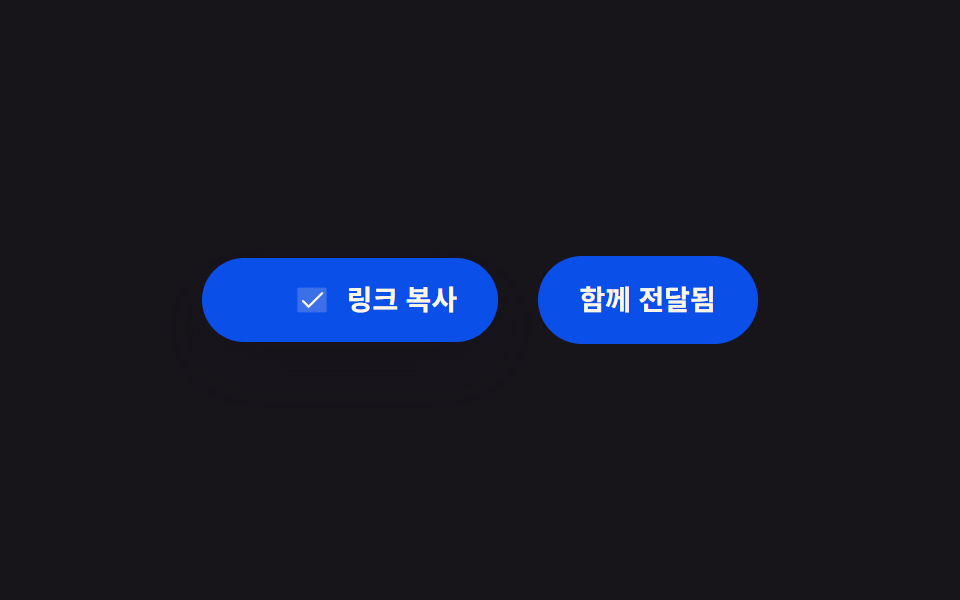
コピーが成功した状態になると、主ボタンはチェックに、補助ボタンは案内文に、決めた時間差だけずれて切り替わり、時間差の値は2つのボタン間の距離から改めて求められます。
使いどころリンクとコードを並べて渡す共有行、招待画面
getBoundingClientRectaria-pressedclassList.toggle
<main class="stage">
<section class="row" id="row">
  <button class="btn primary" id="primaryBtn" type="button" aria-pressed="false" aria-label="リンクをコピー">
    <svg class="icon iconCopy" id="copyIcon" viewBox="0 0 256 256" aria-hidden="true"><g fill="currentColor"><path d="M216 40v128h-48V88H88V40Z" opacity=".2"/><path d="M216 32H88a8 8 0 0 0-8 8v40H40a8 8 0 0 0-8 8v128a8 8 0 0 0 8 8h128a8 8 0 0 0 8-8v-40h40a8 8 0 0 0 8-8V40a8 8 0 0 0-8-8m-56 176H48V96h112Zm48-48h-32V88a8 8 0 0 0-8-8H96V48h112Z"/></g></svg>
    <svg class="icon iconCheck" id="checkIcon" viewBox="0 0 256 256" aria-hidden="true"><g fill="currentColor"><path d="M232 56v144a16 16 0 0 1-16 16H40a16 16 0 0 1-16-16V56a16 16 0 0 1 16-16h176a16 16 0 0 1 16 16" opacity=".2"/><path d="m205.66 85.66l-96 96a8 8 0 0 1-11.32 0l-40-40a8 8 0 0 1 11.32-11.32L104 164.69l90.34-90.35a8 8 0 0 1 11.32 11.32"/></g></svg>
    <span class="label" id="primaryLabel">リンクをコピー</span>
  </button>
  <button class="btn secondary" id="secondaryBtn" type="button" aria-label="招待状を共有">
    <span class="label" id="secondaryLabel">招待状を共有</span>
  </button>
</section>
<span class="sr" id="live" role="status" aria-live="polite"></span>
</main>
@use "../../../../site/static/demo-tokens" as *;
@include stage($stage-ink);
.row {
display: flex;
align-items: center;
gap: $sp-5;
}
.btn {
position: relative;
display: inline-flex;
align-items: center;
gap: $sp-2;
border: 0;
border-radius: $r-pill;
padding: $sp-3 $sp-5;
font-family: -apple-system, "Segoe UI", "Noto Sans KR", sans-serif;
font-weight: 600;
font-size: 14px;
line-height: 1.3;
cursor: pointer;
box-shadow: $shadow-raised;
}
.primary {
background: $subject-blue-deep;
color: $subject-cream;
}
.secondary {
background: transparent;
border: 1px solid rgba($subject-cream, .4);
color: rgba($subject-cream, .86);
box-shadow: none;
transition: background $dur-quick $ease-out, border-color $dur-quick $ease-out;
}
.secondary.is-done {
background: $subject-blue-deep;
border-color: $subject-blue-deep;
color: $subject-cream;
}
.icon {
width: 18px;
height: 18px;
flex: none;
}
.iconCheck {
opacity: 0;
}
.label {
white-space: nowrap;
}
.sr {
position: absolute;
width: 1px;
height: 1px;
padding: 0;
margin: -1px;
overflow: hidden;
clip: rect(0, 0, 0, 0);
white-space: nowrap;
border: 0;
}
@media (max-width: 340px) {
.row {
gap: $sp-3;
}
.btn {
padding: $sp-2 $sp-4;
font-size: 12px;
}
}
@media (prefers-reduced-motion: reduce) {
.secondary {
transition: none;
}
}html, body {
margin: 0;
overflow: hidden;
}
.stage {
box-sizing: border-box;
min-height: 100vh;
display: grid;
place-items: center;
margin: 0;
background: #17141a;
font-family: -apple-system, "Segoe UI", "Noto Sans KR", sans-serif;
padding: clamp(8px, 4vw, 24px);
}
.row {
display: flex;
align-items: center;
gap: 20px;
}
.btn {
position: relative;
display: inline-flex;
align-items: center;
gap: 8px;
border: 0;
border-radius: 999px;
padding: 12px 20px;
font-family: -apple-system, "Segoe UI", "Noto Sans KR", sans-serif;
font-weight: 600;
font-size: 14px;
line-height: 1.3;
cursor: pointer;
box-shadow: 0 14px 24px rgba(23, 20, 26, 0.32);
}
.primary {
background: #0a4fe8;
color: #fff7e6;
}
.secondary {
background: transparent;
border: 1px solid rgba(255, 247, 230, 0.4);
color: rgba(255, 247, 230, 0.86);
box-shadow: none;
transition: background 220ms ease-out, border-color 220ms ease-out;
}
.secondary.is-done {
background: #0a4fe8;
border-color: #0a4fe8;
color: #fff7e6;
}
.icon {
width: 18px;
height: 18px;
flex: none;
}
.iconCheck {
opacity: 0;
}
.label {
white-space: nowrap;
}
.sr {
position: absolute;
width: 1px;
height: 1px;
padding: 0;
margin: -1px;
overflow: hidden;
clip: rect(0, 0, 0, 0);
white-space: nowrap;
border: 0;
}
@media (max-width: 340px) {
.row {
gap: 12px;
}
.btn {
padding: 8px 16px;
font-size: 12px;
}
}
@media (prefers-reduced-motion: reduce) {
.secondary {
transition: none;
}
}// 두 버튼 분할 — 복사가 성공하면 주 버튼은 체크로 바뀌고, 보조 버튼은 안내 문구로
// 시간차를 두고 뒤따라 바뀐다. 그 시간차는 두 버튼 사이의 실측 거리에서 다시 구한다.
// 계산 겹: getBoundingClientRect 로 두 버튼 중심 거리 실측 → 거리×상수 = 시간차.
// 실사용자 리스너 있음(주 버튼 클릭). 실 클립보드 API 호출 없음 — 상태는 시뮬레이션.
(function () {
var row = document.getElementById('row');
var primaryBtn = document.getElementById('primaryBtn');
var copyIcon = document.getElementById('copyIcon');
var checkIcon = document.getElementById('checkIcon');
var secondaryBtn = document.getElementById('secondaryBtn');
var secondaryLabel = document.getElementById('secondaryLabel');
var live = document.getElementById('live');
if (!row || !primaryBtn || !copyIcon || !checkIcon || !secondaryBtn || !secondaryLabel || !live) return;
var STAGGER_MS_PER_PX = 0.9;
var HOLD_MS = 700;
var SECONDARY_TEXT = '招待状を共有';
var SECONDARY_DONE = '一緒に送信済み';
function measureStagger() {
var a = primaryBtn.getBoundingClientRect();
var b = secondaryBtn.getBoundingClientRect();
var ax = a.left + a.width / 2;
var bx = b.left + b.width / 2;
var distance = Math.abs(bx - ax);
return distance * STAGGER_MS_PER_PX;
}
function apply(t, stagger) {
var success = t >= 0;
copyIcon.style.opacity = success ? '0' : '1';
checkIcon.style.opacity = success ? '1' : '0';
primaryBtn.setAttribute('aria-pressed', success ? 'true' : 'false');
var secondaryOn = t >= stagger;
secondaryLabel.textContent = secondaryOn ? SECONDARY_DONE : SECONDARY_TEXT;
secondaryBtn.classList.toggle('is-done', secondaryOn);
if (success && secondaryOn && live.textContent !== SECONDARY_DONE) {
live.textContent = SECONDARY_DONE;
} else if (!success) {
live.textContent = '';
}
}
apply(-1, 0);
var CYCLE_MS = 2000;
var TRIGGER_AT_MS = 300;
var reduce = window.matchMedia('(prefers-reduced-motion: reduce)').matches;
var start = null;
var stagger = measureStagger();
function autoLoop(ts) {
if (start === null) start = ts;
var t = (ts - start) % CYCLE_MS;
apply(t - TRIGGER_AT_MS, stagger);
requestAnimationFrame(autoLoop);
}
var autoRaf = 0;
if (!reduce) autoRaf = requestAnimationFrame(autoLoop);
primaryBtn.addEventListener('click', function () {
if (autoRaf) { cancelAnimationFrame(autoRaf); autoRaf = 0; }
stagger = measureStagger();
apply(-1, stagger);
var clickStart = null;
function userLoop(ts) {
if (clickStart === null) clickStart = ts;
var t = ts - clickStart;
apply(t, stagger);
if (t < stagger + HOLD_MS) requestAnimationFrame(userLoop);
}
requestAnimationFrame(userLoop);
});
})();import { useEffect, useRef } from "react";
import styles from "./CopyTwoButtonSplit.module.scss";
// 두 버튼 분할 — 복사가 성공하면 주 버튼은 체크로 바뀌고, 보조 버튼은 안내 문구로
// 시간차를 두고 뒤따라 바뀐다. 그 시간차는 두 버튼 사이의 실측 거리에서 다시 구한다.
// 계산 겹: getBoundingClientRect 로 두 버튼 중심 거리 실측 → 거리×상수 = 시간차.
// 실사용자 리스너 있음(주 버튼 클릭). 실 클립보드 API 호출 없음 — 상태는 시뮬레이션.
const STAGGER_MS_PER_PX = 0.9;
const HOLD_MS = 700;
const CYCLE_MS = 2000;
const TRIGGER_AT_MS = 300;
const SECONDARY_TEXT = "초대장 공유";
const SECONDARY_DONE = "함께 전달됨";
export default function CopyTwoButtonSplit() {
const primaryRef = useRef<HTMLButtonElement>(null);
const copyIconRef = useRef<SVGSVGElement>(null);
const checkIconRef = useRef<SVGSVGElement>(null);
const secondaryRef = useRef<HTMLButtonElement>(null);
const secondaryLabelRef = useRef<HTMLSpanElement>(null);
const liveRef = useRef<HTMLSpanElement>(null);
useEffect(() => {
const primaryBtn = primaryRef.current;
const copyIcon = copyIconRef.current;
const checkIcon = checkIconRef.current;
const secondaryBtn = secondaryRef.current;
const secondaryLabel = secondaryLabelRef.current;
const live = liveRef.current;
if (!primaryBtn || !copyIcon || !checkIcon || !secondaryBtn || !secondaryLabel || !live) return;
function measureStagger() {
const a = primaryBtn!.getBoundingClientRect();
const b = secondaryBtn!.getBoundingClientRect();
const ax = a.left + a.width / 2;
const bx = b.left + b.width / 2;
return Math.abs(bx - ax) * STAGGER_MS_PER_PX;
}
function apply(t: number, stagger: number) {
const success = t >= 0;
copyIcon!.style.opacity = success ? "0" : "1";
checkIcon!.style.opacity = success ? "1" : "0";
primaryBtn!.setAttribute("aria-pressed", success ? "true" : "false");
const secondaryOn = t >= stagger;
secondaryLabel!.textContent = secondaryOn ? SECONDARY_DONE : SECONDARY_TEXT;
secondaryBtn!.classList.toggle(styles.isDone, secondaryOn);
if (success && secondaryOn) {
live!.textContent = SECONDARY_DONE;
} else if (!success) {
live!.textContent = "";
}
}
apply(-1, 0);
const reduce = window.matchMedia("(prefers-reduced-motion: reduce)").matches;
let start: number | null = null;
let stagger = measureStagger();
let autoRaf = 0;
function autoLoop(ts: number) {
if (start === null) start = ts;
const t = (ts - start) % CYCLE_MS;
apply(t - TRIGGER_AT_MS, stagger);
autoRaf = requestAnimationFrame(autoLoop);
}
if (!reduce) autoRaf = requestAnimationFrame(autoLoop);
function onClick() {
if (autoRaf) {
cancelAnimationFrame(autoRaf);
autoRaf = 0;
}
stagger = measureStagger();
apply(-1, stagger);
let clickStart: number | null = null;
function userLoop(ts: number) {
if (clickStart === null) clickStart = ts;
const t = ts - clickStart;
apply(t, stagger);
if (t < stagger + HOLD_MS) requestAnimationFrame(userLoop);
}
requestAnimationFrame(userLoop);
}
primaryBtn.addEventListener("click", onClick);
return () => {
if (autoRaf) cancelAnimationFrame(autoRaf);
primaryBtn.removeEventListener("click", onClick);
};
}, []);
return (
<div className={styles.stage}>
<section className={styles.row}>
<button ref={primaryRef} className={`${styles.btn} ${styles.primary}`} type="button" aria-pressed="false" aria-label="링크 복사">
<svg ref={copyIconRef} className={styles.icon} viewBox="0 0 256 256" aria-hidden="true">
<g fill="currentColor">
<path d="M216 40v128h-48V88H88V40Z" opacity=".2" />
<path d="M216 32H88a8 8 0 0 0-8 8v40H40a8 8 0 0 0-8 8v128a8 8 0 0 0 8 8h128a8 8 0 0 0 8-8v-40h40a8 8 0 0 0 8-8V40a8 8 0 0 0-8-8m-56 176H48V96h112Zm48-48h-32V88a8 8 0 0 0-8-8H96V48h112Z" />
</g>
</svg>
<svg ref={checkIconRef} className={`${styles.icon} ${styles.iconCheck}`} viewBox="0 0 256 256" aria-hidden="true">
<g fill="currentColor">
<path d="M232 56v144a16 16 0 0 1-16 16H40a16 16 0 0 1-16-16V56a16 16 0 0 1 16-16h176a16 16 0 0 1 16 16" opacity=".2" />
<path d="m205.66 85.66l-96 96a8 8 0 0 1-11.32 0l-40-40a8 8 0 0 1 11.32-11.32L104 164.69l90.34-90.35a8 8 0 0 1 11.32 11.32" />
</g>
</svg>
<span className={styles.label}>링크 복사</span>
</button>
<button ref={secondaryRef} className={`${styles.btn} ${styles.secondary}`} type="button" aria-label="초대장 공유">
<span ref={secondaryLabelRef} className={styles.label}>초대장 공유</span>
</button>
</section>
<span ref={liveRef} className={styles.sr} role="status" aria-live="polite" />
</div>
);
}04 2ボタン分割 — 成功状態を主と補助が時間差で分け持つ行 — 計測 累積面積 3.328% · 動いたフレーム 11/23GODRICH オリジナル · SCSS と React は zip に同梱 · コピー ボタン html UI 9選 — コード・URL・テキストのフィードバックまで
このデモが属する記事
 コピー ボタン html UI 9選 — コード・URL・テキストのフィードバックまで「コピー ボタン html」9選 — 9つのうち1つはコピー結果を2つのボタンが分けて持ち、1つはコピーした文字数だけ表示を埋め、もう1つは失敗したコピーの復帰時間を自ら計ります。 この記事のデモをすべて見る