06ツール呼び出しステップ表示
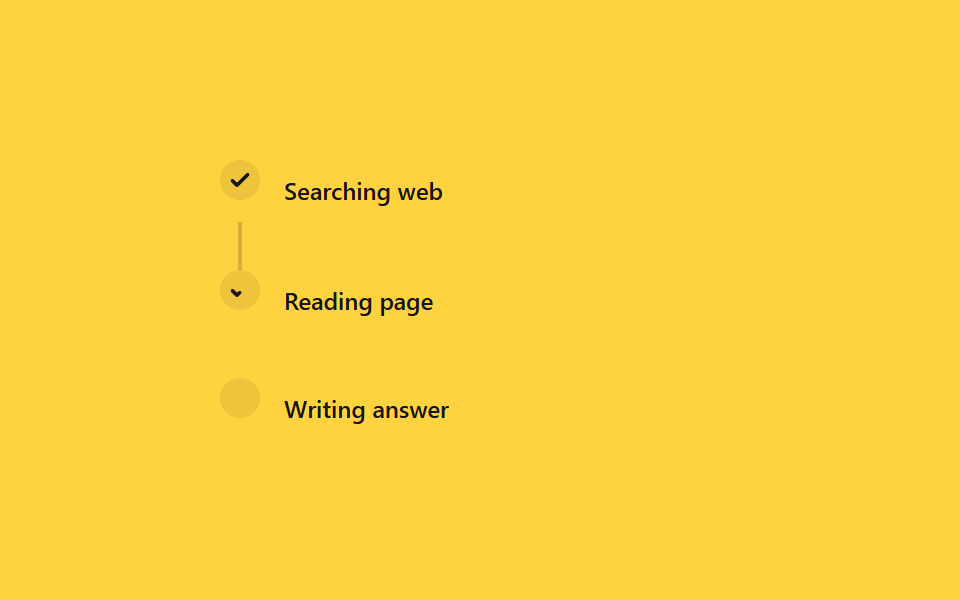
「検索中→読み込み中→回答作成中」のようなツール呼び出しの段階を縦に並べ、完了するたびに丸がチェックに変わり、接続線がtransform: scaleYで下まで満ちていく。
使いどころエージェントのツール呼び出しログ、マルチステップ作業の進捗表示
scaleYstroke-dashoffsetJS 6줄
<main class="stage">
  <div class="ts-list is-demo">
    <div class="ts-step">
      <span class="ts-icon ts-icon--1"><svg viewBox="0 0 16 16"><path d="M3 8.5l3 3 7-7"/></svg></span>
      <span class="ts-label">Searching web</span>
    </div>
    <span class="ts-line ts-line--1"></span>
    <div class="ts-step">
      <span class="ts-icon ts-icon--2"><svg viewBox="0 0 16 16"><path d="M3 8.5l3 3 7-7"/></svg></span>
      <span class="ts-label">Reading page</span>
    </div>
    <span class="ts-line ts-line--2"></span>
    <div class="ts-step">
      <span class="ts-icon ts-icon--3"><svg viewBox="0 0 16 16"><path d="M3 8.5l3 3 7-7"/></svg></span>
      <span class="ts-label">Writing answer</span>
    </div>
  </div>
</main>
@use "../../../../site/static/demo-tokens" as *;
// ── 변수 3개 ──────────────────────────────────────────
$duration: 2s;
$easing: $ease-out;
$color: $subject-ink;
@include stage($stage-yellow);
.ts-list {
display: grid;
grid-template-columns: $sp-5 1fr;
column-gap: $sp-3;
width: min(260px, 84vw);
}
.ts-step { display: contents; }
.ts-icon {
grid-column: 1;
justify-self: center;
width: $sp-5;
height: $sp-5;
border-radius: $r-pill;
display: grid;
place-items: center;
background: rgba(23, 20, 26, .08);
color: $color;
svg { width: 12px; height: 12px; }
path {
fill: none;
stroke: currentColor;
stroke-width: 2.4;
stroke-linecap: round;
stroke-linejoin: round;
stroke-dasharray: 16;
stroke-dashoffset: 16;
}
}
.ts-icon--1 path { stroke-dashoffset: 0; } // 이미 끝난 첫 단계
.ts-label {
grid-column: 2;
align-self: center;
padding: $sp-2 0;
color: $color;
font: 500 12px/1.2 -apple-system, "Segoe UI", sans-serif;
}
.ts-line {
grid-column: 1;
justify-self: center;
width: 2px;
height: $sp-6;
background: rgba(23, 20, 26, .18);
transform-origin: top; // 규칙8: 세로 연결선 위변 채움
transform: scaleY(0);
}
// 실사용: 도구 이벤트마다 JS 가 .is-done 을 붙인다(위 스크립트). 데모 루프는 같은 순서를 keyframes 로 반복한다
@keyframes ts-line-fill { 0%, 5% { transform: scaleY(0); } 25%, 100% { transform: scaleY(1); } }
@keyframes ts-check-2 { 0%, 25% { stroke-dashoffset: 16; } 40%, 100% { stroke-dashoffset: 0; } }
@keyframes ts-line-fill2 { 0%, 40% { transform: scaleY(0); } 60%, 100% { transform: scaleY(1); } }
@keyframes ts-check-3 { 0%, 60% { stroke-dashoffset: 16; } 75%, 100% { stroke-dashoffset: 0; } }
.ts-list.is-demo .ts-line--1 { animation: ts-line-fill $duration $easing infinite; }
.ts-list.is-demo .ts-icon--2 path { animation: ts-check-2 $duration $easing infinite; }
.ts-list.is-demo .ts-line--2 { animation: ts-line-fill2 $duration $easing infinite; }
.ts-list.is-demo .ts-icon--3 path { animation: ts-check-3 $duration $easing infinite; }
@media (prefers-reduced-motion: reduce) {
.ts-list.is-demo .ts-line--1,
.ts-list.is-demo .ts-line--2 { animation: none !important; transform: scaleY(1) !important; }
.ts-list.is-demo .ts-icon--2 path,
.ts-list.is-demo .ts-icon--3 path { animation: none !important; stroke-dashoffset: 0 !important; }
}html, body {
margin: 0;
overflow: hidden;
}
.stage {
box-sizing: border-box;
min-height: 100vh;
display: grid;
place-items: center;
margin: 0;
background: #ffd23f;
font-family: -apple-system, "Segoe UI", "Noto Sans KR", sans-serif;
padding: clamp(8px, 4vw, 24px);
}
.ts-list {
display: grid;
grid-template-columns: 20px 1fr;
column-gap: 12px;
width: min(260px, 84vw);
}
.ts-step {
display: contents;
}
.ts-icon {
grid-column: 1;
justify-self: center;
width: 20px;
height: 20px;
border-radius: 999px;
display: grid;
place-items: center;
background: rgba(23, 20, 26, 0.08);
color: #17141a;
}
.ts-icon svg {
width: 12px;
height: 12px;
}
.ts-icon path {
fill: none;
stroke: currentColor;
stroke-width: 2.4;
stroke-linecap: round;
stroke-linejoin: round;
stroke-dasharray: 16;
stroke-dashoffset: 16;
}
.ts-icon--1 path {
stroke-dashoffset: 0;
}
.ts-label {
grid-column: 2;
align-self: center;
padding: 8px 0;
color: #17141a;
font: 500 12px/1.2 -apple-system, "Segoe UI", sans-serif;
}
.ts-line {
grid-column: 1;
justify-self: center;
width: 2px;
height: 24px;
background: rgba(23, 20, 26, 0.18);
transform-origin: top;
transform: scaleY(0);
}
@keyframes ts-line-fill {
0%, 5% {
transform: scaleY(0);
}
25%, 100% {
transform: scaleY(1);
}
}
@keyframes ts-check-2 {
0%, 25% {
stroke-dashoffset: 16;
}
40%, 100% {
stroke-dashoffset: 0;
}
}
@keyframes ts-line-fill2 {
0%, 40% {
transform: scaleY(0);
}
60%, 100% {
transform: scaleY(1);
}
}
@keyframes ts-check-3 {
0%, 60% {
stroke-dashoffset: 16;
}
75%, 100% {
stroke-dashoffset: 0;
}
}
.ts-list.is-demo .ts-line--1 {
animation: ts-line-fill 2s ease-out infinite;
}
.ts-list.is-demo .ts-icon--2 path {
animation: ts-check-2 2s ease-out infinite;
}
.ts-list.is-demo .ts-line--2 {
animation: ts-line-fill2 2s ease-out infinite;
}
.ts-list.is-demo .ts-icon--3 path {
animation: ts-check-3 2s ease-out infinite;
}
@media (prefers-reduced-motion: reduce) {
.ts-list.is-demo .ts-line--1,
.ts-list.is-demo .ts-line--2 {
animation: none !important;
transform: scaleY(1) !important;
}
.ts-list.is-demo .ts-icon--2 path,
.ts-list.is-demo .ts-icon--3 path {
animation: none !important;
stroke-dashoffset: 0 !important;
}
}// 실사용: 도구 호출 이벤트가 올 때마다 부른다 (이 데모의 자동 루프에는 연결하지 않는다)
function tsAdvance(list, n) {
var steps = list.querySelectorAll('.ts-step');
var lines = list.querySelectorAll('.ts-line');
for (var i = 0; i < n; i++) steps[i].classList.add('is-done');
for (var i = 0; i < n - 1; i++) lines[i].classList.add('is-done');
}import { CSSProperties } from "react";
import styles from "./ToolStepProgress.module.scss";
type Vars = CSSProperties & {
"--duration"?: string;
"--easing"?: string;
"--color"?: string;
};
export interface ToolStepProgressProps {
duration?: string;
easing?: string;
color?: string;
steps?: string[];
}
const Check = () => (
<svg viewBox="0 0 16 16">
<path d="M3 8.5l3 3 7-7" />
</svg>
);
export default function ToolStepProgress({
duration = "2s",
easing = "ease-out",
color = "#17141a",
steps = ["Searching web", "Reading page", "Writing answer"],
}: ToolStepProgressProps) {
const style: Vars = {
"--duration": duration,
"--easing": easing,
"--color": color,
};
return (
<div className={styles.list} style={style}>
<div className={styles.step}>
<span className={`${styles.icon} ${styles.icon1}`}><Check /></span>
<span className={styles.label}>{steps[0]}</span>
</div>
<span className={`${styles.line} ${styles.line1}`} />
<div className={styles.step}>
<span className={`${styles.icon} ${styles.icon2}`}><Check /></span>
<span className={styles.label}>{steps[1]}</span>
</div>
<span className={`${styles.line} ${styles.line2}`} />
<div className={styles.step}>
<span className={`${styles.icon} ${styles.icon3}`}><Check /></span>
<span className={styles.label}>{steps[2]}</span>
</div>
</div>
);
}06 ツール呼び出しステップ表示 — 計測 累積面積 0.112% · 動いたフレーム 16/23GODRICH オリジナル · SCSS と React は zip に同梱 · 【コピペOK】AIチャット ローディング アニメーション css 9選
このデモが属する記事
 【コピペOK】AIチャット ローディング アニメーション css 9選ChatGPTやClaudeのようなAIチャットに質問を送ると、返事が来るまでの数秒間、小さな点が順番に光ったり、画面の文字がふわっと浮かび上がったりする瞬間を見たことはないでしょうか。この記事はその「考え中」の合図を作るローディング アニ この記事のデモをすべて見る