07テキストの値が格子に散らばるQRキャンバス
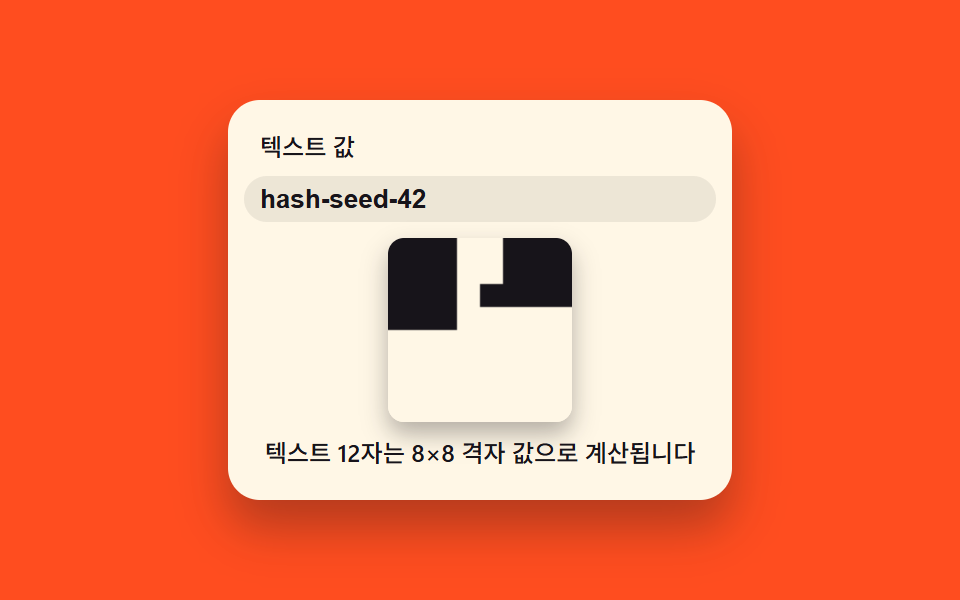
入力したテキストの値を白黒の格子値に変換してキャンバスに点を一つずつ打ちQR状の模様を作り、文字数が増えると格子のマス数も再計算されて増える。
使いどころ名刺・イベント招待状のQR発行フォーム
hashStrcellOncomputeGrid
<main class="stage">
<div class="tq is-demo" id="tq">
  <label class="tq__cap" for="tqText">テキストの値</label>
  <input class="tq__input" id="tqText" type="text" maxlength="18" value="hello world" aria-label="テキストの値を入力するとハッシュで計算したQR風の格子をキャンバスに描きます" aria-describedby="tqReadout">
  <canvas class="tq__canvas" id="tqCanvas" width="120" height="120" aria-hidden="true"></canvas>
  <p class="tq__readout" id="tqReadout" role="status" aria-live="polite"></p>
</div>
</main>
@use "../../../../site/static/demo-tokens" as *;
// 계산 겹(해시->격자 값, 시간 경과에 따른 공개 칸 수)은 index.html 의 computeGrid()/frame() 에 있다. 여기는 무대·레이아웃만.
$duration: $dur-loop;
$easing: $ease-spring;
$color: $subject-ink;
@include stage($stage-orange);
.tq {
display: flex;
flex-direction: column;
align-items: center;
gap: $sp-2;
width: min(220px, 84vw);
background: $subject-cream;
border-radius: $r-card;
padding: $sp-4;
box-shadow: $shadow-raised;
}
.tq__cap {
margin: 0;
align-self: flex-start;
color: $color;
font-size: 12px;
font-weight: 500;
line-height: 1.2;
}
.tq__input {
width: 100%;
border: 0;
border-radius: $r-control;
padding: $sp-1 $sp-2;
background: rgba($subject-ink, .08);
color: $subject-ink;
font-weight: 600;
font-size: 13px;
}
.tq__input:focus-visible {
outline: 2px solid $subject-blue;
outline-offset: 2px;
}
.tq__canvas {
width: 92px;
height: 92px;
border-radius: $r-sm;
box-shadow: $shadow-press;
transition: box-shadow $duration $easing;
}
.tq__readout {
margin: 0;
color: $color;
font-size: 12px;
font-weight: 500;
line-height: 1.3;
text-align: center;
}
@media (max-width: 340px) {
.tq { padding: $sp-3; gap: $sp-1; width: min(200px, 84vw); }
.tq__cap { font-size: 10px; }
.tq__input { font-size: 12px; }
.tq__canvas { width: 64px; height: 64px; }
.tq__readout { font-size: 10px; }
}
@media (prefers-reduced-motion: reduce) {
.tq__canvas { transition: none; }
}html, body {
margin: 0;
overflow: hidden;
}
.stage {
box-sizing: border-box;
min-height: 100vh;
display: grid;
place-items: center;
margin: 0;
background: #ff4d1f;
font-family: -apple-system, "Segoe UI", "Noto Sans KR", sans-serif;
padding: clamp(8px, 4vw, 24px);
}
.tq {
display: flex;
flex-direction: column;
align-items: center;
gap: 8px;
width: min(220px, 84vw);
background: #fff7e6;
border-radius: 16px;
padding: 16px;
box-shadow: 0 14px 24px rgba(23, 20, 26, 0.32);
}
.tq__cap {
margin: 0;
align-self: flex-start;
color: #17141a;
font-size: 12px;
font-weight: 500;
line-height: 1.2;
}
.tq__input {
width: 100%;
border: 0;
border-radius: 12px;
padding: 4px 8px;
background: rgba(23, 20, 26, 0.08);
color: #17141a;
font-weight: 600;
font-size: 13px;
}
.tq__input:focus-visible {
outline: 2px solid #2f6df6;
outline-offset: 2px;
}
.tq__canvas {
width: 92px;
height: 92px;
border-radius: 8px;
box-shadow: 0 6px 12px rgba(23, 20, 26, 0.32);
transition: box-shadow 2s cubic-bezier(0.2, 0.8, 0.2, 1);
}
.tq__readout {
margin: 0;
color: #17141a;
font-size: 12px;
font-weight: 500;
line-height: 1.3;
text-align: center;
}
@media (max-width: 340px) {
.tq {
padding: 12px;
gap: 4px;
width: min(200px, 84vw);
}
.tq__cap {
font-size: 10px;
}
.tq__input {
font-size: 12px;
}
.tq__canvas {
width: 64px;
height: 64px;
}
.tq__readout {
font-size: 10px;
}
}
@media (prefers-reduced-motion: reduce) {
.tq__canvas {
transition: none;
}
}(function () {
var root = document.getElementById('tq');
var input = document.getElementById('tqText');
var canvas = document.getElementById('tqCanvas');
var ctx = canvas.getContext('2d');
var readout = document.getElementById('tqReadout');
var reduce = window.matchMedia('(prefers-reduced-motion: reduce)').matches;
var isDemo = true;
function human() { if (isDemo) { root.classList.remove('is-demo'); isDemo = false; } }
// 계산 한 겹 — テキスト-> 결정적 해시 -> 격자 값(흑백), QR 인코딩이 아니라 QR풍 패턴이다
function hashStr(s) {
var h = 2166136261;
for (var i = 0; i < s.length; i++) {
h ^= s.charCodeAt(i);
h = (h * 16777619) >>> 0;
}
return h >>> 0;
}
function cellOn(hash, i) {
var x = (hash ^ Math.imul(i + 1, 2654435761)) >>> 0;
x = (x ^ (x >>> 15)) >>> 0;
return (x & 1) === 1;
}
var GRID_MAX = 12; // 변형 07: 키우면 글자 수가 많을 때 격자 칸 수(=캔버스를 채우는 칸 크기)가 더 커진다
function computeGrid(text) {
var hash = hashStr(text);
var gridSize = Math.min(GRID_MAX, Math.max(4, 4 + Math.floor(text.length / 3)));
var total = gridSize * gridSize;
var finderSize = Math.min(3, gridSize - 1);
var cells = new Array(total);
for (var r = 0; r < gridSize; r++) {
for (var c = 0; c < gridSize; c++) {
var i = r * gridSize + c;
var inFinder = (r < finderSize && c < finderSize) ||
(r < finderSize && c >= gridSize - finderSize) ||
(r >= gridSize - finderSize && c < finderSize);
cells[i] = inFinder ? true : cellOn(hash, i);
}
}
return { gridSize: gridSize, cells: cells, total: total };
}
var SENT_PREFIX = 'テキスト', SENT_MID1 = '文字は', SENT_MID2 = '×', SENT_SUFFIX = '格子の値として計算されます';
var grid = computeGrid(input.value);
var revealTarget = grid.total;
var revealStartNow = performance.now();
var CELLS_PER_SEC = 90;
function recompute(text) {
grid = computeGrid(text);
revealTarget = grid.total;
revealStartNow = performance.now();
readout.textContent = SENT_PREFIX + text.length + SENT_MID1 + grid.gridSize + SENT_MID2 + grid.gridSize + SENT_SUFFIX;
if (reduce) { draw(grid.total); }
}
function draw(revealedCount) {
var size = canvas.width;
var cell = size / grid.gridSize;
ctx.clearRect(0, 0, size, size);
ctx.fillStyle = '#fff7e6';
ctx.fillRect(0, 0, size, size);
ctx.fillStyle = '#17141a';
for (var i = 0; i < grid.total && i < revealedCount; i++) {
if (!grid.cells[i]) continue;
var r = Math.floor(i / grid.gridSize);
var c = i % grid.gridSize;
ctx.fillRect(c * cell, r * cell, Math.ceil(cell), Math.ceil(cell));
}
}
function onInput() { human(); recompute(input.value); }
input.addEventListener('input', onInput);
input.addEventListener('change', onInput);
var DEMO_VALUES = ['hello world', 'abcdef123456', 'sample-input-07', 'pattern-grid-x9', 'hash-seed-42', 'demo-text-string'];
var DRIVE_PERIOD_MS = 2000;
var driveStart = 0, lastIdx = -1;
function driveTick(now) {
if (!driveStart) driveStart = now;
if (isDemo) {
var frac = ((now - driveStart) % DRIVE_PERIOD_MS) / DRIVE_PERIOD_MS;
var idx = Math.floor(frac * DEMO_VALUES.length);
if (idx !== lastIdx) {
lastIdx = idx;
input.value = DEMO_VALUES[idx];
recompute(DEMO_VALUES[idx]);
}
}
requestAnimationFrame(driveTick);
}
function frame(now) {
if (!reduce) {
var elapsedSec = Math.max(0, (now - revealStartNow) / 1000);
var revealedCount = Math.min(grid.total, Math.floor(elapsedSec * CELLS_PER_SEC));
draw(revealedCount);
}
requestAnimationFrame(frame);
}
readout.textContent = SENT_PREFIX + input.value.length + SENT_MID1 + grid.gridSize + SENT_MID2 + grid.gridSize + SENT_SUFFIX;
if (reduce) { draw(grid.total); }
if (!reduce) {
requestAnimationFrame(driveTick);
requestAnimationFrame(frame);
}
})();import { useEffect, useRef } from "react";
import styles from "./QrCanvasDraw.module.scss";
type Grid = { gridSize: number; cells: boolean[]; total: number };
export default function QrCanvasDraw() {
const rootRef = useRef<HTMLDivElement | null>(null);
const inputRef = useRef<HTMLInputElement | null>(null);
const canvasRef = useRef<HTMLCanvasElement | null>(null);
const readoutRef = useRef<HTMLParagraphElement | null>(null);
useEffect(() => {
const root = rootRef.current;
const input = inputRef.current;
const canvas = canvasRef.current;
const readout = readoutRef.current;
if (!root || !input || !canvas || !readout) return;
const ctx = canvas.getContext("2d");
if (!ctx) return;
const reduce = window.matchMedia("(prefers-reduced-motion: reduce)").matches;
let isDemo = true;
function human() {
if (isDemo) {
root!.classList.remove("is-demo");
isDemo = false;
}
}
function hashStr(s: string) {
let h = 2166136261;
for (let i = 0; i < s.length; i++) {
h ^= s.charCodeAt(i);
h = (h * 16777619) >>> 0;
}
return h >>> 0;
}
function cellOn(hash: number, i: number) {
let x = (hash ^ Math.imul(i + 1, 2654435761)) >>> 0;
x = (x ^ (x >>> 15)) >>> 0;
return (x & 1) === 1;
}
const GRID_MAX = 12; // 변형 07: 키우면 글자 수가 많을 때 격자 칸 수(=캔버스를 채우는 칸 크기)가 더 커진다
function computeGrid(text: string): Grid {
const hash = hashStr(text);
const gridSize = Math.min(GRID_MAX, Math.max(4, 4 + Math.floor(text.length / 3)));
const total = gridSize * gridSize;
const finderSize = Math.min(3, gridSize - 1);
const cells: boolean[] = new Array(total);
for (let r = 0; r < gridSize; r++) {
for (let c = 0; c < gridSize; c++) {
const i = r * gridSize + c;
const inFinder =
(r < finderSize && c < finderSize) ||
(r < finderSize && c >= gridSize - finderSize) ||
(r >= gridSize - finderSize && c < finderSize);
cells[i] = inFinder ? true : cellOn(hash, i);
}
}
return { gridSize, cells, total };
}
const SENT_PREFIX = "텍스트 ";
const SENT_MID1 = "자는 ";
const SENT_MID2 = "×";
const SENT_SUFFIX = " 격자 값으로 계산됩니다";
let grid = computeGrid(input.value);
const CELLS_PER_SEC = 90;
let revealStartNow = performance.now();
function recompute(text: string) {
grid = computeGrid(text);
revealStartNow = performance.now();
readout!.textContent =
SENT_PREFIX + text.length + SENT_MID1 + grid.gridSize + SENT_MID2 + grid.gridSize + SENT_SUFFIX;
if (reduce) draw(grid.total);
}
function draw(revealedCount: number) {
const size = canvas!.width;
const cell = size / grid.gridSize;
ctx!.clearRect(0, 0, size, size);
ctx!.fillStyle = "#fff7e6";
ctx!.fillRect(0, 0, size, size);
ctx!.fillStyle = "#17141a";
for (let i = 0; i < grid.total && i < revealedCount; i++) {
if (!grid.cells[i]) continue;
const r = Math.floor(i / grid.gridSize);
const c = i % grid.gridSize;
ctx!.fillRect(c * cell, r * cell, Math.ceil(cell), Math.ceil(cell));
}
}
function onInput() {
human();
recompute(input!.value);
}
input.addEventListener("input", onInput);
input.addEventListener("change", onInput);
const DEMO_VALUES = ["hello world", "abcdef123456", "sample-input-07", "pattern-grid-x9", "hash-seed-42", "demo-text-string"];
const DRIVE_PERIOD_MS = 2000;
let driveStart = 0;
let lastIdx = -1;
let rafDrive = 0;
function driveTick(now: number) {
if (!driveStart) driveStart = now;
if (isDemo) {
const frac = ((now - driveStart) % DRIVE_PERIOD_MS) / DRIVE_PERIOD_MS;
const idx = Math.floor(frac * DEMO_VALUES.length);
if (idx !== lastIdx) {
lastIdx = idx;
input!.value = DEMO_VALUES[idx];
recompute(DEMO_VALUES[idx]);
}
}
rafDrive = requestAnimationFrame(driveTick);
}
let rafFrame = 0;
function frame(now: number) {
if (!reduce) {
const elapsedSec = Math.max(0, (now - revealStartNow) / 1000);
const revealedCount = Math.min(grid.total, Math.floor(elapsedSec * CELLS_PER_SEC));
draw(revealedCount);
}
rafFrame = requestAnimationFrame(frame);
}
readout.textContent =
SENT_PREFIX + input.value.length + SENT_MID1 + grid.gridSize + SENT_MID2 + grid.gridSize + SENT_SUFFIX;
if (reduce) draw(grid.total);
if (!reduce) {
rafDrive = requestAnimationFrame(driveTick);
rafFrame = requestAnimationFrame(frame);
}
return () => {
input.removeEventListener("input", onInput);
input.removeEventListener("change", onInput);
if (rafDrive) cancelAnimationFrame(rafDrive);
if (rafFrame) cancelAnimationFrame(rafFrame);
};
}, []);
return (
<div ref={rootRef} className={`${styles.root} is-demo`}>
<label className={styles.cap} htmlFor="tqTextReact">
텍스트 값
</label>
<input
ref={inputRef}
className={styles.input}
id="tqTextReact"
type="text"
maxLength={18}
defaultValue="hello world"
aria-label="텍스트 값을 입력하면 해시로 계산한 QR풍 격자를 캔버스에 그립니다"
aria-describedby="tqReadoutReact"
/>
<canvas ref={canvasRef} className={styles.canvas} width={120} height={120} aria-hidden="true" />
<p ref={readoutRef} className={styles.readout} id="tqReadoutReact" role="status" aria-live="polite" />
</div>
);
}07 テキストの値が格子に散らばるQRキャンバス — 計測 累積面積 4.272% · 動いたフレーム 23/23GODRICH オリジナル · SCSS と React は zip に同梱 · css 電卓 デザイン9種 — 入力フォーム デザインが値を描く
このデモが属する記事
 css 電卓 デザイン9種 — 入力フォーム デザインが値を描くcss 電卓 デザインの9つのうち、1つは入力したテキストの値を格子値に変えてキャンバスにQR模様を直接描き、1つは生年月日の値から残り日数を計算してリングゲージを満たし、1つは入力した1つの時刻の値で複数のタイムゾーンカードを描き直します この記事のデモをすべて見る