02押し込み縮小+影の減少
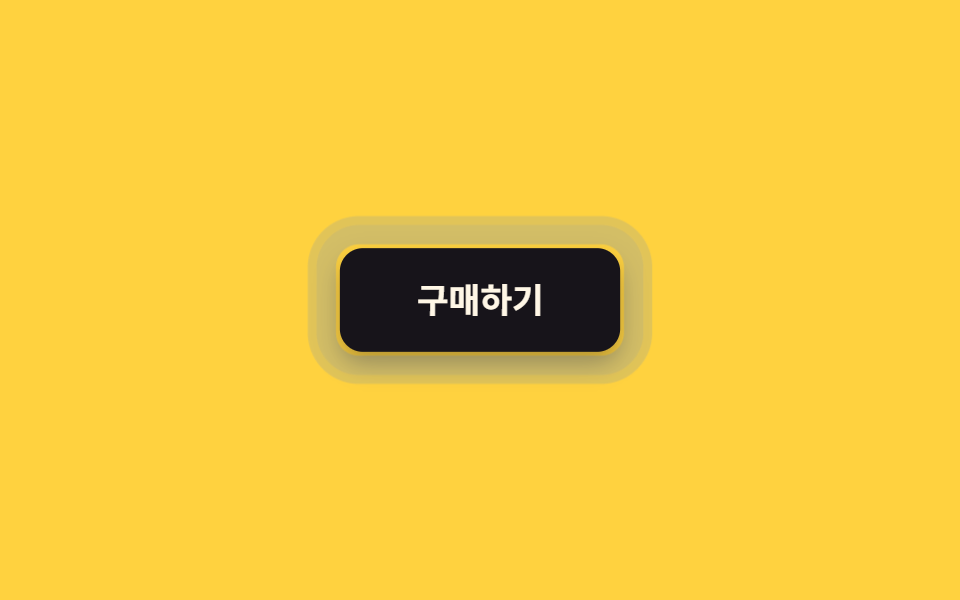
押している間 scale(.96) まで縮み、同時に box-shadow も浅くなる。離すとバウンスなしで即座に元に戻る。
使いどころ送信・決済ボタンなど、押した確信が重要な CTA
scalebox-shadow0.2초
<main class="stage">
  <button class="btn is-demo" type="button">購入する</button>
</main>
@use "../../../../site/static/demo-tokens" as *;
$duration: $dur-quick; // 눌렸다가 돌아오는 시간 (바운스 없음)
$easing: $ease-out;
$color: $subject-ink; // 버튼 색
@include stage($stage-yellow);
.btn {
position: relative;
border: 0;
border-radius: $r-control;
padding: 18px 40px;
font-weight: 600; font-size: 18px; line-height: 1; font-family: inherit;
color: $subject-cream;
background: $color;
cursor: pointer;
-webkit-tap-highlight-color: transparent;
touch-action: manipulation; // 더블탭 확대·300ms 지연 제거
box-shadow: $shadow-raised;
transform: scale(1);
transition: transform $duration $easing, box-shadow $duration $easing;
// 규칙8 한 겹: 눌리는 순간 버튼 바깥으로 두 겹 링이 서로 다른 속도로 불규칙하게 번지다 감쇠
&::after {
content: "";
position: absolute;
inset: -2px;
border-radius: inherit;
box-shadow: 0 0 0 0 rgba($subject-blue, .5), 0 0 0 0 rgba($subject-blue, .3);
opacity: 0;
pointer-events: none;
}
}
.btn:active {
transform: scale(.96);
box-shadow: $shadow-press;
}
.btn:active::after {
animation: ripple-wave $dur-enter $easing;
}
.btn:focus-visible {
outline: 3px solid $subject-blue;
outline-offset: 3px;
}
.btn.is-demo { animation: press-loop $dur-loop $easing infinite; }
.btn.is-demo::after { animation: ripple-loop $dur-loop $easing infinite; }
@keyframes press-loop {
0%, 20% { transform: scale(1); box-shadow: $shadow-raised; }
45%, 60% { transform: scale(.96); box-shadow: $shadow-press; }
100% { transform: scale(1); box-shadow: $shadow-raised; }
}
@keyframes ripple-wave {
0% { box-shadow: 0 0 0 0 rgba($subject-blue, .55), 0 0 0 0 rgba($subject-blue, .34); opacity: 1; }
20% { box-shadow: 0 0 0 8px rgba($subject-blue, .55), 0 0 0 3px rgba($subject-blue, .34); opacity: 1; }
55% { box-shadow: 0 0 0 14px rgba($subject-blue, .3), 0 0 0 9px rgba($subject-blue, .2); opacity: .9; }
85% { box-shadow: 0 0 0 16px rgba($subject-blue, .06), 0 0 0 12px rgba($subject-blue, .04); opacity: .2; }
100% { box-shadow: 0 0 0 16px rgba($subject-blue, 0), 0 0 0 12px rgba($subject-blue, 0); opacity: 0; }
}
@keyframes ripple-loop {
0%, 40% { box-shadow: 0 0 0 0 rgba($subject-blue, .55), 0 0 0 0 rgba($subject-blue, .34); opacity: 1; }
46% { box-shadow: 0 0 0 8px rgba($subject-blue, .55), 0 0 0 3px rgba($subject-blue, .34); opacity: 1; }
53% { box-shadow: 0 0 0 14px rgba($subject-blue, .3), 0 0 0 9px rgba($subject-blue, .2); opacity: .9; }
58% { box-shadow: 0 0 0 16px rgba($subject-blue, .06), 0 0 0 12px rgba($subject-blue, .04); opacity: .2; }
63%, 100% { box-shadow: 0 0 0 16px rgba($subject-blue, 0), 0 0 0 12px rgba($subject-blue, 0); opacity: 0; }
}
@media (prefers-reduced-motion: reduce) {
.btn { transition: none; }
.btn::after { animation: none !important; opacity: 0; }
.btn.is-demo { animation: none; box-shadow: $shadow-press; }
}html, body {
margin: 0;
overflow: hidden;
}
.stage {
box-sizing: border-box;
min-height: 100vh;
display: grid;
place-items: center;
margin: 0;
background: #ffd23f;
font-family: -apple-system, "Segoe UI", "Noto Sans KR", sans-serif;
padding: clamp(8px, 4vw, 24px);
}
.btn {
position: relative;
border: 0;
border-radius: 12px;
padding: 18px 40px;
font-weight: 600;
font-size: 18px;
line-height: 1;
font-family: inherit;
color: #fff7e6;
background: #17141a;
cursor: pointer;
-webkit-tap-highlight-color: transparent;
touch-action: manipulation;
box-shadow: 0 14px 24px rgba(23, 20, 26, 0.32);
transform: scale(1);
transition: transform 220ms ease-out, box-shadow 220ms ease-out;
}
.btn::after {
content: "";
position: absolute;
inset: -2px;
border-radius: inherit;
box-shadow: 0 0 0 0 rgba(47, 109, 246, 0.5), 0 0 0 0 rgba(47, 109, 246, 0.3);
opacity: 0;
pointer-events: none;
}
.btn:active {
transform: scale(0.96);
box-shadow: 0 6px 12px rgba(23, 20, 26, 0.32);
}
.btn:active::after {
animation: ripple-wave 600ms ease-out;
}
.btn:focus-visible {
outline: 3px solid #2f6df6;
outline-offset: 3px;
}
.btn.is-demo {
animation: press-loop 2s ease-out infinite;
}
.btn.is-demo::after {
animation: ripple-loop 2s ease-out infinite;
}
@keyframes press-loop {
0%, 20% {
transform: scale(1);
box-shadow: 0 14px 24px rgba(23, 20, 26, 0.32);
}
45%, 60% {
transform: scale(0.96);
box-shadow: 0 6px 12px rgba(23, 20, 26, 0.32);
}
100% {
transform: scale(1);
box-shadow: 0 14px 24px rgba(23, 20, 26, 0.32);
}
}
@keyframes ripple-wave {
0% {
box-shadow: 0 0 0 0 rgba(47, 109, 246, 0.55), 0 0 0 0 rgba(47, 109, 246, 0.34);
opacity: 1;
}
20% {
box-shadow: 0 0 0 8px rgba(47, 109, 246, 0.55), 0 0 0 3px rgba(47, 109, 246, 0.34);
opacity: 1;
}
55% {
box-shadow: 0 0 0 14px rgba(47, 109, 246, 0.3), 0 0 0 9px rgba(47, 109, 246, 0.2);
opacity: 0.9;
}
85% {
box-shadow: 0 0 0 16px rgba(47, 109, 246, 0.06), 0 0 0 12px rgba(47, 109, 246, 0.04);
opacity: 0.2;
}
100% {
box-shadow: 0 0 0 16px rgba(47, 109, 246, 0), 0 0 0 12px rgba(47, 109, 246, 0);
opacity: 0;
}
}
@keyframes ripple-loop {
0%, 40% {
box-shadow: 0 0 0 0 rgba(47, 109, 246, 0.55), 0 0 0 0 rgba(47, 109, 246, 0.34);
opacity: 1;
}
46% {
box-shadow: 0 0 0 8px rgba(47, 109, 246, 0.55), 0 0 0 3px rgba(47, 109, 246, 0.34);
opacity: 1;
}
53% {
box-shadow: 0 0 0 14px rgba(47, 109, 246, 0.3), 0 0 0 9px rgba(47, 109, 246, 0.2);
opacity: 0.9;
}
58% {
box-shadow: 0 0 0 16px rgba(47, 109, 246, 0.06), 0 0 0 12px rgba(47, 109, 246, 0.04);
opacity: 0.2;
}
63%, 100% {
box-shadow: 0 0 0 16px rgba(47, 109, 246, 0), 0 0 0 12px rgba(47, 109, 246, 0);
opacity: 0;
}
}
@media (prefers-reduced-motion: reduce) {
.btn {
transition: none;
}
.btn::after {
animation: none !important;
opacity: 0;
}
.btn.is-demo {
animation: none;
box-shadow: 0 6px 12px rgba(23, 20, 26, 0.32);
}
}import type { CSSProperties } from "react";
import styles from "./PressShrinkButton.module.scss";
export type PressShrinkButtonProps = {
label: string;
/** 눌렸다가 돌아오는 시간, 바운스 없음 (기본 220ms) */
duration?: number;
easing?: string;
color?: string;
};
type Vars = CSSProperties & { "--duration"?: string; "--easing"?: string; "--color"?: string };
export default function PressShrinkButton({
label,
duration = 220,
easing = "ease-out",
color = "#17141a",
}: PressShrinkButtonProps) {
const vars: Vars = { "--duration": `${duration}ms`, "--easing": easing, "--color": color };
return (
<button type="button" className={styles.btn} style={vars}>
{label}
</button>
);
}02 押し込み縮小+影の減少 — 計測 累積面積 6.326% · 動いたフレーム 19/23GODRICH オリジナル · SCSS と React は zip に同梱 · CSS タップ エフェクト 9選 — 一行でコピペOK
このデモが属する記事
 CSS タップ エフェクト 9選 — 一行でコピペOKcss タップ エフェクトとは、指でボタンやカード、リンクに触れた瞬間だけ色・大きさ・影が変わり、入力が確かに届いたとスマホの画面だけで伝える演出です。この記事では9種類を選び、それぞれ6〜25行のコードとして実装しました。4つは@medi この記事のデモをすべて見る