04サイン波を二つ足して作る波の区切り
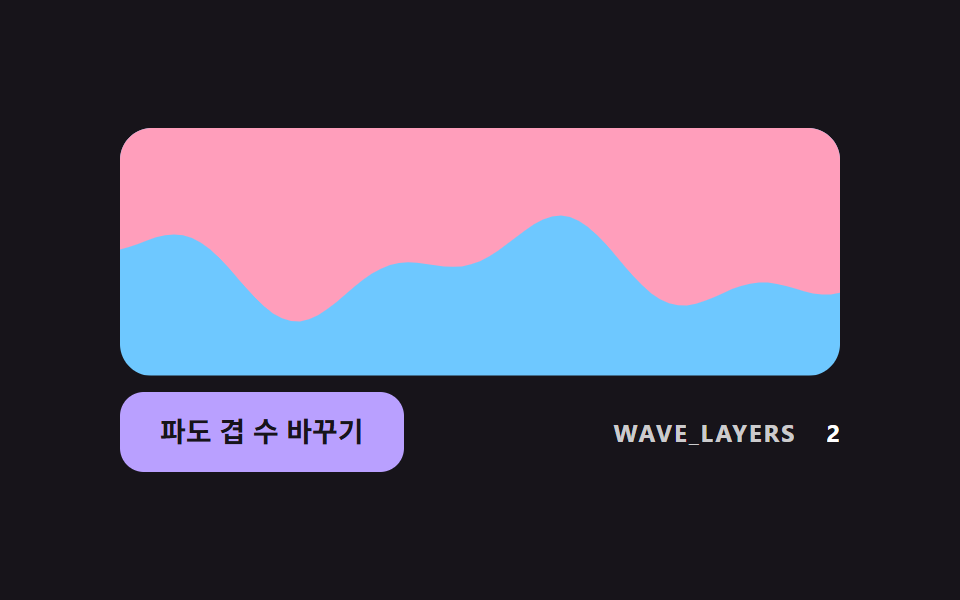
周期の違うサイン波を二つ足したSVGのpathでセクションの境目を描き、一つの曲線より繰り返しが目立ちにくい境目を作る。
使いどころ直線の境目を曲線に変える
WAVE_LAYERSWAVE_AMPWAVE_PERIOD
<main class="stage">
<div class="dv is-demo" id="dvRoot">
  <svg class="dv__svg" id="dvSvg" viewBox="0 0 320 110" aria-hidden="true" focusable="false">
    <rect class="dv__under" x="0" y="0" width="320" height="110"></rect>
    <path class="dv__over" id="dvPath" d="M0 0H320V55H0Z"></path>
  </svg>
  <div class="dv__bar">
  <button class="dv__btn" id="dvBtn" type="button">波の重ね数を変える</button>
  <p class="dv__meta"><span class="dv__tag">WAVE_LAYERS</span> <b id="dvLayers">2</b></p>
  </div>
</div>
</main>
@use "../../../../site/static/demo-tokens" as *;
// 핵심: 경계선 높이를 주기가 다른 사인 WAVE_LAYERS 개의 합으로 계산해 SVG path 로 그린다.
$over-color: $subject-pink;
$under-color: $subject-sky;
@include stage($stage-ink);
.dv {
width: min(100%, 360px);
display: grid;
gap: $sp-2;
justify-items: center;
}
.dv__svg {
display: block;
width: 100%;
height: auto;
border-radius: $r-card;
overflow: hidden;
}
.dv__under { fill: $under-color; }
.dv__over { fill: $over-color; }
.dv__btn {
box-sizing: border-box;
height: 40px;
padding: 0 $sp-5;
border: 0;
border-radius: $r-control;
background: $subject-lilac;
color: $subject-ink;
font-family: inherit;
font-size: 14px;
font-weight: 700;
line-height: 20px;
cursor: pointer;
}
.dv__btn:focus-visible { outline: 3px solid $stage-paper; outline-offset: 3px; }
.dv__meta {
margin: 0;
display: flex;
align-items: baseline;
gap: $sp-2;
font-size: 12px;
line-height: 16px;
color: rgba($stage-paper, .78);
}
.dv__tag { font-weight: 700; letter-spacing: .08em; }
.dv__meta b { min-width: 2ch; text-align: right; font-variant-numeric: tabular-nums; color: $stage-paper; }
@media (prefers-reduced-motion: reduce) {
.dv__btn { transition: none; }
}
.dv__bar { box-sizing: border-box; width: 100%; display: flex; flex-wrap: wrap; align-items: center; justify-content: space-between; gap: $sp-2 $sp-3; }html, body {
margin: 0;
overflow: hidden;
}
.stage {
box-sizing: border-box;
min-height: 100vh;
display: grid;
place-items: center;
margin: 0;
background: #17141a;
font-family: -apple-system, "Segoe UI", "Noto Sans KR", sans-serif;
padding: clamp(8px, 4vw, 24px);
}
.dv {
width: min(100%, 360px);
display: grid;
gap: 8px;
justify-items: center;
}
.dv__svg {
display: block;
width: 100%;
height: auto;
border-radius: 16px;
overflow: hidden;
}
.dv__under {
fill: #6ec8ff;
}
.dv__over {
fill: #ff9ebb;
}
.dv__btn {
box-sizing: border-box;
height: 40px;
padding: 0 20px;
border: 0;
border-radius: 12px;
background: #b9a0ff;
color: #17141a;
font-family: inherit;
font-size: 14px;
font-weight: 700;
line-height: 20px;
cursor: pointer;
}
.dv__btn:focus-visible {
outline: 3px solid #ffffff;
outline-offset: 3px;
}
.dv__meta {
margin: 0;
display: flex;
align-items: baseline;
gap: 8px;
font-size: 12px;
line-height: 16px;
color: rgba(255, 255, 255, 0.78);
}
.dv__tag {
font-weight: 700;
letter-spacing: 0.08em;
}
.dv__meta b {
min-width: 2ch;
text-align: right;
font-variant-numeric: tabular-nums;
color: #ffffff;
}
@media (prefers-reduced-motion: reduce) {
.dv__btn {
transition: none;
}
}
.dv__bar {
box-sizing: border-box;
width: 100%;
display: flex;
flex-wrap: wrap;
align-items: center;
justify-content: space-between;
gap: 8px 12px;
}(function () {
// 기법: 경계 높이 y(x) = BASE_Y + 각 겹(진폭 * sin(2π x / 주기 + 위상 * 속도배수))의 합. 두 주기를 일부러 서로 약분되지 않게 잡아 반복이 덜 보인다.
// 점을 STEP_PX 간격으로 찍어 SVG path 의 d 를 직접 만든다.
var WAVE_LAYERS = 2;
var WAVE_AMP = [16, 9, 5];
var WAVE_PERIOD = [190, 83, 47];
var WAVE_SPEED = [1, 1.7, 2.3];
var BASE_Y = 62;
var VIEW_W = 320;
var STEP_PX = 4;
var RATE_RAD_PER_S = 2.4;
var root = document.getElementById('dvRoot');
var pathEl = document.getElementById('dvPath');
var btn = document.getElementById('dvBtn');
var layersEl = document.getElementById('dvLayers');
var reduce = window.matchMedia('(prefers-reduced-motion: reduce)').matches;
var phase = 0;
function edgeY(x) {
var y = BASE_Y;
for (var i = 0; i < WAVE_LAYERS; i += 1) {
y += WAVE_AMP[i] * Math.sin(2 * Math.PI * x / WAVE_PERIOD[i] + phase * WAVE_SPEED[i]);
}
return y;
}
function draw() {
var d = 'M0 0H' + VIEW_W + 'V' + edgeY(VIEW_W).toFixed(1);
for (var x = VIEW_W - STEP_PX; x >= 0; x -= STEP_PX) d += 'L' + x + ' ' + edgeY(x).toFixed(1);
d += 'L0 ' + edgeY(0).toFixed(1) + 'Z';
pathEl.setAttribute('d', d);
layersEl.textContent = String(WAVE_LAYERS);
}
function stopDemo() { root.classList.remove('is-demo'); }
btn.addEventListener('click', function () {
WAVE_LAYERS = WAVE_LAYERS % 3 + 1;
draw();
});
var lastTs = null;
function tick(ts) {
var dt = lastTs === null ? 0.016 : Math.min(0.05, (ts - lastTs) / 1000);
lastTs = ts;
if (root.classList.contains('is-demo')) {
phase += RATE_RAD_PER_S * dt;
draw();
}
requestAnimationFrame(tick);
}
draw();
if (reduce) {
stopDemo();
} else {
requestAnimationFrame(tick);
}
})();// WaveEdge — vanilla 판(04-divl-sine-wave-section-edge) 의 React 포트.
// 경계 높이를 주기가 다른 사인 WAVE_LAYERS 개의 합으로 계산해 SVG path 의 d 를 직접 만든다.
import { useEffect, useRef } from "react";
import styles from "./WaveEdge.module.scss";
type Box<T> = { current: T };
const WAVE_AMP: number[] = [16, 9, 5];
const WAVE_PERIOD: number[] = [190, 83, 47];
const WAVE_SPEED: number[] = [1, 1.7, 2.3];
const BASE_Y = 62;
const VIEW_W = 320;
const STEP_PX = 4;
const RATE_RAD_PER_S = 2.4;
export default function WaveEdge() {
const pathRef = useRef<SVGPathElement | null>(null) as Box<SVGPathElement | null>;
const btnRef = useRef<HTMLButtonElement | null>(null) as Box<HTMLButtonElement | null>;
const layersRef = useRef<HTMLElement | null>(null) as Box<HTMLElement | null>;
useEffect(() => {
const pathEl = pathRef.current;
const btn = btnRef.current;
const layersEl = layersRef.current;
if (!pathEl || !btn || !layersEl) return;
const reduce = window.matchMedia("(prefers-reduced-motion: reduce)").matches;
let demo = !reduce;
let layers = 2;
let phase = 0;
let lastTs: number | null = null;
let raf = 0;
const edgeY = (x: number): number => {
let y = BASE_Y;
for (let i = 0; i < layers; i += 1) {
y += WAVE_AMP[i] * Math.sin((2 * Math.PI * x) / WAVE_PERIOD[i] + phase * WAVE_SPEED[i]);
}
return y;
};
const draw = (): void => {
let d = "M0 0H" + VIEW_W + "V" + edgeY(VIEW_W).toFixed(1);
for (let x = VIEW_W - STEP_PX; x >= 0; x -= STEP_PX) d += "L" + x + " " + edgeY(x).toFixed(1);
d += "L0 " + edgeY(0).toFixed(1) + "Z";
pathEl.setAttribute("d", d);
layersEl.textContent = String(layers);
};
const onClick = (): void => {
layers = (layers % 3) + 1;
draw();
};
btn.addEventListener("click", onClick);
function tick(ts: number): void {
const dt = lastTs === null ? 0.016 : Math.min(0.05, (ts - lastTs) / 1000);
lastTs = ts;
if (demo) {
phase += RATE_RAD_PER_S * dt;
draw();
}
raf = requestAnimationFrame(tick);
}
draw();
if (!reduce) raf = requestAnimationFrame(tick);
return () => {
demo = false;
cancelAnimationFrame(raf);
btn.removeEventListener("click", onClick);
};
}, []);
return (
<div className={styles.dv}>
<svg className={styles.svg} viewBox="0 0 320 110" aria-hidden="true" focusable="false">
<rect className={styles.under} x="0" y="0" width="320" height="110" />
<path className={styles.over} ref={pathRef} d="M0 0H320V55H0Z" />
</svg>
<div className={styles.bar}>
<button className={styles.btn} ref={btnRef} type="button">파도 겹 수 바꾸기</button>
<p className={styles.meta}>
<span className={styles.tag}>WAVE_LAYERS</span> <b ref={layersRef}>2</b>
</p>
</div>
</div>
);
}04 サイン波を二つ足して作る波の区切り — 計測 累積面積 11.55% · 動いたフレーム 23/23GODRICH オリジナル · SCSS と React は zip に同梱 · css 区切り線 9パターン — 両端が消えて文字の幅で線が分かれる区切りの場面
このデモが属する記事
 css 区切り線 9パターン — 両端が消えて文字の幅で線が分かれる区切りの場面css 区切り線は線一本で済みそうだが、両端がぷつりと切れ、中央の文字の幅に線の長さが合わず、セクションの境目が直線で単調になる — 01番・02番・04番が一つずつ直す。このページの九つは、線の形を値で計算して描きます。 この記事のデモをすべて見る