04ホログラムテキスト(虹色回転)
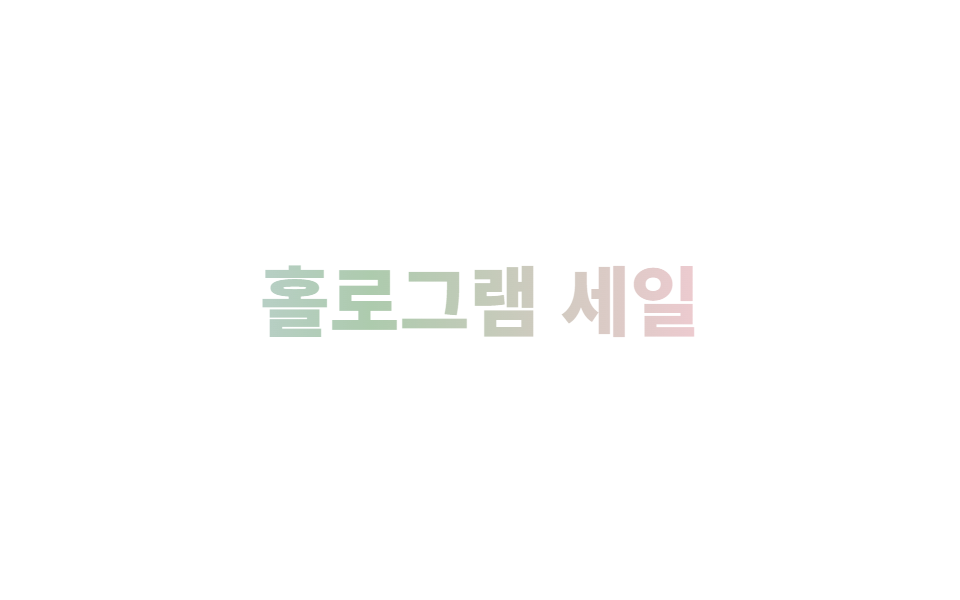
文字に虹色グラデーションをかけ filter: hue-rotate を回し続け、印刷されたホログラムステッカーの文字のように色が絶えず変わります。
使いどころイベントページのタイトル、限定商品名、ホログラムコンセプトのバナー
background-clip: textfilter: hue-rotate@keyframes
<main class="stage">
  <h2 class="holo-text">ホログラムセール</h2>
</main>
@use "../../../../site/static/demo-tokens" as *;
$duration: $dur-loop; // 색이 한 바퀴 도는 시간
$easing: linear;
$color: $subject-blue; // 사용 안 함 — 그라디언트가 색을 대신한다(참고용)
@include stage($stage-paper);
.holo-text {
margin: 0;
font-weight: 800;
font-size: clamp(26px, 9vw, 38px);
line-height: 1.1;
font-family: inherit;
background: linear-gradient(90deg, #dcb9d1, #b9d9dc, #c8dcb9, #dcdab9, #dcb9d1);
background-size: 300% 100%;
-webkit-background-clip: text;
background-clip: text;
color: transparent;
filter: hue-rotate(0deg);
animation: holo-hue $duration $easing infinite, holo-slide $duration $easing infinite;
}
@keyframes holo-hue { to { filter: hue-rotate(360deg); } }
@keyframes holo-slide {
0% { background-position: 0% 50%; }
100% { background-position: 300% 50%; }
}
@media (prefers-reduced-motion: reduce) {
.holo-text { animation: none; filter: hue-rotate(0deg); background-position: 0% 50%; }
}html, body {
margin: 0;
overflow: hidden;
}
.stage {
box-sizing: border-box;
min-height: 100vh;
display: grid;
place-items: center;
margin: 0;
background: #ffffff;
font-family: -apple-system, "Segoe UI", "Noto Sans KR", sans-serif;
padding: clamp(8px, 4vw, 24px);
}
.holo-text {
margin: 0;
font-weight: 800;
font-size: clamp(26px, 9vw, 38px);
line-height: 1.1;
font-family: inherit;
background: linear-gradient(90deg, #dcb9d1, #b9d9dc, #c8dcb9, #dcdab9, #dcb9d1);
background-size: 300% 100%;
-webkit-background-clip: text;
background-clip: text;
color: transparent;
filter: hue-rotate(0deg);
animation: holo-hue 2s linear infinite, holo-slide 2s linear infinite;
}
@keyframes holo-hue {
to {
filter: hue-rotate(360deg);
}
}
@keyframes holo-slide {
0% {
background-position: 0% 50%;
}
100% {
background-position: 300% 50%;
}
}
@media (prefers-reduced-motion: reduce) {
.holo-text {
animation: none;
filter: hue-rotate(0deg);
background-position: 0% 50%;
}
}import type { CSSProperties } from "react";
import styles from "./HoloTextIridescent.module.scss";
export type HoloTextIridescentProps = {
text: string;
/** 색이 한 바퀴 도는 시간 (기본 2000ms) */
duration?: number;
easing?: string;
/** 사용 안 함 — 그라디언트가 색을 대신한다 (참고용) */
color?: string;
};
type Vars = CSSProperties & { "--duration"?: string; "--easing"?: string; "--color"?: string };
export default function HoloTextIridescent({
text,
duration = 2000,
easing = "linear",
color = "#2f6df6",
}: HoloTextIridescentProps) {
const vars: Vars = { "--duration": `${duration}ms`, "--easing": easing, "--color": color };
return <h2 className={styles.text} style={vars}>{text}</h2>;
}04 ホログラムテキスト(虹色回転) — 計測 累積面積 2.844% · 動いたフレーム 16/23GODRICH オリジナル · SCSS と React は zip に同梱 · CSS ホログラムカード効果9選 — ステッカー・バッジ・チケット
このデモが属する記事
 CSS ホログラムカード効果9選 — ステッカー・バッジ・チケットCSS ホログラムとは、角度によって光の反射が変わる箔素材を、CSSのグラデーションとアニメーションだけで再現する技法です。ポケモンカードのような輝きは何度も画面で見かけますが、いざコードにしようとすると手が止まることが多いので、カード・ス この記事のデモをすべて見る