02カーテン分割リビール
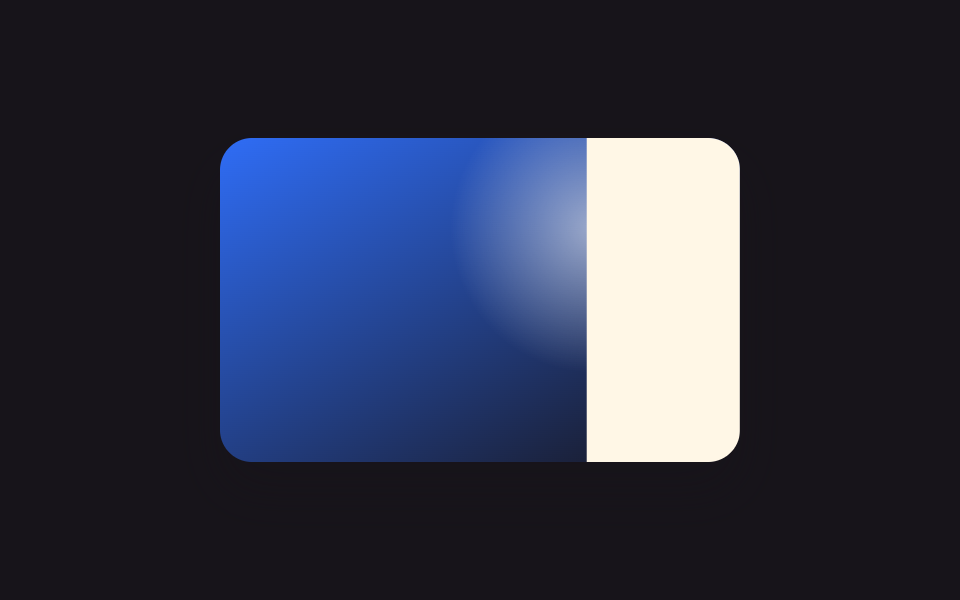
半分ずつの2枚のパネルが写真を覆い、translateX(±100%)で左右に開いてステージのカーテンのように写真を見せる。
使いどころ商品詳細ページの画像ビューア
translateX50vw600ms

<main class="stage">
  <div class="cs-frame cs-focal is-demo">
    <div class="cs-photo"></div>
    <div class="cs-panel cs-panel--l"></div>
    <div class="cs-panel cs-panel--r"></div>
  </div>
</main>
@use "../../../../site/static/demo-tokens" as *;
// ── 변수 3개 ──────────────────────────────────────────
$duration: $dur-enter;
$easing: $ease-spring;
$color: $subject-ink;
@include stage($stage-yellow);
.cs-frame {
position: relative;
width: min(260px, 78vw);
aspect-ratio: 8 / 5;
border-radius: $r-card;
overflow: hidden;
box-shadow: $shadow-raised;
}
.cs-photo {
position: absolute;
inset: 0;
background:
radial-gradient(110px circle at 30% 70%, rgba(255, 255, 255, .5), transparent 58%),
linear-gradient(135deg, $subject-blue, $subject-cream 130%);
}
.cs-panel {
position: absolute;
top: 0; bottom: 0;
width: 50%;
background: $color;
}
.cs-panel--l { left: 0; transform: translateX(0); }
.cs-panel--r { left: 50%; transform: translateX(0); }
// 실사용: 진짜 마우스 호버 — 왼쪽은 왼쪽으로, 오른쪽은 오른쪽으로 밀려나며 커튼처럼 열린다
.cs-panel { transition: transform $duration $easing; }
.cs-focal:hover .cs-panel--l { transform: translateX(-100%); }
.cs-focal:hover .cs-panel--r { transform: translateX(100%); }
// 데모 루프
@keyframes cs-open-l {
0%, 8% { transform: translateX(0); }
45%, 60% { transform: translateX(-100%); }
95%, 100% { transform: translateX(0); }
}
@keyframes cs-open-r {
0%, 8% { transform: translateX(0); }
45%, 60% { transform: translateX(100%); }
95%, 100% { transform: translateX(0); }
}
.cs-frame.is-demo .cs-panel--l { animation: cs-open-l $dur-loop $easing infinite; }
.cs-frame.is-demo .cs-panel--r { animation: cs-open-r $dur-loop $easing infinite; }
@media (prefers-reduced-motion: reduce) {
.cs-focal:hover .cs-panel--l, .cs-frame.is-demo .cs-panel--l { animation: none !important; transition: none !important; transform: translateX(-100%) !important; }
.cs-focal:hover .cs-panel--r, .cs-frame.is-demo .cs-panel--r { animation: none !important; transition: none !important; transform: translateX(100%) !important; }
}html, body {
margin: 0;
overflow: hidden;
}
.stage {
box-sizing: border-box;
min-height: 100vh;
display: grid;
place-items: center;
margin: 0;
background: #ffd23f;
font-family: -apple-system, "Segoe UI", "Noto Sans KR", sans-serif;
padding: clamp(8px, 4vw, 24px);
}
.cs-frame {
position: relative;
width: min(260px, 78vw);
aspect-ratio: 8/5;
border-radius: 16px;
overflow: hidden;
box-shadow: 0 14px 24px rgba(23, 20, 26, 0.32);
}
.cs-photo {
position: absolute;
inset: 0;
background: radial-gradient(110px circle at 30% 70%, rgba(255, 255, 255, 0.5), transparent 58%), linear-gradient(135deg, #2f6df6, #fff7e6 130%);
}
.cs-panel {
position: absolute;
top: 0;
bottom: 0;
width: 50%;
background: #17141a;
}
.cs-panel--l {
left: 0;
transform: translateX(0);
}
.cs-panel--r {
left: 50%;
transform: translateX(0);
}
.cs-panel {
transition: transform 600ms cubic-bezier(0.2, 0.8, 0.2, 1);
}
.cs-focal:hover .cs-panel--l {
transform: translateX(-100%);
}
.cs-focal:hover .cs-panel--r {
transform: translateX(100%);
}
@keyframes cs-open-l {
0%, 8% {
transform: translateX(0);
}
45%, 60% {
transform: translateX(-100%);
}
95%, 100% {
transform: translateX(0);
}
}
@keyframes cs-open-r {
0%, 8% {
transform: translateX(0);
}
45%, 60% {
transform: translateX(100%);
}
95%, 100% {
transform: translateX(0);
}
}
.cs-frame.is-demo .cs-panel--l {
animation: cs-open-l 2s cubic-bezier(0.2, 0.8, 0.2, 1) infinite;
}
.cs-frame.is-demo .cs-panel--r {
animation: cs-open-r 2s cubic-bezier(0.2, 0.8, 0.2, 1) infinite;
}
@media (prefers-reduced-motion: reduce) {
.cs-focal:hover .cs-panel--l, .cs-frame.is-demo .cs-panel--l {
animation: none !important;
transition: none !important;
transform: translateX(-100%) !important;
}
.cs-focal:hover .cs-panel--r, .cs-frame.is-demo .cs-panel--r {
animation: none !important;
transition: none !important;
transform: translateX(100%) !important;
}
}import { CSSProperties } from "react";
import styles from "./CurtainSplit.module.scss";
type Vars = CSSProperties & {
"--duration"?: string;
"--easing"?: string;
"--color"?: string;
};
export interface CurtainSplitProps {
duration?: string;
easing?: string;
color?: string;
}
export default function CurtainSplit({
duration = "600ms",
easing = "cubic-bezier(.2, .8, .2, 1)",
color = "#17141a",
}: CurtainSplitProps) {
const style: Vars = {
"--duration": duration,
"--easing": easing,
"--color": color,
};
return (
<div className={styles.frame} style={style}>
<div className={styles.photo} />
<div className={`${styles.panel} ${styles.panelL}`} />
<div className={`${styles.panel} ${styles.panelR}`} />
</div>
);
}02 カーテン分割リビール — 計測 累積面積 29.122% · 動いたフレーム 18/23GODRICH オリジナル · SCSS と React は zip に同梱 · 一行でコピペOK CSS アニメーション ギャラリー 9選
このデモが属する記事
 一行でコピペOK CSS アニメーション ギャラリー 9選写真にマウスを乗せると覆っていた板がすっと開いたり、円がじわっと広がって中身が見えたりするサイトを見たことはありませんか。この記事はそうしたcss アニメーション ギャラリーの動きを、一行でコピペできるコード9個にまとめたものです。うち1つ この記事のデモをすべて見る