05拡大後にドラッグで移動するライトボックス
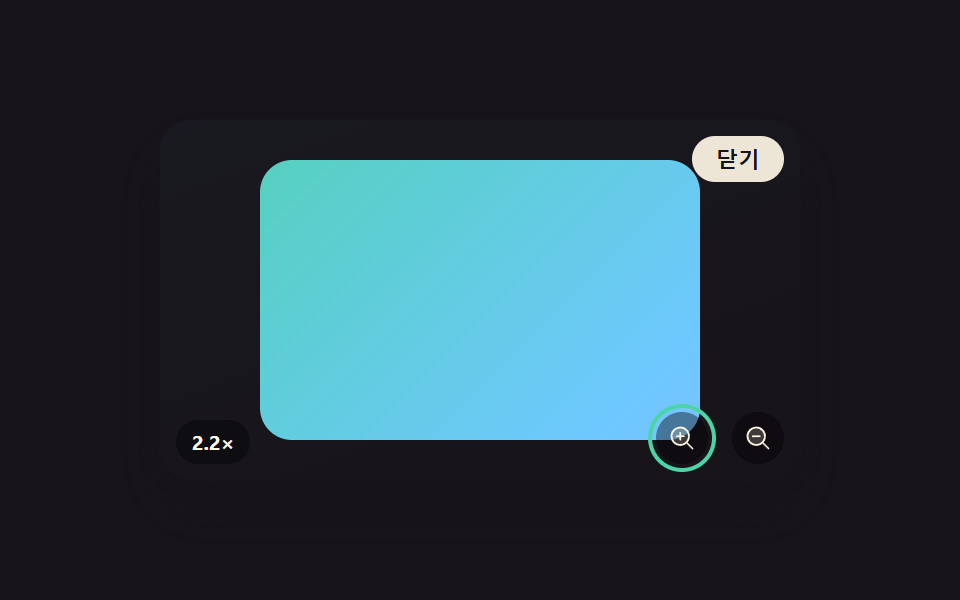
ダブルタップやボタンで画像を拡大すると、その後はドラッグした方向へ画像が動くが、拡大した分だけ生まれる余白の中でしか動けないよう移動範囲が毎回再計算される(256のルーペ・ミニマップビューアーとは異なる実演 — こちらはライトボックスが開いている間の拡大・移動だけを扱う)。
使いどころ商品詳細画像、地図・図面の拡大表示
clamp()pointer drag pantransform: scale
<main class="stage">
<div class="scene is-demo" id="scene">
  <ul class="grid" id="grid">
    <li><button class="thumb" id="thumb0" type="button" aria-haspopup="dialog"><span class="thumbImg"></span></button></li>
  </ul>
  <div class="backdrop" id="backdrop"></div>
  <div class="lightbox" id="lightbox" role="dialog" aria-modal="true" aria-hidden="true" aria-label="写真の拡大移動">
    <div class="frame" id="frame">
      <span class="fullImg" id="fullImg"></span>
    </div>
    <button class="zoomBtn zoomBtn--in" id="zoomInBtn" type="button" aria-label="拡大"><svg xmlns="http://www.w3.org/2000/svg" width="1em" height="1em" viewBox="0 0 256 256" aria-hidden="true"><g fill="currentColor"><path d="M192 112a80 80 0 1 1-80-80a80 80 0 0 1 80 80" opacity=".2"/><path d="m229.66 218.34l-50.06-50.06a88.21 88.21 0 1 0-11.32 11.31l50.06 50.07a8 8 0 0 0 11.32-11.32M40 112a72 72 0 1 1 72 72a72.08 72.08 0 0 1-72-72m112 0a8 8 0 0 1-8 8h-24v24a8 8 0 0 1-16 0v-24H80a8 8 0 0 1 0-16h24V80a8 8 0 0 1 16 0v24h24a8 8 0 0 1 8 8"/></g></svg></button>
    <button class="zoomBtn zoomBtn--out" id="zoomOutBtn" type="button" aria-label="縮小"><svg xmlns="http://www.w3.org/2000/svg" width="1em" height="1em" viewBox="0 0 256 256" aria-hidden="true"><g fill="currentColor"><path d="M192 112a80 80 0 1 1-80-80a80 80 0 0 1 80 80" opacity=".2"/><path d="m229.66 218.34l-50.06-50.06a88.21 88.21 0 1 0-11.32 11.31l50.06 50.07a8 8 0 0 0 11.32-11.32M40 112a72 72 0 1 1 72 72a72.08 72.08 0 0 1-72-72m112 0a8 8 0 0 1-8 8H80a8 8 0 0 1 0-16h64a8 8 0 0 1 8 8"/></g></svg></button>
    <p class="zoomNote" id="zoomNote">1.0×</p>
    <button class="closeBtn" id="closeBtn" type="button">閉じる</button>
  </div>
</div>
</main>
@use "../../../../site/static/demo-tokens" as *;
// 변수 3개
$duration: $dur-base;
$easing: $ease-out;
$color: $subject-mint;
// 계산 겹: index.html 의 panBounds() 가 확대 배율(scale)과 프레임 실측 크기(getBoundingClientRect)로
// 그때그때 남는 여백을 다시 계산해 드래그·자동 이동 범위를 그 값 안으로 clamp 한다.
@include stage($stage-ink);
.scene {
position: relative;
width: 320px;
height: 180px;
border-radius: $r-card;
overflow: hidden;
box-shadow: $shadow-raised;
background: linear-gradient(160deg, #232a3a, $stage-ink 85%);
}
.grid {
position: absolute;
inset: 0;
margin: 0;
padding: 0;
list-style: none;
display: flex;
align-items: center;
justify-content: center;
}
.thumb {
appearance: none;
border: none;
background: none;
padding: 0;
cursor: pointer;
&:focus-visible .thumbImg { outline: 2px solid $color; outline-offset: 2px; }
}
.thumbImg {
display: block;
width: 72px;
height: 72px;
border-radius: $r-sm;
box-shadow: $shadow-press;
background: linear-gradient(135deg, $subject-mint, $subject-sky);
}
.backdrop {
position: absolute;
inset: 0;
background: $subject-ink;
opacity: 0;
visibility: hidden;
pointer-events: none;
}
.lightbox {
position: absolute;
inset: 0;
display: grid;
place-items: center;
visibility: hidden;
}
.frame {
position: relative;
width: 220px;
height: 140px;
border-radius: $r-card;
overflow: hidden;
touch-action: none;
background: rgba(#000, .2);
}
.fullImg {
position: absolute;
inset: 0;
display: block;
background: linear-gradient(135deg, $subject-mint, $subject-sky 55%, $subject-lilac);
transform-origin: center center;
}
.zoomBtn {
position: absolute;
bottom: $sp-2;
appearance: none;
border: none;
width: 26px;
height: 26px;
border-radius: $r-pill;
display: grid;
place-items: center;
background: rgba(#000, .4);
color: $subject-cream;
font-size: 14px;
cursor: pointer;
&--in { right: 46px; }
&--out { right: $sp-2; }
&:focus-visible { outline: 2px solid $color; outline-offset: 2px; }
}
.zoomNote {
position: absolute;
bottom: $sp-2;
left: $sp-2;
margin: 0;
font-size: 10px;
font-weight: 700;
color: $subject-cream;
background: rgba(#000, .4);
padding: $sp-1 $sp-2;
border-radius: $r-pill;
}
.closeBtn {
position: absolute;
top: $sp-2;
right: $sp-2;
appearance: none;
border: none;
border-radius: $r-pill;
padding: $sp-1 $sp-3;
font-size: 11px;
font-weight: 600;
color: $subject-ink;
background: rgba($subject-cream, .92);
cursor: pointer;
&:focus-visible { outline: 2px solid $color; outline-offset: 2px; }
}
@media (max-width: 340px) {
.scene { width: 220px; height: 124px; }
.frame { width: 160px; height: 100px; }
.zoomBtn { width: 22px; height: 22px; font-size: 12px; }
.zoomBtn--in { right: 38px; }
}
@media (prefers-reduced-motion: reduce) {
// 실사용 경로 적용 — 확대·이동 트윈은 index.html 의 animate()/panLoop() 가 reduce 시 즉시 최종 상태로 처리한다.
.closeBtn, .zoomBtn, .thumb { transition: none; }
}html, body {
margin: 0;
overflow: hidden;
}
.stage {
box-sizing: border-box;
min-height: 100vh;
display: grid;
place-items: center;
margin: 0;
background: #17141a;
font-family: -apple-system, "Segoe UI", "Noto Sans KR", sans-serif;
padding: clamp(8px, 4vw, 24px);
}
.scene {
position: relative;
width: 320px;
height: 180px;
border-radius: 16px;
overflow: hidden;
box-shadow: 0 14px 24px rgba(23, 20, 26, 0.32);
background: linear-gradient(160deg, #232a3a, #17141a 85%);
}
.grid {
position: absolute;
inset: 0;
margin: 0;
padding: 0;
list-style: none;
display: flex;
align-items: center;
justify-content: center;
}
.thumb {
appearance: none;
border: none;
background: none;
padding: 0;
cursor: pointer;
}
.thumb:focus-visible .thumbImg {
outline: 2px solid #4cd4a6;
outline-offset: 2px;
}
.thumbImg {
display: block;
width: 72px;
height: 72px;
border-radius: 8px;
box-shadow: 0 6px 12px rgba(23, 20, 26, 0.32);
background: linear-gradient(135deg, #4cd4a6, #6ec8ff);
}
.backdrop {
position: absolute;
inset: 0;
background: #17141a;
opacity: 0;
visibility: hidden;
pointer-events: none;
}
.lightbox {
position: absolute;
inset: 0;
display: grid;
place-items: center;
visibility: hidden;
}
.frame {
position: relative;
width: 220px;
height: 140px;
border-radius: 16px;
overflow: hidden;
touch-action: none;
background: rgba(0, 0, 0, 0.2);
}
.fullImg {
position: absolute;
inset: 0;
display: block;
background: linear-gradient(135deg, #4cd4a6, #6ec8ff 55%, #b9a0ff);
transform-origin: center center;
}
.zoomBtn {
position: absolute;
bottom: 8px;
appearance: none;
border: none;
width: 26px;
height: 26px;
border-radius: 999px;
display: grid;
place-items: center;
background: rgba(0, 0, 0, 0.4);
color: #fff7e6;
font-size: 14px;
cursor: pointer;
}
.zoomBtn--in {
right: 46px;
}
.zoomBtn--out {
right: 8px;
}
.zoomBtn:focus-visible {
outline: 2px solid #4cd4a6;
outline-offset: 2px;
}
.zoomNote {
position: absolute;
bottom: 8px;
left: 8px;
margin: 0;
font-size: 10px;
font-weight: 700;
color: #fff7e6;
background: rgba(0, 0, 0, 0.4);
padding: 4px 8px;
border-radius: 999px;
}
.closeBtn {
position: absolute;
top: 8px;
right: 8px;
appearance: none;
border: none;
border-radius: 999px;
padding: 4px 12px;
font-size: 11px;
font-weight: 600;
color: #17141a;
background: rgba(255, 247, 230, 0.92);
cursor: pointer;
}
.closeBtn:focus-visible {
outline: 2px solid #4cd4a6;
outline-offset: 2px;
}
@media (max-width: 340px) {
.scene {
width: 220px;
height: 124px;
}
.frame {
width: 160px;
height: 100px;
}
.zoomBtn {
width: 22px;
height: 22px;
font-size: 12px;
}
.zoomBtn--in {
right: 38px;
}
}
@media (prefers-reduced-motion: reduce) {
.closeBtn, .zoomBtn, .thumb {
transition: none;
}
}(function () {
var ZOOM_SCALE = 2.2;
var ZOOM_MS = 420;
var PAN_MS = 900;
var LOOP_MS = 2000;
var scene = document.getElementById('scene');
var backdrop = document.getElementById('backdrop');
var lightbox = document.getElementById('lightbox');
var frame = document.getElementById('frame');
var fullImg = document.getElementById('fullImg');
var zoomInBtn = document.getElementById('zoomInBtn');
var zoomOutBtn = document.getElementById('zoomOutBtn');
var zoomNote = document.getElementById('zoomNote');
var closeBtn = document.getElementById('closeBtn');
var thumb = document.getElementById('thumb0');
var reduce = window.matchMedia('(prefers-reduced-motion: reduce)').matches;
var open = false;
var scale = 1;
var offX = 0;
var offY = 0;
var dragging = false;
var dragStartX = 0;
var dragStartY = 0;
var dragBaseX = 0;
var dragBaseY = 0;
var panRafId = null;
var timers = [];
function clamp(v, lo, hi) { return Math.min(hi, Math.max(lo, v)); }
function easeOutCubic(t) { return 1 - Math.pow(1 - t, 3); }
function animate(duration, onFrame, onDone) {
if (reduce) { onFrame(1); if (onDone) onDone(); return; }
var start = performance.now();
function frame(now) {
var p = clamp((now - start) / duration, 0, 1);
onFrame(easeOutCubic(p));
if (p < 1) requestAnimationFrame(frame);
else if (onDone) onDone();
}
requestAnimationFrame(frame);
}
// 拡大 배율만큼 남는 여백을 프레임 실측 크기로 매번 다시 계산한다 — 拡大 정도가 바뀌면 이동 가능 범위도 바뀐다
function panBounds(s) {
var r = frame.getBoundingClientRect();
return { x: (s - 1) * r.width / 2, y: (s - 1) * r.height / 2 };
}
function apply() {
fullImg.style.transform = 'translate(' + offX.toFixed(2) + 'px,' + offY.toFixed(2) + 'px) scale(' + scale.toFixed(3) + ')';
zoomNote.textContent = scale.toFixed(1) + '×';
}
function zoomTo(target, onDone) {
var fromScale = scale;
var fromX = offX, fromY = offY;
animate(ZOOM_MS, function (e) {
scale = fromScale + (target - fromScale) * e;
var b = panBounds(scale);
offX = clamp(fromX * (1 - e), -b.x, b.x);
offY = clamp(fromY * (1 - e), -b.y, b.y);
apply();
}, onDone);
}
function panLoop(durationMs, onDone) {
if (reduce) { if (onDone) onDone(); return; }
var start = performance.now();
function frame2(now) {
var t = now - start;
var b = panBounds(scale);
offX = clamp(b.x * Math.sin(t / 300), -b.x, b.x);
offY = clamp(b.y * 0.6 * Math.sin(t / 420 + 1), -b.y, b.y);
apply();
if (t < durationMs) panRafId = requestAnimationFrame(frame2);
else if (onDone) onDone();
}
panRafId = requestAnimationFrame(frame2);
}
function openFrom() {
if (open) return;
open = true;
scale = 1; offX = 0; offY = 0;
apply();
lightbox.style.visibility = 'visible';
lightbox.setAttribute('aria-hidden', 'false');
backdrop.style.visibility = 'visible';
animate(240, function (e) { backdrop.style.opacity = (e * 0.78).toFixed(3); }, function () {
zoomInBtn.focus({ preventScroll: true });
});
}
function closeLightbox() {
if (!open) return;
if (panRafId) cancelAnimationFrame(panRafId);
animate(220, function (e) { backdrop.style.opacity = (0.78 * (1 - e)).toFixed(3); }, function () {
lightbox.style.visibility = 'hidden';
lightbox.setAttribute('aria-hidden', 'true');
backdrop.style.visibility = 'hidden';
open = false;
thumb.focus({ preventScroll: true });
});
}
function human() {
if (scene.classList.contains('is-demo')) {
scene.classList.remove('is-demo');
if (panRafId) cancelAnimationFrame(panRafId);
timers.forEach(function (id) { clearTimeout(id); clearInterval(id); });
timers = [];
}
}
thumb.addEventListener('click', function () { human(); openFrom(); });
closeBtn.addEventListener('click', function () { human(); closeLightbox(); });
backdrop.addEventListener('click', function () { human(); closeLightbox(); });
zoomInBtn.addEventListener('click', function () { human(); zoomTo(ZOOM_SCALE); });
zoomOutBtn.addEventListener('click', function () { human(); zoomTo(1); });
frame.addEventListener('dblclick', function () { human(); zoomTo(scale > 1.01 ? 1 : ZOOM_SCALE); });
document.addEventListener('keydown', function (e) {
if (open && e.key === 'Escape') { human(); closeLightbox(); }
});
frame.addEventListener('pointerdown', function (e) {
if (scale <= 1.01) return;
human();
dragging = true;
dragStartX = e.clientX;
dragStartY = e.clientY;
dragBaseX = offX;
dragBaseY = offY;
frame.setPointerCapture(e.pointerId);
});
frame.addEventListener('pointermove', function (e) {
if (!dragging) return;
var b = panBounds(scale);
offX = clamp(dragBaseX + (e.clientX - dragStartX), -b.x, b.x);
offY = clamp(dragBaseY + (e.clientY - dragStartY), -b.y, b.y);
apply();
});
function endDrag() { dragging = false; }
frame.addEventListener('pointerup', endDrag);
frame.addEventListener('pointercancel', endDrag);
function cycle() {
openFrom();
timers.push(setTimeout(function () {
zoomTo(ZOOM_SCALE, function () {
panLoop(PAN_MS, function () {
zoomTo(1);
});
});
}, 260));
timers.push(setTimeout(closeLightbox, 1780));
}
if (!reduce) {
cycle();
timers.push(setInterval(function () {
if (scene.classList.contains('is-demo')) cycle();
}, LOOP_MS));
}
})();import { useEffect, useRef } from 'react';
import styles from './ZoomPanDrag.module.scss';
const ZOOM_SCALE = 2.2;
const ZOOM_MS = 420;
const PAN_MS = 900;
const LOOP_MS = 2000;
export default function ZoomPanDrag() {
const sceneRef = useRef<HTMLDivElement>(null);
useEffect(() => {
const scene0 = sceneRef.current;
if (!scene0) return undefined;
const backdrop0 = scene0.querySelector<HTMLDivElement>('.' + styles.backdrop);
const lightbox0 = scene0.querySelector<HTMLDivElement>('.' + styles.lightbox);
const frame0 = scene0.querySelector<HTMLDivElement>('.' + styles.frame);
const fullImg0 = scene0.querySelector<HTMLSpanElement>('.' + styles.fullImg);
const zoomInBtn0 = scene0.querySelector<HTMLButtonElement>('.' + styles['zoomBtn--in']);
const zoomOutBtn0 = scene0.querySelector<HTMLButtonElement>('.' + styles['zoomBtn--out']);
const zoomNote0 = scene0.querySelector<HTMLParagraphElement>('.' + styles.zoomNote);
const closeBtn0 = scene0.querySelector<HTMLButtonElement>('.' + styles.closeBtn);
const thumb0 = scene0.querySelector<HTMLButtonElement>('.' + styles.thumb);
if (!backdrop0 || !lightbox0 || !frame0 || !fullImg0 || !zoomInBtn0 || !zoomOutBtn0 || !zoomNote0 || !closeBtn0 || !thumb0) return undefined;
const scene = scene0;
const backdrop = backdrop0;
const lightbox = lightbox0;
const frame = frame0;
const fullImg = fullImg0;
const zoomInBtn = zoomInBtn0;
const zoomOutBtn = zoomOutBtn0;
const zoomNote = zoomNote0;
const closeBtn = closeBtn0;
const thumb = thumb0;
const reduce = window.matchMedia('(prefers-reduced-motion: reduce)').matches;
let open = false;
let scale = 1;
let offX = 0;
let offY = 0;
let dragging = false;
let dragStartX = 0;
let dragStartY = 0;
let dragBaseX = 0;
let dragBaseY = 0;
let panRafId: number | null = null;
let timers: number[] = [];
function clamp(v: number, lo: number, hi: number) { return Math.min(hi, Math.max(lo, v)); }
function easeOutCubic(t: number) { return 1 - Math.pow(1 - t, 3); }
function animate(duration: number, onFrame: (e: number) => void, onDone?: () => void) {
if (reduce) { onFrame(1); if (onDone) onDone(); return; }
const start = performance.now();
function frame2(now: number) {
const p = clamp((now - start) / duration, 0, 1);
onFrame(easeOutCubic(p));
if (p < 1) requestAnimationFrame(frame2);
else if (onDone) onDone();
}
requestAnimationFrame(frame2);
}
// 확대 배율만큼 남는 여백을 프레임 실측 크기로 매번 다시 계산한다 — 확대 정도가 바뀌면 이동 가능 범위도 바뀐다
function panBounds(s: number) {
const r = frame.getBoundingClientRect();
return { x: (s - 1) * r.width / 2, y: (s - 1) * r.height / 2 };
}
function apply() {
fullImg.style.transform = 'translate(' + offX.toFixed(2) + 'px,' + offY.toFixed(2) + 'px) scale(' + scale.toFixed(3) + ')';
zoomNote.textContent = scale.toFixed(1) + '×';
}
function zoomTo(target: number, onDone?: () => void) {
const fromScale = scale;
const fromX = offX, fromY = offY;
animate(ZOOM_MS, (e) => {
scale = fromScale + (target - fromScale) * e;
const b = panBounds(scale);
offX = clamp(fromX * (1 - e), -b.x, b.x);
offY = clamp(fromY * (1 - e), -b.y, b.y);
apply();
}, onDone);
}
function panLoop(durationMs: number, onDone?: () => void) {
if (reduce) { if (onDone) onDone(); return; }
const start = performance.now();
function frame2(now: number) {
const t = now - start;
const b = panBounds(scale);
offX = clamp(b.x * Math.sin(t / 300), -b.x, b.x);
offY = clamp(b.y * 0.6 * Math.sin(t / 420 + 1), -b.y, b.y);
apply();
if (t < durationMs) panRafId = requestAnimationFrame(frame2);
else if (onDone) onDone();
}
panRafId = requestAnimationFrame(frame2);
}
function openFrom() {
if (open) return;
open = true;
scale = 1; offX = 0; offY = 0;
apply();
lightbox.style.visibility = 'visible';
lightbox.setAttribute('aria-hidden', 'false');
backdrop.style.visibility = 'visible';
animate(240, (e) => { backdrop.style.opacity = (e * 0.78).toFixed(3); }, () => {
zoomInBtn.focus({ preventScroll: true });
});
}
function closeLightbox() {
if (!open) return;
if (panRafId) cancelAnimationFrame(panRafId);
animate(220, (e) => { backdrop.style.opacity = (0.78 * (1 - e)).toFixed(3); }, () => {
lightbox.style.visibility = 'hidden';
lightbox.setAttribute('aria-hidden', 'true');
backdrop.style.visibility = 'hidden';
open = false;
thumb.focus({ preventScroll: true });
});
}
function human() {
if (scene.classList.contains(styles['is-demo'])) {
scene.classList.remove(styles['is-demo']);
if (panRafId) cancelAnimationFrame(panRafId);
timers.forEach((id) => { window.clearTimeout(id); window.clearInterval(id); });
timers = [];
}
}
function onThumbClick() { human(); openFrom(); }
function onCloseClick() { human(); closeLightbox(); }
function onBackdropClick() { human(); closeLightbox(); }
function onZoomInClick() { human(); zoomTo(ZOOM_SCALE); }
function onZoomOutClick() { human(); zoomTo(1); }
function onFrameDblClick() { human(); zoomTo(scale > 1.01 ? 1 : ZOOM_SCALE); }
function onKeydown(e: KeyboardEvent) {
if (open && e.key === 'Escape') { human(); closeLightbox(); }
}
thumb.addEventListener('click', onThumbClick);
closeBtn.addEventListener('click', onCloseClick);
backdrop.addEventListener('click', onBackdropClick);
zoomInBtn.addEventListener('click', onZoomInClick);
zoomOutBtn.addEventListener('click', onZoomOutClick);
frame.addEventListener('dblclick', onFrameDblClick);
document.addEventListener('keydown', onKeydown);
function onPointerDown(e: PointerEvent) {
if (scale <= 1.01) return;
human();
dragging = true;
dragStartX = e.clientX;
dragStartY = e.clientY;
dragBaseX = offX;
dragBaseY = offY;
frame.setPointerCapture(e.pointerId);
}
function onPointerMove(e: PointerEvent) {
if (!dragging) return;
const b = panBounds(scale);
offX = clamp(dragBaseX + (e.clientX - dragStartX), -b.x, b.x);
offY = clamp(dragBaseY + (e.clientY - dragStartY), -b.y, b.y);
apply();
}
function endDrag() { dragging = false; }
frame.addEventListener('pointerdown', onPointerDown);
frame.addEventListener('pointermove', onPointerMove);
frame.addEventListener('pointerup', endDrag);
frame.addEventListener('pointercancel', endDrag);
function cycle() {
openFrom();
timers.push(window.setTimeout(() => {
zoomTo(ZOOM_SCALE, () => {
panLoop(PAN_MS, () => {
zoomTo(1);
});
});
}, 260));
timers.push(window.setTimeout(closeLightbox, 1780));
}
if (!reduce) {
cycle();
timers.push(window.setInterval(() => {
if (scene.classList.contains(styles['is-demo'])) cycle();
}, LOOP_MS));
}
return () => {
timers.forEach((id) => { window.clearTimeout(id); window.clearInterval(id); });
if (panRafId) cancelAnimationFrame(panRafId);
thumb.removeEventListener('click', onThumbClick);
closeBtn.removeEventListener('click', onCloseClick);
backdrop.removeEventListener('click', onBackdropClick);
zoomInBtn.removeEventListener('click', onZoomInClick);
zoomOutBtn.removeEventListener('click', onZoomOutClick);
frame.removeEventListener('dblclick', onFrameDblClick);
document.removeEventListener('keydown', onKeydown);
frame.removeEventListener('pointerdown', onPointerDown);
frame.removeEventListener('pointermove', onPointerMove);
frame.removeEventListener('pointerup', endDrag);
frame.removeEventListener('pointercancel', endDrag);
};
}, []);
return (
<div className={`${styles.scene} ${styles['is-demo']}`} ref={sceneRef}>
<ul className={styles.grid}>
<li><button className={styles.thumb} type="button" aria-haspopup="dialog"><span className={styles.thumbImg} /></button></li>
</ul>
<div className={styles.backdrop} />
<div className={styles.lightbox} role="dialog" aria-modal="true" aria-hidden="true" aria-label="사진 확대 이동">
<div className={styles.frame}>
<span className={styles.fullImg} />
</div>
<button className={`${styles.zoomBtn} ${styles['zoomBtn--in']}`} type="button" aria-label="확대">
<svg xmlns="http://www.w3.org/2000/svg" width="1em" height="1em" viewBox="0 0 256 256" aria-hidden="true">
<g fill="currentColor">
<path d="M192 112a80 80 0 1 1-80-80a80 80 0 0 1 80 80" opacity=".2" />
<path d="m229.66 218.34l-50.06-50.06a88.21 88.21 0 1 0-11.32 11.31l50.06 50.07a8 8 0 0 0 11.32-11.32M40 112a72 72 0 1 1 72 72a72.08 72.08 0 0 1-72-72m112 0a8 8 0 0 1-8 8h-24v24a8 8 0 0 1-16 0v-24H80a8 8 0 0 1 0-16h24V80a8 8 0 0 1 16 0v24h24a8 8 0 0 1 8 8" />
</g>
</svg>
</button>
<button className={`${styles.zoomBtn} ${styles['zoomBtn--out']}`} type="button" aria-label="축소">
<svg xmlns="http://www.w3.org/2000/svg" width="1em" height="1em" viewBox="0 0 256 256" aria-hidden="true">
<g fill="currentColor">
<path d="M192 112a80 80 0 1 1-80-80a80 80 0 0 1 80 80" opacity=".2" />
<path d="m229.66 218.34l-50.06-50.06a88.21 88.21 0 1 0-11.32 11.31l50.06 50.07a8 8 0 0 0 11.32-11.32M40 112a72 72 0 1 1 72 72a72.08 72.08 0 0 1-72-72m112 0a8 8 0 0 1-8 8H80a8 8 0 0 1 0-16h64a8 8 0 0 1 8 8" />
</g>
</svg>
</button>
<p className={styles.zoomNote}>1.0×</p>
<button className={styles.closeBtn} type="button">닫기</button>
</div>
</div>
);
}05 拡大後にドラッグで移動するライトボックス — 計測 累積面積 30.183% · 動いたフレーム 9/23GODRICH オリジナル · SCSS と React は zip に同梱 · css ライトボックス 拡大アニメーション 9種まとめ
このデモが属する記事
 css ライトボックス 拡大アニメーション 9種まとめこの css ライトボックス 9種のうち、1つはクリックしたサムネイルの位置からそのまま拡大し、1つは下向きスワイプの速度を計算して閉じるか戻すかを決め、1つはキーボード移動のたびにフォーカスリングが次の位置へ滑ります。 この記事のデモをすべて見る