09カーテンが開く
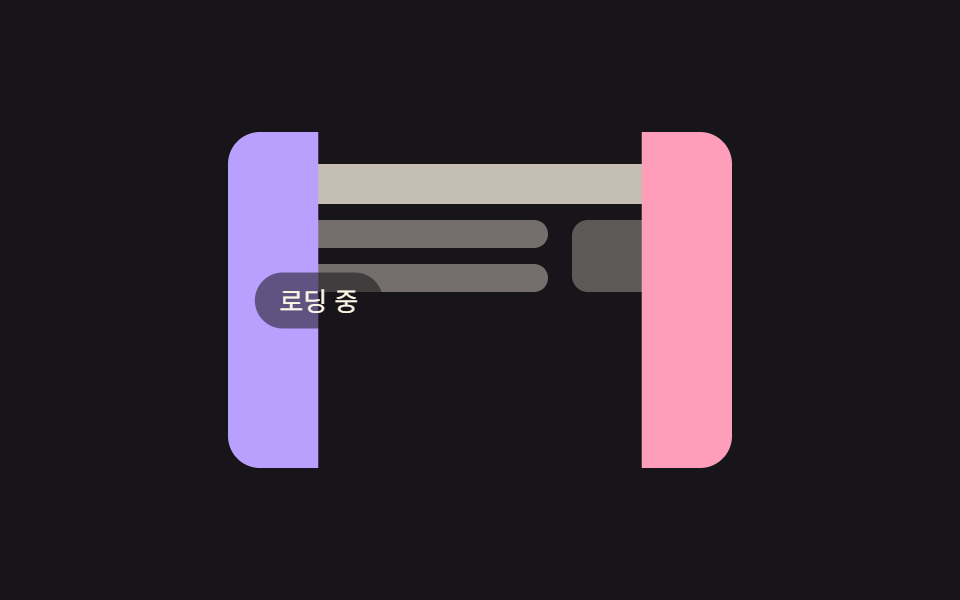
ローディングが終わる瞬間を演出する締めの項目。左右のカーテン2枚が外側へ押し開かれて後ろに隠したコンテンツの場所を現し、しばらくして再び閉じて繰り返す。
使いどころローディング終了から本文への切り替え演出、ページ移動のカバー
translateXoverflow: hidden$duration
<main class="stage">
  <div class="ct-scene is-demo">
    <div class="ct-content" aria-hidden="true">
      <span class="ct-bar ct-bar-title"></span>
      <span class="ct-bar"></span>
      <span class="ct-bar"></span>
      <span class="ct-thumb"></span>
    </div>
    <div class="ct-panel ct-left" aria-hidden="true"><span class="ct-label">読み込み中</span></div>
    <div class="ct-panel ct-right" aria-hidden="true"></div>
  </div>
</main>
@use "../../../../site/static/demo-tokens" as *;
// ── 변수 3개 ──────────────────────────────────────────
$duration: 2s;
$easing: $ease-spring;
$color: $subject-lilac;
@include stage($stage-ink);
// 실사용: 로딩 중에만 .is-loading — 끝나면 클래스를 떼고 커튼을 연 채로 둔다
.ct-scene {
position: relative;
width: 252px;
height: 168px;
border-radius: $r-card;
overflow: hidden;
}
.ct-content {
position: absolute;
inset: 0;
display: grid;
grid-template-columns: 1fr 64px;
grid-template-rows: auto auto auto 1fr;
gap: $sp-2 $sp-3;
padding: $sp-4;
}
.ct-bar {
height: 14px;
border-radius: $r-pill;
background: rgba(255, 247, 230, .4);
}
.ct-bar-title {
height: 20px;
grid-column: 1 / -1;
background: rgba(255, 247, 230, .75);
}
.ct-thumb {
grid-row: 2 / 4;
grid-column: 2;
border-radius: $r-sm;
background: rgba(255, 247, 230, .3);
}
.ct-panel {
position: absolute;
top: 0;
bottom: 0;
width: 50.5%; // 살짝 겹쳐 틈이 안 보이게
}
.ct-left { left: 0; background: $color; }
.ct-right { right: 0; background: $subject-pink; }
.ct-label {
position: absolute;
top: 50%;
left: 100%;
transform: translate(-50%, -50%);
padding: $sp-1 $sp-3;
border-radius: $r-pill;
background: rgba(23, 20, 26, .55);
font-family: -apple-system, "Segoe UI", "Noto Sans KR", sans-serif;
font-size: 13px;
line-height: 1.5;
color: $subject-cream;
white-space: nowrap;
}
.is-loading .ct-left,
.is-demo .ct-left { animation: ct-open-left $duration $easing infinite; }
.is-loading .ct-right,
.is-demo .ct-right { animation: ct-open-right $duration $easing infinite; }
@keyframes ct-open-left {
0%, 12% { transform: translateX(0); }
38%, 72% { transform: translateX(-101%); }
94%, 100% { transform: translateX(0); }
}
@keyframes ct-open-right {
0%, 12% { transform: translateX(0); }
38%, 72% { transform: translateX(101%); }
94%, 100% { transform: translateX(0); }
}
@media (prefers-reduced-motion: reduce) {
.is-loading .ct-left,
.is-demo .ct-left {
animation: none !important;
transform: translateX(-101%) !important; // 열린 채로 멈춘다
}
.is-loading .ct-right,
.is-demo .ct-right {
animation: none !important;
transform: translateX(101%) !important;
}
}html, body {
margin: 0;
overflow: hidden;
}
.stage {
box-sizing: border-box;
min-height: 100vh;
display: grid;
place-items: center;
margin: 0;
background: #17141a;
font-family: -apple-system, "Segoe UI", "Noto Sans KR", sans-serif;
padding: clamp(8px, 4vw, 24px);
}
.ct-scene {
position: relative;
width: 252px;
height: 168px;
border-radius: 16px;
overflow: hidden;
}
.ct-content {
position: absolute;
inset: 0;
display: grid;
grid-template-columns: 1fr 64px;
grid-template-rows: auto auto auto 1fr;
gap: 8px 12px;
padding: 16px;
}
.ct-bar {
height: 14px;
border-radius: 999px;
background: rgba(255, 247, 230, 0.4);
}
.ct-bar-title {
height: 20px;
grid-column: 1/-1;
background: rgba(255, 247, 230, 0.75);
}
.ct-thumb {
grid-row: 2/4;
grid-column: 2;
border-radius: 8px;
background: rgba(255, 247, 230, 0.3);
}
.ct-panel {
position: absolute;
top: 0;
bottom: 0;
width: 50.5%;
}
.ct-left {
left: 0;
background: #b9a0ff;
}
.ct-right {
right: 0;
background: #ff9ebb;
}
.ct-label {
position: absolute;
top: 50%;
left: 100%;
transform: translate(-50%, -50%);
padding: 4px 12px;
border-radius: 999px;
background: rgba(23, 20, 26, 0.55);
font-family: -apple-system, "Segoe UI", "Noto Sans KR", sans-serif;
font-size: 13px;
line-height: 1.5;
color: #fff7e6;
white-space: nowrap;
}
.is-loading .ct-left,
.is-demo .ct-left {
animation: ct-open-left 2s cubic-bezier(0.2, 0.8, 0.2, 1) infinite;
}
.is-loading .ct-right,
.is-demo .ct-right {
animation: ct-open-right 2s cubic-bezier(0.2, 0.8, 0.2, 1) infinite;
}
@keyframes ct-open-left {
0%, 12% {
transform: translateX(0);
}
38%, 72% {
transform: translateX(-101%);
}
94%, 100% {
transform: translateX(0);
}
}
@keyframes ct-open-right {
0%, 12% {
transform: translateX(0);
}
38%, 72% {
transform: translateX(101%);
}
94%, 100% {
transform: translateX(0);
}
}
@media (prefers-reduced-motion: reduce) {
.is-loading .ct-left,
.is-demo .ct-left {
animation: none !important;
transform: translateX(-101%) !important;
}
.is-loading .ct-right,
.is-demo .ct-right {
animation: none !important;
transform: translateX(101%) !important;
}
}import { CSSProperties } from "react";
import styles from "./CurtainReveal.module.scss";
type Vars = CSSProperties & {
"--duration"?: string;
"--easing"?: string;
"--color"?: string;
};
export interface CurtainRevealProps {
duration?: string;
easing?: string;
color?: string;
/** 반대쪽 커튼 색 */
altColor?: string;
/** 커튼 위 알약 문구 */
label?: string;
}
export default function CurtainReveal({
duration = "2s",
easing = "cubic-bezier(.2, .8, .2, 1)",
color = "#b9a0ff",
altColor = "#ff9ebb",
label = "Loading",
}: CurtainRevealProps) {
const style: Vars & { "--alt-color"?: string } = {
"--duration": duration,
"--easing": easing,
"--color": color,
"--alt-color": altColor,
};
return (
<div className={styles.scene} style={style}>
<div className={styles.content} aria-hidden="true">
<span className={`${styles.bar} ${styles.barTitle}`} />
<span className={styles.bar} />
<span className={styles.bar} />
<span className={styles.thumb} />
</div>
<div className={styles.left} aria-hidden="true">
<span className={styles.label}>{label}</span>
</div>
<div className={styles.right} aria-hidden="true" />
</div>
);
}09 カーテンが開く — 計測 累積面積 29.278% · 動いたフレーム 13/23GODRICH オリジナル · SCSS と React は zip に同梱 · 【コピペOK】ローディング 画面 デザイン CSSだけ 9選
このデモが属する記事
 【コピペOK】ローディング 画面 デザイン CSSだけ 9選ローディング 画面 デザインとは、サービスが開く最初の瞬間に「今準備しています」と伝える待ち画面のことです。デフォルトのスピナーでも動きますが、パステルのリングや満ちていく水のような画面にすると、同じ待ち時間が意図のあるものに見えます。コピ この記事のデモをすべて見る