05セグメントステップ
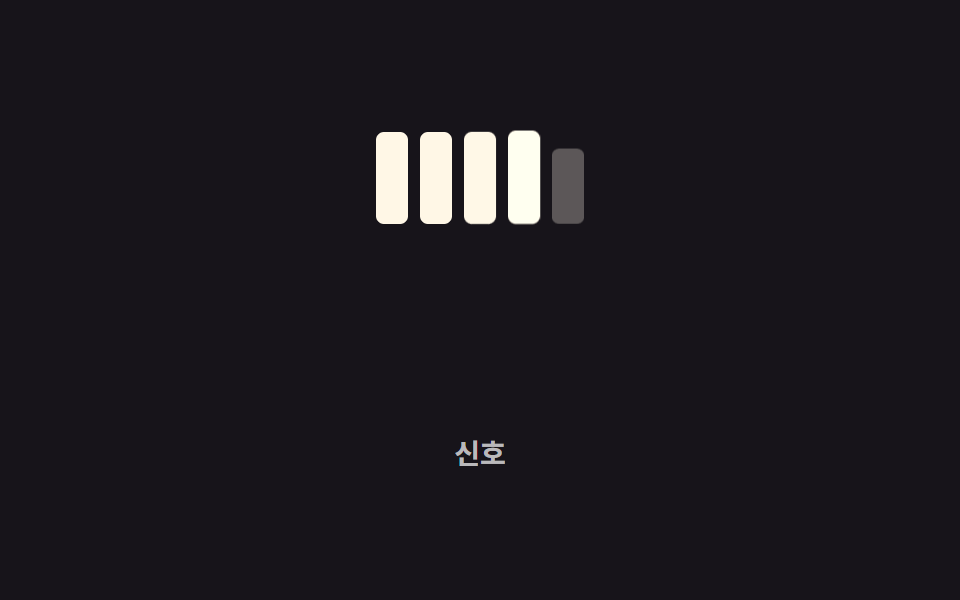
バーは1本につながっておらず複数の区切りに分かれ、値が上がるたびに区切りが順番にひとつずつ点灯する。
使いどころ電波強度表示、体力・ゲージバーのゲームUI
opacity 단계 전환animation-delay조각 5개
<main class="stage">
  <div class="segs is-demo" role="progressbar" aria-valuemin="0" aria-valuemax="5" aria-valuenow="3" aria-label="電波">
    <span class="seg"></span><span class="seg"></span><span class="seg"></span><span class="seg"></span><span class="seg"></span>
  </div>
  <p class="cap">電波</p>
</main>
@use "../../../../site/static/demo-tokens" as *;
// ── 변수 3개 ──────────────────────────────────────────
$duration: 260ms; // 조각 하나가 켜지는 시간
$easing: $ease-pop;
$color: $subject-cream; // 켜진 조각 색
@include stage($stage-ink);
.segs {
display: flex;
align-items: flex-end;
gap: 6px;
}
.seg {
width: 16px;
height: 46px;
border-radius: 4px;
background: rgba(255, 255, 255, .14);
opacity: .35;
transform: scaleY(.7);
transform-origin: bottom; // 규칙8: 아래서 차오름
}
// 조각마다 시작 시점을 다르게 — 하나로 이어진 바가 아니라 순서대로 켜지는 신호처럼
.segs.is-demo .seg { animation: light 2s $easing infinite; }
.segs.is-demo .seg:nth-child(1) { animation-delay: 0ms; }
.segs.is-demo .seg:nth-child(2) { animation-delay: 160ms; }
.segs.is-demo .seg:nth-child(3) { animation-delay: 320ms; }
.segs.is-demo .seg:nth-child(4) { animation-delay: 480ms; }
.segs.is-demo .seg:nth-child(5) { animation-delay: 640ms; }
@keyframes light {
0%, 60%, 100% { opacity: .35; transform: scaleY(.7); background: rgba(255, 255, 255, .14); }
20%, 45% { opacity: 1; transform: scaleY(1); background: $color; }
}
.cap {
margin: 14px 0 0;
color: rgba(255, 255, 255, .7);
font: 600 clamp(12px, 3.2vw, 14px)/1 -apple-system, "Segoe UI", "Noto Sans KR", sans-serif;
}
@media (prefers-reduced-motion: reduce) {
.segs.is-demo .seg { animation: none; opacity: 1; transform: scaleY(1); background: $color; }
}html, body {
margin: 0;
overflow: hidden;
}
.stage {
box-sizing: border-box;
min-height: 100vh;
display: grid;
place-items: center;
margin: 0;
background: #17141a;
font-family: -apple-system, "Segoe UI", "Noto Sans KR", sans-serif;
padding: clamp(8px, 4vw, 24px);
}
.segs {
display: flex;
align-items: flex-end;
gap: 6px;
}
.seg {
width: 16px;
height: 46px;
border-radius: 4px;
background: rgba(255, 255, 255, 0.14);
opacity: 0.35;
transform: scaleY(0.7);
transform-origin: bottom;
}
.segs.is-demo .seg {
animation: light 2s cubic-bezier(0.2, 1.4, 0.4, 1) infinite;
}
.segs.is-demo .seg:nth-child(1) {
animation-delay: 0ms;
}
.segs.is-demo .seg:nth-child(2) {
animation-delay: 160ms;
}
.segs.is-demo .seg:nth-child(3) {
animation-delay: 320ms;
}
.segs.is-demo .seg:nth-child(4) {
animation-delay: 480ms;
}
.segs.is-demo .seg:nth-child(5) {
animation-delay: 640ms;
}
@keyframes light {
0%, 60%, 100% {
opacity: 0.35;
transform: scaleY(0.7);
background: rgba(255, 255, 255, 0.14);
}
20%, 45% {
opacity: 1;
transform: scaleY(1);
background: #fff7e6;
}
}
.cap {
margin: 14px 0 0;
color: rgba(255, 255, 255, 0.7);
font: 600 clamp(12px, 3.2vw, 14px)/1 -apple-system, "Segoe UI", "Noto Sans KR", sans-serif;
}
@media (prefers-reduced-motion: reduce) {
.segs.is-demo .seg {
animation: none;
opacity: 1;
transform: scaleY(1);
background: #fff7e6;
}
}import type { CSSProperties } from "react";
import styles from "./SegmentedSteps.module.scss";
export type SegmentedStepsProps = {
/** 켜진 조각 수 (0~total) */
active: number;
total?: number;
duration?: number;
easing?: string;
color?: string;
label?: string;
};
type Vars = CSSProperties & {
"--duration"?: string;
"--easing"?: string;
"--color"?: string;
};
export default function SegmentedSteps({
active,
total = 5,
duration = 220,
easing = "cubic-bezier(.2,1.4,.4,1)",
color = "#fff7e6",
label,
}: SegmentedStepsProps) {
const vars: Vars = { "--duration": `${duration}ms`, "--easing": easing, "--color": color };
return (
<div
className={styles.segs}
style={vars}
role="progressbar"
aria-valuemin={0}
aria-valuemax={total}
aria-valuenow={active}
aria-label={label}
>
{Array.from({ length: total }, (_, i) => (
<span key={i} className={i < active ? `${styles.seg} ${styles.on}` : styles.seg} />
))}
</div>
);
}05 セグメントステップ — 計測 累積面積 2.794% · 動いたフレーム 20/23GODRICH オリジナル · SCSS と React は zip に同梱 · CSS プログレスバー 円形ゲージ9選 — 数値を変えるだけ
このデモが属する記事
 CSS プログレスバー 円形ゲージ9選 — 数値を変えるだけcss プログレスバー 円で探している人が見たいのは、直線の帯ではなく丸いリングやゲージで割合を示すCSS部品です。今回は実際に動く9種類を用意し、どれもwidthではなくtransformとconic-gradientだけで値を表現してい この記事のデモをすべて見る