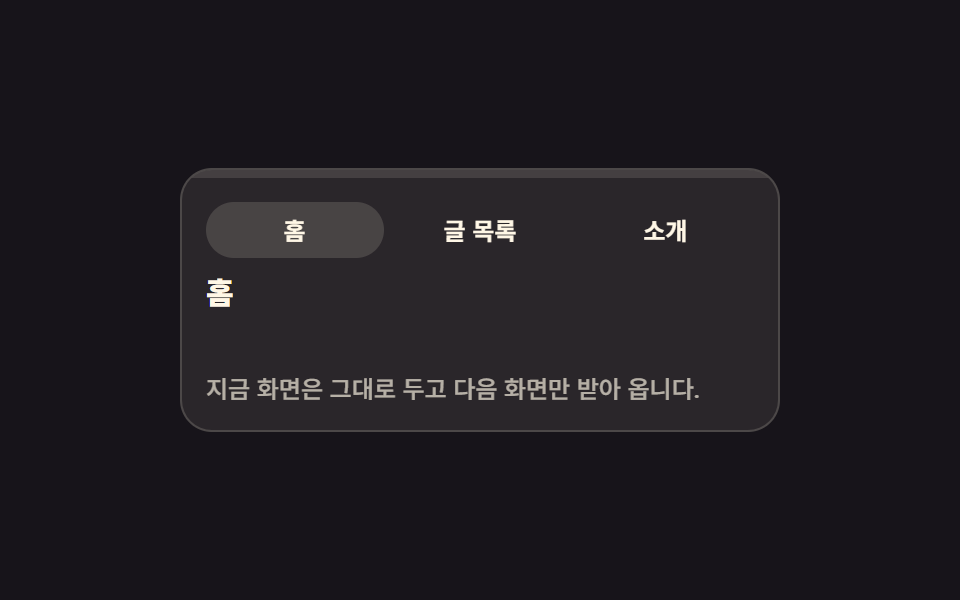
01画面の上を横切るルートのプログレスバー
リンクを押すと画面最上部の細い帯が scaleX で少しずつ伸び、次の画面を待つ時間を目に見えるようにします。進行値は role="progressbar" と aria-valuenow にそのまま書き込まれます。
使いどころ一覧から詳細へ移る場面が多いブログ・マガジンサイト
role="progressbar"aria-valuenowscaleX

<main class="stage">
  <section class="rp is-demo" id="rp" aria-label="画面遷移のプログレスバーのプレビュー">
    <div class="rp__bar">
      <span class="rp__fill" id="rp-fill" role="progressbar" aria-valuenow="0" aria-valuemin="0" aria-valuemax="100" aria-label="次の画面の読み込み進行率"></span>
    </div>
    <nav class="rp__tabs" aria-label="画面移動">
      <button class="rp__tab is-current" type="button" aria-current="page">
        <span class="rp__pill" aria-hidden="true"></span><span class="rp__label">ホーム</span>
      </button>
      <button class="rp__tab" type="button">
        <span class="rp__pill" aria-hidden="true"></span><span class="rp__label">記事一覧</span>
      </button>
      <button class="rp__tab" type="button">
        <span class="rp__pill" aria-hidden="true"></span><span class="rp__label">紹介</span>
      </button>
    </nav>
    <div class="rp__view" id="rp-view" aria-busy="false">
      <p class="rp__head" id="rp-head">ホーム</p>
      <p class="rp__wait">次の画面を準備中</p>
      <p class="rp__text">今の画面はそのままに、次の画面だけを取りに行きます。</p>
    </div>
  </section>
</main>
@use "sass:color";
@use "../../../../site/static/demo-tokens" as *;
// 상단 라우트 진행 바 — 링크를 누르면 화면 맨 위 띠가 가짜 fetch 진행만큼 scaleX 로 자란다
$duration: $dur-quick;
$easing: $ease-spring;
$color: $subject-blue;
@include stage($stage-ink);
$panel: color.mix($subject-cream, $stage-ink, 8%);
$line: rgba(255, 247, 230, .16);
.rp {
box-sizing: border-box;
display: grid;
width: min(300px, 88vw);
overflow: hidden;
border: 1px solid $line;
border-radius: $r-card;
background: $panel;
color: $subject-cream;
}
.rp * { box-sizing: border-box; }
// ── 화면 맨 위 진행 띠 ──
// 트랙은 늘 자리에 있고 채움만 scaleX 로 자란다. 폭(width)이 아니라 transform 이라 레이아웃을 다시 계산하지 않는다
.rp__bar { height: 4px; background: rgba(255, 247, 230, .12); }
.rp__fill {
display: block;
height: 100%;
background: $color;
transform: scaleX(0);
transform-origin: left center; // 규칙8: 루트 진행띠 좌측 채움
transition: transform $duration $easing;
}
// 100% 뒤 페이드는 실제 클릭 경로(.is-done)에서만. 격자 루프는 사라지는 장면을 재현하지 않는다
.rp.is-done .rp__fill { opacity: 0; transition: opacity $dur-base linear 180ms; }
// ── 링크 세 개 ──
// 균등 칸은 grid 로 짠다 (flex 1 1 0 + scaleX 조합은 인디케이터 오탐을 부른다)
.rp__tabs {
display: grid;
grid-template-columns: repeat(3, 1fr);
gap: $sp-1;
padding: $sp-3 $sp-3 $sp-2;
}
.rp__tab {
position: relative;
margin: 0;
padding: $sp-2 $sp-1;
border: 0;
border-radius: $r-pill;
background: none;
color: $subject-cream;
font-family: inherit;
font-size: 12px;
font-weight: 700;
line-height: 1;
cursor: pointer;
}
.rp__tab:focus-visible { outline: 2px solid $color; outline-offset: 2px; }
.rp__pill {
position: absolute;
inset: 0;
border-radius: $r-pill;
background: rgba(255, 247, 230, .14);
opacity: 0;
}
.rp__tab.is-current .rp__pill { opacity: 1; }
.rp__label { position: relative; }
// ── 본문: 기다리는 동안에도 자리와 글자가 그대로 남는다 ──
.rp__view {
display: grid;
gap: $sp-2;
padding: 0 $sp-3 $sp-3;
}
.rp__head {
margin: 0;
font-size: 15px;
font-weight: 800;
line-height: 1.2;
}
// 안내 줄은 자리를 늘 차지하고 보임만 변한다 — 켜질 때 아래 글이 밀리지 않는다
.rp__wait {
margin: 0;
color: $color;
font-size: 11px;
font-weight: 700;
line-height: 1.2;
opacity: 0;
}
.rp__text {
margin: 0;
color: rgba(255, 247, 230, .66);
font-size: 12px;
font-weight: 500;
line-height: 1.5;
}
// 정적(손으로 조작) 경로 — aria-busy 가 켜지면 안내가 뜨고 본문이 옅어진다
.rp__view[aria-busy="true"] .rp__wait { opacity: 1; }
.rp__view[aria-busy="true"] .rp__text { opacity: .45; }
// ── 격자 미리보기 전용 2초 루프 ──
// 0 → 88% 까지만 채우고 그대로 둔다. 완료·퇴장은 재현하지 않는다(대표 이미지가 빈 띠가 된다)
// 처음 상태로는 88% 지점에서 한 프레임에 컷으로 돌아온다(24프레임의 마지막 샘플은 95.8%)
@keyframes rp-trickle {
0% { transform: scaleX(0); animation-timing-function: steps(1, end); }
8% { transform: scaleX(.12); }
26% { transform: scaleX(.38); }
48% { transform: scaleX(.66); }
70% { transform: scaleX(.88); }
80% { transform: scaleX(.88); animation-timing-function: steps(1, end); }
88%, 100% { transform: scaleX(0); }
}
@keyframes rp-pill-home {
0%, 7% { opacity: 1; }
8%, 87% { opacity: 0; }
88%, 100% { opacity: 1; }
}
@keyframes rp-pill-list {
0%, 7% { opacity: 0; }
8%, 87% { opacity: 1; }
88%, 100% { opacity: 0; }
}
// 복귀는 셋으로 나눠 흘린다 — 누르는 순간(8%)이 가장 크게 변한 장면으로 남아야 대표 이미지가 산다
@keyframes rp-wait {
0%, 7% { opacity: 0; }
8%, 77% { opacity: 1; }
78%, 100% { opacity: 0; }
}
@keyframes rp-text {
0%, 7% { opacity: 1; }
8%, 83% { opacity: .45; }
84%, 100% { opacity: 1; }
}
.rp.is-demo {
.rp__fill {
animation-name: rp-trickle;
animation-duration: $dur-loop;
animation-timing-function: $easing;
animation-iteration-count: infinite;
}
.rp__tab:nth-child(1) .rp__pill { animation-name: rp-pill-home; }
.rp__tab:nth-child(2) .rp__pill { animation-name: rp-pill-list; }
.rp__wait { animation-name: rp-wait; }
.rp__text { animation-name: rp-text; }
.rp__pill,
.rp__wait,
.rp__text {
animation-duration: $dur-loop;
animation-timing-function: steps(1, end);
animation-iteration-count: infinite;
}
}
@media (max-width: 340px) {
.rp__tabs { padding: $sp-2; }
.rp__tab { padding: $sp-1; font-size: 11px; }
.rp__view { gap: $sp-1; padding: 0 $sp-2 $sp-2; }
.rp__head { font-size: 13px; }
.rp__wait { font-size: 10px; }
.rp__text { font-size: 11px; }
}
@media (prefers-reduced-motion: reduce) {
.rp.is-demo .rp__fill,
.rp.is-demo .rp__pill,
.rp.is-demo .rp__wait,
.rp.is-demo .rp__text { animation: none !important; transition: none !important; }
// 움직임만 끄고 "기다리는 중" 이라는 결과 상태는 남긴다
.rp.is-demo .rp__fill { transform: scaleX(.88) !important; }
.rp.is-demo .rp__tab:nth-child(1) .rp__pill { opacity: 0 !important; }
.rp.is-demo .rp__tab:nth-child(2) .rp__pill { opacity: 1 !important; }
.rp.is-demo .rp__wait { opacity: 1 !important; }
.rp.is-demo .rp__text { opacity: .45 !important; }
}html, body {
margin: 0;
overflow: hidden;
}
.stage {
box-sizing: border-box;
min-height: 100vh;
display: grid;
place-items: center;
margin: 0;
background: #17141a;
font-family: -apple-system, "Segoe UI", "Noto Sans KR", sans-serif;
padding: clamp(8px, 4vw, 24px);
}
.rp {
box-sizing: border-box;
display: grid;
width: min(300px, 88vw);
overflow: hidden;
border: 1px solid rgba(255, 247, 230, 0.16);
border-radius: 16px;
background: rgb(16.2980392157%, 14.9647058824%, 16.5960784314%);
color: #fff7e6;
}
.rp * {
box-sizing: border-box;
}
.rp__bar {
height: 4px;
background: rgba(255, 247, 230, 0.12);
}
.rp__fill {
display: block;
height: 100%;
background: #2f6df6;
transform: scaleX(0);
transform-origin: left center;
transition: transform 220ms cubic-bezier(0.2, 0.8, 0.2, 1);
}
.rp.is-done .rp__fill {
opacity: 0;
transition: opacity 300ms linear 180ms;
}
.rp__tabs {
display: grid;
grid-template-columns: repeat(3, 1fr);
gap: 4px;
padding: 12px 12px 8px;
}
.rp__tab {
position: relative;
margin: 0;
padding: 8px 4px;
border: 0;
border-radius: 999px;
background: none;
color: #fff7e6;
font-family: inherit;
font-size: 12px;
font-weight: 700;
line-height: 1;
cursor: pointer;
}
.rp__tab:focus-visible {
outline: 2px solid #2f6df6;
outline-offset: 2px;
}
.rp__pill {
position: absolute;
inset: 0;
border-radius: 999px;
background: rgba(255, 247, 230, 0.14);
opacity: 0;
}
.rp__tab.is-current .rp__pill {
opacity: 1;
}
.rp__label {
position: relative;
}
.rp__view {
display: grid;
gap: 8px;
padding: 0 12px 12px;
}
.rp__head {
margin: 0;
font-size: 15px;
font-weight: 800;
line-height: 1.2;
}
.rp__wait {
margin: 0;
color: #2f6df6;
font-size: 11px;
font-weight: 700;
line-height: 1.2;
opacity: 0;
}
.rp__text {
margin: 0;
color: rgba(255, 247, 230, 0.66);
font-size: 12px;
font-weight: 500;
line-height: 1.5;
}
.rp__view[aria-busy=true] .rp__wait {
opacity: 1;
}
.rp__view[aria-busy=true] .rp__text {
opacity: 0.45;
}
@keyframes rp-trickle {
0% {
transform: scaleX(0);
animation-timing-function: steps(1, end);
}
8% {
transform: scaleX(0.12);
}
26% {
transform: scaleX(0.38);
}
48% {
transform: scaleX(0.66);
}
70% {
transform: scaleX(0.88);
}
80% {
transform: scaleX(0.88);
animation-timing-function: steps(1, end);
}
88%, 100% {
transform: scaleX(0);
}
}
@keyframes rp-pill-home {
0%, 7% {
opacity: 1;
}
8%, 87% {
opacity: 0;
}
88%, 100% {
opacity: 1;
}
}
@keyframes rp-pill-list {
0%, 7% {
opacity: 0;
}
8%, 87% {
opacity: 1;
}
88%, 100% {
opacity: 0;
}
}
@keyframes rp-wait {
0%, 7% {
opacity: 0;
}
8%, 77% {
opacity: 1;
}
78%, 100% {
opacity: 0;
}
}
@keyframes rp-text {
0%, 7% {
opacity: 1;
}
8%, 83% {
opacity: 0.45;
}
84%, 100% {
opacity: 1;
}
}
.rp.is-demo .rp__fill {
animation-name: rp-trickle;
animation-duration: 2s;
animation-timing-function: cubic-bezier(0.2, 0.8, 0.2, 1);
animation-iteration-count: infinite;
}
.rp.is-demo .rp__tab:nth-child(1) .rp__pill {
animation-name: rp-pill-home;
}
.rp.is-demo .rp__tab:nth-child(2) .rp__pill {
animation-name: rp-pill-list;
}
.rp.is-demo .rp__wait {
animation-name: rp-wait;
}
.rp.is-demo .rp__text {
animation-name: rp-text;
}
.rp.is-demo .rp__pill,
.rp.is-demo .rp__wait,
.rp.is-demo .rp__text {
animation-duration: 2s;
animation-timing-function: steps(1, end);
animation-iteration-count: infinite;
}
@media (max-width: 340px) {
.rp__tabs {
padding: 8px;
}
.rp__tab {
padding: 4px;
font-size: 11px;
}
.rp__view {
gap: 4px;
padding: 0 8px 8px;
}
.rp__head {
font-size: 13px;
}
.rp__wait {
font-size: 10px;
}
.rp__text {
font-size: 11px;
}
}
@media (prefers-reduced-motion: reduce) {
.rp.is-demo .rp__fill,
.rp.is-demo .rp__pill,
.rp.is-demo .rp__wait,
.rp.is-demo .rp__text {
animation: none !important;
transition: none !important;
}
.rp.is-demo .rp__fill {
transform: scaleX(0.88) !important;
}
.rp.is-demo .rp__tab:nth-child(1) .rp__pill {
opacity: 0 !important;
}
.rp.is-demo .rp__tab:nth-child(2) .rp__pill {
opacity: 1 !important;
}
.rp.is-demo .rp__wait {
opacity: 1 !important;
}
.rp.is-demo .rp__text {
opacity: 0.45 !important;
}
}// 가짜 fetch 진행: 12 → 38 → 66 → 88 → 100. 그때마다 aria-valuenow 를 실제로 갱신한다.
var rp = document.getElementById('rp');
var rpFill = document.getElementById('rp-fill');
var rpView = document.getElementById('rp-view');
var rpHead = document.getElementById('rp-head');
var rpTabs = rp.querySelectorAll('.rp__tab');
var rpSteps = [12, 38, 66, 88, 100];
var rpTimer = 0;
function rpSet(v) {
rpFill.style.transform = 'scaleX(' + v / 100 + ')';
rpFill.setAttribute('aria-valuenow', String(v));
}
function rpGo(btn) {
rp.classList.remove('is-demo');
rp.classList.remove('is-done');
clearInterval(rpTimer);
for (var i = 0; i < rpTabs.length; i++) {
var on = rpTabs[i] === btn;
rpTabs[i].classList.toggle('is-current', on);
if (on) rpTabs[i].setAttribute('aria-current', 'page');
else rpTabs[i].removeAttribute('aria-current');
}
rpView.setAttribute('aria-busy', 'true');
rpSet(0);
var k = 0;
rpTimer = setInterval(function () {
rpSet(rpSteps[k]);
k += 1;
if (k < rpSteps.length) return;
clearInterval(rpTimer);
rpHead.textContent = btn.querySelector('.rp__label').textContent;
rpView.setAttribute('aria-busy', 'false');
// 완료 뒤 페이드는 실제 클릭 경로에서만 — 격자 루프는 재현하지 않는다
rp.classList.add('is-done');
}, 240);
}
for (var t = 0; t < rpTabs.length; t++) {
rpTabs[t].addEventListener('click', function (e) { rpGo(e.currentTarget); });
}import { useEffect, useRef, useState } from "react";
import type { CSSProperties } from "react";
import styles from "./RouteProgressBar.module.scss";
export type RouteProgressBarProps = {
/** 링크(탭) 라벨 — 누르면 가짜 fetch 진행이 시작된다 */
links?: string[];
bodyText?: string;
waitLabel?: string;
progressLabel?: string;
navLabel?: string;
groupLabel?: string;
/** 격자 미리보기용 2초 자동 루프. 사람이 손대면 꺼진다 */
demo?: boolean;
duration?: number;
easing?: string;
color?: string;
};
type Vars = CSSProperties & { "--duration"?: string; "--easing"?: string; "--color"?: string };
// ambient 가 얇아 useRef 가 T | null 을 돌려준다 — 필요한 꼴만 로컬 타입으로 단언
type Box<T> = { current: T };
const DEFAULT_LINKS = ["Home", "Posts", "About"];
// 가짜 fetch 진행 — 마지막 100 뒤에만 띠가 사라진다
const STEPS = [12, 38, 66, 88, 100];
export default function RouteProgressBar({
links = DEFAULT_LINKS,
bodyText = "The screen you are on stays put; only the next one is fetched.",
waitLabel = "Preparing the next screen",
progressLabel = "Loading progress for the next screen",
navLabel = "Screen navigation",
groupLabel = "Route progress bar preview",
demo = true,
duration = 220,
easing = "cubic-bezier(.2,.8,.2,1)",
color = "#2f6df6",
}: RouteProgressBarProps) {
const [live, setLive] = useState(demo);
const [current, setCurrent] = useState(0);
const [head, setHead] = useState(links[0]);
const [value, setValue] = useState(0);
const [busy, setBusy] = useState(false);
const [done, setDone] = useState(false);
const timer = useRef<number>(0) as Box<number>;
useEffect(() => () => clearInterval(timer.current), []);
function go(i: number) {
setLive(false);
setDone(false);
setBusy(true);
setCurrent(i);
setValue(0);
clearInterval(timer.current);
let k = 0;
timer.current = window.setInterval(() => {
setValue(STEPS[k]);
k += 1;
if (k < STEPS.length) return;
clearInterval(timer.current);
setHead(links[i]);
setBusy(false);
// 100% 뒤 페이드는 실제 클릭 경로에서만 — 미리보기 루프는 재현하지 않는다
setDone(true);
}, 240);
}
const vars: Vars = { "--duration": `${duration}ms`, "--easing": easing, "--color": color };
const cls = [styles.rp, live ? styles.isDemo : "", done ? styles.isDone : ""].filter(Boolean).join(" ");
return (
<section className={cls} style={vars} aria-label={groupLabel}>
<div className={styles.bar}>
<span
className={styles.fill}
role="progressbar"
aria-valuenow={value}
aria-valuemin={0}
aria-valuemax={100}
aria-label={progressLabel}
style={{ transform: `scaleX(${value / 100})` }}
/>
</div>
<nav className={styles.tabs} aria-label={navLabel}>
{links.map((l, i) => (
<button
className={[styles.tab, i === current ? styles.isCurrent : ""].filter(Boolean).join(" ")}
type="button"
key={l}
aria-current={i === current ? "page" : undefined}
onClick={() => go(i)}
>
<span className={styles.pill} aria-hidden="true" />
<span className={styles.label}>{l}</span>
</button>
))}
</nav>
<div className={styles.view} aria-busy={busy}>
<p className={styles.head}>{head}</p>
<p className={styles.wait}>{waitLabel}</p>
<p className={styles.text}>{bodyText}</p>
</div>
</section>
);
}01 画面の上を横切るルートのプログレスバー — 計測 累積面積 5.168% · 動いたフレーム 19/23GODRICH オリジナル · SCSS と React は zip に同梱 · ページ遷移 ローディング 9選 — コピペで動く
このデモが属する記事
 ページ遷移 ローディング 9選 — コピペで動くページ遷移 ローディングとは、画面が次の画面へ切り替わるまでのわずかな待ち時間を目に見える形にする仕組みです。この九つは中央で回るスピナーではなく、プログレスバー・色の帯・点線のプレースホルダー・楽観的な遷移のように、画面全体が入れ替わる瞬 この記事のデモをすべて見る