08view()でイベントをリビール
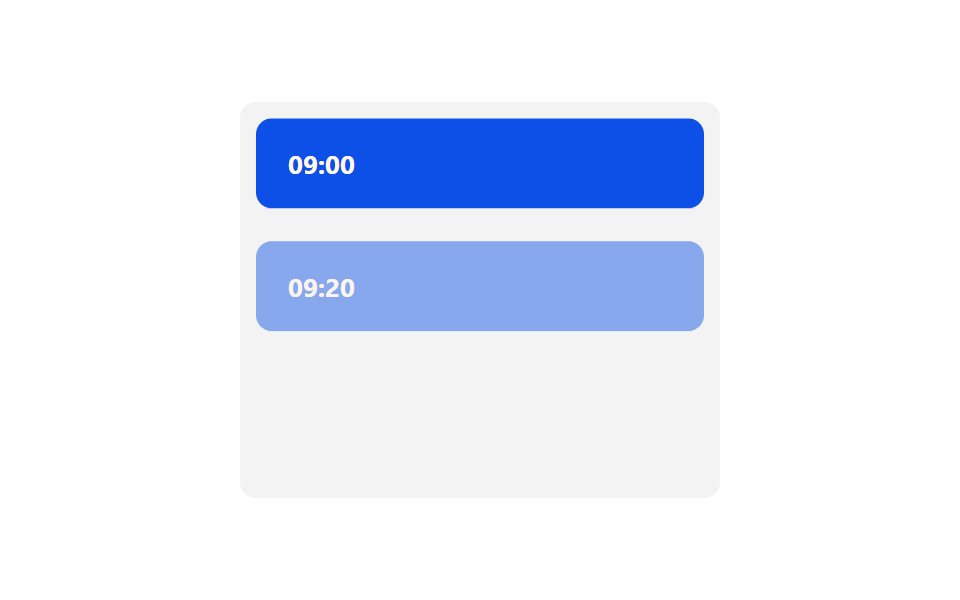
イベントカードごとにanimation-timeline: view()とanimation-rangeを設定すると、そのカードがスクロールで見える範囲に合わせてopacityとtranslateYが自動的に動き、IntersectionObserverなしで1つずつ現れる。
使いどころスクロールで1つずつ現れるイベントタイムライン、長文記事のセクション登場
animation-timeline: view()animation-rangeJS 0줄
<main class="stage">
  <div class="ts08-box">
    <div class="ts08-card is-demo">09:00</div>
    <div class="ts08-card is-demo">09:20</div>
    <div class="ts08-card is-demo">10:00</div>
    <div class="ts08-card is-demo">10:40</div>
  </div>
</main>
@use "../../../../site/static/demo-tokens" as *;
// ── 변수 3개 ──────────────────────────────────────────
$duration: $dur-loop;
$easing: $ease-out;
$color: $subject-blue-deep; // 크림 글자가 얹히므로 진한 파랑
@include stage($stage-paper);
.ts08-box {
width: min(240px, 84vw);
height: clamp(120px, 66vh, 220px);
overflow-y: auto;
padding: $sp-2;
box-sizing: border-box;
background: rgba(23, 20, 26, .05);
border-radius: $r-sm;
}
.ts08-card {
padding: $sp-4;
margin-bottom: $sp-2;
border-radius: $r-sm;
background: $color;
color: $subject-cream;
font: 700 13px/1 -apple-system, "Segoe UI", "Noto Sans KR", sans-serif;
opacity: 0;
transform: translateY(16px);
&:last-of-type { margin-bottom: 0; }
}
// 실제 사용 코드: 카드마다 자기가 스크롤로 보이는 구간에 맞춰 자동으로 드러난다
@supports (animation-timeline: view()) {
.ts08-card:not(.is-demo) {
animation: ts08-reveal $easing both;
animation-timeline: view();
animation-range: entry 0% cover 40%;
}
}
// 미지원 브라우저(Firefox·Safari): 다 드러난 최종 상태로 고정
@supports not (animation-timeline: view()) {
.ts08-card:not(.is-demo) { opacity: 1; transform: none; }
}
@keyframes ts08-reveal { from { opacity: 0; transform: translateY(16px); } to { opacity: 1; transform: translateY(0); } }
// 데모 루프: 실제 스크롤 대신, 카드가 하나씩 드러나는 걸 순서대로 흉내(캡처용)
.ts08-card.is-demo { animation: ts08-reveal-loop $duration $easing infinite; }
.ts08-card.is-demo:nth-child(1) { animation-delay: 0ms; }
.ts08-card.is-demo:nth-child(2) { animation-delay: 220ms; }
.ts08-card.is-demo:nth-child(3) { animation-delay: 440ms; }
.ts08-card.is-demo:nth-child(4) { animation-delay: 660ms; }
@keyframes ts08-reveal-loop {
0% { opacity: 0; transform: translateY(16px); }
18% { opacity: 1; transform: translateY(0); }
85% { opacity: 1; transform: translateY(0); }
100% { opacity: 0; transform: translateY(16px); }
}
@media (prefers-reduced-motion: reduce) {
.ts08-card, .ts08-card.is-demo { animation: none !important; opacity: 1 !important; transform: none !important; }
}html, body {
margin: 0;
overflow: hidden;
}
.stage {
box-sizing: border-box;
min-height: 100vh;
display: grid;
place-items: center;
margin: 0;
background: #ffffff;
font-family: -apple-system, "Segoe UI", "Noto Sans KR", sans-serif;
padding: clamp(8px, 4vw, 24px);
}
.ts08-box {
width: min(240px, 84vw);
height: clamp(120px, 66vh, 220px);
overflow-y: auto;
padding: 8px;
box-sizing: border-box;
background: rgba(23, 20, 26, 0.05);
border-radius: 8px;
}
.ts08-card {
padding: 16px;
margin-bottom: 8px;
border-radius: 8px;
background: #0a4fe8;
color: #fff7e6;
font: 700 13px/1 -apple-system, "Segoe UI", "Noto Sans KR", sans-serif;
opacity: 0;
transform: translateY(16px);
}
.ts08-card:last-of-type {
margin-bottom: 0;
}
@supports (animation-timeline: view()) {
.ts08-card:not(.is-demo) {
animation: ts08-reveal ease-out both;
animation-timeline: view();
animation-range: entry 0% cover 40%;
}
}
@supports not (animation-timeline: view()) {
.ts08-card:not(.is-demo) {
opacity: 1;
transform: none;
}
}
@keyframes ts08-reveal {
from {
opacity: 0;
transform: translateY(16px);
}
to {
opacity: 1;
transform: translateY(0);
}
}
.ts08-card.is-demo {
animation: ts08-reveal-loop 2s ease-out infinite;
}
.ts08-card.is-demo:nth-child(1) {
animation-delay: 0ms;
}
.ts08-card.is-demo:nth-child(2) {
animation-delay: 220ms;
}
.ts08-card.is-demo:nth-child(3) {
animation-delay: 440ms;
}
.ts08-card.is-demo:nth-child(4) {
animation-delay: 660ms;
}
@keyframes ts08-reveal-loop {
0% {
opacity: 0;
transform: translateY(16px);
}
18% {
opacity: 1;
transform: translateY(0);
}
85% {
opacity: 1;
transform: translateY(0);
}
100% {
opacity: 0;
transform: translateY(16px);
}
}
@media (prefers-reduced-motion: reduce) {
.ts08-card, .ts08-card.is-demo {
animation: none !important;
opacity: 1 !important;
transform: none !important;
}
}import { CSSProperties } from "react";
import styles from "./ViewRevealEvents.module.scss";
type Vars = CSSProperties & { "--color"?: string };
export interface ViewRevealEventsProps {
color?: string;
times?: string[];
}
// animation-timeline: view() 도 scroll() 과 같은 지원 범위다 — IntersectionObserver 없이
// 카드마다 자기가 뷰포트에 들어오는 구간에서 opacity·translateY 가 자동으로 움직인다.
export default function ViewRevealEvents({
color = "#0a4fe8",
times = ["09:00", "09:20", "10:00", "10:40"],
}: ViewRevealEventsProps) {
const style: Vars = { "--color": color };
return (
<div className={styles.box} style={style}>
{times.map((t) => (
<div key={t} className={styles.card}>{t}</div>
))}
</div>
);
}08 view()でイベントをリビール — 計測 累積面積 29.524% · 動いたフレーム 16/23GODRICH オリジナル · SCSS と React は zip に同梱 · 【コピペOK】タイムライン デザイン css 9選
このデモが属する記事
 【コピペOK】タイムライン デザイン css 9選会社の沿革ページや通販サイトの注文状況のように、いくつかの段階を線と丸でつないで順番に見せる部品を「タイムライン」と呼びます。タイムライン デザイン cssで検索して出てくるような、線が伸びたり丸が光ったりする動きを、AOS・GSAPなしの この記事のデモをすべて見る