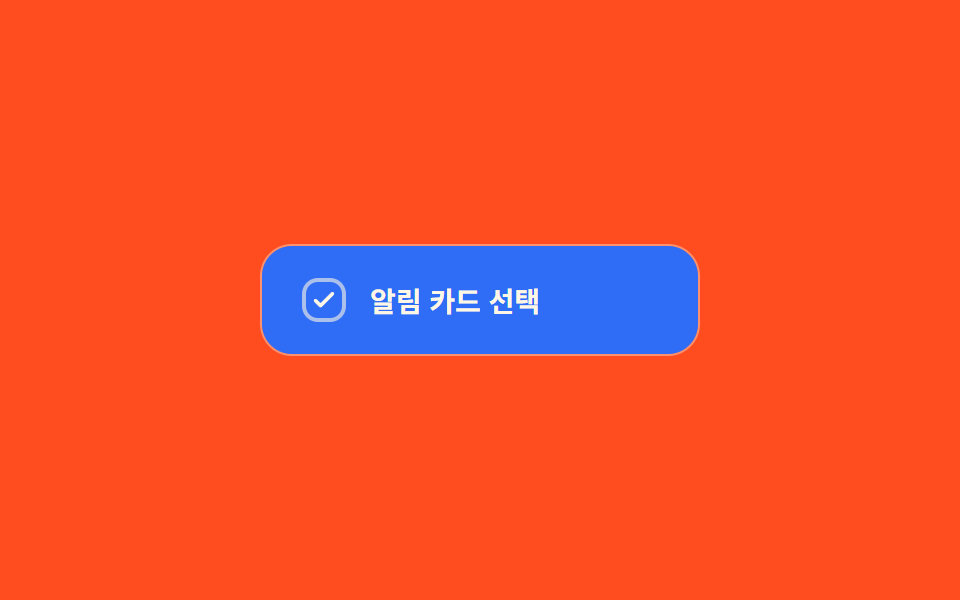
06塗りワイプ切替 — チェック値がオンになるとボックスの背景塗りの値が一方の角から反対側へ広がるように変わる方式
チェック値がオンになった瞬間、ボックスの塗りの値が一方の角から始まり反対側の角まで広がります。
使いどころアクセントカラーを強調したい選択項目、カード型の選択リスト
WIPE_MSclip-pathbackground
<main class="stage">
<label class="cbw is-demo" id="cbw">
  <input type="checkbox" class="cbw__input" id="cbwInput">
  <span class="cbw__card" id="cbwCard">
    <span class="cbw__fill" id="cbwFill" aria-hidden="true"></span>
    <span class="cbw__box" aria-hidden="true">
      <svg viewBox="0 0 20 20" width="14" height="14"><path d="M4 10.5l3.5 3.5L16 5.5" fill="none" stroke="currentColor" stroke-width="2.6" stroke-linecap="round" stroke-linejoin="round"/></svg>
    </span>
    <span class="cbw__text">通知カードを選択</span>
  </span>
</label>
</main>
@use "../../../../site/static/demo-tokens" as *;
// 계산 겹: index.html measure() 가 카드의 실측 대각선 길이(getBoundingClientRect)를 재고,
// clip-path circle() 반지름을 easeOutCubic 로 그 길이까지 rAF 적분해 한쪽 모서리에서
// 반대쪽 모서리까지 채움 배경이 번지는 값을 만든다.
@include stage($stage-orange);
.cbw {
cursor: pointer;
user-select: none;
display: block;
}
.cbw__input {
position: absolute;
width: 1px;
height: 1px;
opacity: 0;
pointer-events: none;
}
.cbw__card {
position: relative;
display: flex;
align-items: center;
gap: $sp-3;
width: 220px;
padding: $sp-4 $sp-5;
border-radius: $r-card;
background: rgba($subject-cream, .14);
border: 1px solid rgba($subject-cream, .3);
overflow: hidden;
box-sizing: border-box;
}
.cbw__fill {
position: absolute;
inset: 0;
background: $subject-blue;
clip-path: circle(0px at 0% 100%);
pointer-events: none;
}
.cbw__box {
position: relative;
z-index: 1;
flex: 0 0 auto;
width: 22px;
height: 22px;
border-radius: $r-sm;
border: 2px solid rgba($subject-cream, .6);
color: $subject-cream;
display: grid;
place-items: center;
box-sizing: border-box;
svg {
opacity: 0;
transition: opacity $dur-quick $ease-out;
}
}
.cbw__input:checked ~ .cbw__card .cbw__box svg {
opacity: 1;
}
.cbw__text {
position: relative;
z-index: 1;
color: $subject-cream;
font-size: 14px;
font-weight: 600;
}
.cbw__input:focus-visible ~ .cbw__card {
outline: 2px solid $subject-blue-light;
outline-offset: 2px;
}
@media (max-width: 340px) {
.cbw__card { width: 100%; max-width: 220px; }
.cbw__text { font-size: 13px; }
}
@media (prefers-reduced-motion: reduce) {
.cbw__fill { transition: none; }
.cbw__box svg { transition: none; }
}html, body {
margin: 0;
overflow: hidden;
}
.stage {
box-sizing: border-box;
min-height: 100vh;
display: grid;
place-items: center;
margin: 0;
background: #ff4d1f;
font-family: -apple-system, "Segoe UI", "Noto Sans KR", sans-serif;
padding: clamp(8px, 4vw, 24px);
}
.cbw {
cursor: pointer;
user-select: none;
display: block;
}
.cbw__input {
position: absolute;
width: 1px;
height: 1px;
opacity: 0;
pointer-events: none;
}
.cbw__card {
position: relative;
display: flex;
align-items: center;
gap: 12px;
width: 220px;
padding: 16px 20px;
border-radius: 16px;
background: rgba(255, 247, 230, 0.14);
border: 1px solid rgba(255, 247, 230, 0.3);
overflow: hidden;
box-sizing: border-box;
}
.cbw__fill {
position: absolute;
inset: 0;
background: #2f6df6;
clip-path: circle(0px at 0% 100%);
pointer-events: none;
}
.cbw__box {
position: relative;
z-index: 1;
flex: 0 0 auto;
width: 22px;
height: 22px;
border-radius: 8px;
border: 2px solid rgba(255, 247, 230, 0.6);
color: #fff7e6;
display: grid;
place-items: center;
box-sizing: border-box;
}
.cbw__box svg {
opacity: 0;
transition: opacity 220ms ease-out;
}
.cbw__input:checked ~ .cbw__card .cbw__box svg {
opacity: 1;
}
.cbw__text {
position: relative;
z-index: 1;
color: #fff7e6;
font-size: 14px;
font-weight: 600;
}
.cbw__input:focus-visible ~ .cbw__card {
outline: 2px solid #5b8cf8;
outline-offset: 2px;
}
@media (max-width: 340px) {
.cbw__card {
width: 100%;
max-width: 220px;
}
.cbw__text {
font-size: 13px;
}
}
@media (prefers-reduced-motion: reduce) {
.cbw__fill {
transition: none;
}
.cbw__box svg {
transition: none;
}
}(function () {
var WIPE_MS = 420; // 계산 겹 상수: 채움이 한쪽 모서리에서 반대쪽까지 번지는 데 걸리는 실제 시간(ms)
var CYCLE_MS = 900; // 자동 루프가 체크·해제를 오가는 간격
var reduce = window.matchMedia('(prefers-reduced-motion: reduce)').matches;
var root = document.getElementById('cbw');
var input = document.getElementById('cbwInput');
var card = document.getElementById('cbwCard');
var fill = document.getElementById('cbwFill');
var isDemo = true;
var diag = 0;
var wiping = false, wipeStart = 0, wipeDir = 1;
function measure() {
// 계산 겹: 카드 실측 대각선 길이 — 채움 원이 반대쪽 모서리에 정확히 닿는 반지름 값
var r = card.getBoundingClientRect();
diag = Math.sqrt(r.width * r.width + r.height * r.height);
}
function easeOutCubic(t) { return 1 - Math.pow(1 - t, 3); }
function human() {
if (isDemo) { root.classList.remove('is-demo'); isDemo = false; }
}
function setChecked(next, ts) {
input.checked = next;
wipeDir = next ? 1 : -1;
wipeStart = ts;
wiping = true;
}
input.addEventListener('change', function () {
human();
setChecked(input.checked, performance.now());
});
var cycleStart = 0;
var lastState = false;
function loop(ts) {
if (!cycleStart) cycleStart = ts;
if (!diag) measure();
if (isDemo) {
var step = Math.floor((ts - cycleStart) / CYCLE_MS) % 2 === 1;
if (step !== lastState) { lastState = step; setChecked(step, ts); }
}
if (wiping) {
var t = Math.min(1, (ts - wipeStart) / WIPE_MS);
var p = easeOutCubic(t);
var r = wipeDir === 1 ? p * diag : (1 - p) * diag;
fill.style.clipPath = 'circle(' + r.toFixed(1) + 'px at 0% 100%)';
if (t >= 1) wiping = false;
}
requestAnimationFrame(loop);
}
window.addEventListener('resize', measure);
measure();
if (reduce) { WIPE_MS = 1; }
requestAnimationFrame(loop);
})();// ColorFillWipe — vanilla 판(run/368/demo/06-custom-checkbox-color-fill-wipe/index.html) 의 React 포트.
// 카드의 실측 대각선 길이(getBoundingClientRect)를 재고, clip-path circle() 반지름을
// easeOutCubic 로 그 길이까지 rAF 적분해 한쪽 모서리에서 반대쪽까지 채움 배경을 만든다.
import { useEffect, useRef } from "react";
import styles from "./ColorFillWipe.module.scss";
type Box<T> = { current: T };
export default function ColorFillWipe() {
const rootRef = useRef(null) as unknown as Box<HTMLLabelElement>;
const inputRef = useRef(null) as unknown as Box<HTMLInputElement>;
const cardRef = useRef(null) as unknown as Box<HTMLSpanElement>;
const fillRef = useRef(null) as unknown as Box<HTMLSpanElement>;
const rafRef = useRef(0) as unknown as Box<number>;
useEffect(() => {
let WIPE_MS = 420; // 계산 겹 상수: 채움이 한쪽 모서리에서 반대쪽까지 번지는 데 걸리는 실제 시간(ms)
const CYCLE_MS = 900; // 자동 루프가 체크·해제를 오가는 간격
const reduce = window.matchMedia("(prefers-reduced-motion: reduce)").matches;
const root = rootRef.current;
const input = inputRef.current;
const card = cardRef.current;
const fill = fillRef.current;
if (!root || !input || !card || !fill) return;
let isDemo = true;
let diag = 0;
let wiping = false, wipeStart = 0, wipeDir = 1;
function measure() {
// 계산 겹: 카드 실측 대각선 길이 — 채움 원이 반대쪽 모서리에 정확히 닿는 반지름 값
const r = card!.getBoundingClientRect();
diag = Math.sqrt(r.width * r.width + r.height * r.height);
}
function easeOutCubic(t: number) { return 1 - Math.pow(1 - t, 3); }
function human() {
if (isDemo) { root!.classList.remove(styles.isDemo); isDemo = false; }
}
function setChecked(next: boolean, ts: number) {
input!.checked = next;
wipeDir = next ? 1 : -1;
wipeStart = ts;
wiping = true;
}
function onChange() { human(); setChecked(input!.checked, performance.now()); }
input.addEventListener("change", onChange);
let cycleStart = 0;
let lastState = false;
function loop(ts: number) {
if (!cycleStart) cycleStart = ts;
if (!diag) measure();
if (isDemo) {
const step = Math.floor((ts - cycleStart) / CYCLE_MS) % 2 === 1;
if (step !== lastState) { lastState = step; setChecked(step, ts); }
}
if (wiping) {
const t = Math.min(1, (ts - wipeStart) / WIPE_MS);
const p = easeOutCubic(t);
const r = wipeDir === 1 ? p * diag : (1 - p) * diag;
fill!.style.clipPath = "circle(" + r.toFixed(1) + "px at 0% 100%)";
if (t >= 1) wiping = false;
}
rafRef.current = requestAnimationFrame(loop);
}
function onResize() { measure(); }
window.addEventListener("resize", onResize);
measure();
if (reduce) { WIPE_MS = 1; }
rafRef.current = requestAnimationFrame(loop);
return () => {
input.removeEventListener("change", onChange);
window.removeEventListener("resize", onResize);
cancelAnimationFrame(rafRef.current);
};
}, []);
return (
<main className={styles.stage}>
<label className={styles.cbw + " " + styles.isDemo} ref={rootRef}>
<input type="checkbox" className={styles.cbwInput} ref={inputRef} />
<span className={styles.cbwCard} ref={cardRef}>
<span className={styles.cbwFill} ref={fillRef} aria-hidden="true" />
<span className={styles.cbwBox} aria-hidden="true">
<svg viewBox="0 0 20 20" width={14} height={14}>
<path d="M4 10.5l3.5 3.5L16 5.5" fill="none" stroke="currentColor" strokeWidth={2.6} strokeLinecap="round" strokeLinejoin="round" />
</svg>
</span>
<span className={styles.cbwText}>알림 카드 선택</span>
</span>
</label>
</main>
);
}06 塗りワイプ切替 — チェック値がオンになるとボックスの背景塗りの値が一方の角から反対側へ広がるように変わる方式 — 計測 累積面積 7.924% · 動いたフレーム 8/23GODRICH オリジナル · SCSS と React は zip に同梱 · チェックボックス ui 9選 — チェック値で変わる9つの方式
このデモが属する記事
 チェックボックス ui 9選 — チェック値で変わる9つの方式チェックボックス ui: 9つのうち1つはチェック値がオンになるとチェックマークの線の長さの値が0から最後まで描かれ、1つは同じ値が変わった瞬間にボックスの大きさの値が一瞬大きくなってから跳ねるように収まり、もう1つは親ボックスの値が変わる この記事のデモをすべて見る