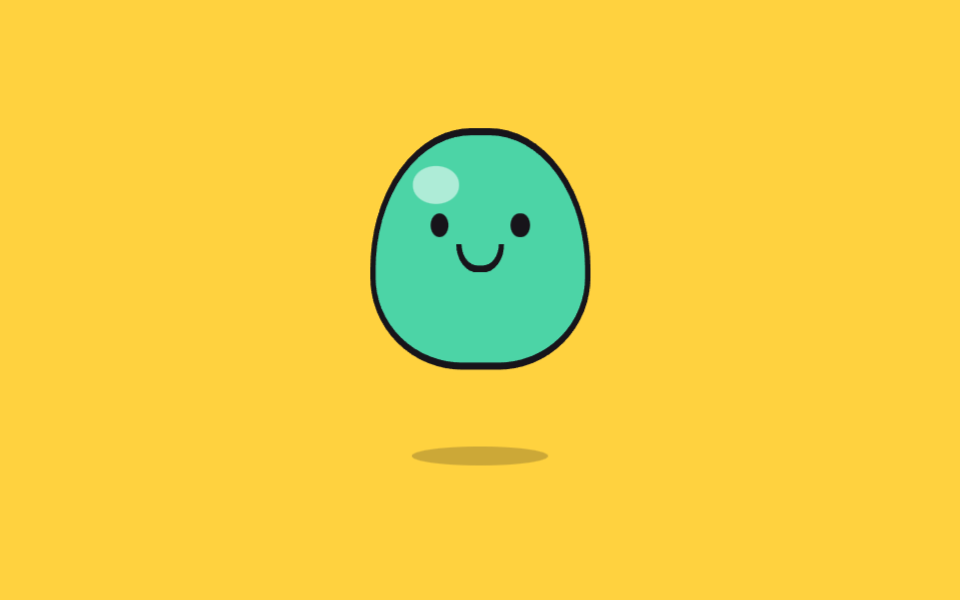
02ぷにぷにゼリーのバウンド
ゼリーがかがんでから縦に伸びて跳ね、着地すると体が左右に揺れます。押すたびにカウンターが増えて、一回り大きく跳ねます。
使いどころスタートボタン横のマスコット
cubic-bezierscaletranslateY
<main class="stage">
<div class="jl is-demo" id="jl">
  <output class="jl__count" id="jlCount" aria-hidden="true">0</output>
  <button class="jl__hit" type="button" aria-label="ゼリーを弾ませる">
    <span class="jl__scene" aria-hidden="true">
      <span class="jl__shadow"></span>
      <span class="jl__body" id="jlBody">
        <span class="jl__eye jl__eye--l"></span>
        <span class="jl__eye jl__eye--r"></span>
        <span class="jl__mouth"></span>
        <span class="jl__shine"></span>
      </span>
    </span>
  </button>
</div>
</main>
@use "../../../../site/static/demo-tokens" as *;
// 폭신 젤리 튀어오름 — 눌렀다 늘어나며 뛰고, 착지한 뒤 좌우로 출렁여 안정된다.
// 스쿼시·스트레치를 전부 transform(scaleY·translateY) 로만 한다 — width/height 를 건드리면
// 매 프레임 레이아웃이 다시 돈다. 그림자는 젤리가 뜬 만큼 가로로 줄어 착지감을 준다.
// 카운터(output)는 장식이라 aria-hidden — 횟수는 단추 라벨이 대신 알린다.
$duration: $dur-loop;
$easing: $ease-pop;
$color: $subject-mint;
@include stage($stage-yellow);
.jl { position: relative; display: grid; place-items: end center; }
// 카운터 — 젤리 머리 위 작은 알약. 배경 노랑 위 잉크 글자(대비 14.9:1)
.jl__count {
position: absolute; top: 0; left: 50%; transform: translateX(-50%);
min-width: $sp-6; padding: 0 $sp-2; box-sizing: border-box;
background: $subject-ink; color: $stage-yellow;
border-radius: $r-pill; text-align: center;
font-weight: 700; font-size: 12px; line-height: 20px;
}
.jl__hit { border: 0; padding: 0; background: none; cursor: pointer; -webkit-tap-highlight-color: transparent; }
.jl__hit:focus-visible { outline: 2px solid $subject-ink; outline-offset: 4px; border-radius: $r-card; }
.jl__scene {
position: relative; display: block; box-sizing: border-box;
width: clamp(150px, 48vw, 210px); height: clamp(120px, 38vw, 168px);
}
// 바닥 그림자 — 젤리 발밑. 떠 있는 동안 가로로 줄고 연해진다(누적면적에 잡히는 움직임)
.jl__shadow {
position: absolute; bottom: 0; left: 50%; width: 62%; height: 12px;
background: rgba(23, 20, 26, .22); border-radius: 50%;
transform: translateX(-50%);
}
// 젤리 몸 — 둥근 돔. 변형은 전부 이 요소 하나의 transform
.jl__body {
position: absolute; bottom: 4px; left: 50%; width: 56%; aspect-ratio: 1 / .82;
background: $color; border: 3px solid $subject-ink;
border-radius: 46% 46% 42% 42% / 58% 58% 38% 38%;
transform: translateX(-50%);
}
.jl__shine {
position: absolute; top: 14%; left: 18%; width: 22%; height: 16%;
background: rgba(255, 255, 255, .55); border-radius: 50%;
}
.jl__eye {
position: absolute; top: 34%; width: 9%; aspect-ratio: 1;
background: $subject-ink; border-radius: 50%;
}
.jl__eye--l { left: 26%; }
.jl__eye--r { right: 26%; }
.jl__mouth {
position: absolute; top: 48%; left: 50%; width: 18%; height: 9%;
border: 3px solid $subject-ink; border-top: 0; border-radius: 0 0 $r-pill $r-pill;
transform: translateX(-50%);
}
// ── 격자 미리보기 루프(2초): 웅크림(8%) → 도약(16~26%) → 착지 눌림(26%) → 출렁(34~66%) → 안정
.jl.is-demo .jl__body {
animation-name: jlHop;
animation-duration: $duration;
animation-timing-function: $easing;
animation-iteration-count: infinite;
}
.jl.is-demo .jl__shadow {
animation-name: jlShadow;
animation-duration: $duration;
animation-timing-function: $easing;
animation-iteration-count: infinite;
}
@keyframes jlHop {
0% { transform: translateX(-50%) scale(1, 1); }
8% { transform: translateX(-50%) scale(1.16, .66); }
16% { transform: translateX(-50%) translateY(-52px) scale(.9, 1.16); }
24% { transform: translateX(-50%) translateY(-18px) scale(.98, 1.05); }
30% { transform: translateX(-50%) scale(1.12, .78); }
38% { transform: translateX(-50%) scale(.96, 1.06); }
46% { transform: translateX(-50%) scale(1.06, .93); }
54% { transform: translateX(-50%) scale(.97, 1.04); }
62% { transform: translateX(-50%) scale(1.03, .97); }
70%, 100% { transform: translateX(-50%) scale(1, 1); }
}
@keyframes jlShadow {
0% { transform: translateX(-50%) scale(1, 1); }
8% { transform: translateX(-50%) scale(1.1, 1); }
16% { transform: translateX(-50%) scale(.55, .8); }
30% { transform: translateX(-50%) scale(1.08, 1); }
40%, 100% { transform: translateX(-50%) scale(1, 1); }
}
// ── 눌렀을 때 큰 바운드(일회성). 미리보기 루프보다 높이 뜨고 이징은 더 세게 튄다
.jl__body--boing { animation: jlBoing 700ms cubic-bezier(.28, 1.7, .42, 1) 1; }
@keyframes jlBoing {
0% { transform: translateX(-50%) scale(1.2, .6); }
30% { transform: translateX(-50%) translateY(-72px) scale(.86, 1.22); }
55% { transform: translateX(-50%) scale(1.18, .74); }
75% { transform: translateX(-50%) scale(.96, 1.06); }
100% { transform: translateX(-50%) scale(1, 1); }
}
// ── 좁은 화면: 장면을 줄여 무대 안에 들어온다
@media (max-width: 340px) {
.jl__count { font-size: 11px; line-height: 16px; }
.jl__body { border-width: 2px; }
}
@media (prefers-reduced-motion: reduce) {
// 출렁임을 끊면 가만히 서 있는 젤리가 남는다 — 눌렀을 때는 카운터만 오른다
.jl.is-demo .jl__body,
.jl.is-demo .jl__shadow,
.jl__body--boing {
animation: none !important;
}
}html, body {
margin: 0;
overflow: hidden;
}
.stage {
box-sizing: border-box;
min-height: 100vh;
display: grid;
place-items: center;
margin: 0;
background: #ffd23f;
font-family: -apple-system, "Segoe UI", "Noto Sans KR", sans-serif;
padding: clamp(8px, 4vw, 24px);
}
.jl {
position: relative;
display: grid;
place-items: end center;
}
.jl__count {
position: absolute;
top: 0;
left: 50%;
transform: translateX(-50%);
min-width: 24px;
padding: 0 8px;
box-sizing: border-box;
background: #17141a;
color: #ffd23f;
border-radius: 999px;
text-align: center;
font-weight: 700;
font-size: 12px;
line-height: 20px;
}
.jl__hit {
border: 0;
padding: 0;
background: none;
cursor: pointer;
-webkit-tap-highlight-color: transparent;
}
.jl__hit:focus-visible {
outline: 2px solid #17141a;
outline-offset: 4px;
border-radius: 16px;
}
.jl__scene {
position: relative;
display: block;
box-sizing: border-box;
width: clamp(150px, 48vw, 210px);
height: clamp(120px, 38vw, 168px);
}
.jl__shadow {
position: absolute;
bottom: 0;
left: 50%;
width: 62%;
height: 12px;
background: rgba(23, 20, 26, 0.22);
border-radius: 50%;
transform: translateX(-50%);
}
.jl__body {
position: absolute;
bottom: 4px;
left: 50%;
width: 56%;
aspect-ratio: 1/0.82;
background: #4cd4a6;
border: 3px solid #17141a;
border-radius: 46% 46% 42% 42%/58% 58% 38% 38%;
transform: translateX(-50%);
}
.jl__shine {
position: absolute;
top: 14%;
left: 18%;
width: 22%;
height: 16%;
background: rgba(255, 255, 255, 0.55);
border-radius: 50%;
}
.jl__eye {
position: absolute;
top: 34%;
width: 9%;
aspect-ratio: 1;
background: #17141a;
border-radius: 50%;
}
.jl__eye--l {
left: 26%;
}
.jl__eye--r {
right: 26%;
}
.jl__mouth {
position: absolute;
top: 48%;
left: 50%;
width: 18%;
height: 9%;
border: 3px solid #17141a;
border-top: 0;
border-radius: 0 0 999px 999px;
transform: translateX(-50%);
}
.jl.is-demo .jl__body {
animation-name: jlHop;
animation-duration: 2s;
animation-timing-function: cubic-bezier(0.2, 1.4, 0.4, 1);
animation-iteration-count: infinite;
}
.jl.is-demo .jl__shadow {
animation-name: jlShadow;
animation-duration: 2s;
animation-timing-function: cubic-bezier(0.2, 1.4, 0.4, 1);
animation-iteration-count: infinite;
}
@keyframes jlHop {
0% {
transform: translateX(-50%) scale(1, 1);
}
8% {
transform: translateX(-50%) scale(1.16, 0.66);
}
16% {
transform: translateX(-50%) translateY(-52px) scale(0.9, 1.16);
}
24% {
transform: translateX(-50%) translateY(-18px) scale(0.98, 1.05);
}
30% {
transform: translateX(-50%) scale(1.12, 0.78);
}
38% {
transform: translateX(-50%) scale(0.96, 1.06);
}
46% {
transform: translateX(-50%) scale(1.06, 0.93);
}
54% {
transform: translateX(-50%) scale(0.97, 1.04);
}
62% {
transform: translateX(-50%) scale(1.03, 0.97);
}
70%, 100% {
transform: translateX(-50%) scale(1, 1);
}
}
@keyframes jlShadow {
0% {
transform: translateX(-50%) scale(1, 1);
}
8% {
transform: translateX(-50%) scale(1.1, 1);
}
16% {
transform: translateX(-50%) scale(0.55, 0.8);
}
30% {
transform: translateX(-50%) scale(1.08, 1);
}
40%, 100% {
transform: translateX(-50%) scale(1, 1);
}
}
.jl__body--boing {
animation: jlBoing 700ms cubic-bezier(0.28, 1.7, 0.42, 1) 1;
}
@keyframes jlBoing {
0% {
transform: translateX(-50%) scale(1.2, 0.6);
}
30% {
transform: translateX(-50%) translateY(-72px) scale(0.86, 1.22);
}
55% {
transform: translateX(-50%) scale(1.18, 0.74);
}
75% {
transform: translateX(-50%) scale(0.96, 1.06);
}
100% {
transform: translateX(-50%) scale(1, 1);
}
}
@media (max-width: 340px) {
.jl__count {
font-size: 11px;
line-height: 16px;
}
.jl__body {
border-width: 2px;
}
}
@media (prefers-reduced-motion: reduce) {
.jl.is-demo .jl__body,
.jl.is-demo .jl__shadow,
.jl__body--boing {
animation: none !important;
}
}var jl = document.getElementById('jl');
var body = document.getElementById('jlBody');
var count = document.getElementById('jlCount');
var hits = 0;
// 누를 때마다 카운터가 오르고 젤리가 평소보다 크게 한 번 튄다 — 클래스를 もう一度 끼워 애니메이션을 재시동
document.querySelector('.jl__hit').addEventListener('click', function () {
jl.classList.remove('is-demo');
hits = hits + 1;
count.textContent = String(hits);
body.classList.remove('jl__body--boing');
void body.offsetWidth;
body.classList.add('jl__body--boing');
});
jl.addEventListener('pointerdown', function () { jl.classList.remove('is-demo'); });// CuteJellyBounce — vanilla 판(run/075/demo/02-cute-jelly-bounce) 의 React 포트.
// 누를 때마다 카운터가 오르고 젤리가 크게 한 번 튄다 — 몸 요소를 key 로 다시 만들어 일회성 애니메이션을 재시동한다.
import { useState } from "react";
import type { CSSProperties } from "react";
import styles from "./CuteJellyBounce.module.scss";
export type CuteJellyBounceProps = {
duration?: number;
easing?: string;
color?: string;
};
type Vars = CSSProperties & { "--duration"?: string; "--easing"?: string; "--color"?: string };
export default function CuteJellyBounce(props: CuteJellyBounceProps) {
const duration = props.duration ?? 2000;
const easing = props.easing ?? "cubic-bezier(.2, 1.4, .4, 1)";
const color = props.color ?? "#4cd4a6";
const [hits, setHits] = useState<number>(0);
const [preview, setPreview] = useState<boolean>(true);
const vars: Vars = { "--duration": duration + "ms", "--easing": easing, "--color": color };
return (
<main className={styles.stage}>
<div className={styles.jl + (preview ? " " + styles.isDemo : "")} style={vars}>
<output className={styles.count} aria-hidden="true">{hits}</output>
<button
className={styles.hit}
type="button"
aria-label="젤리 튀기"
onClick={() => setHits(hits + 1)}
onPointerDown={() => setPreview(false)}
>
<span className={styles.scene} aria-hidden="true">
<span className={styles.shadow}></span>
<span className={styles.body} key={"boing" + hits}>
<span className={styles.eye + " " + styles.eyeL}></span>
<span className={styles.eye + " " + styles.eyeR}></span>
<span className={styles.mouth}></span>
<span className={styles.shine}></span>
</span>
</span>
</button>
</div>
</main>
);
}02 ぷにぷにゼリーのバウンド — 計測 累積面積 12.578% · 動いたフレーム 17/23GODRICH オリジナル · SCSS と React は zip に同梱 · css キャラクター アニメーション 9選 — かわいいキャラを動かすCSS
このデモが属する記事
 css キャラクター アニメーション 9選 — かわいいキャラを動かすCSScss キャラクター アニメーションとは、描いたキャラクターを画像ファイルなしでコードだけでまばたきさせたり跳ねさせたりする作りのことです。ハート目の顔からクッキーを分ける友だちまで9体を図形で組み、クリックするとキャラがすぐ反応するという この記事のデモをすべて見る