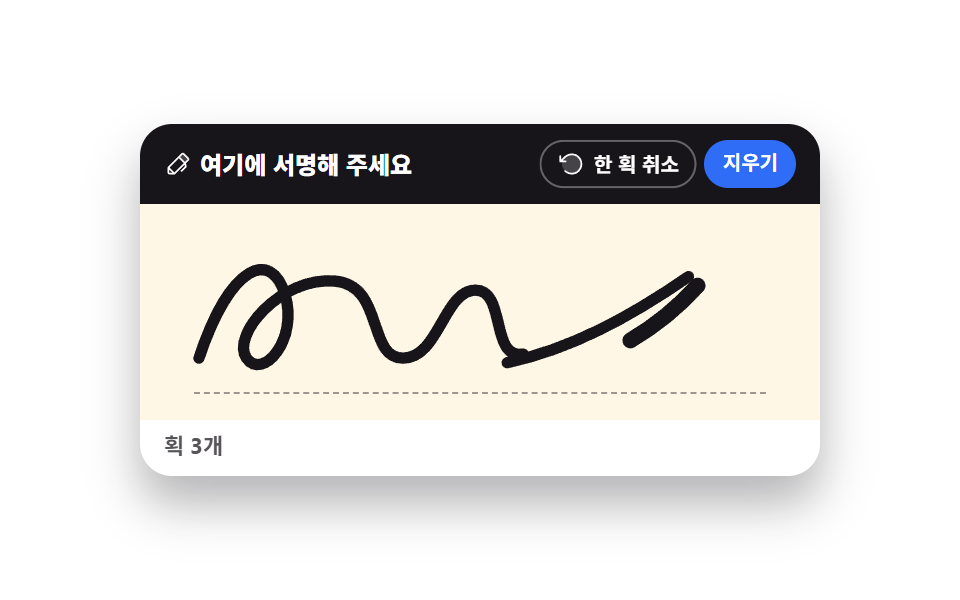
08入力欄に合わせる手書き
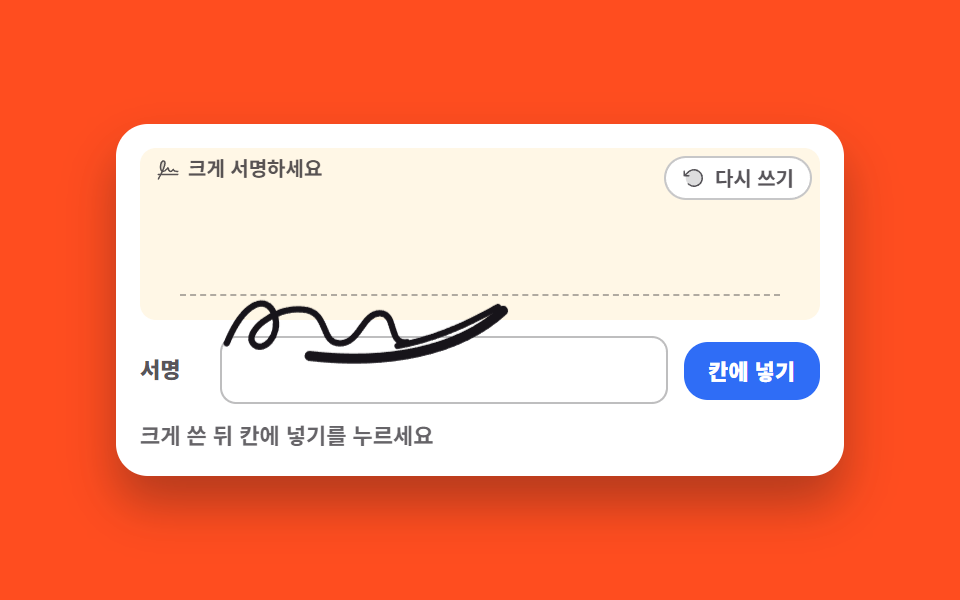
大きく書いた手書きを入力欄の高さに合わせて縮め、その場に収めます。
使いどころ申込書の氏名欄の自筆入力、口座開設フォームの署名欄
getBoundingClientRecttransform-originscale
<main class="stage">
<div class="fi is-demo" id="fit">
  <div class="fi__card">
    <div class="fi__pad" id="pad">
      <p class="fi__hint"><svg xmlns="http://www.w3.org/2000/svg" viewBox="0 0 256 256" fill="currentColor" class="fi__ico" aria-hidden="true"><path d="M67.41,142.56C35.71,129.52,45.41,32.07,78,32,111.82,32.05,92,90.26,67.41,142.56Z" opacity="0.2"/><path d="M232,168H63.86c2.66-5.24,5.33-10.63,8-16.11,14.94,1.65,32.58-8.78,52.66-31.14,5,13.46,14.45,30.93,30.58,31.25,9.09.18,18.11-5.2,27.42-16.37C189.31,143.75,203.3,152,232,152a8,8,0,0,0,0-16c-30.43,0-39.43-10.45-40-16.11a7.67,7.67,0,0,0-5.46-7.75,8.14,8.14,0,0,0-9.25,3.49C165.23,134.17,158,136.06,155.38,136c-8.26-.16-16.66-19.52-19.54-33.42a8,8,0,0,0-14.09-3.37C101.54,124.55,88,133.08,79.57,135.29,88.06,116.42,94.4,99.85,98.46,85.9c6.82-23.44,7.32-39.83,1.51-50.1-3-5.38-9.34-11.8-22.06-11.8C61.85,24,49.18,39.18,43.14,65.65c-3.59,15.71-4.18,33.21-1.62,48s7.87,25.55,15.59,31.94c-3.73,7.72-7.53,15.26-11.23,22.41H24a8,8,0,0,0,0,16H37.41c-11.32,21-20.12,35.64-20.26,35.88a8,8,0,1,0,13.71,8.24c.15-.26,11.27-18.79,24.7-44.12H232a8,8,0,0,0,0-16ZM58.74,69.21C62.72,51.74,70.43,40,77.91,40c5.33,0,7.1,1.86,8.13,3.67,3,5.33,6.52,24.19-21.66,86.39C56.12,118.78,53.31,93,58.74,69.21Z"/></svg><span>大きく署名してください</span></p>
      <button type="button" class="fi__reset" id="resetBtn"><svg xmlns="http://www.w3.org/2000/svg" viewBox="0 0 256 256" fill="currentColor" class="fi__ico" aria-hidden="true"><path d="M216,128a88,88,0,1,1-88-88A88,88,0,0,1,216,128Z" opacity="0.2"/><path d="M224,128a96,96,0,0,1-94.71,96H128A95.38,95.38,0,0,1,62.1,197.8a8,8,0,0,1,11-11.63A80,80,0,1,0,71.43,71.39a3.07,3.07,0,0,1-.26.25L44.59,96H72a8,8,0,0,1,0,16H24a8,8,0,0,1-8-8V56a8,8,0,0,1,16,0V85.8L60.25,60A96,96,0,0,1,224,128Z"/></svg><span>書き直す</span></button>
      <div class="fi__inkWrap" id="inkWrap">
        <canvas class="fi__ink" id="ink" role="img" aria-label="大きな署名パッド"></canvas>
        <svg class="fi__ghost" viewBox="0 0 300 76" preserveAspectRatio="none" aria-hidden="true">
          <path class="fi__stroke fi__stroke--a" pathLength="100" d="M26,49 C40,15 58,10 64,26 C70,43 54,58 47,49 C40,41 62,20 86,22 C108,23 100,49 116,49 C132,49 134,25 148,25 C162,25 154,51 170,48"/>
          <path class="fi__stroke fi__stroke--b" pathLength="100" d="M162,51 C190,46 216,35 242,20"/>
          <path class="fi__stroke fi__stroke--c" pathLength="100" d="M246,23 C210,56 152,66 92,59"/>
        </svg>
      </div>
      <span class="fi__rule" aria-hidden="true"></span>
    </div>
    <div class="fi__form">
      <span class="fi__formLabel" id="slotLabel">署名</span>
      <div class="fi__slot" id="slot" role="img" aria-labelledby="slotLabel">
        <svg class="fi__ok" viewBox="0 0 24 24" aria-hidden="true"><polyline points="5,13 10,18 19,7"/></svg>
      </div>
      <button type="button" class="fi__fit" id="fitBtn">欄に入れる</button>
    </div>
    <p class="fi__live">
      <span class="fi__liveReal" id="live" aria-live="polite">大きく書いてから欄に入れるを押してください</span>
      <span class="fi__liveDemo fi__liveDemo--before" aria-hidden="true">大きく書いてから欄に入れるを押してください</span>
      <span class="fi__liveDemo fi__liveDemo--after" aria-hidden="true">欄の高さに合わせて0.34倍で収めました</span>
    </p>
  </div>
</div>
</main>@use "../../../../site/static/demo-tokens" as *;
// 폼 칸에 맞춰 앉는 손글씨 — 손글씨는 크게 써야 잘 써지고 폼 인풋은 작다.
// 그래서 큰 판에 쓴 뒤 잉크의 바운딩 박스와 칸의 getBoundingClientRect 를 재서 scale 로 줄여 칸에 앉힌다.
// 실제 동작은 canvas 2D + Pointer Events 가 하고, 격자 미리보기(.is-demo)는 canvas 를 감춘 뒤
// 같은 모양의 SVG 경로를 stroke-dashoffset 으로 긋고 래퍼를 transform 으로 줄인다.
// demo.py 는 CSS 애니메이션 시계로 프레임을 뽑으므로 canvas 로 그린 획은 24장이 전부 같다.
$duration: $dur-loop;
$easing: $ease-out;
$color: $subject-ink;
@include stage($stage-orange);
.fi { display: flex; justify-content: center; width: 100%; }
.fi__card {
width: min(100%, 340px); background: $stage-paper; border-radius: $r-card;
box-shadow: $shadow-raised; padding: $sp-3; display: grid; gap: $sp-2;
}
// 줄어든 손글씨가 아래 폼 줄 위로 넘어와 앉아야 하므로 판을 위에 쌓는다 (DOM 순서상 폼 줄이 나중이다)
.fi__pad {
position: relative; z-index: 2; background: $subject-cream; border-radius: $r-sm;
aspect-ratio: 300 / 76; touch-action: none;
}
.fi__hint {
position: absolute; left: $sp-2; top: $sp-1; margin: 0;
display: flex; align-items: center; gap: $sp-1;
font-weight: 700; font-size: clamp(9px, 2.4vw, 10px); line-height: 1.3; color: rgba(23, 20, 26, .72);
}
.fi__ico { width: 12px; height: 12px; flex: 0 0 auto; }
.fi__reset {
position: absolute; right: $sp-1; top: $sp-1; z-index: 3;
display: inline-flex; align-items: center; gap: $sp-1; cursor: pointer;
border: 1px solid rgba(23, 20, 26, .24); background: $stage-paper; color: rgba(23, 20, 26, .72);
border-radius: $r-pill; font-family: inherit; font-weight: 700;
font-size: clamp(9px, 2.4vw, 10px); line-height: 1.2; padding: $sp-1 $sp-2;
}
.fi__reset:focus-visible, .fi__fit:focus-visible { outline: 3px solid $subject-blue; outline-offset: 2px; }
.fi__inkWrap {
position: absolute; inset: 0; pointer-events: none;
// 붙는 지점이 있는 요소다 — 글씨가 칸의 왼쪽 기준선에 맞아야 하므로 줄어드는 축을 자기 중심이 아닌 왼쪽 가운데에 둔다
transform-origin: left center;
}
.fi__ink, .fi__ghost { position: absolute; inset: 0; width: 100%; height: 100%; }
.fi__ghost { display: none; fill: none; }
.fi__stroke {
stroke: $color; stroke-width: 5; stroke-linecap: round; stroke-linejoin: round;
stroke-dasharray: 100; stroke-dashoffset: 100;
}
.fi__stroke--c { stroke-width: 8; }
.fi__rule {
position: absolute; left: 6%; right: 6%; bottom: 14%; height: 0;
border-bottom: 1px dashed rgba(23, 20, 26, .34);
}
.fi__form { display: flex; align-items: center; gap: $sp-2; }
.fi__formLabel {
width: 32px; flex: 0 0 auto; font-weight: 800;
font-size: clamp(9px, 2.4vw, 11px); line-height: 1.3; color: rgba(23, 20, 26, .72);
}
.fi__slot {
flex: 1 1 auto; min-height: 32px; display: flex; align-items: center; justify-content: flex-end;
padding: 0 $sp-2; border: 1px solid rgba(23, 20, 26, .28); border-radius: $r-sm; background: $stage-paper;
}
.fi__slot.is-filled { border-color: $subject-blue; }
.fi__ok {
width: 14px; height: 14px; flex: 0 0 auto; opacity: 0; transform: scale(.4);
fill: none; stroke: $subject-blue; stroke-width: 3; stroke-linecap: round; stroke-linejoin: round;
}
.fi__slot.is-filled .fi__ok { opacity: 1; transform: scale(1); }
.fi__fit {
flex: 0 0 auto; cursor: pointer; border: 0; background: $subject-blue; color: $stage-paper;
border-radius: $r-control; font-family: inherit; font-weight: 800;
font-size: clamp(9px, 2.4vw, 11px); line-height: 1.2; padding: $sp-2 $sp-3;
}
.fi__live {
position: relative; margin: 0; font-weight: 700;
font-size: clamp(9px, 2.4vw, 11px); line-height: 1.4; color: rgba(23, 20, 26, .66); white-space: nowrap;
}
.fi__liveDemo { display: none; position: absolute; left: 0; top: 0; opacity: 0; }
// ── 미리보기 루프 (2s): 0~44% 큰 손글씨가 그어지고(마지막 획은 굵고 빠르게), 46~52% 「칸에 넣기」가 눌리고,
// 54~76% 글씨 덩어리가 왼쪽 가운데를 축으로 줄며 아래 칸으로 들어간다(poster 후보).
// 78~86% 칸 테두리가 컷으로 바뀌고 확인 표시가 팝, 86~94% 칸 안에서 글씨가 되감겨 지워지고
// 94~98% 빈 판이 제자리로 돌아온다 — 지우는 장면을 작게 줄여 poster 가 그쪽으로 가지 않게 했다.
.fi.is-demo .fi__ink { visibility: hidden; }
.fi.is-demo .fi__ghost { display: block; }
.fi.is-demo .fi__stroke {
animation-duration: $duration;
animation-timing-function: $easing;
animation-iteration-count: infinite;
}
.fi.is-demo .fi__stroke--a { animation-name: fiDrawA; }
.fi.is-demo .fi__stroke--b { animation-name: fiDrawB; }
.fi.is-demo .fi__stroke--c { animation-name: fiDrawC; }
@keyframes fiDrawA {
0%, 2% { stroke-dashoffset: 100; }
22%, 86% { stroke-dashoffset: 0; }
94%, 100% { stroke-dashoffset: 100; }
}
@keyframes fiDrawB {
0%, 22% { stroke-dashoffset: 100; }
34%, 86% { stroke-dashoffset: 0; }
92%, 100% { stroke-dashoffset: 100; }
}
@keyframes fiDrawC {
0%, 36% { stroke-dashoffset: 100; }
44%, 86% { stroke-dashoffset: 0; }
90%, 100% { stroke-dashoffset: 100; }
}
.fi.is-demo .fi__inkWrap {
animation-name: fiFit;
animation-duration: $duration;
animation-timing-function: $ease-spring;
animation-iteration-count: infinite;
}
@keyframes fiFit {
0%, 54% { transform: translate(0, 0) scale(1); }
76%, 94% { transform: translate($sp-10, 82%) scale(.34); }
98%, 100% { transform: translate(0, 0) scale(1); }
}
// 54% 에 줄어들기 시작하므로 46~52% 에 버튼이 자기 중심에서 눌린다 (transform-origin 기본값 50% 50%)
.fi.is-demo .fi__fit {
animation-name: fiPress;
animation-duration: $duration;
animation-timing-function: $ease-pop;
animation-iteration-count: infinite;
}
@keyframes fiPress {
0%, 46% { transform: scale(1); }
49% { transform: scale(.88); }
54%, 100% { transform: scale(1); }
}
// 칸 테두리는 반투명 겹침이 없게 컷으로 갈아 끼운다
.fi.is-demo .fi__slot {
animation-name: fiSlotOk;
animation-duration: $duration;
animation-timing-function: steps(1, end);
animation-iteration-count: infinite;
}
@keyframes fiSlotOk {
0%, 77% { border-color: rgba(23, 20, 26, .28); }
78%, 87% { border-color: $subject-blue; }
88%, 100% { border-color: rgba(23, 20, 26, .28); }
}
// 확인 표시는 자기 중심에서 팝 — 컷만 쓰면 프레임이 모자라니 scale 움직임을 함께 준다
.fi.is-demo .fi__ok {
animation-name: fiOkPop;
animation-duration: $duration;
animation-timing-function: $ease-pop;
animation-iteration-count: infinite;
}
@keyframes fiOkPop {
0%, 77% { opacity: 0; transform: scale(.4); }
78% { opacity: 1; transform: scale(.4); }
84%, 87% { opacity: 1; transform: scale(1); }
88%, 100% { opacity: 0; transform: scale(.4); }
}
// 미리보기 문구는 실제 값이 아니므로 실제 칸은 자리만 남기고(color: transparent) 두 문장을 컷으로 갈아 끼운다
.fi.is-demo .fi__liveReal { color: transparent; }
.fi.is-demo .fi__liveDemo {
display: block;
animation-duration: $duration;
animation-timing-function: steps(1, end);
animation-iteration-count: infinite;
}
.fi.is-demo .fi__liveDemo--before { animation-name: fiSayBefore; }
.fi.is-demo .fi__liveDemo--after { animation-name: fiSayAfter; }
@keyframes fiSayBefore {
0%, 77% { opacity: 1; }
78%, 93% { opacity: 0; }
94%, 100% { opacity: 1; }
}
@keyframes fiSayAfter {
0%, 77% { opacity: 0; }
78%, 93% { opacity: 1; }
94%, 100% { opacity: 0; }
}
@media (max-width: 340px) {
.fi__card { padding: $sp-2; }
.fi__formLabel { width: 28px; }
.fi__fit { padding: $sp-2; }
}
@media (prefers-reduced-motion: reduce) {
.fi.is-demo .fi__stroke,
.fi.is-demo .fi__inkWrap,
.fi.is-demo .fi__fit,
.fi.is-demo .fi__slot,
.fi.is-demo .fi__ok,
.fi.is-demo .fi__liveDemo { animation: none !important; }
// 움직임 없이 글씨가 칸에 앉은 최종 상태로 세운다
.fi.is-demo .fi__stroke { stroke-dashoffset: 0 !important; }
.fi.is-demo .fi__inkWrap { transform: translate($sp-10, 82%) scale(.34) !important; }
.fi.is-demo .fi__slot { border-color: $subject-blue !important; }
.fi.is-demo .fi__ok { opacity: 1 !important; transform: scale(1) !important; }
.fi.is-demo .fi__liveDemo--before { opacity: 0 !important; }
.fi.is-demo .fi__liveDemo--after { opacity: 1 !important; }
}html, body {
margin: 0;
overflow: hidden;
}
.stage {
box-sizing: border-box;
min-height: 100vh;
display: grid;
place-items: center;
margin: 0;
background: #ff4d1f;
font-family: -apple-system, "Segoe UI", "Noto Sans KR", sans-serif;
padding: clamp(8px, 4vw, 24px);
}
.fi {
display: flex;
justify-content: center;
width: 100%;
}
.fi__card {
width: min(100%, 340px);
background: #ffffff;
border-radius: 16px;
box-shadow: 0 14px 24px rgba(23, 20, 26, 0.32);
padding: 12px;
display: grid;
gap: 8px;
}
.fi__pad {
position: relative;
z-index: 2;
background: #fff7e6;
border-radius: 8px;
aspect-ratio: 300/76;
touch-action: none;
}
.fi__hint {
position: absolute;
left: 8px;
top: 4px;
margin: 0;
display: flex;
align-items: center;
gap: 4px;
font-weight: 700;
font-size: clamp(9px, 2.4vw, 10px);
line-height: 1.3;
color: rgba(23, 20, 26, 0.72);
}
.fi__ico {
width: 12px;
height: 12px;
flex: 0 0 auto;
}
.fi__reset {
position: absolute;
right: 4px;
top: 4px;
z-index: 3;
display: inline-flex;
align-items: center;
gap: 4px;
cursor: pointer;
border: 1px solid rgba(23, 20, 26, 0.24);
background: #ffffff;
color: rgba(23, 20, 26, 0.72);
border-radius: 999px;
font-family: inherit;
font-weight: 700;
font-size: clamp(9px, 2.4vw, 10px);
line-height: 1.2;
padding: 4px 8px;
}
.fi__reset:focus-visible, .fi__fit:focus-visible {
outline: 3px solid #2f6df6;
outline-offset: 2px;
}
.fi__inkWrap {
position: absolute;
inset: 0;
pointer-events: none;
transform-origin: left center;
}
.fi__ink, .fi__ghost {
position: absolute;
inset: 0;
width: 100%;
height: 100%;
}
.fi__ghost {
display: none;
fill: none;
}
.fi__stroke {
stroke: #17141a;
stroke-width: 5;
stroke-linecap: round;
stroke-linejoin: round;
stroke-dasharray: 100;
stroke-dashoffset: 100;
}
.fi__stroke--c {
stroke-width: 8;
}
.fi__rule {
position: absolute;
left: 6%;
right: 6%;
bottom: 14%;
height: 0;
border-bottom: 1px dashed rgba(23, 20, 26, 0.34);
}
.fi__form {
display: flex;
align-items: center;
gap: 8px;
}
.fi__formLabel {
width: 32px;
flex: 0 0 auto;
font-weight: 800;
font-size: clamp(9px, 2.4vw, 11px);
line-height: 1.3;
color: rgba(23, 20, 26, 0.72);
}
.fi__slot {
flex: 1 1 auto;
min-height: 32px;
display: flex;
align-items: center;
justify-content: flex-end;
padding: 0 8px;
border: 1px solid rgba(23, 20, 26, 0.28);
border-radius: 8px;
background: #ffffff;
}
.fi__slot.is-filled {
border-color: #2f6df6;
}
.fi__ok {
width: 14px;
height: 14px;
flex: 0 0 auto;
opacity: 0;
transform: scale(0.4);
fill: none;
stroke: #2f6df6;
stroke-width: 3;
stroke-linecap: round;
stroke-linejoin: round;
}
.fi__slot.is-filled .fi__ok {
opacity: 1;
transform: scale(1);
}
.fi__fit {
flex: 0 0 auto;
cursor: pointer;
border: 0;
background: #2f6df6;
color: #ffffff;
border-radius: 12px;
font-family: inherit;
font-weight: 800;
font-size: clamp(9px, 2.4vw, 11px);
line-height: 1.2;
padding: 8px 12px;
}
.fi__live {
position: relative;
margin: 0;
font-weight: 700;
font-size: clamp(9px, 2.4vw, 11px);
line-height: 1.4;
color: rgba(23, 20, 26, 0.66);
white-space: nowrap;
}
.fi__liveDemo {
display: none;
position: absolute;
left: 0;
top: 0;
opacity: 0;
}
.fi.is-demo .fi__ink {
visibility: hidden;
}
.fi.is-demo .fi__ghost {
display: block;
}
.fi.is-demo .fi__stroke {
animation-duration: 2s;
animation-timing-function: ease-out;
animation-iteration-count: infinite;
}
.fi.is-demo .fi__stroke--a {
animation-name: fiDrawA;
}
.fi.is-demo .fi__stroke--b {
animation-name: fiDrawB;
}
.fi.is-demo .fi__stroke--c {
animation-name: fiDrawC;
}
@keyframes fiDrawA {
0%, 2% {
stroke-dashoffset: 100;
}
22%, 86% {
stroke-dashoffset: 0;
}
94%, 100% {
stroke-dashoffset: 100;
}
}
@keyframes fiDrawB {
0%, 22% {
stroke-dashoffset: 100;
}
34%, 86% {
stroke-dashoffset: 0;
}
92%, 100% {
stroke-dashoffset: 100;
}
}
@keyframes fiDrawC {
0%, 36% {
stroke-dashoffset: 100;
}
44%, 86% {
stroke-dashoffset: 0;
}
90%, 100% {
stroke-dashoffset: 100;
}
}
.fi.is-demo .fi__inkWrap {
animation-name: fiFit;
animation-duration: 2s;
animation-timing-function: cubic-bezier(0.2, 0.8, 0.2, 1);
animation-iteration-count: infinite;
}
@keyframes fiFit {
0%, 54% {
transform: translate(0, 0) scale(1);
}
76%, 94% {
transform: translate(40px, 82%) scale(0.34);
}
98%, 100% {
transform: translate(0, 0) scale(1);
}
}
.fi.is-demo .fi__fit {
animation-name: fiPress;
animation-duration: 2s;
animation-timing-function: cubic-bezier(0.2, 1.4, 0.4, 1);
animation-iteration-count: infinite;
}
@keyframes fiPress {
0%, 46% {
transform: scale(1);
}
49% {
transform: scale(0.88);
}
54%, 100% {
transform: scale(1);
}
}
.fi.is-demo .fi__slot {
animation-name: fiSlotOk;
animation-duration: 2s;
animation-timing-function: steps(1, end);
animation-iteration-count: infinite;
}
@keyframes fiSlotOk {
0%, 77% {
border-color: rgba(23, 20, 26, 0.28);
}
78%, 87% {
border-color: #2f6df6;
}
88%, 100% {
border-color: rgba(23, 20, 26, 0.28);
}
}
.fi.is-demo .fi__ok {
animation-name: fiOkPop;
animation-duration: 2s;
animation-timing-function: cubic-bezier(0.2, 1.4, 0.4, 1);
animation-iteration-count: infinite;
}
@keyframes fiOkPop {
0%, 77% {
opacity: 0;
transform: scale(0.4);
}
78% {
opacity: 1;
transform: scale(0.4);
}
84%, 87% {
opacity: 1;
transform: scale(1);
}
88%, 100% {
opacity: 0;
transform: scale(0.4);
}
}
.fi.is-demo .fi__liveReal {
color: transparent;
}
.fi.is-demo .fi__liveDemo {
display: block;
animation-duration: 2s;
animation-timing-function: steps(1, end);
animation-iteration-count: infinite;
}
.fi.is-demo .fi__liveDemo--before {
animation-name: fiSayBefore;
}
.fi.is-demo .fi__liveDemo--after {
animation-name: fiSayAfter;
}
@keyframes fiSayBefore {
0%, 77% {
opacity: 1;
}
78%, 93% {
opacity: 0;
}
94%, 100% {
opacity: 1;
}
}
@keyframes fiSayAfter {
0%, 77% {
opacity: 0;
}
78%, 93% {
opacity: 1;
}
94%, 100% {
opacity: 0;
}
}
@media (max-width: 340px) {
.fi__card {
padding: 8px;
}
.fi__formLabel {
width: 28px;
}
.fi__fit {
padding: 8px;
}
}
@media (prefers-reduced-motion: reduce) {
.fi.is-demo .fi__stroke,
.fi.is-demo .fi__inkWrap,
.fi.is-demo .fi__fit,
.fi.is-demo .fi__slot,
.fi.is-demo .fi__ok,
.fi.is-demo .fi__liveDemo {
animation: none !important;
}
.fi.is-demo .fi__stroke {
stroke-dashoffset: 0 !important;
}
.fi.is-demo .fi__inkWrap {
transform: translate(40px, 82%) scale(0.34) !important;
}
.fi.is-demo .fi__slot {
border-color: #2f6df6 !important;
}
.fi.is-demo .fi__ok {
opacity: 1 !important;
transform: scale(1) !important;
}
.fi.is-demo .fi__liveDemo--before {
opacity: 0 !important;
}
.fi.is-demo .fi__liveDemo--after {
opacity: 1 !important;
}
}var root = document.getElementById('fit');
var pad = document.getElementById('pad');
var canvas = document.getElementById('ink');
var wrap = document.getElementById('inkWrap');
var slot = document.getElementById('slot');
var live = document.getElementById('live');
var ctx = canvas.getContext('2d');
var strokes = [], current = null, fitted = false;
var SLOT_INSET = 8;
var HINT = '大きく書いてから欄に入れるを押してください';
var DONE = '欄の高さに合わせて%s倍で収めました';
// 고DPI 대응 — 배킹 스토어를 devicePixelRatio 배로 키우고 좌표계는 CSS 픽셀 그대로 쓴다
function resize() {
var r = pad.getBoundingClientRect(), dpr = window.devicePixelRatio || 1;
canvas.width = Math.round(r.width * dpr);
canvas.height = Math.round(r.height * dpr);
ctx.setTransform(dpr, 0, 0, dpr, 0, 0);
repaint();
}
function repaint() {
ctx.clearRect(0, 0, canvas.width, canvas.height);
ctx.lineCap = 'round';
ctx.lineJoin = 'round';
ctx.strokeStyle = '#17141a';
ctx.lineWidth = 3.4;
for (var s = 0; s < strokes.length; s++) {
var pts = strokes[s];
ctx.beginPath();
ctx.moveTo(pts[0].x, pts[0].y);
for (var i = 1; i < pts.length; i++) {
// 두 점의 중점을 제어점으로 삼아 꺾임을 둥글게 잇는다
ctx.quadraticCurveTo(pts[i].x, pts[i].y, (pts[i].x + pts[i - 1].x) / 2, (pts[i].y + pts[i - 1].y) / 2);
}
ctx.stroke();
}
}
// 잉크가 실제로 차지한 사각형 — 판 전체가 아니라 이 높이를 칸 높이에 맞춘다
function inkBounds() {
var box = null;
for (var s = 0; s < strokes.length; s++) {
for (var i = 0; i < strokes[s].length; i++) {
var p = strokes[s][i];
if (!box) { box = { left: p.x, right: p.x, top: p.y, bottom: p.y }; continue; }
box.left = Math.min(box.left, p.x);
box.right = Math.max(box.right, p.x);
box.top = Math.min(box.top, p.y);
box.bottom = Math.max(box.bottom, p.y);
}
}
return box;
}
function fitToSlot() {
var box = inkBounds();
if (!box) { return; }
// 목표 칸의 크기를 짐작하지 않고 getBoundingClientRect 로 실측한다 — 폰트·줄높이가 바뀌어도 따라간다
var slotRect = slot.getBoundingClientRect(), padRect = pad.getBoundingClientRect();
var inkHeight = Math.max(8, box.bottom - box.top);
var scaleValue = (slotRect.height * 0.72) / inkHeight;
var targetX = slotRect.left - padRect.left + SLOT_INSET;
var targetY = slotRect.top - padRect.top + slotRect.height / 2;
// transform-origin 이 왼쪽 가운데다 — 글씨가 칸의 왼쪽 기준선에 맞아야 하므로 축을 자기 중심이 아닌 왼쪽에 둔다
var tx = targetX - box.left * scaleValue;
var ty = targetY - (padRect.height / 2 + (box.top + inkHeight / 2 - padRect.height / 2) * scaleValue);
wrap.style.transform = 'translate(' + tx.toFixed(1) + 'px, ' + ty.toFixed(1) + 'px) scale(' + scaleValue.toFixed(3) + ')';
slot.classList.add('is-filled');
live.textContent = DONE.replace('%s', scaleValue.toFixed(2));
fitted = true;
}
function unfit() {
wrap.style.transform = '';
slot.classList.remove('is-filled');
live.textContent = HINT;
fitted = false;
}
function toLocal(e) {
var r = canvas.getBoundingClientRect();
return { x: e.clientX - r.left, y: e.clientY - r.top };
}
pad.addEventListener('pointerdown', function (e) {
root.classList.remove('is-demo');
if (fitted) { unfit(); }
current = [toLocal(e)];
strokes.push(current);
pad.setPointerCapture(e.pointerId);
});
pad.addEventListener('pointermove', function (e) {
if (!current) { return; }
current.push(toLocal(e));
repaint();
});
window.addEventListener('pointerup', function () { current = null; });
document.getElementById('fitBtn').addEventListener('click', function () { root.classList.remove('is-demo'); fitToSlot(); });
document.getElementById('resetBtn').addEventListener('click', function () {
root.classList.remove('is-demo');
strokes = [];
unfit();
repaint();
});
window.addEventListener('resize', resize);
resize();// SignatureFitInput — vanilla 판(run/287/demo/08-signature-fit-to-input/index.html) 의 React 포트.
// 큰 판에 canvas 2D 로 손글씨를 받고, 잉크가 실제로 차지한 사각형과 목표 칸의 getBoundingClientRect 를
// 재서 scale 값을 구한 뒤 transform-origin: left center 를 축으로 줄여 폼 칸에 앉힌다. 값·수치는 vanilla 와 같다.
import { useCallback, useEffect, useRef, useState } from "react";
import type { CSSProperties, PointerEvent as ReactPointerEvent } from "react";
import styles from "./SignatureFitInput.module.scss";
export type SignatureFitInputProps = {
duration?: number;
easing?: string;
color?: string;
};
type Vars = CSSProperties & { "--duration"?: string; "--easing"?: string; "--color"?: string };
type Point = { x: number; y: number };
type InkBox = { left: number; right: number; top: number; bottom: number };
type Box<T> = { current: T };
const SLOT_INSET = 8;
const HINT = "크게 쓴 뒤 칸에 넣기를 누르세요";
const DONE = "칸 높이에 맞춰 %s 배로 앉혔습니다";
function applyRepaint(ctx: CanvasRenderingContext2D, strokes: Point[][], width: number, height: number): void {
ctx.clearRect(0, 0, width, height);
ctx.lineCap = "round";
ctx.lineJoin = "round";
ctx.strokeStyle = "#17141a";
ctx.lineWidth = 3.4;
for (const pts of strokes) {
ctx.beginPath();
ctx.moveTo(pts[0].x, pts[0].y);
for (let i = 1; i < pts.length; i++) {
// 두 점의 중점을 제어점으로 삼아 꺾임을 둥글게 잇는다
ctx.quadraticCurveTo(pts[i].x, pts[i].y, (pts[i].x + pts[i - 1].x) / 2, (pts[i].y + pts[i - 1].y) / 2);
}
ctx.stroke();
}
}
// 잉크가 실제로 차지한 사각형 — 판 전체가 아니라 이 높이를 칸 높이에 맞춘다
function inkBounds(strokes: Point[][]): InkBox | null {
let box: InkBox | null = null;
for (const pts of strokes) {
for (const p of pts) {
if (!box) {
box = { left: p.x, right: p.x, top: p.y, bottom: p.y };
continue;
}
box.left = Math.min(box.left, p.x);
box.right = Math.max(box.right, p.x);
box.top = Math.min(box.top, p.y);
box.bottom = Math.max(box.bottom, p.y);
}
}
return box;
}
export default function SignatureFitInput({
duration = 2000,
easing = "ease-out",
color = "#17141a",
}: SignatureFitInputProps) {
const padRef = useRef<HTMLDivElement | null>(null);
const canvasRef = useRef<HTMLCanvasElement | null>(null);
const slotRef = useRef<HTMLDivElement | null>(null);
const strokesRef = useRef<Point[][]>([]) as Box<Point[][]>;
const currentRef = useRef<Point[] | null>(null);
const [demo, setDemo] = useState(true);
const [fitted, setFitted] = useState(false);
const [fitTransform, setFitTransform] = useState("");
const [message, setMessage] = useState(HINT);
const vars: Vars = { "--duration": `${duration}ms`, "--easing": easing, "--color": color };
const repaint = useCallback(() => {
const canvas = canvasRef.current;
if (!canvas) return;
const ctx = canvas.getContext("2d");
if (!ctx) return;
applyRepaint(ctx, strokesRef.current, canvas.width, canvas.height);
}, [strokesRef]);
// 고DPI 대응 — 배킹 스토어를 devicePixelRatio 배로 키우고 좌표계는 CSS 픽셀 그대로 쓴다
const resize = useCallback(() => {
const pad = padRef.current;
const canvas = canvasRef.current;
if (!pad || !canvas) return;
const ctx = canvas.getContext("2d");
if (!ctx) return;
const r = pad.getBoundingClientRect();
const dpr = window.devicePixelRatio || 1;
canvas.width = Math.round(r.width * dpr);
canvas.height = Math.round(r.height * dpr);
ctx.setTransform(dpr, 0, 0, dpr, 0, 0);
repaint();
}, [repaint]);
useEffect(() => {
resize();
window.addEventListener("resize", resize);
return () => window.removeEventListener("resize", resize);
}, [resize]);
useEffect(() => {
function onUp(): void {
currentRef.current = null;
}
window.addEventListener("pointerup", onUp);
return () => window.removeEventListener("pointerup", onUp);
}, []);
function toLocal(event: ReactPointerEvent<HTMLDivElement>): Point | null {
const canvas = canvasRef.current;
if (!canvas) return null;
const r = canvas.getBoundingClientRect();
return { x: event.clientX - r.left, y: event.clientY - r.top };
}
function unfit(): void {
setFitTransform("");
setFitted(false);
setMessage(HINT);
}
function fitToSlot(): void {
setDemo(false);
const box = inkBounds(strokesRef.current);
const pad = padRef.current;
const slot = slotRef.current;
if (!box || !pad || !slot) return;
// 목표 칸의 크기를 짐작하지 않고 getBoundingClientRect 로 실측한다 — 폰트·줄높이가 바뀌어도 따라간다
const slotRect = slot.getBoundingClientRect();
const padRect = pad.getBoundingClientRect();
const inkHeight = Math.max(8, box.bottom - box.top);
const scaleValue = (slotRect.height * 0.72) / inkHeight;
const targetX = slotRect.left - padRect.left + SLOT_INSET;
const targetY = slotRect.top - padRect.top + slotRect.height / 2;
// transform-origin 이 왼쪽 가운데다 — 글씨가 칸의 왼쪽 기준선에 맞아야 하므로 축을 자기 중심이 아닌 왼쪽에 둔다
const tx = targetX - box.left * scaleValue;
const ty = targetY - (padRect.height / 2 + (box.top + inkHeight / 2 - padRect.height / 2) * scaleValue);
setFitTransform(`translate(${tx.toFixed(1)}px, ${ty.toFixed(1)}px) scale(${scaleValue.toFixed(3)})`);
setFitted(true);
setMessage(DONE.replace("%s", scaleValue.toFixed(2)));
}
function onPointerDown(event: ReactPointerEvent<HTMLDivElement>): void {
setDemo(false);
if (fitted) unfit();
const point = toLocal(event);
const pad = padRef.current;
if (!point || !pad) return;
currentRef.current = [point];
strokesRef.current.push(currentRef.current);
pad.setPointerCapture(event.pointerId);
}
function onPointerMove(event: ReactPointerEvent<HTMLDivElement>): void {
const current = currentRef.current;
if (!current) return;
const point = toLocal(event);
if (!point) return;
current.push(point);
repaint();
}
function onReset(): void {
setDemo(false);
strokesRef.current = [];
unfit();
repaint();
}
const cls = [styles.root, demo ? styles.isDemo : ""].filter(Boolean).join(" ");
const slotCls = [styles.slot, fitted ? styles.isFilled : ""].filter(Boolean).join(" ");
return (
<main className={styles.stage}>
<div className={cls} style={vars}>
<div className={styles.card}>
<div className={styles.pad} ref={padRef} onPointerDown={onPointerDown} onPointerMove={onPointerMove}>
<p className={styles.hint}>
<svg xmlns="http://www.w3.org/2000/svg" viewBox="0 0 256 256" fill="currentColor" className={styles.ico} aria-hidden="true"><path d="M67.41,142.56C35.71,129.52,45.41,32.07,78,32,111.82,32.05,92,90.26,67.41,142.56Z" opacity="0.2"/><path d="M232,168H63.86c2.66-5.24,5.33-10.63,8-16.11,14.94,1.65,32.58-8.78,52.66-31.14,5,13.46,14.45,30.93,30.58,31.25,9.09.18,18.11-5.2,27.42-16.37C189.31,143.75,203.3,152,232,152a8,8,0,0,0,0-16c-30.43,0-39.43-10.45-40-16.11a7.67,7.67,0,0,0-5.46-7.75,8.14,8.14,0,0,0-9.25,3.49C165.23,134.17,158,136.06,155.38,136c-8.26-.16-16.66-19.52-19.54-33.42a8,8,0,0,0-14.09-3.37C101.54,124.55,88,133.08,79.57,135.29,88.06,116.42,94.4,99.85,98.46,85.9c6.82-23.44,7.32-39.83,1.51-50.1-3-5.38-9.34-11.8-22.06-11.8C61.85,24,49.18,39.18,43.14,65.65c-3.59,15.71-4.18,33.21-1.62,48s7.87,25.55,15.59,31.94c-3.73,7.72-7.53,15.26-11.23,22.41H24a8,8,0,0,0,0,16H37.41c-11.32,21-20.12,35.64-20.26,35.88a8,8,0,1,0,13.71,8.24c.15-.26,11.27-18.79,24.7-44.12H232a8,8,0,0,0,0-16ZM58.74,69.21C62.72,51.74,70.43,40,77.91,40c5.33,0,7.1,1.86,8.13,3.67,3,5.33,6.52,24.19-21.66,86.39C56.12,118.78,53.31,93,58.74,69.21Z"/></svg>
<span>크게 서명하세요</span>
</p>
<button type="button" className={styles.reset} onClick={onReset}>
<svg xmlns="http://www.w3.org/2000/svg" viewBox="0 0 256 256" fill="currentColor" className={styles.ico} aria-hidden="true"><path d="M216,128a88,88,0,1,1-88-88A88,88,0,0,1,216,128Z" opacity="0.2"/><path d="M224,128a96,96,0,0,1-94.71,96H128A95.38,95.38,0,0,1,62.1,197.8a8,8,0,0,1,11-11.63A80,80,0,1,0,71.43,71.39a3.07,3.07,0,0,1-.26.25L44.59,96H72a8,8,0,0,1,0,16H24a8,8,0,0,1-8-8V56a8,8,0,0,1,16,0V85.8L60.25,60A96,96,0,0,1,224,128Z"/></svg>
<span>다시 쓰기</span>
</button>
<div className={styles.inkWrap} style={fitTransform ? { transform: fitTransform } : undefined}>
<canvas className={styles.ink} ref={canvasRef} role="img" aria-label="큰 서명 판"></canvas>
<svg className={styles.ghost} viewBox="0 0 300 76" preserveAspectRatio="none" aria-hidden="true">
<path className={`${styles.stroke} ${styles.strokeA}`} pathLength="100" d="M26,49 C40,15 58,10 64,26 C70,43 54,58 47,49 C40,41 62,20 86,22 C108,23 100,49 116,49 C132,49 134,25 148,25 C162,25 154,51 170,48"/>
<path className={`${styles.stroke} ${styles.strokeB}`} pathLength="100" d="M162,51 C190,46 216,35 242,20"/>
<path className={`${styles.stroke} ${styles.strokeC}`} pathLength="100" d="M246,23 C210,56 152,66 92,59"/>
</svg>
</div>
<span className={styles.rule} aria-hidden="true"></span>
</div>
<div className={styles.form}>
<span className={styles.formLabel} id="slotLabel">서명</span>
<div className={slotCls} ref={slotRef} role="img" aria-labelledby="slotLabel">
<svg className={styles.ok} viewBox="0 0 24 24" aria-hidden="true"><polyline points="5,13 10,18 19,7"/></svg>
</div>
<button type="button" className={styles.fit} onClick={fitToSlot}>칸에 넣기</button>
</div>
<p className={styles.live}>
<span className={styles.liveReal} aria-live="polite">{message}</span>
<span className={`${styles.liveDemo} ${styles.sayBefore}`} aria-hidden="true">크게 쓴 뒤 칸에 넣기를 누르세요</span>
<span className={`${styles.liveDemo} ${styles.sayAfter}`} aria-hidden="true">칸 높이에 맞춰 0.34 배로 앉혔습니다</span>
</p>
</div>
</div>
</main>
);
}08 入力欄に合わせる手書き — 計測 累積面積 7.096% · 動いたフレーム 23/23GODRICH オリジナル · SCSS と React は zip に同梱 · canvas 手書きサインと描画UI 9選 — ライブラリなし
このデモが属する記事
 canvas 手書きサインと描画UI 9選 — ライブラリなしcanvas 手書きサインとは、契約書や同意書で手書きの署名を受け取る入力欄のことです。この9つはライブラリなしで、ブラウザ標準のcanvasとPointer Eventsだけを使って作ってあります。ファイルを貼り付ければ、筆圧による太さ・ この記事のデモをすべて見る