08方眼の床を動かして拡大する
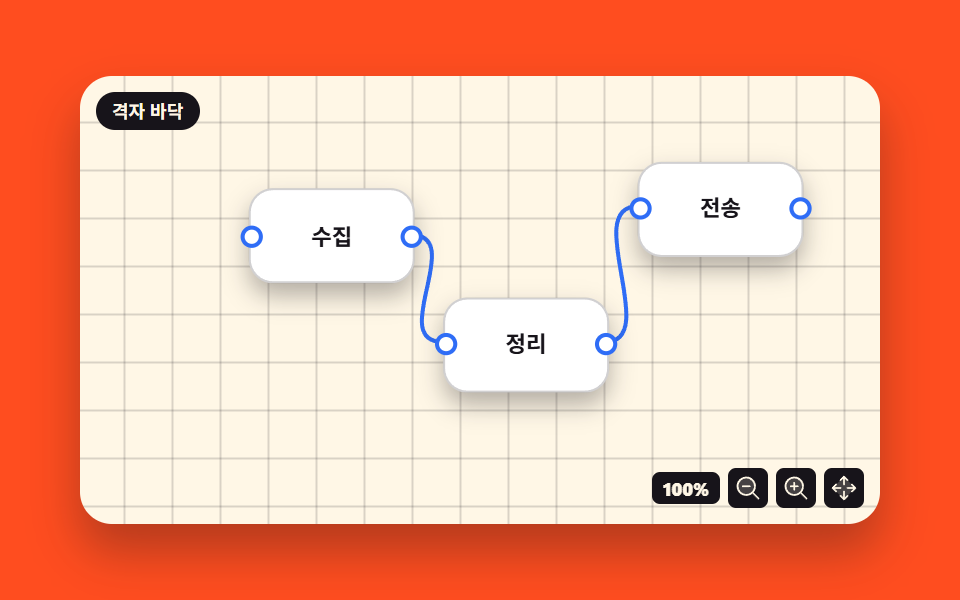
床を引くと方眼模様がノードと同じ距離だけ一緒に動き、拡大ボタンを押すと画面の中心を軸に倍率が上がります。
使いどころ広い図面の見渡し、ホワイトボード画面
background-positiontransform: scaletransform-origin
<main class="stage">
<div class="ng is-demo" id="ng">
  <div class="ng__canvas" id="ngCanvas">
    <div class="ng__world" id="ngWorld">
      <svg class="ng__wires" viewBox="0 0 400 224" preserveAspectRatio="none" aria-hidden="true">
        <path class="ng__wire" d="M168,81 C196,81 156,134 184,134"/>
        <path class="ng__wire" d="M264,134 C292,134 252,67 280,67"/>
      </svg>
      <div class="ng__node ng__node--a">
        <span class="ng__port ng__port--in" aria-hidden="true"></span>
        <span class="ng__name">収集</span>
        <span class="ng__port ng__port--out" aria-hidden="true"></span>
      </div>
      <div class="ng__node ng__node--b">
        <span class="ng__port ng__port--in" aria-hidden="true"></span>
        <span class="ng__name">整形</span>
        <span class="ng__port ng__port--out" aria-hidden="true"></span>
      </div>
      <div class="ng__node ng__node--c">
        <span class="ng__port ng__port--in" aria-hidden="true"></span>
        <span class="ng__name">送出</span>
        <span class="ng__port ng__port--out" aria-hidden="true"></span>
      </div>
    </div>
    <span class="ng__chip">方眼の床</span>
    <div class="ng__tools">
      <span class="ng__zoom" title="倍率">
        <b class="ng__zoomNow" id="ngZoom">100%</b>
        <b class="ng__zoomAlt" aria-hidden="true">120%</b>
      </span>
      <button type="button" class="ng__btn" id="ngOut" aria-label="縮小"><svg xmlns="http://www.w3.org/2000/svg" viewBox="0 0 256 256" fill="currentColor" class="ng__ico" aria-hidden="true"><path d="M192,112a80,80,0,1,1-80-80A80,80,0,0,1,192,112Z" opacity="0.2"/><path d="M229.66,218.34,179.6,168.28a88.21,88.21,0,1,0-11.32,11.31l50.06,50.07a8,8,0,0,0,11.32-11.32ZM40,112a72,72,0,1,1,72,72A72.08,72.08,0,0,1,40,112Zm112,0a8,8,0,0,1-8,8H80a8,8,0,0,1,0-16h64A8,8,0,0,1,152,112Z"/></svg></button>
      <button type="button" class="ng__btn" id="ngIn" aria-label="拡大"><svg xmlns="http://www.w3.org/2000/svg" viewBox="0 0 256 256" fill="currentColor" class="ng__ico" aria-hidden="true"><path d="M192,112a80,80,0,1,1-80-80A80,80,0,0,1,192,112Z" opacity="0.2"/><path d="M229.66,218.34,179.6,168.28a88.21,88.21,0,1,0-11.32,11.31l50.06,50.07a8,8,0,0,0,11.32-11.32ZM40,112a72,72,0,1,1,72,72A72.08,72.08,0,0,1,40,112Zm112,0a8,8,0,0,1-8,8H120v24a8,8,0,0,1-16,0V120H80a8,8,0,0,1,0-16h24V80a8,8,0,0,1,16,0v24h24A8,8,0,0,1,152,112Z"/></svg></button>
      <button type="button" class="ng__btn" id="ngHome" aria-label="中央へ"><svg xmlns="http://www.w3.org/2000/svg" viewBox="0 0 256 256" fill="currentColor" class="ng__ico" aria-hidden="true"><path d="M232,128,128,232,24,128,128,24Z" opacity="0.2"/><path d="M90.34,61.66a8,8,0,0,1,0-11.32l32-32a8,8,0,0,1,11.32,0l32,32a8,8,0,0,1-11.32,11.32L136,43.31V96a8,8,0,0,1-16,0V43.31L101.66,61.66A8,8,0,0,1,90.34,61.66Zm64,132.68L136,212.69V160a8,8,0,0,0-16,0v52.69l-18.34-18.35a8,8,0,0,0-11.32,11.32l32,32a8,8,0,0,0,11.32,0l32-32a8,8,0,0,0-11.32-11.32Zm83.32-72-32-32a8,8,0,0,0-11.32,11.32L212.69,120H160a8,8,0,0,0,0,16h52.69l-18.35,18.34a8,8,0,0,0,11.32,11.32l32-32A8,8,0,0,0,237.66,122.34ZM43.31,136H96a8,8,0,0,0,0-16H43.31l18.35-18.34A8,8,0,0,0,50.34,90.34l-32,32a8,8,0,0,0,0,11.32l32,32a8,8,0,0,0,11.32-11.32Z"/></svg></button>
    </div>
  </div>
</div>
</main>@use "../../../../site/static/demo-tokens" as *;
$duration: $dur-loop; // 미리보기 루프 주기 — 설정 `초`(2s) 고정
$easing: $ease-out; // 단추 눌림 피드백 (팬은 아래 주석대로 일부러 linear)
$color: $subject-blue; // 연결선·포트 색
@include stage($stage-orange);
.ng { width: min(100%, 400px); }
.ng__canvas {
position: relative; width: 100%; height: clamp(140px, 48vw, 224px); overflow: hidden;
border-radius: $r-card; box-shadow: $shadow-raised;
background-color: $subject-cream;
// 격자 무늬 = 세로줄 한 겹 + 가로줄 한 겹. 타일 크기는 background-size 가 정한다
background-image: linear-gradient(to right, rgba($subject-ink, .16) 1px, transparent 1px),
linear-gradient(to bottom, rgba($subject-ink, .16) 1px, transparent 1px);
background-size: 24px 24px;
background-position: 0 0;
touch-action: none; cursor: grab;
}
.ng__world {
position: absolute; inset: 0;
// 확대는 무대 한가운데를 축으로 — 모서리에 두면 커지는 게 아니라 옆으로 밀리며 늘어나 보인다
transform-origin: 50% 50%;
transform: translate(0, 0) scale(1);
}
.ng__wires { position: absolute; inset: 0; display: block; width: 100%; height: 100%; }
.ng__wire { fill: none; stroke: $color; stroke-width: 2; stroke-linecap: round; vector-effect: non-scaling-stroke; }
.ng__node {
position: absolute; width: 20%; height: 20%;
display: flex; align-items: center; justify-content: center;
background: $stage-paper; border: 1px solid rgba($subject-ink, .20);
border-radius: $r-control; box-shadow: $shadow-press;
}
.ng__node--a { left: 22%; top: 26%; }
.ng__node--b { left: 46%; top: 50%; }
.ng__node--c { left: 70%; top: 20%; }
.ng__name { font-weight: 700; font-size: clamp(8px, 2.4vw, 11px); line-height: 1.1; color: $subject-ink; }
.ng__port {
position: absolute; top: 50%; width: 7px; height: 7px; border-radius: 50%;
background: $stage-paper; border: 2px solid $color; transform: translateY(-50%);
}
.ng__port--in { left: -5px; }
.ng__port--out { right: -5px; }
.ng__chip {
position: absolute; left: 8px; top: 8px;
background: $subject-ink; color: $subject-cream; border-radius: $r-pill;
padding: $sp-1 $sp-2; font-weight: 700; font-size: 9px; line-height: 1.2;
}
.ng__tools { position: absolute; right: 8px; bottom: 8px; display: flex; align-items: center; gap: $sp-1; }
.ng__zoom {
position: relative; display: inline-block; width: 34px; height: 16px;
background: $subject-ink; border-radius: $r-xs;
}
.ng__zoomNow, .ng__zoomAlt {
position: absolute; inset: 0; display: flex; align-items: center; justify-content: center;
font-weight: 800; font-size: 9px; line-height: 1; color: $subject-cream;
}
.ng__zoomAlt { opacity: 0; }
.ng__btn {
display: inline-flex; align-items: center; justify-content: center;
width: 20px; height: 20px; padding: 0; border: none; border-radius: $r-xs;
background: $subject-ink; color: $subject-cream; cursor: pointer;
transition: transform $dur-instant $easing;
}
.ng__btn:active { transform: scale(.92); } // 자기 중심에서 눌린다
.ng__ico { width: 14px; height: 14px; }
// ── 미리보기 루프 (2s) : 천천히 팬 → 한 번 확대 → 88% 에 복귀
// ⚠ 격자(background-position)와 노드 레이어(translate)는 **같은 키프레임 시각·같은 이징**이어야 한다.
// 한쪽만 ease 를 쓰면 중간 프레임에서 거리가 어긋나 바닥이 미끄러져 보인다 — 그래서 둘 다 linear
.ng.is-demo .ng__canvas {
animation-name: ngGridPan; animation-duration: $duration; animation-timing-function: linear;
animation-iteration-count: infinite; animation-fill-mode: backwards;
}
.ng.is-demo .ng__world {
animation-name: ngWorldPan; animation-duration: $duration; animation-timing-function: linear;
animation-iteration-count: infinite; animation-fill-mode: backwards;
}
@keyframes ngGridPan {
0% { background-position: 0 0; }
40%, 80% { background-position: -36px -20px; }
88%, 100% { background-position: 0 0; }
}
@keyframes ngWorldPan {
0% { transform: translate(0, 0) scale(1); }
40% { transform: translate(-36px, -20px) scale(1); }
50%, 80% { transform: translate(-36px, -20px) scale(1.2); }
88%, 100% { transform: translate(0, 0) scale(1); }
}
// 배율 글자는 컷으로 갈아끼운다 — 두 겹을 페이드로 섞으면 반투명 유령 프레임이 생긴다
.ng.is-demo .ng__zoomNow, .ng.is-demo .ng__zoomAlt {
animation-duration: $duration; animation-timing-function: steps(1, end);
animation-iteration-count: infinite; animation-fill-mode: backwards;
}
.ng.is-demo .ng__zoomNow { animation-name: ngLabelBase; }
.ng.is-demo .ng__zoomAlt { animation-name: ngLabelZoom; }
@keyframes ngLabelBase { 0% { opacity: 1; } 45.5% { opacity: 0; } 83.5% { opacity: 1; } 100% { opacity: 1; } }
@keyframes ngLabelZoom { 0% { opacity: 0; } 45.5% { opacity: 1; } 83.5% { opacity: 0; } 100% { opacity: 0; } }
// ── 320×200 폰 (BD9). 좁은 쪽에서는 값을 올리지 않는다
@media (max-width: 340px), (max-height: 220px) {
.ng__chip { font-size: 8px; padding: 0 $sp-1; }
.ng__btn { width: 18px; height: 18px; }
.ng__ico { width: 12px; height: 12px; }
.ng__zoom { width: 30px; height: 14px; }
.ng__zoomNow, .ng__zoomAlt { font-size: 8px; }
}
@media (prefers-reduced-motion: reduce) {
.ng.is-demo .ng__canvas,
.ng.is-demo .ng__world,
.ng.is-demo .ng__zoomNow,
.ng.is-demo .ng__zoomAlt { animation: none !important; }
.ng.is-demo .ng__world { transform: translate(0, 0) scale(1) !important; }
.ng.is-demo .ng__canvas { background-position: 0 0 !important; }
.ng.is-demo .ng__zoomNow { opacity: 1 !important; }
.ng.is-demo .ng__zoomAlt { opacity: 0 !important; }
.ng__btn { transition: none !important; }
}html, body {
margin: 0;
overflow: hidden;
}
.stage {
box-sizing: border-box;
min-height: 100vh;
display: grid;
place-items: center;
margin: 0;
background: #ff4d1f;
font-family: -apple-system, "Segoe UI", "Noto Sans KR", sans-serif;
padding: clamp(8px, 4vw, 24px);
}
.ng {
width: min(100%, 400px);
}
.ng__canvas {
position: relative;
width: 100%;
height: clamp(140px, 48vw, 224px);
overflow: hidden;
border-radius: 16px;
box-shadow: 0 14px 24px rgba(23, 20, 26, 0.32);
background-color: #fff7e6;
background-image: linear-gradient(to right, rgba(23, 20, 26, 0.16) 1px, transparent 1px), linear-gradient(to bottom, rgba(23, 20, 26, 0.16) 1px, transparent 1px);
background-size: 24px 24px;
background-position: 0 0;
touch-action: none;
cursor: grab;
}
.ng__world {
position: absolute;
inset: 0;
transform-origin: 50% 50%;
transform: translate(0, 0) scale(1);
}
.ng__wires {
position: absolute;
inset: 0;
display: block;
width: 100%;
height: 100%;
}
.ng__wire {
fill: none;
stroke: #2f6df6;
stroke-width: 2;
stroke-linecap: round;
vector-effect: non-scaling-stroke;
}
.ng__node {
position: absolute;
width: 20%;
height: 20%;
display: flex;
align-items: center;
justify-content: center;
background: #ffffff;
border: 1px solid rgba(23, 20, 26, 0.2);
border-radius: 12px;
box-shadow: 0 6px 12px rgba(23, 20, 26, 0.32);
}
.ng__node--a {
left: 22%;
top: 26%;
}
.ng__node--b {
left: 46%;
top: 50%;
}
.ng__node--c {
left: 70%;
top: 20%;
}
.ng__name {
font-weight: 700;
font-size: clamp(8px, 2.4vw, 11px);
line-height: 1.1;
color: #17141a;
}
.ng__port {
position: absolute;
top: 50%;
width: 7px;
height: 7px;
border-radius: 50%;
background: #ffffff;
border: 2px solid #2f6df6;
transform: translateY(-50%);
}
.ng__port--in {
left: -5px;
}
.ng__port--out {
right: -5px;
}
.ng__chip {
position: absolute;
left: 8px;
top: 8px;
background: #17141a;
color: #fff7e6;
border-radius: 999px;
padding: 4px 8px;
font-weight: 700;
font-size: 9px;
line-height: 1.2;
}
.ng__tools {
position: absolute;
right: 8px;
bottom: 8px;
display: flex;
align-items: center;
gap: 4px;
}
.ng__zoom {
position: relative;
display: inline-block;
width: 34px;
height: 16px;
background: #17141a;
border-radius: 4px;
}
.ng__zoomNow, .ng__zoomAlt {
position: absolute;
inset: 0;
display: flex;
align-items: center;
justify-content: center;
font-weight: 800;
font-size: 9px;
line-height: 1;
color: #fff7e6;
}
.ng__zoomAlt {
opacity: 0;
}
.ng__btn {
display: inline-flex;
align-items: center;
justify-content: center;
width: 20px;
height: 20px;
padding: 0;
border: none;
border-radius: 4px;
background: #17141a;
color: #fff7e6;
cursor: pointer;
transition: transform 140ms ease-out;
}
.ng__btn:active {
transform: scale(0.92);
}
.ng__ico {
width: 14px;
height: 14px;
}
.ng.is-demo .ng__canvas {
animation-name: ngGridPan;
animation-duration: 2s;
animation-timing-function: linear;
animation-iteration-count: infinite;
animation-fill-mode: backwards;
}
.ng.is-demo .ng__world {
animation-name: ngWorldPan;
animation-duration: 2s;
animation-timing-function: linear;
animation-iteration-count: infinite;
animation-fill-mode: backwards;
}
@keyframes ngGridPan {
0% {
background-position: 0 0;
}
40%, 80% {
background-position: -36px -20px;
}
88%, 100% {
background-position: 0 0;
}
}
@keyframes ngWorldPan {
0% {
transform: translate(0, 0) scale(1);
}
40% {
transform: translate(-36px, -20px) scale(1);
}
50%, 80% {
transform: translate(-36px, -20px) scale(1.2);
}
88%, 100% {
transform: translate(0, 0) scale(1);
}
}
.ng.is-demo .ng__zoomNow, .ng.is-demo .ng__zoomAlt {
animation-duration: 2s;
animation-timing-function: steps(1, end);
animation-iteration-count: infinite;
animation-fill-mode: backwards;
}
.ng.is-demo .ng__zoomNow {
animation-name: ngLabelBase;
}
.ng.is-demo .ng__zoomAlt {
animation-name: ngLabelZoom;
}
@keyframes ngLabelBase {
0% {
opacity: 1;
}
45.5% {
opacity: 0;
}
83.5% {
opacity: 1;
}
100% {
opacity: 1;
}
}
@keyframes ngLabelZoom {
0% {
opacity: 0;
}
45.5% {
opacity: 1;
}
83.5% {
opacity: 0;
}
100% {
opacity: 0;
}
}
@media (max-width: 340px), (max-height: 220px) {
.ng__chip {
font-size: 8px;
padding: 0 4px;
}
.ng__btn {
width: 18px;
height: 18px;
}
.ng__ico {
width: 12px;
height: 12px;
}
.ng__zoom {
width: 30px;
height: 14px;
}
.ng__zoomNow, .ng__zoomAlt {
font-size: 8px;
}
}
@media (prefers-reduced-motion: reduce) {
.ng.is-demo .ng__canvas,
.ng.is-demo .ng__world,
.ng.is-demo .ng__zoomNow,
.ng.is-demo .ng__zoomAlt {
animation: none !important;
}
.ng.is-demo .ng__world {
transform: translate(0, 0) scale(1) !important;
}
.ng.is-demo .ng__canvas {
background-position: 0 0 !important;
}
.ng.is-demo .ng__zoomNow {
opacity: 1 !important;
}
.ng.is-demo .ng__zoomAlt {
opacity: 0 !important;
}
.ng__btn {
transition: none !important;
}
}(function () {
var ng = document.getElementById('ng');
var canvas = document.getElementById('ngCanvas');
var world = document.getElementById('ngWorld');
var zoomText = document.getElementById('ngZoom');
var panX = 0, panY = 0, zoom = 1, from = null;
function apply() {
// 격자와 노드 레이어에 같은 거리를 준다. 한쪽만 움직이면 바닥이 노드 밑에서 미끄러져 보인다
canvas.style.backgroundPosition = panX + 'px ' + panY + 'px';
world.style.transform = 'translate(' + panX + 'px, ' + panY + 'px) scale(' + zoom + ')';
zoomText.textContent = Math.round(zoom * 100) + '%';
}
function stopDemo() { ng.classList.remove('is-demo'); }
function setZoom(next) {
stopDemo();
zoom = Math.min(2, Math.max(0.6, Math.round(next * 10) / 10));
apply();
}
canvas.addEventListener('pointerdown', function (e) {
if (e.target.closest('.ng__btn')) return;
stopDemo();
from = { x: e.clientX - panX, y: e.clientY - panY };
canvas.setPointerCapture(e.pointerId);
e.preventDefault();
});
canvas.addEventListener('pointermove', function (e) {
if (!from) return;
panX = e.clientX - from.x;
panY = e.clientY - from.y;
apply();
});
function stop() { from = null; }
canvas.addEventListener('pointerup', stop);
canvas.addEventListener('pointercancel', stop);
document.getElementById('ngIn').addEventListener('click', function () { setZoom(zoom + 0.2); });
document.getElementById('ngOut').addEventListener('click', function () { setZoom(zoom - 0.2); });
document.getElementById('ngHome').addEventListener('click', function () {
stopDemo(); panX = 0; panY = 0; zoom = 1; apply();
});
})();import { useRef, useState } from "react";
import styles from "./PanZoomCanvas.module.scss";
export type PanZoomCanvasProps = { duration?: number; easing?: string; color?: string };
// ambient 에 React 이벤트 제네릭이 없다 — 필요한 것만 로컬 타입으로 선언한다
type PointerEvt = { clientX: number; clientY: number; pointerId: number; target: any; preventDefault(): void };
type Box<T> = { current: T };
const NODES = [
{ key: "a", name: "수집", left: "22%", top: "26%", inPort: false, outPort: true },
{ key: "b", name: "정리", left: "46%", top: "50%", inPort: true, outPort: true },
{ key: "c", name: "전송", left: "70%", top: "20%", inPort: true, outPort: false },
];
const WIRES = ["M168,81 C196,81 156,134 184,134", "M264,134 C292,134 252,67 280,67"];
export default function PanZoomCanvas({ duration = 2000, easing = "ease-out", color = "#2f6df6" }: PanZoomCanvasProps) {
const [demo, setDemo] = useState(true);
const [pan, setPan] = useState<{ x: number; y: number }>({ x: 0, y: 0 });
const [zoom, setZoom] = useState(1);
const canvasRef = useRef<any>(null) as Box<any>;
const fromRef = useRef<{ x: number; y: number } | null>(null) as Box<{ x: number; y: number } | null>;
const rootStyle = { "--ngDur": duration + "ms", "--ngEase": easing, "--ngColor": color } as { [k: string]: string };
// 격자와 노드 레이어에 **같은 거리**를 준다. 한쪽만 움직이면 바닥이 노드 밑에서 미끄러져 보인다
const gridStyle = demo ? undefined : { backgroundPosition: pan.x + "px " + pan.y + "px" };
const worldStyle = demo ? undefined : { transform: "translate(" + pan.x + "px, " + pan.y + "px) scale(" + zoom + ")" };
function step(next: number) {
setDemo(false);
setZoom(Math.min(2, Math.max(0.6, Math.round(next * 10) / 10)));
}
function onDown(e: PointerEvt) {
if (e.target && e.target.closest && e.target.closest("button")) return;
setDemo(false);
fromRef.current = { x: e.clientX - pan.x, y: e.clientY - pan.y };
canvasRef.current.setPointerCapture(e.pointerId);
e.preventDefault();
}
function onMove(e: PointerEvt) {
const f = fromRef.current;
if (!f) return;
setPan({ x: e.clientX - f.x, y: e.clientY - f.y });
}
function onUp() {
fromRef.current = null;
}
return (
<main className={styles.stage}>
<div className={demo ? styles.ng + " " + styles.isDemo : styles.ng} style={rootStyle}>
<div
className={styles.canvas}
ref={(el: any) => { canvasRef.current = el; }}
style={gridStyle}
onPointerDown={onDown}
onPointerMove={onMove}
onPointerUp={onUp}
onPointerCancel={onUp}
>
<div className={styles.world} style={worldStyle}>
<svg className={styles.wires} viewBox="0 0 400 224" preserveAspectRatio="none" aria-hidden="true">
{WIRES.map((d) => (
<path key={d} className={styles.wire} d={d} />
))}
</svg>
{NODES.map((n) => (
<div key={n.key} className={styles.node} style={{ left: n.left, top: n.top }}>
{n.inPort ? <span className={styles.port + " " + styles.portIn} aria-hidden="true" /> : null}
<span className={styles.name}>{n.name}</span>
{n.outPort ? <span className={styles.port + " " + styles.portOut} aria-hidden="true" /> : null}
</div>
))}
</div>
<span className={styles.chip}>격자 바닥</span>
<div className={styles.tools}>
<span className={styles.zoom} title="배율">
<b className={styles.zoomNow}>{Math.round(zoom * 100) + "%"}</b>
<b className={styles.zoomAlt} aria-hidden="true">120%</b>
</span>
<button type="button" className={styles.btn} aria-label="축소" onClick={() => step(zoom - 0.2)}>
<svg xmlns="http://www.w3.org/2000/svg" viewBox="0 0 256 256" fill="currentColor" className={styles.ico} aria-hidden="true"><path d="M192,112a80,80,0,1,1-80-80A80,80,0,0,1,192,112Z" opacity="0.2"/><path d="M229.66,218.34,179.6,168.28a88.21,88.21,0,1,0-11.32,11.31l50.06,50.07a8,8,0,0,0,11.32-11.32ZM40,112a72,72,0,1,1,72,72A72.08,72.08,0,0,1,40,112Zm112,0a8,8,0,0,1-8,8H80a8,8,0,0,1,0-16h64A8,8,0,0,1,152,112Z"/></svg>
</button>
<button type="button" className={styles.btn} aria-label="확대" onClick={() => step(zoom + 0.2)}>
<svg xmlns="http://www.w3.org/2000/svg" viewBox="0 0 256 256" fill="currentColor" className={styles.ico} aria-hidden="true"><path d="M192,112a80,80,0,1,1-80-80A80,80,0,0,1,192,112Z" opacity="0.2"/><path d="M229.66,218.34,179.6,168.28a88.21,88.21,0,1,0-11.32,11.31l50.06,50.07a8,8,0,0,0,11.32-11.32ZM40,112a72,72,0,1,1,72,72A72.08,72.08,0,0,1,40,112Zm112,0a8,8,0,0,1-8,8H120v24a8,8,0,0,1-16,0V120H80a8,8,0,0,1,0-16h24V80a8,8,0,0,1,16,0v24h24A8,8,0,0,1,152,112Z"/></svg>
</button>
<button
type="button"
className={styles.btn}
aria-label="가운데로"
onClick={() => { setDemo(false); setPan({ x: 0, y: 0 }); setZoom(1); }}
>
<svg xmlns="http://www.w3.org/2000/svg" viewBox="0 0 256 256" fill="currentColor" className={styles.ico} aria-hidden="true"><path d="M232,128,128,232,24,128,128,24Z" opacity="0.2"/><path d="M90.34,61.66a8,8,0,0,1,0-11.32l32-32a8,8,0,0,1,11.32,0l32,32a8,8,0,0,1-11.32,11.32L136,43.31V96a8,8,0,0,1-16,0V43.31L101.66,61.66A8,8,0,0,1,90.34,61.66Zm64,132.68L136,212.69V160a8,8,0,0,0-16,0v52.69l-18.34-18.35a8,8,0,0,0-11.32,11.32l32,32a8,8,0,0,0,11.32,0l32-32a8,8,0,0,0-11.32-11.32Zm83.32-72-32-32a8,8,0,0,0-11.32,11.32L212.69,120H160a8,8,0,0,0,0,16h52.69l-18.35,18.34a8,8,0,0,0,11.32,11.32l32-32A8,8,0,0,0,237.66,122.34ZM43.31,136H96a8,8,0,0,0,0-16H43.31l18.35-18.34A8,8,0,0,0,50.34,90.34l-32,32a8,8,0,0,0,0,11.32l32,32a8,8,0,0,0,11.32-11.32Z"/></svg>
</button>
</div>
</div>
</div>
</main>
);
}08 方眼の床を動かして拡大する — 計測 累積面積 54.162% · 動いたフレーム 15/23GODRICH オリジナル · SCSS と React は zip に同梱 · フローチャート デザイン 9種 — ノードを線でつなぐ画面
このデモが属する記事
 フローチャート デザイン 9種 — ノードを線でつなぐ画面フローチャート デザインとは、処理の箱を画面に並べ、その箱どうしを線でつないで仕事の流れを見せる画面の作り方です。ここに置いた9つは、ライブラリを一つも使わずHTMLとSCSS、数行のJavaScriptだけで組んだノードグラフの部品で、箱 この記事のデモをすべて見る