02凡例を消すと残りの棒が伸び直す
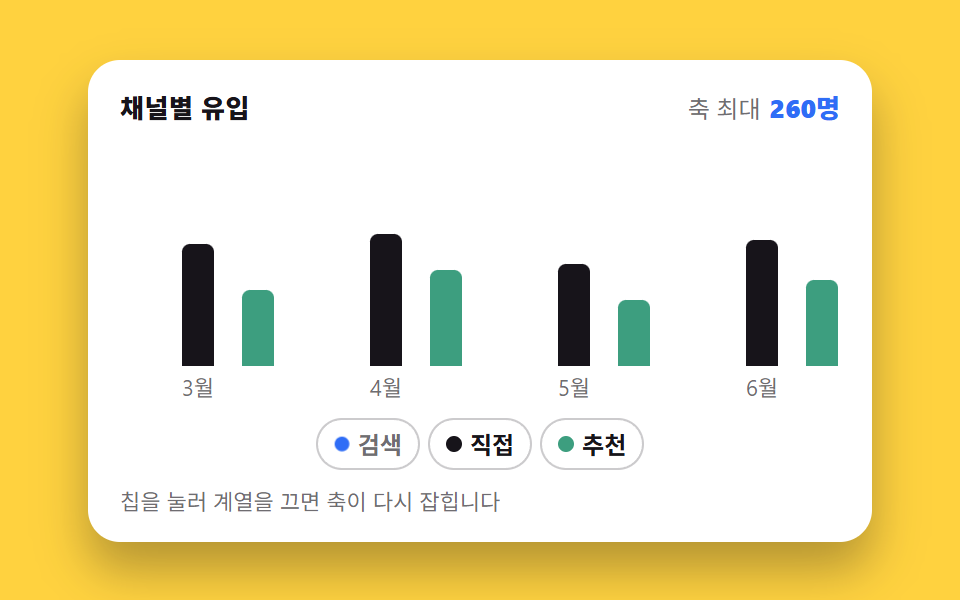
凡例のチップを押すとその系列の棒が底まで畳まれ、残った系列の最大値が計算し直されて他の棒が一斉に高く伸びます。
使いどころ系列が3つ以上あって一つずつ外して見たいチャネル比較チャート
aria-pressed@propertytransform-origin
<main class="stage">
  <figure class="lg is-demo" id="lg">
    <figcaption class="lg__head">
      <span class="lg__title">チャネル別流入</span>
      <span class="lg__sum"><span class="lg__lab">軸の最大</span> <span class="lg__val" aria-hidden="true"><i class="lg__n"></i>人</span></span>
    </figcaption>
    <div class="lg__plot" role="img" aria-label="チャネル別流入の棒グラフ。検索が最も高く5月の460人が最大、直接は最大260人、紹介は最大190人">
      <div class="lg__groups">
        <div class="lg__group">
          <i class="lg__bar" data-s="0" data-m="0" style="--b:91.3%"></i>
          <i class="lg__bar" data-s="1" data-m="0" style="--b:52.2%"></i>
          <i class="lg__bar" data-s="2" data-m="0" style="--b:32.6%"></i>
        </div>
        <div class="lg__group">
          <i class="lg__bar" data-s="0" data-m="1" style="--b:82.6%"></i>
          <i class="lg__bar" data-s="1" data-m="1" style="--b:56.5%"></i>
          <i class="lg__bar" data-s="2" data-m="1" style="--b:41.3%"></i>
        </div>
        <div class="lg__group">
          <i class="lg__bar" data-s="0" data-m="2" style="--b:100%"></i>
          <i class="lg__bar" data-s="1" data-m="2" style="--b:43.5%"></i>
          <i class="lg__bar" data-s="2" data-m="2" style="--b:28.3%"></i>
        </div>
        <div class="lg__group">
          <i class="lg__bar" data-s="0" data-m="3" style="--b:95.7%"></i>
          <i class="lg__bar" data-s="1" data-m="3" style="--b:54.3%"></i>
          <i class="lg__bar" data-s="2" data-m="3" style="--b:37%"></i>
        </div>
      </div>
      <div class="lg__axis" aria-hidden="true">
        <span>3月</span><span>4月</span><span>5月</span><span>6月</span>
      </div>
    </div>
    <div class="lg__chips" role="group" aria-label="表示する系列を選ぶ">
      <button class="lg__chip" type="button" data-s="0" aria-pressed="true"><i class="lg__dot" aria-hidden="true"></i>検索</button>
      <button class="lg__chip" type="button" data-s="1" aria-pressed="true"><i class="lg__dot" aria-hidden="true"></i>直接</button>
      <button class="lg__chip" type="button" data-s="2" aria-pressed="true"><i class="lg__dot" aria-hidden="true"></i>紹介</button>
    </div>
    <p class="lg__hint">チップを押して系列を消すと軸が引き直されます</p>
    <span class="sr" aria-live="polite" id="lg-live">軸の最大 460</span>
    <div class="sr"><table>
      <caption>チャネル別の月間流入</caption>
      <thead><tr><th>月</th><th>検索</th><th>直接</th><th>紹介</th></tr></thead>
      <tbody>
        <tr><th>3月</th><td>420</td><td>240</td><td>150</td></tr>
        <tr><th>4月</th><td>380</td><td>260</td><td>190</td></tr>
        <tr><th>5月</th><td>460</td><td>200</td><td>130</td></tr>
        <tr><th>6月</th><td>440</td><td>250</td><td>170</td></tr>
      </tbody>
    </table></div>
  </figure>
</main>@use "../../../../site/static/demo-tokens" as *;
// 막대 높이를 <percentage> 로 등록한다. 등록해야만 --h 가 "값"이 되어
// transition 이 숫자를 보간한다 — 등록 안 된 커스텀 속성은 문자열 토큰이라
// 값이 바뀌면 그냥 뛰어넘는다 (이 데모의 주제).
@property --h {
syntax: "<percentage>";
initial-value: 0%;
inherits: false;
}
// 자동 루프가 굴리는 축 배율. 계승되어 모든 막대의 --h 계산에 들어간다.
// 루프에서도 정적 경로와 같은 원리(--h 보간)로 막대가 자란다.
@property --g {
syntax: "<number>";
initial-value: 1;
inherits: true;
}
// 축 최대값. 글자로 두면 루프에서 갈아 끼울 수 없어 「검색을 껐는데 축은 460」 같은
// 프레임이 남는다 — 정수로 등록해 카운터로 그린다
@property --mx {
syntax: "<integer>";
initial-value: 460;
inherits: true;
}
$duration: $dur-base;
$easing: $ease-spring;
$color: $subject-blue;
// 흰 카드 위의 막대는 $subject-mint 그대로는 흰 바탕과 1.86:1 이라
// WCAG 1.4.11(비텍스트 3:1)에 못 미친다. 토큰 두 개를 섞어 3.28:1 로 내린 판을 쓴다
$mint-bar: mix($subject-mint, $subject-ink, 72%);
$axis-max: 460; // 켜진 계열 전체의 최댓값
$axis-next: 260; // 검색을 뺐을 때 남은 계열의 최댓값
$axis-scale: 1.7692; // 460 / 260 — 축이 다시 잡히는 배율 (calc 안에서는 변수 치환이 안 되니 밖에서 계산해 둔다)
@include stage($stage-yellow);
.sr {
position: absolute;
width: 1px;
height: 1px;
overflow: hidden;
clip-path: inset(50%);
white-space: nowrap;
}
.lg {
--g: 1;
--mx: 460;
box-sizing: border-box;
width: min(392px, 88vw);
display: flex;
flex-direction: column;
gap: $sp-2;
margin: 0;
padding: $sp-3;
border-radius: $r-card;
background: $stage-paper;
box-shadow: $shadow-raised;
color: $subject-ink;
font-family: -apple-system, "Segoe UI", "Noto Sans KR", sans-serif;
}
.lg__head {
display: flex;
align-items: baseline;
justify-content: space-between;
gap: $sp-2;
padding: 0 $sp-1;
}
.lg__title { font-size: 13px; line-height: 18px; font-weight: 800; letter-spacing: .02em; }
.lg__lab { font-size: 12px; line-height: 18px; color: rgba(23, 20, 26, .62); }
.lg__n { font-style: normal; counter-reset: mx var(--mx); }
.lg__n::after { content: counter(mx); }
.lg__val { font-size: 13px; line-height: 18px; font-weight: 800; color: $color; font-variant-numeric: tabular-nums; }
.lg__plot { display: flex; flex-direction: column; gap: $sp-1; }
// 칸 배분은 flex 가 아니라 grid 균등 분할 — scaleX 인디케이터 오탐(BD19) 회피이자
// 칸 폭이 정확히 균등해지는 정답
.lg__groups {
display: grid;
grid-template-columns: repeat(4, 1fr);
gap: $sp-2;
height: 112px;
}
.lg__group {
display: grid;
grid-template-columns: repeat(3, 1fr);
gap: $sp-1;
align-items: end;
}
.lg__bar {
--h: var(--b); // 기본 높이 = 축 최댓값(460) 기준 백분율
justify-self: center;
width: 64%;
height: var(--h);
border-radius: $r-xs $r-xs 0 0;
background: $color;
transform-origin: 50% 100%; // 바닥 고정 — 접히면 아래로 사라진다
}
.lg__bar[data-s="1"] { background: $subject-ink; }
.lg__bar[data-s="2"] { background: $mint-bar; }
// 꺼진 계열: 숨기는 게 아니라 바닥으로 접는다 — transform 이라 레이아웃 재계산 없음
.lg__bar[data-fold="1"] { transform: scaleY(0); }
.lg__axis {
display: grid;
grid-template-columns: repeat(4, 1fr);
gap: $sp-2;
}
.lg__axis span { text-align: center; font-size: 11px; line-height: 14px; color: rgba(23, 20, 26, .62); }
.lg__chips {
display: flex;
flex-wrap: wrap;
justify-content: center;
gap: $sp-1;
padding: 0 $sp-1;
}
.lg__chip {
display: inline-flex;
align-items: center;
gap: $sp-1;
margin: 0;
padding: $sp-1 $sp-2;
border: 1.5px solid rgba(23, 20, 26, .22);
border-radius: $r-pill;
background: $stage-paper;
color: $subject-ink;
font-family: inherit;
font-size: 12px;
line-height: 16px;
font-weight: 700;
cursor: pointer;
}
.lg__chip:focus-visible { outline: 2px solid $color; outline-offset: 1px; }
.lg__dot { width: 8px; height: 8px; border-radius: 50%; background: $color; }
.lg__chip[data-s="1"] .lg__dot { background: $subject-ink; }
.lg__chip[data-s="2"] .lg__dot { background: $mint-bar; }
.lg__chip[aria-pressed="false"] { color: rgba(23, 20, 26, .62); }
.lg__chip[aria-pressed="false"] .lg__dot { transform: scale(.55); }
.lg__hint { margin: 0; padding: 0 $sp-1; font-size: 11px; line-height: 16px; color: rgba(23, 20, 26, .62); }
// ── 사람이 만진 뒤(정적 경로) ──
// --h 를 transition 대상에 넣는 게 핵심이다. 등록된 커스텀 속성이라
// 값 자체가 보간되고, height 는 var(--h) 를 매 프레임 따라간다.
.lg:not(.is-demo) .lg__bar {
transition-property: --h, transform;
transition-duration: $duration;
transition-timing-function: $easing;
}
.lg:not(.is-demo) .lg__dot {
transition-property: transform;
transition-duration: $dur-quick;
transition-timing-function: $easing;
}
// ── 자동 루프(2초): 검색을 끄면 남은 막대가 다시 자란다 ──
// --g 는 축 배율(460/260). 루프에서 막대의 --h 는 원본 백분율 × 배율로 계산되고,
// --g 가 부드럽게 굴러가므로 정적 경로와 같은 보간으로 막대가 자란다.
.lg.is-demo .lg__bar { --h: calc(var(--b) * var(--g)); }
.lg.is-demo,
.lg.is-demo .lg__bar[data-s="0"] {
animation-duration: $dur-loop;
animation-iteration-count: infinite;
}
// 키프레임 안의 커스텀 속성에는 sass 변수가 그대로 새겨지지 않는다 — #{} 로 치환해야 한다
@keyframes lg-grow {
0%, 12% { --g: 1; }
30%, 68% { --g: #{$axis-scale}; }
84%, 100% { --g: 1; }
}
// 검색 막대의 접힘/복귀는 컷 — 반쯤 접힌 막대는 거짓말이다
.lg.is-demo .lg__bar[data-s="0"] {
animation-name: lg-fold;
animation-timing-function: steps(1, end);
}
@keyframes lg-fold {
0%, 11.99% { transform: scaleY(1); }
12%, 83.99% { transform: scaleY(0); }
84%, 100% { transform: scaleY(1); }
}
// 칩도 같은 박자로: 점은 컷과 별개로 부드럽게 줄어들며 프레임을 채운다
.lg.is-demo .lg__chip[data-s="0"] {
animation-name: lg-chip;
animation-duration: $dur-loop;
animation-timing-function: steps(1, end);
animation-iteration-count: infinite;
}
// 축 최대 숫자도 칩과 **같은 박자**의 컷 — 상태는 누른 순간 바뀌고 막대가 따라 자란다.
// 숫자만 막대 도착 시각에 두면 「축은 아직 460인데 막대는 260 기준」 프레임이 생긴다
.lg.is-demo { animation-name: lg-grow, lg-mx; animation-timing-function: $ease-out, steps(1, end); }
@keyframes lg-mx {
0%, 11.99% { --mx: #{$axis-max}; }
12%, 83.99% { --mx: #{$axis-next}; }
84%, 100% { --mx: #{$axis-max}; }
}
@keyframes lg-chip {
0%, 11.99% { color: $subject-ink; }
12%, 83.99% { color: rgba(23, 20, 26, .62); }
84%, 100% { color: $subject-ink; }
}
.lg.is-demo .lg__chip[data-s="0"] .lg__dot {
animation-name: lg-dot;
animation-duration: $dur-loop;
animation-timing-function: $ease-pop;
animation-iteration-count: infinite;
}
@keyframes lg-dot {
0%, 12% { transform: scale(1); }
30%, 68% { transform: scale(.55); }
84%, 100% { transform: scale(1); }
}
@media (max-width: 340px) {
.lg { padding: $sp-2; gap: $sp-1; }
.lg__groups { height: 84px; gap: $sp-1; }
.lg__title, .lg__val { font-size: 12px; line-height: 16px; }
.lg__lab { font-size: 11px; line-height: 16px; }
.lg__chip { padding: $sp-1; font-size: 11px; line-height: 14px; }
.lg__hint { display: none; }
}
@media (prefers-reduced-motion: reduce) {
.lg.is-demo,
.lg.is-demo .lg__bar[data-s="0"],
.lg.is-demo .lg__chip[data-s="0"],
.lg.is-demo .lg__chip[data-s="0"] .lg__dot { animation: none !important; }
.lg:not(.is-demo) .lg__bar,
.lg:not(.is-demo) .lg__dot { transition: none !important; }
}@property --h {
syntax: "<percentage>";
initial-value: 0%;
inherits: false;
}
@property --g {
syntax: "<number>";
initial-value: 1;
inherits: true;
}
@property --mx {
syntax: "<integer>";
initial-value: 460;
inherits: true;
}
html, body {
margin: 0;
overflow: hidden;
}
.stage {
box-sizing: border-box;
min-height: 100vh;
display: grid;
place-items: center;
margin: 0;
background: #ffd23f;
font-family: -apple-system, "Segoe UI", "Noto Sans KR", sans-serif;
padding: clamp(8px, 4vw, 24px);
}
.sr {
position: absolute;
width: 1px;
height: 1px;
overflow: hidden;
clip-path: inset(50%);
white-space: nowrap;
}
.lg {
--g: 1;
--mx: 460;
box-sizing: border-box;
width: min(392px, 88vw);
display: flex;
flex-direction: column;
gap: 8px;
margin: 0;
padding: 12px;
border-radius: 16px;
background: #ffffff;
box-shadow: 0 14px 24px rgba(23, 20, 26, 0.32);
color: #17141a;
font-family: -apple-system, "Segoe UI", "Noto Sans KR", sans-serif;
}
.lg__head {
display: flex;
align-items: baseline;
justify-content: space-between;
gap: 8px;
padding: 0 4px;
}
.lg__title {
font-size: 13px;
line-height: 18px;
font-weight: 800;
letter-spacing: 0.02em;
}
.lg__lab {
font-size: 12px;
line-height: 18px;
color: rgba(23, 20, 26, 0.62);
}
.lg__n {
font-style: normal;
counter-reset: mx var(--mx);
}
.lg__n::after {
content: counter(mx);
}
.lg__val {
font-size: 13px;
line-height: 18px;
font-weight: 800;
color: #2f6df6;
font-variant-numeric: tabular-nums;
}
.lg__plot {
display: flex;
flex-direction: column;
gap: 4px;
}
.lg__groups {
display: grid;
grid-template-columns: repeat(4, 1fr);
gap: 8px;
height: 112px;
}
.lg__group {
display: grid;
grid-template-columns: repeat(3, 1fr);
gap: 4px;
align-items: end;
}
.lg__bar {
--h: var(--b);
justify-self: center;
width: 64%;
height: var(--h);
border-radius: 4px 4px 0 0;
background: #2f6df6;
transform-origin: 50% 100%;
}
.lg__bar[data-s="1"] {
background: #17141a;
}
.lg__bar[data-s="2"] {
background: rgb(23.9843137255%, 62.0549019608%, 49.7254901961%);
}
.lg__bar[data-fold="1"] {
transform: scaleY(0);
}
.lg__axis {
display: grid;
grid-template-columns: repeat(4, 1fr);
gap: 8px;
}
.lg__axis span {
text-align: center;
font-size: 11px;
line-height: 14px;
color: rgba(23, 20, 26, 0.62);
}
.lg__chips {
display: flex;
flex-wrap: wrap;
justify-content: center;
gap: 4px;
padding: 0 4px;
}
.lg__chip {
display: inline-flex;
align-items: center;
gap: 4px;
margin: 0;
padding: 4px 8px;
border: 1.5px solid rgba(23, 20, 26, 0.22);
border-radius: 999px;
background: #ffffff;
color: #17141a;
font-family: inherit;
font-size: 12px;
line-height: 16px;
font-weight: 700;
cursor: pointer;
}
.lg__chip:focus-visible {
outline: 2px solid #2f6df6;
outline-offset: 1px;
}
.lg__dot {
width: 8px;
height: 8px;
border-radius: 50%;
background: #2f6df6;
}
.lg__chip[data-s="1"] .lg__dot {
background: #17141a;
}
.lg__chip[data-s="2"] .lg__dot {
background: rgb(23.9843137255%, 62.0549019608%, 49.7254901961%);
}
.lg__chip[aria-pressed=false] {
color: rgba(23, 20, 26, 0.62);
}
.lg__chip[aria-pressed=false] .lg__dot {
transform: scale(0.55);
}
.lg__hint {
margin: 0;
padding: 0 4px;
font-size: 11px;
line-height: 16px;
color: rgba(23, 20, 26, 0.62);
}
.lg:not(.is-demo) .lg__bar {
transition-property: --h, transform;
transition-duration: 300ms;
transition-timing-function: cubic-bezier(0.2, 0.8, 0.2, 1);
}
.lg:not(.is-demo) .lg__dot {
transition-property: transform;
transition-duration: 220ms;
transition-timing-function: cubic-bezier(0.2, 0.8, 0.2, 1);
}
.lg.is-demo .lg__bar {
--h: calc(var(--b) * var(--g));
}
.lg.is-demo,
.lg.is-demo .lg__bar[data-s="0"] {
animation-duration: 2s;
animation-iteration-count: infinite;
}
@keyframes lg-grow {
0%, 12% {
--g: 1;
}
30%, 68% {
--g: 1.7692;
}
84%, 100% {
--g: 1;
}
}
.lg.is-demo .lg__bar[data-s="0"] {
animation-name: lg-fold;
animation-timing-function: steps(1, end);
}
@keyframes lg-fold {
0%, 11.99% {
transform: scaleY(1);
}
12%, 83.99% {
transform: scaleY(0);
}
84%, 100% {
transform: scaleY(1);
}
}
.lg.is-demo .lg__chip[data-s="0"] {
animation-name: lg-chip;
animation-duration: 2s;
animation-timing-function: steps(1, end);
animation-iteration-count: infinite;
}
.lg.is-demo {
animation-name: lg-grow, lg-mx;
animation-timing-function: ease-out, steps(1, end);
}
@keyframes lg-mx {
0%, 11.99% {
--mx: 460;
}
12%, 83.99% {
--mx: 260;
}
84%, 100% {
--mx: 460;
}
}
@keyframes lg-chip {
0%, 11.99% {
color: #17141a;
}
12%, 83.99% {
color: rgba(23, 20, 26, 0.62);
}
84%, 100% {
color: #17141a;
}
}
.lg.is-demo .lg__chip[data-s="0"] .lg__dot {
animation-name: lg-dot;
animation-duration: 2s;
animation-timing-function: cubic-bezier(0.2, 1.4, 0.4, 1);
animation-iteration-count: infinite;
}
@keyframes lg-dot {
0%, 12% {
transform: scale(1);
}
30%, 68% {
transform: scale(0.55);
}
84%, 100% {
transform: scale(1);
}
}
@media (max-width: 340px) {
.lg {
padding: 8px;
gap: 4px;
}
.lg__groups {
height: 84px;
gap: 4px;
}
.lg__title, .lg__val {
font-size: 12px;
line-height: 16px;
}
.lg__lab {
font-size: 11px;
line-height: 16px;
}
.lg__chip {
padding: 4px;
font-size: 11px;
line-height: 14px;
}
.lg__hint {
display: none;
}
}
@media (prefers-reduced-motion: reduce) {
.lg.is-demo,
.lg.is-demo .lg__bar[data-s="0"],
.lg.is-demo .lg__chip[data-s="0"],
.lg.is-demo .lg__chip[data-s="0"] .lg__dot {
animation: none !important;
}
.lg:not(.is-demo) .lg__bar,
.lg:not(.is-demo) .lg__dot {
transition: none !important;
}
}// 범례 토글의 핵심은 "숨기기"가 아니라 "축 다시 잡기"다.
// 칩을 끄면 (1) 그 계열 막대는 scaleY(0) 로 바닥에 접히고(transform-origin: bottom),
// (2) 남은 계열의 최댓값으로 축을 다시 계산해 각 막대의 --h 를 다시 쓴다.
// --h 는 @property 로 등록한 <percentage> 라 transition 이 값을 보간한다 —
// 등록 안 된 커스텀 속성은 문자열이라 값이 바뀌어도 뛰어넘는다.
var lg = document.getElementById('lg');
var live = document.getElementById('lg-live');
var bars = lg.querySelectorAll('.lg__bar');
var chips = lg.querySelectorAll('.lg__chip');
var V = [[420, 380, 460, 440], [240, 260, 200, 250], [150, 190, 130, 170]];
function apply() {
lg.classList.remove('is-demo');
var on = [], max = 0;
for (var k = 0; k < 3; k++) if (chips[k].getAttribute('aria-pressed') === 'true') on.push(k);
on.forEach(function (k) { V[k].forEach(function (v) { if (v > max) max = v; }); });
for (var i = 0; i < bars.length; i++) {
var b = bars[i], s = +b.getAttribute('data-s');
if (on.indexOf(s) < 0) { b.setAttribute('data-fold', '1'); }
else {
b.removeAttribute('data-fold');
b.style.setProperty('--h', (max ? V[s][+b.getAttribute('data-m')] / max * 100 : 0).toFixed(1) + '%');
}
}
lg.style.setProperty('--mx', String(max));
live.textContent = '軸の最大 ' + max + '人';
}
chips.forEach(function (c) {
c.addEventListener('click', function () {
c.setAttribute('aria-pressed', String(c.getAttribute('aria-pressed') !== 'true'));
apply();
});
});import { useState } from "react";
import type { CSSProperties } from "react";
import styles from "./LegendToggle.module.scss";
// 범례 토글 React 판 — vanilla(run/264/demo/02) 와 같은 동작.
// 상태는 pressed 배열 하나뿐: 파생값(축 최댓값·막대 높이)은 전부 렌더마다 다시 계산한다.
export type LegendToggleProps = {
title?: string;
axisLabel?: string;
unit?: string;
seriesLabels?: string[];
monthLabels?: string[];
values?: number[][]; // [계열][달]
duration?: number; // ms — --duration 으로 transition 에 전달
easing?: string;
color?: string;
};
type Vars = CSSProperties & { "--duration"?: string; "--easing"?: string; "--color"?: string };
type BarVars = CSSProperties & { "--b"?: string; "--h"?: string };
export default function LegendToggle({
title = "채널별 유입",
axisLabel = "축 최대",
unit = "명",
seriesLabels = ["검색", "직접", "추천"],
monthLabels = ["3월", "4월", "5월", "6월"],
values = [[420, 380, 460, 440], [240, 260, 200, 250], [150, 190, 130, 170]],
duration = 300,
easing = "cubic-bezier(.2,.8,.2,1)",
color = "#2f6df6",
}: LegendToggleProps) {
const [demo, setDemo] = useState(true);
const [pressed, setPressed] = useState<boolean[]>([true, true, true]);
const onIdx = pressed.map((p, k) => (p ? k : -1)).filter((k) => k >= 0);
const axisMax = onIdx.length
? Math.max(...onIdx.flatMap((k) => values[k]))
: 0; // 전부 꺼면 0 — 막대는 바닥(0%)으로
const fullMax = Math.max(...values.flat()); // 처음 축(전 계열 최댓값) 기준 백분율
const vars: Vars = { "--duration": `${duration}ms`, "--easing": easing, "--color": color };
function toggle(i: number) {
setDemo(false);
setPressed((prev) => prev.map((p, k) => (k === i ? !p : p)));
}
return (
<figure className={`${styles.lg} ${demo ? styles.isDemo : ""}`} style={vars}>
<figcaption className={styles.head}>
<span className={styles.title}>{title}</span>
<span className={styles.sum}>
<span className={styles.lab}>{axisLabel}</span>{" "}
<span className={styles.val} aria-live="polite">
{axisMax}
{unit}
</span>
</span>
</figcaption>
<div
className={styles.plot}
role="img"
aria-label="채널별 유입 막대 그래프. 검색이 가장 높고 5월 460명이 최대, 직접은 최대 260명, 추천은 최대 190명"
>
<div className={styles.groups}>
{monthLabels.map((m, mi) => (
<div className={styles.group} key={m}>
{seriesLabels.map((s, si) => {
const folded = !pressed[si];
const barVars: BarVars = {
"--b": `${((values[si][mi] / fullMax) * 100).toFixed(1)}%`,
"--h": axisMax ? `${((values[si][mi] / axisMax) * 100).toFixed(1)}%` : "0%",
};
return (
<i
className={styles.bar}
key={s}
data-s={si}
data-fold={folded ? "1" : undefined}
style={barVars}
/>
);
})}
</div>
))}
</div>
<div className={styles.axis} aria-hidden="true">
{monthLabels.map((m) => <span key={m}>{m}</span>)}
</div>
</div>
<div className={styles.chips} role="group" aria-label="보일 계열 고르기">
{seriesLabels.map((s, si) => (
<button
key={s}
type="button"
className={styles.chip}
data-s={si}
aria-pressed={pressed[si]}
onClick={() => toggle(si)}
>
<i className={styles.dot} aria-hidden="true" />
{s}
</button>
))}
</div>
<p className={styles.hint}>칩을 눌러 계열을 끄면 축이 다시 잡힙니다</p>
</figure>
);
}02 凡例を消すと残りの棒が伸び直す — 計測 累積面積 8.599% · 動いたフレーム 11/23GODRICH オリジナル · SCSS と React は zip に同梱 · ダッシュボード グラフ デザイン 操作9選 — 触ると数字が変わる
このデモが属する記事
 ダッシュボード グラフ デザイン 操作9選 — 触ると数字が変わるダッシュボード グラフ デザインで本当に働くのは描かれた線ではなく、その上で手がすることです。9 つはすべてチャートライブラリなしで CSS の棒とインライン SVG の上に素の JS だけを載せ、触ると数字が変わるものだけを選びました。 この記事のデモをすべて見る