07目標線を動かすと超えた棒だけ色が変わる
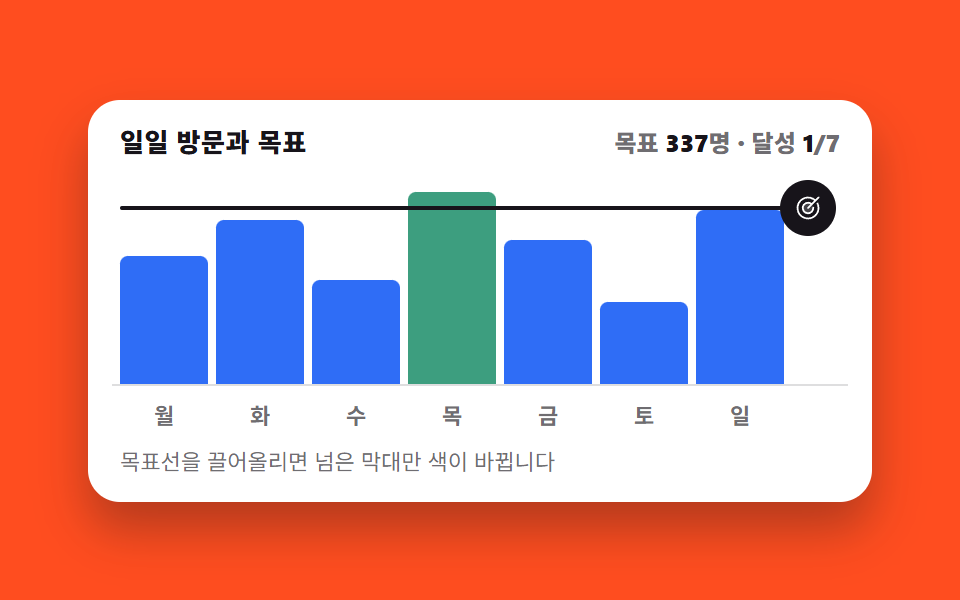
横の目標線を上下に動かすと線を超えた棒だけ色が変わり、横の達成本数が指を離す前から追いかけます。
使いどころ目標値を動かしながら達成本数を数えるKPIカード
setPointerCapture@propertyaria-valuenow
<main class="stage">
  <figure class="gl is-demo" id="gl">
    <figcaption class="gl__head">
      <span class="gl__title">日別の訪問と目標</span>
      <span class="gl__stat" aria-hidden="true">目標 <b class="gl__n gl__n--v"></b>人 · 達成 <b class="gl__n gl__n--c"></b>/7</span>
    </figcaption>

    <div class="gl__zone">
      <div class="gl__bars" role="img" aria-label="7日分の訪問バーと300人の目標線。月245、火312、水198、木368、金276、土154、日332人">
        <span class="gl__bar"></span>
        <span class="gl__bar" data-over="1"></span>
        <span class="gl__bar"></span>
        <span class="gl__bar" data-over="1"></span>
        <span class="gl__bar"></span>
        <span class="gl__bar"></span>
        <span class="gl__bar" data-over="1"></span>
      </div>
      <div class="gl__goal">
        <span class="gl__rail" aria-hidden="true"></span>
        <button class="gl__grab" type="button" role="slider" aria-orientation="vertical"
                aria-label="目標線をドラッグ" aria-valuemin="50" aria-valuemax="400"
                aria-valuenow="300" aria-valuetext="300人" id="gl-grab">
          <svg class="gl__ic" viewBox="0 0 256 256" aria-hidden="true"><g fill="currentColor"><path d="M176 128a48 48 0 1 1-48-48a48 48 0 0 1 48 48" opacity=".2"/><path d="M221.87 83.16A104.1 104.1 0 1 1 195.67 49l22.67-22.68a8 8 0 0 1 11.32 11.32l-96 96a8 8 0 0 1-11.32-11.32l27.72-27.72a40 40 0 1 0 17.87 31.09a8 8 0 1 1 16-.9a56 56 0 1 1-22.38-41.65l22.75-22.75a87.88 87.88 0 1 0 23.13 29.67a8 8 0 0 1 14.44-6.9"/></g></svg>
        </button>
      </div>
    </div>

    <div class="gl__days" aria-hidden="true">
      <span>月</span><span>火</span><span>水</span><span>木</span><span>金</span><span>土</span><span>日</span>
    </div>

    <p class="gl__hint">目標線を引き上げると超えたバーだけ色が変わります</p>

    <div class="sr">
      <span aria-live="polite" id="gl-live"></span>
      <table>
        <caption>曜日別の訪問者数</caption>
        <thead><tr><th>曜日</th><th>訪問</th></tr></thead>
        <tbody>
          <tr><th>月</th><td>245</td></tr><tr><th>火</th><td>312</td></tr><tr><th>水</th><td>198</td></tr>
          <tr><th>木</th><td>368</td></tr><tr><th>金</th><td>276</td></tr><tr><th>土</th><td>154</td></tr>
          <tr><th>日</th><td>332</td></tr>
        </tbody>
      </table>
    </div>
  </figure>
</main>@use "../../../../site/static/demo-tokens" as *;
// 목표선 위치(%). 등록해야 keyframes 가 값을 보간할 수 있고, 숫자 카운터도 굴러간다
@property --goal {
syntax: "<percentage>";
initial-value: 75%;
inherits: true;
}
@property --gv {
syntax: "<integer>";
initial-value: 300;
inherits: true;
}
@property --n {
syntax: "<integer>";
initial-value: 3;
inherits: true;
}
$duration: $dur-quick;
$easing: $ease-out;
$color: $subject-blue;
// 흰 카드 위의 막대는 $subject-mint 그대로는 흰 바탕과 1.86:1 이라
// WCAG 1.4.11(비텍스트 3:1)에 못 미친다. 토큰 두 개를 섞어 3.28:1 로 내린 판을 쓴다
$mint-bar: mix($subject-mint, $subject-ink, 72%);
// 요일별 방문(명). 높이 = 값/400 — 세로 축 상한 400명
$h: 61.25% 78% 49.5% 92% 69% 38.5% 83%;
@include stage($stage-orange);
.sr {
position: absolute;
width: 1px;
height: 1px;
overflow: hidden;
clip-path: inset(50%);
white-space: nowrap;
}
.gl {
box-sizing: border-box;
width: min(392px, 88vw);
display: flex;
flex-direction: column;
gap: $sp-2;
margin: 0;
padding: $sp-3;
border-radius: $r-card;
background: $stage-paper;
box-shadow: $shadow-raised;
color: $subject-ink;
font-family: -apple-system, "Segoe UI", "Noto Sans KR", sans-serif;
--goal: 75%;
--gv: 300;
--n: 3;
}
.gl__head {
display: flex;
align-items: baseline;
justify-content: space-between;
gap: $sp-2;
padding: 0 $sp-1;
}
.gl__title { font-size: 13px; line-height: 18px; font-weight: 800; letter-spacing: .02em; }
// 목표값·달성 개수는 글자가 아니라 카운터 — --gv·--n 이 바뀌면 그 정수가 그대로 글자가
// 된다. 손을 떼기 전에도(pointermove 중에도) 계속 따라온다
.gl__stat {
font-size: 12px;
line-height: 18px;
font-weight: 800;
font-variant-numeric: tabular-nums;
color: rgba(23, 20, 26, .62);
}
.gl__n { color: $subject-ink; }
.gl__n--v { counter-reset: gv var(--gv); }
.gl__n--v::after { content: counter(gv); }
.gl__n--c { counter-reset: n var(--n); }
.gl__n--c::after { content: counter(n); }
// ── 차트 구역: 막대 7칸 grid + 그 위에 목표선 오버레이 ──
// 주의: role="img" wrapper 안 span 은 grid 자식이 아니면 inline 이라 높이를 안 가진다 —
// wrapper 자체를 grid 로 만든다 (05 와 같은 실수를 여기서 피한 이유)
.gl__zone {
position: relative;
height: 104px;
padding: 0 $sp-8 0 $sp-1; // 오른쪽 32px 은 손잡이 자리
border-bottom: 1px solid rgba(23, 20, 26, .14);
}
.gl__bars {
display: grid;
grid-template-columns: repeat(7, 1fr);
align-items: end;
column-gap: $sp-1;
height: 100%;
}
.gl__bar {
height: var(--h);
border-radius: $r-xs $r-xs 0 0;
background: $color;
}
@for $i from 1 through 7 {
// nth() 는 #{} 로 감싸야 evaluate 된다 — 밖에 두면 그대로 CSS 로 새어나간다
.gl__bar:nth-child(#{$i}) { --h: #{nth($h, $i)}; }
}
// 넘김 판정은 JS 가 data-over 에만 적는다 — CSS 는 그 속성만 읽는다
.gl__bar[data-over="1"] { background: $mint-bar; }
// 목표선 한 덩어리(선+손잡이) — 칸 아닌, 등록된 --goal 하나로 통째로 움직인다
.gl__goal {
position: absolute;
left: $sp-1;
right: $sp-8;
bottom: var(--goal);
}
.gl__rail {
position: absolute;
left: 0;
right: 0;
top: -1px;
height: 2px;
border-radius: $r-pill;
background: $subject-ink;
}
.gl__grab {
position: absolute;
right: -26px;
top: 50%;
transform: translateY(-50%);
display: grid;
place-items: center;
width: 28px;
height: 28px;
margin: 0;
padding: 0;
border: 0;
border-radius: 50%;
background: $subject-ink;
color: $stage-paper;
cursor: ns-resize;
touch-action: none; // pointermove 를 브라우저 스크롤에게 뺏기지 않는다
}
.gl__grab:focus-visible { outline: 2px solid $subject-ink; outline-offset: 2px; }
.gl__ic { width: 14px; height: 14px; }
.gl__days {
display: grid;
grid-template-columns: repeat(7, 1fr);
column-gap: $sp-1;
padding: 0 $sp-8 0 $sp-1;
font-size: 11px;
line-height: 14px;
font-weight: 700;
text-align: center;
color: rgba(23, 20, 26, .62);
}
.gl__hint { margin: 0; padding: 0 $sp-1; font-size: 11px; line-height: 16px; color: rgba(23, 20, 26, .62); }
// ── 자동 루프(2초): 목표선이 300 → 140 → 380 → 140 → 300 명을 오간다(90% 안에 복귀) ──
// 선·숫자는 linear 로 **드래그처럼 등속** — 카운터가 선과 어긋나지 않는다.
// 달성 개수(--n)와 막대 색은 이산값이라 steps(1, end) 컷: 선이 그 막대 꼭대기를 지나는
// 바로 그 순간의 퍼센트에서 갈아입는다(아래 숫자들은 값/400 위치에서 계산한 교차시각)
.gl.is-demo {
animation-name: gl-goal, gl-gv, gl-n;
animation-duration: $dur-loop, $dur-loop, $dur-loop;
animation-timing-function: linear, linear, steps(1, end);
animation-iteration-count: infinite, infinite, infinite;
}
@keyframes gl-goal {
0% { --goal: 75%; }
8% { --goal: 35%; }
44% { --goal: 95%; }
80% { --goal: 35%; }
90%, 100% { --goal: 75%; }
}
@keyframes gl-gv {
0% { --gv: 300; }
8% { --gv: 140; }
44% { --gv: 380; }
80% { --gv: 140; }
90%, 100% { --gv: 300; }
}
// 달성 개수 — 선이 각 막대 꼭대기를 지나는 순간마다 ±1 (교차시각 계산값)
@keyframes gl-n {
0% { --n: 3; }
1.2% { --n: 4; }
2.8% { --n: 5; }
5.1% { --n: 6; }
7.3% { --n: 7; }
10.1% { --n: 6; }
16.7% { --n: 5; }
23.8% { --n: 4; }
28.4% { --n: 3; }
33.8% { --n: 2; }
36.8% { --n: 1; }
42.2% { --n: 0; }
45.8% { --n: 1; }
51.2% { --n: 2; }
54.2% { --n: 3; }
59.6% { --n: 4; }
64.3% { --n: 5; }
71.3% { --n: 6; }
77.9% { --n: 7; }
80.9% { --n: 6; }
83.6% { --n: 5; }
86.6% { --n: 4; }
88.5%, 100% { --n: 3; }
}
// 막대 색 컷 — 각 막대가 넘는 구간에만 민트. steps(1,end) 는 구간 시작값을
// 구간 끝까지 잡으므로 두 색이 겹쳐 반쯤 섞인 프레임이 생기지 않는다
@keyframes gl-c1 { 0%{background:$color;} 2.8%{background:$mint-bar;} 23.8%{background:$color;} 64.3%{background:$mint-bar;} 86.6%,100%{background:$color;} }
@keyframes gl-c2 { 0%{background:$mint-bar;} 33.8%{background:$color;} 54.2%,100%{background:$mint-bar;} }
@keyframes gl-c3 { 0%{background:$color;} 5.1%{background:$mint-bar;} 16.7%{background:$color;} 71.3%{background:$mint-bar;} 83.6%,100%{background:$color;} }
@keyframes gl-c4 { 0%{background:$mint-bar;} 42.2%{background:$color;} 45.8%,100%{background:$mint-bar;} }
@keyframes gl-c5 { 0%{background:$color;} 1.2%{background:$mint-bar;} 28.4%{background:$color;} 59.6%{background:$mint-bar;} 88.5%,100%{background:$color;} }
@keyframes gl-c6 { 0%{background:$color;} 7.3%{background:$mint-bar;} 10.1%{background:$color;} 77.9%{background:$mint-bar;} 80.9%,100%{background:$color;} }
@keyframes gl-c7 { 0%{background:$mint-bar;} 36.8%{background:$color;} 51.2%,100%{background:$mint-bar;} }
@for $i from 1 through 7 {
.gl.is-demo .gl__bar:nth-child(#{$i}) {
animation-name: gl-c#{$i};
animation-duration: $dur-loop;
animation-timing-function: steps(1, end);
animation-iteration-count: infinite;
}
}
@media (max-width: 340px) {
.gl { padding: $sp-2; gap: $sp-1; }
.gl__hint { display: none; }
.gl__title { font-size: 12px; line-height: 16px; }
.gl__stat { font-size: 11px; line-height: 16px; }
.gl__zone { height: 84px; }
.gl__grab { width: 24px; height: 24px; }
.gl__ic { width: 12px; height: 12px; }
}
@media (prefers-reduced-motion: reduce) {
.gl.is-demo,
.gl.is-demo .gl__bar { animation: none !important; }
}@property --goal {
syntax: "<percentage>";
initial-value: 75%;
inherits: true;
}
@property --gv {
syntax: "<integer>";
initial-value: 300;
inherits: true;
}
@property --n {
syntax: "<integer>";
initial-value: 3;
inherits: true;
}
html, body {
margin: 0;
overflow: hidden;
}
.stage {
box-sizing: border-box;
min-height: 100vh;
display: grid;
place-items: center;
margin: 0;
background: #ff4d1f;
font-family: -apple-system, "Segoe UI", "Noto Sans KR", sans-serif;
padding: clamp(8px, 4vw, 24px);
}
.sr {
position: absolute;
width: 1px;
height: 1px;
overflow: hidden;
clip-path: inset(50%);
white-space: nowrap;
}
.gl {
box-sizing: border-box;
width: min(392px, 88vw);
display: flex;
flex-direction: column;
gap: 8px;
margin: 0;
padding: 12px;
border-radius: 16px;
background: #ffffff;
box-shadow: 0 14px 24px rgba(23, 20, 26, 0.32);
color: #17141a;
font-family: -apple-system, "Segoe UI", "Noto Sans KR", sans-serif;
--goal: 75%;
--gv: 300;
--n: 3;
}
.gl__head {
display: flex;
align-items: baseline;
justify-content: space-between;
gap: 8px;
padding: 0 4px;
}
.gl__title {
font-size: 13px;
line-height: 18px;
font-weight: 800;
letter-spacing: 0.02em;
}
.gl__stat {
font-size: 12px;
line-height: 18px;
font-weight: 800;
font-variant-numeric: tabular-nums;
color: rgba(23, 20, 26, 0.62);
}
.gl__n {
color: #17141a;
}
.gl__n--v {
counter-reset: gv var(--gv);
}
.gl__n--v::after {
content: counter(gv);
}
.gl__n--c {
counter-reset: n var(--n);
}
.gl__n--c::after {
content: counter(n);
}
.gl__zone {
position: relative;
height: 104px;
padding: 0 32px 0 4px;
border-bottom: 1px solid rgba(23, 20, 26, 0.14);
}
.gl__bars {
display: grid;
grid-template-columns: repeat(7, 1fr);
align-items: end;
column-gap: 4px;
height: 100%;
}
.gl__bar {
height: var(--h);
border-radius: 4px 4px 0 0;
background: #2f6df6;
}
.gl__bar:nth-child(1) {
--h: 61.25%;
}
.gl__bar:nth-child(2) {
--h: 78%;
}
.gl__bar:nth-child(3) {
--h: 49.5%;
}
.gl__bar:nth-child(4) {
--h: 92%;
}
.gl__bar:nth-child(5) {
--h: 69%;
}
.gl__bar:nth-child(6) {
--h: 38.5%;
}
.gl__bar:nth-child(7) {
--h: 83%;
}
.gl__bar[data-over="1"] {
background: rgb(23.9843137255%, 62.0549019608%, 49.7254901961%);
}
.gl__goal {
position: absolute;
left: 4px;
right: 32px;
bottom: var(--goal);
}
.gl__rail {
position: absolute;
left: 0;
right: 0;
top: -1px;
height: 2px;
border-radius: 999px;
background: #17141a;
}
.gl__grab {
position: absolute;
right: -26px;
top: 50%;
transform: translateY(-50%);
display: grid;
place-items: center;
width: 28px;
height: 28px;
margin: 0;
padding: 0;
border: 0;
border-radius: 50%;
background: #17141a;
color: #ffffff;
cursor: ns-resize;
touch-action: none;
}
.gl__grab:focus-visible {
outline: 2px solid #17141a;
outline-offset: 2px;
}
.gl__ic {
width: 14px;
height: 14px;
}
.gl__days {
display: grid;
grid-template-columns: repeat(7, 1fr);
column-gap: 4px;
padding: 0 32px 0 4px;
font-size: 11px;
line-height: 14px;
font-weight: 700;
text-align: center;
color: rgba(23, 20, 26, 0.62);
}
.gl__hint {
margin: 0;
padding: 0 4px;
font-size: 11px;
line-height: 16px;
color: rgba(23, 20, 26, 0.62);
}
.gl.is-demo {
animation-name: gl-goal, gl-gv, gl-n;
animation-duration: 2s, 2s, 2s;
animation-timing-function: linear, linear, steps(1, end);
animation-iteration-count: infinite, infinite, infinite;
}
@keyframes gl-goal {
0% {
--goal: 75%;
}
8% {
--goal: 35%;
}
44% {
--goal: 95%;
}
80% {
--goal: 35%;
}
90%, 100% {
--goal: 75%;
}
}
@keyframes gl-gv {
0% {
--gv: 300;
}
8% {
--gv: 140;
}
44% {
--gv: 380;
}
80% {
--gv: 140;
}
90%, 100% {
--gv: 300;
}
}
@keyframes gl-n {
0% {
--n: 3;
}
1.2% {
--n: 4;
}
2.8% {
--n: 5;
}
5.1% {
--n: 6;
}
7.3% {
--n: 7;
}
10.1% {
--n: 6;
}
16.7% {
--n: 5;
}
23.8% {
--n: 4;
}
28.4% {
--n: 3;
}
33.8% {
--n: 2;
}
36.8% {
--n: 1;
}
42.2% {
--n: 0;
}
45.8% {
--n: 1;
}
51.2% {
--n: 2;
}
54.2% {
--n: 3;
}
59.6% {
--n: 4;
}
64.3% {
--n: 5;
}
71.3% {
--n: 6;
}
77.9% {
--n: 7;
}
80.9% {
--n: 6;
}
83.6% {
--n: 5;
}
86.6% {
--n: 4;
}
88.5%, 100% {
--n: 3;
}
}
@keyframes gl-c1 {
0% {
background: #2f6df6;
}
2.8% {
background: rgb(23.9843137255%, 62.0549019608%, 49.7254901961%);
}
23.8% {
background: #2f6df6;
}
64.3% {
background: rgb(23.9843137255%, 62.0549019608%, 49.7254901961%);
}
86.6%, 100% {
background: #2f6df6;
}
}
@keyframes gl-c2 {
0% {
background: rgb(23.9843137255%, 62.0549019608%, 49.7254901961%);
}
33.8% {
background: #2f6df6;
}
54.2%, 100% {
background: rgb(23.9843137255%, 62.0549019608%, 49.7254901961%);
}
}
@keyframes gl-c3 {
0% {
background: #2f6df6;
}
5.1% {
background: rgb(23.9843137255%, 62.0549019608%, 49.7254901961%);
}
16.7% {
background: #2f6df6;
}
71.3% {
background: rgb(23.9843137255%, 62.0549019608%, 49.7254901961%);
}
83.6%, 100% {
background: #2f6df6;
}
}
@keyframes gl-c4 {
0% {
background: rgb(23.9843137255%, 62.0549019608%, 49.7254901961%);
}
42.2% {
background: #2f6df6;
}
45.8%, 100% {
background: rgb(23.9843137255%, 62.0549019608%, 49.7254901961%);
}
}
@keyframes gl-c5 {
0% {
background: #2f6df6;
}
1.2% {
background: rgb(23.9843137255%, 62.0549019608%, 49.7254901961%);
}
28.4% {
background: #2f6df6;
}
59.6% {
background: rgb(23.9843137255%, 62.0549019608%, 49.7254901961%);
}
88.5%, 100% {
background: #2f6df6;
}
}
@keyframes gl-c6 {
0% {
background: #2f6df6;
}
7.3% {
background: rgb(23.9843137255%, 62.0549019608%, 49.7254901961%);
}
10.1% {
background: #2f6df6;
}
77.9% {
background: rgb(23.9843137255%, 62.0549019608%, 49.7254901961%);
}
80.9%, 100% {
background: #2f6df6;
}
}
@keyframes gl-c7 {
0% {
background: rgb(23.9843137255%, 62.0549019608%, 49.7254901961%);
}
36.8% {
background: #2f6df6;
}
51.2%, 100% {
background: rgb(23.9843137255%, 62.0549019608%, 49.7254901961%);
}
}
.gl.is-demo .gl__bar:nth-child(1) {
animation-name: gl-c1;
animation-duration: 2s;
animation-timing-function: steps(1, end);
animation-iteration-count: infinite;
}
.gl.is-demo .gl__bar:nth-child(2) {
animation-name: gl-c2;
animation-duration: 2s;
animation-timing-function: steps(1, end);
animation-iteration-count: infinite;
}
.gl.is-demo .gl__bar:nth-child(3) {
animation-name: gl-c3;
animation-duration: 2s;
animation-timing-function: steps(1, end);
animation-iteration-count: infinite;
}
.gl.is-demo .gl__bar:nth-child(4) {
animation-name: gl-c4;
animation-duration: 2s;
animation-timing-function: steps(1, end);
animation-iteration-count: infinite;
}
.gl.is-demo .gl__bar:nth-child(5) {
animation-name: gl-c5;
animation-duration: 2s;
animation-timing-function: steps(1, end);
animation-iteration-count: infinite;
}
.gl.is-demo .gl__bar:nth-child(6) {
animation-name: gl-c6;
animation-duration: 2s;
animation-timing-function: steps(1, end);
animation-iteration-count: infinite;
}
.gl.is-demo .gl__bar:nth-child(7) {
animation-name: gl-c7;
animation-duration: 2s;
animation-timing-function: steps(1, end);
animation-iteration-count: infinite;
}
@media (max-width: 340px) {
.gl {
padding: 8px;
gap: 4px;
}
.gl__hint {
display: none;
}
.gl__title {
font-size: 12px;
line-height: 16px;
}
.gl__stat {
font-size: 11px;
line-height: 16px;
}
.gl__zone {
height: 84px;
}
.gl__grab {
width: 24px;
height: 24px;
}
.gl__ic {
width: 12px;
height: 12px;
}
}
@media (prefers-reduced-motion: reduce) {
.gl.is-demo,
.gl.is-demo .gl__bar {
animation: none !important;
}
}// 실제 동작: 드래그(pointerdown → setPointerCapture → pointermove)로 목표값을 바꾸면
// JS 는 등록된 커스텀 속성 세 개(--goal 위치 · --gv 값 · --n 달성 개수)와 막대의
// data-over 만 고친다. 색·선·숫자는 전부 CSS 가 그 값들을 읽어 그린다.
var root = document.getElementById('gl');
var grab = document.getElementById('gl-grab');
var live = document.getElementById('gl-live');
var bars = [].slice.call(root.querySelectorAll('.gl__bar'));
var DATA = [245, 312, 198, 368, 276, 154, 332]; // 표와 같은 값
var MIN = 50, MAX = 400;
function setGoal(v) {
v = Math.max(MIN, Math.min(MAX, Math.round(v)));
var n = 0;
bars.forEach(function (b, i) {
var over = DATA[i] >= v ? '1' : '0';
b.dataset.over = over;
if (over === '1') { n += 1; }
});
root.style.setProperty('--goal', v / 4 + '%'); // 세로 축 상한 400人 = 100%
root.style.setProperty('--gv', String(v));
root.style.setProperty('--n', String(n));
grab.setAttribute('aria-valuenow', String(v));
grab.setAttribute('aria-valuetext', v + '人');
live.textContent = '目標 ' + v + '人、達成 ' + n + '/7';
}
function fromPointer(e) {
var r = root.querySelector('.gl__zone').getBoundingClientRect();
setGoal((1 - (e.clientY - r.top) / r.height) * MAX);
}
grab.addEventListener('pointerdown', function (e) {
root.classList.remove('is-demo');
grab.setPointerCapture(e.pointerId);
fromPointer(e);
});
grab.addEventListener('pointermove', function (e) {
if (grab.hasPointerCapture(e.pointerId)) { fromPointer(e); }
});
grab.addEventListener('keydown', function (e) {
var now = Number(grab.getAttribute('aria-valuenow'));
var v = null;
if (e.key === 'ArrowUp') { v = now + 10; }
if (e.key === 'ArrowDown') { v = now - 10; }
if (e.key === 'Home') { v = MIN; }
if (e.key === 'End') { v = MAX; }
if (v !== null) { e.preventDefault(); root.classList.remove('is-demo'); setGoal(v); }
});import { useRef, useState } from "react";
import type { CSSProperties } from "react";
import styles from "./GoalLineDrag.module.scss";
export type GoalLineDragProps = {
title?: string;
goalLabel?: string;
hitLabel?: string;
unit?: string;
sliderLabel?: string;
hint?: string;
chartLabel?: string;
tableCaption?: string;
headDay?: string;
headVisits?: string;
days?: string[];
values?: number[];
min?: number;
max?: number;
initialGoal?: number;
duration?: number;
easing?: string;
color?: string;
};
// ambient 타입이 빈약해 포인터 이벤트는 파일 안 로컬 타입으로만 다룬다
type PointerLike = {
clientY: number;
pointerId: number;
currentTarget: {
setPointerCapture(id: number): void;
hasPointerCapture(id: number): boolean;
getBoundingClientRect(): DOMRect;
};
};
type KeyEvt = { key: string; preventDefault(): void };
type Vars = CSSProperties & {
"--duration"?: string;
"--easing"?: string;
"--color"?: string;
"--goal"?: string;
"--gv"?: string;
"--n"?: string;
};
const DATA = [245, 312, 198, 368, 276, 154, 332]; // 표와 같은 값 — 월화수목금토일
export default function GoalLineDrag({
title = "일일 방문과 목표",
goalLabel = "목표",
hitLabel = "달성",
unit = "명",
sliderLabel = "목표선 끌기",
hint = "목표선을 끌어올리면 넘은 막대만 색이 바뀝니다",
chartLabel = "요일 7개 방문 막대와 목표선 300명. 월 245, 화 312, 수 198, 목 368, 금 276, 토 154, 일 332명",
tableCaption = "요일별 방문자 수",
headDay = "요일",
headVisits = "방문",
days = ["월", "화", "수", "목", "금", "토", "일"],
values = DATA,
min = 50,
max = 400,
initialGoal = 300,
duration = 220,
easing = "ease-out",
color = "#2f6df6",
}: GoalLineDragProps) {
const [demo, setDemo] = useState(true);
const [goal, setGoal] = useState(initialGoal);
// 목표값은 그래픽 좌표가 아니라 값으로 센다 — 손 위치는 차트 구역 rect 기준
const zoneRef = useRef<{ getBoundingClientRect(): DOMRect } | null>(null);
// 상태는 숫자 하나뿐 — 달성 개수·넘김 여부는 전부 여기서 파생한다
const over = values.map((v) => v >= goal);
const n = over.filter(Boolean).length;
const vars: Vars = {
"--duration": `${duration}ms`, "--easing": easing, "--color": color,
"--goal": `${goal / 4}%`, "--gv": String(goal), "--n": String(n),
};
function apply(v: number) {
setDemo(false);
setGoal(Math.max(min, Math.min(max, Math.round(v))));
}
function fromPointer(e: PointerLike) {
const z = zoneRef.current;
if (!z) { return; }
const r = z.getBoundingClientRect();
apply((1 - (e.clientY - r.top) / r.height) * max);
}
function onKey(e: KeyEvt) {
let v: number | null = null;
if (e.key === "ArrowUp") v = goal + 10;
if (e.key === "ArrowDown") v = goal - 10;
if (e.key === "Home") v = min;
if (e.key === "End") v = max;
if (v !== null) { e.preventDefault(); apply(v); }
}
return (
<div className={`${styles.gl} ${demo ? styles.isDemo : ""}`} style={vars}>
<div className={styles.head}>
<span className={styles.title}>{title}</span>
<span className={styles.stat} aria-hidden="true">
{goalLabel} <b className={styles.nV} />{unit} · {hitLabel} <b className={styles.nC} />/{values.length}
</span>
</div>
<div className={styles.zone} ref={zoneRef}>
<div className={styles.bars} role="img" aria-label={chartLabel}>
{values.map((v, i) => (
<span key={i} className={styles.bar} data-over={over[i] ? "1" : "0"} style={{ "--h": `${v / 4}%` } as CSSProperties} />
))}
</div>
<div className={styles.goal}>
<span className={styles.rail} aria-hidden="true" />
<button
type="button"
className={styles.grab}
role="slider"
aria-orientation="vertical"
aria-label={sliderLabel}
aria-valuemin={min}
aria-valuemax={max}
aria-valuenow={goal}
aria-valuetext={`${goal}${unit}`}
onPointerDown={(e: PointerLike) => { e.currentTarget.setPointerCapture(e.pointerId); fromPointer(e); }}
onPointerMove={(e: PointerLike) => { if (e.currentTarget.hasPointerCapture(e.pointerId)) fromPointer(e); }}
onKeyDown={onKey}
>
<svg className={styles.ic} viewBox="0 0 256 256" aria-hidden="true"><g fill="currentColor"><path d="M176 128a48 48 0 1 1-48-48a48 48 0 0 1 48 48" opacity=".2"/><path d="M221.87 83.16A104.1 104.1 0 1 1 195.67 49l22.67-22.68a8 8 0 0 1 11.32 11.32l-96 96a8 8 0 0 1-11.32-11.32l27.72-27.72a40 40 0 1 0 17.87 31.09a8 8 0 1 1 16-.9a56 56 0 1 1-22.38-41.65l22.75-22.75a87.88 87.88 0 1 0 23.13 29.67a8 8 0 0 1 14.44-6.9"/></g></svg>
</button>
</div>
</div>
<div className={styles.daysRow} aria-hidden="true">
{days.map((d) => <span key={d}>{d}</span>)}
</div>
<p className={styles.hint}>{hint}</p>
<div className={styles.sr}>
<span aria-live="polite">{goalLabel} {goal}{unit}, {hitLabel} {n}개 중 {values.length}개</span>
<table>
<caption>{tableCaption}</caption>
<thead><tr><th>{headDay}</th><th>{headVisits}</th></tr></thead>
<tbody>
{values.map((v, i) => <tr key={i}><th>{days[i]}</th><td>{v}</td></tr>)}
</tbody>
</table>
</div>
</div>
);
}07 目標線を動かすと超えた棒だけ色が変わる — 計測 累積面積 18.649% · 動いたフレーム 22/23GODRICH オリジナル · SCSS と React は zip に同梱 · ダッシュボード グラフ デザイン 操作9選 — 触ると数字が変わる
このデモが属する記事
 ダッシュボード グラフ デザイン 操作9選 — 触ると数字が変わるダッシュボード グラフ デザインで本当に働くのは描かれた線ではなく、その上で手がすることです。9 つはすべてチャートライブラリなしで CSS の棒とインライン SVG の上に素の JS だけを載せ、触ると数字が変わるものだけを選びました。 この記事のデモをすべて見る