03月間カレンダーウィジェット
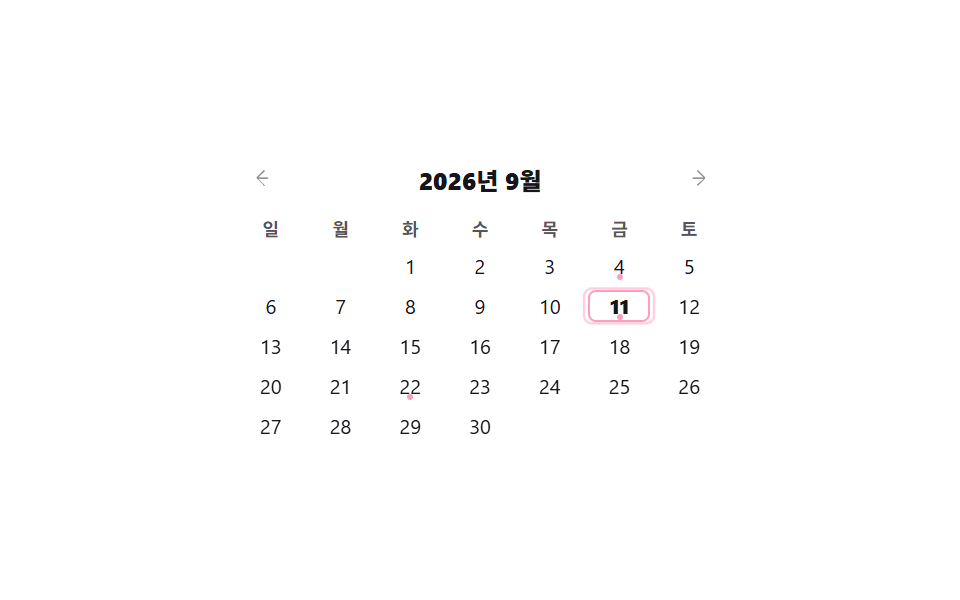
矢印を押すと実際に月が切り替わってその月の日付マスが再描画され、予定がある日は点で、今日は枠線で示されます。
使いどころ完成した予定管理ページなしにサイドバーの一枠に今月のミニカレンダーだけ付けたいとき
Dateclickaria-pressed
<main class="stage">
  <div class="cal">
    <div class="cal__head">
      <button class="cal__nav" type="button" data-dir="-1" aria-label="前の月">
        <svg viewBox="0 0 256 256" width="12" height="12"><g fill="currentColor"><path d="m165.66 202.34l-72-72a8 8 0 0 1 0-11.32l72-72a8 8 0 0 1 11.32 11.32L109.31 122H208a8 8 0 0 1 0 16h-98.69l67.67 63.66a8 8 0 0 1-11.32 11.32Z"/></g></svg>
      </button>
      <strong class="cal__month">2026年9月</strong>
      <button class="cal__nav" type="button" data-dir="1" aria-label="次の月">
        <svg viewBox="0 0 256 256" width="12" height="12"><g fill="currentColor"><path d="M181.66 133.66l-72 72a8 8 0 0 1-11.32-11.32L165.31 138H56a8 8 0 0 1 0-16h109.31l-67-63.66a8 8 0 0 1 11.32-11.32l72 72a8 8 0 0 1 .03 11.32Z"/></g></svg>
      </button>
    </div>
    <div class="cal__dows">
      <span class="cal__dow">日</span><span class="cal__dow">月</span><span class="cal__dow">火</span><span class="cal__dow">水</span><span class="cal__dow">木</span><span class="cal__dow">金</span><span class="cal__dow">土</span>
    </div>
    <div class="cal__grid is-demo"></div>
  </div>
</main>
@use "../../../../site/static/demo-tokens" as *;
$duration: $dur-quick;
$easing: $ease-out;
$color: $subject-pink;
@include stage($stage-paper);
.cal {
box-sizing: border-box;
width: min(240px, 86vw);
font-family: -apple-system, "Segoe UI", "Noto Sans KR", sans-serif;
color: $stage-ink;
}
.cal__head { display: flex; align-items: center; justify-content: space-between; margin: 0 0 $sp-2; }
.cal__month { font-size: 12px; font-weight: 800; }
.cal__nav {
width: 20px; height: 20px; padding: 0;
border: 0; background: transparent; color: rgba(23, 20, 26, .5);
display: grid; place-items: center;
border-radius: $r-xs; cursor: pointer;
}
.cal__nav:hover { background: rgba(23, 20, 26, .06); color: $stage-ink; }
.cal__dows, .cal__grid { display: grid; grid-template-columns: repeat(7, 1fr); gap: $sp-1; }
.cal__dows { margin: 0 0 $sp-1; }
.cal__dow {
height: 14px; display: flex; align-items: center; justify-content: center;
font-size: 9px; font-weight: 700; color: rgba(23, 20, 26, .72);
}
.cal__day {
position: relative;
height: 16px; padding: 0;
border: 0; background: transparent;
font: inherit; font-size: 10px; color: $stage-ink;
border-radius: $r-xs;
cursor: pointer;
}
.cal__day:empty { visibility: hidden; }
.cal__day:hover { background: rgba(23, 20, 26, .06); }
.cal__day[aria-pressed="true"] { background: $color; color: #fff; font-weight: 700; }
.cal__day--today { font-weight: 800; box-shadow: inset 0 0 0 1px $color; }
.cal__day--event::after {
content: "";
position: absolute; left: 50%; bottom: 1px;
width: 3px; height: 3px; border-radius: 50%;
background: $color;
transform: translateX(-50%);
}
.cal__day[aria-pressed="true"].cal__day--event::after { background: #fff; }
// ── 자동 루프: 오늘 칸에 옅은 고리가 계속 퍼졌다 사라진다 ──────────────
.cal__day--today::before {
content: "";
position: absolute; inset: 0;
border-radius: $r-xs;
border: 1px solid $color;
opacity: 0;
}
.cal__grid.is-demo .cal__day--today::before {
animation: cal-ping 2s $easing infinite;
}
@keyframes cal-ping {
0% { transform: scale(1); opacity: .7; }
70% { transform: scale(1.6); opacity: 0; }
100% { transform: scale(1.6); opacity: 0; }
}
@media (max-width: 340px) {
.cal { width: min(216px, 84vw); }
.cal__day, .cal__dow { font-size: 9px; }
}
@media (prefers-reduced-motion: reduce) {
.cal__grid.is-demo .cal__day--today::before { animation: none !important; }
}html, body {
margin: 0;
overflow: hidden;
}
.stage {
box-sizing: border-box;
min-height: 100vh;
display: grid;
place-items: center;
margin: 0;
background: #ffffff;
font-family: -apple-system, "Segoe UI", "Noto Sans KR", sans-serif;
padding: clamp(8px, 4vw, 24px);
}
.cal {
box-sizing: border-box;
width: min(240px, 86vw);
font-family: -apple-system, "Segoe UI", "Noto Sans KR", sans-serif;
color: #17141a;
}
.cal__head {
display: flex;
align-items: center;
justify-content: space-between;
margin: 0 0 8px;
}
.cal__month {
font-size: 12px;
font-weight: 800;
}
.cal__nav {
width: 20px;
height: 20px;
padding: 0;
border: 0;
background: transparent;
color: rgba(23, 20, 26, 0.5);
display: grid;
place-items: center;
border-radius: 4px;
cursor: pointer;
}
.cal__nav:hover {
background: rgba(23, 20, 26, 0.06);
color: #17141a;
}
.cal__dows, .cal__grid {
display: grid;
grid-template-columns: repeat(7, 1fr);
gap: 4px;
}
.cal__dows {
margin: 0 0 4px;
}
.cal__dow {
height: 14px;
display: flex;
align-items: center;
justify-content: center;
font-size: 9px;
font-weight: 700;
color: rgba(23, 20, 26, 0.72);
}
.cal__day {
position: relative;
height: 16px;
padding: 0;
border: 0;
background: transparent;
font: inherit;
font-size: 10px;
color: #17141a;
border-radius: 4px;
cursor: pointer;
}
.cal__day:empty {
visibility: hidden;
}
.cal__day:hover {
background: rgba(23, 20, 26, 0.06);
}
.cal__day[aria-pressed=true] {
background: #ff9ebb;
color: #fff;
font-weight: 700;
}
.cal__day--today {
font-weight: 800;
box-shadow: inset 0 0 0 1px #ff9ebb;
}
.cal__day--event::after {
content: "";
position: absolute;
left: 50%;
bottom: 1px;
width: 3px;
height: 3px;
border-radius: 50%;
background: #ff9ebb;
transform: translateX(-50%);
}
.cal__day[aria-pressed=true].cal__day--event::after {
background: #fff;
}
.cal__day--today::before {
content: "";
position: absolute;
inset: 0;
border-radius: 4px;
border: 1px solid #ff9ebb;
opacity: 0;
}
.cal__grid.is-demo .cal__day--today::before {
animation: cal-ping 2s ease-out infinite;
}
@keyframes cal-ping {
0% {
transform: scale(1);
opacity: 0.7;
}
70% {
transform: scale(1.6);
opacity: 0;
}
100% {
transform: scale(1.6);
opacity: 0;
}
}
@media (max-width: 340px) {
.cal {
width: min(216px, 84vw);
}
.cal__day, .cal__dow {
font-size: 9px;
}
}
@media (prefers-reduced-motion: reduce) {
.cal__grid.is-demo .cal__day--today::before {
animation: none !important;
}
}// 실제 동작: 화살표를 누르면 달이 실제로 바뀌며 날짜 칸이 다시 그려지고, 날짜를 누르면 그 칸만 선택된다.
var EVENTS = [4, 11, 22];
var MONTH_LABEL = '{y}年{m}月';
var grid = document.querySelector('.cal__grid');
var label = document.querySelector('.cal__month');
var cur = { y: 2026, m: 8 };
function build() {
grid.classList.remove('is-demo');
grid.innerHTML = '';
var first = new Date(cur.y, cur.m, 1).getDay();
var days = new Date(cur.y, cur.m + 1, 0).getDate();
for (var i = 0; i < first; i++) grid.appendChild(document.createElement('span'));
for (var d = 1; d <= days; d++) {
var b = document.createElement('button');
b.type = 'button'; b.className = 'cal__day'; b.textContent = String(d);
b.setAttribute('aria-pressed', 'false');
if (cur.y === 2026 && cur.m === 8 && d === 11) b.classList.add('cal__day--today');
if (cur.y === 2026 && cur.m === 8 && EVENTS.indexOf(d) !== -1) b.classList.add('cal__day--event');
b.addEventListener('click', function () {
grid.querySelectorAll('[aria-pressed="true"]').forEach(function (o) { o.setAttribute('aria-pressed', 'false'); });
this.setAttribute('aria-pressed', 'true');
});
grid.appendChild(b);
}
label.textContent = MONTH_LABEL.replace('{y}', cur.y).replace('{m}', cur.m + 1);
}
document.querySelectorAll('.cal__nav').forEach(function (btn) {
btn.addEventListener('click', function () {
cur.m += Number(btn.dataset.dir);
if (cur.m < 0) { cur.m = 11; cur.y--; }
if (cur.m > 11) { cur.m = 0; cur.y++; }
build();
});
});
build();
grid.classList.add('is-demo');import { useMemo, useState } from "react";
import type { CSSProperties } from "react";
import styles from "./CalendarWidget.module.scss";
export type CalendarWidgetProps = {
duration?: number;
easing?: string;
color?: string;
};
type Vars = CSSProperties & { "--duration"?: string; "--easing"?: string; "--color"?: string };
const DOWS = ["Su", "Mo", "Tu", "We", "Th", "Fr", "Sa"];
const EVENTS = [4, 11, 22];
const TODAY = { y: 2026, m: 8, d: 11 };
export default function CalendarWidget({ duration = 220, easing = "ease-out", color = "#ff9ebb" }: CalendarWidgetProps) {
const [cur, setCur] = useState({ y: 2026, m: 8 });
const [selected, setSelected] = useState<number | null>(null);
const vars: Vars = { "--duration": `${duration}ms`, "--easing": easing, "--color": color };
const days = useMemo(() => {
const first = new Date(cur.y, cur.m, 1).getDay();
const count = new Date(cur.y, cur.m + 1, 0).getDate();
return { blanks: first, count };
}, [cur]);
function nav(dir: number) {
setCur((c) => {
let m = c.m + dir, y = c.y;
if (m < 0) { m = 11; y--; }
if (m > 11) { m = 0; y++; }
return { y, m };
});
setSelected(null);
}
const monthLabel = new Date(cur.y, cur.m, 1).toLocaleString("en-US", { month: "long", year: "numeric" });
return (
<div className={styles.cal} style={vars}>
<div className={styles.head}>
<button type="button" className={styles.nav} aria-label="Previous month" onClick={() => nav(-1)}>‹</button>
<strong className={styles.month}>{monthLabel}</strong>
<button type="button" className={styles.nav} aria-label="Next month" onClick={() => nav(1)}>›</button>
</div>
<div className={styles.dows}>{DOWS.map((d) => <span key={d} className={styles.dow}>{d}</span>)}</div>
<div className={styles.grid}>
{Array.from({ length: days.blanks }).map((_, i) => <span key={`b${i}`} />)}
{Array.from({ length: days.count }).map((_, i) => {
const d = i + 1;
const isToday = cur.y === TODAY.y && cur.m === TODAY.m && d === TODAY.d;
const hasEvent = cur.y === TODAY.y && cur.m === TODAY.m && EVENTS.includes(d);
return (
<button
key={d}
type="button"
className={`${styles.day} ${isToday ? styles.today : ""} ${hasEvent ? styles.event : ""}`}
aria-pressed={selected === d}
onClick={() => setSelected(d)}
>
{d}
</button>
);
})}
</div>
</div>
);
}03 月間カレンダーウィジェット — 計測 累積面積 0.333% · 動いたフレーム 8/23GODRICH オリジナル · SCSS と React は zip に同梱 · ダッシュボード コンポーネント9選 — 画面ごとじゃなくこの部品だけ
このデモが属する記事
 ダッシュボード コンポーネント9選 — 画面ごとじゃなくこの部品だけダッシュボード コンポーネントとは、完成した管理画面をまるごと組み込む代わりに、ヘッダーやフィード、カレンダーのように画面の一部品だけをそのまま自分のプロジェクトに移せるUI部品です。画面ごとではなくこの部品だけで、九つのうち一つは Ctr この記事のデモをすべて見る