02ヘッダーの境目を引いて広げる列幅
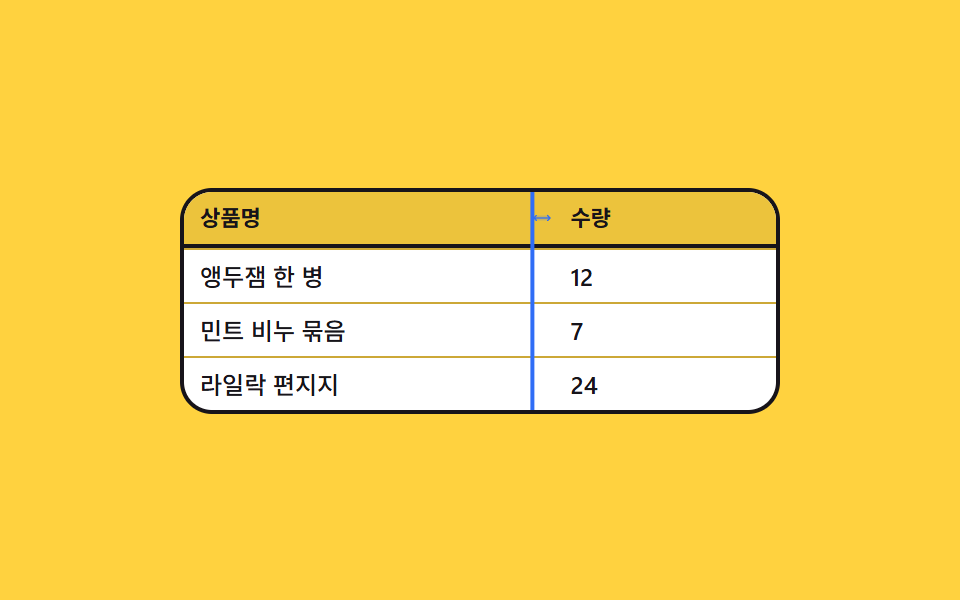
ヘッダーとヘッダーの間にある細いハンドルをつかんで左右に引くと、その列だけが広がったり狭まったりします。引いている間は表を縦に貫くガイド線が付いてきて、どこで手を離せばよいかを示します。
使いどころ見切れた項目を人ごとに広げて見る管理画面
grid-template-columnspointermovetranslateX
<main class="stage">
  <div class="cr is-demo" id="cr">
    <div class="cr__grid" id="cr-grid" role="grid" aria-label="商品リスト">
      <div class="cr__row cr__row--head" role="row">
        <span class="cr__c cr__c--h" role="columnheader">商品名</span>
        <span class="cr__grip" id="cr-grip" role="separator" aria-label="列幅を調整" tabindex="0" aria-orientation="vertical">
          <svg viewBox="0 0 256 256" width="1em" height="1em" fill="currentColor" aria-hidden="true"><g><path d="m232 128l-32 32H56l-32-32l32-32h144Z" opacity=".2"/><path d="m237.66 133.66l-32 32a8 8 0 0 1-11.32-11.32L212.69 136H43.31l18.35 18.34a8 8 0 0 1-11.32 11.32l-32-32a8 8 0 0 1 0-11.32l32-32a8 8 0 0 1 11.32 11.32L43.31 120h169.38l-18.35-18.34a8 8 0 0 1 11.32-11.32l32 32a8 8 0 0 1 0 11.32"/></g></svg>
        </span>
        <span class="cr__c cr__c--h" role="columnheader">数量</span>
      </div>
      <div class="cr__row" role="row"><span class="cr__c" role="gridcell">さくらんぼジャム 1瓶</span><i></i><span class="cr__c" role="gridcell">12</span></div>
      <div class="cr__row" role="row"><span class="cr__c" role="gridcell">ミント石けんセット</span><i></i><span class="cr__c" role="gridcell">7</span></div>
      <div class="cr__row" role="row"><span class="cr__c" role="gridcell">ライラック便箋</span><i></i><span class="cr__c" role="gridcell">24</span></div>
    </div>
    <div class="cr__guide" id="cr-guide" aria-hidden="true"></div>
  </div>
</main>
@use "sass:color";
@use "../../../../site/static/demo-tokens" as *;
$duration: $dur-quick;
$easing: $ease-spring;
$color: $subject-blue;
@include stage($stage-yellow);
$row-h: 26px;
$ink: $subject-ink;
$line: color.mix($ink, $stage-yellow, 22%);
// 열 폭은 길이형 커스텀 속성 하나. 등록하지 않으면 keyframes 가 보간하지 못하고 한 번에 튄다
@property --w1 {
syntax: "<length>";
inherits: true;
initial-value: 132px;
}
.cr {
position: relative;
box-sizing: border-box;
width: min(300px, 92vw);
border: 2px solid $ink;
border-radius: $r-card;
background: $stage-paper;
overflow: hidden;
color: $ink;
font-family: -apple-system, "Segoe UI", "Noto Sans KR", sans-serif;
}
.cr__grid { --w1: 132px; display: block; }
.cr__row {
display: grid;
grid-template-columns: var(--w1) 12px 1fr;
align-items: center;
height: $row-h;
}
.cr__row + .cr__row { border-top: 1px solid $line; }
.cr__row--head {
border-bottom: 2px solid $ink;
background: color.mix($ink, $stage-yellow, 8%);
}
.cr__c {
padding: 0 $sp-2;
font-size: 12px;
line-height: $row-h;
font-weight: 500;
white-space: nowrap;
overflow: hidden;
text-overflow: ellipsis;
}
.cr__c--h {
font-size: 11px;
font-weight: 700;
text-transform: none;
}
// ── 손잡이 ────────────────────────────────────────────
.cr__grip {
display: inline-flex;
align-items: center;
justify-content: center;
height: $row-h;
color: rgba(23, 20, 26, .42);
font-size: 10px;
line-height: $row-h;
cursor: col-resize;
touch-action: none;
}
.cr__grip:hover, .cr .cr__grip:focus-visible { color: $color; }
.cr__grip:focus-visible { outline: 2px solid $color; outline-offset: -2px; }
// ── 끄는 동안 따라오는 안내선 ─────────────────────────
.cr__guide {
position: absolute;
left: 0; top: 0;
z-index: 3; // 행 배경이 불투명해서 이게 없으면 머리글 칸에서만 보인다
width: 2px;
height: 100%;
background: $color;
opacity: 0;
transform: translateX(132px);
pointer-events: none;
}
.cr.is-drag .cr__guide { opacity: 1; }
// ── 자동 루프 (2s) ───────────────────────────────────
// 8~34% 넓히고 46~72% 좁히고 72~86% 제자리로. 폭은 --w1 하나만 움직이고
// 안내선은 같은 값을 translateX 로 따라간다 — 두 값을 따로 쓰면 어긋난다.
.cr.is-demo .cr__grid {
animation-name: cr-w;
animation-duration: $dur-loop;
animation-timing-function: $easing;
animation-iteration-count: infinite;
}
.cr.is-demo .cr__guide {
animation-name: cr-guide;
animation-duration: $dur-loop;
animation-timing-function: $easing;
animation-iteration-count: infinite;
animation-fill-mode: backwards;
}
.cr.is-demo .cr__grip {
animation-name: cr-grip;
animation-duration: $dur-loop;
animation-timing-function: steps(1, end);
animation-iteration-count: infinite;
}
@keyframes cr-w {
0% { --w1: 132px; }
8% { --w1: 132px; }
34% { --w1: 180px; }
46% { --w1: 180px; }
72% { --w1: 100px; }
86% { --w1: 132px; }
100% { --w1: 132px; }
}
@keyframes cr-guide {
0% { opacity: 0; transform: translateX(132px); }
8% { opacity: 1; transform: translateX(132px); }
34% { opacity: 1; transform: translateX(180px); }
46% { opacity: 1; transform: translateX(180px); }
72% { opacity: 1; transform: translateX(100px); }
86% { opacity: 0; transform: translateX(132px); }
100% { opacity: 0; transform: translateX(132px); }
}
@keyframes cr-grip {
0% { color: rgba(23, 20, 26, .42); }
8% { color: $color; }
86% { color: rgba(23, 20, 26, .42); }
100% { color: rgba(23, 20, 26, .42); }
}
// 320×200 — 폭이 좁아지므로 시작 폭과 여백만 줄인다
@media (max-width: 340px) {
.cr__grid { --w1: 116px; }
.cr__c { padding: 0 $sp-1; }
}
@media (prefers-reduced-motion: reduce) {
.cr.is-demo .cr__grid,
.cr.is-demo .cr__guide,
.cr.is-demo .cr__grip { animation: none !important; }
.cr.is-demo .cr__grid { --w1: 180px; }
.cr.is-demo .cr__guide { opacity: 1; transform: translateX(180px); }
}html, body {
margin: 0;
overflow: hidden;
}
.stage {
box-sizing: border-box;
min-height: 100vh;
display: grid;
place-items: center;
margin: 0;
background: #ffd23f;
font-family: -apple-system, "Segoe UI", "Noto Sans KR", sans-serif;
padding: clamp(8px, 4vw, 24px);
}
@property --w1 {
syntax: "<length>";
inherits: true;
initial-value: 132px;
}
.cr {
position: relative;
box-sizing: border-box;
width: min(300px, 92vw);
border: 2px solid #17141a;
border-radius: 16px;
background: #ffffff;
overflow: hidden;
color: #17141a;
font-family: -apple-system, "Segoe UI", "Noto Sans KR", sans-serif;
}
.cr__grid {
--w1: 132px;
display: block;
}
.cr__row {
display: grid;
grid-template-columns: var(--w1) 12px 1fr;
align-items: center;
height: 26px;
}
.cr__row + .cr__row {
border-top: 1px solid rgb(79.9843137255%, 65.9607843137%, 21.5137254902%);
}
.cr__row--head {
border-bottom: 2px solid #17141a;
background: rgb(92.7215686275%, 76.3921568627%, 23.5450980392%);
}
.cr__c {
padding: 0 8px;
font-size: 12px;
line-height: 26px;
font-weight: 500;
white-space: nowrap;
overflow: hidden;
text-overflow: ellipsis;
}
.cr__c--h {
font-size: 11px;
font-weight: 700;
text-transform: none;
}
.cr__grip {
display: inline-flex;
align-items: center;
justify-content: center;
height: 26px;
color: rgba(23, 20, 26, 0.42);
font-size: 10px;
line-height: 26px;
cursor: col-resize;
touch-action: none;
}
.cr__grip:hover, .cr .cr__grip:focus-visible {
color: #2f6df6;
}
.cr__grip:focus-visible {
outline: 2px solid #2f6df6;
outline-offset: -2px;
}
.cr__guide {
position: absolute;
left: 0;
top: 0;
z-index: 3;
width: 2px;
height: 100%;
background: #2f6df6;
opacity: 0;
transform: translateX(132px);
pointer-events: none;
}
.cr.is-drag .cr__guide {
opacity: 1;
}
.cr.is-demo .cr__grid {
animation-name: cr-w;
animation-duration: 2s;
animation-timing-function: cubic-bezier(0.2, 0.8, 0.2, 1);
animation-iteration-count: infinite;
}
.cr.is-demo .cr__guide {
animation-name: cr-guide;
animation-duration: 2s;
animation-timing-function: cubic-bezier(0.2, 0.8, 0.2, 1);
animation-iteration-count: infinite;
animation-fill-mode: backwards;
}
.cr.is-demo .cr__grip {
animation-name: cr-grip;
animation-duration: 2s;
animation-timing-function: steps(1, end);
animation-iteration-count: infinite;
}
@keyframes cr-w {
0% {
--w1: 132px;
}
8% {
--w1: 132px;
}
34% {
--w1: 180px;
}
46% {
--w1: 180px;
}
72% {
--w1: 100px;
}
86% {
--w1: 132px;
}
100% {
--w1: 132px;
}
}
@keyframes cr-guide {
0% {
opacity: 0;
transform: translateX(132px);
}
8% {
opacity: 1;
transform: translateX(132px);
}
34% {
opacity: 1;
transform: translateX(180px);
}
46% {
opacity: 1;
transform: translateX(180px);
}
72% {
opacity: 1;
transform: translateX(100px);
}
86% {
opacity: 0;
transform: translateX(132px);
}
100% {
opacity: 0;
transform: translateX(132px);
}
}
@keyframes cr-grip {
0% {
color: rgba(23, 20, 26, 0.42);
}
8% {
color: #2f6df6;
}
86% {
color: rgba(23, 20, 26, 0.42);
}
100% {
color: rgba(23, 20, 26, 0.42);
}
}
@media (max-width: 340px) {
.cr__grid {
--w1: 116px;
}
.cr__c {
padding: 0 4px;
}
}
@media (prefers-reduced-motion: reduce) {
.cr.is-demo .cr__grid,
.cr.is-demo .cr__guide,
.cr.is-demo .cr__grip {
animation: none !important;
}
.cr.is-demo .cr__grid {
--w1: 180px;
}
.cr.is-demo .cr__guide {
opacity: 1;
transform: translateX(180px);
}
}// 실제 동작: 손잡이를 끌면 첫 열의 폭만 바뀐다. 폭은 grid-template-columns 의 첫 값 하나.
var cr = document.getElementById('cr');
var crGrid = document.getElementById('cr-grid');
var crGrip = document.getElementById('cr-grip');
var crGuide = document.getElementById('cr-guide');
var CR_MIN = 88, CR_MAX = 200;
var crW = 132, crFrom = 0, crAt = 0;
function crSet(w) {
crW = Math.max(CR_MIN, Math.min(CR_MAX, w));
crGrid.style.setProperty('--w1', crW + 'px');
}
function crMove(e) {
cr.classList.remove('is-demo');
crSet(crFrom + (e.clientX - crAt));
crGuide.style.transform = 'translateX(' + crW + 'px)';
}
function crUp() {
cr.classList.remove('is-drag');
window.removeEventListener('pointermove', crMove);
window.removeEventListener('pointerup', crUp);
}
crGrip.addEventListener('pointerdown', function (e) {
cr.classList.remove('is-demo');
cr.classList.add('is-drag');
crFrom = crW; crAt = e.clientX;
crGuide.style.transform = 'translateX(' + crW + 'px)';
window.addEventListener('pointermove', crMove);
window.addEventListener('pointerup', crUp);
});
// 손잡이를 두 번 누르면 가장 긴 글자에 맞춰 넓힌다
crGrip.addEventListener('dblclick', function () {
cr.classList.remove('is-demo');
var wide = 0;
[].forEach.call(crGrid.querySelectorAll('.cr__row:not(.cr__row--head) .cr__c:first-child'), function (el) {
wide = Math.max(wide, el.scrollWidth + 20);
});
crSet(wide);
});
crGrip.addEventListener('keydown', function (e) {
if (e.key !== 'ArrowLeft' && e.key !== 'ArrowRight') return;
e.preventDefault(); cr.classList.remove('is-demo');
crSet(crW + (e.key === 'ArrowRight' ? 8 : -8));
});
crSet(crW);import { useEffect, useRef, useState } from "react";
import type { CSSProperties } from "react";
import styles from "./ColumnResizeDrag.module.scss";
export type ResizeRow = { name: string; qty: string };
export type ColumnResizeDragProps = {
rows?: ResizeRow[];
tableLabel?: string;
nameLabel?: string;
qtyLabel?: string;
gripLabel?: string;
/** 자동 재생 루프 (갤러리용). 사람이 손대면 꺼진다 */
demo?: boolean;
duration?: number;
easing?: string;
color?: string;
};
type Vars = CSSProperties & { "--duration"?: string; "--easing"?: string; "--color"?: string };
type WidthVars = CSSProperties & { "--w1"?: string };
type PtrEvt = { clientX: number };
type KeyEvt = { key: string; preventDefault: () => void };
const MIN = 88;
const MAX = 200;
const DEFAULT_ROWS: ResizeRow[] = [
{ name: "Cherry jam, one jar", qty: "12" },
{ name: "Mint soap bundle", qty: "7" },
{ name: "Lilac letter paper", qty: "24" },
];
function Grip() {
return (
<svg viewBox="0 0 256 256" width="1em" height="1em" fill="currentColor" aria-hidden="true">
<g>
<path d="m232 128l-32 32H56l-32-32l32-32h144Z" opacity=".2" />
<path d="m237.66 133.66l-32 32a8 8 0 0 1-11.32-11.32L212.69 136H43.31l18.35 18.34a8 8 0 0 1-11.32 11.32l-32-32a8 8 0 0 1 0-11.32l32-32a8 8 0 0 1 11.32 11.32L43.31 120h169.38l-18.35-18.34a8 8 0 0 1 11.32-11.32l32 32a8 8 0 0 1 0 11.32" />
</g>
</svg>
);
}
function clampW(w: number): number {
return Math.max(MIN, Math.min(MAX, w));
}
export default function ColumnResizeDrag({
rows = DEFAULT_ROWS,
tableLabel = "Product list",
nameLabel = "Product",
qtyLabel = "Qty",
gripLabel = "Resize column",
demo = true,
duration = 220,
easing = "cubic-bezier(.2,.8,.2,1)",
color = "#2f6df6",
}: ColumnResizeDragProps) {
const [w, setW] = useState(132);
const [guideX, setGuideX] = useState(132);
const [dragging, setDragging] = useState(false);
const [live, setLive] = useState(demo);
// ambient useRef 는 항상 T | null 을 돌려준다 — 지역 별칭으로 한 번만 좁혀 쓴다
const dragRef = useRef<{ from: number; at: number }>({ from: 132, at: 0 });
const drag = dragRef.current || { from: 132, at: 0 };
const cellsRef = useRef<(HTMLElement | null)[]>([]);
const cells: (HTMLElement | null)[] = cellsRef.current || [];
const vars: Vars = { "--duration": `${duration}ms`, "--easing": easing, "--color": color };
const gridVars: WidthVars = { "--w1": `${w}px` };
// 끄는 동안에만 창 전체를 듣는다 — 손잡이 밖으로 나가도 폭이 따라온다
useEffect(() => {
if (!dragging) return;
function move(e: PtrEvt) {
const next = clampW(drag.from + (e.clientX - drag.at));
setW(next);
setGuideX(next);
}
function up() { setDragging(false); }
window.addEventListener("pointermove", move);
window.addEventListener("pointerup", up);
return () => {
window.removeEventListener("pointermove", move);
window.removeEventListener("pointerup", up);
};
}, [dragging]);
function onDown(e: PtrEvt) {
setLive(false);
drag.from = w;
drag.at = e.clientX;
setGuideX(w);
setDragging(true);
}
// 손잡이를 두 번 누르면 가장 긴 글자에 맞춰 넓힌다
function onFit() {
setLive(false);
let wide = 0;
cells.forEach((el) => { if (el) wide = Math.max(wide, el.scrollWidth + 20); });
setW(clampW(wide));
}
function onKey(e: KeyEvt) {
if (e.key !== "ArrowLeft" && e.key !== "ArrowRight") return;
e.preventDefault();
setLive(false);
setW(clampW(w + (e.key === "ArrowRight" ? 8 : -8)));
}
const cls = [styles.root, live ? styles.isDemo : "", dragging ? styles.isDrag : ""].join(" ");
return (
<div className={cls} style={vars}>
<div className={styles.grid} style={gridVars} role="grid" aria-label={tableLabel}>
<div className={`${styles.row} ${styles.rowHead}`} role="row">
<span className={`${styles.c} ${styles.cH}`} role="columnheader">{nameLabel}</span>
<span
className={styles.grip}
role="separator"
aria-label={gripLabel}
aria-orientation="vertical"
tabIndex={0}
onPointerDown={onDown}
onDoubleClick={onFit}
onKeyDown={onKey}
>
<Grip />
</span>
<span className={`${styles.c} ${styles.cH}`} role="columnheader">{qtyLabel}</span>
</div>
{rows.map((r, i) => (
<div className={styles.row} role="row" key={r.name}>
<span
className={styles.c}
role="gridcell"
ref={(el: HTMLElement | null) => { cells[i] = el; }}
>
{r.name}
</span>
<i />
<span className={styles.c} role="gridcell">{r.qty}</span>
</div>
))}
</div>
<div className={styles.guide} aria-hidden="true" style={{ transform: `translateX(${guideX}px)` }} />
</div>
);
}02 ヘッダーの境目を引いて広げる列幅 — 計測 累積面積 3.553% · 動いたフレーム 18/23GODRICH オリジナル · SCSS と React は zip に同梱 · テーブル UI デザイン 9選 — 列幅ドラッグと範囲選択まで
このデモが属する記事
 テーブル UI デザイン 9選 — 列幅ドラッグと範囲選択までテーブル ui デザインとは、行と列に並べた値を読む人が自分の手で並べ替え、絞り込み、取り出せるようにする作りのことです。9つとも実際の配列を並べ替え、実際の文字列を比べ、合計は見るたびにその場で足し直します。 この記事のデモをすべて見る