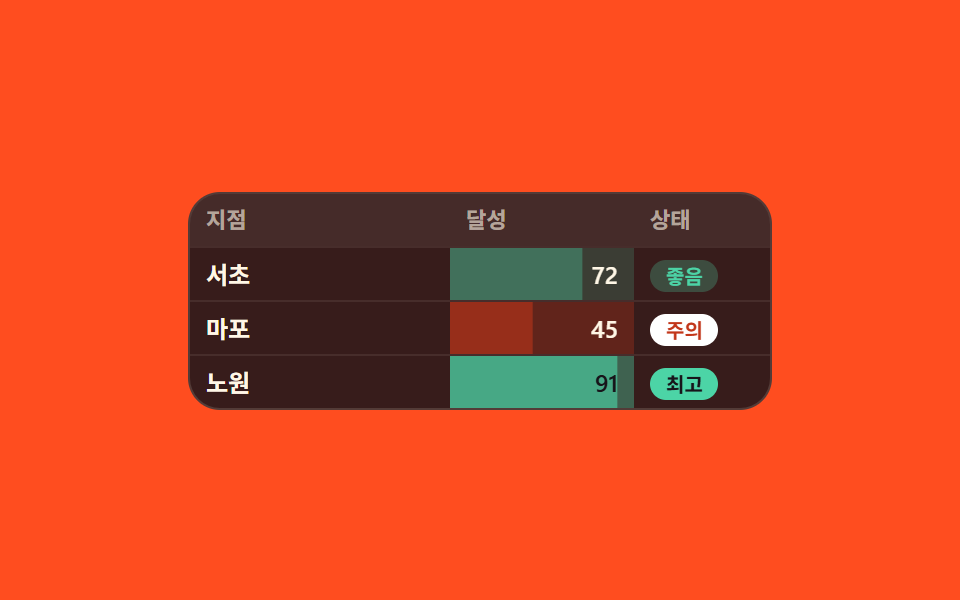
07数字の大きさどおりに塗られるセル色とバー
同じ数字の欄でも値がどの区間に入るかで背景が淡い色から濃い色に分かれ、欄の内側には値の分だけ伸びたバーが敷かれ、横には「良好」「注意」といった言葉のバッジが並びます。
使いどころ達成率や在庫など目で先に見渡す数値レポート
scaleXsteps(1, end)data-level
<main class="stage">
  <div class="cf is-demo" id="cf">
    <div class="cf__grid" id="cf-grid" role="grid" aria-label="達成率">
      <div class="cf__row cf__row--head" role="row">
        <span role="columnheader">支店</span><span role="columnheader">達成</span><span role="columnheader">状態</span>
      </div>
      <div class="cf__row" role="row">
        <span role="gridcell">ソチョ</span>
        <span class="cf__num" role="gridcell" data-level="2"><span class="cf__bar" style="--v: .72" aria-hidden="true"></span><i>72</i></span>
        <span role="gridcell"><em class="cf__badge" data-level="2">良好</em></span>
      </div>
      <div class="cf__row" role="row">
        <span role="gridcell">マポ</span>
        <span class="cf__num" role="gridcell" data-level="1"><span class="cf__bar" style="--v: .45" aria-hidden="true"></span><i>45</i></span>
        <span role="gridcell"><em class="cf__badge" data-level="1">注意</em></span>
      </div>
      <div class="cf__row" role="row">
        <span role="gridcell">ノウォン</span>
        <span class="cf__num" role="gridcell" data-level="3"><span class="cf__bar" style="--v: .91" aria-hidden="true"></span><i>91</i></span>
        <span role="gridcell"><em class="cf__badge" data-level="3">最高</em></span>
      </div>
    </div>
  </div>
</main>
@use "sass:color";
@use "../../../../site/static/demo-tokens" as *;
$duration: $dur-base;
$easing: $ease-spring;
$color: $subject-cream;
@include stage($stage-orange);
$row-h: 26px;
$panel: color.mix($subject-ink, $stage-orange, 86%);
$line: rgba(255, 247, 230, .14);
.cf {
box-sizing: border-box;
width: min(292px, 92vw);
color: $color;
font-family: -apple-system, "Segoe UI", "Noto Sans KR", sans-serif;
}
.cf__grid {
border: 1px solid $line;
border-radius: $r-card;
background: $panel;
overflow: hidden;
}
.cf__row {
display: grid;
grid-template-columns: 1fr 92px 68px;
height: $row-h;
}
.cf__row + .cf__row { border-top: 1px solid rgba(255, 247, 230, .08); }
.cf__row > * {
padding: 0 $sp-2;
font-size: 12px;
line-height: $row-h;
font-weight: 600;
white-space: nowrap;
overflow: hidden;
}
.cf__row--head { background: rgba(255, 247, 230, .07); }
.cf__row--head > * {
color: rgba(255, 247, 230, .6);
font-size: 11px;
font-weight: 700;
}
// ── 숫자 칸 — 구간 색 + 값만큼 자란 막대 ──────────────
.cf__num {
position: relative;
text-align: right;
}
.cf__num i { position: relative; font-style: normal; }
.cf__num[data-level="1"] { background: rgba(194, 54, 26, .30); }
.cf__num[data-level="2"] { background: rgba(76, 212, 166, .18); }
.cf__num[data-level="3"] { background: rgba(76, 212, 166, .38); color: $subject-ink; }
.cf__bar {
position: absolute;
left: 0; top: 0;
width: 100%;
height: 100%;
transform-origin: left center; // 규칙8: 값 막대 왼쪽 게이지
transform: scaleX(var(--v, 0));
}
.cf__num[data-level="1"] .cf__bar { background: rgba(194, 54, 26, .55); }
.cf__num[data-level="2"] .cf__bar { background: rgba(76, 212, 166, .34); }
.cf__num[data-level="3"] .cf__bar { background: rgba(76, 212, 166, .62); }
// ── 낱말 배지 — 색만으로 알리지 않는다 ────────────────
.cf__badge {
display: inline-flex;
align-items: center;
height: 16px;
padding: 0 $sp-2;
border-radius: $r-pill;
font-size: 10px;
line-height: 16px;
font-style: normal;
font-weight: 700;
}
.cf__badge[data-level="1"] { background: $stage-paper; color: $error; }
.cf__badge[data-level="2"] { background: rgba(76, 212, 166, .26); color: $subject-mint; }
.cf__badge[data-level="3"] { background: $subject-mint; color: $subject-ink; }
// ── 자동 루프 (2s) ───────────────────────────────────
// 8~40% 막대가 0 에서 제 값까지 자란다(가로만 늘리므로 중간 프레임이 유령이 되지 않는다).
// 구간 색과 배지는 막대가 도착하는 순간마다 줄마다 다른 시각에 컷으로 켜져 프레임을 채운다.
// 64~86% 에 0 으로 되돌아오고 그 뒤로는 아무것도 움직이지 않는다.
.cf.is-demo .cf__bar {
animation-name: cf-fill;
animation-duration: $dur-loop;
animation-timing-function: $easing;
animation-iteration-count: infinite;
animation-fill-mode: backwards;
}
.cf.is-demo .cf__row:nth-child(3) .cf__bar { animation-delay: 60ms; }
.cf.is-demo .cf__row:nth-child(4) .cf__bar { animation-delay: 120ms; }
.cf.is-demo .cf__num {
animation-duration: $dur-loop;
animation-timing-function: steps(1, end);
animation-iteration-count: infinite;
}
.cf.is-demo .cf__row:nth-child(2) .cf__num { animation-name: cf-tint-a; }
.cf.is-demo .cf__row:nth-child(3) .cf__num { animation-name: cf-tint-b; }
.cf.is-demo .cf__row:nth-child(4) .cf__num { animation-name: cf-tint-c; }
.cf.is-demo .cf__badge {
animation-duration: $dur-loop;
animation-timing-function: steps(1, end);
animation-iteration-count: infinite;
}
.cf.is-demo .cf__row:nth-child(2) .cf__badge { animation-name: cf-badge-a; }
.cf.is-demo .cf__row:nth-child(3) .cf__badge { animation-name: cf-badge-b; }
.cf.is-demo .cf__row:nth-child(4) .cf__badge { animation-name: cf-badge-c; }
// 등급은 막대가 다 자란 뒤(44%) 세 줄이 **한꺼번에** 켜진다 — 이 장이 한 판에서 제일 크게
// 변하므로 poster 가 「막대·구간색·배지가 다 있는 완성 화면」이 된다. 끄는 쪽은 72·76·80% 로
// 흩어 한 장에서 꺼지는 칸을 하나로 줄인다 (248-09 와 같은 계열의 함정).
@keyframes cf-fill {
0% { transform: scaleX(0); }
8% { transform: scaleX(0); }
38% { transform: scaleX(var(--v, 0)); }
70% { transform: scaleX(var(--v, 0)); }
82% { transform: scaleX(0); }
100% { transform: scaleX(0); }
}
@keyframes cf-tint-a {
0% { background: none; }
44% { background: rgba(76, 212, 166, .18); }
72% { background: none; }
100% { background: none; }
}
@keyframes cf-tint-b {
0% { background: none; }
44% { background: rgba(194, 54, 26, .30); }
76% { background: none; }
100% { background: none; }
}
@keyframes cf-tint-c {
0% { background: none; }
44% { background: rgba(76, 212, 166, .38); }
80% { background: none; }
100% { background: none; }
}
@keyframes cf-badge-a {
0% { opacity: 0; }
44% { opacity: 1; }
72% { opacity: 0; }
100% { opacity: 0; }
}
@keyframes cf-badge-b {
0% { opacity: 0; }
44% { opacity: 1; }
76% { opacity: 0; }
100% { opacity: 0; }
}
@keyframes cf-badge-c {
0% { opacity: 0; }
44% { opacity: 1; }
80% { opacity: 0; }
100% { opacity: 0; }
}
// 320×200 — 숫자·상태 열 폭과 셀 여백만 줄인다
@media (max-width: 340px) {
.cf__row { grid-template-columns: 1fr 76px 56px; }
.cf__row > * { padding: 0 $sp-1; }
.cf__badge { padding: 0 $sp-1; }
}
@media (prefers-reduced-motion: reduce) {
.cf.is-demo .cf__bar,
.cf.is-demo .cf__num,
.cf.is-demo .cf__badge { animation: none !important; }
.cf.is-demo .cf__bar { transform: scaleX(var(--v, 0)); }
}html, body {
margin: 0;
overflow: hidden;
}
.stage {
box-sizing: border-box;
min-height: 100vh;
display: grid;
place-items: center;
margin: 0;
background: #ff4d1f;
font-family: -apple-system, "Segoe UI", "Noto Sans KR", sans-serif;
padding: clamp(8px, 4vw, 24px);
}
.cf {
box-sizing: border-box;
width: min(292px, 92vw);
color: #fff7e6;
font-family: -apple-system, "Segoe UI", "Noto Sans KR", sans-serif;
}
.cf__grid {
border: 1px solid rgba(255, 247, 230, 0.14);
border-radius: 16px;
background: rgb(21.7568627451%, 10.9725490196%, 10.4705882353%);
overflow: hidden;
}
.cf__row {
display: grid;
grid-template-columns: 1fr 92px 68px;
height: 26px;
}
.cf__row + .cf__row {
border-top: 1px solid rgba(255, 247, 230, 0.08);
}
.cf__row > * {
padding: 0 8px;
font-size: 12px;
line-height: 26px;
font-weight: 600;
white-space: nowrap;
overflow: hidden;
}
.cf__row--head {
background: rgba(255, 247, 230, 0.07);
}
.cf__row--head > * {
color: rgba(255, 247, 230, 0.6);
font-size: 11px;
font-weight: 700;
}
.cf__num {
position: relative;
text-align: right;
}
.cf__num i {
position: relative;
font-style: normal;
}
.cf__num[data-level="1"] {
background: rgba(194, 54, 26, 0.3);
}
.cf__num[data-level="2"] {
background: rgba(76, 212, 166, 0.18);
}
.cf__num[data-level="3"] {
background: rgba(76, 212, 166, 0.38);
color: #17141a;
}
.cf__bar {
position: absolute;
left: 0;
top: 0;
width: 100%;
height: 100%;
transform-origin: left center;
transform: scaleX(var(--v, 0));
}
.cf__num[data-level="1"] .cf__bar {
background: rgba(194, 54, 26, 0.55);
}
.cf__num[data-level="2"] .cf__bar {
background: rgba(76, 212, 166, 0.34);
}
.cf__num[data-level="3"] .cf__bar {
background: rgba(76, 212, 166, 0.62);
}
.cf__badge {
display: inline-flex;
align-items: center;
height: 16px;
padding: 0 8px;
border-radius: 999px;
font-size: 10px;
line-height: 16px;
font-style: normal;
font-weight: 700;
}
.cf__badge[data-level="1"] {
background: #ffffff;
color: #c2361a;
}
.cf__badge[data-level="2"] {
background: rgba(76, 212, 166, 0.26);
color: #4cd4a6;
}
.cf__badge[data-level="3"] {
background: #4cd4a6;
color: #17141a;
}
.cf.is-demo .cf__bar {
animation-name: cf-fill;
animation-duration: 2s;
animation-timing-function: cubic-bezier(0.2, 0.8, 0.2, 1);
animation-iteration-count: infinite;
animation-fill-mode: backwards;
}
.cf.is-demo .cf__row:nth-child(3) .cf__bar {
animation-delay: 60ms;
}
.cf.is-demo .cf__row:nth-child(4) .cf__bar {
animation-delay: 120ms;
}
.cf.is-demo .cf__num {
animation-duration: 2s;
animation-timing-function: steps(1, end);
animation-iteration-count: infinite;
}
.cf.is-demo .cf__row:nth-child(2) .cf__num {
animation-name: cf-tint-a;
}
.cf.is-demo .cf__row:nth-child(3) .cf__num {
animation-name: cf-tint-b;
}
.cf.is-demo .cf__row:nth-child(4) .cf__num {
animation-name: cf-tint-c;
}
.cf.is-demo .cf__badge {
animation-duration: 2s;
animation-timing-function: steps(1, end);
animation-iteration-count: infinite;
}
.cf.is-demo .cf__row:nth-child(2) .cf__badge {
animation-name: cf-badge-a;
}
.cf.is-demo .cf__row:nth-child(3) .cf__badge {
animation-name: cf-badge-b;
}
.cf.is-demo .cf__row:nth-child(4) .cf__badge {
animation-name: cf-badge-c;
}
@keyframes cf-fill {
0% {
transform: scaleX(0);
}
8% {
transform: scaleX(0);
}
38% {
transform: scaleX(var(--v, 0));
}
70% {
transform: scaleX(var(--v, 0));
}
82% {
transform: scaleX(0);
}
100% {
transform: scaleX(0);
}
}
@keyframes cf-tint-a {
0% {
background: none;
}
44% {
background: rgba(76, 212, 166, 0.18);
}
72% {
background: none;
}
100% {
background: none;
}
}
@keyframes cf-tint-b {
0% {
background: none;
}
44% {
background: rgba(194, 54, 26, 0.3);
}
76% {
background: none;
}
100% {
background: none;
}
}
@keyframes cf-tint-c {
0% {
background: none;
}
44% {
background: rgba(76, 212, 166, 0.38);
}
80% {
background: none;
}
100% {
background: none;
}
}
@keyframes cf-badge-a {
0% {
opacity: 0;
}
44% {
opacity: 1;
}
72% {
opacity: 0;
}
100% {
opacity: 0;
}
}
@keyframes cf-badge-b {
0% {
opacity: 0;
}
44% {
opacity: 1;
}
76% {
opacity: 0;
}
100% {
opacity: 0;
}
}
@keyframes cf-badge-c {
0% {
opacity: 0;
}
44% {
opacity: 1;
}
80% {
opacity: 0;
}
100% {
opacity: 0;
}
}
@media (max-width: 340px) {
.cf__row {
grid-template-columns: 1fr 76px 56px;
}
.cf__row > * {
padding: 0 4px;
}
.cf__badge {
padding: 0 4px;
}
}
@media (prefers-reduced-motion: reduce) {
.cf.is-demo .cf__bar,
.cf.is-demo .cf__num,
.cf.is-demo .cf__badge {
animation: none !important;
}
.cf.is-demo .cf__bar {
transform: scaleX(var(--v, 0));
}
}// 실제 동작: 값 하나가 구간표를 지나 등급이 되고, 등급이 배경색·막대 길이·배지를 한꺼번에 정한다.
var cf = document.getElementById('cf');
var CF_BAND = [{ min: 80, level: 3, word: '最高' }, { min: 60, level: 2, word: '良好' }, { min: 0, level: 1, word: '注意' }];
function cfGrade(v) {
for (var i = 0; i < CF_BAND.length; i++) { if (v >= CF_BAND[i].min) return CF_BAND[i]; }
return CF_BAND[CF_BAND.length - 1];
}
function cfPut(row, v) {
cf.classList.remove('is-demo');
var cell = row.querySelector('.cf__num');
var badge = row.querySelector('.cf__badge');
var g = cfGrade(v);
cell.querySelector('i').textContent = String(v);
cell.querySelector('.cf__bar').style.setProperty('--v', String(v / 100));
cell.setAttribute('data-level', String(g.level));
badge.setAttribute('data-level', String(g.level));
badge.textContent = g.word;
}
// 셀을 누르면 그 줄의 값이 한 단계 올라가며 ランク 전체가 다시 계산된다
[].forEach.call(cf.querySelectorAll('.cf__num'), function (cell) {
cell.addEventListener('click', function () {
var now = +cell.querySelector('i').textContent;
cfPut(cell.closest('.cf__row'), now >= 95 ? 20 : now + 15);
});
});import { useState } from "react";
import type { CSSProperties } from "react";
import styles from "./ConditionalCellFormat.module.scss";
export type CellRow = { name: string; value: number };
export type ConditionalCellFormatProps = {
gridLabel?: string;
branchLabel?: string;
rateLabel?: string;
statusLabel?: string;
bestWord?: string;
goodWord?: string;
watchWord?: string;
rows?: CellRow[];
/** 자동 재생 루프 (갤러리용). 사람이 손대면 꺼진다 */
demo?: boolean;
duration?: number;
easing?: string;
color?: string;
};
type Vars = CSSProperties & { "--duration"?: string; "--easing"?: string; "--color"?: string };
type BarVars = CSSProperties & { "--v"?: string };
const ROWS: CellRow[] = [
{ name: "Seocho", value: 72 },
{ name: "Mapo", value: 45 },
{ name: "Nowon", value: 91 },
];
export default function ConditionalCellFormat({
gridLabel = "Attainment",
branchLabel = "Branch",
rateLabel = "Rate",
statusLabel = "Status",
bestWord = "Best",
goodWord = "Good",
watchWord = "Watch",
rows = ROWS,
demo = true,
duration = 300,
easing = "cubic-bezier(.2,.8,.2,1)",
color = "#fff7e6",
}: ConditionalCellFormatProps) {
const [data, setData] = useState<CellRow[]>(rows);
const [live, setLive] = useState(demo);
const vars: Vars = { "--duration": `${duration}ms`, "--easing": easing, "--color": color };
// 값 하나가 구간표를 지나 등급이 되고, 등급이 배경색·막대 길이·배지를 한꺼번에 정한다
const grade = (v: number) => (v >= 80 ? 3 : v >= 60 ? 2 : 1);
const word = (level: number) => (level === 3 ? bestWord : level === 2 ? goodWord : watchWord);
const barVars = (v: number): BarVars => ({ "--v": String(v / 100) });
// 셀을 누르면 그 줄의 값이 한 단계 올라가며 등급 전체가 다시 계산된다
const bump = (i: number) => {
setLive(false);
setData((prev) =>
prev.map((r, n) => (n === i ? { name: r.name, value: r.value >= 95 ? 20 : r.value + 15 } : r))
);
};
return (
<div className={[styles.root, live ? styles.isDemo : ""].join(" ")} style={vars}>
<div className={styles.grid} role="grid" aria-label={gridLabel}>
<div className={[styles.row, styles.rowHead].join(" ")} role="row">
<span role="columnheader">{branchLabel}</span>
<span role="columnheader">{rateLabel}</span>
<span role="columnheader">{statusLabel}</span>
</div>
{data.map((r, i) => {
const level = grade(r.value);
return (
<div className={styles.row} role="row" key={r.name}>
<span role="gridcell">{r.name}</span>
<span
className={styles.num}
role="gridcell"
data-level={String(level)}
onClick={() => bump(i)}
>
<span className={styles.bar} style={barVars(r.value)} aria-hidden="true" />
<i>{r.value}</i>
</span>
<span role="gridcell">
<em className={styles.badge} data-level={String(level)}>{word(level)}</em>
</span>
</div>
);
})}
</div>
</div>
);
}07 数字の大きさどおりに塗られるセル色とバー — 計測 累積面積 5.962% · 動いたフレーム 15/23GODRICH オリジナル · SCSS と React は zip に同梱 · テーブル UI デザイン 9選 — 列幅ドラッグと範囲選択まで
このデモが属する記事
 テーブル UI デザイン 9選 — 列幅ドラッグと範囲選択までテーブル ui デザインとは、行と列に並べた値を読む人が自分の手で並べ替え、絞り込み、取り出せるようにする作りのことです。9つとも実際の配列を並べ替え、実際の文字列を比べ、合計は見るたびにその場で足し直します。 この記事のデモをすべて見る