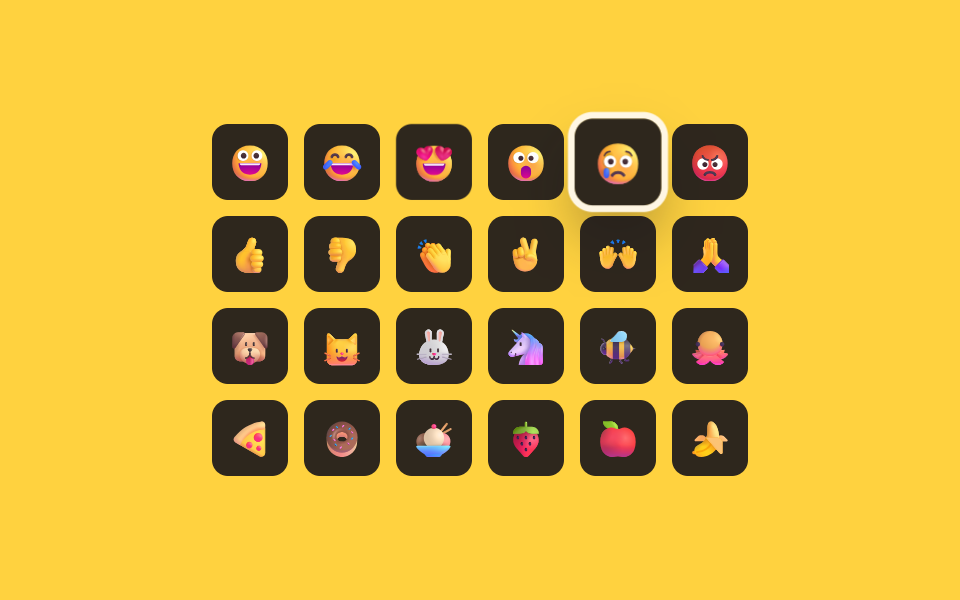
06矢印キーの値で格子内の焦点が移動するキーボード操作
押した矢印キーの値を格子の行数・列数と合わせて計算し、矢印を一回押すだけで焦点が隣のマスではなく行が変わる位置まで正確に移動する。
使いどころマウスなしで使う入力、アクセシビリティが重要なフォーム
measureColsmovesetFocus
<main class="stage">
<div class="kg is-demo" id="kg">
  <div class="kg__grid" id="kgGrid" role="grid" aria-label="絵文字グリッド"></div>
  <p class="kg__sr" role="status" aria-live="polite" id="kgLive"></p>
</div>
</main>
@use "../../../../site/static/demo-tokens" as *;
// 계산 겹: index.html measureCols() 가 첫 줄 칸들의 실제 렌더 top 값을 재서 지금 열 수를 구하고,
// move() 가 그 값으로 ArrowUp/Down 이 몇 칸을 건너뛸지 계산한다 — 열 수를 상수로 박아두지 않는다.
@include stage($stage-yellow);
.kg { display: flex; flex-direction: column; align-items: center; justify-content: center; }
.kg__grid {
display: grid; grid-template-columns: repeat(6, 1fr); gap: $sp-2;
}
.kg__cell {
width: 38px; height: 38px; border: none; border-radius: $r-sm;
background: rgba($subject-ink, .90); display: flex; align-items: center; justify-content: center;
font-size: 18px; cursor: pointer; outline: none;
transform: scale(1); transition: transform $dur-quick $ease-spring, box-shadow $dur-quick $ease-out;
}
.kg__cell--active { transform: scale(1.14); box-shadow: 0 0 0 3px $subject-cream, $shadow-raised; }
.kg__cell:focus-visible { box-shadow: 0 0 0 3px $subject-cream, $shadow-raised; }
.kg__sr { position: absolute; width: 1px; height: 1px; overflow: hidden; clip: rect(0 0 0 0); margin: -1px; padding: 0; border: 0; }
@media (max-width: 340px) {
.kg__grid { grid-template-columns: repeat(6, 1fr); gap: $sp-1; }
.kg__cell { width: 26px; height: 26px; font-size: 13px; }
}
@media (prefers-reduced-motion: reduce) {
.kg__cell { transition: none; }
}html, body {
margin: 0;
overflow: hidden;
}
.stage {
box-sizing: border-box;
min-height: 100vh;
display: grid;
place-items: center;
margin: 0;
background: #ffd23f;
font-family: -apple-system, "Segoe UI", "Noto Sans KR", sans-serif;
padding: clamp(8px, 4vw, 24px);
}
.kg {
display: flex;
flex-direction: column;
align-items: center;
justify-content: center;
}
.kg__grid {
display: grid;
grid-template-columns: repeat(6, 1fr);
gap: 8px;
}
.kg__cell {
width: 38px;
height: 38px;
border: none;
border-radius: 8px;
background: rgba(23, 20, 26, 0.9);
display: flex;
align-items: center;
justify-content: center;
font-size: 18px;
cursor: pointer;
outline: none;
transform: scale(1);
transition: transform 220ms cubic-bezier(0.2, 0.8, 0.2, 1), box-shadow 220ms ease-out;
}
.kg__cell--active {
transform: scale(1.14);
box-shadow: 0 0 0 3px #fff7e6, 0 14px 24px rgba(23, 20, 26, 0.32);
}
.kg__cell:focus-visible {
box-shadow: 0 0 0 3px #fff7e6, 0 14px 24px rgba(23, 20, 26, 0.32);
}
.kg__sr {
position: absolute;
width: 1px;
height: 1px;
overflow: hidden;
clip: rect(0 0 0 0);
margin: -1px;
padding: 0;
border: 0;
}
@media (max-width: 340px) {
.kg__grid {
grid-template-columns: repeat(6, 1fr);
gap: 4px;
}
.kg__cell {
width: 26px;
height: 26px;
font-size: 13px;
}
}
@media (prefers-reduced-motion: reduce) {
.kg__cell {
transition: none;
}
}(function () {
var EMOJIS = [
{ ch: '\u{1F600}', name: '笑顔' }, { ch: '\u{1F602}', name: '爆笑' }, { ch: '\u{1F60D}', name: 'ハート目' },
{ ch: '\u{1F62E}', name: '驚き' }, { ch: '\u{1F622}', name: '涙' }, { ch: '\u{1F621}', name: '怒り' },
{ ch: '\u{1F44D}', name: 'いいね' }, { ch: '\u{1F44E}', name: 'よくないね' }, { ch: '\u{1F44F}', name: '拍手' },
{ ch: '\u{270C}', name: 'ピース' }, { ch: '\u{1F64C}', name: '万歳' }, { ch: '\u{1F64F}', name: '祈り' },
{ ch: '\u{1F436}', name: '犬' }, { ch: '\u{1F431}', name: '猫' }, { ch: '\u{1F430}', name: 'うさぎ' },
{ ch: '\u{1F984}', name: 'ユニコーン' }, { ch: '\u{1F41D}', name: 'ミツバチ' }, { ch: '\u{1F419}', name: 'タコ' },
{ ch: '\u{1F355}', name: 'ピザ' }, { ch: '\u{1F369}', name: 'ドーナツ' }, { ch: '\u{1F368}', name: 'アイスクリーム' },
{ ch: '\u{1F353}', name: 'いちご' }, { ch: '\u{1F34E}', name: 'りんご' }, { ch: '\u{1F34C}', name: 'バナナ' }
];
var root = document.getElementById('kg');
var grid = document.getElementById('kgGrid');
var live = document.getElementById('kgLive');
var synthetic = false;
function human() { if (synthetic) return; if (root.classList.contains('is-demo')) root.classList.remove('is-demo'); }
var cells = [];
EMOJIS.forEach(function (e, i) {
var b = document.createElement('button');
b.type = 'button'; b.className = 'kg__cell'; b.setAttribute('role', 'gridcell');
b.setAttribute('aria-label', e.name); b.setAttribute('aria-selected', i === 0 ? 'true' : 'false');
b.tabIndex = i === 0 ? 0 : -1;
b.textContent = e.ch;
grid.appendChild(b);
cells.push(b);
});
cells[0].classList.add('kg__cell--active');
// 계산 겹: 방향키 하나가 옆 칸(±1)으로 갈지 줄(±열 수)로 건너뛸지는 격자의 실제 렌더 열 수에
// 달려 있다 — 열 수를 상수로 박아두지 않고, 첫 줄에 속한 칸들의 getBoundingClientRect().top 이
// 서로 같다는 사실로 지금 이 순간의 실제 열 수를 측정해서 그 값으로 이동 폭을 계산한다.
function measureCols() {
if (!cells.length) return 1;
var firstTop = cells[0].getBoundingClientRect().top;
var n = 0;
for (var i = 0; i < cells.length; i++) {
if (Math.abs(cells[i].getBoundingClientRect().top - firstTop) < 1) n++; else break;
}
return n || 1;
}
var focusIndex = 0;
function setFocus(i, announce) {
cells[focusIndex].tabIndex = -1;
cells[focusIndex].setAttribute('aria-selected', 'false');
cells[focusIndex].classList.remove('kg__cell--active');
focusIndex = i;
cells[focusIndex].tabIndex = 0;
cells[focusIndex].setAttribute('aria-selected', 'true');
cells[focusIndex].classList.add('kg__cell--active');
cells[focusIndex].focus({ preventScroll: true });
if (announce) {
var cols = measureCols();
var row = Math.floor(focusIndex / cols) + 1;
var col = (focusIndex % cols) + 1;
live.textContent = row + '行目 ' + col + '列目、 ' + EMOJIS[focusIndex].name;
}
}
function move(key) {
var cols = measureCols();
var next = focusIndex;
if (key === 'ArrowRight') next = focusIndex + 1;
else if (key === 'ArrowLeft') next = focusIndex - 1;
else if (key === 'ArrowDown') next = focusIndex + cols;
else if (key === 'ArrowUp') next = focusIndex - cols;
else if (key === 'Home') next = 0;
else if (key === 'End') next = cells.length - 1;
if (next < 0 || next >= cells.length) return;
setFocus(next, true);
}
var NAV_KEYS = ['ArrowRight', 'ArrowLeft', 'ArrowUp', 'ArrowDown', 'Home', 'End'];
grid.addEventListener('keydown', function (ev) {
if (NAV_KEYS.indexOf(ev.key) === -1) return;
ev.preventDefault();
human();
move(ev.key);
});
var reduce = window.matchMedia('(prefers-reduced-motion: reduce)').matches;
var steps = ['ArrowRight', 'ArrowRight', 'ArrowDown', 'ArrowDown', 'ArrowLeft', 'ArrowUp'];
var si = 0, loopTimer = 0;
function runStep() {
if (!root.classList.contains('is-demo')) return;
var key = steps[si % steps.length];
synthetic = true;
cells[focusIndex].dispatchEvent(new KeyboardEvent('keydown', { key: key, bubbles: true }));
synthetic = false;
si++;
loopTimer = window.setTimeout(runStep, 640);
}
if (!reduce) { loopTimer = window.setTimeout(runStep, 500); }
else { root.classList.remove('is-demo'); }
})();// EmojiPickerKeyboardArrowGridNav — vanilla 판(run/402/demo/06-.../index.html) 의 React 포트.
// 계산 겹: measureCols() 가 첫 줄 칸들의 실제 렌더 top 값을 재서 지금 열 수를 구하고, move() 가
// 그 값으로 ArrowUp/Down 이 몇 칸을 건너뛸지 계산한다 — 열 수를 상수로 박아두지 않는다.
import { useEffect, useRef, useState } from "react";
import styles from "./EmojiPickerKeyboardArrowGridNav.module.scss";
type Box<T> = { current: T };
const EMOJIS = [
{ ch: "\u{1F600}", name: "웃음" }, { ch: "\u{1F602}", name: "폭소" }, { ch: "\u{1F60D}", name: "하트눈" },
{ ch: "\u{1F62E}", name: "놀람" }, { ch: "\u{1F622}", name: "눈물" }, { ch: "\u{1F621}", name: "화남" },
{ ch: "\u{1F44D}", name: "좋아요" }, { ch: "\u{1F44E}", name: "싫어요" }, { ch: "\u{1F44F}", name: "박수" },
{ ch: "\u{270C}", name: "브이" }, { ch: "\u{1F64C}", name: "만세" }, { ch: "\u{1F64F}", name: "기도" },
{ ch: "\u{1F436}", name: "강아지" }, { ch: "\u{1F431}", name: "고양이" }, { ch: "\u{1F430}", name: "토끼" },
{ ch: "\u{1F984}", name: "유니콘" }, { ch: "\u{1F41D}", name: "꿀벌" }, { ch: "\u{1F419}", name: "문어" },
{ ch: "\u{1F355}", name: "피자" }, { ch: "\u{1F369}", name: "도넛" }, { ch: "\u{1F368}", name: "아이스크림" },
{ ch: "\u{1F353}", name: "딸기" }, { ch: "\u{1F34E}", name: "사과" }, { ch: "\u{1F34C}", name: "바나나" },
];
const NAV_KEYS = ["ArrowRight", "ArrowLeft", "ArrowUp", "ArrowDown", "Home", "End"];
export default function EmojiPickerKeyboardArrowGridNav() {
const [isDemo, setIsDemo] = useState(true);
const [focusIndex, setFocusIndexState] = useState(0);
const isDemoRef = useRef(true) as unknown as Box<boolean>;
const synthRef = useRef(false) as unknown as Box<boolean>;
const focusIndexRef = useRef(0) as unknown as Box<number>;
const liveRef = useRef(null) as unknown as Box<HTMLParagraphElement>;
const gridRef = useRef(null) as unknown as Box<HTMLDivElement>;
const loopTimerRef = useRef(0) as unknown as Box<number>;
const cellRefs = useRef({} as { [i: number]: HTMLButtonElement }) as unknown as Box<{ [i: number]: HTMLButtonElement }>;
function human() {
if (synthRef.current) return;
if (isDemoRef.current) { isDemoRef.current = false; setIsDemo(false); }
}
function measureCols(): number {
const n = EMOJIS.length;
if (n === 0) return 1;
const first = cellRefs.current[0];
if (!first) return 1;
const firstTop = first.getBoundingClientRect().top;
let cols = 0;
for (let i = 0; i < n; i++) {
const el = cellRefs.current[i];
if (!el) break;
if (Math.abs(el.getBoundingClientRect().top - firstTop) < 1) cols++; else break;
}
return cols || 1;
}
function setFocus(i: number, announce: boolean) {
focusIndexRef.current = i;
setFocusIndexState(i);
const el = cellRefs.current[i];
if (el) el.focus({ preventScroll: true });
if (announce && liveRef.current) {
const cols = measureCols();
const row = Math.floor(i / cols) + 1;
const col = (i % cols) + 1;
liveRef.current.textContent = row + "번째 줄 " + col + "번째 칸, " + EMOJIS[i].name;
}
}
function move(key: string) {
const cols = measureCols();
const cur = focusIndexRef.current;
let next = cur;
if (key === "ArrowRight") next = cur + 1;
else if (key === "ArrowLeft") next = cur - 1;
else if (key === "ArrowDown") next = cur + cols;
else if (key === "ArrowUp") next = cur - cols;
else if (key === "Home") next = 0;
else if (key === "End") next = EMOJIS.length - 1;
if (next < 0 || next >= EMOJIS.length) return;
setFocus(next, true);
}
function onKeyDown(ev: { key: string; preventDefault: () => void }) {
if (NAV_KEYS.indexOf(ev.key) === -1) return;
ev.preventDefault();
human();
move(ev.key);
}
useEffect(() => {
const reduce = window.matchMedia("(prefers-reduced-motion: reduce)").matches;
const steps = ["ArrowRight", "ArrowRight", "ArrowDown", "ArrowDown", "ArrowLeft", "ArrowUp"];
let si = 0;
function runStep() {
if (!isDemoRef.current) return;
const key = steps[si % steps.length];
const el = cellRefs.current[focusIndexRef.current];
synthRef.current = true;
if (el) el.dispatchEvent(new KeyboardEvent("keydown", { key: key, bubbles: true }));
synthRef.current = false;
si++;
loopTimerRef.current = window.setTimeout(runStep, 640);
}
if (!reduce) { loopTimerRef.current = window.setTimeout(runStep, 500); }
else { isDemoRef.current = false; setIsDemo(false); }
return () => window.clearTimeout(loopTimerRef.current);
// eslint-disable-next-line react-hooks/exhaustive-deps
}, []);
return (
<main className={styles.stage}>
<div className={styles.kg + " " + (isDemo ? styles.isDemo : "")}>
<div
className={styles.grid}
role="grid"
aria-label="이모지 격자"
ref={gridRef}
onKeyDown={onKeyDown}
>
{EMOJIS.map((e, i) => (
<button
key={e.name + i}
type="button"
className={styles.cell + " " + (focusIndex === i ? styles.cellActive : "")}
role="gridcell"
aria-label={e.name}
aria-selected={focusIndex === i}
tabIndex={focusIndex === i ? 0 : -1}
ref={(el: HTMLButtonElement | null) => { if (el) cellRefs.current[i] = el; }}
>
{e.ch}
</button>
))}
</div>
<p className={styles.sr} role="status" aria-live="polite" ref={liveRef} />
</div>
</main>
);
}06 矢印キーの値で格子内の焦点が移動するキーボード操作 — 計測 累積面積 6.242% · 動いたフレーム 12/23GODRICH オリジナル · SCSS と React は zip に同梱 · 絵文字ピッカー 9パターン — 値で開閉
このデモが属する記事
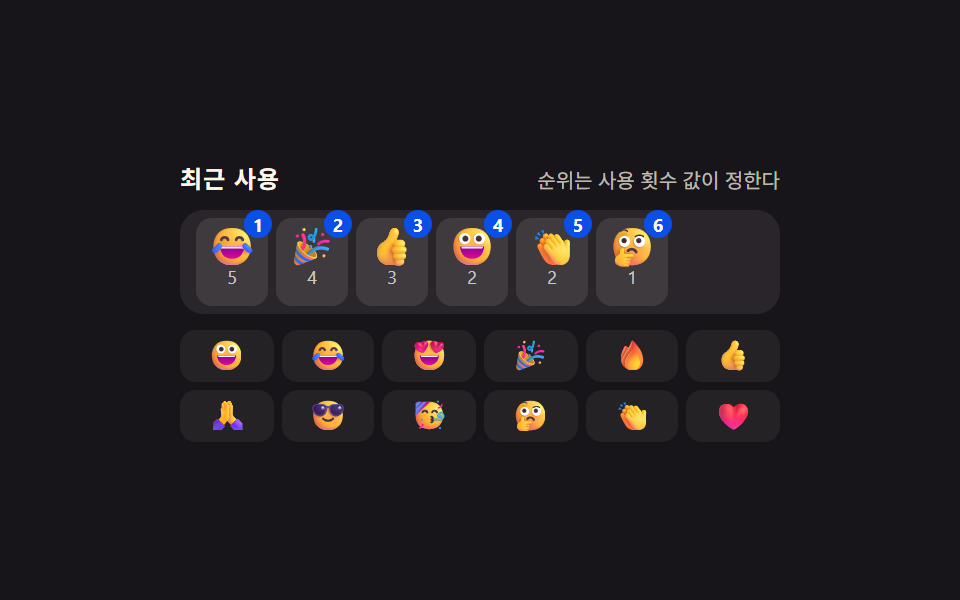 絵文字ピッカー 9パターン — 値で開閉入力欄の下に残る空間の値がパネルの高さより小さいときだけパネルは上に開く位置に変わり、押し続けた時間の値が決めたしきい値を超えたときだけ同じ絵文字のバリエーションが扇状に広がり、カーソル位置の値をあらかじめ保存していた場合だけ選んだ絵文字が この記事のデモをすべて見る