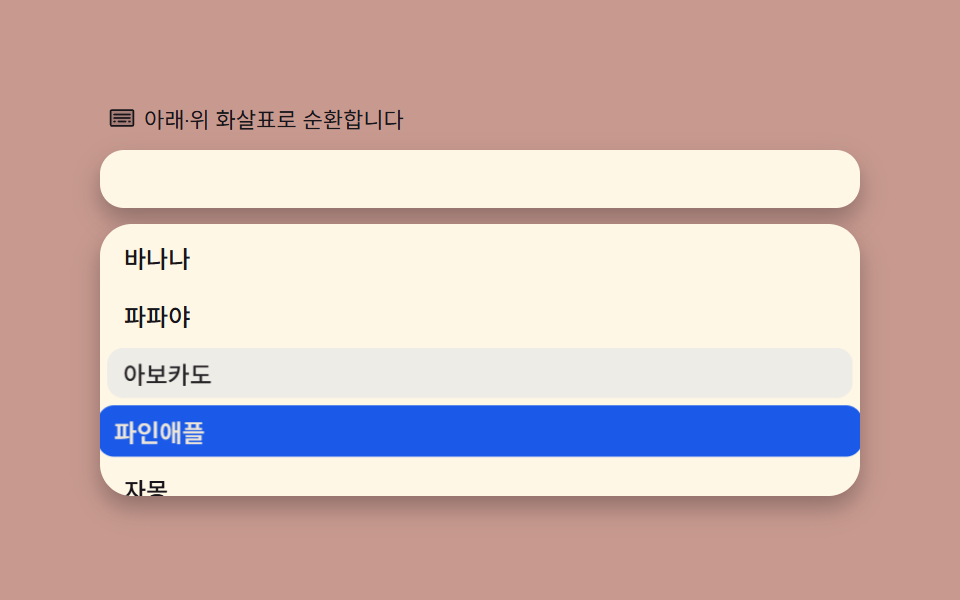
03キーボード循環 — ↑↓で項目を選び、端から反対側へ戻るmod計算
アクティブインデックスを(i + 1) % lengthで計算すると、最後の項目で↓を押すと最初の項目へ自然に戻ります。aria-activedescendantでスクリーンリーダーに位置を伝え、scrollIntoView({block:'nearest'})でアクティブ項目がリストの外に隠れないようにします。
使いどころキーボード利用者に必須
keydownaria-activedescendantscrollIntoView
<main class="stage">
<div class="kb" id="kb">
  <p class="kb__hint">
    <svg class="kb__ic" viewBox="0 0 256 256" aria-hidden="true"><g fill="currentColor"><path d="M232 64v128a8 8 0 0 1-8 8H32a8 8 0 0 1-8-8V64a8 8 0 0 1 8-8h192a8 8 0 0 1 8 8" opacity=".2"/><path d="M224 48H32a16 16 0 0 0-16 16v128a16 16 0 0 0 16 16h192a16 16 0 0 0 16-16V64a16 16 0 0 0-16-16m0 144H32V64h192zm-16-64a8 8 0 0 1-8 8H56a8 8 0 0 1 0-16h144a8 8 0 0 1 8 8m0-32a8 8 0 0 1-8 8H56a8 8 0 0 1 0-16h144a8 8 0 0 1 8 8M72 160a8 8 0 0 1-8 8h-8a8 8 0 0 1 0-16h8a8 8 0 0 1 8 8m96 0a8 8 0 0 1-8 8H96a8 8 0 0 1 0-16h64a8 8 0 0 1 8 8m40 0a8 8 0 0 1-8 8h-8a8 8 0 0 1 0-16h8a8 8 0 0 1 8 8"/></g></svg>
    上下の矢印キーで循環移動します
  </p>
  <div class="kb__field" role="combobox" aria-expanded="true" aria-owns="kbList" aria-haspopup="listbox" id="kbField">
    <input class="kb__input" id="kbInput" type="text" role="searchbox" aria-autocomplete="list" aria-controls="kbList" aria-label="フルーツリストの操作" aria-activedescendant="kb-opt-0" autocomplete="off" readonly>
  </div>
  <ul class="kb__list" id="kbList" role="listbox" aria-label="フルーツリスト"></ul>
</div>
</main>
@use "../../../../site/static/demo-tokens" as *;
$duration: $dur-quick;
$easing: $ease-spring;
$color: $subject-blue-deep;
// 파스텔 무대(도구/파스텔.py to_pastel 결과: 채도 .34 · 명도 +.11, $stage-orange 기준)
$p-orange: #c89a8f;
@include stage($p-orange);
.kb {
width: 100%;
max-width: 380px;
display: flex;
flex-direction: column;
gap: $sp-2;
}
.kb__hint {
margin: 0;
padding: 0 $sp-1;
display: flex;
align-items: center;
gap: $sp-1;
font-weight: 400;
font-size: 11px;
line-height: 1.4;
color: $subject-ink;
}
.kb__ic {
width: 14px;
height: 14px;
flex: 0 0 auto;
}
.kb__field {
background: $subject-cream;
border-radius: $r-control;
padding: $sp-1 $sp-3;
box-shadow: $shadow-press;
}
.kb__input {
width: 100%;
border: 0;
outline: 0;
background: transparent;
font-weight: 500;
font-size: 12px;
color: $subject-ink;
caret-color: $color;
}
.kb__list {
margin: 0;
padding: $sp-1;
list-style: none;
display: flex;
flex-direction: column;
gap: $sp-1;
height: 128px;
overflow-y: auto;
background: $subject-cream;
border-radius: $r-card;
box-shadow: $shadow-press;
}
.kb__item {
padding: $sp-1 $sp-2;
border-radius: $r-sm;
font-weight: 500;
font-size: 12px;
color: $subject-ink;
background: transparent;
transform: scale(1);
transform-origin: center;
transition: transform $duration $easing, background-color $duration $easing, color $duration $easing;
}
.kb__item.is-active {
background: $color;
color: $subject-cream;
transform: scale(1.03);
}
@media (max-width: 340px) {
.kb { max-width: 260px; }
.kb__list { height: 96px; }
}
@media (prefers-reduced-motion: reduce) {
.kb__item {
transition: none;
}
}html, body {
margin: 0;
overflow: hidden;
}
.stage {
box-sizing: border-box;
min-height: 100vh;
display: grid;
place-items: center;
margin: 0;
background: #c89a8f;
font-family: -apple-system, "Segoe UI", "Noto Sans KR", sans-serif;
padding: clamp(8px, 4vw, 24px);
}
.kb {
width: 100%;
max-width: 380px;
display: flex;
flex-direction: column;
gap: 8px;
}
.kb__hint {
margin: 0;
padding: 0 4px;
display: flex;
align-items: center;
gap: 4px;
font-weight: 400;
font-size: 11px;
line-height: 1.4;
color: #17141a;
}
.kb__ic {
width: 14px;
height: 14px;
flex: 0 0 auto;
}
.kb__field {
background: #fff7e6;
border-radius: 12px;
padding: 4px 12px;
box-shadow: 0 6px 12px rgba(23, 20, 26, 0.32);
}
.kb__input {
width: 100%;
border: 0;
outline: 0;
background: transparent;
font-weight: 500;
font-size: 12px;
color: #17141a;
caret-color: #0a4fe8;
}
.kb__list {
margin: 0;
padding: 4px;
list-style: none;
display: flex;
flex-direction: column;
gap: 4px;
height: 128px;
overflow-y: auto;
background: #fff7e6;
border-radius: 16px;
box-shadow: 0 6px 12px rgba(23, 20, 26, 0.32);
}
.kb__item {
padding: 4px 8px;
border-radius: 8px;
font-weight: 500;
font-size: 12px;
color: #17141a;
background: transparent;
transform: scale(1);
transform-origin: center;
transition: transform 220ms cubic-bezier(0.2, 0.8, 0.2, 1), background-color 220ms cubic-bezier(0.2, 0.8, 0.2, 1), color 220ms cubic-bezier(0.2, 0.8, 0.2, 1);
}
.kb__item.is-active {
background: #0a4fe8;
color: #fff7e6;
transform: scale(1.03);
}
@media (max-width: 340px) {
.kb {
max-width: 260px;
}
.kb__list {
height: 96px;
}
}
@media (prefers-reduced-motion: reduce) {
.kb__item {
transition: none;
}
}// 키보드 순환 탐색(03) — 활성 인덱스는 항상 (i + delta + 길이) % 길이 로 계산해
// 배열 양 끝에서 반대쪽으로 순환한다(음수 나머지를 피하려 길이를 한 번 더 더한다).
// aria-activedescendant 로 지금 활성 항목을 스크린리더에 알리고, scrollIntoView 의
// block:'nearest' 로 필요한 최소 거리만 스크롤한다(항상 맨 위로 당기지 않는다).
(function () {
var field = document.getElementById('kbField');
var input = document.getElementById('kbInput');
var list = document.getElementById('kbList');
if (!field || !input || !list) return;
var WORDS = ['バナナ', 'パパイヤ', 'アボカド', 'パイナップル', 'グレープフルーツ', 'チェリー', '桃', 'スイカ', 'いちご', 'マンゴー'];
var activeIndex = 0;
list.innerHTML = WORDS.map(function (w, i) {
return '<li class="kb__item" role="option" id="kb-opt-' + i + '">' + w + '</li>';
}).join('');
var items = list.querySelectorAll('.kb__item');
function updateActive() {
for (var i = 0; i < items.length; i++) items[i].classList.remove('is-active');
var el = items[activeIndex];
if (!el) return;
el.classList.add('is-active');
input.setAttribute('aria-activedescendant', el.id);
el.scrollIntoView({ block: 'nearest' });
}
function moveActive(delta) {
activeIndex = (activeIndex + delta + WORDS.length) % WORDS.length;
updateActive();
}
updateActive();
var playing = true;
function stop() { playing = false; }
function onKeydown(e) {
stop();
if (e.key === 'ArrowDown') { e.preventDefault(); moveActive(1); }
else if (e.key === 'ArrowUp') { e.preventDefault(); moveActive(-1); }
}
input.addEventListener('keydown', onKeydown);
input.addEventListener('pointerdown', stop);
var reduce = window.matchMedia('(prefers-reduced-motion: reduce)').matches;
var STEP_MS = reduce ? 0 : 230;
if (STEP_MS > 0) {
var last = performance.now();
(function tick(now) {
if (playing) {
if (now - last >= STEP_MS) {
moveActive(1);
last = now;
}
}
requestAnimationFrame(tick);
})(last);
}
})();// SearchAutocompleteKeyboardNavWrap — vanilla 판(run/335/demo/03-search-autocomplete-keyboard-nav-wrap/index.html)
// 의 React 포트. 활성 인덱스는 항상 (i + delta + 길이) % 길이 로 계산해 배열 양 끝에서
// 반대쪽으로 순환한다. aria-activedescendant 로 활성 항목을 알리고 scrollIntoView 의
// block:'nearest' 로 필요한 최소 거리만 스크롤한다.
import { useEffect, useRef } from "react";
import styles from "./SearchAutocompleteKeyboardNavWrap.module.scss";
export type SearchAutocompleteKeyboardNavWrapProps = {
duration?: string;
easing?: string;
color?: string;
};
type Box<T> = { current: T };
const HINT = "아래 · 위 화살표로 순환합니다";
const ARIA_LABEL = "과일 목록 탐색";
const ARIA_LIST_LABEL = "과일 목록";
const WORDS = ["바나나", "파파야", "아보카도", "파인애플", "자몽", "체리", "복숭아", "수박", "딸기", "망고"];
const STEP_MS = 230;
export default function SearchAutocompleteKeyboardNavWrap({
duration = "220ms",
easing = "cubic-bezier(.2,.8,.2,1)",
color = "#0a4fe8"
}: SearchAutocompleteKeyboardNavWrapProps) {
const inputRef = useRef<HTMLInputElement | null>(null);
const listRef = useRef<HTMLUListElement | null>(null);
const rafRef = useRef(0) as Box<number>;
useEffect(() => {
const input = inputRef.current;
const list = listRef.current;
if (!input || !list) return;
list.innerHTML = WORDS.map((w, i) => '<li class="' + styles.item + '" role="option" id="kb-opt-react-' + i + '">' + w + "</li>").join("");
const items = list.querySelectorAll<HTMLElement>("." + styles.item);
let activeIndex = 0;
function updateActive(): void {
items.forEach((el) => el.classList.remove(styles.isActive));
const el = items[activeIndex];
if (!el) return;
el.classList.add(styles.isActive);
input!.setAttribute("aria-activedescendant", el.id);
el.scrollIntoView({ block: "nearest" });
}
function moveActive(delta: number): void {
activeIndex = (activeIndex + delta + WORDS.length) % WORDS.length;
updateActive();
}
updateActive();
let playing = true;
function stop(): void {
playing = false;
}
function onKeydown(e: KeyboardEvent): void {
stop();
if (e.key === "ArrowDown") {
e.preventDefault();
moveActive(1);
} else if (e.key === "ArrowUp") {
e.preventDefault();
moveActive(-1);
}
}
input.addEventListener("keydown", onKeydown);
input.addEventListener("pointerdown", stop);
const reduce = window.matchMedia("(prefers-reduced-motion: reduce)").matches;
if (!reduce) {
let last = performance.now();
const tick = (now: number): void => {
if (playing) {
if (now - last >= STEP_MS) {
moveActive(1);
last = now;
}
}
rafRef.current = requestAnimationFrame(tick);
};
rafRef.current = requestAnimationFrame(tick);
}
return () => {
cancelAnimationFrame(rafRef.current);
input.removeEventListener("keydown", onKeydown);
input.removeEventListener("pointerdown", stop);
};
// eslint-disable-next-line react-hooks/exhaustive-deps
}, []);
return (
<main className={styles.stage}>
<div className={styles.kb}>
<p className={styles.hint}>
<svg className={styles.ic} viewBox="0 0 256 256" aria-hidden="true">
<g fill="currentColor">
<path d="M232 64v128a8 8 0 0 1-8 8H32a8 8 0 0 1-8-8V64a8 8 0 0 1 8-8h192a8 8 0 0 1 8 8" opacity=".2" />
<path d="M224 48H32a16 16 0 0 0-16 16v128a16 16 0 0 0 16 16h192a16 16 0 0 0 16-16V64a16 16 0 0 0-16-16m0 144H32V64h192zm-16-64a8 8 0 0 1-8 8H56a8 8 0 0 1 0-16h144a8 8 0 0 1 8 8m0-32a8 8 0 0 1-8 8H56a8 8 0 0 1 0-16h144a8 8 0 0 1 8 8M72 160a8 8 0 0 1-8 8h-8a8 8 0 0 1 0-16h8a8 8 0 0 1 8 8m96 0a8 8 0 0 1-8 8H96a8 8 0 0 1 0-16h64a8 8 0 0 1 8 8m40 0a8 8 0 0 1-8 8h-8a8 8 0 0 1 0-16h8a8 8 0 0 1 8 8" />
</g>
</svg>
{HINT}
</p>
<div className={styles.field}>
<input
className={styles.input}
ref={inputRef}
type="text"
role="searchbox"
aria-autocomplete="list"
aria-controls="kbListReact"
aria-label={ARIA_LABEL}
aria-activedescendant="kb-opt-react-0"
autoComplete="off"
readOnly
style={{ caretColor: color, transitionDuration: duration, transitionTimingFunction: easing }}
/>
</div>
<ul className={styles.list} id="kbListReact" ref={listRef} role="listbox" aria-label={ARIA_LIST_LABEL} />
</div>
</main>
);
}03 キーボード循環 — ↑↓で項目を選び、端から反対側へ戻るmod計算 — 計測 累積面積 35.733% · 動いたフレーム 23/23GODRICH オリジナル · SCSS と React は zip に同梱 · オートコンプリート 実装 — ハイライト・デバウンス・編集距離を重ねた9種
このデモが属する記事
 オートコンプリート 実装 — ハイライト・デバウンス・編集距離を重ねた9種検索窓のオートコンプリート 実装は文字を打つたびに再計算が走る一枚の層です。入力した文字が候補のどこにあるかを見つけてその部分だけ太字にし、300msのデバウンスでリクエストをまとめ、キーボードでもリストを巡れます。最近の検索・誤字候補・人 この記事のデモをすべて見る