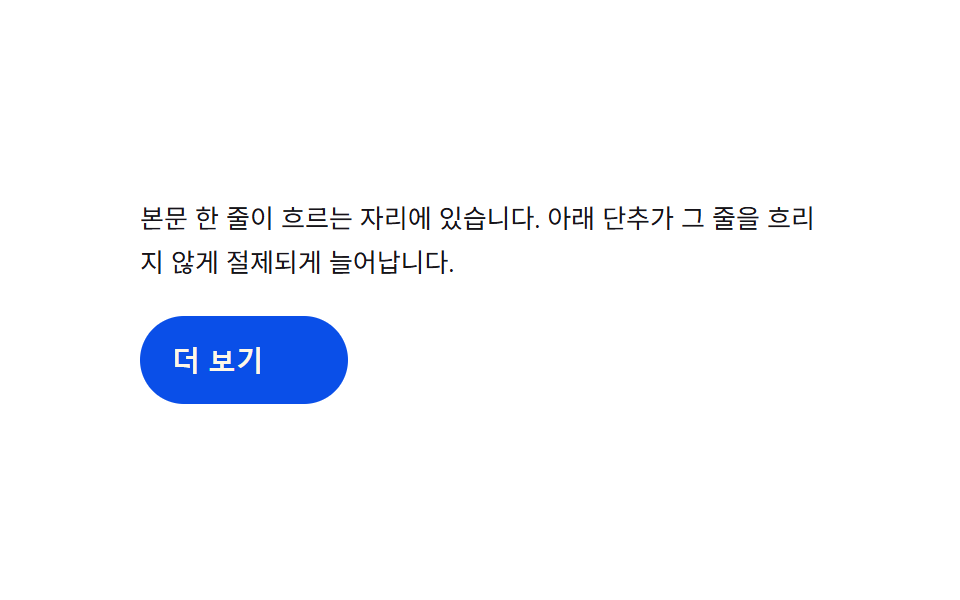
04幅の慣性切替 — 展開値が伸びる間、幅の値が目標を少し越えてから戻る方式
展開値が伸びると幅の値が目標より少し越し、それから戻ってくるため、伸びることに重みがあるように見えます。
使いどころ本文中のもっと見るボタン、インラインツールバーの展開
REST_WKD
<main class="stage">
<div class="we is-demo" id="we">
  <p class="we__line">本文の一行が流れる場所です。下のボタンがこの行を濁さないように控えめに伸びます。</p>
  <button type="button" class="we__btn" id="weBtn" aria-expanded="false">
    <span class="we__base">もっと見る</span>
    <span class="we__more" id="weMore">全文値を見る</span>
  </button>
</div>
</main>
@use "../../../../site/static/demo-tokens" as *;
// 계산 겹: 너비가 CSS transition 이 아니라 index.html 의 스프링 감쇠 계산(K·D)으로 매 프레임
// 결정된다 — 목표를 넘었다가 되돌아오는 관성. more 글자는 진행률 p 로만 얹힌다.
@include stage($stage-paper);
.we {
width: 100%;
max-width: 340px;
display: grid;
gap: $sp-4;
justify-items: start;
}
.we__line {
margin: 0;
color: $subject-ink;
font-size: 13px;
line-height: 1.7;
}
.we__btn {
position: relative;
display: inline-flex;
align-items: center;
justify-content: flex-start;
height: 44px;
padding: 0 $sp-4;
box-sizing: border-box;
border: 0;
border-radius: $r-pill;
background: $subject-blue-deep;
color: $subject-cream;
font-weight: 600;
font-size: 14px;
cursor: pointer;
overflow: hidden;
white-space: nowrap;
will-change: width;
}
.we__more {
margin-left: $sp-2;
opacity: 0;
white-space: nowrap;
font-weight: 600;
}
@media (max-width: 340px) {
.we { max-width: 280px; }
.we__btn { height: 40px; font-size: 13px; }
}
@media (prefers-reduced-motion: reduce) {
.we__more { transition: none; }
}html, body {
margin: 0;
overflow: hidden;
}
.stage {
box-sizing: border-box;
min-height: 100vh;
display: grid;
place-items: center;
margin: 0;
background: #ffffff;
font-family: -apple-system, "Segoe UI", "Noto Sans KR", sans-serif;
padding: clamp(8px, 4vw, 24px);
}
.we {
width: 100%;
max-width: 340px;
display: grid;
gap: 16px;
justify-items: start;
}
.we__line {
margin: 0;
color: #17141a;
font-size: 13px;
line-height: 1.7;
}
.we__btn {
position: relative;
display: inline-flex;
align-items: center;
justify-content: flex-start;
height: 44px;
padding: 0 16px;
box-sizing: border-box;
border: 0;
border-radius: 999px;
background: #0a4fe8;
color: #fff7e6;
font-weight: 600;
font-size: 14px;
cursor: pointer;
overflow: hidden;
white-space: nowrap;
will-change: width;
}
.we__more {
margin-left: 8px;
opacity: 0;
white-space: nowrap;
font-weight: 600;
}
@media (max-width: 340px) {
.we {
max-width: 280px;
}
.we__btn {
height: 40px;
font-size: 13px;
}
}
@media (prefers-reduced-motion: reduce) {
.we__more {
transition: none;
}
}(function () {
var root = document.getElementById('we');
var btn = document.getElementById('weBtn');
var more = document.getElementById('weMore');
var REST_W = 104; // 접힘 너비(px) — getBoundingClientRect 로 실측해 갱신한다
var K = 170, D = 12; // 스프링 상수·감쇠 — 목표를 넘었다가 되돌아오는 관성 값
// 계산 겹: 목표 폭을 getBoundingClientRect 로 실측한다(짐작 px 아님).
// 늘어난 상태의 텍스트를 잠깐 펼쳐 재고 다시 접는다 — 글꼴마다 값이 다르다.
function measure() {
var prev = more.style.width;
more.style.width = 'auto';
var w = more.getBoundingClientRect().width;
more.style.width = prev || '0px';
return Math.ceil(w);
}
var openW = measure() + REST_W + 24; // 24 = 기준 너비에 더할 여유
var open = false;
var cur = REST_W, vel = 0, target = REST_W;
var raf = null;
// 스프링 감쇠 계산: 매 프레임 a = -K*(cur-target) - D*vel — 오버슈트 후 안착
function tick() {
var a = -K * (cur - target) * 0.001 - D * vel * 0.01;
vel += a;
cur += vel;
if (Math.abs(cur - target) < 0.4 && Math.abs(vel) < 0.05) { cur = target; vel = 0; }
btn.style.width = cur.toFixed(1) + 'px';
var p = Math.max(0, Math.min(1, (cur - REST_W) / (openW - REST_W)));
more.style.opacity = String(p);
raf = requestAnimationFrame(tick);
}
function toggle() {
open = !open;
target = open ? openW : REST_W;
btn.setAttribute('aria-expanded', String(open));
}
btn.addEventListener('click', function () {
root.classList.remove('is-demo');
stopAutoplay();
toggle();
});
raf = requestAnimationFrame(tick);
var autoTimer = null;
function stopAutoplay() { if (autoTimer) { clearInterval(autoTimer); autoTimer = null; } }
var reduce = window.matchMedia('(prefers-reduced-motion: reduce)').matches;
if (!reduce) { autoTimer = setInterval(toggle, 1300); }
else { open = true; target = openW; cur = openW; btn.style.width = openW + 'px'; more.style.opacity = '1'; }
})();import { useEffect, useRef } from "react";
import styles from "./WidthExpandInline.module.scss";
type Box<T> = { current: T };
const REST_W = 104; // 접힘 너비(px) — getBoundingClientRect 로 실측해 갱신한다
const K = 170, D = 12; // 스프링 상수·감쇠 — 목표를 넘었다가 되돌아오는 관성 값
export default function WidthExpandInline() {
const rootRef = useRef(null) as unknown as Box<HTMLDivElement | null>;
useEffect(() => {
const root = rootRef.current;
if (!root) return;
const btn = root.querySelector(`.${styles.btn}`) as HTMLButtonElement | null;
const more = root.querySelector(`.${styles.more}`) as HTMLElement | null;
if (!btn || !more) return;
// 계산 겹: 목표 폭을 getBoundingClientRect 로 실측한다(짐작 px 아님).
function measure() {
const prev = more!.style.width;
more!.style.width = "auto";
const w = more!.getBoundingClientRect().width;
more!.style.width = prev || "0px";
return Math.ceil(w);
}
const openW = measure() + REST_W + 24; // 24 = 기준 너비에 더할 여유
let open = false;
let cur = REST_W, vel = 0, target = REST_W;
let raf: number | null = null;
function tick() {
const a = -K * (cur - target) * 0.001 - D * vel * 0.01;
vel += a;
cur += vel;
if (Math.abs(cur - target) < 0.4 && Math.abs(vel) < 0.05) { cur = target; vel = 0; }
btn!.style.width = cur.toFixed(1) + "px";
const p = Math.max(0, Math.min(1, (cur - REST_W) / (openW - REST_W)));
more!.style.opacity = String(p);
raf = requestAnimationFrame(tick);
}
function toggle() {
open = !open;
target = open ? openW : REST_W;
btn!.setAttribute("aria-expanded", String(open));
}
function onClick() {
root!.classList.remove(styles["is-demo"]);
stopAutoplay();
toggle();
}
btn.addEventListener("click", onClick);
raf = requestAnimationFrame(tick);
let autoTimer: number | null = null;
function stopAutoplay() { if (autoTimer !== null) { window.clearInterval(autoTimer); autoTimer = null; } }
const reduce = window.matchMedia("(prefers-reduced-motion: reduce)").matches;
if (!reduce) { autoTimer = window.setInterval(toggle, 1300); }
else {
open = true; target = openW; cur = openW;
btn!.style.width = openW + "px"; more!.style.opacity = "1";
}
return () => {
stopAutoplay();
if (raf !== null) cancelAnimationFrame(raf);
btn.removeEventListener("click", onClick);
};
}, []);
return (
<div ref={rootRef} className={`${styles.stage} ${styles.we} ${styles["is-demo"]}`}>
<p className={styles.line}>본문 한 줄이 흐르는 자리에 있습니다. 아래 단추가 그 줄을 흐리지 않게 절제되게 늘어납니다.</p>
<button type="button" className={styles.btn} aria-expanded="false">
<span className={styles.base}>더 보기</span>
<span className={styles.more}>전문 값 보기</span>
</button>
</div>
);
}04 幅の慣性切替 — 展開値が伸びる間、幅の値が目標を少し越えてから戻る方式 — 計測 累積面積 4.333% · 動いたフレーム 14/23GODRICH オリジナル · SCSS と React は zip に同梱 · css 開閉 ボタン 9選 — ボタンの形が変わる9つの方式
このデモが属する記事
 css 開閉 ボタン 9選 — ボタンの形が変わる9つの方式css 開閉 ボタン:9つのうち1つは開く値が変わるとボタンの角の丸み値が一緒に大きくなり、1つは閉じる値がオンになるとプラス記号が回転して閉じる記号に変わり、もう1つは展開値が伸びる間、幅の値が目標を少し越えてから戻ります。 この記事のデモをすべて見る