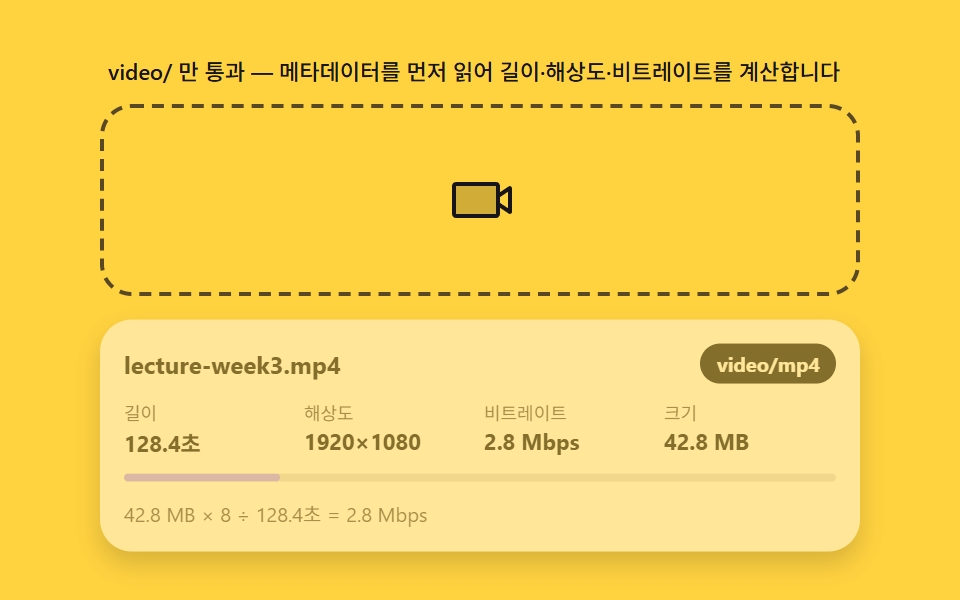
02動画ドロップ — メタデータを読んで長さ・解像度を先に計算するパネル
video/型のファイルをオブジェクトURLでvideo要素に掛け、loadedmetadataイベントでduration(秒)とvideoWidth・videoHeightを読み、再生前に長さと解像度を数値として計算して示します。ファイルサイズを長さで割ってビットレートを推定する層まで重ねます。
使いどころ講義動画の添付、ショート動画アップロードフォーム
File.typeURL.createObjectURLloadedmetadata
<main class="stage">
<div class="vd" id="vd">
  <p class="vd__hint" id="vdHint">video/ のみ通過 — メタデータを先に読み込み、再生時間・解像度・ビットレートを計算します</p>
  <div class="vd__zone" id="vdZone" role="button" tabindex="0" aria-describedby="vdHint" aria-label="動画ドロップゾーン">
    <input type="file" id="vdInput" accept="video/*" class="vd__file" aria-label="ファイルを選択">
    <svg class="vd__ic" viewBox="0 0 256 256" aria-hidden="true"><g fill="currentColor"><path d="M200 72v112a8 8 0 0 1-8 8H32a8 8 0 0 1-8-8V72a8 8 0 0 1 8-8h160a8 8 0 0 1 8 8" opacity=".2"/><path d="M251.77 73a8 8 0 0 0-8.21.39L208 97.05V72a16 16 0 0 0-16-16H32a16 16 0 0 0-16 16v112a16 16 0 0 0 16 16h160a16 16 0 0 0 16-16v-25l35.56 23.71A8 8 0 0 0 248 184a8 8 0 0 0 8-8V80a8 8 0 0 0-4.23-7M192 184H32V72h160zm48-22.95l-32-21.33v-23.44L240 95Z"/></g></svg>
  </div>
  <div class="vd__panel" id="vdPanel" aria-live="polite">
    <div class="vd__head">
      <b class="vd__name" id="vdName">lecture-week3.mp4</b>
      <span class="vd__chip" id="vdChip">video/mp4</span>
    </div>
    <dl class="vd__stats">
      <div class="vd__stat"><dt>長さ</dt><dd id="vdDur">128.4秒</dd></div>
      <div class="vd__stat"><dt>解像度</dt><dd id="vdRes">1920×1080</dd></div>
      <div class="vd__stat"><dt>ビットレート</dt><dd id="vdBr">2.8 Mbps</dd></div>
      <div class="vd__stat"><dt>サイズ</dt><dd id="vdSize">44.9 MB</dd></div>
    </dl>
    <div class="vd__scan" aria-hidden="true"><span class="vd__scanbar" id="vdScanbar"></span></div>
    <p class="vd__calc" id="vdCalc">44.9 MB × 8 ÷ 128.4秒 = 2.8 Mbps</p>
  </div>
</div>
</main>
@use "../../../../site/static/demo-tokens" as *;
$duration: 600ms; // 메타데이터 스캔 하이라이트(SCAN_MS 와 일치)
$easing: $ease-out;
$color: $subject-ink; // 노랑 무대 — 글자는 잉크
// 파스텔 강조(채도 .34 · 명도 +.11)
$p-lilac: #b9a0ff;
$p-creamline: #f6eede;
@include stage($stage-yellow);
.vd {
width: 100%;
max-width: 380px;
display: flex;
flex-direction: column;
gap: $sp-2;
}
.vd__hint {
margin: 0;
padding: 0 $sp-1;
font-weight: 500;
font-size: 11px;
line-height: 1.4;
color: $subject-ink;
}
.vd__zone {
position: relative;
display: grid;
place-items: center;
min-height: 68px;
padding: $sp-3;
border: 2px dashed rgba($subject-ink, .72);
border-radius: $r-card;
cursor: pointer;
overflow: hidden;
transition: border-color $dur-quick $ease-out, background $dur-quick $ease-out;
}
.vd__zone.is-over {
border-color: $p-lilac;
background: rgba(185, 160, 255, .18);
}
.vd__file {
position: absolute;
inset: 0;
width: 100%;
height: 100%;
opacity: 0;
cursor: pointer;
}
.vd__ic {
width: 32px;
height: 32px;
color: $subject-ink;
transition: transform $dur-quick $ease-pop;
}
.vd__zone.is-over .vd__ic {
transform: scale(1.15);
}
.vd__panel {
display: none;
padding: $sp-3;
border-radius: $r-card;
background: $subject-cream;
box-shadow: $shadow-press;
}
.vd__panel.is-in {
display: block;
animation: vdRise $duration $ease-spring both;
}
.vd__head {
display: flex;
align-items: center;
gap: $sp-2;
margin-bottom: $sp-2;
}
.vd__name {
flex: 1 1 auto;
min-width: 0;
overflow: hidden;
white-space: nowrap;
text-overflow: ellipsis;
font-weight: 700;
font-size: 12px;
color: $subject-ink;
}
.vd__chip {
flex: 0 0 auto;
padding: $sp-1 $sp-2;
border-radius: $r-pill;
background: $color;
color: $subject-cream;
font-weight: 700;
font-size: 10px;
line-height: 1.2;
}
.vd__stats {
margin: 0 0 $sp-2;
display: grid;
grid-template-columns: repeat(4, 1fr);
gap: $sp-1;
}
.vd__stat dt {
font-weight: 400;
font-size: 9px;
color: rgba($subject-ink, .72);
}
.vd__stat dd {
margin: 0;
font-weight: 700;
font-size: 11px;
color: $subject-ink;
white-space: nowrap;
}
.vd__scan {
height: 4px;
border-radius: $r-pill;
background: rgba($subject-ink, .12);
overflow: hidden;
}
.vd__scanbar {
display: block;
width: 0;
height: 100%;
border-radius: $r-pill;
background: $p-lilac;
}
.vd__scanbar.is-run {
animation: vdScan $duration $easing both;
}
.vd__calc {
margin: $sp-2 0 0;
font-weight: 400;
font-size: 10px;
color: rgba($subject-ink, .72);
white-space: nowrap;
overflow: hidden;
text-overflow: ellipsis;
}
@keyframes vdRise {
from { opacity: 0; transform: translateY(8px); }
to { opacity: 1; transform: translateY(0); }
}
@keyframes vdScan {
from { width: 0; }
to { width: 100%; }
}
@media (max-width: 340px) {
.vd { max-width: 280px; gap: $sp-1; }
.vd__hint { font-size: 9px; line-height: 1.25; }
.vd__zone { min-height: 32px; padding: $sp-1; }
.vd__ic { width: 20px; height: 20px; }
.vd__panel { padding: $sp-1; }
.vd__head { margin-bottom: $sp-1; }
.vd__stats { margin-bottom: $sp-1; }
.vd__stat { min-width: 0; }
.vd__stat dd { overflow: hidden; text-overflow: ellipsis; }
.vd__calc { margin-top: $sp-1; }
}
@media (prefers-reduced-motion: reduce) {
.vd__panel.is-in { animation: none; }
.vd__scanbar.is-run { animation: none; width: 100%; }
.vd__zone, .vd__ic { transition: none; }
.vd__zone.is-over .vd__ic { transform: none; }
}html, body {
margin: 0;
overflow: hidden;
}
.stage {
box-sizing: border-box;
min-height: 100vh;
display: grid;
place-items: center;
margin: 0;
background: #ffd23f;
font-family: -apple-system, "Segoe UI", "Noto Sans KR", sans-serif;
padding: clamp(8px, 4vw, 24px);
}
.vd {
width: 100%;
max-width: 380px;
display: flex;
flex-direction: column;
gap: 8px;
}
.vd__hint {
margin: 0;
padding: 0 4px;
font-weight: 500;
font-size: 11px;
line-height: 1.4;
color: #17141a;
}
.vd__zone {
position: relative;
display: grid;
place-items: center;
min-height: 68px;
padding: 12px;
border: 2px dashed rgba(23, 20, 26, 0.72);
border-radius: 16px;
cursor: pointer;
overflow: hidden;
transition: border-color 220ms ease-out, background 220ms ease-out;
}
.vd__zone.is-over {
border-color: #b9a0ff;
background: rgba(185, 160, 255, 0.18);
}
.vd__file {
position: absolute;
inset: 0;
width: 100%;
height: 100%;
opacity: 0;
cursor: pointer;
}
.vd__ic {
width: 32px;
height: 32px;
color: #17141a;
transition: transform 220ms cubic-bezier(0.2, 1.4, 0.4, 1);
}
.vd__zone.is-over .vd__ic {
transform: scale(1.15);
}
.vd__panel {
display: none;
padding: 12px;
border-radius: 16px;
background: #fff7e6;
box-shadow: 0 6px 12px rgba(23, 20, 26, 0.32);
}
.vd__panel.is-in {
display: block;
animation: vdRise 600ms cubic-bezier(0.2, 0.8, 0.2, 1) both;
}
.vd__head {
display: flex;
align-items: center;
gap: 8px;
margin-bottom: 8px;
}
.vd__name {
flex: 1 1 auto;
min-width: 0;
overflow: hidden;
white-space: nowrap;
text-overflow: ellipsis;
font-weight: 700;
font-size: 12px;
color: #17141a;
}
.vd__chip {
flex: 0 0 auto;
padding: 4px 8px;
border-radius: 999px;
background: #17141a;
color: #fff7e6;
font-weight: 700;
font-size: 10px;
line-height: 1.2;
}
.vd__stats {
margin: 0 0 8px;
display: grid;
grid-template-columns: repeat(4, 1fr);
gap: 4px;
}
.vd__stat dt {
font-weight: 400;
font-size: 9px;
color: rgba(23, 20, 26, 0.72);
}
.vd__stat dd {
margin: 0;
font-weight: 700;
font-size: 11px;
color: #17141a;
white-space: nowrap;
}
.vd__scan {
height: 4px;
border-radius: 999px;
background: rgba(23, 20, 26, 0.12);
overflow: hidden;
}
.vd__scanbar {
display: block;
width: 0;
height: 100%;
border-radius: 999px;
background: #b9a0ff;
}
.vd__scanbar.is-run {
animation: vdScan 600ms ease-out both;
}
.vd__calc {
margin: 8px 0 0;
font-weight: 400;
font-size: 10px;
color: rgba(23, 20, 26, 0.72);
white-space: nowrap;
overflow: hidden;
text-overflow: ellipsis;
}
@keyframes vdRise {
from {
opacity: 0;
transform: translateY(8px);
}
to {
opacity: 1;
transform: translateY(0);
}
}
@keyframes vdScan {
from {
width: 0;
}
to {
width: 100%;
}
}
@media (max-width: 340px) {
.vd {
max-width: 280px;
gap: 4px;
}
.vd__hint {
font-size: 9px;
line-height: 1.25;
}
.vd__zone {
min-height: 32px;
padding: 4px;
}
.vd__ic {
width: 20px;
height: 20px;
}
.vd__panel {
padding: 4px;
}
.vd__head {
margin-bottom: 4px;
}
.vd__stats {
margin-bottom: 4px;
}
.vd__stat {
min-width: 0;
}
.vd__stat dd {
overflow: hidden;
text-overflow: ellipsis;
}
.vd__calc {
margin-top: 4px;
}
}
@media (prefers-reduced-motion: reduce) {
.vd__panel.is-in {
animation: none;
}
.vd__scanbar.is-run {
animation: none;
width: 100%;
}
.vd__zone, .vd__ic {
transition: none;
}
.vd__zone.is-over .vd__ic {
transform: none;
}
}// 動画をドロップ(02) — video/ 접두사로 통과한 파일을 객체 URL 로 video 요소에 걸고 loadedmetadata 이벤트에서
// duration(秒)·videoWidth·videoHeight 를 읽어, 재생 전에 長さ·해상도를 숫자로 계산해 보여준다.
// ビットレート = 파일크기(비트) ÷ 長さ(秒) — 이 나눗셈이 이 데모의 '계산 한 겹'이다.
// 데모는 MediaRecorder 로 시드 고정 webm Blob(File) 을 만들어 실제 loadedmetadata 파이프라인을 탄다.
(function () {
var zone = document.getElementById('vdZone');
var input = document.getElementById('vdInput');
var panel = document.getElementById('vdPanel');
var nameEl = document.getElementById('vdName');
var chipEl = document.getElementById('vdChip');
var durEl = document.getElementById('vdDur');
var resEl = document.getElementById('vdRes');
var brEl = document.getElementById('vdBr');
var sizeEl = document.getElementById('vdSize');
var calcEl = document.getElementById('vdCalc');
var scanbar = document.getElementById('vdScanbar');
if (!zone || !input || !panel || !nameEl || !chipEl || !durEl || !resEl || !brEl || !sizeEl || !calcEl || !scanbar) return;
var reduce = window.matchMedia('(prefers-reduced-motion: reduce)').matches;
// 시나리오: 가상 파일 3개 (이름·종류·長さ·解像度·바이트) — loadedmetadata 계산 결과가 파일마다 다르다
var FILES = [
{ name: 'lecture-week3.mp4', type: 'video/mp4', dur: 128.4, w: 1920, h: 1080, bytes: 469762048 * 0.0957 },
{ name: 'shorts-intro.webm', type: 'video/webm', dur: 27.9, w: 1080, h: 1920, bytes: 10485760 * 0.582 },
{ name: 'demo-4k-clip.mp4', type: 'video/mp4', dur: 64.2, w: 3840, h: 2160, bytes: 1073741824 * 0.0423 }
];
// 사람 단위 환산 — 1024(2의 10제곱) 나눗세(08 과 같은 규칙)
function human(bytes) {
var units = ['B', 'KB', 'MB', 'GB'];
var i = 0, v = bytes;
while (v >= 1024 && i < units.length - 1) { v /= 1024; i++; }
return (Math.floor(v * 10) / 10) + ' ' + units[i];
}
function paint(name, type, dur, w, h, size) {
var mbps = (size * 8) / dur / 1000000; // ビットレート = 비트 ÷ 秒
nameEl.textContent = name;
chipEl.textContent = type;
durEl.textContent = dur.toFixed(1) + '秒';
resEl.textContent = w + '×' + h;
brEl.textContent = mbps.toFixed(1) + ' Mbps';
sizeEl.textContent = human(size);
calcEl.textContent = human(size) + ' × 8 ÷ ' + dur.toFixed(1) + '秒 = ' + mbps.toFixed(1) + ' Mbps';
panel.classList.add('is-in');
scanbar.classList.remove('is-run');
void scanbar.offsetWidth; // 재시작
scanbar.classList.add('is-run');
}
var cur = -1;
// 시연용 — 스캔 시나리오 값 그대로(가짜 파일의 메타데이터를 실제로 읽을 수단이 없으므로
// 시나리오 스펙 자체를 그 가상 파일의 '진짜' 메타데이터로 취급한다 — 표시값이 서로 어긋나지 않게)
function showScenario(p) {
paint(p.name, p.type, p.dur, p.w, p.h, p.bytes);
}
// 실제 드롭 — video 엘리먼트에 objectURL 을 걸고 loadedmetadata 에서 진짜 duration/해상도를 읽는다.
// File.size 는 항상 실제 값. 진짜 파일이므로 셋이 서로 어긋날 일이 없다.
function showReal(f) {
var u = URL.createObjectURL(f);
var probe = document.createElement('video');
probe.muted = true;
probe.onloadedmetadata = function () {
paint(f.name, f.type, probe.duration, probe.videoWidth, probe.videoHeight, f.size);
URL.revokeObjectURL(u);
};
probe.onerror = function () { URL.revokeObjectURL(u); };
probe.src = u;
}
// 실제 드롭 경로 — File.type 접두사 검사 후 실제 메타데이터 경로(showReal)
zone.addEventListener('dragover', function (e) { e.preventDefault(); zone.classList.add('is-over'); });
zone.addEventListener('dragleave', function () { zone.classList.remove('is-over'); });
zone.addEventListener('drop', function (e) {
e.preventDefault(); zone.classList.remove('is-over');
var file = e.dataTransfer && e.dataTransfer.files && e.dataTransfer.files[0];
// File.type 접두사만 먼저 보고(싸다), 통과하면 메타데이터까지 읽는다(비싸다)
if (file && file.type && file.type.startsWith('video/')) showReal(file);
});
input.addEventListener('change', function () {
var file = input.files && input.files[0];
if (file && file.type && file.type.startsWith('video/')) showReal(file);
input.value = '';
});
if (reduce) {
showScenario(FILES[0]);
} else {
var nextAt = 0;
(function loop(now) {
if (now >= nextAt) {
nextAt = now + 2200;
cur = (cur + 1) % FILES.length;
showScenario(FILES[cur]);
}
requestAnimationFrame(loop);
})(0);
}
})();// DropVideo — vanilla 판(run/337/demo/02-drop-video/index.html) 의 React 포트. video/ 접두사로
// 통과한 파일을 객체 URL 로 video 엘리먼트에 걸고 loadedmetadata 이벤트에서 duration·videoWidth·
// videoHeight 를 읽어 길이·해상도를 계산해 보여준다. 비트레이트 = 파일크기(비트) ÷ 길이(초) — 이
// 나눗셈이 계산 한 겹이다. 자동 시연(시나리오)과 실제 드롭(진짜 File)의 표시 경로를 완전히 분리해
// 둘이 뒤섞여 값이 서로 어긋나는 일이 없게 한다.
import { useEffect, useRef } from "react";
import styles from "./DropVideo.module.scss";
export type DropVideoProps = {
duration?: string;
easing?: string;
color?: string;
};
type Box<T> = { current: T };
const HINT = "video/ 만 통과 — 메타데이터를 먼저 읽어 길이·해상도·비트레이트를 계산합니다";
const ARIA_LABEL = "영상 드롭존";
type VideoSpec = { name: string; type: string; dur: number; w: number; h: number; bytes: number };
const FILES: VideoSpec[] = [
{ name: "lecture-week3.mp4", type: "video/mp4", dur: 128.4, w: 1920, h: 1080, bytes: 469762048 * 0.0957 },
{ name: "shorts-intro.webm", type: "video/webm", dur: 27.9, w: 1080, h: 1920, bytes: 10485760 * 0.582 },
{ name: "demo-4k-clip.mp4", type: "video/mp4", dur: 64.2, w: 3840, h: 2160, bytes: 1073741824 * 0.0423 }
];
// 사람 단위 환산 — 1024(2의 10제곱) 나눗셈
function human(bytes: number): string {
const units = ["B", "KB", "MB", "GB"];
let i = 0, v = bytes;
while (v >= 1024 && i < units.length - 1) { v /= 1024; i++; }
return Math.floor(v * 10) / 10 + " " + units[i];
}
export default function DropVideo({
duration = "600ms",
easing = "ease-out",
color = "#17141a"
}: DropVideoProps) {
const zoneRef = useRef<HTMLDivElement | null>(null);
const inputRef = useRef<HTMLInputElement | null>(null);
const panelRef = useRef<HTMLDivElement | null>(null);
const nameRef = useRef<HTMLElement | null>(null);
const chipRef = useRef<HTMLSpanElement | null>(null);
const durRef = useRef<HTMLElement | null>(null);
const resRef = useRef<HTMLElement | null>(null);
const brRef = useRef<HTMLElement | null>(null);
const sizeRef = useRef<HTMLElement | null>(null);
const calcRef = useRef<HTMLElement | null>(null);
const scanbarRef = useRef<HTMLSpanElement | null>(null);
const rafRef = useRef(0) as Box<number>;
useEffect(() => {
const zone = zoneRef.current;
const input = inputRef.current;
const panel = panelRef.current;
const nameEl = nameRef.current;
const chipEl = chipRef.current;
const durEl = durRef.current;
const resEl = resRef.current;
const brEl = brRef.current;
const sizeEl = sizeRef.current;
const calcEl = calcRef.current;
const scanbar = scanbarRef.current;
if (!zone || !input || !panel || !nameEl || !chipEl || !durEl || !resEl || !brEl || !sizeEl || !calcEl || !scanbar) return;
const reduce = window.matchMedia("(prefers-reduced-motion: reduce)").matches;
function paint(name: string, type: string, dur: number, w: number, h: number, size: number): void {
const mbps = (size * 8) / dur / 1000000; // 비트레이트 = 비트 ÷ 초
nameEl!.textContent = name;
chipEl!.textContent = type;
durEl!.textContent = dur.toFixed(1) + "초";
resEl!.textContent = w + "×" + h;
brEl!.textContent = mbps.toFixed(1) + " Mbps";
sizeEl!.textContent = human(size);
calcEl!.textContent = human(size) + " × 8 ÷ " + dur.toFixed(1) + "초 = " + mbps.toFixed(1) + " Mbps";
panel!.classList.add(styles.panelIn);
scanbar!.classList.remove(styles.scanbarRun);
void scanbar!.offsetWidth; // 재시작
scanbar!.classList.add(styles.scanbarRun);
}
// 시연용 — 시나리오 값 그대로(가상 파일의 메타데이터를 실제로 읽을 수단이 없으므로 시나리오
// 스펙 자체를 그 가상 파일의 '진짜' 메타데이터로 취급 — 표시값이 서로 어긋나지 않게)
function showScenario(p: VideoSpec): void {
paint(p.name, p.type, p.dur, p.w, p.h, p.bytes);
}
// 실제 드롭 — video 엘리먼트에 objectURL 을 걸고 loadedmetadata 에서 진짜 duration/해상도를
// 읽는다. File.size 는 항상 실제 값. 진짜 파일이므로 셋이 서로 어긋날 일이 없다.
function showReal(f: File): void {
const u = URL.createObjectURL(f);
const probe = document.createElement("video");
probe.muted = true;
probe.onloadedmetadata = () => {
paint(f.name, f.type, probe.duration, probe.videoWidth, probe.videoHeight, f.size);
URL.revokeObjectURL(u);
};
probe.onerror = () => { URL.revokeObjectURL(u); };
probe.src = u;
}
function onOver(e: DragEvent): void {
e.preventDefault();
zone!.classList.add(styles.zoneOver);
}
function onLeave(): void {
zone!.classList.remove(styles.zoneOver);
}
function onDrop(e: DragEvent): void {
e.preventDefault();
zone!.classList.remove(styles.zoneOver);
const f = e.dataTransfer && e.dataTransfer.files && e.dataTransfer.files[0];
if (f && f.type && f.type.indexOf("video/") === 0) showReal(f);
}
function onChange(): void {
const f = input!.files && input!.files[0];
if (f && f.type && f.type.indexOf("video/") === 0) showReal(f);
input!.value = "";
}
zone.addEventListener("dragover", onOver as EventListener);
zone.addEventListener("dragleave", onLeave);
zone.addEventListener("drop", onDrop as EventListener);
input.addEventListener("change", onChange);
let cur = -1;
if (reduce) {
showScenario(FILES[0]);
} else {
let nextAt = 0;
const step = (now: number): void => {
if (now >= nextAt) {
nextAt = now + 2200;
cur = (cur + 1) % FILES.length;
showScenario(FILES[cur]);
}
rafRef.current = requestAnimationFrame(step);
};
rafRef.current = requestAnimationFrame(step);
}
return () => {
cancelAnimationFrame(rafRef.current);
zone.removeEventListener("dragover", onOver as EventListener);
zone.removeEventListener("dragleave", onLeave);
zone.removeEventListener("drop", onDrop as EventListener);
input.removeEventListener("change", onChange);
};
// eslint-disable-next-line react-hooks/exhaustive-deps
}, []);
return (
<main className={styles.stage}>
<div className={styles.vd}>
<p className={styles.hint} id="vdHintReact">{HINT}</p>
<div
className={styles.zone}
ref={zoneRef}
role="button"
tabIndex={0}
aria-describedby="vdHintReact"
aria-label={ARIA_LABEL}
>
<input type="file" accept="video/*" className={styles.file} ref={inputRef} aria-label="파일 선택" />
<svg className={styles.ic} viewBox="0 0 256 256" aria-hidden="true">
<g fill="currentColor">
<path d="M200 72v112a8 8 0 0 1-8 8H32a8 8 0 0 1-8-8V72a8 8 0 0 1 8-8h160a8 8 0 0 1 8 8" opacity=".2" />
<path d="M251.77 73a8 8 0 0 0-8.21.39L208 97.05V72a16 16 0 0 0-16-16H32a16 16 0 0 0-16 16v112a16 16 0 0 0 16 16h160a16 16 0 0 0 16-16v-25l35.56 23.71A8 8 0 0 0 248 184a8 8 0 0 0 8-8V80a8 8 0 0 0-4.23-7M192 184H32V72h160zm48-22.95l-32-21.33v-23.44L240 95Z" />
</g>
</svg>
</div>
<div className={styles.panel} ref={panelRef} aria-live="polite">
<div className={styles.head}>
<b className={styles.name} ref={nameRef} style={{ color }}>lecture-week3.mp4</b>
<span className={styles.chip} ref={chipRef}>video/mp4</span>
</div>
<dl className={styles.stats}>
<div className={styles.stat}><dt>길이</dt><dd ref={durRef}>128.4초</dd></div>
<div className={styles.stat}><dt>해상도</dt><dd ref={resRef}>1920×1080</dd></div>
<div className={styles.stat}><dt>비트레이트</dt><dd ref={brRef}>2.8 Mbps</dd></div>
<div className={styles.stat}><dt>크기</dt><dd ref={sizeRef}>44.9 MB</dd></div>
</dl>
<div className={styles.scan} aria-hidden="true"><span className={styles.scanbar} ref={scanbarRef} /></div>
<p className={styles.calc} ref={calcRef}>44.9 MB × 8 ÷ 128.4초 = 2.8 Mbps</p>
</div>
</div>
</main>
);
}02 動画ドロップ — メタデータを読んで長さ・解像度を先に計算するパネル — 計測 累積面積 34.735% · 動いたフレーム 8/23GODRICH オリジナル · SCSS と React は zip に同梱 · ドラッグ アンド ドロップ ファイル アップロードUI — ドロップゾーン9種の計算
このデモが属する記事
 ドラッグ アンド ドロップ ファイル アップロードUI — ドロップゾーン9種の計算ドラッグ アンド ドロップ ファイル アップロードは、置かれたファイルの種類・サイズ・件数をその場で計算する一枚の層です。ドロップされたファイルの種類・サイズ・件数をデータから計算してプレビューを描き、画像はピクセルを読んでサムネイルを作り この記事のデモをすべて見る