03複数ファイル — 件数を数え、埋まった枠と残りを計算するグループ
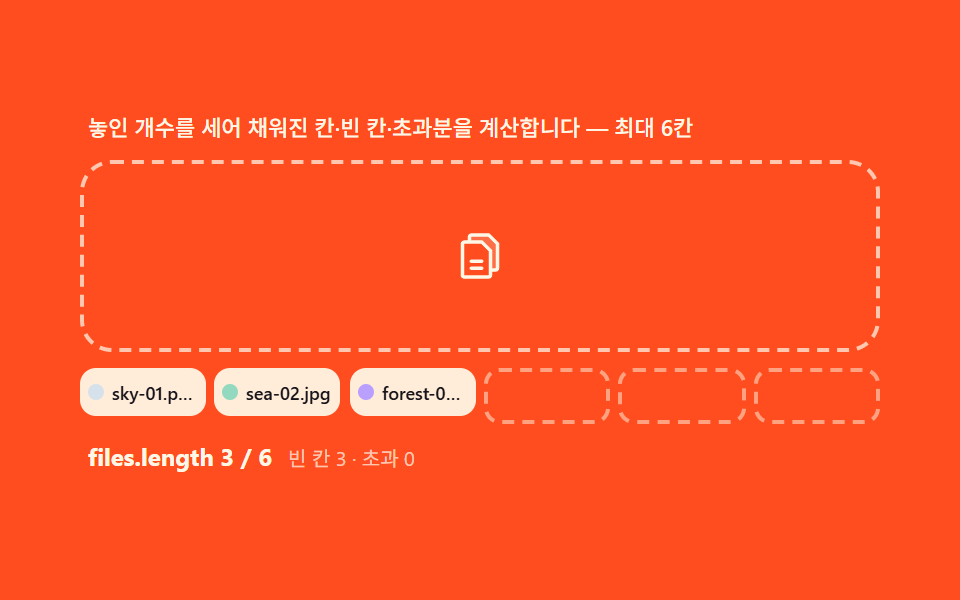
DataTransfer.filesをArray.fromで配列に広げ、lengthで件数を数え、固定枠数から埋まった枠を引いて残りを計算し、空き枠にだけ点線表示を残します。上限を超えたファイルは後ろから黙って切れるのではなく「N件超過」の案内とともに一覧の外に別途積まれます。
使いどころギャラリー登録、複数文書の添付
DataTransfer.filesArray.fromCSS custom properties
<main class="stage">
<div class="mf" id="mf">
  <p class="mf__hint" id="mfHint">ドロップされた個数を数えて埋まった枠・空き枠・超過分を計算します — 最大6枠</p>
  <div class="mf__zone" id="mfZone" role="button" tabindex="0" aria-describedby="mfHint" aria-label="複数ファイルドロップゾーン">
    <input type="file" id="mfInput" multiple class="mf__file" aria-label="ファイルを選択">
    <svg class="mf__ic" viewBox="0 0 256 256" aria-hidden="true"><g fill="currentColor"><path d="M208 72v112a8 8 0 0 1-8 8h-24v-88l-40-40H80V40a8 8 0 0 1 8-8h80Z" opacity=".2"/><path d="m213.66 66.34l-40-40A8 8 0 0 0 168 24H88a16 16 0 0 0-16 16v16H56a16 16 0 0 0-16 16v144a16 16 0 0 0 16 16h112a16 16 0 0 0 16-16v-16h16a16 16 0 0 0 16-16V72a8 8 0 0 0-2.34-5.66M168 216H56V72h76.69L168 107.31zm32-32h-16v-80a8 8 0 0 0-2.34-5.66l-40-40A8 8 0 0 0 136 56H88V40h76.69L200 75.31Zm-56-32a8 8 0 0 1-8 8H88a8 8 0 0 1 0-16h48a8 8 0 0 1 8 8m0 32a8 8 0 0 1-8 8H88a8 8 0 0 1 0-16h48a8 8 0 0 1 8 8"/></g></svg>
    <span class="mf__over-flag" id="mfOverFlag" aria-live="polite">2件超過</span>
  </div>
  <ul class="mf__slots" id="mfSlots" aria-live="polite"></ul>
  <div class="mf__meta">
    <span class="mf__tag" id="mfTag">files.length 0 / 6</span>
    <span class="mf__unit" id="mfRemain">空き 6 · 超過 0</span>
  </div>
  <ul class="mf__pile" id="mfPile"></ul>
</div>
</main>
@use "../../../../site/static/demo-tokens" as *;
$duration: 220ms; // 칸 채움 팝
$easing: $ease-pop;
$color: $subject-blue-deep;
// 파스텔 강조(채도 .34 · 명도 +.11)
$p-sky: #d6e1eb;
$p-mint: #93d9c0;
@include stage($stage-orange);
.mf {
width: 100%;
max-width: 400px;
display: flex;
flex-direction: column;
gap: $sp-2;
}
.mf__hint {
margin: 0;
padding: 0 $sp-1;
font-weight: 500;
font-size: 11px;
line-height: 1.4;
color: $subject-cream;
}
.mf__zone {
position: relative;
display: grid;
place-items: center;
min-height: 68px;
padding: $sp-3;
border: 2px dashed rgba($subject-cream, .72);
border-radius: $r-card;
cursor: pointer;
overflow: hidden;
transition: border-color $dur-quick $ease-out, background $dur-quick $ease-out;
}
.mf__zone.is-over {
border-color: $p-mint;
background: rgba(147, 217, 192, .14);
}
.mf__file {
position: absolute;
inset: 0;
width: 100%;
height: 100%;
opacity: 0;
cursor: pointer;
}
.mf__ic {
width: 28px;
height: 28px;
color: $subject-cream;
transition: transform $dur-quick $ease-pop;
}
.mf__zone.is-over .mf__ic {
transform: scale(1.18);
}
.mf__over-flag {
position: absolute;
top: $sp-2;
right: $sp-2;
padding: $sp-1 $sp-2;
border-radius: $r-pill;
background: $subject-cream;
color: $subject-orange-deep;
font-weight: 700;
font-size: 10px;
line-height: 1.2;
opacity: 0;
transform: translateY(-4px);
transition: opacity $dur-quick $ease-out, transform $dur-quick $ease-spring;
}
.mf__over-flag.is-on {
opacity: 1;
transform: translateY(0);
}
.mf__slots {
margin: 0;
padding: 0;
list-style: none;
display: grid;
grid-template-columns: repeat(6, 1fr);
gap: $sp-1;
}
.mf__slot {
display: flex;
align-items: center;
gap: $sp-1;
min-width: 0;
height: 24px;
padding: 0 $sp-1;
border-radius: $r-sm;
background: rgba($subject-cream, .94);
overflow: hidden;
}
.mf__slot.is-empty {
background: transparent;
border: 2px dashed rgba($subject-cream, .5);
}
.mf__slot.is-pop {
animation: mfPop $duration $easing both;
}
.mf__dot {
flex: 0 0 auto;
width: 8px;
height: 8px;
border-radius: 50%;
}
.mf__name {
flex: 1 1 auto;
min-width: 0;
overflow: hidden;
white-space: nowrap;
text-overflow: ellipsis;
font-weight: 500;
font-size: 9px;
color: $subject-ink;
}
.mf__meta {
display: flex;
align-items: baseline;
gap: $sp-2;
padding: 0 $sp-1;
}
.mf__tag {
font-weight: 700;
font-size: 12px;
color: $subject-cream;
}
.mf__unit {
font-weight: 400;
font-size: 10px;
color: rgba($subject-cream, .72);
}
.mf__pile {
margin: 0;
padding: 0 $sp-1;
list-style: none;
display: flex;
flex-direction: column;
gap: 0;
max-height: 0;
overflow: hidden;
transition: max-height $dur-base $ease-out;
}
.mf__pile:not(:empty) {
max-height: 48px;
}
.mf__piled {
font-weight: 400;
font-size: 10px;
color: rgba($subject-cream, .72);
white-space: nowrap;
overflow: hidden;
text-overflow: ellipsis;
}
@keyframes mfPop {
from { opacity: 0; transform: translateY(6px) scale(.94); }
to { opacity: 1; transform: translateY(0) scale(1); }
}
@media (max-width: 340px) {
.mf { max-width: 280px; gap: $sp-1; }
.mf__hint { font-size: 9px; line-height: 1.25; }
.mf__zone { min-height: 40px; padding: $sp-2; }
.mf__ic { width: 22px; height: 22px; }
.mf__slot { height: 20px; }
.mf__name { font-size: 8px; }
}
@media (prefers-reduced-motion: reduce) {
.mf__slot.is-pop { animation: none; }
.mf__zone, .mf__ic, .mf__over-flag { transition: none; }
.mf__zone.is-over .mf__ic { transform: none; }
.mf__pile { transition: none; }
}html, body {
margin: 0;
overflow: hidden;
}
.stage {
box-sizing: border-box;
min-height: 100vh;
display: grid;
place-items: center;
margin: 0;
background: #ff4d1f;
font-family: -apple-system, "Segoe UI", "Noto Sans KR", sans-serif;
padding: clamp(8px, 4vw, 24px);
}
.mf {
width: 100%;
max-width: 400px;
display: flex;
flex-direction: column;
gap: 8px;
}
.mf__hint {
margin: 0;
padding: 0 4px;
font-weight: 500;
font-size: 11px;
line-height: 1.4;
color: #fff7e6;
}
.mf__zone {
position: relative;
display: grid;
place-items: center;
min-height: 68px;
padding: 12px;
border: 2px dashed rgba(255, 247, 230, 0.72);
border-radius: 16px;
cursor: pointer;
overflow: hidden;
transition: border-color 220ms ease-out, background 220ms ease-out;
}
.mf__zone.is-over {
border-color: #93d9c0;
background: rgba(147, 217, 192, 0.14);
}
.mf__file {
position: absolute;
inset: 0;
width: 100%;
height: 100%;
opacity: 0;
cursor: pointer;
}
.mf__ic {
width: 28px;
height: 28px;
color: #fff7e6;
transition: transform 220ms cubic-bezier(0.2, 1.4, 0.4, 1);
}
.mf__zone.is-over .mf__ic {
transform: scale(1.18);
}
.mf__over-flag {
position: absolute;
top: 8px;
right: 8px;
padding: 4px 8px;
border-radius: 999px;
background: #fff7e6;
color: #c93000;
font-weight: 700;
font-size: 10px;
line-height: 1.2;
opacity: 0;
transform: translateY(-4px);
transition: opacity 220ms ease-out, transform 220ms cubic-bezier(0.2, 0.8, 0.2, 1);
}
.mf__over-flag.is-on {
opacity: 1;
transform: translateY(0);
}
.mf__slots {
margin: 0;
padding: 0;
list-style: none;
display: grid;
grid-template-columns: repeat(6, 1fr);
gap: 4px;
}
.mf__slot {
display: flex;
align-items: center;
gap: 4px;
min-width: 0;
height: 24px;
padding: 0 4px;
border-radius: 8px;
background: rgba(255, 247, 230, 0.94);
overflow: hidden;
}
.mf__slot.is-empty {
background: transparent;
border: 2px dashed rgba(255, 247, 230, 0.5);
}
.mf__slot.is-pop {
animation: mfPop 220ms cubic-bezier(0.2, 1.4, 0.4, 1) both;
}
.mf__dot {
flex: 0 0 auto;
width: 8px;
height: 8px;
border-radius: 50%;
}
.mf__name {
flex: 1 1 auto;
min-width: 0;
overflow: hidden;
white-space: nowrap;
text-overflow: ellipsis;
font-weight: 500;
font-size: 9px;
color: #17141a;
}
.mf__meta {
display: flex;
align-items: baseline;
gap: 8px;
padding: 0 4px;
}
.mf__tag {
font-weight: 700;
font-size: 12px;
color: #fff7e6;
}
.mf__unit {
font-weight: 400;
font-size: 10px;
color: rgba(255, 247, 230, 0.72);
}
.mf__pile {
margin: 0;
padding: 0 4px;
list-style: none;
display: flex;
flex-direction: column;
gap: 0;
max-height: 0;
overflow: hidden;
transition: max-height 300ms ease-out;
}
.mf__pile:not(:empty) {
max-height: 48px;
}
.mf__piled {
font-weight: 400;
font-size: 10px;
color: rgba(255, 247, 230, 0.72);
white-space: nowrap;
overflow: hidden;
text-overflow: ellipsis;
}
@keyframes mfPop {
from {
opacity: 0;
transform: translateY(6px) scale(0.94);
}
to {
opacity: 1;
transform: translateY(0) scale(1);
}
}
@media (max-width: 340px) {
.mf {
max-width: 280px;
gap: 4px;
}
.mf__hint {
font-size: 9px;
line-height: 1.25;
}
.mf__zone {
min-height: 40px;
padding: 8px;
}
.mf__ic {
width: 22px;
height: 22px;
}
.mf__slot {
height: 20px;
}
.mf__name {
font-size: 8px;
}
}
@media (prefers-reduced-motion: reduce) {
.mf__slot.is-pop {
animation: none;
}
.mf__zone, .mf__ic, .mf__over-flag {
transition: none;
}
.mf__zone.is-over .mf__ic {
transform: none;
}
.mf__pile {
transition: none;
}
}// 다중 파일(03) — DataTransfer.files 를 Array.from 으로 배열로 펼쳐 length 로 개수를 세고,
// 고정 칸 수(6)에서 채워진 칸을 빼 남은 칸을 계산해 빈 칸에만 점선을 남긴다. 최대를 넘는 파일은
// 잘리지 않고 'N件超過' 안내와 함께 그리드 바깥에 따로 쌓는다. 카운터 계산이 이 데모의 축이다.
(function () {
var zone = document.getElementById('mfZone');
var input = document.getElementById('mfInput');
var slotsEl = document.getElementById('mfSlots');
var pileEl = document.getElementById('mfPile');
var tagEl = document.getElementById('mfTag');
var remainEl = document.getElementById('mfRemain');
var overFlag = document.getElementById('mfOverFlag');
if (!zone || !input || !slotsEl || !pileEl || !tagEl || !remainEl || !overFlag) return;
var reduce = window.matchMedia('(prefers-reduced-motion: reduce)').matches;
var MAX = 6; // 고정 칸 수 — 06 칸은 문구·계산 전부 이 상수에서 나온다
var NAMES = ['sky-01.png', 'sea-02.jpg', 'forest-03.png', 'desert-04.jpg', 'snow-05.png', 'volcano-06.jpg',
'lake-07.png', 'city-08.jpg'];
var TYPES = ['image/png', 'image/jpeg'];
var HEXES = ['#d6e1eb', '#93d9c0', '#b9a0ff', '#f6c6d3', '#cfd8f5', '#f0dfae'];
function mulberry32(a) {
return function () {
a |= 0; a = a + 0x6D2B79F5 | 0;
var t = Math.imul(a ^ a >>> 15, 1 | a);
t = t + Math.imul(t ^ t >>> 7, 61 | t) ^ t;
return ((t ^ t >>> 14) >>> 0) / 4294967296;
};
}
var rnd = mulberry32(337);
// 가상 드롭 묶음 — 시나리오: 3개 → 5개 → 8개(2 超過). 개수별로 칸 계산이 달라진다.
var BUNDLES = [3, 5, 8];
var bundle = -1;
var filled = 0; // 지금 채워진 칸 수
var shown = []; // 칸에 들어간 파일 목록
// 슬롯 DOM 을 만든다 — 空き 점선은 .is-empty
function buildSlots() {
slotsEl.textContent = '';
for (var i = 0; i < MAX; i++) {
var li = document.createElement('li');
li.className = 'mf__slot';
slotsEl.appendChild(li);
}
}
buildSlots();
// 계산·렌더 — files 배열 하나로 칸·超過·문구 전부를 유도한다
function intake(files) {
var arr = Array.from(files); // 유사배열 FileList → 배열
var take = Math.min(arr.length, MAX - 0); // 칸에 들어갈 앞부분
shown = arr.slice(0, MAX);
var over = arr.length - Math.min(arr.length, MAX); // 초과분 = length - MAX (양수일 때만)
filled = shown.length;
var empty = MAX - filled; // 남은 空き 계산
var slotLis = slotsEl.children;
for (var i = 0; i < MAX; i++) {
var li = slotLis[i];
li.className = 'mf__slot' + (i < filled ? '' : ' is-empty');
li.textContent = '';
if (i < filled) {
var f = shown[i];
var dot = document.createElement('span');
dot.className = 'mf__dot';
dot.style.background = HEXES[(i + Math.floor(rnd() * 2)) % HEXES.length];
var nm = document.createElement('span');
nm.className = 'mf__name';
nm.textContent = f.name;
li.appendChild(dot); li.appendChild(nm);
li.style.setProperty('--i', String(i));
if (!reduce) {
li.style.animation = 'none';
void li.offsetWidth;
li.style.animation = '';
li.classList.add('is-pop');
}
}
}
pileEl.textContent = '';
if (over > 0) {
overFlag.textContent = over + '件超過';
overFlag.classList.add('is-on');
for (var k = MAX; k < arr.length; k++) {
var pi = document.createElement('li');
pi.className = 'mf__piled';
pi.textContent = arr[k].name;
pileEl.appendChild(pi);
}
} else {
overFlag.textContent = '2件超過';
overFlag.classList.remove('is-on');
}
tagEl.textContent = 'files.length ' + arr.length + ' / ' + MAX;
remainEl.textContent = '空き ' + empty + ' · 超過 ' + over;
}
// 가상 File 만들기 — 실제 File 객체(new File) 로 name/type/size 를 진짜로 갖게
function virtualFiles(n) {
var out = [];
var start = Math.floor(rnd() * 2);
for (var i = 0; i < n; i++) {
try {
out.push(new File([new Blob(['x'])], NAMES[(start + i) % NAMES.length], { type: TYPES[i % 2] }));
} catch (e) { out.push({ name: NAMES[(start + i) % NAMES.length], type: TYPES[i % 2], size: 1024 }); }
}
return out;
}
// 실제 드롭 — 같은 intake
zone.addEventListener('dragover', function (e) { e.preventDefault(); zone.classList.add('is-over'); });
zone.addEventListener('dragleave', function () { zone.classList.remove('is-over'); });
zone.addEventListener('drop', function (e) {
e.preventDefault(); zone.classList.remove('is-over');
if (e.dataTransfer && e.dataTransfer.files && e.dataTransfer.files.length) intake(e.dataTransfer.files);
});
input.addEventListener('change', function () {
if (input.files && input.files.length) intake(input.files);
input.value = '';
});
// 자동 시연 — 묶음 크기를 바꿔가며 드롭. 超過 계산이 번갈아 나타난다.
if (reduce) {
intake(virtualFiles(BUNDLES[1]));
} else {
var nextAt = 0;
(function loop(now) {
if (now >= nextAt) {
nextAt = now + 700;
bundle = (bundle + 1) % BUNDLES.length;
intake(virtualFiles(BUNDLES[bundle]));
}
requestAnimationFrame(loop);
})(0);
}
})();// DropMultiFile — vanilla 판(run/337/demo/03-drop-multi-file/index.html) 의 React 포트.
// DataTransfer.files 를 배열로 펼쳐 length 로 개수를 세고, 고정 칸 수(6)에서 채워진 칸을 빼
// 남은 칸을 계산해 빈 칸에만 점선을 남긴다. 최대를 넘는 파일은 잘리지 않고 'N개 초과' 안내와
// 함께 그리드 바깥에 따로 쌓는다. 카운터 계산이 이 데모의 축이다.
import { useEffect, useRef } from "react";
import styles from "./DropMultiFile.module.scss";
export type DropMultiFileProps = {
duration?: string;
easing?: string;
color?: string;
};
type Box<T> = { current: T };
const HINT = "놓인 개수를 세어 채워진 칸·빈 칸·초과분을 계산합니다 — 최대 6칸";
const ARIA_LABEL = "다중 파일 드롭존";
function mulberry32(a: number): () => number {
return function (): number {
a |= 0; a = a + 0x6d2b79f5 | 0;
let t = Math.imul(a ^ a >>> 15, 1 | a);
t = t + Math.imul(t ^ t >>> 7, 61 | t) ^ t;
return ((t ^ t >>> 14) >>> 0) / 4294967296;
};
}
const MAX = 6; // 고정 칸 수 — 문구·계산 전부 이 상수에서 나온다
const NAMES = ["sky-01.png", "sea-02.jpg", "forest-03.png", "desert-04.jpg", "snow-05.png", "volcano-06.jpg",
"lake-07.png", "city-08.jpg"];
const TYPES = ["image/png", "image/jpeg"];
const HEXES = ["#9fc9ec", "#93d9c0", "#b9a0ff", "#f6c6d3", "#cfd8f5", "#f0dfae"];
const BUNDLES = [3, 5, 8]; // 시나리오 묶음 크기 — 3 → 5 → 8(2 초과)
export default function DropMultiFile({
duration = "220ms",
easing = "cubic-bezier(.2,1.4,.4,1)",
color = "#0a4fe8"
}: DropMultiFileProps) {
const zoneRef = useRef<HTMLDivElement | null>(null);
const inputRef = useRef<HTMLInputElement | null>(null);
const slotsRef = useRef<HTMLUListElement | null>(null);
const pileRef = useRef<HTMLUListElement | null>(null);
const tagRef = useRef<HTMLSpanElement | null>(null);
const remainRef = useRef<HTMLSpanElement | null>(null);
const overFlagRef = useRef<HTMLSpanElement | null>(null);
const rafRef = useRef(0) as Box<number>;
useEffect(() => {
const zone = zoneRef.current;
const input = inputRef.current;
const slotsEl = slotsRef.current;
const pileEl = pileRef.current;
const tagEl = tagRef.current;
const remainEl = remainRef.current;
const overFlag = overFlagRef.current;
if (!zone || !input || !slotsEl || !pileEl || !tagEl || !remainEl || !overFlag) return;
const reduce = window.matchMedia("(prefers-reduced-motion: reduce)").matches;
const rnd = mulberry32(337);
for (let i = 0; i < MAX; i++) {
const li = document.createElement("li");
li.className = styles.slot;
slotsEl.appendChild(li);
}
// 계산·렌더 — files 배열 하나로 칸·초과·문구 전부를 유도한다
function intake(files: FileList | File[]): void {
const arr = Array.prototype.slice.call(files) as File[];
const shown = arr.slice(0, MAX);
const over = arr.length - Math.min(arr.length, MAX); // 초과분 = length - MAX
const filled = shown.length;
const empty = MAX - filled;
const slotLis = slotsEl!.children;
for (let i = 0; i < MAX; i++) {
const li = slotLis[i] as HTMLElement;
li.className = styles.slot + (i < filled ? "" : " " + styles.slotEmpty);
li.textContent = "";
if (i < filled) {
const f = shown[i];
const dot = document.createElement("span");
dot.className = styles.dot;
dot.style.background = HEXES[(i + Math.floor(rnd() * 2)) % HEXES.length];
const nm = document.createElement("span");
nm.className = styles.name;
nm.textContent = f.name;
li.appendChild(dot); li.appendChild(nm);
if (!reduce) {
li.style.animation = "none";
void li.offsetWidth;
li.style.animation = "";
li.classList.add(styles.slotPop);
}
}
}
pileEl!.textContent = "";
if (over > 0) {
overFlag!.textContent = over + "개 초과";
overFlag!.classList.add(styles.overFlagOn);
for (let k = MAX; k < arr.length; k++) {
const pi = document.createElement("li");
pi.className = styles.piled;
pi.textContent = arr[k].name;
pileEl!.appendChild(pi);
}
} else {
overFlag!.textContent = "2개 초과";
overFlag!.classList.remove(styles.overFlagOn);
}
tagEl!.textContent = "files.length " + arr.length + " / " + MAX;
remainEl!.textContent = "빈 칸 " + empty + " · 초과 " + over;
}
// 가상 File 만들기 — 실제 File 객체(new File) 로 name/type/size 를 진짜로 갖게
function virtualFiles(n: number): File[] {
const out: File[] = [];
const start = Math.floor(rnd() * 2);
for (let i = 0; i < n; i++) {
try {
out.push(new File([new Blob(["x"])], NAMES[(start + i) % NAMES.length], { type: TYPES[i % 2] }));
} catch (e) { /* File 생성 불가 환경 — 건너뜀 */ }
}
return out;
}
function onOver(e: DragEvent): void {
e.preventDefault();
zone!.classList.add(styles.zoneOver);
}
function onLeave(): void {
zone!.classList.remove(styles.zoneOver);
}
function onDrop(e: DragEvent): void {
e.preventDefault();
zone!.classList.remove(styles.zoneOver);
if (e.dataTransfer && e.dataTransfer.files && e.dataTransfer.files.length) intake(e.dataTransfer.files);
}
function onChange(): void {
if (input!.files && input!.files.length) intake(input!.files);
input!.value = "";
}
zone.addEventListener("dragover", onOver as EventListener);
zone.addEventListener("dragleave", onLeave);
zone.addEventListener("drop", onDrop as EventListener);
input.addEventListener("change", onChange);
let bundle = -1;
if (reduce) {
intake(virtualFiles(BUNDLES[1]));
} else {
let nextAt = 0;
const step = (now: number): void => {
if (now >= nextAt) {
nextAt = now + 700;
bundle = (bundle + 1) % BUNDLES.length;
intake(virtualFiles(BUNDLES[bundle]));
}
rafRef.current = requestAnimationFrame(step);
};
rafRef.current = requestAnimationFrame(step);
}
return () => {
cancelAnimationFrame(rafRef.current);
zone.removeEventListener("dragover", onOver as EventListener);
zone.removeEventListener("dragleave", onLeave);
zone.removeEventListener("drop", onDrop as EventListener);
input.removeEventListener("change", onChange);
};
// eslint-disable-next-line react-hooks/exhaustive-deps
}, []);
return (
<main className={styles.stage}>
<div className={styles.mf}>
<p className={styles.hint} id="mfHintReact">{HINT}</p>
<div
className={styles.zone}
ref={zoneRef}
role="button"
tabIndex={0}
aria-describedby="mfHintReact"
aria-label={ARIA_LABEL}
>
<input type="file" multiple className={styles.file} ref={inputRef} aria-label="파일 선택" />
<svg className={styles.ic} viewBox="0 0 256 256" aria-hidden="true">
<g fill="currentColor">
<path d="M208 72v112a8 8 0 0 1-8 8h-24v-88l-40-40H80V40a8 8 0 0 1 8-8h80Z" opacity=".2" />
<path d="m213.66 66.34l-40-40A8 8 0 0 0 168 24H88a16 16 0 0 0-16 16v16H56a16 16 0 0 0-16 16v144a16 16 0 0 0 16 16h112a16 16 0 0 0 16-16v-16h16a16 16 0 0 0 16-16V72a8 8 0 0 0-2.34-5.66M168 216H56V72h76.69L168 107.31zm32-32h-16v-80a8 8 0 0 0-2.34-5.66l-40-40A8 8 0 0 0 136 56H88V40h76.69L200 75.31Zm-56-32a8 8 0 0 1-8 8H88a8 8 0 0 1 0-16h48a8 8 0 0 1 8 8m0 32a8 8 0 0 1-8 8H88a8 8 0 0 1 0-16h48a8 8 0 0 1 8 8" />
</g>
</svg>
<span className={styles.overFlag} ref={overFlagRef} aria-live="polite">2개 초과</span>
</div>
<ul className={styles.slots} ref={slotsRef} aria-live="polite" />
<p className={styles.meta}>
<span className={styles.tag} ref={tagRef} style={{ color }}>files.length 0 / 6</span>
<span className={styles.unit} ref={remainRef}>빈 칸 6 · 초과 0</span>
</p>
<ul className={styles.pile} ref={pileRef} />
</div>
</main>
);
}03 複数ファイル — 件数を数え、埋まった枠と残りを計算するグループ — 計測 累積面積 18.115% · 動いたフレーム 7/23GODRICH オリジナル · SCSS と React は zip に同梱 · ドラッグ アンド ドロップ ファイル アップロードUI — ドロップゾーン9種の計算
このデモが属する記事
 ドラッグ アンド ドロップ ファイル アップロードUI — ドロップゾーン9種の計算ドラッグ アンド ドロップ ファイル アップロードは、置かれたファイルの種類・サイズ・件数をその場で計算する一枚の層です。ドロップされたファイルの種類・サイズ・件数をデータから計算してプレビューを描き、画像はピクセルを読んでサムネイルを作り この記事のデモをすべて見る