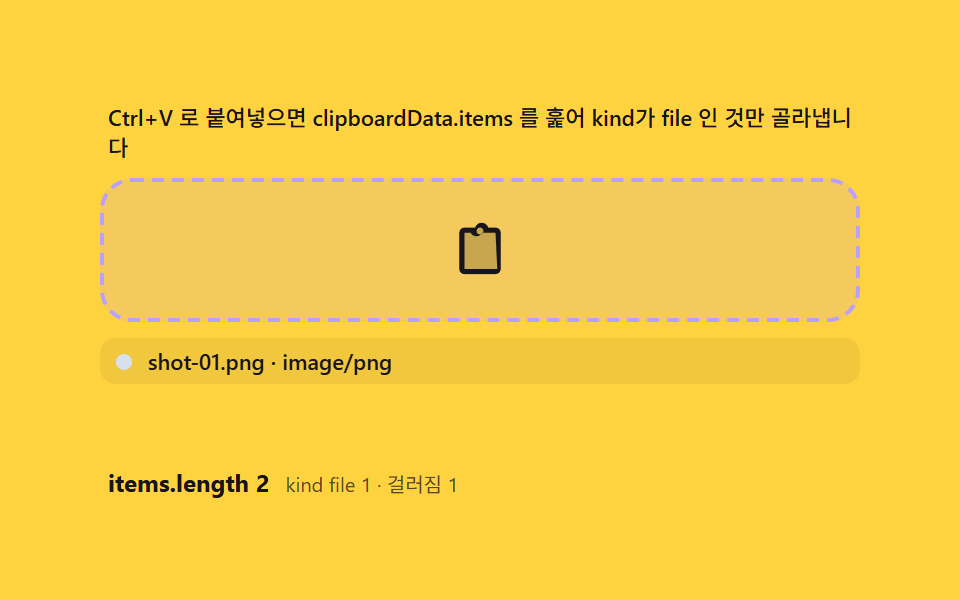
06貼り付け入口 — クリップボードのファイルをドロップと同じ経路に合流させる計算
pasteイベントのClipboardEvent.clipboardData.itemsからkindがfileのものだけを選び、getAsFile()で取り出して、ドロップで入ったFileと同じ処理関数へ渡します。2つの入口が1つのパイプラインに合流し、画面のグリッドはファイルがどこから来たかを知りません。
使いどころスクリーンショットの即時添付、メモの貼り付け
pasteClipboardEvent.clipboardDataDataTransferItemList
<main class="stage">
<div class="pc" id="pc">
  <p class="pc__hint" id="pcHint">Ctrl+V で clipboardData.items を走査し、kind が file のものだけを取り出します</p>
  <div class="pc__zone" id="pcZone" role="button" tabindex="0" aria-describedby="pcHint" aria-label="貼り付け・ドロップゾーン">
    <input type="file" id="pcInput" multiple class="pc__file" aria-label="ファイルを選択">
    <svg class="pc__ic" viewBox="0 0 256 256" aria-hidden="true"><g fill="currentColor"><path d="M200 32h-42.34a32 32 0 0 0-59.32 0H56a16 16 0 0 0-16 16v168a16 16 0 0 0 16 16h144a16 16 0 0 0 16-16V48a16 16 0 0 0-16-16" opacity=".2"/><path d="M200 24h-33.5a31.9 31.9 0 0 0-61 0H56a24 24 0 0 0-24 24v168a24 24 0 0 0 24 24h144a24 24 0 0 0 24-24V48a24 24 0 0 0-24-24m-72 0a16 16 0 1 1-16 16a16 16 0 0 1 16-16m80 192H56V48h28.31a31.9 31.9 0 0 0 43.38 12.66A32 32 0 0 0 139.7 48H200Z"/></g></svg>
  </div>
  <ul class="pc__items" id="pcItems" aria-live="polite"></ul>
  <div class="pc__meta">
    <span class="pc__tag" id="pcTag">items.length 0</span>
    <span class="pc__unit" id="pcUnit">kind file 0 · 除外 0</span>
  </div>
</div>
</main>
@use "../../../../site/static/demo-tokens" as *;
$duration: 220ms; // 항목 입장 팝
$easing: $ease-pop;
$color: $subject-ink;
// 파스텔 강조(채도 .34 · 명도 +.11)
$p-lilac: #b9a0ff;
$p-mint: #93d9c0;
@include stage($stage-yellow);
.pc {
width: 100%;
max-width: 380px;
display: flex;
flex-direction: column;
gap: $sp-2;
}
.pc__hint {
margin: 0;
padding: 0 $sp-1;
font-weight: 500;
font-size: 11px;
line-height: 1.4;
color: $subject-ink;
}
.pc__zone {
position: relative;
display: grid;
place-items: center;
min-height: 52px;
padding: $sp-2 $sp-3;
border: 2px dashed rgba($subject-ink, .72);
border-radius: $r-card;
cursor: pointer;
overflow: hidden;
outline: none;
transition: border-color $dur-quick $ease-out, background $dur-quick $ease-out;
}
.pc__zone.is-over {
border-color: $p-lilac;
background: rgba(185, 160, 255, .16);
}
.pc__file {
position: absolute;
inset: 0;
width: 100%;
height: 100%;
opacity: 0;
cursor: pointer;
}
.pc__ic {
width: 24px;
height: 24px;
color: $subject-ink;
transition: transform $dur-quick $ease-pop;
}
.pc__zone.is-over .pc__ic {
transform: scale(1.15);
}
.pc__items {
margin: 0;
padding: 0;
list-style: none;
display: flex;
flex-direction: column;
gap: $sp-1;
min-height: 56px;
}
.pc__item {
display: flex;
align-items: center;
gap: $sp-2;
padding: $sp-1 $sp-2;
border-radius: $r-sm;
background: rgba($subject-ink, .06);
}
.pc__item.is-in {
animation: pcIn $duration $easing both;
}
.pc__dot {
flex: 0 0 auto;
width: 8px;
height: 8px;
border-radius: 50%;
}
.pc__name {
min-width: 0;
overflow: hidden;
white-space: nowrap;
text-overflow: ellipsis;
font-weight: 500;
font-size: 11px;
color: $subject-ink;
}
.pc__meta {
display: flex;
align-items: baseline;
gap: $sp-2;
padding: 0 $sp-1;
}
.pc__tag {
font-weight: 700;
font-size: 12px;
color: $subject-ink;
}
.pc__unit {
font-weight: 400;
font-size: 10px;
color: rgba($subject-ink, .72);
}
@keyframes pcIn {
from { opacity: 0; transform: translateY(6px) scale(.94); }
to { opacity: 1; transform: translateY(0) scale(1); }
}
@media (max-width: 340px) {
.pc { max-width: 270px; gap: $sp-1; }
.pc__hint { font-size: 9px; line-height: 1.25; }
.pc__zone { min-height: 36px; padding: $sp-1 $sp-2; }
.pc__ic { width: 20px; height: 20px; }
.pc__name { font-size: 10px; }
.pc__items { min-height: 44px; gap: $sp-1; }
.pc__item { padding: $sp-1; }
}
@media (prefers-reduced-motion: reduce) {
.pc__item.is-in { animation: none; }
.pc__zone, .pc__ic { transition: none; }
.pc__zone.is-over .pc__ic { transform: none; }
}html, body {
margin: 0;
overflow: hidden;
}
.stage {
box-sizing: border-box;
min-height: 100vh;
display: grid;
place-items: center;
margin: 0;
background: #ffd23f;
font-family: -apple-system, "Segoe UI", "Noto Sans KR", sans-serif;
padding: clamp(8px, 4vw, 24px);
}
.pc {
width: 100%;
max-width: 380px;
display: flex;
flex-direction: column;
gap: 8px;
}
.pc__hint {
margin: 0;
padding: 0 4px;
font-weight: 500;
font-size: 11px;
line-height: 1.4;
color: #17141a;
}
.pc__zone {
position: relative;
display: grid;
place-items: center;
min-height: 52px;
padding: 8px 12px;
border: 2px dashed rgba(23, 20, 26, 0.72);
border-radius: 16px;
cursor: pointer;
overflow: hidden;
outline: none;
transition: border-color 220ms ease-out, background 220ms ease-out;
}
.pc__zone.is-over {
border-color: #b9a0ff;
background: rgba(185, 160, 255, 0.16);
}
.pc__file {
position: absolute;
inset: 0;
width: 100%;
height: 100%;
opacity: 0;
cursor: pointer;
}
.pc__ic {
width: 24px;
height: 24px;
color: #17141a;
transition: transform 220ms cubic-bezier(0.2, 1.4, 0.4, 1);
}
.pc__zone.is-over .pc__ic {
transform: scale(1.15);
}
.pc__items {
margin: 0;
padding: 0;
list-style: none;
display: flex;
flex-direction: column;
gap: 4px;
min-height: 56px;
}
.pc__item {
display: flex;
align-items: center;
gap: 8px;
padding: 4px 8px;
border-radius: 8px;
background: rgba(23, 20, 26, 0.06);
}
.pc__item.is-in {
animation: pcIn 220ms cubic-bezier(0.2, 1.4, 0.4, 1) both;
}
.pc__dot {
flex: 0 0 auto;
width: 8px;
height: 8px;
border-radius: 50%;
}
.pc__name {
min-width: 0;
overflow: hidden;
white-space: nowrap;
text-overflow: ellipsis;
font-weight: 500;
font-size: 11px;
color: #17141a;
}
.pc__meta {
display: flex;
align-items: baseline;
gap: 8px;
padding: 0 4px;
}
.pc__tag {
font-weight: 700;
font-size: 12px;
color: #17141a;
}
.pc__unit {
font-weight: 400;
font-size: 10px;
color: rgba(23, 20, 26, 0.72);
}
@keyframes pcIn {
from {
opacity: 0;
transform: translateY(6px) scale(0.94);
}
to {
opacity: 1;
transform: translateY(0) scale(1);
}
}
@media (max-width: 340px) {
.pc {
max-width: 270px;
gap: 4px;
}
.pc__hint {
font-size: 9px;
line-height: 1.25;
}
.pc__zone {
min-height: 36px;
padding: 4px 8px;
}
.pc__ic {
width: 20px;
height: 20px;
}
.pc__name {
font-size: 10px;
}
.pc__items {
min-height: 44px;
gap: 4px;
}
.pc__item {
padding: 4px;
}
}
@media (prefers-reduced-motion: reduce) {
.pc__item.is-in {
animation: none;
}
.pc__zone, .pc__ic {
transition: none;
}
.pc__zone.is-over .pc__ic {
transform: none;
}
}// クリップボードから貼り付け(06) — paste 이벤트의 clipboardData 는 DataTransfer 이고 그 안의
// DataTransferItemList(items) 를 훑어 kind==='file' 인 항목만 getAsFile() 로 실제 File 을 받아
// 드롭과 같은 처리 파이프라인에 넣는다. kind==='string' 항목은 파일이 아니므로 건너뛴다 — 그
// "훑어서 골라내는" 필터링 계산이 이 데모의 축이다.
(function () {
var zone = document.getElementById('pcZone');
var input = document.getElementById('pcInput');
var listEl = document.getElementById('pcItems');
var tagEl = document.getElementById('pcTag');
var unitEl = document.getElementById('pcUnit');
if (!zone || !input || !listEl || !tagEl || !unitEl) return;
var reduce = window.matchMedia('(prefers-reduced-motion: reduce)').matches;
function mulberry32(a) {
return function () {
a |= 0; a = a + 0x6D2B79F5 | 0;
var t = Math.imul(a ^ a >>> 15, 1 | a);
t = t + Math.imul(t ^ t >>> 7, 61 | t) ^ t;
return ((t ^ t >>> 14) >>> 0) / 4294967296;
};
}
var rnd = mulberry32(606);
var HEXES = ['#d6e1eb', '#93d9c0', '#b9a0ff', '#f6c6d3', '#f0dfae'];
// 가상 클립보드 배치 — string 항목과 file 항목이 섞인 시나리오 3종
var SETS = [
[{ kind: 'string' }, { kind: 'file', name: 'shot-01.png', type: 'image/png' }],
[{ kind: 'string' }, { kind: 'string' }, { kind: 'file', name: 'shot-02.jpg', type: 'image/jpeg' },
{ kind: 'file', name: 'note.txt', type: 'text/plain' }],
[{ kind: 'file', name: 'shot-03.png', type: 'image/png' }]
];
var cur = -1;
// clipboardData.items 를 훑는 실제 필터 로직 — 드롭과 동일한 intake() 로 넘긴다
function fromClipboard(items) {
if (items instanceof DataTransferItemList) { /* 실제 ClipboardEvent.clipboardData.items 경로 */ }
var picked = [];
var skipped = 0;
for (var i = 0; i < items.length; i++) {
var it = items[i];
if (it.kind === 'file') {
var f = it.getAsFile();
if (f) picked.push(f);
} else {
skipped++;
}
}
render(items.length, picked, skipped);
}
function render(total, picked, skipped) {
listEl.textContent = '';
for (var i = 0; i < picked.length; i++) {
var f = picked[i];
var li = document.createElement('li');
li.className = 'pc__item';
var dot = document.createElement('span');
dot.className = 'pc__dot';
dot.style.background = HEXES[i % HEXES.length];
var nm = document.createElement('span');
nm.className = 'pc__name';
nm.textContent = f.name + ' · ' + f.type;
li.appendChild(dot); li.appendChild(nm);
if (!reduce) li.classList.add('is-in');
listEl.appendChild(li);
}
tagEl.textContent = 'items.length ' + total;
unitEl.textContent = 'kind file ' + picked.length + ' · 除外 ' + skipped;
}
// 실제 File 객체를 담은 진짜 DataTransfer — items.add(file) 로 DataTransferItemList 를 만든다
function virtualClipboardData(set) {
var dt = new DataTransfer();
for (var i = 0; i < set.length; i++) {
if (set[i].kind === 'file') {
try { dt.items.add(new File([new Blob(['x'])], set[i].name, { type: set[i].type })); }
catch (e) {}
} else {
try { dt.items.add('text-' + Math.floor(rnd() * 999), 'text/plain'); } catch (e) {}
}
}
return dt;
}
// 실제 paste — ClipboardEvent.clipboardData.items 를 그대로 훑는다
zone.addEventListener('paste', function (clipboardEvent) {
if (!(clipboardEvent instanceof ClipboardEvent) || !clipboardEvent.clipboardData) return;
if (clipboardEvent.clipboardData.items) fromClipboard(clipboardEvent.clipboardData.items);
});
// 실제 드롭도 같은 필터 형태로(items 가 없으면 files 로 대체)
zone.addEventListener('dragover', function (e) { e.preventDefault(); zone.classList.add('is-over'); });
zone.addEventListener('dragleave', function () { zone.classList.remove('is-over'); });
zone.addEventListener('drop', function (e) {
e.preventDefault(); zone.classList.remove('is-over');
if (e.dataTransfer && e.dataTransfer.items) fromClipboard(e.dataTransfer.items);
});
input.addEventListener('change', function () {
var fs = input.files;
if (fs && fs.length) render(fs.length, Array.prototype.slice.call(fs), 0);
input.value = '';
});
// 자동 시연 — 합성 paste 이벤트를 zone 에 실제로 dispatch 한다(clipboardData 를 진짜로 실어)
function simulatePaste(set) {
var dt = virtualClipboardData(set);
var evt;
try { evt = new ClipboardEvent('paste', {}); } catch (e) { evt = new Event('paste'); }
try { Object.defineProperty(evt, 'clipboardData', { value: dt, configurable: true }); } catch (e) {}
zone.classList.add('is-over');
zone.dispatchEvent(evt);
setTimeout(function () { zone.classList.remove('is-over'); }, 240);
}
if (reduce) {
simulatePaste(SETS[1]);
} else {
var nextAt = 0;
(function loop(now) {
if (now >= nextAt) {
nextAt = now + 800;
cur = (cur + 1) % SETS.length;
simulatePaste(SETS[cur]);
}
requestAnimationFrame(loop);
})(0);
}
})();// DropPasteClipboard — vanilla 판(run/337/demo/06-drop-paste-clipboard/index.html) 의 React 포트.
// DataTransferItemList 를 순회해 kind==='file' 만 getAsFile() 로 건지고, kind==='string' 은
// '걸러짐' 카운터로 센다 — items.length 전체와 실제로 통과한 파일 수의 차이가 계산 한 겹.
// 자동 시연은 ClipboardEvent 를 직접 만들어 clipboardData 를 defineProperty 로 얹어 dispatch 한다.
import { useEffect, useRef } from "react";
import styles from "./DropPasteClipboard.module.scss";
export type DropPasteClipboardProps = {
duration?: string;
easing?: string;
color?: string;
};
type Box<T> = { current: T };
const HINT = "items.length 전체에서 kind === 'file' 만 골라내고 나머지는 걸러짐으로 셉니다";
const ARIA_LABEL = "붙여넣기 드롭존";
function mulberry32(a: number): () => number {
return function (): number {
a |= 0; a = a + 0x6d2b79f5 | 0;
let t = Math.imul(a ^ a >>> 15, 1 | a);
t = t + Math.imul(t ^ t >>> 7, 61 | t) ^ t;
return ((t ^ t >>> 14) >>> 0) / 4294967296;
};
}
type Entry = { kind: "string" | "file"; name?: string; type?: string };
const SETS: Entry[][] = [
[{ kind: "string" }, { kind: "file", name: "shot-01.png", type: "image/png" }, { kind: "string" }],
[{ kind: "file", name: "shot-02.jpg", type: "image/jpeg" }, { kind: "file", name: "note.pdf", type: "application/pdf" }],
[{ kind: "string" }, { kind: "string" }, { kind: "file", name: "clip-03.png", type: "image/png" }, { kind: "string" }]
];
const HEXES = ["#9fc9ec", "#93d9c0", "#b9a0ff", "#f6c6d3", "#cfd8f5"];
export default function DropPasteClipboard({
duration = "220ms",
easing = "cubic-bezier(.2,1.4,.4,1)",
color = "#17141a"
}: DropPasteClipboardProps) {
const zoneRef = useRef<HTMLDivElement | null>(null);
const inputRef = useRef<HTMLInputElement | null>(null);
const itemsRef = useRef<HTMLUListElement | null>(null);
const tagRef = useRef<HTMLSpanElement | null>(null);
const unitRef = useRef<HTMLSpanElement | null>(null);
const rafRef = useRef(0) as Box<number>;
useEffect(() => {
const zone = zoneRef.current;
const input = inputRef.current;
const itemsEl = itemsRef.current;
const tagEl = tagRef.current;
const unitEl = unitRef.current;
if (!zone || !input || !itemsEl || !tagEl || !unitEl) return;
const reduce = window.matchMedia("(prefers-reduced-motion: reduce)").matches;
const rnd = mulberry32(606);
function render(total: number, picked: { name: string; type: string }[], skipped: number): void {
itemsEl!.textContent = "";
picked.forEach((f) => {
const li = document.createElement("li");
li.className = styles.item;
const dot = document.createElement("span");
dot.className = styles.dot;
dot.style.background = HEXES[Math.floor(rnd() * HEXES.length)];
const nm = document.createElement("span");
nm.className = styles.name;
nm.textContent = f.name + " · " + f.type;
li.appendChild(dot); li.appendChild(nm);
itemsEl!.appendChild(li);
if (!reduce) requestAnimationFrame(() => li.classList.add(styles.itemIn));
else li.classList.add(styles.itemIn);
});
tagEl!.textContent = "items.length " + total;
unitEl!.textContent = "kind file " + picked.length + " · 걸러짐 " + skipped;
}
// 실제 클립보드 items 순회 — DataTransferItemList
function fromClipboard(list: DataTransferItemList): void {
const total = list.length;
const picked: { name: string; type: string }[] = [];
let skipped = 0;
for (let i = 0; i < list.length; i++) {
const it = list[i];
if (it.kind === "file") {
const f = it.getAsFile();
if (f) picked.push({ name: f.name, type: f.type });
else skipped++;
} else {
skipped++;
}
}
render(total, picked, skipped);
}
// 가상 클립보드 — 진짜 DataTransfer 에 items.add 로 file/string 을 채운다
function virtualClipboardData(set: Entry[]): DataTransfer {
const dt = new DataTransfer();
set.forEach((e, i) => {
if (e.kind === "file") {
try {
dt.items.add(new File([new Blob(["x"])], e.name || ("f" + i), { type: e.type || "application/octet-stream" }));
} catch (err) { /* 생성 불가 환경 — 건너뜀 */ }
} else {
try { dt.items.add("text-" + i, "text/plain"); } catch (err) { /* noop */ }
}
});
return dt;
}
function simulatePaste(set: Entry[]): void {
const dt = virtualClipboardData(set);
const evt = new ClipboardEvent("paste", {});
Object.defineProperty(evt, "clipboardData", { value: dt, configurable: true });
zone!.dispatchEvent(evt);
if (!reduce) {
zone!.classList.add(styles.zoneOver);
window.setTimeout(() => zone!.classList.remove(styles.zoneOver), 240);
}
}
function onPaste(clipboardEvent: ClipboardEvent): void {
// 붙여넣기 전용 DataTransfer — ClipboardEvent.clipboardData 를 그대로 훑는다
const cd = clipboardEvent.clipboardData;
if (cd && cd.items) fromClipboard(cd.items);
}
function onOver(e: DragEvent): void {
e.preventDefault();
zone!.classList.add(styles.zoneOver);
}
function onLeave(): void {
zone!.classList.remove(styles.zoneOver);
}
function onDrop(e: DragEvent): void {
e.preventDefault();
zone!.classList.remove(styles.zoneOver);
if (e.dataTransfer && e.dataTransfer.items) fromClipboard(e.dataTransfer.items);
}
function onChange(): void {
const files = input!.files;
if (files && files.length) {
const picked = Array.prototype.slice.call(files).map((f: File) => ({ name: f.name, type: f.type }));
render(files.length, picked, 0);
}
input!.value = "";
}
zone.addEventListener("paste", onPaste as EventListener);
zone.addEventListener("dragover", onOver as EventListener);
zone.addEventListener("dragleave", onLeave);
zone.addEventListener("drop", onDrop as EventListener);
input.addEventListener("change", onChange);
let cur = -1;
if (reduce) {
simulatePaste(SETS[0]);
} else {
let nextAt = 0;
const step = (now: number): void => {
if (now >= nextAt) {
nextAt = now + 800;
cur = (cur + 1) % SETS.length;
simulatePaste(SETS[cur]);
}
rafRef.current = requestAnimationFrame(step);
};
rafRef.current = requestAnimationFrame(step);
}
return () => {
cancelAnimationFrame(rafRef.current);
zone.removeEventListener("paste", onPaste as EventListener);
zone.removeEventListener("dragover", onOver as EventListener);
zone.removeEventListener("dragleave", onLeave);
zone.removeEventListener("drop", onDrop as EventListener);
input.removeEventListener("change", onChange);
};
// eslint-disable-next-line react-hooks/exhaustive-deps
}, []);
return (
<main className={styles.stage}>
<div className={styles.pc}>
<p className={styles.hint} id="pcHintReact">{HINT}</p>
<div
className={styles.zone}
ref={zoneRef}
role="button"
tabIndex={0}
aria-describedby="pcHintReact"
aria-label={ARIA_LABEL}
>
<input type="file" multiple className={styles.file} ref={inputRef} aria-label="파일 선택" />
<svg className={styles.ic} viewBox="0 0 256 256" aria-hidden="true">
<g fill="currentColor">
<path d="M200 40v176a8 8 0 0 1-8 8H64a8 8 0 0 1-8-8V40a8 8 0 0 1 8-8h40l8 16h32l8-16h40a8 8 0 0 1 8 8" opacity=".2" />
<path d="M184 24h-31.06a15.92 15.92 0 0 0-8.5-8.6a32 32 0 0 0-25.34 0a15.92 15.92 0 0 0-8.5 8.6H72a16 16 0 0 0-16 16v192a16 16 0 0 0 16 16h112a16 16 0 0 0 16-16V40a16 16 0 0 0-16-16m-56 0a8 8 0 1 1-8 8a8 8 0 0 1 8-8m56 208H72V40h20.26A15.9 15.9 0 0 0 96 46.63a16 16 0 0 0 12.66 6.19a15.86 15.86 0 0 0 6.31-1.31A32 32 0 0 0 128 56a32.06 32.06 0 0 0 13-2.49a15.86 15.86 0 0 0 6.31 1.31A16 16 0 0 0 160 46.63a15.9 15.9 0 0 0 3.74-6.63H184Z" />
</g>
</svg>
</div>
<ul className={styles.items} ref={itemsRef} aria-live="polite" />
<p className={styles.meta}>
<span className={styles.tag} ref={tagRef} style={{ color }}>items.length 0</span>
<span className={styles.unit} ref={unitRef}>kind file 0 · 걸러짐 0</span>
</p>
</div>
</main>
);
}06 貼り付け入口 — クリップボードのファイルをドロップと同じ経路に合流させる計算 — 計測 累積面積 30.958% · 動いたフレーム 6/23GODRICH オリジナル · SCSS と React は zip に同梱 · ドラッグ アンド ドロップ ファイル アップロードUI — ドロップゾーン9種の計算
このデモが属する記事
 ドラッグ アンド ドロップ ファイル アップロードUI — ドロップゾーン9種の計算ドラッグ アンド ドロップ ファイル アップロードは、置かれたファイルの種類・サイズ・件数をその場で計算する一枚の層です。ドロップされたファイルの種類・サイズ・件数をデータから計算してプレビューを描き、画像はピクセルを読んでサムネイルを作り この記事のデモをすべて見る