03経過バイト差から計算する速度ラベル
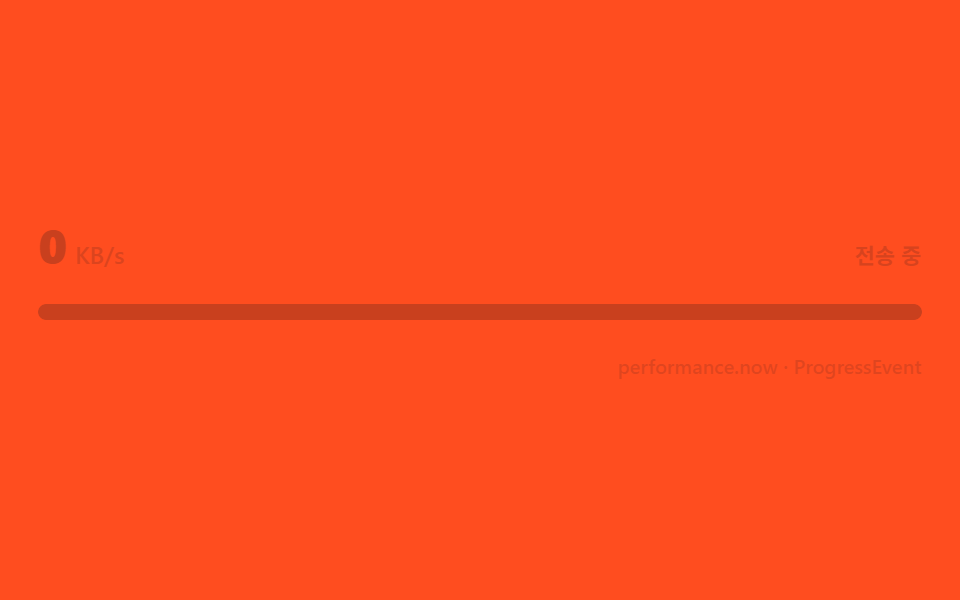
progressイベントが来るたびに前回とのバイト差を時間差で割ってKB/sを再計算し、直近数回の平均で値のブレを抑えます。
使いどころ大容量ファイルアップロード、管理者アップロードログ
performance.nowProgressEventrequestAnimationFrame
<main class="stage">
<div class="sl is-demo" id="slRoot" role="group" tabindex="0" aria-label="ファイルアップロード転送速度">
  <div class="sl__row">
    <span class="sl__speed" id="slSpeed" aria-hidden="true"><b class="sl__n"></b><i>KB/s</i></span>
    <span class="sl__label">送信中</span>
  </div>
  <div class="sl__track">
    <span class="sl__fill" id="slFill"></span>
  </div>
  <div class="sl__bar">
    <span class="sl__meta">performance.now · ProgressEvent</span>
  </div>
</div>
</main>
@use "../../../../site/static/demo-tokens" as *;
// 전송 속도 라벨(03) — 숫자는 counter() 트릭으로, 바는 transform: scaleX 로만 움직인다.
// 실사용 경로는 JS 가 이동평균으로 --n 을 lerp 시켜 채운다(위 index.html 참고) — 데모 루프는 같은 변수를 흉내낸다.
@property --n {
syntax: "<integer>";
inherits: false;
initial-value: 0;
}
@include stage($stage-orange);
$sl-text: $subject-ink;
$sl-fill: $subject-ink;
$duration: $dur-loop;
$easing: $ease-lerp-settle;
$color: $sl-fill;
.sl {
display: flex; flex-direction: column; justify-content: center; gap: $sp-4;
width: 100%; height: 100%; min-height: 164px;
padding: 0 $sp-2;
}
.sl:focus-visible { outline: 2px solid $sl-text; outline-offset: 3px; border-radius: $r-control; }
.sl__row {
display: flex; align-items: baseline; justify-content: space-between;
gap: $sp-2;
}
.sl__speed {
display: flex; align-items: baseline; gap: 4px;
font-weight: 700; font-size: 24px; line-height: 1;
color: $sl-text;
--n: 0;
}
.sl__speed i { font-weight: 600; font-size: 12px; font-style: normal; opacity: .68; }
.sl__n { counter-reset: sln var(--n); }
.sl__n::before { content: counter(sln); }
.sl__label {
font-weight: 600; font-size: 11px; line-height: 1.3;
color: rgba($sl-text, .74);
}
.sl__track {
position: relative;
height: $sp-2;
border-radius: $r-pill;
background: rgba($sl-text, .16);
overflow: hidden;
}
.sl__fill {
position: absolute; inset: 0;
transform-origin: left center;
transform: scaleX(0);
border-radius: $r-pill;
background: $sl-fill;
}
.sl__bar { display: flex; justify-content: flex-end; }
.sl__meta { font-weight: 500; font-size: 10px; color: rgba($sl-text, .6); }
// ── 데모 루프 — 속도 숫자는 순간마다 튀지만(이동평균 표본), 바는 단조 증가만 하다가 사라진 순간 되감는다 ──
@keyframes slCount {
0% { --n: 0; }
8% { --n: 210; }
20% { --n: 480; }
32% { --n: 360; }
44% { --n: 610; }
56% { --n: 470; }
68% { --n: 540; }
84% { --n: 300; }
90% { --n: 300; }
92% { --n: 0; }
100% { --n: 0; }
}
@keyframes slFill {
0% { transform: scaleX(0); }
70% { transform: scaleX(1); }
90% { transform: scaleX(1); }
92% { transform: scaleX(0); }
100% { transform: scaleX(0); }
}
@keyframes slFade {
0% { opacity: 1; }
84% { opacity: 1; }
90% { opacity: 0; }
94% { opacity: 0; }
100% { opacity: 1; }
}
.is-demo .sl__speed {
animation-name: slCount;
animation-duration: $duration;
animation-timing-function: $easing;
animation-iteration-count: infinite;
}
.is-demo .sl__fill {
animation-name: slFill;
animation-duration: $duration;
animation-timing-function: $ease-out;
animation-iteration-count: infinite;
}
.sl.is-demo {
animation-name: slFade;
animation-duration: $duration;
animation-timing-function: $ease-out;
animation-iteration-count: infinite;
}
@media (max-width: 340px) {
.sl__speed { font-size: 20px; }
}
@media (prefers-reduced-motion: reduce) {
.is-demo .sl__speed, .is-demo .sl__fill, .is-demo.sl { animation: none !important; }
.is-demo .sl__speed { --n: 480 !important; }
.is-demo .sl__fill { transform: scaleX(.62) !important; }
}@property --n {
syntax: "<integer>";
inherits: false;
initial-value: 0;
}
html, body {
margin: 0;
overflow: hidden;
}
.stage {
box-sizing: border-box;
min-height: 100vh;
display: grid;
place-items: center;
margin: 0;
background: #ff4d1f;
font-family: -apple-system, "Segoe UI", "Noto Sans KR", sans-serif;
padding: clamp(8px, 4vw, 24px);
}
.sl {
display: flex;
flex-direction: column;
justify-content: center;
gap: 16px;
width: 100%;
height: 100%;
min-height: 164px;
padding: 0 8px;
}
.sl:focus-visible {
outline: 2px solid #17141a;
outline-offset: 3px;
border-radius: 12px;
}
.sl__row {
display: flex;
align-items: baseline;
justify-content: space-between;
gap: 8px;
}
.sl__speed {
display: flex;
align-items: baseline;
gap: 4px;
font-weight: 700;
font-size: 24px;
line-height: 1;
color: #17141a;
--n: 0;
}
.sl__speed i {
font-weight: 600;
font-size: 12px;
font-style: normal;
opacity: 0.68;
}
.sl__n {
counter-reset: sln var(--n);
}
.sl__n::before {
content: counter(sln);
}
.sl__label {
font-weight: 600;
font-size: 11px;
line-height: 1.3;
color: rgba(23, 20, 26, 0.74);
}
.sl__track {
position: relative;
height: 8px;
border-radius: 999px;
background: rgba(23, 20, 26, 0.16);
overflow: hidden;
}
.sl__fill {
position: absolute;
inset: 0;
transform-origin: left center;
transform: scaleX(0);
border-radius: 999px;
background: #17141a;
}
.sl__bar {
display: flex;
justify-content: flex-end;
}
.sl__meta {
font-weight: 500;
font-size: 10px;
color: rgba(23, 20, 26, 0.6);
}
@keyframes slCount {
0% {
--n: 0;
}
8% {
--n: 210;
}
20% {
--n: 480;
}
32% {
--n: 360;
}
44% {
--n: 610;
}
56% {
--n: 470;
}
68% {
--n: 540;
}
84% {
--n: 300;
}
90% {
--n: 300;
}
92% {
--n: 0;
}
100% {
--n: 0;
}
}
@keyframes slFill {
0% {
transform: scaleX(0);
}
70% {
transform: scaleX(1);
}
90% {
transform: scaleX(1);
}
92% {
transform: scaleX(0);
}
100% {
transform: scaleX(0);
}
}
@keyframes slFade {
0% {
opacity: 1;
}
84% {
opacity: 1;
}
90% {
opacity: 0;
}
94% {
opacity: 0;
}
100% {
opacity: 1;
}
}
.is-demo .sl__speed {
animation-name: slCount;
animation-duration: 2s;
animation-timing-function: linear(0, 0.051, 0.176, 0.341, 0.518, 0.685, 0.831, 0.947, 1.032, 1.087, 1.117, 1.126, 1.121, 1.105, 1.085, 1.062, 1.041, 1.022, 1.008, 0.997, 1);
animation-iteration-count: infinite;
}
.is-demo .sl__fill {
animation-name: slFill;
animation-duration: 2s;
animation-timing-function: ease-out;
animation-iteration-count: infinite;
}
.sl.is-demo {
animation-name: slFade;
animation-duration: 2s;
animation-timing-function: ease-out;
animation-iteration-count: infinite;
}
@media (max-width: 340px) {
.sl__speed {
font-size: 20px;
}
}
@media (prefers-reduced-motion: reduce) {
.is-demo .sl__speed, .is-demo .sl__fill, .is-demo.sl {
animation: none !important;
}
.is-demo .sl__speed {
--n: 480 !important;
}
.is-demo .sl__fill {
transform: scaleX(0.62) !important;
}
}// 전송 속도 라벨 — 실제 XHR 대신 ProgressEvent 를 직접 만들어 같은 파이프라인을 태운다.
// progress 가 올 때마다 이전 시점과의 바이트 차를 시간 차로 나눠 KB/s 를 다시 계산하고,
// 최근 5개 표본의 평균을 취해 순간 값이 튀어도 라벨이 덜컹이지 않게 만든다.
(function () {
var SEED = 0x51a3c9;
function mulberry32(a) {
return function () {
a |= 0; a = (a + 0x6D2B79F5) | 0;
var t = Math.imul(a ^ (a >>> 15), 1 | a);
t = (t + Math.imul(t ^ (t >>> 7), 61 | t)) ^ t;
return ((t ^ (t >>> 14)) >>> 0) / 4294967296;
};
}
var rand = mulberry32(SEED);
var TOTAL = 8_400_000;
var root = document.getElementById('slRoot');
var speed = document.getElementById('slSpeed');
var fill = document.getElementById('slFill');
if (!root || !speed || !fill) return;
var bus = new EventTarget();
var loaded = 0, lastLoaded = 0, lastT = 0;
var samples = [];
var shownKbps = 0, timer = null, raf = null;
bus.addEventListener('progress', function (e) {
var now = performance.now();
var dt = (now - lastT) / 1000;
var db = e.loaded - lastLoaded;
var kbps = dt > 0 ? (db / 1024) / dt : 0;
samples.push(kbps);
if (samples.length > 5) samples.shift();
var sum = 0;
for (var i = 0; i < samples.length; i++) sum += samples[i];
var target = sum / samples.length;
lastT = now; lastLoaded = e.loaded;
fill.style.transform = 'scaleX(' + (e.loaded / e.total) + ')';
if (!raf) tick(target);
});
function tick(target) {
shownKbps += (target - shownKbps) * 0.3;
speed.style.setProperty('--n', Math.round(shownKbps));
if (Math.abs(target - shownKbps) > 0.5) {
raf = requestAnimationFrame(function () { tick(target); });
} else {
raf = null;
}
}
function pump() {
if (root.classList.contains('is-demo')) return;
var chunk = 60000 + rand() * 140000;
loaded = Math.min(TOTAL, loaded + chunk);
bus.dispatchEvent(new ProgressEvent('progress', { lengthComputable: true, loaded: loaded, total: TOTAL }));
if (loaded >= TOTAL) clearInterval(timer);
}
function live() {
if (!root.classList.contains('is-demo')) return;
root.classList.remove('is-demo');
lastT = performance.now();
timer = setInterval(pump, 260);
}
['pointerdown', 'focusin'].forEach(function (ev) { root.addEventListener(ev, live); });
})();// UploadProgressSpeedLabel — vanilla 판(run/329/demo/03-upload-progress-speed-label/index.html) 의 React 포트.
// 실제 XHR 대신 ProgressEvent 를 직접 만들어 같은 파이프라인을 태운다. progress 가 올 때마다 이전 시점과의
// 바이트 차를 시간 차로 나눠 KB/s 를 다시 계산하고, 최근 5개 표본의 평균을 취해 순간 값이 튀어도
// 라벨이 덜컹이지 않게 만든다. 숫자는 counter() 트릭(--n 정수)으로, 바는 transform: scaleX 로만 움직인다.
import { useEffect, useRef, useState } from "react";
import type { CSSProperties } from "react";
import styles from "./UploadProgressSpeedLabel.module.scss";
export type UploadProgressSpeedLabelProps = {
duration?: string;
easing?: string;
color?: string;
seed?: number; // mulberry32 시드
total?: number; // 총 바이트
chunkBase?: number; // 매 펌프 기본 바이트
chunkJitter?: number; // 매 펌프 랜덤 바이트 상한
pumpMs?: number; // 펌프 주기(ms)
};
type Vars = CSSProperties & { "--duration"?: string; "--easing"?: string; "--color"?: string };
type Box<T> = { current: T };
const LABEL = "전송 중";
const META = "performance.now · ProgressEvent";
const SEED = 0x51a3c9;
const TOTAL = 8_400_000;
function mulberry32(a: number): () => number {
return function () {
a |= 0; a = (a + 0x6D2B79F5) | 0;
const t = Math.imul(a ^ (a >>> 15), 1 | a);
const u = (t + Math.imul(t ^ (t >>> 7), 61 | t)) ^ t;
return ((u ^ (u >>> 14)) >>> 0) / 4294967296;
};
}
export default function UploadProgressSpeedLabel({
duration = "2s",
easing = "linear(0.0, 0.051, 0.176, 0.341, 0.518, 0.685, 0.831, 0.947, 1.032, 1.087, 1.117, 1.126, 1.121, 1.105, 1.085, 1.062, 1.041, 1.022, 1.008, 0.997, 1)",
color = "#17141a",
seed = SEED,
total = TOTAL,
chunkBase = 60000,
chunkJitter = 140000,
pumpMs = 260
}: UploadProgressSpeedLabelProps) {
const [demo, setDemo] = useState(true);
const speedRef = useRef<HTMLSpanElement | null>(null);
const fillRef = useRef<HTMLSpanElement | null>(null);
const timerRef = useRef(0) as Box<number>;
const rafRef = useRef(0) as Box<number>;
useEffect(() => {
return () => {
window.clearInterval(timerRef.current);
cancelAnimationFrame(rafRef.current);
};
}, []);
function live(): void {
if (!demo) return;
setDemo(false);
const rand = mulberry32(seed);
const bus = new EventTarget();
let loaded = 0, lastLoaded = 0, lastT = performance.now();
let samples: number[] = [];
let shownKbps = 0;
function tick(target: number): void {
shownKbps += (target - shownKbps) * 0.3;
if (speedRef.current) speedRef.current.style.setProperty("--n", String(Math.round(shownKbps)));
if (Math.abs(target - shownKbps) > 0.5) {
rafRef.current = requestAnimationFrame(() => tick(target));
}
}
bus.addEventListener("progress", (e) => {
const now = performance.now();
const evt = e as ProgressEvent;
const dt = (now - lastT) / 1000;
const db = evt.loaded - lastLoaded;
const kbps = dt > 0 ? (db / 1024) / dt : 0;
samples.push(kbps);
if (samples.length > 5) samples.shift();
let sum = 0;
for (let i = 0; i < samples.length; i++) sum += samples[i];
const target = sum / samples.length;
lastT = now; lastLoaded = evt.loaded;
if (fillRef.current) fillRef.current.style.transform = "scaleX(" + (evt.loaded / evt.total) + ")";
cancelAnimationFrame(rafRef.current);
tick(target);
});
function pump(): void {
const chunk = chunkBase + rand() * chunkJitter;
loaded = Math.min(total, loaded + chunk);
bus.dispatchEvent(new ProgressEvent("progress", { lengthComputable: true, loaded: loaded, total: total }));
if (loaded >= total) window.clearInterval(timerRef.current);
}
timerRef.current = window.setInterval(pump, pumpMs);
}
const rootCls = demo ? `${styles.sl} ${styles.isDemo}` : styles.sl;
const vars: Vars = { "--duration": duration, "--easing": easing, "--color": color };
return (
<main className={styles.stage}>
<div
className={rootCls}
style={vars}
role="group"
tabIndex={0}
aria-label="파일 업로드 전송 속도"
onPointerDown={live}
onFocus={live}
>
<div className={styles.row}>
<span className={styles.speed} ref={speedRef} aria-hidden="true"><b className={styles.n}></b><i>KB/s</i></span>
<span className={styles.label}>{LABEL}</span>
</div>
<div className={styles.track}>
<span className={styles.fill} ref={fillRef}></span>
</div>
<div className={styles.bar}>
<span className={styles.meta}>{META}</span>
</div>
</div>
</main>
);
}03 経過バイト差から計算する速度ラベル — 計測 累積面積 3.254% · 動いたフレーム 20/23GODRICH オリジナル · SCSS と React は zip に同梱 · アップロード プログレスバー ローダー9種 — 計算するUI
このデモが属する記事
 アップロード プログレスバー ローダー9種 — 計算するUIアップロード プログレスバーは、バイトと時間の実測値からリング・速度・チェックの動きを計算して描く部品です。ファイルをドロップすると、バイトと時間から速度を計算してリングが回り、完了するとチェックに変わります。9つの状態をライブラリなしで計 この記事のデモをすべて見る