03読み込み開始の基準線 — スクロール速度の値から先読み開始地点を計算するリスト
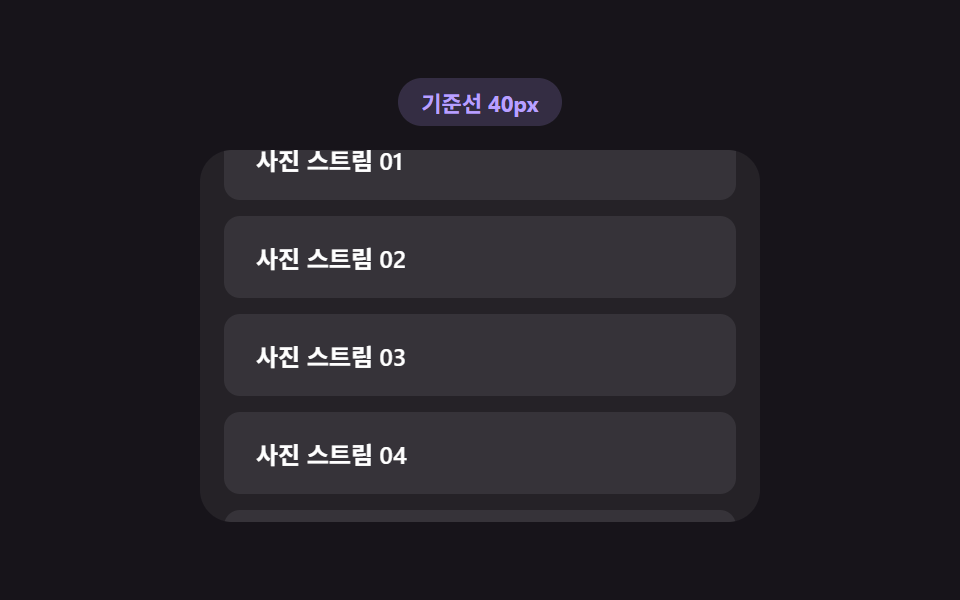
スクロール速度が速くなった状態になると、画面端からどれだけ前もって開始地点を引くかの値を求め直し、その分早く次の一覧を呼び出し、速度が遅くなった状態になるとその値は再び小さくなります。
使いどころ素早くスクロールする一覧型アプリ、写真ストリーム
recomputeThresholdSPEED_GAINperformance.now
<main class="stage">
<div class="ltt is-demo" id="ltt">
  <div class="ltt__badge" id="lttBadge">しきい線 40px</div>
  <div class="ltt__view" id="lttView">
    <ul class="ltt__track" id="lttTrack">
      <li class="ltt__sentinel" id="lttSentinel" aria-hidden="true">
        <span class="ltt__dot" id="lttDot"></span>
      </li>
    </ul>
  </div>
</div>
</main>
@use "../../../../site/static/demo-tokens" as *;
// 로딩 시작 기준선 — recomputeThreshold() 가 스크롤 속도(px/ms)로 기준선 거리를 다시 계산한다.
// 점(dot)은 그 기준선 안에 들어오면 armed, 실제 로드 중이면 loading 클래스로 색이 바뀐다.
$duration: $dur-quick;
$easing: $ease-out;
$color: $subject-lilac;
@include stage($stage-ink);
.ltt {
display: flex;
flex-direction: column;
align-items: center;
gap: $sp-3;
width: min(100%, 280px);
}
.ltt__badge {
padding: $sp-1 $sp-3;
border-radius: $r-pill;
background: rgba(185, 160, 255, .18);
color: $color;
font-weight: 700;
font-size: 11px;
font-variant-numeric: tabular-nums;
}
.ltt__view {
box-sizing: border-box;
width: 100%;
height: 186px;
overflow-y: auto;
overflow-x: hidden;
border-radius: $r-card;
background: rgba(255, 255, 255, .06);
padding: $sp-3;
scrollbar-width: thin;
}
.ltt__track {
list-style: none;
margin: 0;
padding: 0;
display: flex;
flex-direction: column;
gap: $sp-2;
}
.ltt__row {
box-sizing: border-box;
padding: $sp-3 $sp-4;
border-radius: $r-sm;
background: rgba(255, 255, 255, .08);
color: $stage-paper;
font-weight: 600;
font-size: 12px;
}
.ltt__sentinel {
display: flex;
justify-content: center;
height: 26px;
align-items: center;
}
.ltt__dot {
width: 10px;
height: 10px;
border-radius: 50%;
background: rgba(255, 255, 255, .2);
transition: background $duration $easing, transform $duration $easing;
}
.ltt__dot--armed {
background: $color;
transform: scale(1.3);
}
.ltt__dot--loading {
background: $subject-sky;
transform: scale(1.6);
}
@media (max-width: 340px) {
.ltt { gap: $sp-1; }
.ltt__view { height: 90px; }
.ltt__row { padding: $sp-2 $sp-3; font-size: 11px; }
}
@media (prefers-reduced-motion: reduce) {
.ltt__dot { transition: none !important; }
}html, body {
margin: 0;
overflow: hidden;
}
.stage {
box-sizing: border-box;
min-height: 100vh;
display: grid;
place-items: center;
margin: 0;
background: #17141a;
font-family: -apple-system, "Segoe UI", "Noto Sans KR", sans-serif;
padding: clamp(8px, 4vw, 24px);
}
.ltt {
display: flex;
flex-direction: column;
align-items: center;
gap: 12px;
width: min(100%, 280px);
}
.ltt__badge {
padding: 4px 12px;
border-radius: 999px;
background: rgba(185, 160, 255, 0.18);
color: #b9a0ff;
font-weight: 700;
font-size: 11px;
font-variant-numeric: tabular-nums;
}
.ltt__view {
box-sizing: border-box;
width: 100%;
height: 186px;
overflow-y: auto;
overflow-x: hidden;
border-radius: 16px;
background: rgba(255, 255, 255, 0.06);
padding: 12px;
scrollbar-width: thin;
}
.ltt__track {
list-style: none;
margin: 0;
padding: 0;
display: flex;
flex-direction: column;
gap: 8px;
}
.ltt__row {
box-sizing: border-box;
padding: 12px 16px;
border-radius: 8px;
background: rgba(255, 255, 255, 0.08);
color: #ffffff;
font-weight: 600;
font-size: 12px;
}
.ltt__sentinel {
display: flex;
justify-content: center;
height: 26px;
align-items: center;
}
.ltt__dot {
width: 10px;
height: 10px;
border-radius: 50%;
background: rgba(255, 255, 255, 0.2);
transition: background 220ms ease-out, transform 220ms ease-out;
}
.ltt__dot--armed {
background: #b9a0ff;
transform: scale(1.3);
}
.ltt__dot--loading {
background: #6ec8ff;
transform: scale(1.6);
}
@media (max-width: 340px) {
.ltt {
gap: 4px;
}
.ltt__view {
height: 90px;
}
.ltt__row {
padding: 8px 12px;
font-size: 11px;
}
}
@media (prefers-reduced-motion: reduce) {
.ltt__dot {
transition: none !important;
}
}(function () {
var view = document.getElementById('lttView');
var track = document.getElementById('lttTrack');
var sentinel = document.getElementById('lttSentinel');
var dot = document.getElementById('lttDot');
var badge = document.getElementById('lttBadge');
var root = document.getElementById('ltt');
var BASE_THRESHOLD_PX = 40;
var MAX_THRESHOLD_PX = 220;
var SPEED_GAIN = 900; // px 임계값 = BASE + 속도(px/ms) * GAIN
var LOAD_DELAY_MS = 520;
var MAX_BATCHES = 5;
var rowSeq = 0;
var batches = 0;
var loading = false;
var lastTop = 0;
var lastTime = performance.now();
var threshold = BASE_THRESHOLD_PX;
var dir = 1;
var phase = 0;
var autoplayTimer = null;
function addRow() {
var li = document.createElement('li');
li.className = 'ltt__row';
li.textContent = '写真ストリーム ' + String(rowSeq + 1).padStart(2, '0');
track.insertBefore(li, sentinel);
rowSeq += 1;
}
for (var i = 0; i < 6; i += 1) { addRow(); }
// 계산 겹: 이번 스크롤 이벤트와 지난 이벤트 사이의 이동 거리 값을 걸린 시간 값으로 나눠
// 속도(px/ms)를 구하고, 그 속도에 비례해 しきい線 거리 값을 다시 계산한다 — 빠르게 훑을수록
// 화면 끝에 닿기 전에 더 일찍 다음 목록을 부른다.
function recomputeThreshold() {
var now = performance.now();
var dt = Math.max(now - lastTime, 1);
var speed = Math.abs(view.scrollTop - lastTop) / dt;
lastTop = view.scrollTop;
lastTime = now;
threshold = Math.min(BASE_THRESHOLD_PX + speed * SPEED_GAIN, MAX_THRESHOLD_PX);
badge.textContent = 'しきい線 ' + Math.round(threshold) + 'px';
}
function recompute() {
recomputeThreshold();
var remaining = sentinel.getBoundingClientRect().top - view.getBoundingClientRect().bottom;
dot.classList.toggle('ltt__dot--armed', remaining <= threshold);
if (remaining <= threshold && !loading && batches < MAX_BATCHES) { startLoad(); }
}
function startLoad() {
loading = true;
dot.classList.add('ltt__dot--loading');
setTimeout(function () {
for (var n = 0; n < 3; n += 1) { addRow(); }
loading = false;
batches += 1;
dot.classList.remove('ltt__dot--loading');
recompute();
}, LOAD_DELAY_MS);
}
view.addEventListener('scroll', recompute);
function userTakesOver() {
if (!root.classList.contains('is-demo')) { return; }
root.classList.remove('is-demo');
stopAutoplay();
}
view.addEventListener('wheel', userTakesOver, { passive: true });
view.addEventListener('touchstart', userTakesOver, { passive: true });
function autoplayTick() {
var max = view.scrollHeight - view.clientHeight;
if (batches >= MAX_BATCHES && view.scrollTop >= max - 1 && dir !== 0) {
dir = 0;
setTimeout(function () {
while (track.firstChild !== sentinel) { track.removeChild(track.firstChild); }
rowSeq = 0; batches = 0; phase = 0;
for (var i = 0; i < 6; i += 1) { addRow(); }
view.scrollTop = 0; lastTop = 0;
dir = 1;
}, 600);
return;
}
if (dir === 0) { return; }
phase += 1;
var step = (phase % 40 < 20) ? 2 : 14; // 느린 구간과 빠른 구간을 번갈아 속도 계산이 보이게
view.scrollTop = Math.min(view.scrollTop + step, max);
recompute();
}
function stopAutoplay() {
if (autoplayTimer) { clearInterval(autoplayTimer); autoplayTimer = null; }
}
var reduce = window.matchMedia('(prefers-reduced-motion: reduce)').matches;
if (!reduce) {
autoplayTimer = setInterval(autoplayTick, 55);
}
})();import { useEffect, useRef, useState, useCallback } from "react";
import styles from "./LoadTriggerThreshold.module.scss";
// 로딩 시작 기준선 — recomputeThreshold() 가 스크롤 속도(px/ms)로 기준선 거리를 다시 계산한다.
// 빠르게 훑을수록 화면 끝에 닿기 전에 더 일찍 다음 목록을 부른다.
const BASE_THRESHOLD_PX = 40;
const MAX_THRESHOLD_PX = 220;
const SPEED_GAIN = 900;
const LOAD_DELAY_MS = 520;
const MAX_BATCHES = 5;
export default function LoadTriggerThreshold() {
const rootRef = useRef<HTMLDivElement>(null);
const viewRef = useRef<HTMLDivElement>(null);
const sentinelRef = useRef<HTMLLIElement>(null);
const dotRef = useRef<HTMLSpanElement>(null);
const [badge, setBadge] = useState("기준선 40px");
const [rows, setRows] = useState(6);
const loadingRef = useRef(false);
const batchesRef = useRef(0);
const lastTopRef = useRef(0);
const lastTimeRef = useRef(0);
const thresholdRef = useRef(BASE_THRESHOLD_PX);
const phaseRef = useRef(0);
const dirRef = useRef(1);
const autoplayRef = useRef<number | null>(null);
// 계산 겹: 이번 스크롤 이벤트와 지난 이벤트 사이의 이동 거리 값을 걸린 시간 값으로 나눠
// 속도(px/ms)를 구하고, 그 속도에 비례해 기준선 거리 값을 다시 계산한다.
const recomputeThreshold = useCallback(() => {
const view = viewRef.current;
if (!view) { return; }
const now = performance.now();
const dt = Math.max(now - (lastTimeRef.current ?? now), 1);
const speed = Math.abs(view.scrollTop - (lastTopRef.current ?? 0)) / dt;
lastTopRef.current = view.scrollTop;
lastTimeRef.current = now;
thresholdRef.current = Math.min(BASE_THRESHOLD_PX + speed * SPEED_GAIN, MAX_THRESHOLD_PX);
setBadge("기준선 " + Math.round(thresholdRef.current) + "px");
}, []);
const recompute = useCallback(() => {
const view = viewRef.current;
const sentinel = sentinelRef.current;
const dot = dotRef.current;
if (!view || !sentinel || !dot) { return; }
recomputeThreshold();
const remaining = sentinel.getBoundingClientRect().top - view.getBoundingClientRect().bottom;
const threshold = thresholdRef.current ?? BASE_THRESHOLD_PX;
dot.classList.toggle(styles["ltt__dot--armed"], remaining <= threshold);
if (remaining <= threshold && !loadingRef.current && (batchesRef.current ?? 0) < MAX_BATCHES) {
loadingRef.current = true;
dot.classList.add(styles["ltt__dot--loading"]);
window.setTimeout(() => {
setRows((prev) => prev + 3);
loadingRef.current = false;
batchesRef.current = (batchesRef.current ?? 0) + 1;
dot.classList.remove(styles["ltt__dot--loading"]);
}, LOAD_DELAY_MS);
}
}, [recomputeThreshold]);
useEffect(() => {
lastTimeRef.current = performance.now();
const view = viewRef.current;
if (!view) { return; }
const onScroll = () => recompute();
view.addEventListener("scroll", onScroll);
const takeover = () => {
rootRef.current?.classList.remove(styles["is-demo"]);
if (autoplayRef.current !== null) { window.clearInterval(autoplayRef.current); }
};
view.addEventListener("wheel", takeover, { passive: true });
view.addEventListener("touchstart", takeover, { passive: true });
const reduce = window.matchMedia("(prefers-reduced-motion: reduce)").matches;
if (!reduce) {
autoplayRef.current = window.setInterval(() => {
const v = viewRef.current;
if (!v) { return; }
const max = v.scrollHeight - v.clientHeight;
if ((batchesRef.current ?? 0) >= MAX_BATCHES && v.scrollTop >= max - 1 && dirRef.current !== 0) {
dirRef.current = 0;
window.setTimeout(() => {
setRows(6);
batchesRef.current = 0;
phaseRef.current = 0;
v.scrollTop = 0;
lastTopRef.current = 0;
dirRef.current = 1;
}, 600);
return;
}
if (dirRef.current === 0) { return; }
phaseRef.current = (phaseRef.current ?? 0) + 1;
const step = ((phaseRef.current ?? 0) % 40 < 20) ? 2 : 14; // 느린/빠른 구간 번갈아
v.scrollTop = Math.min(v.scrollTop + step, max);
recompute();
}, 55);
}
return () => {
view.removeEventListener("scroll", onScroll);
view.removeEventListener("wheel", takeover);
view.removeEventListener("touchstart", takeover);
if (autoplayRef.current !== null) { window.clearInterval(autoplayRef.current); }
};
}, [recompute]);
const rowEls = [];
for (let i = 0; i < rows; i += 1) {
rowEls.push(
<li key={i} className={styles["ltt__row"]}>
사진 스트림 {String(i + 1).padStart(2, "0")}
</li>
);
}
return (
<main className={styles.stage}>
<div ref={rootRef} className={`${styles.ltt} ${styles["is-demo"]}`} id="ltt">
<div className={styles["ltt__badge"]}>{badge}</div>
<div ref={viewRef} className={styles["ltt__view"]}>
<ul className={styles["ltt__track"]}>
{rowEls}
<li ref={sentinelRef} className={styles["ltt__sentinel"]} aria-hidden="true">
<span ref={dotRef} className={styles["ltt__dot"]} />
</li>
</ul>
</div>
</div>
</main>
);
}03 読み込み開始の基準線 — スクロール速度の値から先読み開始地点を計算するリスト — 計測 累積面積 33.015% · 動いたフレーム 23/23GODRICH オリジナル · SCSS と React は zip に同梱 · 無限スクロールローディング UIパターン9選 — スピナーから仮想ウィンドウまで
このデモが属する記事
 無限スクロールローディング UIパターン9選 — スピナーから仮想ウィンドウまで9つのうち1つは残りスクロール距離の値からローディング表示の不透明度を求め直し、1つは上に追加された高さの値の分だけスクロール位置を補正して画面がずれないようにし、もう1つは見えているインデックス範囲の値だけを残し他は描きません。無限スクロ この記事のデモをすべて見る